Inspiration
When using AI-powered coding agents, we noticed that many of our tokens would get wasted while trying to debug. To debug manually, we'd have to spend countless hours searching and filtering through multiple files and hundreds of lines of code. We built TraceBack to make debugging more token-efficient, which is especially useful for large and complex codebases, with the potential of saving developers and companies large amounts of money. Now, everyone can use the same cutting-edge AI tools for a fraction of the cost.
What it does
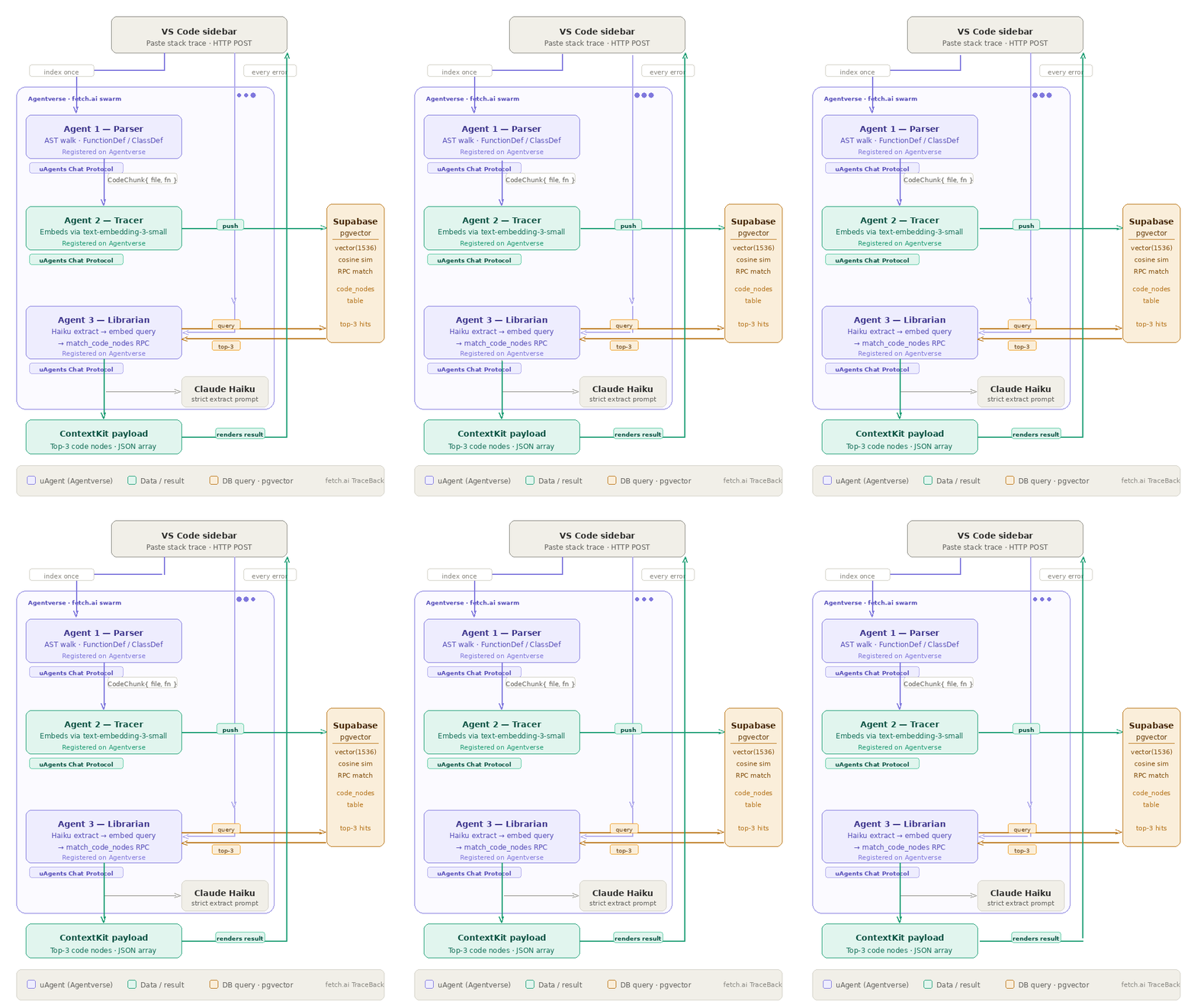
TraceBack is a VSCode extension that uses an agentic workflow to find and fix errors, abstracting the need to have an LLM search through your entire codebase. A swarm of Fetch.ai agents traces the error log stack trace against a vector map of the current repository. It instantly returns the incident context containing only the specific functions/variables responsible for the bug, and then, if allowed, it applies changes directly to the target file.
How we built it
TraceBack was built on top of the VS Code Extension API, with the frontend rendered with React.js inside a VS Code Webview. In the background, Fetch.ai uagents hosted on Agentverse use an Abstract Syntax Tree to break down the codebase, then parse the output to generate vector embeddings, which are pushed to Supabase (pgvectors) and extracted using a cosine similarity search to source the failing function.
Challenges we ran into
One challenge was having the AI agents apply the fixed code directly to the source codebase, as it involved using the Agents to manually access the local machine's files and alter them. Another challenge included embedding mismatches as we switched from using OpenAI to using Gemini.
Accomplishments that we're proud of
Building our first VS Code Extension and incorporating multiple agents that function together to perform complex tasks in a single flow. We're also proud of the overall inspiration behind the idea and the potential for impact that it has.
What we learned
We learned how to build a VS Code extension, how to orchestrate multiple agents using Agentverse, and how to use stored vector embeddings in Supabase to enable the agents to perform an efficient search through a codebase.
What's next for TraceBack
Finding a manner to optimize the code on top of fixing bugs and allowing users to query the system for questions they have about any codebase. We want to eventually deploy TraceBack as an installable VS Code extension.
Built With
- agentverse
- fetch.ai
- figmamake
- python
- react
- typescript


Log in or sign up for Devpost to join the conversation.