-
-
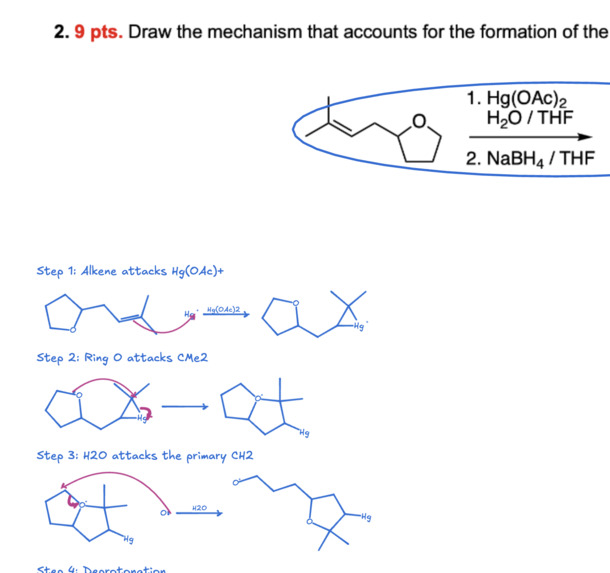
Organic Chemistry Tutor
-
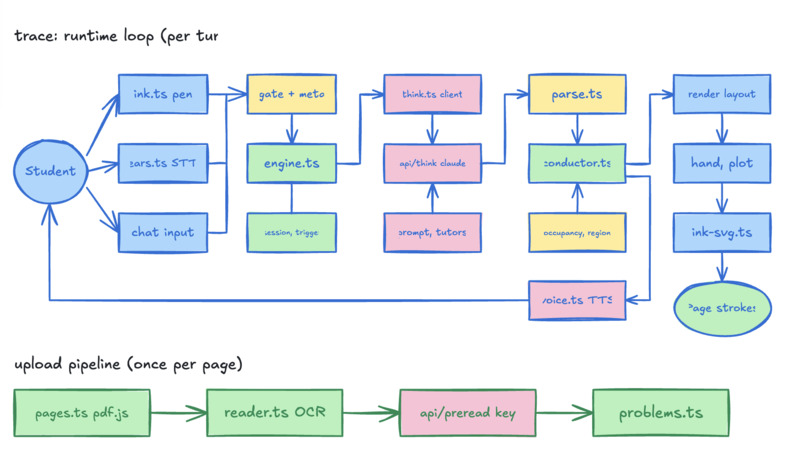
Agent generated system design diagrams
-
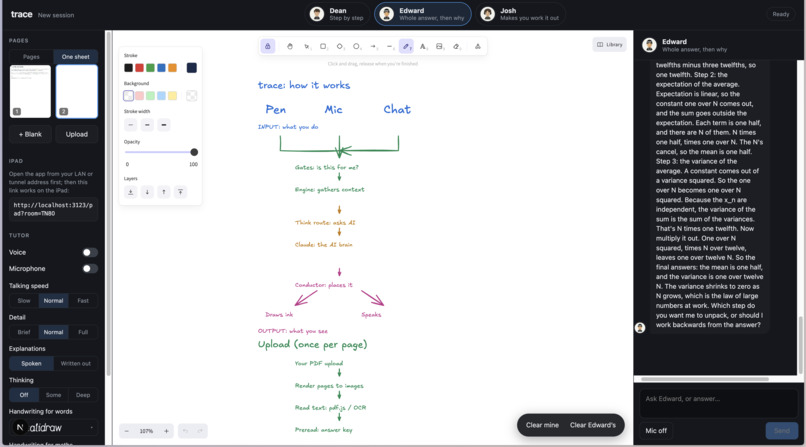
Diagram generation
-
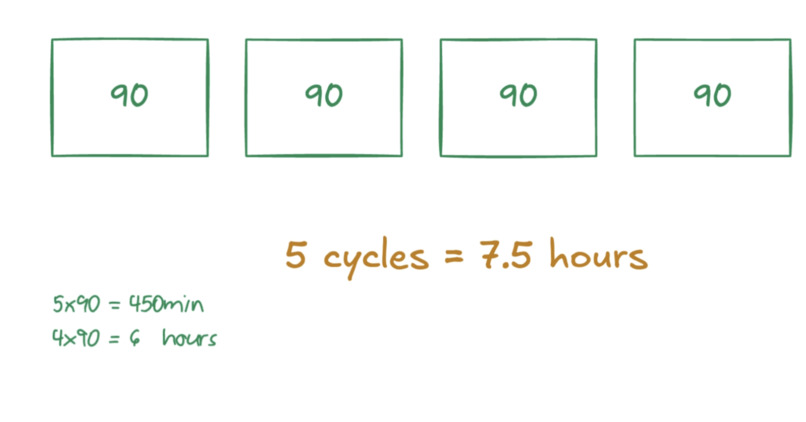
custom diagrams
Inspiration
Josh was working through an optimization midterm at 1 AM, half the problem already on paper. Every AI tutor he opened wanted the same thing: retype the problem into a chat box, or send a screenshot, then read a wall of text that ignored everything he'd already written. The interface was the problem. Homework is handwritten, messy, half-finished, and the help should meet it there.
What he wanted was the TA from office hours: someone in the room who looks at your page, says "that line's off," and writes the next step right next to your work while explaining it. So we built that. The page is the interface. You never type the problem in.
What it does
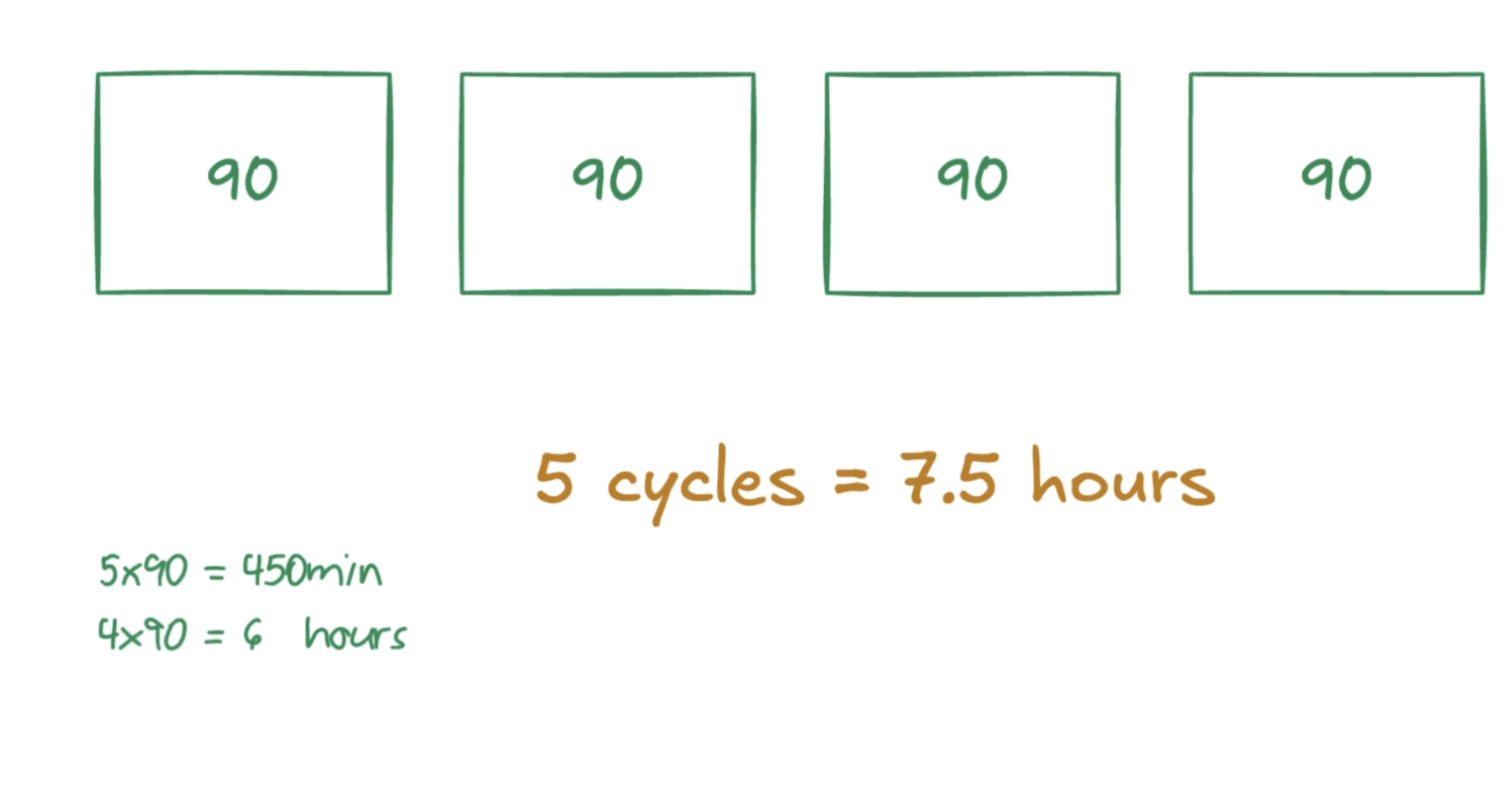
You do your homework the way you already do it: by hand, on the actual page. Upload the PDF or a photo and trace reads every question on it. Then you work. Write a step, pause, or ask out loud, and a tutor answers in a voice while writing on your page in a real person's handwriting, the pen landing on the word it's saying. It feels like a TA sitting next to you, not a chat window.
What it can do on the page:
- Pick up from your work. It reads what you've already written and continues from your last line instead of starting over.
- Check you as you go. Say "check me as I go" and it grades each line as you write it, circles the one that's wrong, fixes only that line, and writes nothing ahead of you.
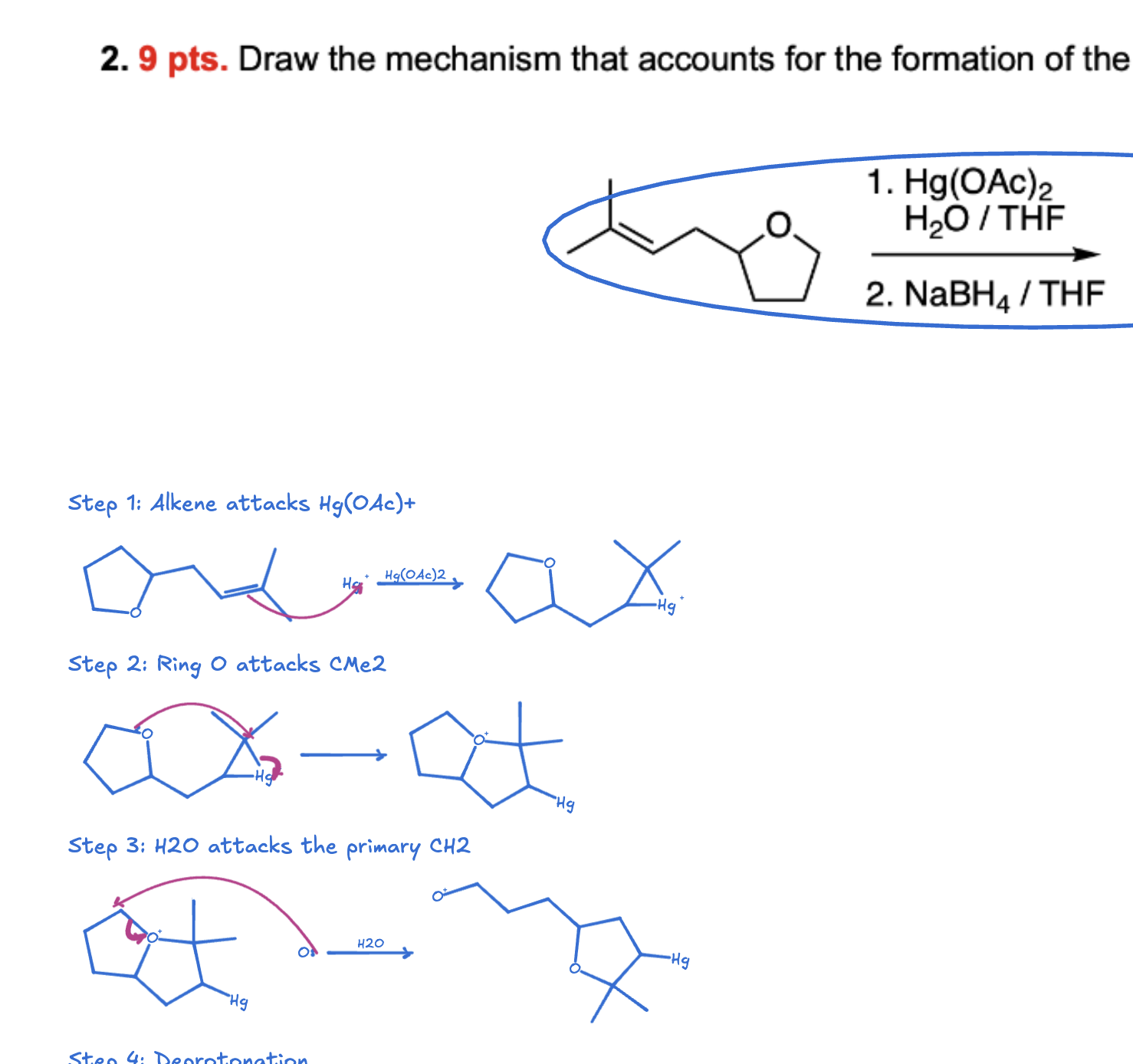
- Hard problems, not toy ones. A two-iteration gradient descent with a bisection line search. A convexity proof from AM-GM. A five-step oxymercuration–demercuration mechanism with curved arrows. Graphs with the critical points marked.
- Three teaching styles. Walk me through it, just show me the whole answer, or make me work it out. Switch by clicking a card or saying the name.
- Your whole problem set. Several documents open at once; "question 2 on the orgo homework" goes to the right page of the right document, and it tells you if it's still reading.
- A tablet as the notebook. The pencil draws there, the tutor's ink appears there as it's drawn, the laptop follows the pen.
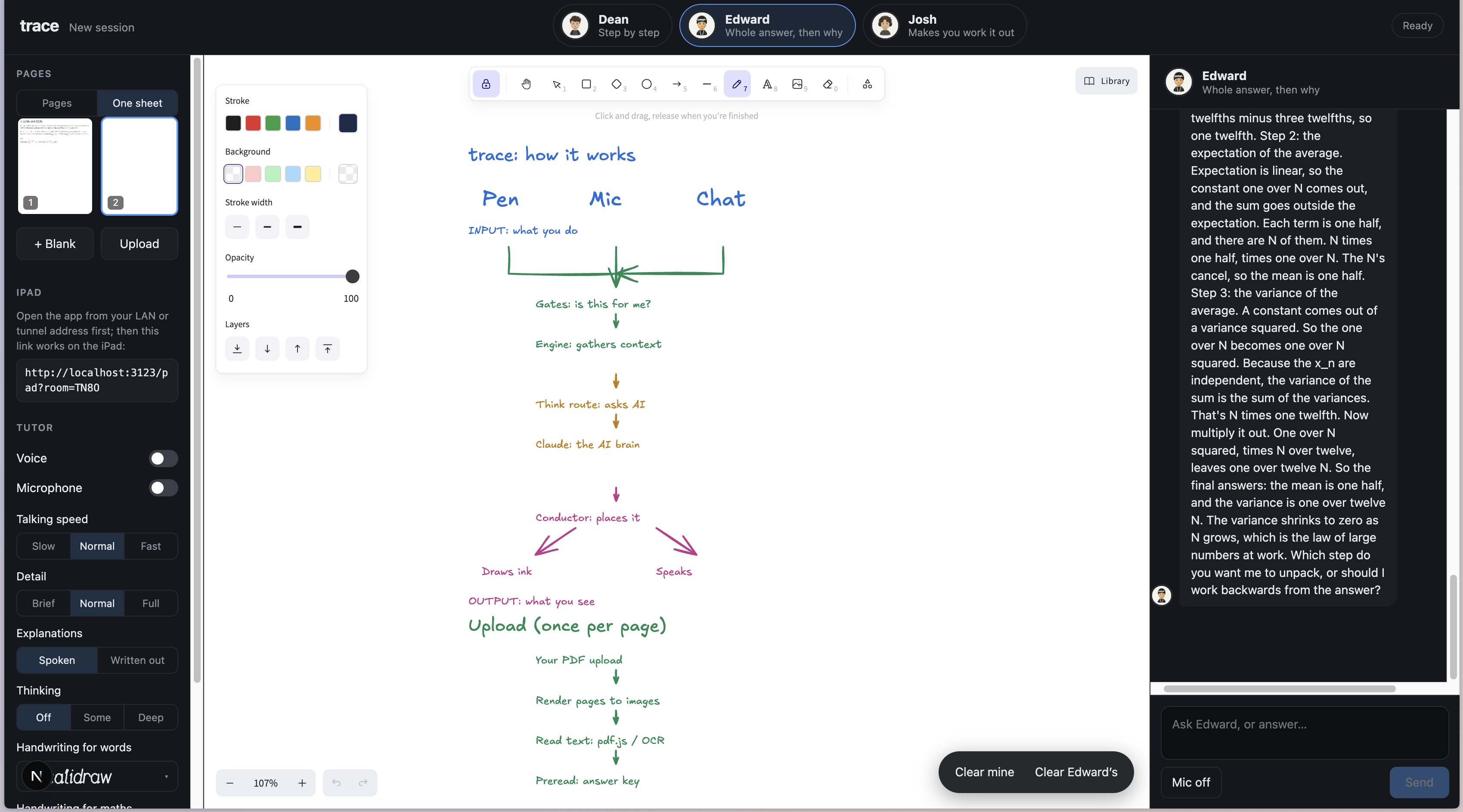
- It can explain itself. Paste the GitHub link, ask how it works, and it reads its own repo and draws the architecture.
How we built it
Two Claude models, two jobs. At upload, Opus solves every question once and writes an answer key: the answer, the key idea, the likely mistakes, the worked solution as board lines with checked numbers, and for mechanism problems the structures as atom-mapped SMILES with the arrows for each step. The page is split at the question boundaries and each question is read in parallel on its own crop, so a three-question midterm is three reads at once, not one long one. During the session, Sonnet runs each turn from that key through a warm pool of claude -p processes, so the live tutor is checking against a solved key instead of solving under time pressure.
A line protocol, never JSON. The brain streams one command per line: @PLAN, @SEG (a line of text, math, a plot, a diagram, a chemical structure), @MARK (circle or underline a line), @DRAW (a sketch of shapes), @ASK, @SAY, @GOTO, @ERASE, @EDIT. The pen moves on the first command. The brain never outputs coordinates: it says "below line 3" or names a function and its range, and code picks the pixels.
A conductor decides where everything goes. An occupancy grid of everything already on the page, a region for this turn, a per-tutor ink budget, deduping against what's already written. A step label stays with its drawing; the scratch page grows downward when a column runs out of room. Plots are sampled with mathjs and laid out by the renderer; chemistry is drawn from SMILES with arrow pushes by atom number.
The handwriting is a real human's. Recorded stroke by stroke on a capture whiteboard, segmented into a bank, and laid out by an engine we wrote that writes text and math from it with the original timing and pressure. A converter turns the tutor's plain typed math into the LaTeX the engine understands; symbols never recorded fall back to public MathWriting strokes. The board is an Excalidraw scene.
Voice is Cartesia. Sonic 3.6 over SSE with word timestamps: the brain puts a caret before the word the pen should start on, and the writing lands in sync with the speech. Ink STT over a WebSocket with server-minted short-lived tokens, partial transcripts for barge-in so "wait" stops the tutor mid-sentence, and an echo filter so the tutor's own voice coming back through the mic isn't mistaken for the student. Playback is serialized so lines never overlap, and a few "kept" lines survive a cancel so it's never cut off mid-word.
The stack. Next.js and TypeScript. Apple Vision for photo OCR, pdf.js for PDFs with a text layer. A tablet joins through an in-memory relay: pencil strokes go up as they're drawn, the tutor's ink comes down as it's revealed.
We tested it with simulated students. A headless runner uploads pages, speaks, writes lines with deliberate mistakes and switches documents; every tutor drawing's ink box is checked against every other one and the student's ink; and a model playing the student grades each session on whether it would have understood. Most of day two's fixes came out of those transcripts. 194 unit tests underneath.
Challenges we ran into
- Latency that still feels like a conversation. A tutor that answers in six seconds isn't a tutor. We got the first spoken word to about a second by streaming a line protocol instead of JSON (the pen moves on the first command), keeping a warm pool of Claude processes so nothing cold-starts, prefetching the voice for lines that are still being parsed, and making the first command tiny. Everything slow was moved off the live path.
- Correct and fast. Those pull in opposite directions. Our answer was to split the work across two models: Opus solves every question once at upload and writes a checked answer key with the worked lines and, for chemistry, the structures and arrows for each step; Sonnet runs the live turn from that key instead of solving under time pressure. The live tutor checks, it doesn't guess.
- Reading a whole problem set in parallel. A page is one image to a model, so we split it: find the question boundaries from the text layer or OCR, crop a band per independent question, keep sub-parts with their stem, and read every band at once. A 3-question midterm is three parallel reads, not one long one. If you ask about a question whose read isn't back yet, it jumps the queue and the tutor says it's still reading rather than "I don't see it."
- Real handwriting, not a font. Edward recorded his own hand on a capture whiteboard, segmented the strokes into a bank, and wrote the engine that lays out text and math from it with the original timing and pressure. Then the long tail: symbols he had never written, exponents that rendered as dots on the base letter, prose words running together, typed
e^(λa+(1-λ)b)where only the(got raised. A converter now turns the tutor's plain math into the LaTeX the layout engine understands, and coverage gaps fall back to public MathWriting strokes. - Teaching the tutor what a plot is. The brain never outputs coordinates. It names the function, the range and the points that matter; the renderer samples the curve, picks the axes and ticks, places labels where the curve isn't, and keeps everything inside its own box. Same idea for chemistry: the brain gives SMILES and arrow pushes by atom number, the renderer draws the molecule.
- Where to put things on the page. The hardest problem in the project. An occupancy grid of everything already on the page, a region per turn, rows that fit or flow beside, a step label kept with its drawing, scratch paper that grows downward instead of jumping to free space, and an eval that measures every drawing's ink box against every other one. We shipped with zero collisions across the demo scenarios.
- Mishearing. Speech-to-text hears "orgo" as "Virgo"; the tutor's own voice leaks into the mic and looks like the student talking; a quick "is that right?" shares every word with what the tutor just said. Barge-in from partial transcripts, an echo filter that needs runs of the tutor's words rather than shared words, and per-document question resolution so "question 2 on the orgo homework" doesn't land on the midterm's 2a.
- Keeping a tablet and a laptop on the same page. The notebook is a second client on an in-memory relay: pencil strokes go up as they're drawn, the tutor's ink comes down as it's revealed, pages and settings stay mirrored, and the tablet stays pinned to the page you're on while the laptop follows the pen. Then hackathon Wi-Fi isolated the devices and a dev-origin pattern silently blocked every LAN address, which took a while to find.
Accomplishments that we're proud of
- You never type the problem in. Every AI tutor today starts with you retyping the question or sending a screenshot, then reading a wall of text. With trace you just do your homework: write by hand on the actual page, talk when you're stuck, and it answers out loud while writing next to your work. It handles the hard stuff (a two-iteration gradient descent with bisection, a convexity proof, a full organic mechanism) and it still feels like a TA sitting next to you, not a chat window.
- It works on the page you already have. Upload a photo of a midterm with half a proof written on it, say "I'm stuck," and the tutor picks up from your last line in handwriting. That was the whole idea on Friday, and it's what runs on Sunday.
- A five-step organic chemistry mechanism, drawn correctly, in about 13 seconds. Oxymercuration–demercuration with curved arrows, from a photo of the homework, every intermediate consistent with the one before it. Not a picture of a mechanism; the mechanism.
- A spoken turn in about a second. Streamed commands, a warm model pool, voice prefetch, and a pre-solved answer key mean the tutor starts talking and writing before you'd finish typing the question into a chat box.
- It catches your mistake, not just the answer. Write a wrong derivative term, ask "is that right?", and it circles that line and fixes only that line, with the voice and the pen landing on the same word.
- Zero overlapping ink. Across every demo scenario, no drawing lands on another or on the student's writing. Placement is measured, not eyeballed.
- A real person's handwriting. Captured, segmented, synthesized with the original timing and pressure, laying out math including fractions, exponents and Greek.
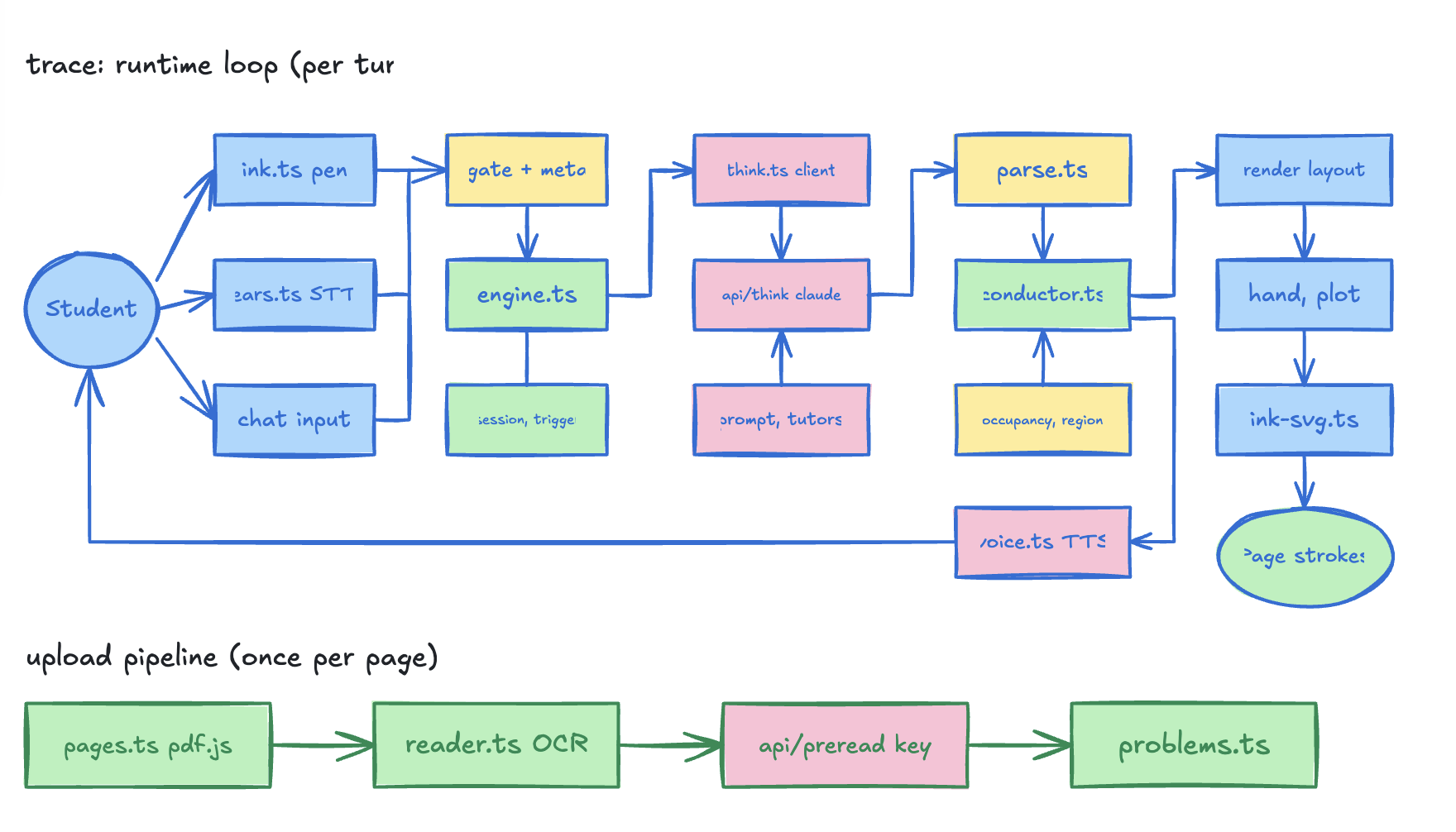
- It can explain itself. Paste the GitHub link, ask how it works, and the tutor reads the repo and draws its own architecture: input → engine → brain → conductor → hand, with the actual module names in the boxes.
- 194 unit tests and an eval harness where an AI student grades the tutor. Scripted sessions with deliberate mistakes, document switching and speech, judged on whether the student would have understood. Most of day two's fixes came from those transcripts.
- A tablet as the notebook. Pencil on the tablet, tutor's ink appearing on it as it's drawn, laptop following the pen.
What we learned
- Split the model by job. The slow, careful model solves everything once at upload; the fast model teaches from that solution live. One model doing both in real time was slower and wrong more often. Correctness and latency stopped fighting the moment we separated them.
- Stream commands, never JSON. You can't act on JSON until the last brace arrives. One command per line means the pen moves and the voice starts on the first twenty tokens, and a slow turn still looks alive.
- The hard part of a tutor isn't the answer, it's the page. Where to write, how big, in what order, without covering the student's work. A correct line written over their proof is worse than silence. Placement ate more of the weekend than the brain did, and it's what makes the ink feel like a person's.
- Voice is turn-taking, not text-to-speech. Barge-in, echo from the tutor's own speaker, lines that must not be cut off mid-word, lines that must never overlap. Getting a conversation to feel natural was mostly deciding when not to speak.
- Give the model the real page, not a description of it. Cropping each question and reading them in parallel beat one careful pass over the whole image on both speed and accuracy. Vision models are good at "line 3" and bad at coordinates; the protocol is built around that.
- Test with a judge, not by eye. Scripted students with deliberate mistakes, graded by a model playing the student, found more real bugs in an afternoon than a day of manual runs: dropped replies, wrong-document jumps, silent failures we'd never have noticed by watching.
- Hackathon Wi-Fi is part of the architecture. Client isolation and dev-origin rules cost us a tablet for a morning. Plan for the network you'll demo on, not the one you built on.
What's next for Trace
- A native tablet app. The notebook runs in the browser through a relay today; a native app with the pencil as a first-class input, local stroke rendering and a direct connection to the session takes the device sync and latency problems off the table, and the mic stops depending on a secure origin.
- Hosted and signed-in. Right now it runs on a laptop with a local Claude login. A hosted version with accounts, per-student memory of what they got wrong, and the tutor picking up where last night's session ended.
- Every subject's notation. Math, graphs and organic chemistry draw today. Next: physics diagrams, circuits, number theory, proofs with structure, and the student's own worksheet layouts preserved.
- Your handwriting, not just ours. More recorded hands, and eventually the tutor writing in a hand that matches the page.
- Hand it back. Export the annotated page as a PDF, or straight into the notes app the student already uses.
Built With
- apple
- cartesia
- claude
- excalidraw
- freehand
- learning
- meta
- nextjs
- openai
- pdf.js
- playwright
- supervised
- swift
- typescript
- vision
- websockets

Log in or sign up for Devpost to join the conversation.