Inspiration
We run a grassroots youth football academy in South Wales: nine coaches, children aged 2 to 13. Every coach finishes a session on a cold, dark field with thirty seconds of sharp observations in their head about twelve children. "Ollie finally used his left foot." "Amara switched play twice." By the time they're home, it's gone, and it almost never becomes feedback the child or their parents see.
The obvious fix, "just ask an AI", doesn't work here. Plenty of grassroots pitches have no signal, and these notes are about children. A coach shouldn't paste a child's name into a cloud chatbot. Hybrid inference is the first approach that fits both constraints.
What it does
Touchline is a mobile-first web app (installable PWA) for the two minutes after training.
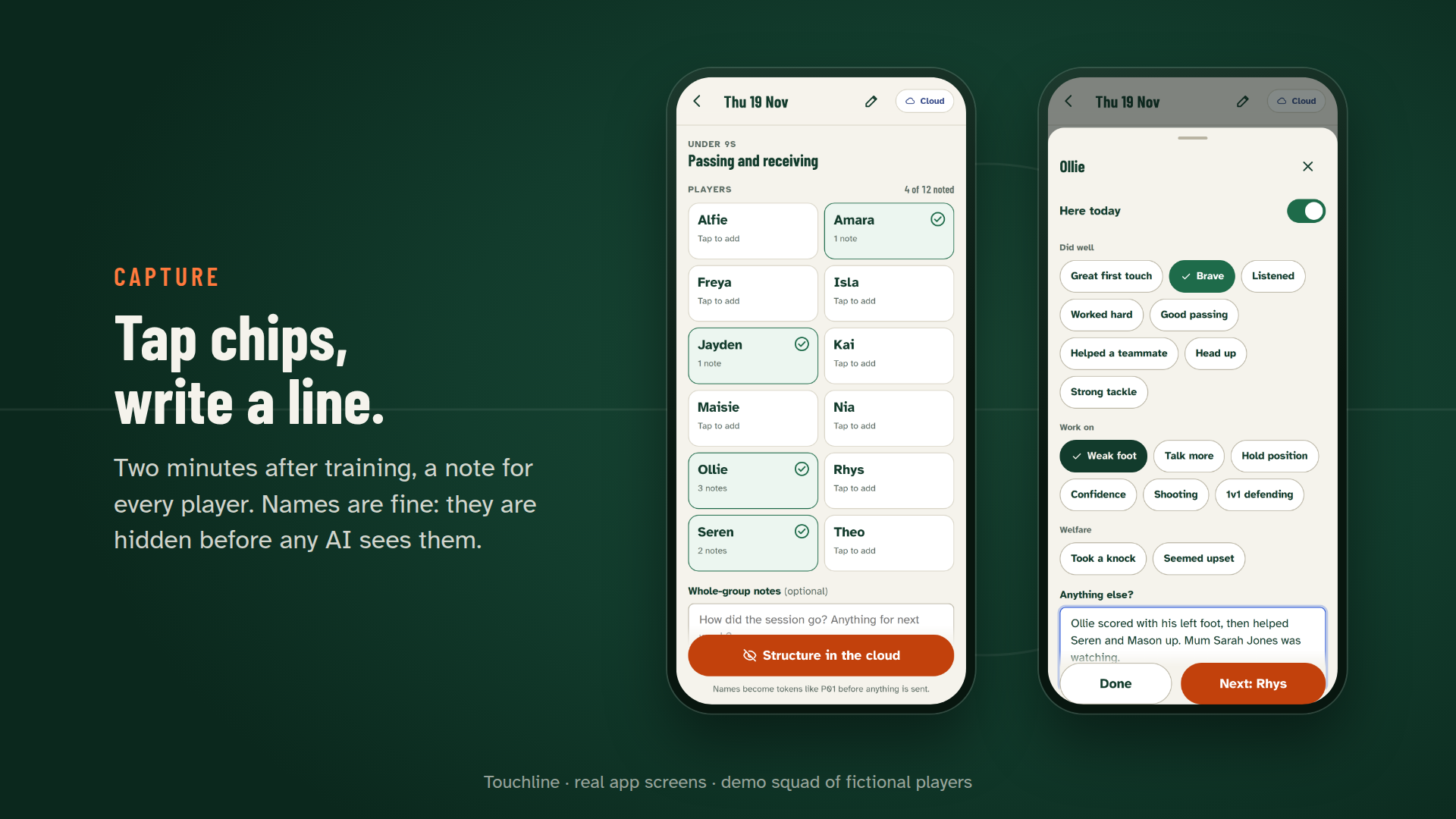
- Capture. Tap a child's tile, tap chips ("Brave", "Weak foot", "Took a knock"), add a line of free text. Names are fine to write; they're handled for you.
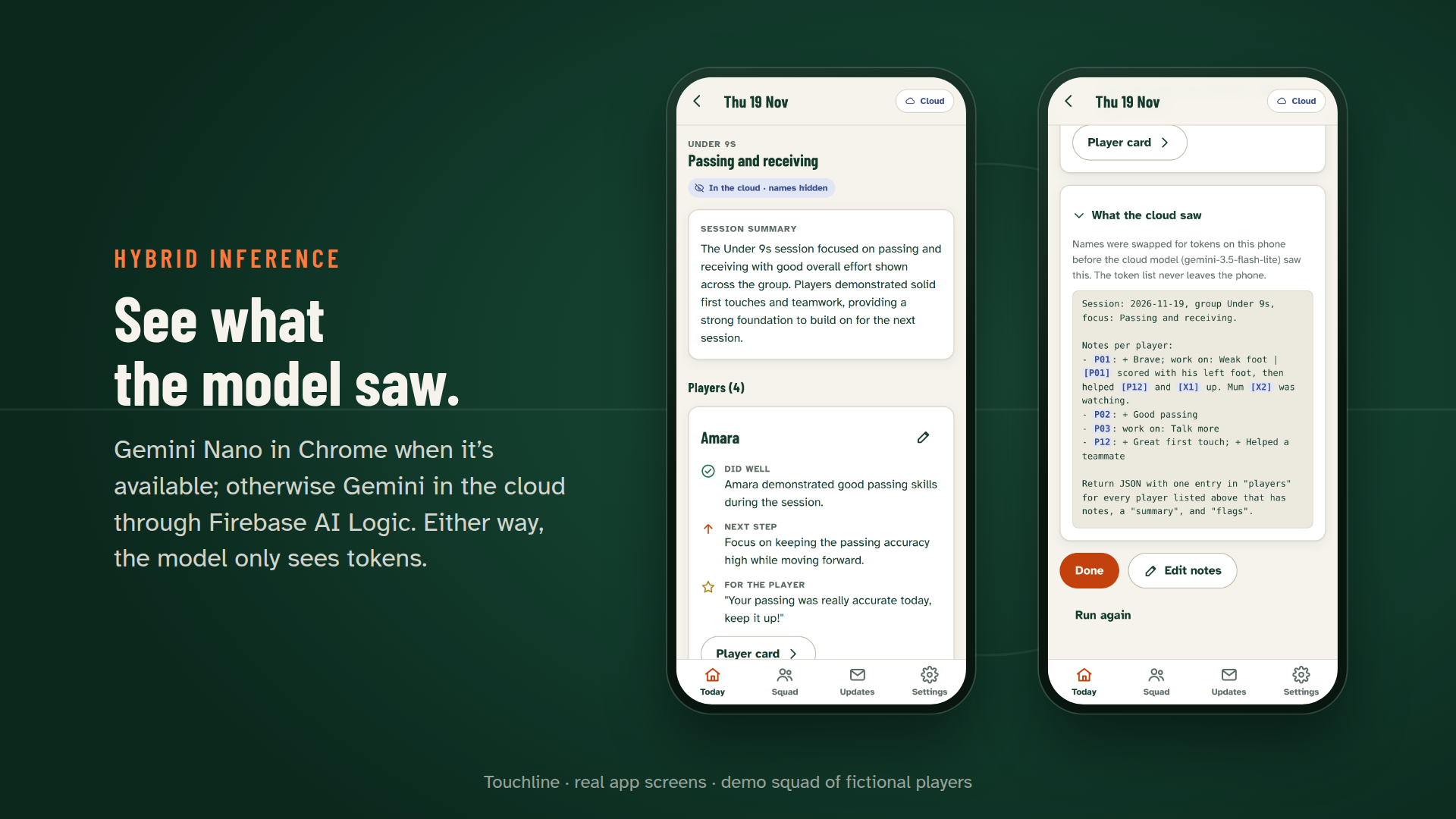
- Structure, on the phone. Touchline turns the notes into, for every child, what they did well, one next step and a warm praise line written to the child, plus a coach summary and welfare flags. In Chrome with Gemini Nano this runs on the device through Firebase AI Logic, even in airplane mode.
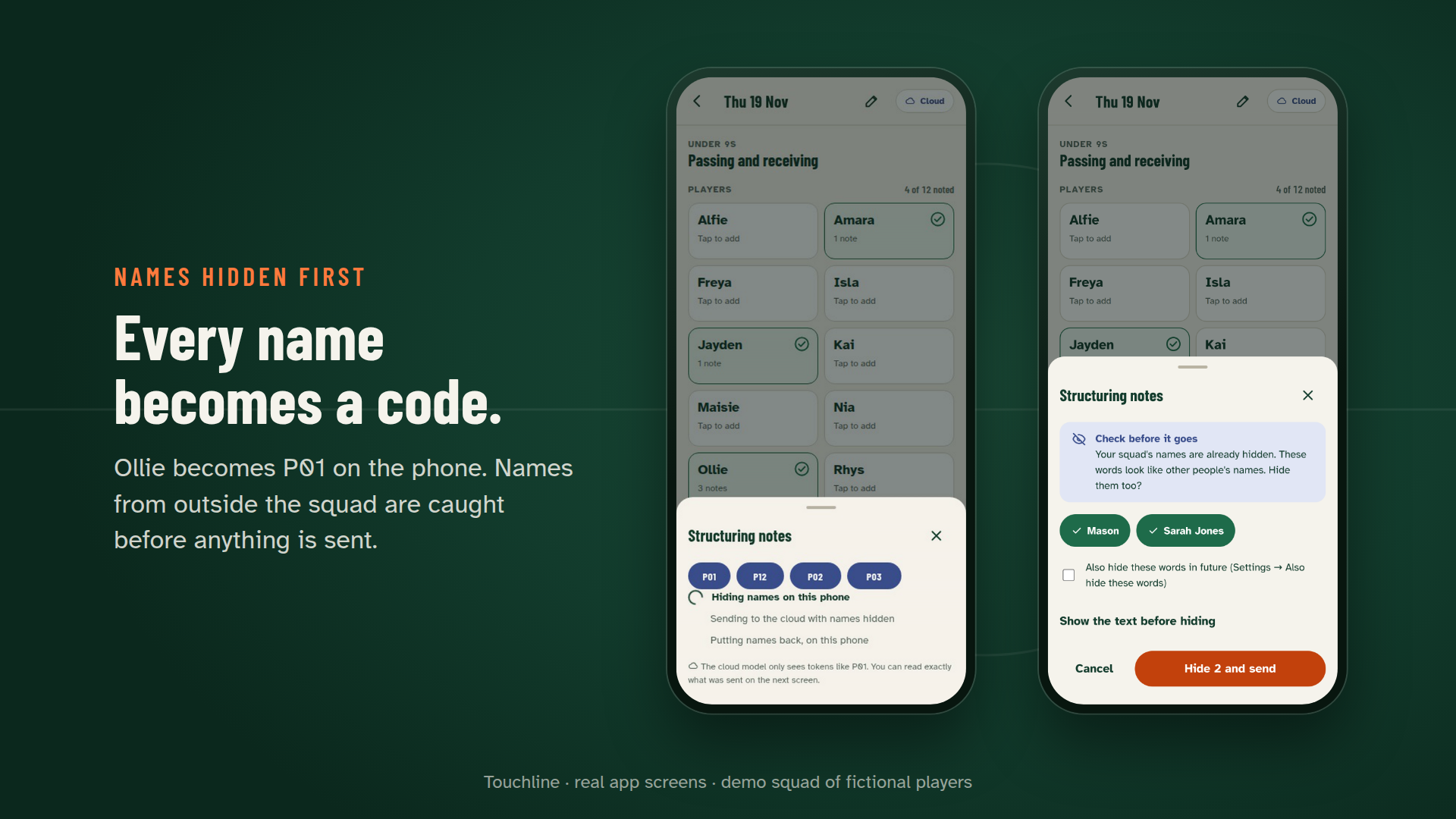
- Names are hidden on the phone first. Before any model call, every squad name, nickname and part of a name becomes a token (Ollie → P01). If a note mentions someone outside the squad ("mum Sarah Jones"), a Check before it goes step catches it on the phone and hides it, ticked by default. A final leak check refuses to send anything that still contains a name. Results come back with tokens and the names are put back on the phone. Each result is badged "On this device" or "In the cloud · names hidden", and a "What the cloud saw" panel shows the exact text that was sent.
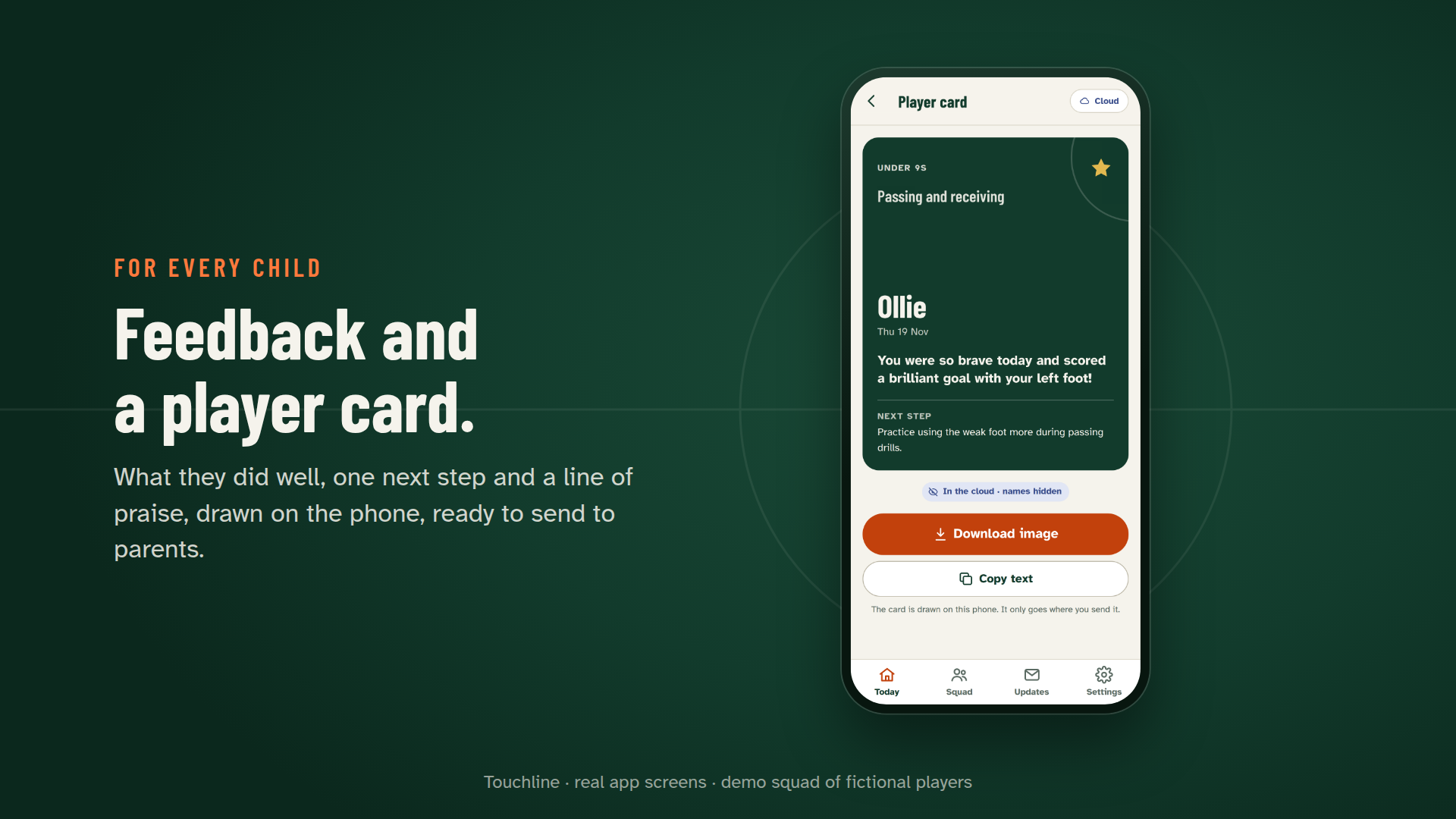
- Player cards. A clean card per child (praise and next step), drawn on the phone, ready to share with their parents.
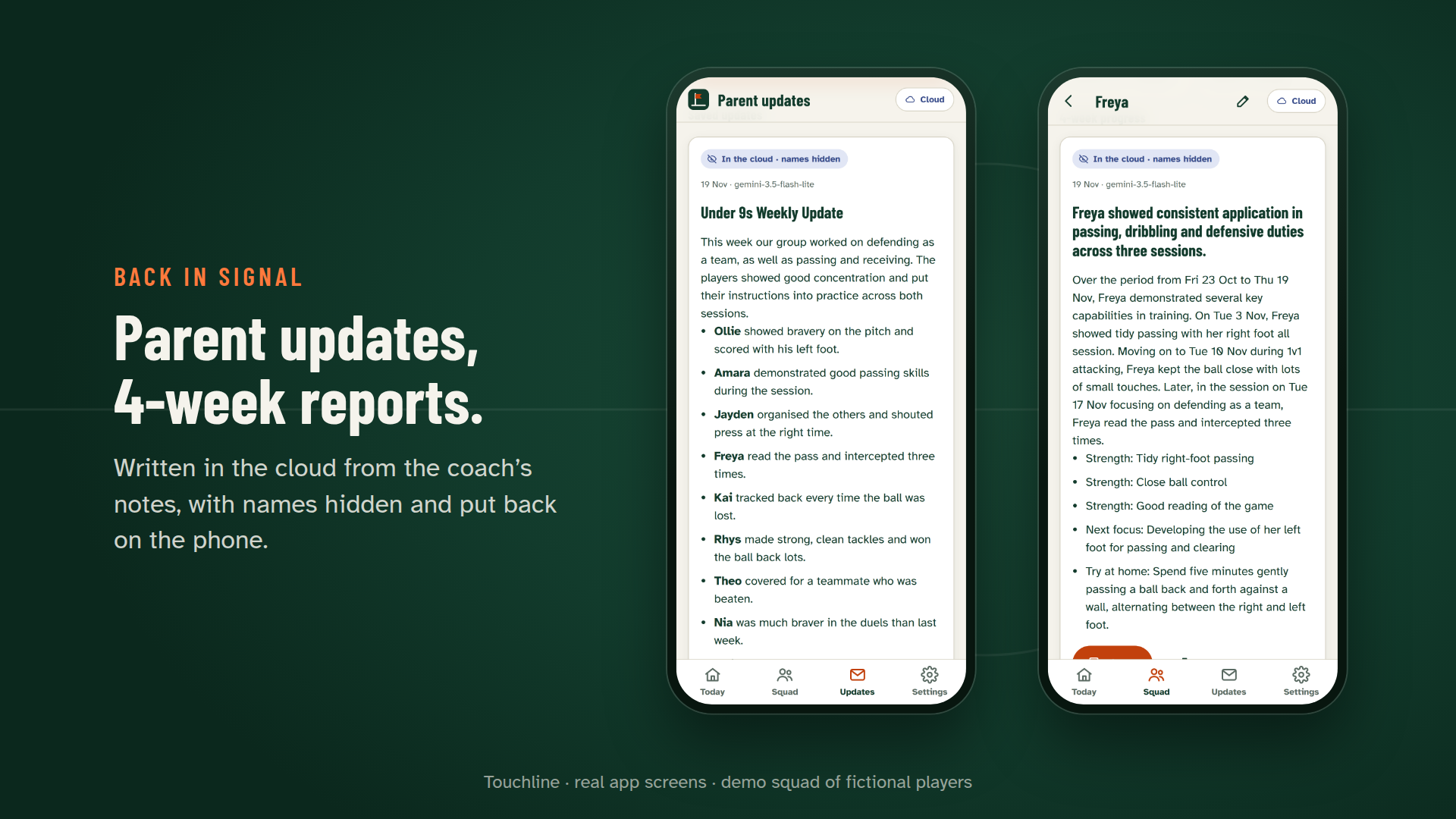
- The cloud only where it helps. Back in signal, a cloud Gemini model writes the weekly update for a group's parents and a 4-week progress report per child across sessions, still with names hidden.
- Flags for the coach, never for the child. Welfare notes ("took a knock", "seemed upset", anything about home) become private flags and are kept out of praise, next steps, cards and parent updates. History flags spot patterns: "Ollie hasn't had a mention in 3 sessions." "Freya: weak foot noted 3 sessions running."
- Offline-first everything. IndexedDB, a service worker, and plain notes from the chips if no model is available at all, ready to upgrade with AI later. Export, import, remove one child and erase their notes, or delete everything.
How we built it
- Firebase AI Logic hybrid inference (
firebase/ai, Gemini Developer API backend). Session structuring usesprefer_on_devicewhen online andonly_on_devicewhen offline or when the coach switches the cloud off. Parent updates and progress reports useonly_in_cloud. Gemini Nano is downloaded on a user gesture withinitializeDeviceModel(), and each result'sinferenceSourcedrives the badge the coach sees. - Structured output on both paths from one JSON Schema: passed to Gemini Nano as
onDeviceParams.promptOptions.responseConstraintand to the cloud asgenerationConfig.responseJsonSchema, then through a tolerant parser that keeps only known tokens. - The masker (TypeScript, no dependencies) handles whole words, accents, nicknames, duplicate first names, possessives, plurals, emails and phone numbers, invisible characters, full-width letters and camelCase hashtags. It is tested by 250+ unit and property tests, about 220 of them adversarial.
- App Check with reCAPTCHA Enterprise protects the AI endpoint. Remote Config holds model names and prompt overrides. Anonymous Auth + Firestore keep an optional anonymised backup (tokens only, off until the coach turns it on) with strict security rules, and Firestore's offline cache queues writes made without signal.
- Preact + Vite PWA, IndexedDB, Workbox, hosted on Cloudflare Workers static assets.
- Tests: Vitest + fast-check (570 unit tests, over 99% line coverage on core modules), 72 Playwright tests at 375 px and 1280 px with axe accessibility checks, failure injection (429, 500, malformed output, timeouts, offline) and an unmocked live suite against the real Firebase backend.
Challenges we ran into
prefer_on_devicecan quietly become the cloud. If Gemini Nano isn't ready, the same call goes to the cloud. So we mask before every call, on-device or not, and the leak check sits right before the model. The privacy guarantee doesn't depend on where the SDK routes the call.- Masking real children's names is harder than find-and-replace. "Max" in "maximum", "Will" vs "will", two Sams, "Ollie's", "Zoë" typed as "zoe", names glued into hashtags. An adversarial test pass found eleven real leaks in our first version, all fixed and pinned by tests.
- Names that aren't in the squad. Our first independent review wrote "mum Sarah Jones picked him up" and watched it reach the cloud: the squad list can't know a parent's name. We added an on-device check that flags capitalised words that aren't ordinary English (using a SCOWL word list) or that follow "mum", "Mrs" and similar, and asks the coach before sending.
- Welfare notes are not feedback. The same review found "dad moved out" turning into a next step for the child. Welfare now lives only in private flags, in the prompt, in the schema and in the no-AI fallback, which never copies free text into child-facing fields.
- Free-tier cloud capacity. On build day the larger Flash model often returned "high demand" or timed out. We measured the alternatives, made Flash-Lite the default via Remote Config, and added backoff, a 14-second timeout per attempt and an automatic fallback model. If the cloud still can't answer, the parent update can be written without AI from the coach's own reviewed notes.
- Keeping cloud writing honest. Early parent updates invented reminders ("bring water bottles"). We tightened the prompts so updates only use what's in the records.
Accomplishments that we're proud of
- The privacy promise is visible, not just claimed: the name-to-token "fold" plays before anything is sent, and you can read exactly what the model saw.
- It works at an actual pitch: no signal, cold hands (48 px targets), dark evenings (designed dark theme).
- It's a complete product, not a demo: empty states, errors with a way out, undo, export and import, erasing one child, delete everything (including the cloud backup), and accessibility checks on every screen.
- We let independent reviewers attack it. A security review and a judge-style UX review, each run without our reasoning, found real problems: names outside the squad, welfare text in feedback, and a data deletion that could silently skip the cloud. All were fixed and pinned by tests.
What we learned
- Hybrid inference changes the product question from "can AI do this?" to "where should each step run?". Here the answer is the phone for anything raw and personal, and the cloud for polish across weeks.
- One JSON Schema for both Gemini Nano and the cloud keeps the two paths interchangeable, which is what makes a fallback trustworthy.
- Privacy features need tests written by someone trying to break them.
What's next for Touchline
- Try it with the coaches at our own academy.
- Multi-coach clubs: share anonymised summaries with a head coach.
- On-device voice capture as Chrome's local speech recognition reaches more devices.
- Welsh-language support for coaches and parents.
Testing instructions for judges
Where it runs: in Chrome with Gemini Nano available, session notes are structured on your device (the result is badged "On this device"). Everywhere else, Touchline hides the names and uses the cloud model (badged "In the cloud · names hidden"). Our own recording machines didn't have Gemini Nano (one had no capable hardware, one too little free disk), so the demo video shows the cloud fallback and explains the on-device path with the code; it never shows a staged on-device badge. The on-device route is exercised in our automated tests through the real Firebase SDK with a stand-in for Chrome's Prompt API.
- Open https://touchline.impactlayer.workers.dev in Chrome (desktop or Android). No sign-up.
- Tap Try the demo squad (12 fictional players, 3 past sessions).
- Start today's session → pick a focus → Start capturing. Tap a few players, choose chips, and write a line that mentions names, e.g. "Ollie helped Seren up".
- Tap Structure on this phone (if your Chrome has Gemini Nano) or Structure in the cloud (if not). Watch the names fold into tokens. On the review screen, check the badge and open What the cloud saw.
- Optional: write a note mentioning someone outside the squad, such as "helped Mason up", and watch Check before it goes catch it.
- Open a Player card. Then Updates → Write this week's update, and Squad → Freya → Write a 4-week progress report (both cloud, names hidden).
- Optional: turn on airplane mode and capture again. Without Gemini Nano you get plain notes from the chips, which you can upgrade with AI once you're back online. With Gemini Nano, structuring still runs.
- Gemini Nano in Chrome: see https://developer.chrome.com/docs/ai/get-started for hardware requirements. Settings shows whether it's ready on your device and offers the download.
What was built during the submission period
Everything. The project started on 19 November 2026 within the submission period: the product design, the masking library, the hybrid inference engine, the Firebase setup (AI Logic, App Check, Auth, Firestore, Remote Config), the PWA, the tests and the demo video. No pre-existing code was used apart from open-source dependencies listed in package.json.
AI coding assistant disclosure
Built with Claude Code (Anthropic) as the AI coding assistant. Working from our written brief, it designed and wrote the code, tests, documentation and demo video; separate Claude reviewer agents, run without the builder's reasoning, reviewed security and UX, and their findings were fixed. Dylan set the brief; the Firebase console, GitHub and submission steps were carried out in his signed-in browser by another Claude session acting for him.
Links
- Try it: https://touchline.impactlayer.workers.dev
- Code (Apache-2.0): https://github.com/dragonacademy4/touchline-hybrid
- Demo video: https://youtu.be/pQa4fvzMoJY
Built With
- axe-core
- chrome-built-in-ai
- cloud-firestore
- cloudflare-workers
- fast-check
- firebase-ai-logic
- firebase-app-check
- firebase-auth
- firebase-remote-config
- gemini
- gemini-nano
- indexeddb
- playwright
- preact
- pwa
- recaptcha-enterprise
- typescript
- vite
- vitest
- workbox
