-
-
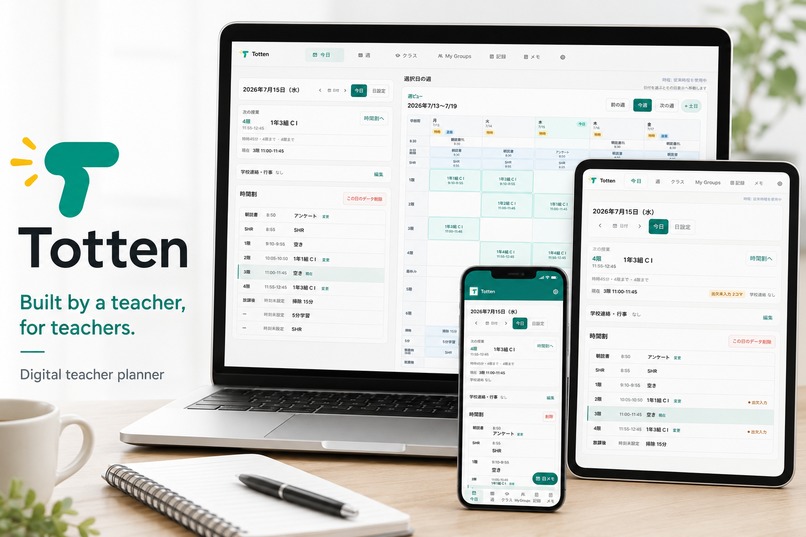
Totten across desktop, tablet, and mobile — one teacher-centered workspace for the real school day.
-
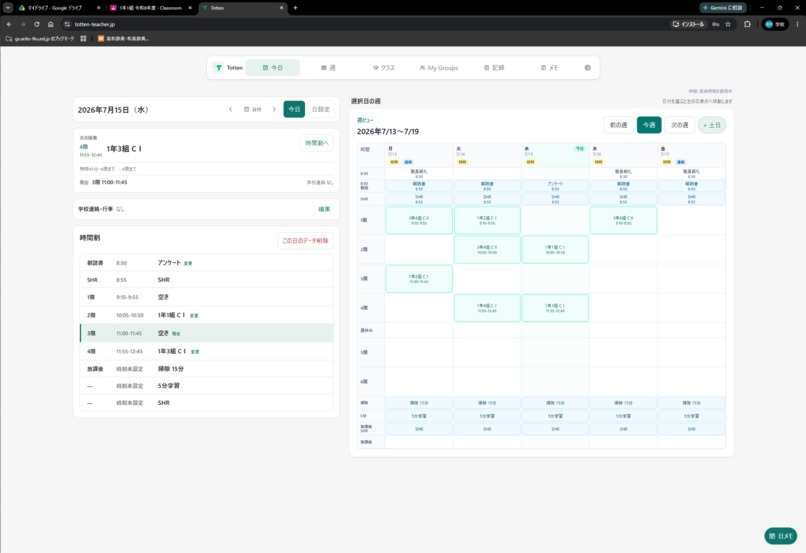
Desktop daily and weekly planning views shown side by side, helping teachers understand both today and the week ahead.
-
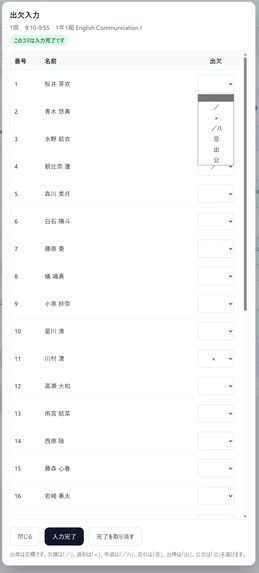
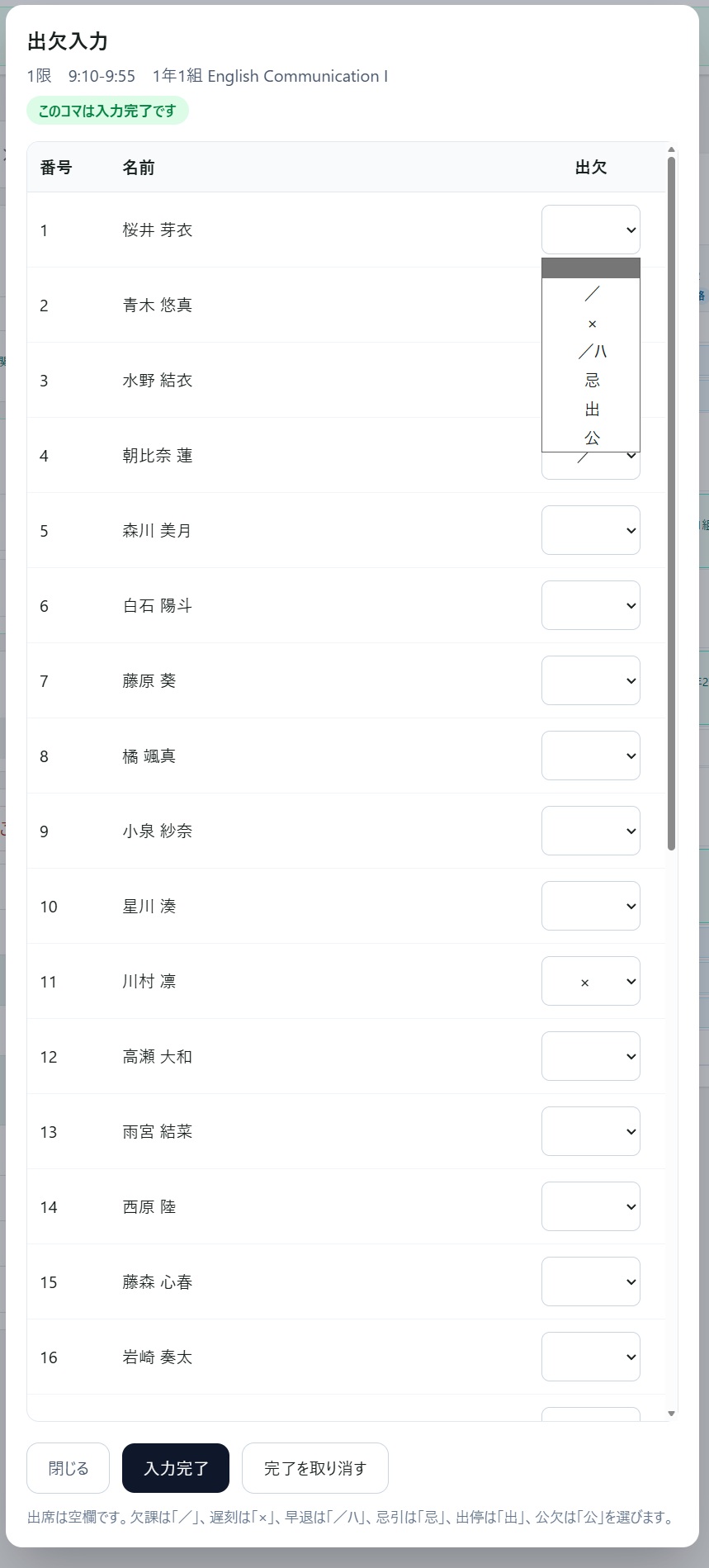
Attendance can be recorded directly from each lesson using school-specific attendance marks. All student data shown is fictional.
-
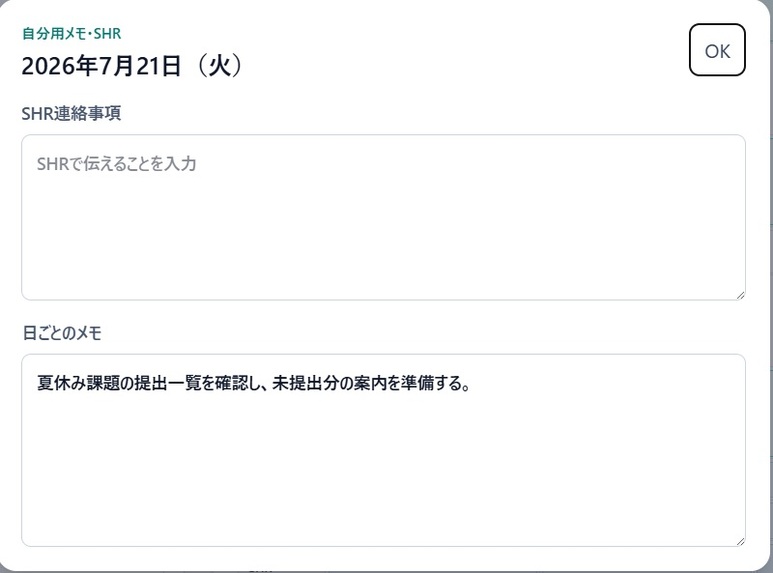
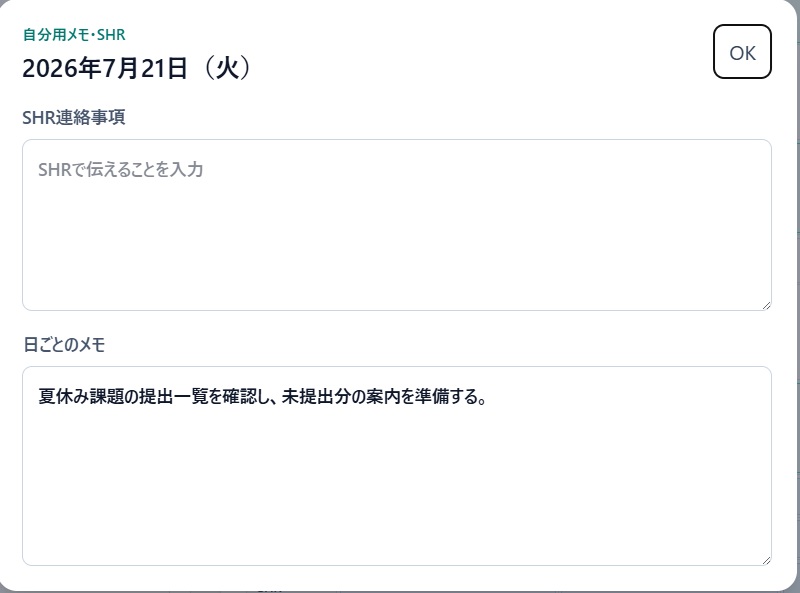
Daily and homeroom notes keep operational reminders attached to the correct date and school activity.
-
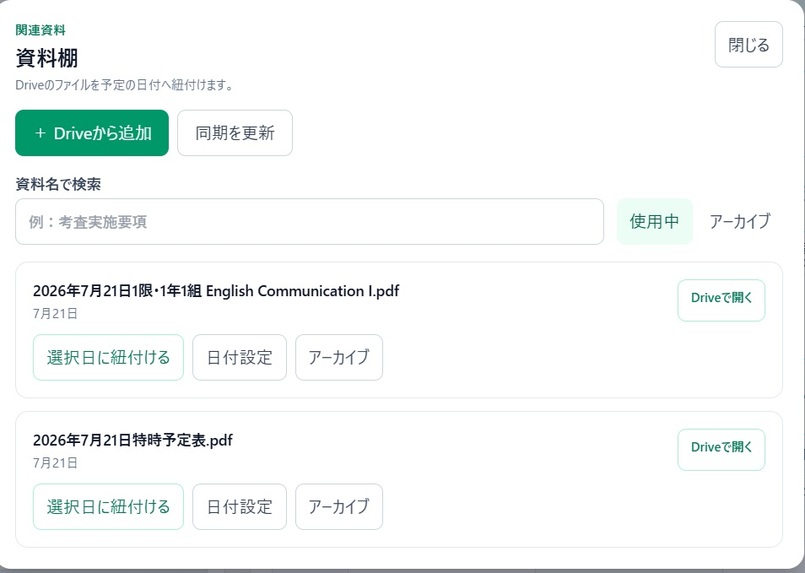
Daily and homeroom notes keep operational reminders attached to the correct date and school activity.
-
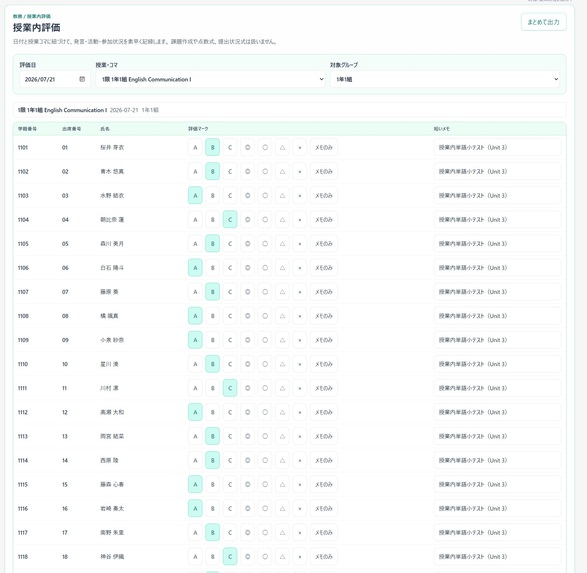
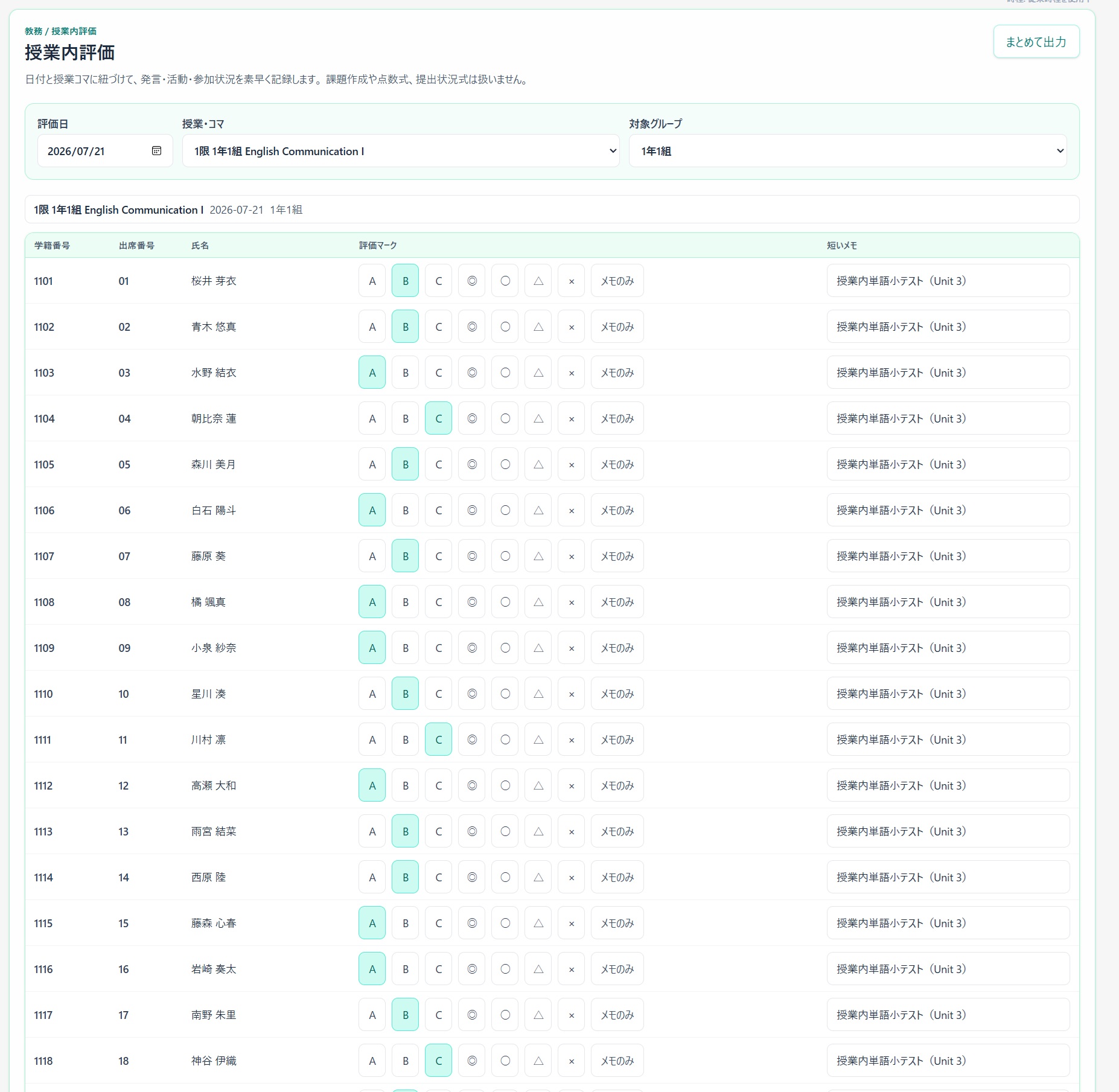
In-class evaluation records for a fictional 30-student class, with support for export to Google Sheets.
-
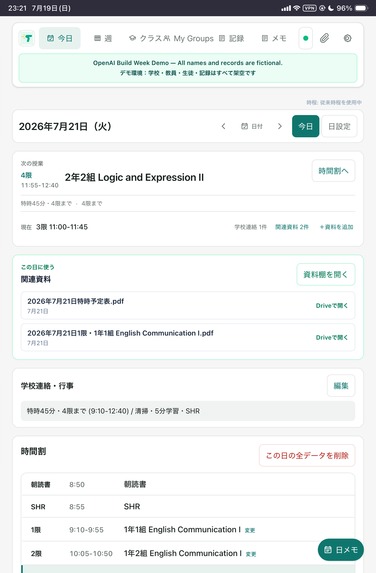
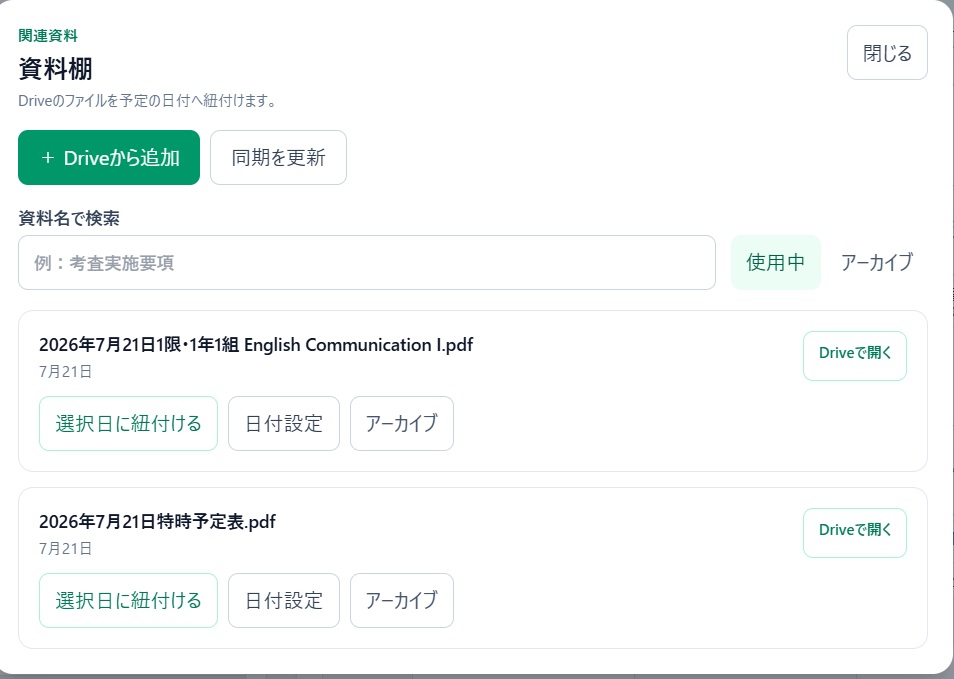
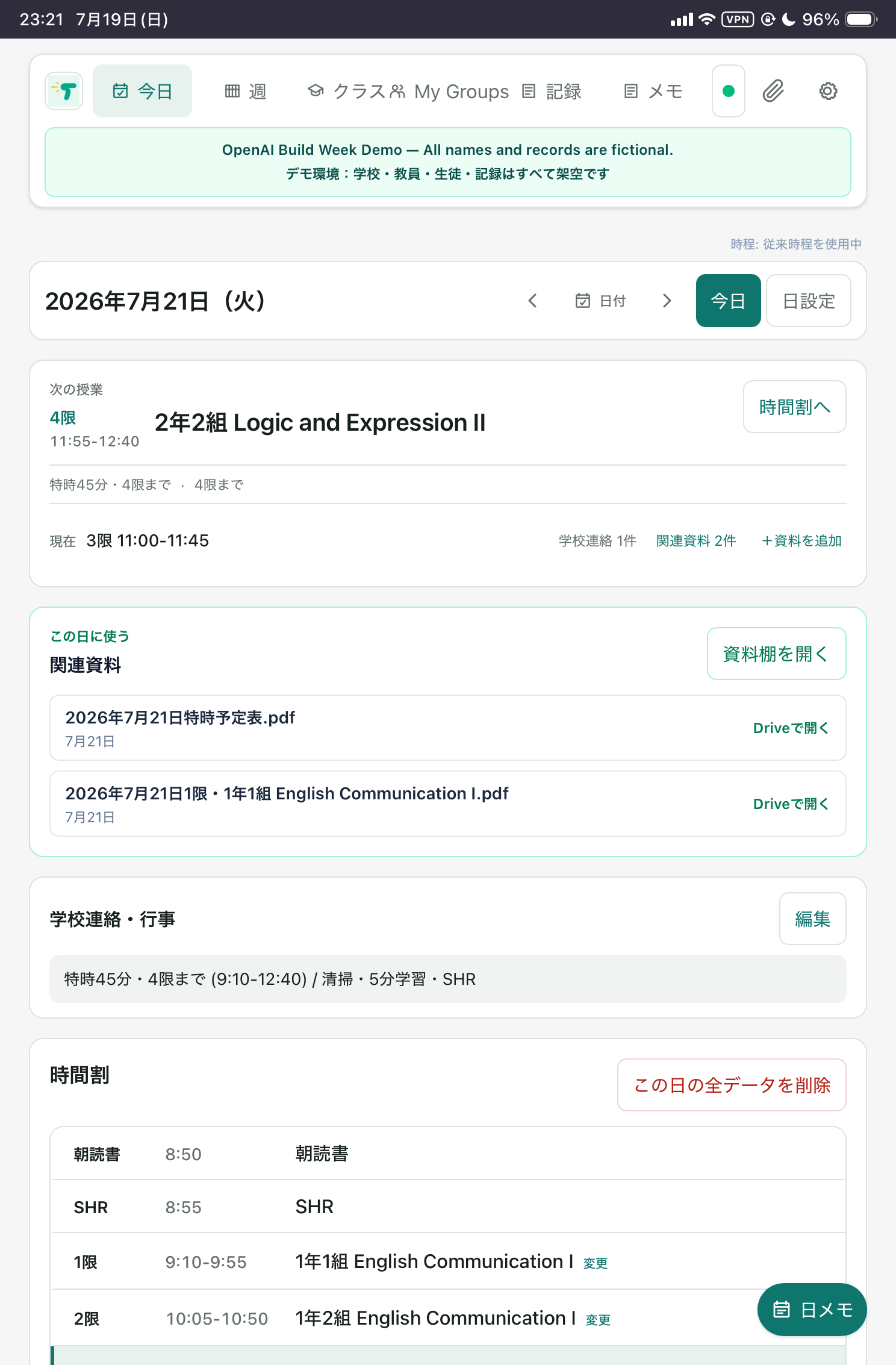
The daily teacher workspace on iPad, showing the current lesson, next lesson, timetable, and related documents.
-
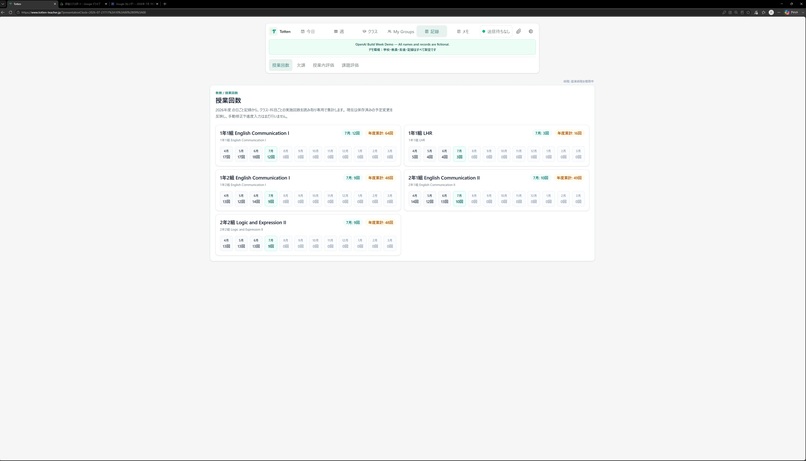
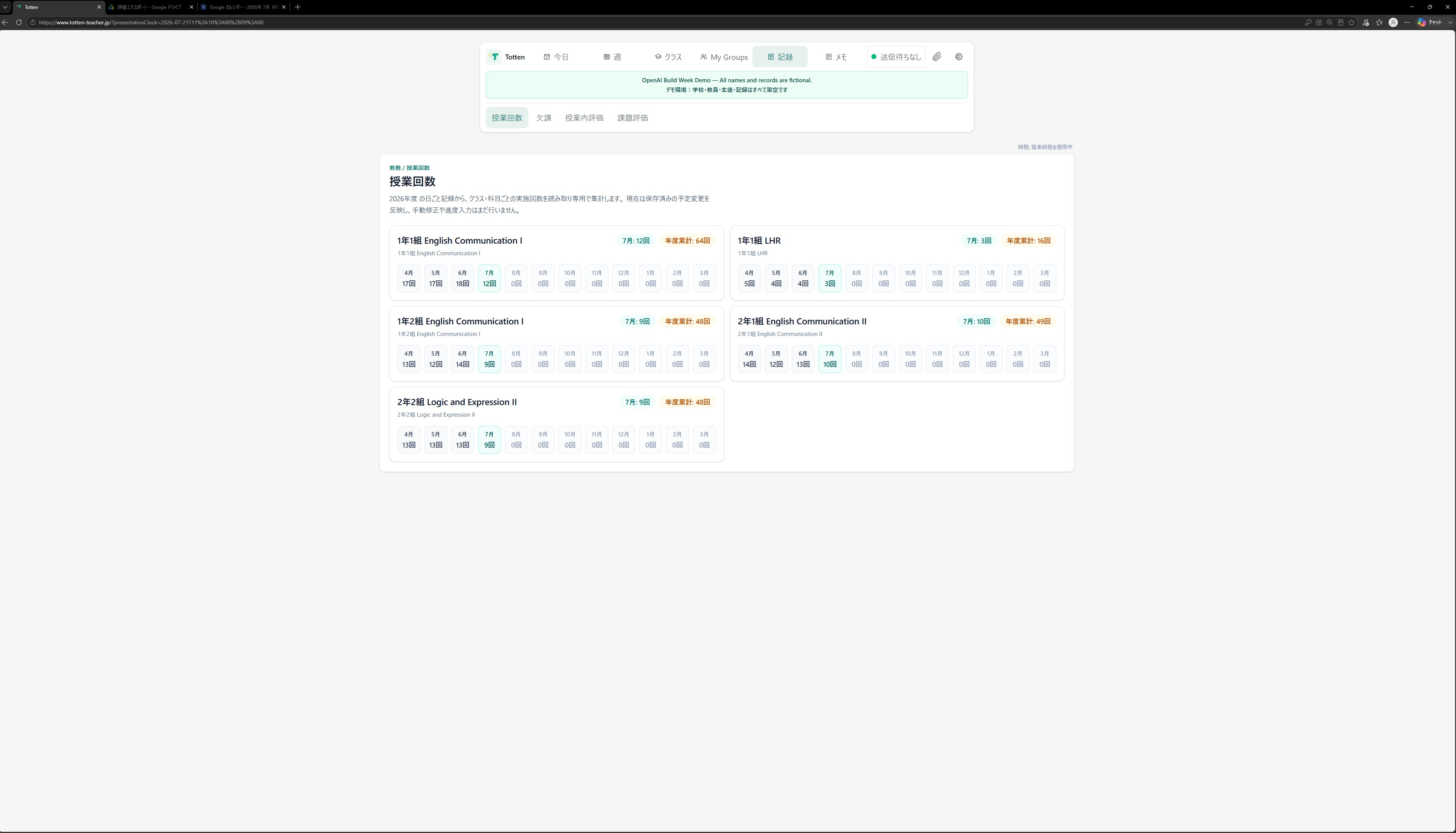
Lesson-count tracking helps teachers review instructional progress across multiple classes and subjects.
-
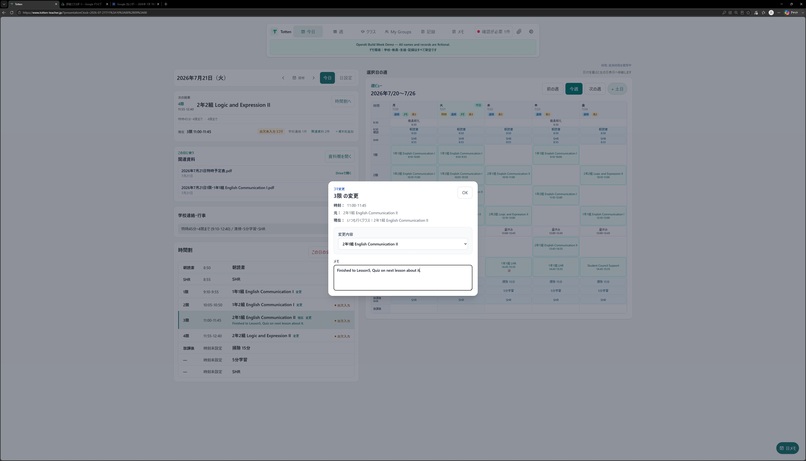
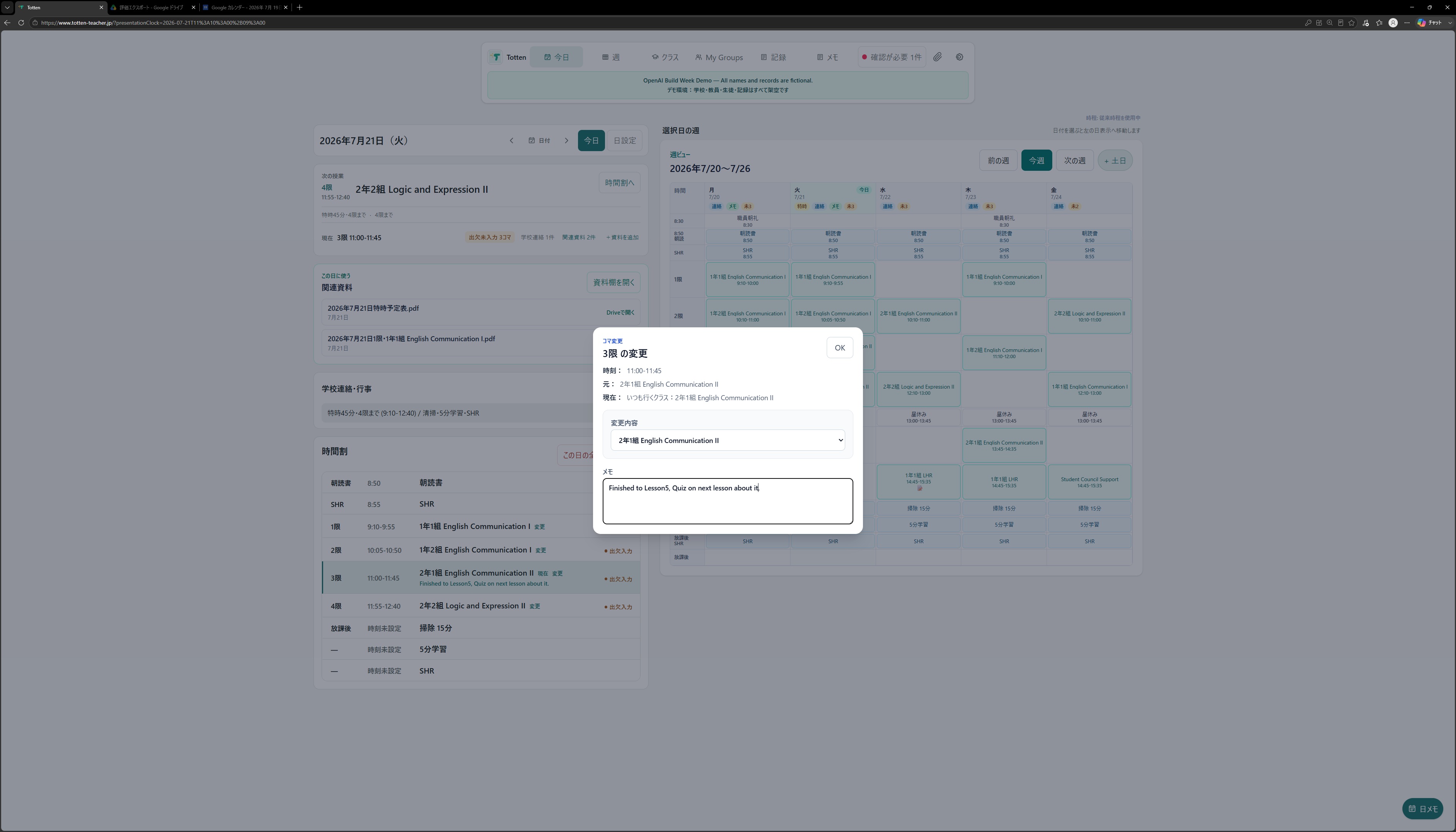
Teachers can adjust an individual lesson and attach a short teaching memo without leaving the daily planner.
-
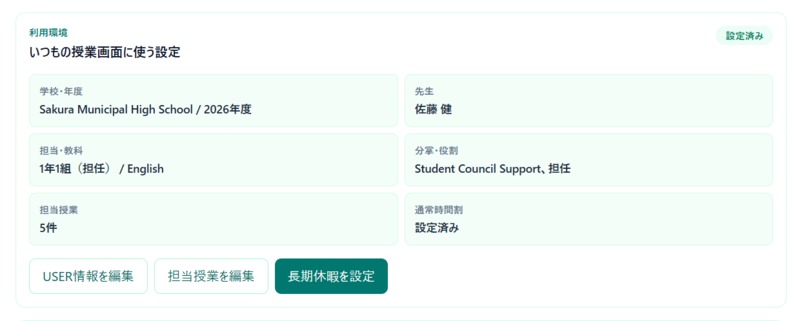
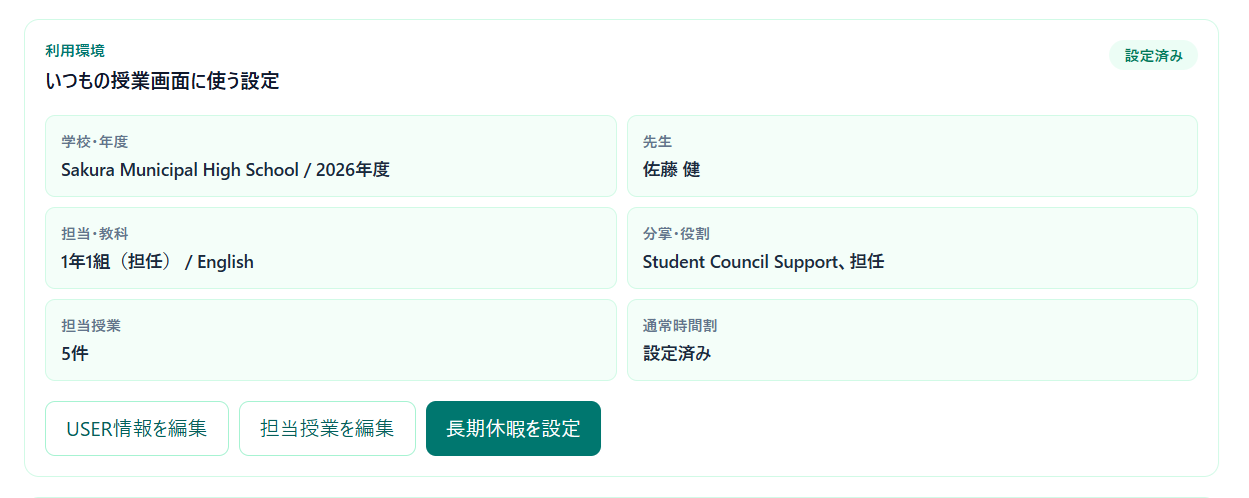
Totten adapts to each teacher’s school year, classes, subjects, timetable, and responsibilities. All information shown is fictional.
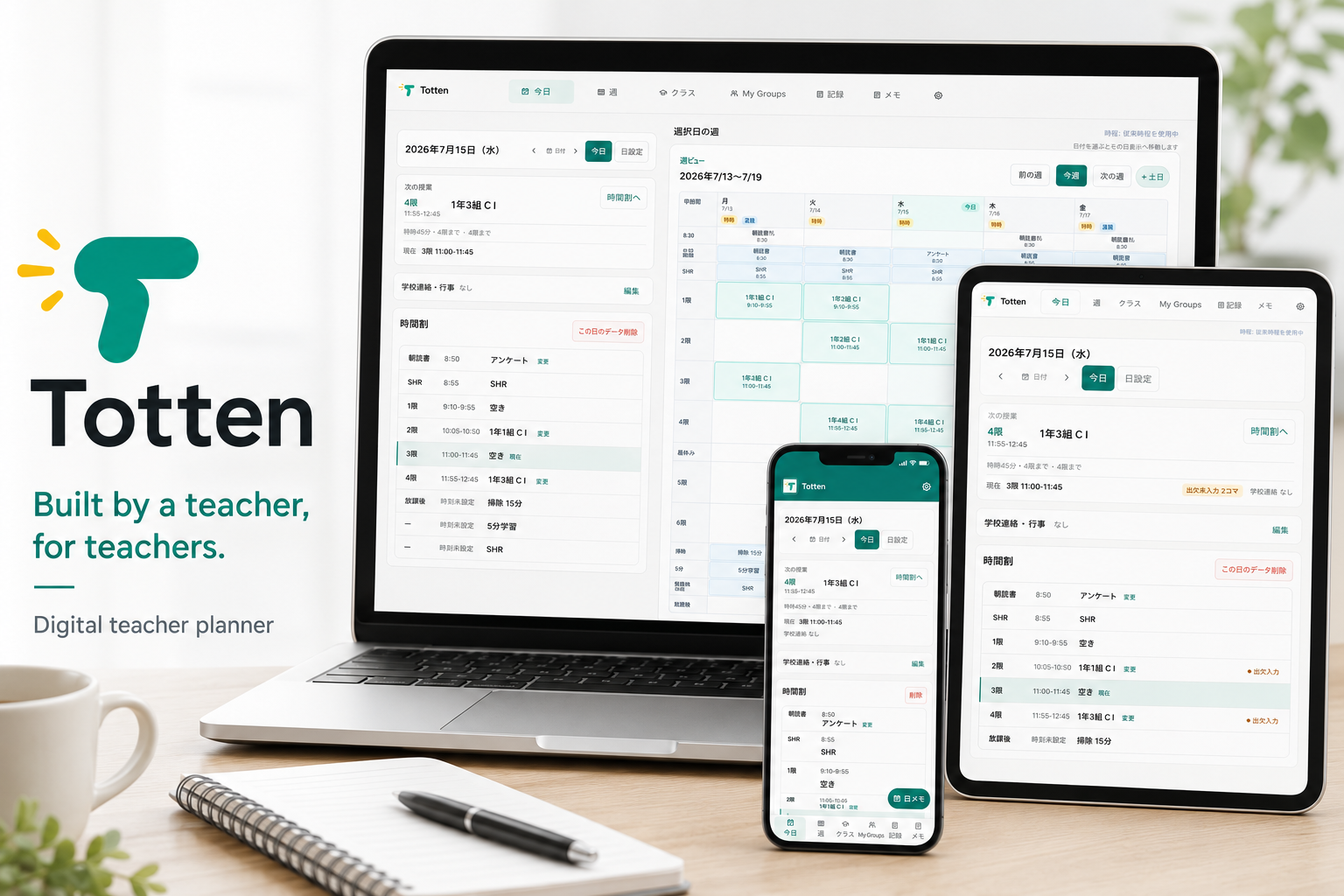
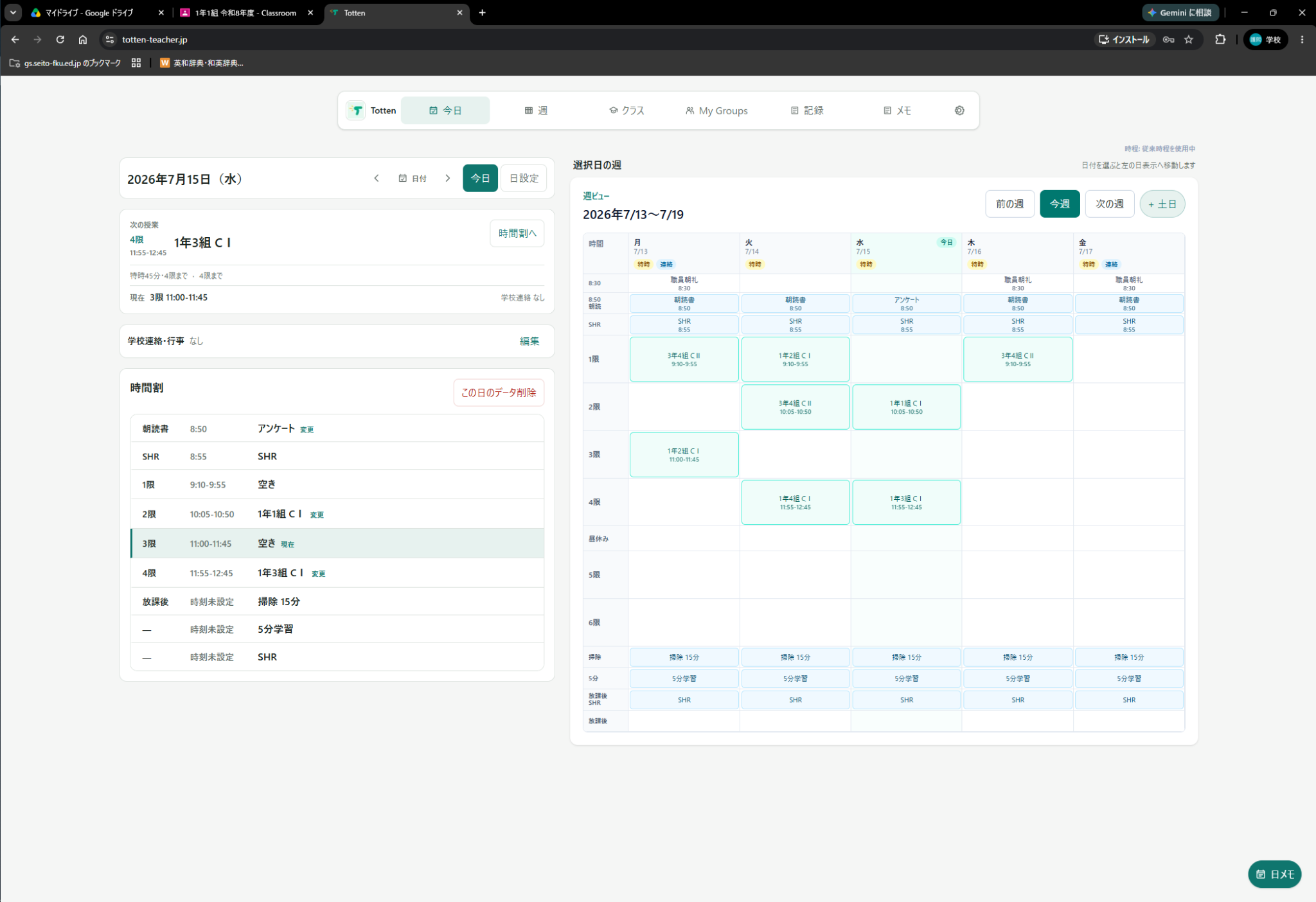
Totten at a glance
Totten is not a calendar adapted for teachers. It is an exception-first digital workspace designed around the irregular reality of school life.
It brings schedules, attendance, evaluations, school documents, and daily tasks into one reliable view across desktop, tablet, and mobile.
During Build Week, I extended Totten with Google integrations, safer cross-device workflows, time-driven special schedules, evaluation export, truthful Sync Health, recovery-focused persistence, and a fully fictional judging environment.
I built Totten as a Japanese public high school teacher with no previous programming experience, using Codex and GPT-5.6 as my engineering partner.
Inspiration
I am a public high school English teacher in Japan.
Before building Totten, I had never written code. However, I understood the problem clearly because I experienced it every day: teachers manage fragmented information across paper planners, spreadsheets, printed schedules, school systems, messaging tools, cloud storage, and personal notes.
Important information exists everywhere, but the individual teacher is still responsible for connecting it all.
Existing calendar and productivity tools do not fully reflect the reality of school work. Teachers deal with changing timetables, examinations, business trips, attendance, lesson records, student evaluations, homeroom activities, school events, administrative responsibilities, and many exceptions that ordinary calendar applications were not designed to handle.
I began building Totten on June 17, 2026, after realizing that no existing tool reflected the actual daily workflow of a Japanese high school teacher.
I could not write the code myself, but I knew what the product needed to do.
What makes Totten different
Totten is not a calendar adapted for teachers; it is a teacher workspace designed around school exceptions from the beginning.
Generic calendars assume that a schedule is a list of events. School work is different.
Timetables change. Examinations replace lessons. Teachers move between classes. Attendance and evaluations belong to specific students, groups, and lessons. Important information arrives through printed schedules, PDFs, messages, school systems, and cloud files.
Totten is designed to connect those exceptions into the teacher’s actual day.
Why not just use Google Calendar or an existing school system?
Google Calendar is event-first. Totten is timetable-first and exception-first.
A calendar works well when the same events repeat every week. School schedules rarely remain identical for long. A staff meeting may shorten every lesson from 50 to 45 minutes. A school event may cancel all afternoon classes. Examinations, special timetables, assemblies, business trips, and other changes regularly replace the normal day.
Managing this in a generic calendar means manually editing the start and end time of each lesson, changing individual recurring events, deleting cancelled periods, and rebuilding special days one event at a time.
Totten lets a teacher change the operating pattern of the entire day while preserving the correct lessons, student groups, attendance records, evaluations, notes, and related materials.
Google Calendar, cloud storage, spreadsheets, LMS platforms, and school information systems each solve part of the problem. Totten does not replace them. It connects their outputs around the teacher’s actual day.
Google is not Totten’s competitor. It is one of the systems Totten connects.
What it does
Totten supports the teacher’s day from the first morning check to the final record after class.
- Understand today: daily and weekly timetables, current and upcoming lessons, examinations, special schedules, events, and business trips
- Record what happened: attendance, absences, lesson notes, homeroom notes, and teaching records
- Evaluate learning: in-class and assignment evaluations linked to the correct students, groups, and lessons
- Connect school information: announcements, administrative tasks, PDFs, and Google Drive materials linked to specific dates
- Move work between tools: Google Calendar synchronization and Google Sheets export
- Keep work available: local-first storage, cross-device handoff, synchronization, backup, recovery, and conflict safeguards
When a teacher opens Totten, the goal is simple: they should immediately understand what is happening now, what comes next, and what still needs their attention.
How I built it
I built Totten independently with Codex, despite having no previous programming experience.
I was responsible for the domain knowledge and product decisions:
- defining the problem and product requirements
- explaining school-specific workflows and exceptions
- identifying incorrect assumptions
- deciding priorities and user experience
- rejecting implementations that technically worked but did not fit real school practice
- testing the application on physical devices
- reproducing failures and verifying corrections
Codex acted as my engineering partner:
- investigating the codebase
- proposing technical designs
- implementing features
- writing automated tests
- reviewing security and data-loss risks
- checking diffs and maintaining a traceable Git history
Together, this process produced:
- responsive interfaces for desktop, tablet, and mobile
- authentication, account onboarding, and role management
- school workspaces and row-level security
- scoped local storage
- offline-first synchronization
- conflict detection and recovery
- student roster, attendance, and evaluation workflows
- Google Calendar, Drive, and Sheets integrations
- backup and restore safeguards
- AI-assisted PDF processing
The application was developed iteratively through requirement definition, implementation, review, security hardening, automated testing, production deployment, real-device testing, and repeated correction.
Codex did not replace my role. It expanded what I was capable of building.
Build Week contributions
Totten already existed before OpenAI Build Week as a working local-first planner for Japanese high school teachers.
During the official Build Week submission period beginning July 13, 2026, I meaningfully extended it with Codex-assisted development.
The main Build Week additions included:
- production-ready one-way synchronization from Totten to a dedicated Google Calendar
- time-driven special-day schedules for events that do not fit ordinary lesson periods
- safer device handoff across desktop, tablet, and smartphone
- Google Drive materials linked to specific teaching dates
- Google Sheets export for in-class and assignment evaluations
- a truthful Sync Health view that distinguishes saved, pending, retrying, attention-required, and unknown states
- stronger offline reliability, conflict detection, and recovery-safe synchronization
- safer recovery of deleted and recreated daily records
- a fully fictional Sakura Municipal High School environment for demonstration and judging
I also reworked important daily-data operations so that user intent is persisted before interface state changes. This helps protect teachers’ work even if the browser closes or a device is interrupted at the worst possible moment.
During Build Week, I used Codex and GPT-5.6 to implement, review, test, and refine these extensions. I used GPT-5.6 particularly for requirement analysis, risk identification, product review, and checking whether the implementation matched real school operations.
Development was organized across multiple task-focused Codex sessions. The submitted /feedback Session ID represents the primary Build Week implementation thread, while the broader contributions are documented through the dated Git commit history.
Proof that it works
Totten is not a static mockup or a collection of disconnected feature demonstrations.
- It runs as a real production web application
- It has been tested across desktop, tablet, and mobile devices
- The current codebase passes more than 1,100 automated tests
- Other teachers have already used the application
- The judging environment includes a fictional class of 30 students
- The demonstration uses the real authentication, storage, synchronization, evaluation, and Google integration workflows
The fictional demonstration environment
Because Totten handles student, teacher, attendance, and evaluation information, I did not use any real school or personal data in the demonstration.
I created a fictional environment called Sakura Municipal High School, including:
- a fictional school and academic year
- a fictional teacher account
- a fictional class of 30 students
- a special timetable
- attendance examples
- daily and homeroom notes
- school announcements
- fictional teaching materials
- 30 fictional evaluation records
This is not a separate visual mockup. The demonstration uses Totten’s real production interface, authentication, scoped storage, synchronization, and evaluation workflows.
All names, schools, schedules, records, and documents shown in the demonstration are fictional.
Why the name “Totten”?
The name Totten comes from the local dialect of the Chikuho and Kitakyushu areas in Fukuoka, Japan.
In this dialect, adding “-ten” to a verb is a friendly way of encouraging someone to try or do something.
The core of the application is also connected to the Japanese verb toru, meaning “to take,” “capture,” or “record” — taking notes, recording attendance, keeping evaluations, and retrieving school documents.
Totten therefore carries the feeling of:
Capture it. Record it. Bring it all together.
The green brand color was inspired by the school color of the high school where the project began, located in the Chikuho region.
Challenges I faced
The most difficult part was not creating individual features. It was designing software that could safely handle the many exceptions found in schools.
Examples included:
- protecting student and teacher information
- keeping multiple devices synchronized without silently overwriting newer data
- separating data between schools, users, workspaces, and academic years
- supporting timetable changes and irregular school schedules
- resolving student identity consistently across attendance and evaluation records
- preventing one user’s cached workspace from appearing after another user logged in
- safely recovering interrupted or conflicting changes
- integrating Google services without mixing permissions or accounts
- converting unstructured school documents into useful teacher actions
- distinguishing between a feature that merely worked and one that was safe enough for real use
One small example captures the development process well.
A special 45-minute schedule originally showed fourth period as 11:55–12:45, which was actually 50 minutes. I recognized that this contradicted the school schedule, asked Codex to trace the source of truth, and corrected the underlying timetable definition so that Totten, Google Calendar, the demo data, and the generated school documents all consistently showed 11:55–12:40.
The challenge was not simply producing code. It was continuously connecting technical implementation to real-world school practice.
Accomplishments I am proud of
Totten is not a static mockup or a technical proof of concept. It is a working application deployed for desktop, tablet, and mobile devices.
I am especially proud that:
- I built it as a solo creator with no previous programming experience
- the product is grounded in firsthand educational practice
- it supports complex school-specific workflows rather than only idealized ones
- it includes authentication, permissions, synchronization, backup, and privacy safeguards
- it has been tested across multiple physical devices
- other teachers have already used the application
- the Build Week demo uses the real production application rather than a simulated interface
- Codex enabled me to turn domain expertise into functioning software
During Build Week, school was still in session. Outside my teaching duties, I sometimes used my phone to remotely direct Codex running on my computer at home.
That flexibility allowed me to continue developing Totten without stepping away from the classroom it was designed to support.
What I learned
This project taught me that domain expertise and software engineering do not have to originate from the same person.
I could not write code when I started, but I could:
- define the problem
- recognize incorrect assumptions
- test the results
- make product decisions
- understand the consequences for teachers
- determine whether the software matched reality
AI-assisted development is not a one-prompt process. It requires continuous dialogue, judgment, verification, correction, and responsibility.
Codex provided the engineering capability.
I provided the domain knowledge, product decisions, and real-world verification.
Totten is what became possible when a teacher’s domain expertise met Codex.
What’s next for Totten
The next steps include:
- improving AI-assisted extraction of teacher-specific information from school documents
- expanding multilingual support
- strengthening backup, recovery, and audit workflows
- supporting more school structures and academic-year transitions
- improving administrator-to-teacher communication
- refining synchronization and conflict-resolution controls
- making Totten adaptable as a reusable platform for different schools
The long-term goal is to make Totten a reliable digital workspace for teachers whose real work is too complex for ordinary calendar and productivity tools.
Built by a teacher, for teachers.
Built With
- codex
- geminiapi
- googledriveapi
- googleoauth
- gpt-5.6
- next.js
- postgresql
- progressivewebapp
- react
- responsivewebdesign
- rowlevelsecurity
- supabase
- typescript
- vercel

Log in or sign up for Devpost to join the conversation.