-
-
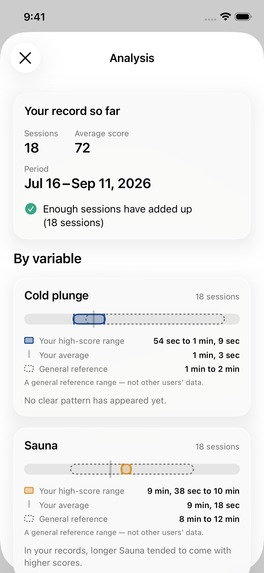
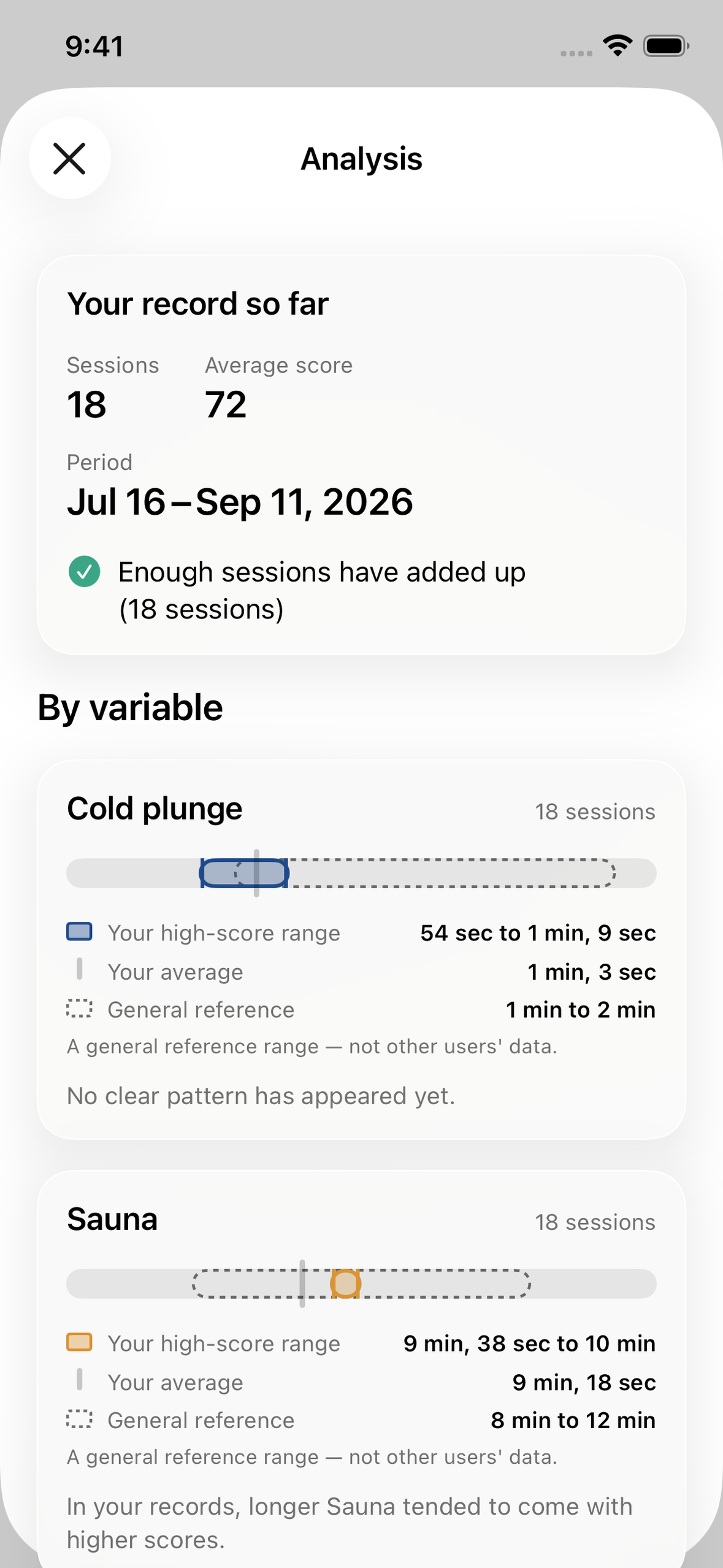
Same 18 sessions: Sauna and Rest show a direction, Cold plunge still says "no clear pattern." It won't guess before the data earns it.
-
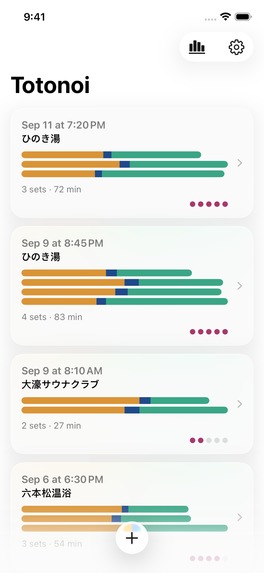
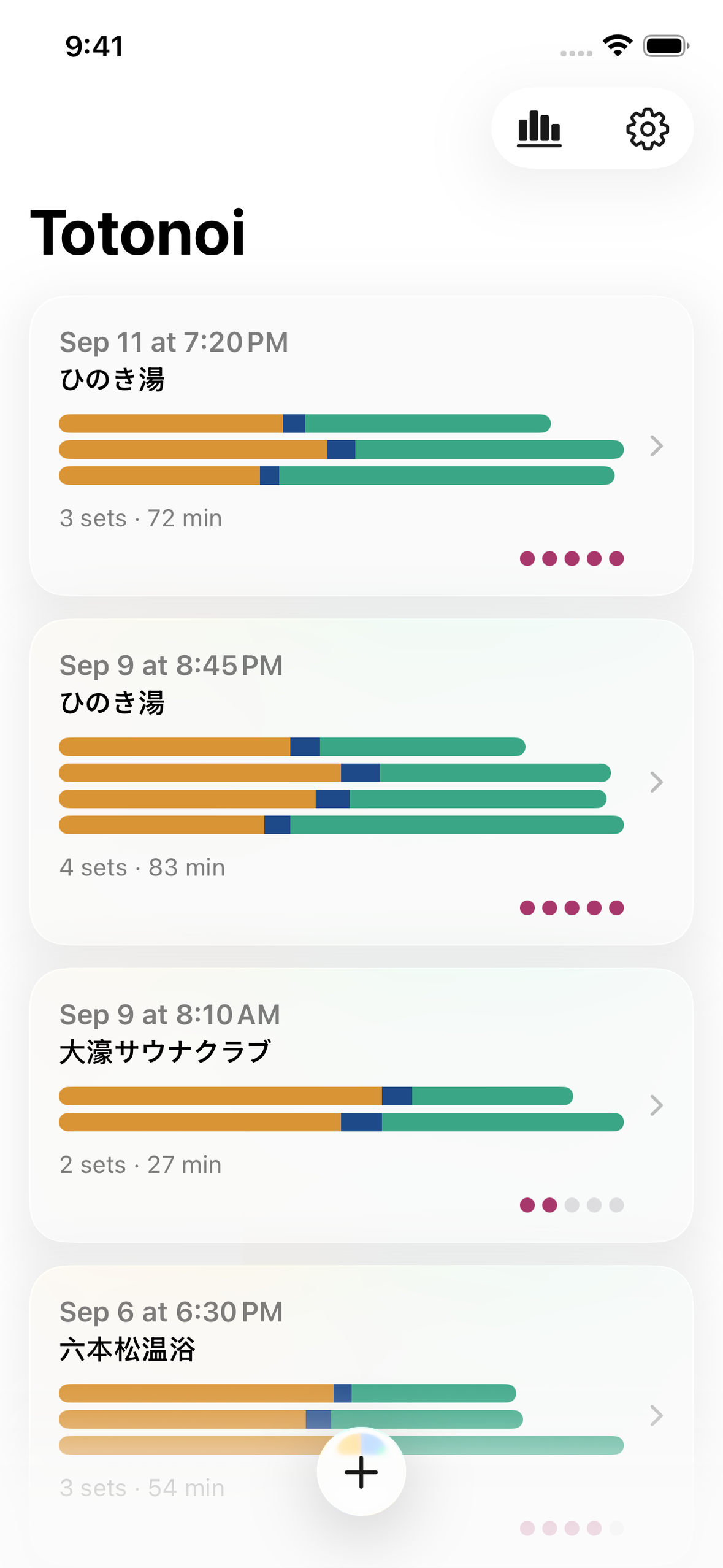
Every set is drawn on one shared time axis, so a 21-minute set looks longer than a 15-minute one. Amber sauna, blue plunge, green rest.
-
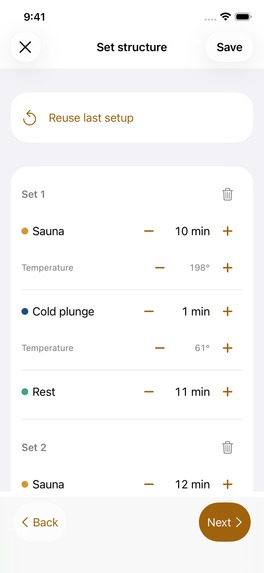
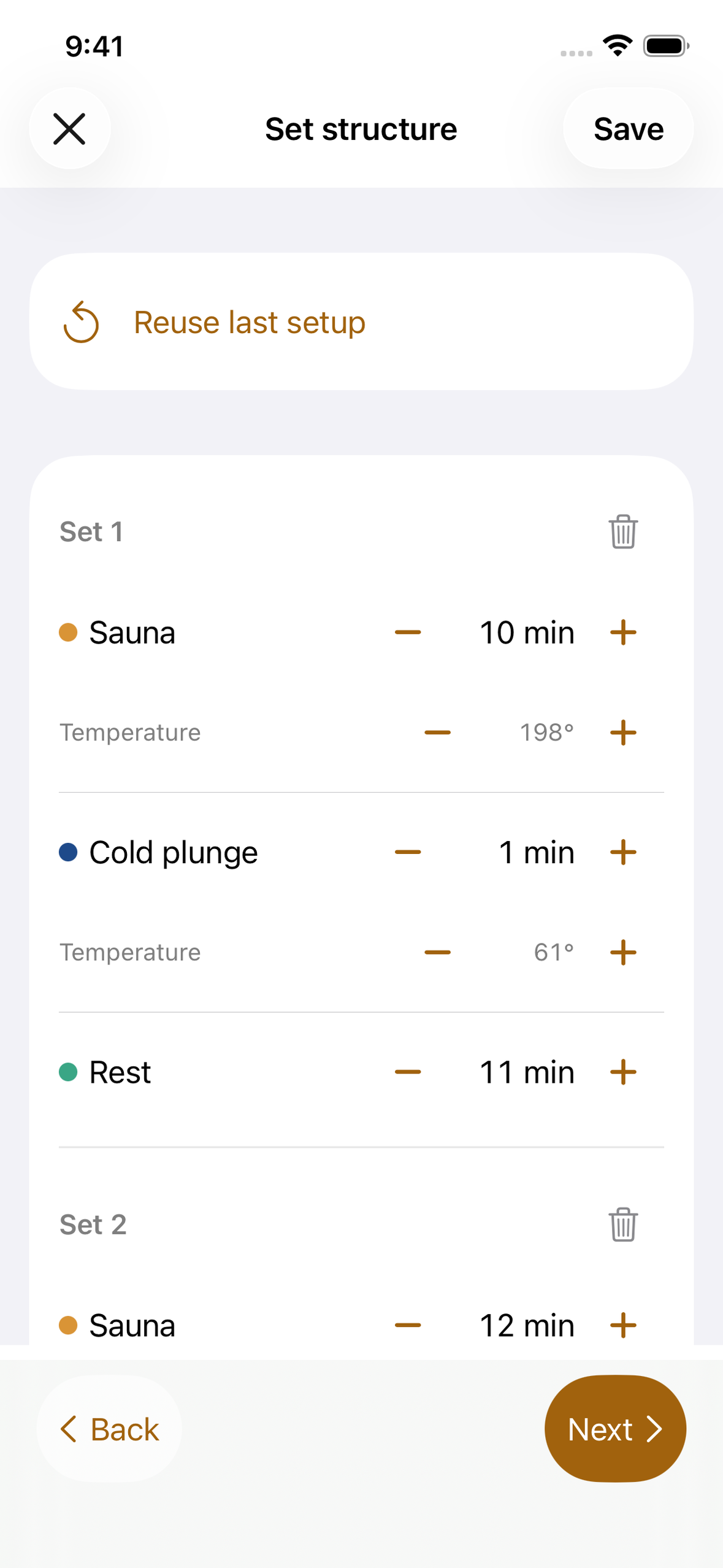
Logged after you're out, not during. The venue's temperatures are already filled in; "Reuse last setup" brings back your usual structure.
-
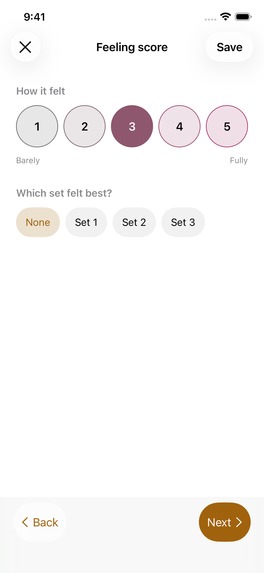
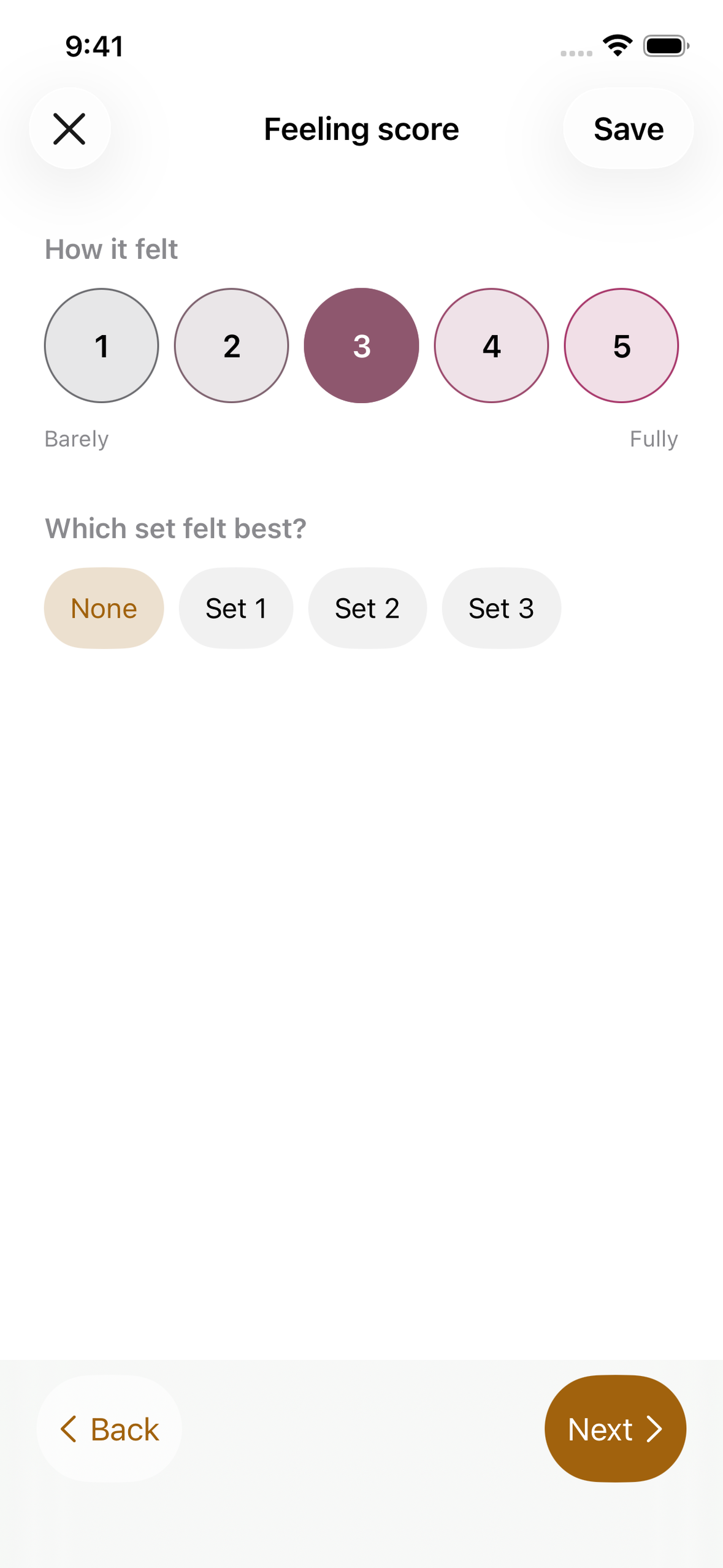
Color, number and fill all carry the same information. "Barely" and "Fully" describe your own feeling — the app never grades the session.
-
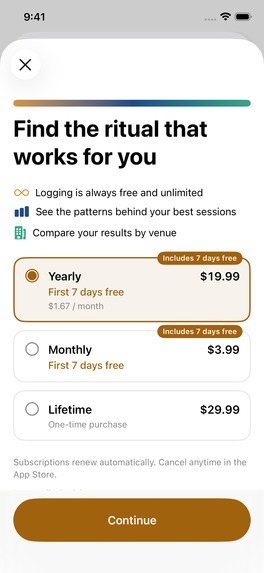
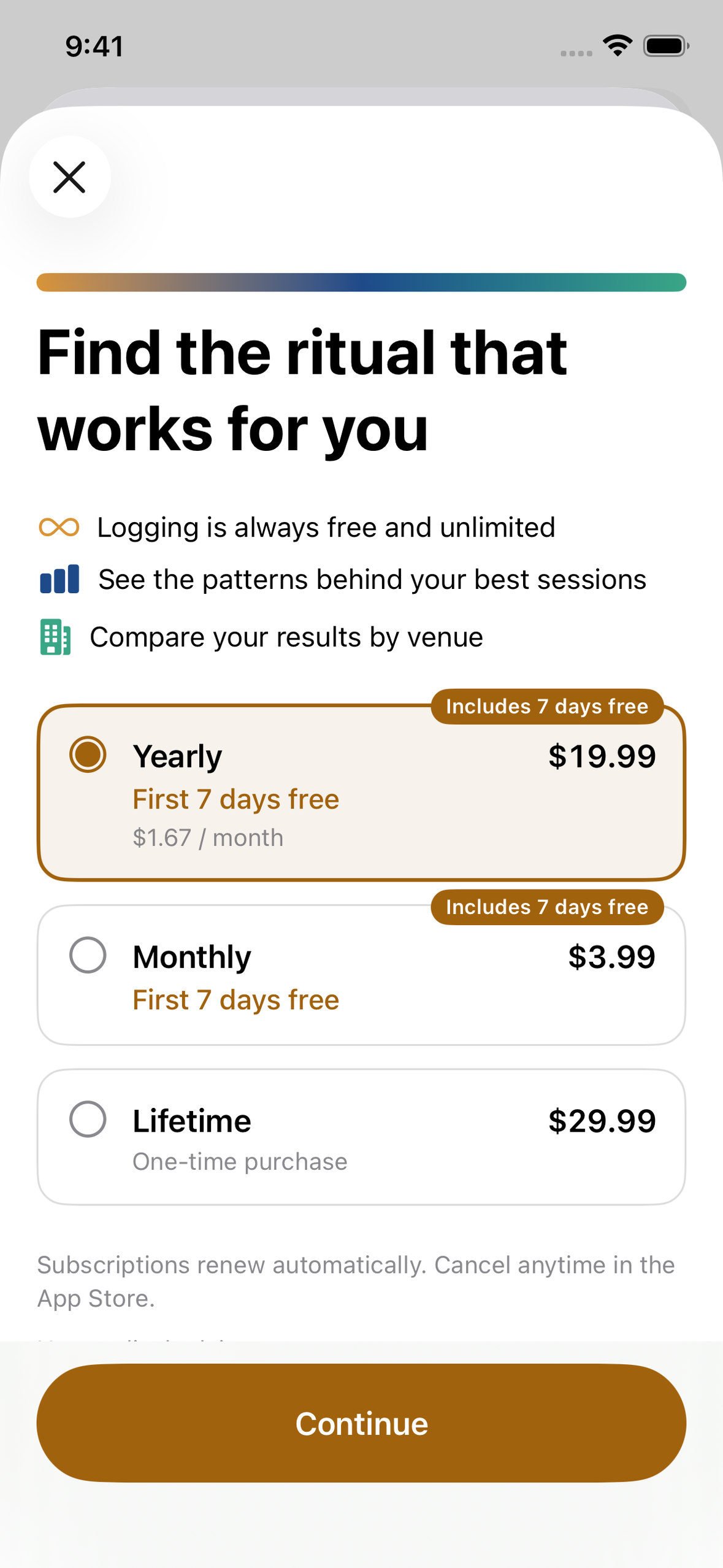
Logging stays free and unlimited forever. The paywall sits in front of the analysis only, with the 7-day trial written into each plan label.
-


The room you can't take a phone into
A sauna room runs at around 100°C. An iPhone is rated to 35°C. Most facilities in Japan ban phones outright, and the ones that don't are still a place where you're sitting naked on a towel with nowhere to put one.
So the product had a constraint before it had a feature: it can never be opened in the room it is about.
That rules out the obvious design. Most sauna apps run a timer — you start it when you walk in, stop it when you walk out. It's the natural shape for the problem and it does not work. Either the phone is in the room, which the facility forbids and the heat punishes, or the timer is running in a locker and measuring nothing.
Totonoi is logged afterwards, in the changing room, from memory. That is a worse input method in every respect except one: it is the one that actually happens.
There are plenty of sauna logging apps. Most of them run a timer in the room. I've covered why that doesn't work.
The second difference is when the numbers appear. Log four sessions in another app and you get an average — 3.0 out of 5, presented as a fact about you. Four data points of a subjective score is not a fact about anyone. Totonoi holds the interpretation back until there are enough sessions to support one, and says so in the meantime.
Neither of these makes Totonoi better at everything. The market leader here has fifteen thousand venues in its database and over a million monthly users, and Totonoi has neither. What it has is a position on two questions the category mostly doesn't ask.
The three rules
Thirty seconds, not thirty minutes. Venue temperatures are stored per facility and filled in automatically — a sauna at a given place is the same temperature every visit, so asking twice is asking for nothing. Your last session's set structure is recalled with one tap, then edited where it differs — most visits are a small variation on the previous one. The input that remains is the part that actually varied.
Missing data is still data. Pick a venue and you have a valid record. Everything after that is optional — including the score. Sets, temperatures, durations, notes: any of them can be missing and the session still saves and still counts. The alternative — refusing the record until it's complete — trains people to skip logging on the days they're too tired to fill in a form, which are exactly the days worth having.
Say what the data supports, and no more. The analysis has three confidence tiers. Below the first threshold it describes and does not interpret. In the middle it will name a direction. Only at the top will it give a range. A variable that shows no pattern at 15 sessions is told to the user as "no clear pattern has appeared yet," not smoothed into an average that sounds like a finding.
What this app refuses to claim
Sauna content is full of health claims. Cardiovascular benefits, cortisol, recovery, longevity. Some of it is supported and most of it is marketing, and none of it is something a logging app is in a position to assert.
Totonoi reports one thing: what your own scores correlated with, in your own records. It does not tell you what is good for you.
"Optimal" is a banned word. Not a style preference — there is a list, a script I run before every commit that greps the source tree and the string catalogs for it and exits non-zero, and a test that walks the statistics engine's output object and fails if any string reachable from it contains a banned term. The word implies the app knows what the best value is, and it doesn't; it knows which values you scored highly at, which is a different and much smaller claim.
The same applies to the labels on the score itself. The two ends are "Barely" and "Fully" — describing how completely you felt the thing you were going for. They are not "Poor" and "Excellent." The user is reporting their own experience, not being graded on it.
The App Store category is Lifestyle, not Health & Fitness. That was deliberate. Health & Fitness invites the question of whether you're making medical claims, and the age-rating questionnaire asks whether the app should be declared a regulated medical device. The honest answer to both is no, and the cleanest way to keep it that way is to not stand in the category where the question gets asked.
What we chose not to build
Comparison with other users. Cross-user aggregation needs a backend, and a backend needs accounts, moderation, and a privacy posture I would have to defend. On a solo build with a fixed deadline that was not a close call. But the more I sat with it, the less I wanted it even with infinite time: "your cold plunge is shorter than average" is a sentence that pushes people toward someone else's number, in a practice that is entirely about your own. The confidence tiers do the job I would have wanted comparison to do — they tell you how much to trust what you're being shown — without introducing anyone else's body into it.
AI as a main feature. Apple's on-device Foundation Models can phrase a statistical result in a sentence. It is not in 1.0, and it was never going to be the product. Two reasons. The framework requires iPhone 15 Pro or newer, which excludes most phones currently in use. And my own development device is an iPhone 11 — I cannot run it. Building a core experience I can't dogfood, on hardware most of my users don't have, would be building for a demo rather than for use. What shipped is the seam: a slot in the analysis screen that renders nothing, and the rule that when the model is unavailable the card stays hidden rather than apologising for the device. The statistics engine is the paid feature and it runs everywhere.
A push notification system. It's on the roadmap and it isn't in 1.0. Reaching the top confidence tier takes roughly eight weeks at two sessions a week, and a reminder would genuinely help. But the SDK isn't integrated yet, and asking for notification permission during onboarding with nothing to send would spend a one-time prompt on nothing. It ships when there's something on the other end of it.
How it's built
SwiftUI, iOS 26, Swift 6 with strict concurrency. SwiftData for persistence, CloudKit deliberately off — records do not leave the device, which is also why the privacy label declares purchase history and nothing else.
Two structural decisions shaped more of the codebase than the framework choices did.
The statistics engine returns no strings. Core/Statistics computes correlations, quartile ranges and separation, and hands back structured values. Every piece of wording is assembled in the view layer. This started as a testability argument and turned into the enforcement point for everything in "What this app refuses to claim" — a grep only ever sees literals, so an engine that assembled prose at runtime would produce user-facing sentences no static check could reach.
Entitlements, never product IDs. Nothing in the app asks "did they buy the annual plan." It asks whether the pro entitlement is active, and RevenueCat answers. No product identifier appears anywhere in the codebase — not in a constant, not in a config file. Where the app does need to know which plan is active, it resolves that through RevenueCat's package type. Adding the lifetime option later required no conditional anywhere in the feature code.
The project builds with SWIFT_DEFAULT_ACTOR_ISOLATION = MainActor, which means anything added under Core/ has to be marked nonisolated on purpose. Forgetting compiles fine and quietly makes a pure calculation depend on the main actor, so that rule is written down where it can be found.
134 tests. One of them, as covered below, was checking the wrong thing.
Challenges
The delete confirmation that had no cancel button
Three screens delete something permanently. Each had a confirmation dialog with two buttons: delete, and cancel.
On the simulator, both appeared. On a real iPhone, the cancel button was gone. All three screens, silently.
SwiftUI's confirmationDialog chooses its presentation style at runtime. When it renders as a popover anchored to a row, the system treats the popover as already dismissible by tapping outside and drops the .cancel-role button as redundant. The API does exactly what it documents. The result is a user looking at a destructive action with one visible option.
The fix was .alert, which draws every button you hand it regardless of how it presents. What I keep thinking about is the template screen: template deletion is a hard delete with no archive and no undo. That dialog was the last thing standing between a tap and permanent loss, and on the device it was showing a single button labelled Delete.
There was a test for this. It passed.
The test checked that the cancel button's localization key existed in the string catalog. It did exist. The string was there, correctly translated, in both languages. The button just wasn't on screen.
"The key exists" and "the user sees it" are different claims. I had written a test for the first and believed I had covered the second.
I kept the test — it still checks something real. I stopped reading a green suite as evidence that a screen works.
220pt, measured against nothing
Session bars were clipping at the right edge. Narrow screen, long venue name, large text size — the segments ran past the container.
I was confident about the cause. The bar layout clamps each segment to a 6pt minimum so a 30-second cold plunge stays visible as a colour, and I assumed the clamped width was being added without being subtracted from the others. Over-allocation, overflow. I started writing it up as a build-in-public post.
Writing it made me open the redistribution code, and it was correct. It took out the clamped floor and distributed the remainder proportionally. The arithmetic added up to exactly the available width.
The real cause was a number only one side of the layout could see. The bar computed its width from seconds — duration times a points-per-second constant, clamped to a maxWidth: 220. It never consulted the container. The layout placing the bars only knew how to wrap between bars; handed a single bar wider than the space available, it had no mechanism to shrink one. On a narrow screen the bar asked for a width the container didn't have, and nothing in the chain was in a position to refuse.
The fix was to compute segment widths from the container's actual available width and delete the constant.
The standard EULA still needs a link
The first submission was rejected under Guideline 3.1.2. The app offers auto-renewing subscriptions, and the App Store product page had no working link to the terms of use.
I had used Apple's standard EULA, which applies automatically when you leave the licence agreement field blank in App Store Connect. I read that as "terms handled." They are, as a legal document. Apple also requires a visible link in the description text itself, and leaving the field blank does not produce one.
Two separate requirements. I had satisfied one and assumed it covered the other. Fixed by adding the URL to the description body — not the promotional text, which can be changed without review and isn't treated as a permanent part of the page — and resubmitting the same day. Approved the next.
What I learned
Two bugs, the same reasoning method, opposite outcomes.
The bar clipping: I inferred the cause from the shape of the symptom. Segments overflow, there's a clamping routine, therefore the clamp isn't being compensated. Wrong.
The other one: the record button overlapped the last card at the largest accessibility text size, and only at that size. I inferred that the scroll inset was working — if it weren't applied at all, the toolbar would cover content at every text size, not just the largest. The size-dependence ruled out the explanation I would otherwise have reached for. That one held up. I confirmed it on the device weeks later.
Same move both times: reason from what the symptom can and cannot be explained by. Once it failed, once it worked.
The difference was what the reasoning stood on. The accessibility inference rested on something I could see: the bug appeared at one text size and not others, and I had watched that happen. The clipping inference rested on a number I had never measured. I knew there was a clamp. I did not know what width the layout was actually working with, and I reasoned as though I did.
Deduction inherits whatever you feed it. When one of the premises is a number you assumed rather than read, the conclusion arrives with the same confidence as any other and no marker on it.
I now treat "I'm confident I know why" as the moment to go measure, not the moment to start writing the fix.


Log in or sign up for Devpost to join the conversation.