-
-
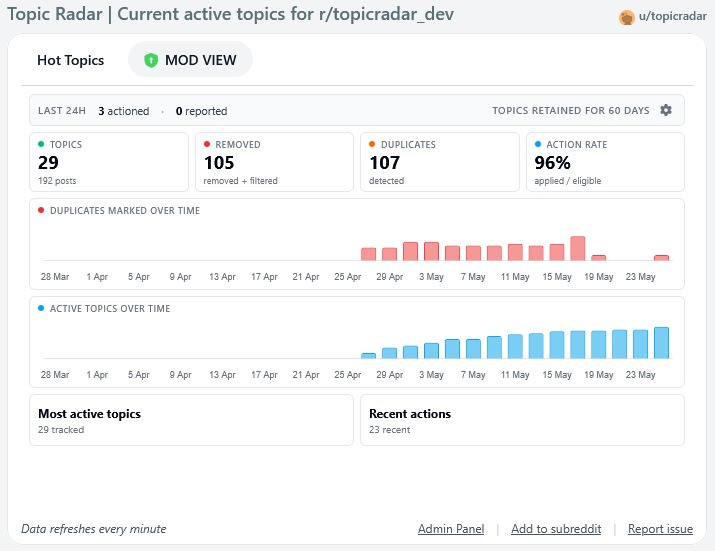
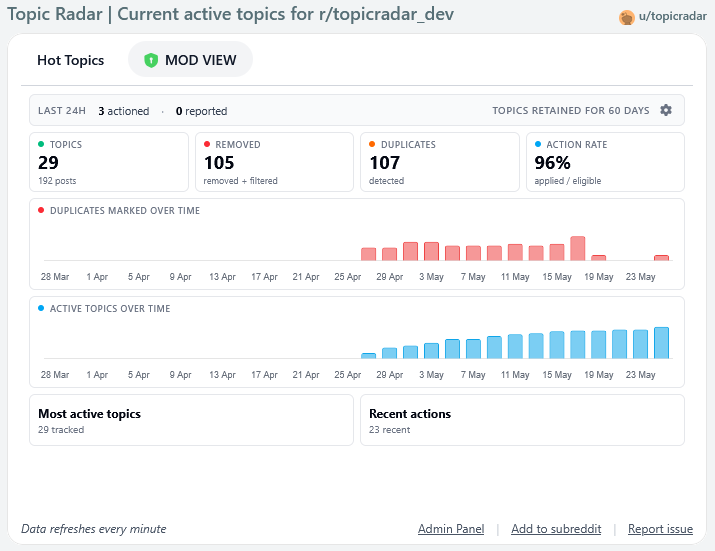
Mod View
-
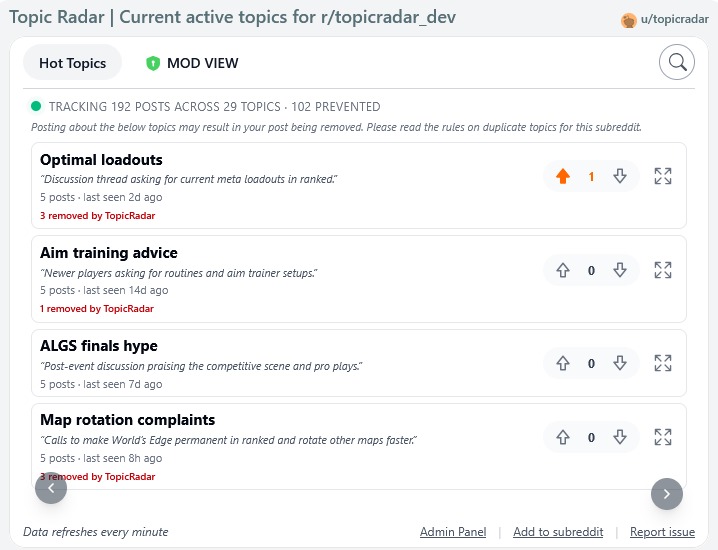
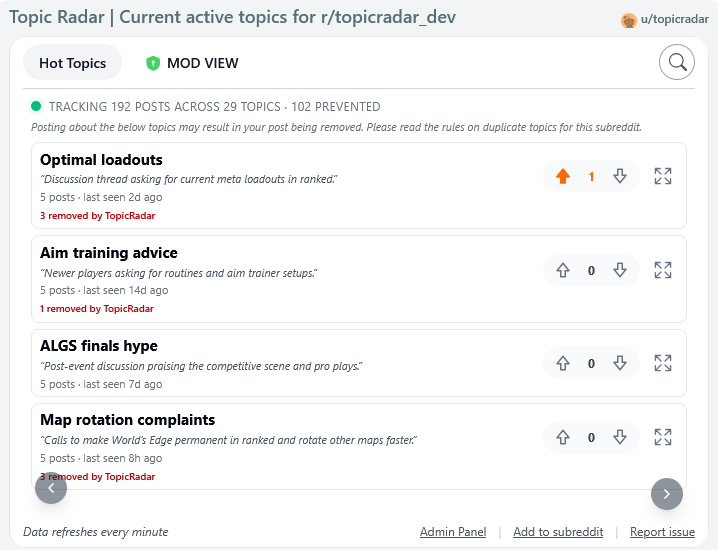
User View
-
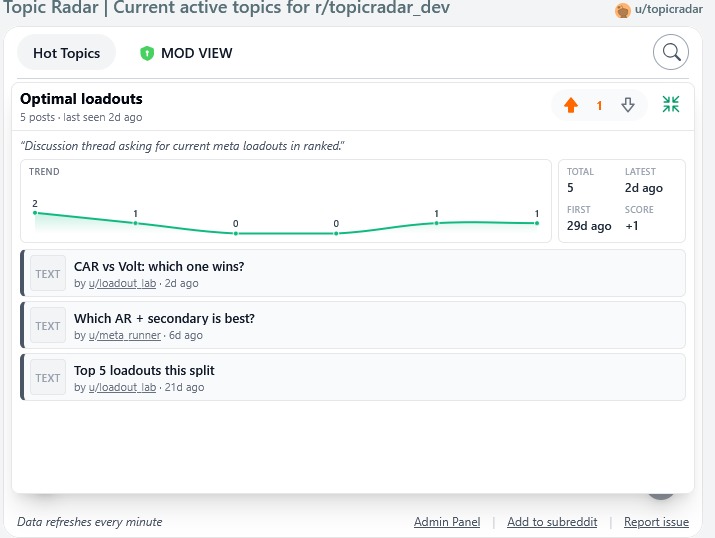
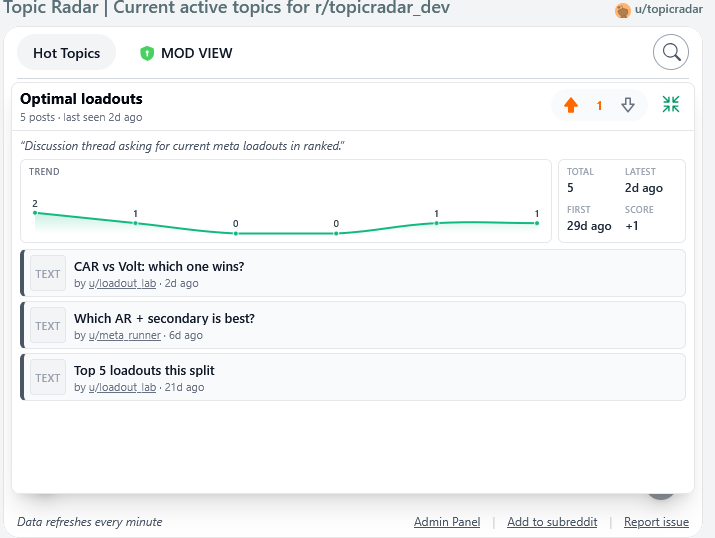
Expanded Topic View
-
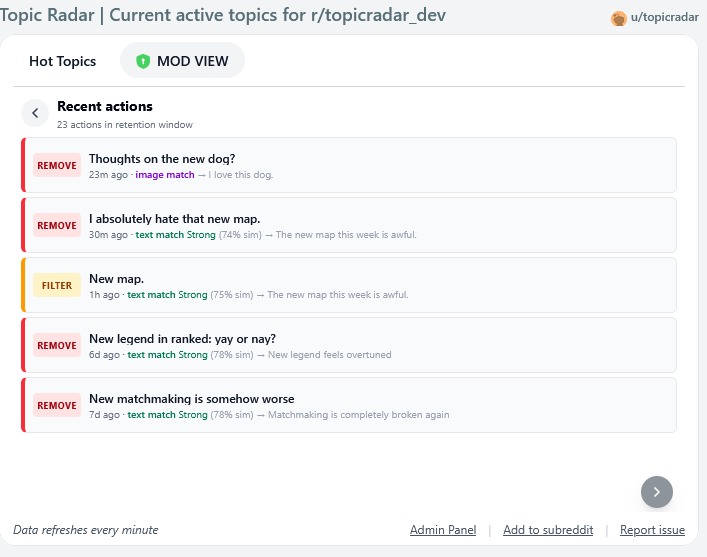
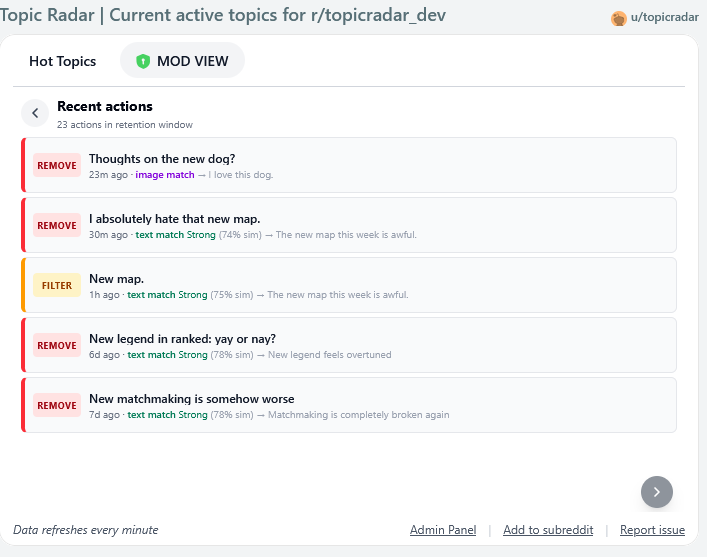
Mod Log View
Got these problems?
- People ignore the duplicate post rule?
- Continuous spam of the same topic?
- Disputes about who is first posting a topic?
- Unable to find if a topic is a duplicate or not?
Well, this is a solution for you!
TopicRadar's purpose is to help moderators manage duplicate-topic posts on their subreddit, automatically detecting when new posts cover a topic that has already been posted recently, and (optionally) reporting, filtering, or removing the duplicate based on moderator-configured rules. It comes with a web view post to show users which topics are active and easily search To see if what they are going to post would violate the rules, Therefore, there can never be any dispute about if it's a duplicate or not.
Duplicate-topic spam is one of the most common moderation pains for active subreddits. Even with automod rules and post flair, recurring topics (outages, drama, the same question over and over) sneak through because they're worded differently each time. TopicRadar groups posts by meaning, not by exact wording or matching keywords, so it can catch duplicates that traditional tooling misses.
🔥 Key features
- Automatic duplicate-topic detection: uses AI vector text embeddings (OpenAI
text-embedding-3-small) to group posts that are about the same thing even when worded differently. This isn't just AI matching using a standard LLM. It uses a sophisticated algorithm which properly matches duplicates efficiently. And without the need for moderators to input their own OpenAI keys, therefore making this app completely free! The full technical spec is down below For insights on how the mathematics work in the algorithm. - Image duplicate detection: perceptual image hashing (pHash) catches reposts of the same screenshot, meme, or photo, even when cropped or recompressed.
- URL canonical matching: posts linking to the same article are grouped together even if the link has different tracking parameters.
- Three configurable strength levels: Weak, Moderate, or Strong, each tuning how aggressively similar posts get clustered.
- Four mod-action modes:
None(tracking only),Report(send to mod queue),Filter(temp-remove for review), orRemove(full removal with a sticky removal comment + post lock). - Configurable threshold for action: Set how many duplicates a topic must already have (3–8) before TopicRadar acts on the next one. Lower is more aggressive.
- Configurable retention window: 14, 30, 60, or 90 days. Topics older than the window reset and are no longer counted as duplicates.
- Self-correcting false-positive learning: when a moderator approves a post TopicRadar removed, it records the approval against that cluster and raises that cluster's similarity threshold so the same false positive is less likely to recur.
- Moderator & approved-user exemption: moderators and approved users never get their posts auto-actioned, even if they post on a tracked topic.
- Mod view dashboard: moderators see live stats: actioned-in-last-24h, total tracked topics, applied/eligible rate, time-series charts of duplicates marked and active topics, plus a full feed of recent actions and active topics.
- Public "frequently posted" tab: non-moderator users see a curated list of active topics so they can avoid posting duplicates before they happen. Each topic gets an AI-generated short title and one-line description. Users can upvote/downvote topics to surface relevance.
- Backfill on install: when first installed, TopicRadar pulls the most recent 600 posts in the sub and seeds its clusters from them so duplicate detection works from day one rather than waiting weeks to build up signal.
- Automatic light/dark theme.
Topic titles and description summarisation
Once a cluster reaches 3, 6, or 12 posts, TopicRadar sends up to 12 of its post titles to GPT-4o-mini and asks for a short noun-phrase title (2–6 words) and a one-sentence description. These get stored on the cluster and surfaced in the UI. This is purely cosmetic, it's what users see in the "frequently posted" tab instead of just the first poster's wording.
⬇️ How to install
- Click
+ Add to this communityfrom the App page (if not already here). - Select your subreddit.
- The app will automatically create a pinned TopicRadar post in your subreddit and begin backfilling clusters from your recent post history (~10 minutes for 600 posts).
- Configure the app in My Communities > Click your subreddit > TopicRadar (Settings). The defaults are sensible (Moderate strength, Remove action, 60-day retention, action after 3 duplicates) but adjust to taste.
- That's it!
Backfill seeding
When TopicRadar is first installed, it can't action duplicates against an empty cluster store, every post would look new. To avoid this cold-start gap, the install trigger schedules a backfill job that pulls the most recent 600 text posts in the subreddit and runs them through the same detection pipeline (with no actions taken). Each backfilled post increments a backfillSeedCount on its cluster.
When the live detection then decides whether to action a new duplicate, it uses effective post count:
effectivePostCount = topicPostCount - backfillSeedCount
So a cluster seeded from 4 backfilled posts will only start actioning duplicates once 4 live posts have joined it (assuming the default min-duplicates-before-action of 3 - that would be the 4th live post that gets actioned). This prevents TopicRadar from immediately nuking the first post about a topic that just happens to have been popular in the past month.
⚠️ Tuning advice
- Start in Report mode for the first week so you can see what TopicRadar would have actioned without actually removing anything. Once you trust the matches, switch to Remove. Be advised that because more moderator actions are being made, then more modmail may be incurred.
- Start with Moderate strength. Move to Strong if duplicates are still slipping through, or Weak if you're seeing false positives.
- When you approve a post TopicRadar removed, the cluster's threshold auto-raises slightly — so you don't need to manually tune for false positives, just keep approving and the system adapts.
🗒️ Things to note
- Topics need at least the configured "minimum duplicates" count (default 3) before any action is taken. The first few posts on a topic are always allowed through so the cluster has time to form. This allows the first users talking about the topic to actually stay and be visible.
- Posts removed by TopicRadar receive a sticky distinguished comment linking the user to the existing posts on the same topic and a modmail link to contest the removal.
- The mod-view stats are mod-only. Public users only see the "frequently posted" tab. Removed-count display in the public tab can be toggled off in settings if you don't want users to see how many duplicates have been removed.
⚙️ Technical: How the matching works
This section is for anyone curious about the algorithm. Skip it if you just want to use the app.
The problem
Duplicate detection by exact-string match is useless on Reddit because every poster phrases the same topic differently. "Servers down again?", "Anyone else getting connection errors?", and "Why can't I log in?" are all the same topic but share almost no tokens. Keyword/regex rules in AutoModerator can't handle this without massive false-positive rates.
The trick is to compare posts in semantic space, where two phrasings of the same idea sit close together regardless of wording.
Text matching: embeddings + cosine similarity
When a post is created, TopicRadar generates a vector embedding of title + body excerpt using OpenAI's text-embedding-3-small model at 256 dimensions. The model maps the text to a point in a 256-dimensional space such that semantically similar texts produce nearby points.
To decide whether the new post belongs to an existing topic cluster, we compute the cosine similarity between the new post's embedding and each existing cluster's centroid:
cosine(A, B) = (A · B) / (||A|| × ||B||)
Cosine similarity ranges from -1 to 1. For text embeddings it tends to live in the 0.3–0.9 range. Two posts about "servers down" might score around 0.75. Two unrelated posts might score around 0.4.
A cluster centroid is the running mean of every embedding in that cluster. Concretely we store:
centroidSum: the element-wise sum of all member embeddings.centroidCount: how many embeddings have been added.
When matching, we compute centroidMean = centroidSum / centroidCount and compare the incoming embedding against that mean. Using the mean (rather than the original seed embedding) means the cluster's "centre of gravity" drifts as more posts join, which makes the cluster more robust to outlier phrasings.
If the new post's cosine similarity to a cluster's centroid is at least the threshold for the current strength setting, it joins that cluster:
| Strength | Embedding threshold | Image hamming threshold |
|---|---|---|
| Weak | 0.66 | 6 |
| Moderate | 0.62 | 10 |
| Strong | 0.58 | 16 |
Lower thresholds mean more posts qualify as duplicates (more aggressive). If no existing cluster crosses the threshold, the post becomes the seed of a new cluster.
URL canonical matching
Before doing any embedding work, TopicRadar checks whether the post links to a URL already associated with a known cluster. URLs are normalised by:
- lowercasing the host and stripping
www. - trimming trailing slashes
- sorting query parameters alphabetically
- dropping tracking junk (
utm_*,fbclid,gclid,ref, etc.)
If the canonical URL is already mapped to a topic, and the new post's embedding is within a looser threshold (0.5) of that cluster's centroid, the URL match wins. This catches re-shares of the same article even when titles differ.
Image matching: perceptual hashing
For image posts (single image, gallery, or image-link), each image is downloaded and run through a block-hash perceptual hash (image-hash library, 16-bit, method 2). pHashes are designed so visually similar images produce nearby hashes even after cropping, recompression, or minor edits.
We compare two hashes using Hamming distance, the number of bit positions where they differ. A hamming distance of 0 means identical hashes. The thresholds above are bit-counts; at Moderate strength, two images within 10 bits are considered a match.
For image posts, matching runs in this order:
- Image hash against recent image posts. If found within the hamming threshold → match (path =
image). - Fallback to text embedding generate an embedding from the image post's title + body and compare against centroids of all clusters (text and image). If a centroid is within the embedding threshold then match (path =
centroid).
This means image posts can join text clusters (e.g. an image post titled "Servers are down" joins the existing text cluster about server outages), and any future visually-similar image will also land in that cluster via the pHash path. Text posts, conversely, cannot join an image-only cluster purely on visual grounds — only via the text-embedding bridge, which requires the image cluster to have at least one post with a substantive title.
False-positive learning
When a moderator approves a post that TopicRadar removed, the onModAction trigger fires with action=approvelink. We look up the original removal record, find the cluster it was matched against, and increment falsePositiveCount on that cluster.
Once a cluster has accumulated ≥ 2 false positives, we add a per-cluster threshold boost of +0.04 to its similarity threshold, capped at +0.20 total. So a cluster at Moderate strength (base 0.62) that has been corrected twice will only match posts at cosine ≥ 0.66. Three corrections → 0.70. And so on.
The boost is per-cluster, not global, so a single noisy cluster getting boosted doesn't reduce sensitivity across the rest of the sub. The boost survives until the cluster expires from the retention window.
Storage layout
Everything lives in Devvit Redis, scoped per-subreddit, with per-record TTLs equal to the configured retention window. All keys are prefixed topicradar:v1:{subredditName}::
post:{postId}/image-post:{postId}, full post records (hashes). Image post records also carry the perceptual hashes for that post.recent-posts/recent-image-posts, zsets scored bycreatedAt, used to enumerate posts in the retention window for centroid lookup and timestamp aggregation.topic:{topicId}, cluster records including centroid sum, centroid count, post count, removed count, AI title/description, threshold boost, false-positive count, backfill seed count.hot-topics, zset scored bypostCount, used to rank topics for the public "frequently posted" tab and the mod view.url-index, hash mapping canonical URL to topic ID.duplicate-topic-action:{postId}, the action record for each post (action type, status, scores, detection path).duplicate-topic-actions, zset of action records scored bycreatedAt, used for the mod-view recent-actions feed and time series.topic-votes:{topicId}, hash ofup/downcounters for the user-voting on each topic.topic-user-vote:{topicId}, hash mapping each voter's username to their current vote, so the UI can show the viewer's own up/down state.
All keys have a TTL matching the retention window, so old data evicts automatically without needing a background cleanup job.
Caching
To keep the public "frequently posted" tab snappy and reduce Redis traffic, the heavy computed responses are wrapped in Devvit's built-in cache() helper (Redis-backed shared cache plus a per-pod in-memory layer):
topicradar:frequent-summary:{subredditName}:{limit}, the full categorised-topic summary served to the/api/topics/frequentendpoint and the mod-view stats handler. TTL: 60 seconds. This bounds how stale the "frequently posted" list and the mod view's headline counters can be, so users see new topics within roughly a minute of them being clustered.topicradar:topic-search:{subredditName}:{query}:{limit}, search results for the search box in the public tab. TTL: 60 seconds. Repeating the same query within a minute returns the cached match list instead of rescanning recent clusters.
The footer reflects the 60-second freshness with "Data refreshes every minute". Lowering the TTL further would cut down Redis savings without meaningfully changing user experience; raising it past a minute would make the frontend feel stale when topics rapidly evolve. The Devvit cache enforces a 5-second minimum.
On the client, only useTopicRecentPosts keeps a small in-memory Map to avoid re-fetching the same topic's recent posts when a user expands/collapses a card repeatedly within a session. Everything else fetches fresh per page load.
The text-fallback (the markdown summary attached to the pinned TopicRadar post for old-Reddit users) is rate-limited to one regeneration per minute per subreddit, so the same handler doesn't rewrite that long markdown payload on every page view.
Built With
- devvit
- javascript
- react
- typescript
- vector-similarity


Log in or sign up for Devpost to join the conversation.