-
-
Logo
-
Inspiration
Every child learns differently, and yet most educational tools still deliver knowledge the same way — static text on a screen, or a video they passively watch. We wanted to build something that felt alive. Something where the teacher wasn't a talking head reading from a script, but a character who genuinely inhabited the lesson — showing you what they were describing the moment they described it, in a world that had never existed before and would never exist again in quite the same way. The spark came from a simple question: what if a child could choose their favorite cartoon character as their personal teacher, and that character would create an entirely original lesson just for them — not pulled from a database, not templated, but invented from scratch every single time? That question led us to Gemini's interleaved multimodal output, and from there, Toon World was born.
What it does
Toon World is an AI-powered educational app for children aged 4–8. A child picks a subject — counting, the alphabet, the solar system, emotions — and then picks an original cartoon character as their teacher. The app then generates a complete illustrated storybook lesson in real time, streaming text and images simultaneously from a single Gemini model call, with a voice that reads each paragraph aloud. What makes this genuinely revolutionary is that the text, the images, and the voice are not three separate systems stitched together. The text and images emerge from the same generation pass — Gemini's interleaved multimodal output means the illustration of Luna the Star Fox holding up three apples appears because the model just wrote the sentence about counting to three. They are causally connected. The voice then reads that same sentence aloud as the child looks at the image. For the first time, a child can experience a fully original, coherent, multi-sensory lesson that has never existed before and is created entirely for them in that moment.
How we built it
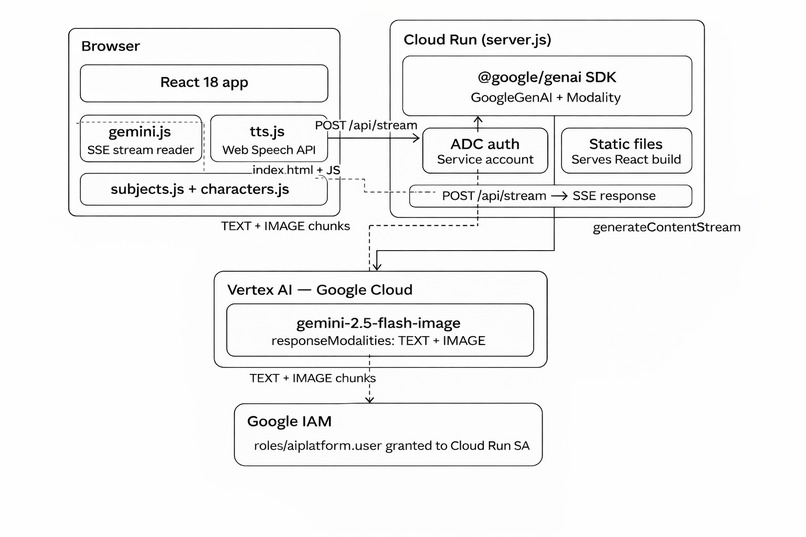
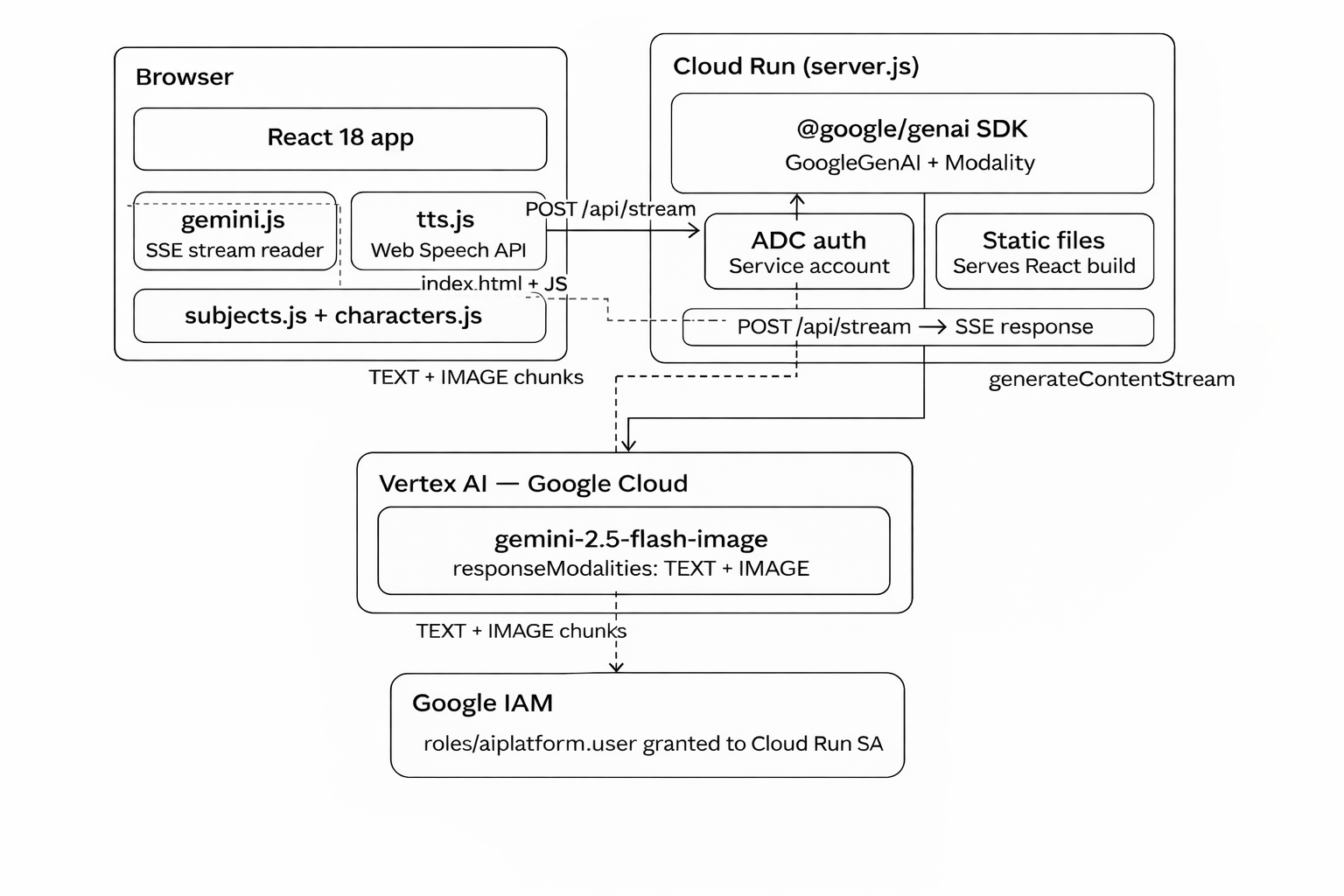
The frontend is a React 18 app built with Vite, using React Router for navigation between the home screen and lesson pages. The home screen uses a sentence-builder interface — "I want to learn ___ with ___!" — where subjects and characters are selected from horizontally scrollable tile pickers. Once a selection is made, the app navigates to a lesson page and immediately begins streaming. The backend is a Node.js server deployed on Google Cloud Run, using the official @google/genai SDK to call Vertex AI. Authentication uses Application Default Credentials — the Cloud Run service account automatically authenticates with Vertex AI, so no API keys are ever stored in the codebase. The core of the application is a single SDK call:
jsconst stream = await ai.models.generateContentStream({
  model: 'gemini-2.5-flash-image',
  contents: [{ role: 'user', parts: [{ text: prompt }] }],
  config: {
    responseModalities: [Modality.TEXT, Modality.IMAGE],
  },
});
The responseModalities: [TEXT, IMAGE] configuration is what makes everything possible. Gemini streams back alternating text paragraphs and images in a single coherent response — the model's "brain" writes the story and paints the pictures simultaneously. The server forwards each chunk to the browser as a Server-Sent Event the moment it arrives. The React frontend reads these events with the browser's ReadableStream API and renders each block on screen as it lands, creating the live storybook effect. Voice is handled by the browser's built-in Web Speech API — a speaker button on each paragraph reads it aloud with no external service required. All 16 characters in the app are completely original, designed specifically to avoid any IP or trademark issues with Gemini's content safety filters. Each character has a detailed visual description used only in image generation prompts, keeping character names safely in the text narration where they belong.
Challenges we ran into
Getting interleaved output to actually work was the single hardest technical challenge. The Vertex AI request format differed from AI Studio in subtle but breaking ways — contents required an explicit role: "user" field that AI Studio silently accepted without. Each of these failures produced cryptic error messages that required careful research to diagnose. Content safety filters were a constant battle during early development. Named fictional characters, certain educational topics phrased the wrong way, and even some innocent lesson prompts triggered PROHIBITED_CONTENT responses. The solution required deeply rethinking how we structured prompts — explicitly separating the rules for text sections from the rules for image sections, and being very precise about what information the image generation instructions could and could not reference. Streaming architecture introduced complexity that didn't exist in the batch version. Base64-encoded images arrive across multiple SSE chunks, so a naive chunk-by-chunk renderer would show broken partial images. We had to build an accumulator that detects part-type transitions — when the stream switches from image data back to text, we know the image is complete and can render it. Getting this right took several iterations. Deploying to Google Cloud without Docker installed locally turned out to be straightforward once we discovered that gcloud builds submit runs the entire Docker build in the cloud — but getting there required enabling four separate Google Cloud APIs, understanding ADC versus API key authentication, and diagnosing a subtle mismatch between the Vite dev server proxy port and the Node server port that caused every lesson request to fail silently in development. Despite all of this, the moment the first lesson streamed correctly — a paragraph appearing, then an illustration of the character demonstrating exactly what the paragraph just described, then the next paragraph, live on screen — made every debugging session worthwhile. That experience, a child watching their chosen character teach them something new in a story that has never existed before, is what the whole project is about.
Accomplishments that we're proud of
Our greatest accomplishment is building something that genuinely did not exist before we built it. Not just technically, but experientially — a child can now sit down, choose a character, choose a subject, and watch a complete illustrated lesson materialise in front of them in real time, written and painted by an AI that has never told this particular story before and never will again. Every lesson is a world premiere. We are proud that we used Gemini's interleaved multimodal output the way it was meant to be used — not as a text generator that separately calls an image generator, but as a single creative intelligence that weaves words and pictures together in one coherent stream, the way a great teacher naturally does. We are proud that we built this on proper Google Cloud infrastructure, with Vertex AI and the @google/genai SDK, in a way that is secure, scalable, and production-ready. And most of all, we are proud that we built it for kids — because children deserve educational tools that feel like magic, not worksheets, and we believe Toon World delivers exactly that.
What we learned
The most important lesson was understanding the difference between generating interleaved content and experiencing it as interleaved. Early versions of the app used the non-streaming generateContent endpoint, which meant everything loaded at once after a 40–60 second wait. Technically the output was interleaved — the model had produced alternating text and image blocks — but experientially it felt like a dump of content. Switching to streamGenerateContent and rendering each block the moment it arrived transformed the feel of the product entirely. The lesson now writes itself in front of the child, which is the whole point. We also learned the hard way that asking Gemini to generate images of named Disney or DreamWorks characters reliably triggers PROHIBITED_CONTENT errors. The fix required a careful two-layer naming system: character names are used freely in text narration, but image generation prompts describe only visual appearance — "a poised young woman with platinum blonde hair in a side braid wearing a shimmering ice-blue dress" — with explicit instructions to include zero IP references. This is why we ultimately created entirely original characters, which both solved the content filter problem and made the app genuinely more creative. We learned that the @google/genai SDK does far more than simplify API calls. It handles ADC token fetching, automatic refresh, request formatting, SSE stream parsing, and the Vertex AI endpoint routing — all of which we had previously implemented manually in about 250 lines of brittle code. Replacing that with the SDK reduced our server to clean, readable logic that directly expresses intent.
What's next for Toon World Interactive Learning App
The foundation we have built is deliberately designed to grow. The most immediate priority is expanding the cast of characters and the library of subjects — we want every child to find a character that speaks to them, and every parent to find a subject that matches where their child is in their learning journey. New characters are a single entry in a data file, and new subjects are equally simple to add, so this is a matter of creative design rather than engineering effort. On the technical side, the single biggest upgrade on our roadmap is replacing the browser's built-in text-to-speech with a truly expressive voice layer. We are evaluating both ElevenLabs Voice Design and Google's Gemini Text-to-Speech API — both offer the ability to generate a unique voice that matches a character's personality, so Bumblo the Bear sounds warm and gentle while Captain Cosmo sounds bold and commanding. ElevenLabs Voice Design is particularly exciting because it allows us to describe a voice in plain English and receive a custom-generated voice in return, which aligns perfectly with how we already generate character visuals and personalities. With Gemini TTS we could keep the entire stack within the Google ecosystem, using a single platform for text, image, and voice generation simultaneously. Beyond voice, we envision adding interactive quiz moments between lesson blocks where the character reacts to the child's answer with a newly generated image — celebrating a correct answer or offering encouragement for an incorrect one — making every lesson not just something a child watches, but something they genuinely participate in.

Log in or sign up for Devpost to join the conversation.