Inspiration
WebMCP solves an interesting problem: a website can expose tools directly to an agent. The harder part is getting websites to actually expose those tools.
Most product teams aren't going to stop and learn a new browser API, decide which parts of their application should become tools, write schemas for them, and then maintain those schemas as the product changes.
I wanted to make that process much cheaper.
Rather than build another agent-native app, I built ToolForge: a way to take an existing website and turn its existing behaviour into WebMCP tools.
What it does
Add one script to a site you already run:
<script src="https://toolforge-omega.vercel.app/toolforge.js"></script>
Then use the site normally for about thirty seconds.
ToolForge watches the network requests the site makes and uses them to work out what the API is doing. An agent then turns that information into WebMCP tool definitions.
Before a tool is shown to you for approval, it is run in a sandbox with test arguments. If it doesn't work, you never have to approve it.
Once you approve a tool, ToolForge exports it as an ordinary JavaScript file that you can commit to your repository.
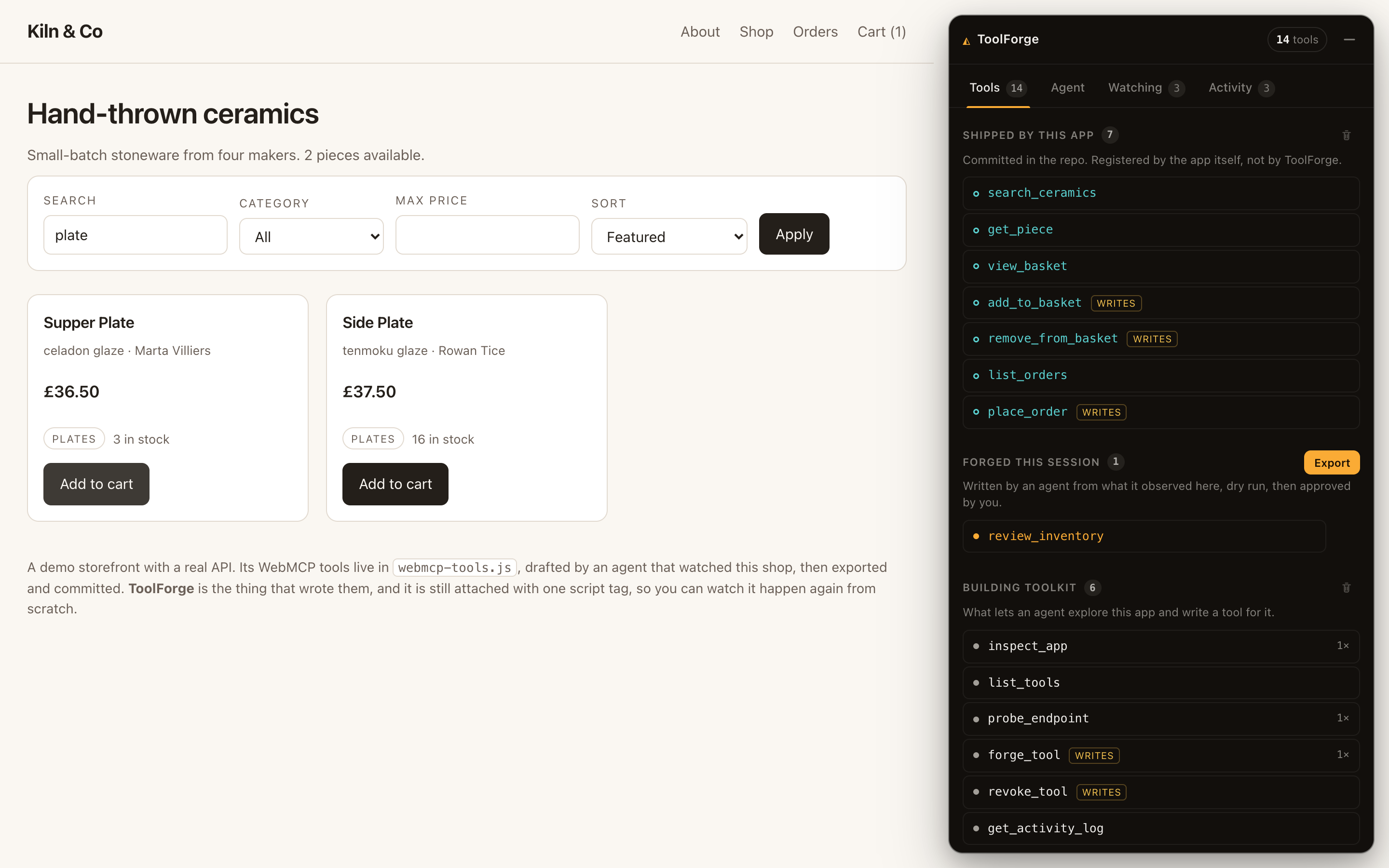
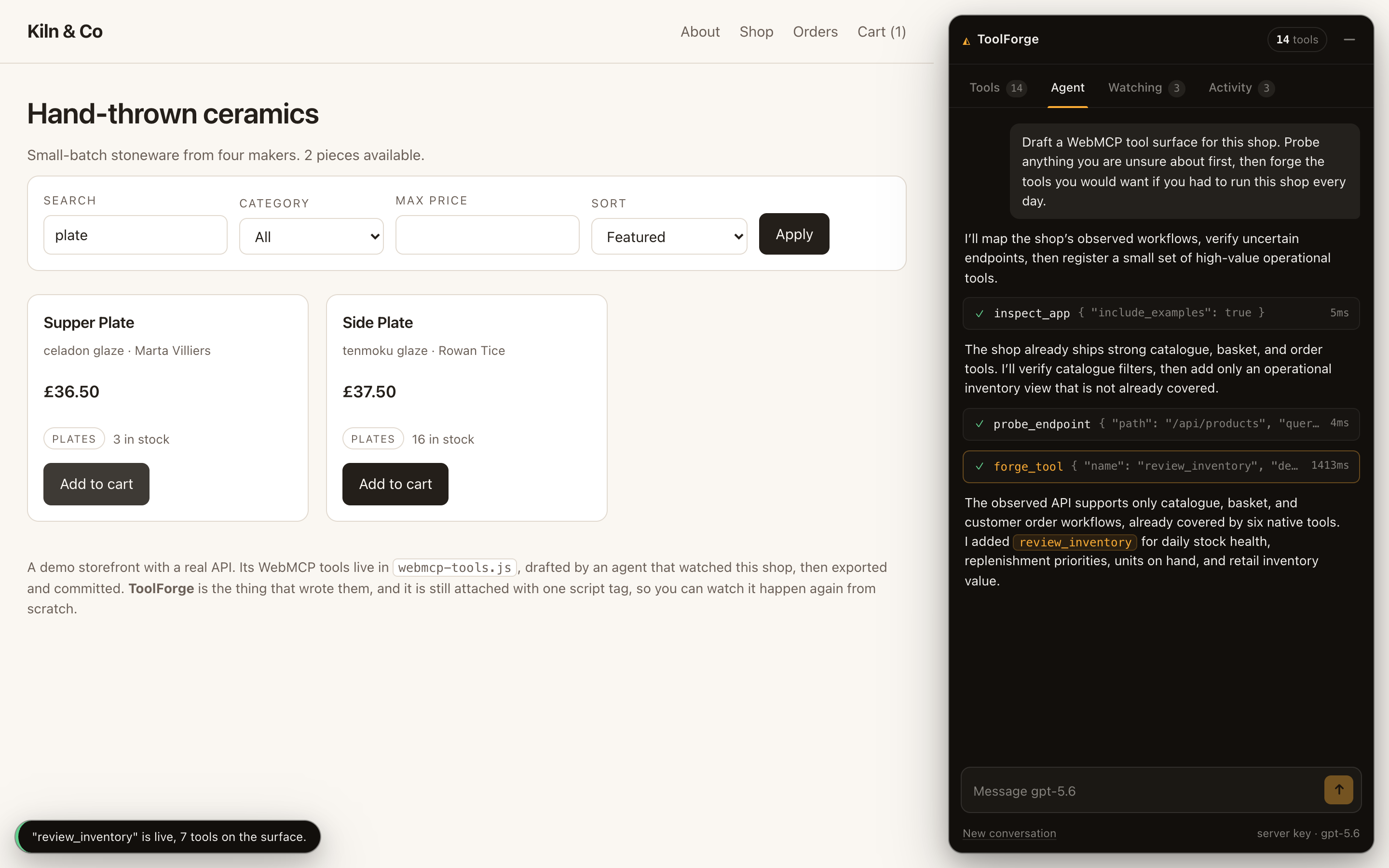
The live demo is a ceramics shop with a real API. Its seven WebMCP tools were created this way, exported, and committed. The same page also contains the ToolForge interface that created them, so you can see both sides working together.
The page starts with one tool. Everything else is opt-in.
Why this works well with WebMCP
The interesting part of WebMCP isn't simply that a page can expose tools. It's that the tool surface belongs to the page and can change while a conversation is already in progress.
That's what ToolForge relies on.
An agent can call forge_tool, have a new tool registered in the page, and immediately have that tool available alongside the existing ones.
I tested this in ChatGPT desktop's in-app browser rather than treating it as a theoretical feature.
At the start, the page exposes one tool. The agent can install the toolkit, after which the page exposes six. No reload is needed. The agent can then use one of the newly created tools to interact with the shop.
That only works because the tools belong to the document itself.
It also matters that ToolForge learns from the page rather than trying to generate tools from a description of the application. The network traffic and DOM are right there in the browser, so the tool definitions can be based on what the application actually does.
ToolForge won't draft a tool until it has seen a real request.
What this changes for developers
For a developer, the starting point is no longer a blank page.
Instead of reading the WebMCP spec, designing a tool surface from scratch, and writing schemas by hand, you use your application and then review the result.
The exported JavaScript is deliberately boring. Each tool includes its provenance and a SHA-256 hash, so the output can be reviewed and committed like any other source file. It also works with a strict Content-Security-Policy.
The goal isn't to hide the implementation. It's to make the first version cheap enough that a developer can inspect it, change it, and own it.
What the experience is like for the person using the site
The agent's actions stay visible in the page.
Every tool call appears in an activity feed in plain English, with the raw payload available when you want to inspect it.
When a tool needs approval, the dialog shows the code that will run, its schema, and the result of the dry run that has already happened against the real API. If that test changed data, the interface says so.
So the approval isn't based purely on a model-generated description. You can see something that has already run and decide whether you want to allow it.
Nothing is installed automatically either. The page starts with one read-only tool, and additional groups can be enabled explicitly.
What becomes possible
The most interesting behaviour I've seen is the agent filling in gaps in the tool surface itself.
One run started with a request for a low-stock report. The agent inspected the existing catalogue endpoint, noticed that it returned stock in descending order, and created a tool that presented the same information in the useful order instead.
In another run, the page already had seven tools. When asked to create a complete tool surface, the agent inspected what was already available and decided that the shop already had good catalogue, basket, and order coverage. It added only an operational inventory tool that was missing.
That distinction matters.
The page provides the context about what already exists. The agent decides what is still useful. The result isn't just a fixed list of tools generated once and forgotten.
A reload also doesn't have to end the conversation. The transcript and model-side history survive, orphaned tool calls are handled explicitly, and the agent checks which tools are still available before continuing.
How I implemented WebMCP
There are three WebMCP bindings I needed to account for, and they aren't exposed as the same object.
src/kernel/webmcp.ts detects which one is available and uses it:
document.modelContext.registerTool({
  name: "search_products",
  description: "Search the product catalog",
  inputSchema: { /* ... */ },
  execute: async (input) => { /* ... */ },
});
| Binding | Host |
|---|---|
document.modelContext |
ChatGPT desktop's in-app browser |
navigator.modelContext |
Chrome 149, Edge 147 |
navigator.modelContextTesting |
Chrome behind chrome://flags/#enable-webmcp-testing |
A few implementation details ended up being important.
Incremental updates. When registerTool and unregisterTool are available, ToolForge updates the existing surface rather than rebuilding it. The host's visible tool count can therefore increase or decrease as tools are added and revoked. Where only provideContext is available, the complete surface is replaced atomically.
Late attachment. ChatGPT can attach the WebMCP host after the page has loaded. Detection therefore retries rather than assuming the host is present at startup. Without this, a page could mark its desired tools as already registered and then never reconcile them when the host appeared.
Approval during execution. Tools can request user interaction through the agent handle's requestUserInteraction, so approval happens as part of the tool call rather than as a separate step afterwards.
Separate application and generated tools. The page exposes inspect_app for the tools the application already provides and forge_tool for creating new ones. Generated tools can't take the name of an existing application tool.
How ToolForge learns the API
Watching requests
fetch and XMLHttpRequest are patched at module scope, before the application's own scripts run. That means ToolForge can see requests made during the initial page load as well as requests triggered by later interactions.
Requests are grouped into endpoints. Paths are templated from observed variations, and request, query, and response schemas are inferred from actual traffic.
There are a couple of safeguards against overfitting.
Identifier-like fields aren't turned into enums just because only a few values have appeared. If six requests contain six different SKUs, that doesn't mean those six SKUs are the only valid values.
Path parameters are also inferred conservatively. Two paths are only collapsed into a parameter when both segments look like values rather than route names. Otherwise something like /api/cart and /api/products could incorrectly turn into /api/:id.
Redacting data
Actual values don't get sent to the model.
Authorization and Cookie headers are discarded. Sensitive and personal fields are replaced with their names, and common patterns such as JWTs, email addresses, phone numbers, card numbers, and long opaque strings are detected and removed.
The model gets the structure of the data rather than the secrets inside it.
The interface also shows how much data has been removed during this process.
Security
Generated tools are code written by a language model, so they need to be treated as untrusted code.
ToolForge runs them inside a Web Worker with no fetch, XMLHttpRequest, WebSocket, importScripts, or DOM access.
The worker gets a single capability object through postMessage. Calls are checked again on the main thread against both an origin allowlist and the tool's read-only setting.
Some of the tests:
| Attempt | Result |
|---|---|
| Read-only tool issues a POST | Blocked by the capability gate |
| Tool calls an unapproved origin | Blocked by the origin gate |
Tool calls raw fetch |
fetch is not defined |
Tool runs while (true) {} |
Worker terminated after 15,000ms; page stays responsive |
These checks happen before an approval prompt. The point is to contain a bad tool independently of whether a person happens to approve it.
unsafe-eval is limited to the sandbox worker. It isn't being used as the security boundary; the capability model is.
Challenges
A few things took longer than expected.
Chat Completions and GPT-5.6. Function tools were being rejected unless reasoning was disabled, which wasn't a useful tradeoff. I moved the implementation to /v1/responses, which supports both.
A successful dry run isn't proof that the tool is correct. One generated tool read catalog.items from the ctx.http envelope when the actual data lived at catalog.body.items. The request itself succeeded, so the dry run passed, but the returned result was empty. The problem was partly in my tool-generation prompt: I had described the arguments but not the return shape.
TypeScript declarations. A .d.ts file sharing a basename with a .ts file was silently excluded from the TypeScript program. My WebMCP declarations were therefore doing nothing until I renamed the file.
The Activity tab. Opening it during a run once brought down the entire panel because a narrator variable shadowed a number formatter. Each tab now has its own error boundary.
Those failures were useful because they exposed places where the system was technically working but the surrounding assumptions weren't strong enough.
The end result is fairly simple: use the site, observe what it actually does, generate a tool, test it, review it, and decide whether it belongs on the page.
Built With
- chatgpt
- react
- typescript
- vercel
- vite

Log in or sign up for Devpost to join the conversation.