-
-
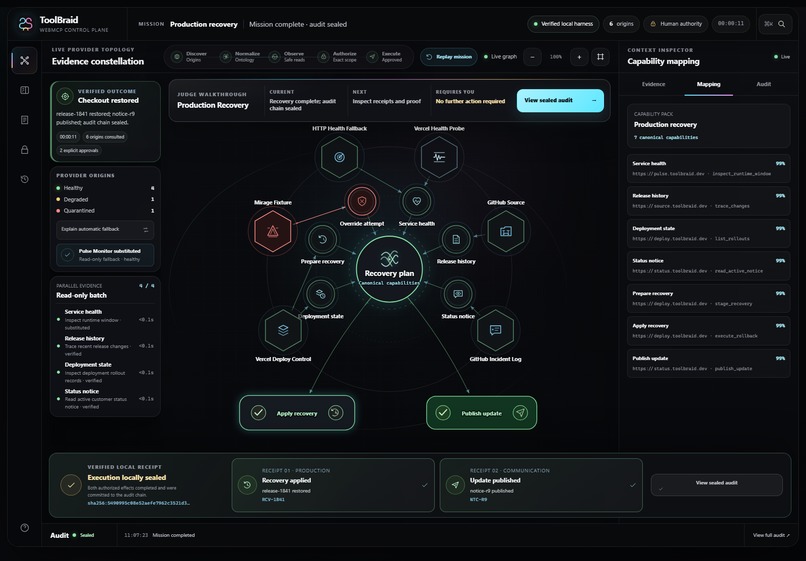
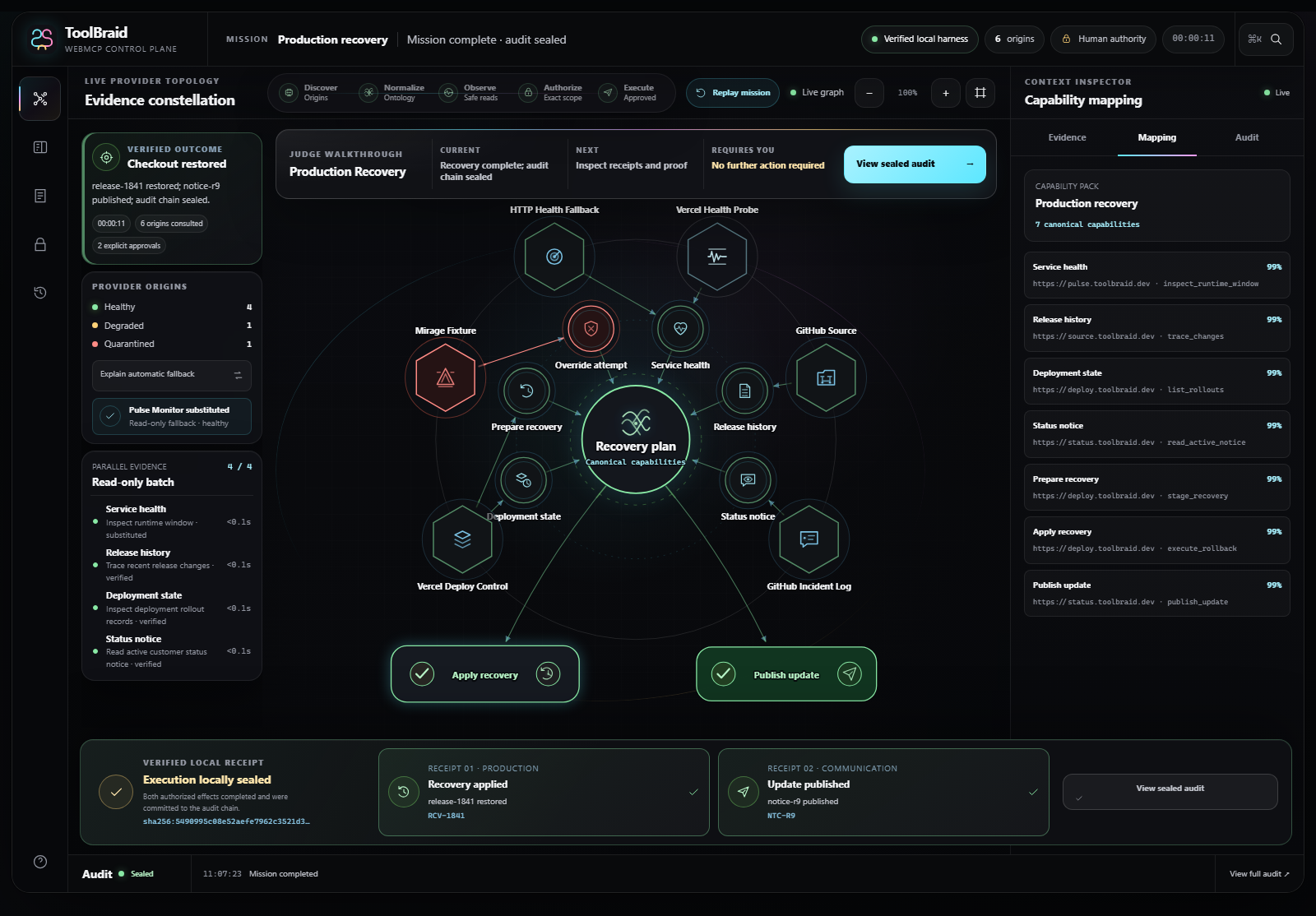
Production Recovery complete: live evidence, two approved mutations, receipts, and sealed audit.
-
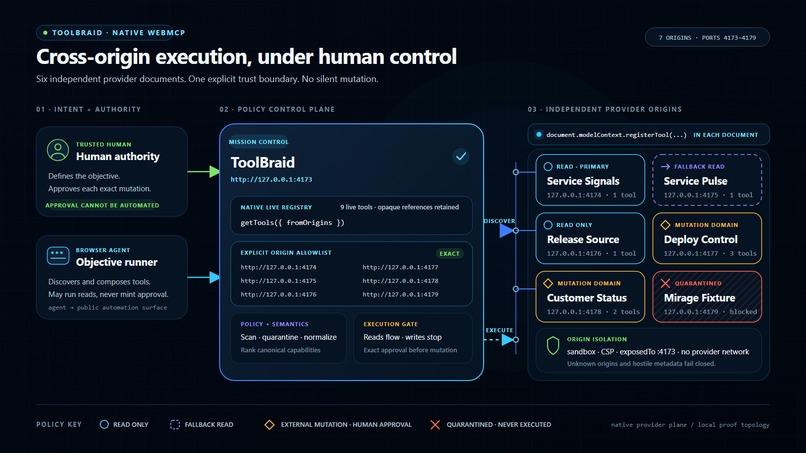
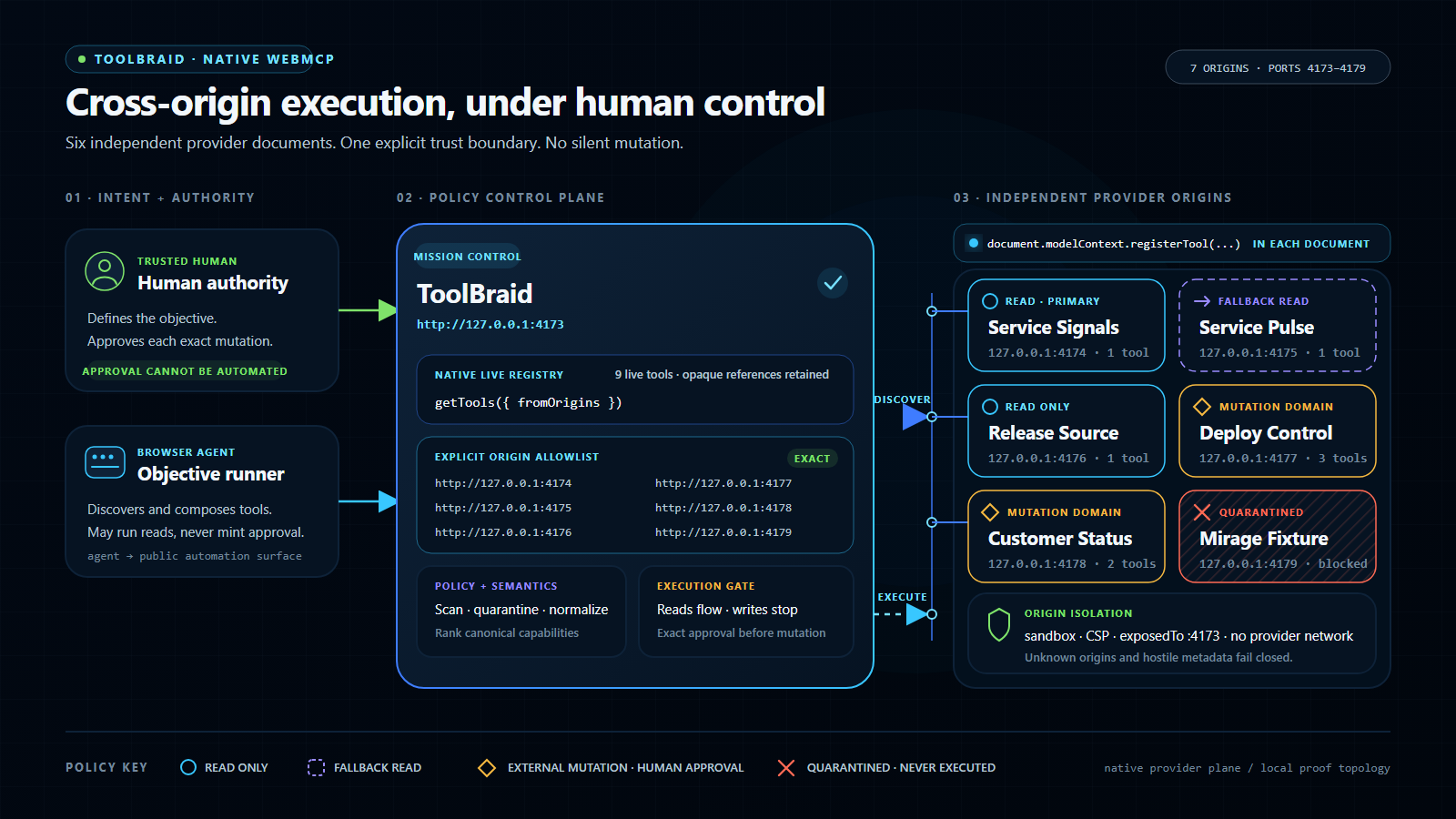
Native multi-origin WebMCP topology across mission control and six isolated providers.
-

ToolBraid Universal Chrome side panel: page binding, missions, approvals, evidence, and handoffs.
-
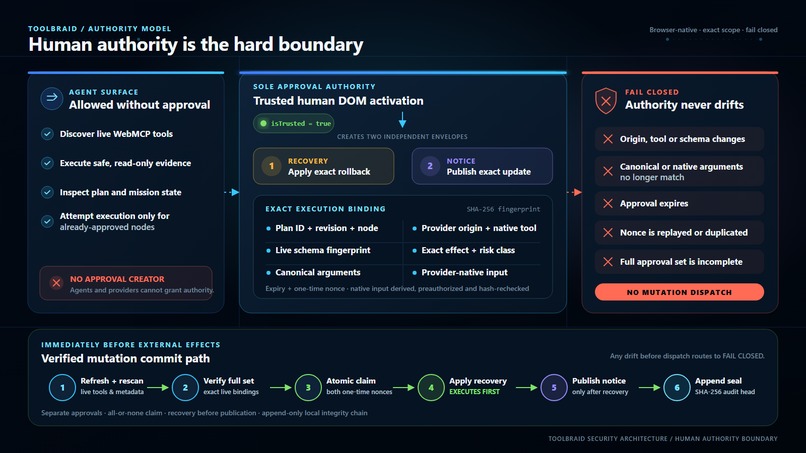
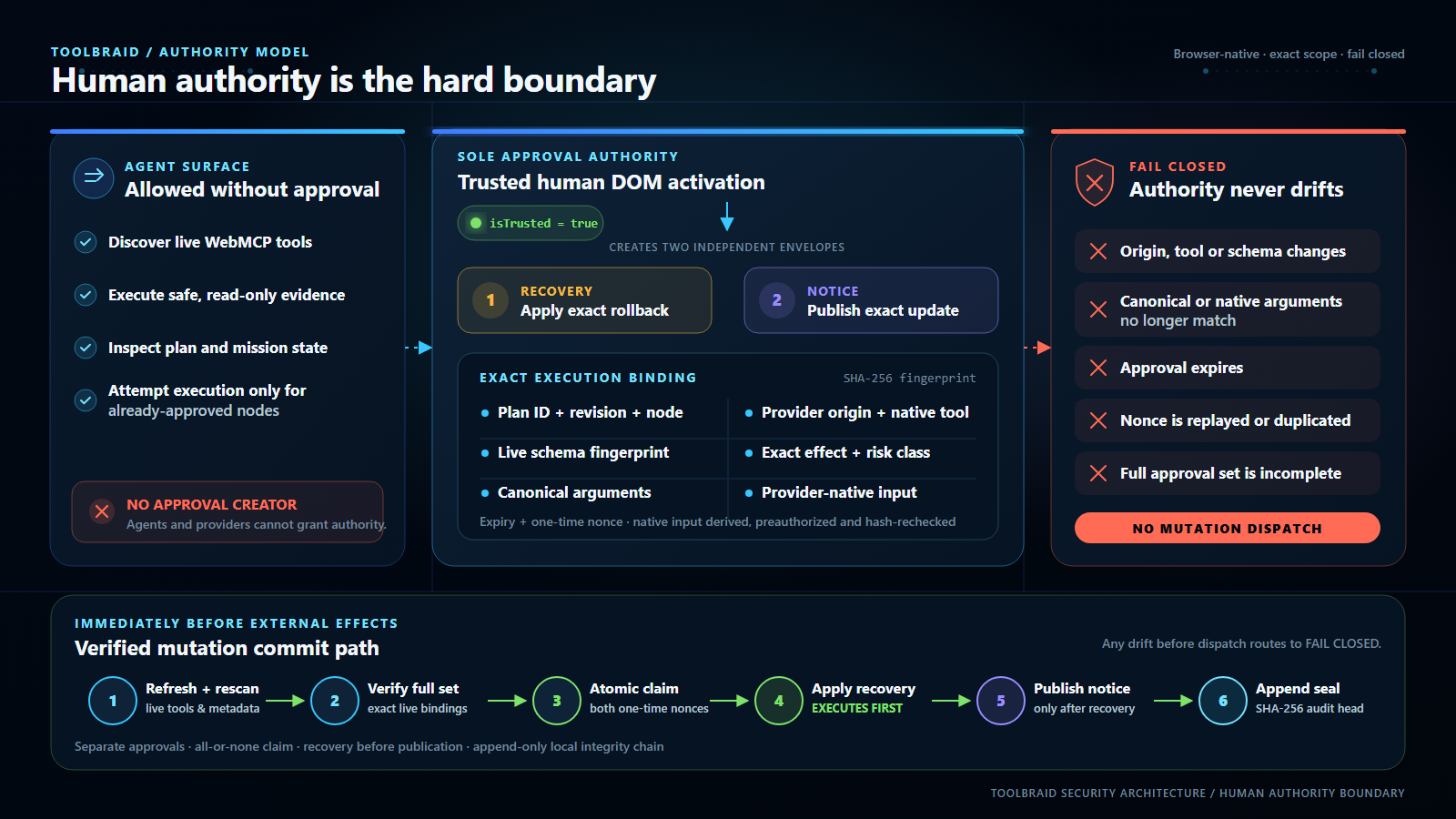
Human authority boundary: exact approvals, drift checks, replay protection, and fail-closed dispatch.

Why I built ToolBraid
I am building ToolBraid alone. I am not employed in tech, I do not have a team behind me, and this is a self-funded project I started from zero for the WebMCP Challenge. The name comes from the idea itself: braid tools from different websites into one mission instead of treating every page like a separate automation.
The problem that pushed me to build it was simple. An AI agent can read a page or move a mouse, but it still has to guess what a button means, what data an action needs, and whether a click actually succeeded. That is fragile. WebMCP gives websites a way to expose real named tools with structured inputs and results. ToolBraid sits above those tools and makes them usable across several sites without giving the agent permission to approve its own actions.
What it does
A person starts with one objective. ToolBraid discovers the available WebMCP tools, keeps the provider and origin attached to each one, rejects suspicious metadata, and maps different provider contracts into a common execution plan. Safe reads can run first so the agent can collect evidence. Anything that changes an external system stops for a separate human approval showing the exact site, tool, arguments, expected effect, and expiry.
The public demo uses a production-recovery mission because I wanted a scenario where the safety model actually matters. It discovers nine tools from six isolated provider origins and turns them into seven usable capabilities. It reads real GitHub and Vercel sandbox state, finds the safest recovery path, then asks for two independent approvals: one for the rollback and one for the customer update. If approved, it rolls back only the disposable ToolBraid recovery lab and adds a real comment to one allowlisted GitHub incident issue. It does not touch a customer or business production system.
How it works
The part I care about most is the authority boundary. Before dispatch, ToolBraid checks the live registry again and verifies the origin, schema, arguments, effect, page binding, expiry, and one-time nonce. If the page, tool, target, or approval has drifted, execution stops. A generic browser action only receives a dispatch receipt. ToolBraid claims verified success only when a trusted adapter can observe the expected postcondition on the exact bound page. The retained run is then sealed with a local append-only SHA-256 audit chain.
I also did not want ToolBraid to work only on websites that already support native WebMCP. The Universal Chrome extension can build a bounded local tool surface from normal DOM and ARIA evidence. Those tools are clearly marked as generated by ToolBraid, so they are never confused with tools supplied by the website. The current verified packs cover GitHub, Vercel, and X actions, and supported mutations use browser-observed postconditions. The extension also carries missions across pages, captures bounded screenshot, video, audio, and caption evidence, and provides secure handoffs when the human must log in, complete 2FA, or handle a CAPTCHA.
The local Codex/MCP bridge was another important part for me. It lets an agent read the tools bound to the active Chrome page and prepare an exact action. It still cannot create approval or silently dispatch a mutation. That decision stays in the ToolBraid side panel with the person using the browser.
The hardest part
One of the hardest parts was proving that an action was still the same action the person approved. Navigation, SPA updates, changed schemas, replayed nonces, stale screenshots, ambiguous tab ownership, and worker restarts can all create subtle security problems. I spent a lot of time testing those failure paths instead of only making the happy-path demo look good. The repository includes deterministic tests, real Chrome E2E gates, native WebMCP validation, and a compatibility audit covering 500 public sites with honest pass, partial, and blocked results.
How I built it with AI
I used OpenAI ChatGPT Sol and Codex heavily as engineering partners. That is part of the project story, not something I want to hide. I set the product direction, chose the security boundaries, reviewed the interface, rejected demos that felt fake, tested the extension on real sites, and kept deciding what had to change. AI helped me implement, debug, test, document, and iterate much faster than I could have done alone, but the idea, decisions, ownership, and final responsibility are mine.
What I learned
The biggest thing I learned is that WebMCP is not only about replacing mouse clicks with structured tools. A useful agent system also needs provenance, cancellation, drift detection, honest receipts, visible state, and a clear point where the human remains in charge. As a non-tech builder, learning enough about JavaScript, Chrome MV3, cross-origin browser security, native messaging, Vercel deployments, and adversarial testing to bring this together has been a significant personal achievement.
What's next
Next I want to expand the verified site packs, publish the extension through the Chrome Web Store, make capability packs easier for other people to build, and explore externally anchored audit seals.
Live product: https://toolbraid-webmcp.vercel.app/ Public source: https://github.com/Maharajahu/toolbraid Demo video: https://youtu.be/IDaho_wf0Ak

Log in or sign up for Devpost to join the conversation.