

Inspiration
As ambitious students ourselves, we were inspired by our own experiences jumping from resource to resource to finish a single project. ToolBear is the solution to this problem; a perfect ally to online learners designed to be both convenient and efficient.
What it does
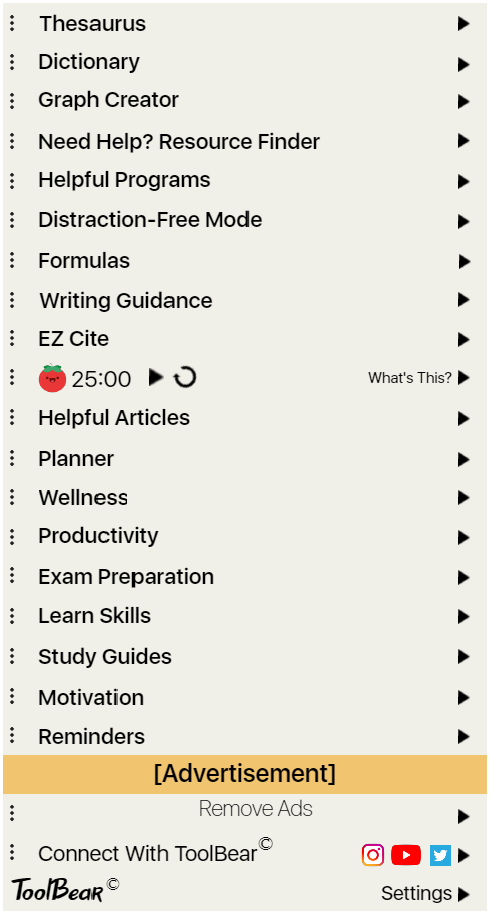
ToolBear features a total of 19 essential programs and services, all in one place, eliminating the need to scour the internet for similar services when in a pinch. The ToolBear homepage lists all features included in the extension, which are clickable as indicated by the arrow to the right of each box. Clickable functionality either opens the feature and requests an action from the user, or provides information about what exactly the said feature does.
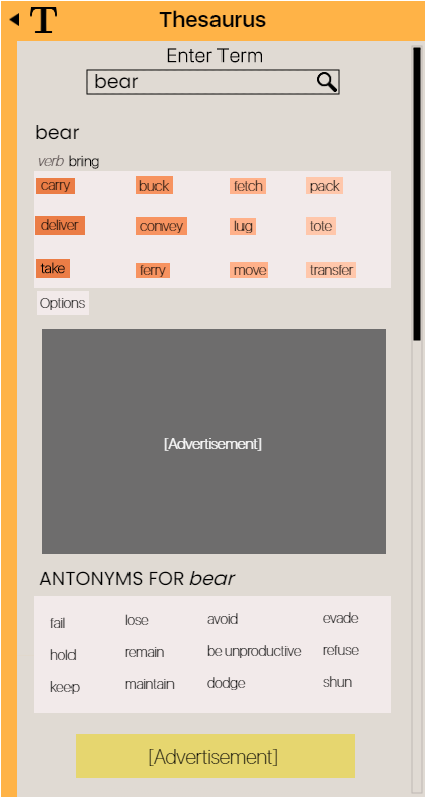
“Thesaurus”: First on the list is a thesaurus integration, which takes user-inputted words and returns a list of synonyms, colour coded in different shades of orange which correspond to their relevance and similarity to the original term.
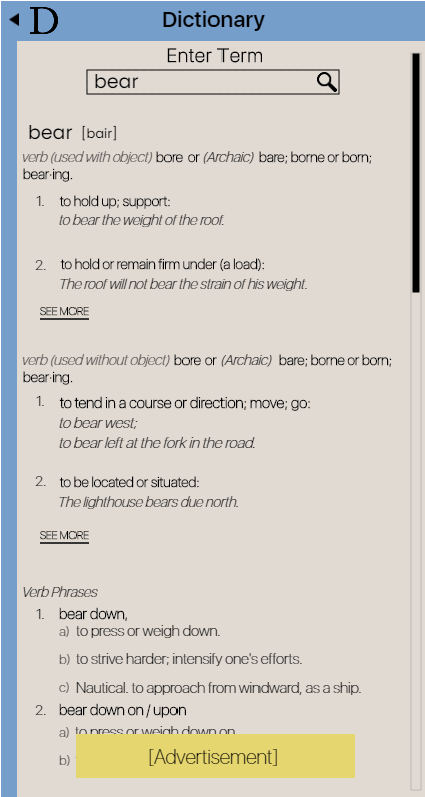
“Dictionary”: Directly below is an integrated dictionary, which when clicked will open a page with a field which receives user input. When the user presses enter, the page will update and display a list of definitions with examples, organized by headings which indicate whether the term is a verb, for example, as well as a use case for the term, in italics. Scroll bars are implemented into each tab who’s contents exceed the space provided by the extension window.
“Graph Creator”: The included graph creator aims to make digital graphing painless, allowing users to select the type of graph that they wish to create. Once the type of graph has been chosen, the user can enter titles as well as the numeric intervals for the values to be graphed for both the x and y axes. They will be able to specify exact figures, which will be accurately plotted on the graph.
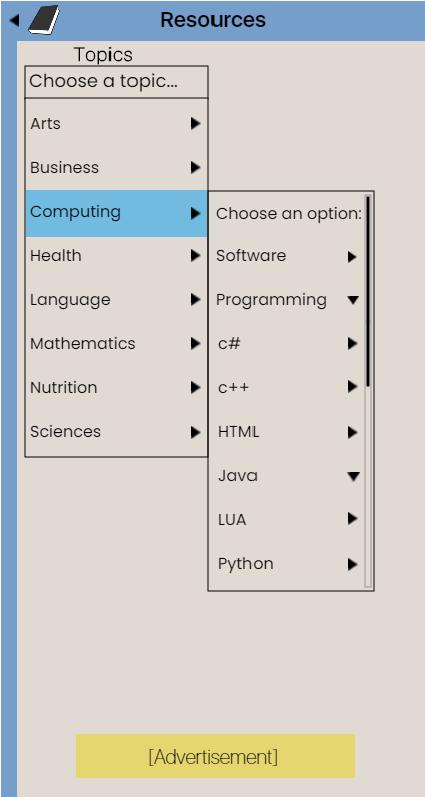
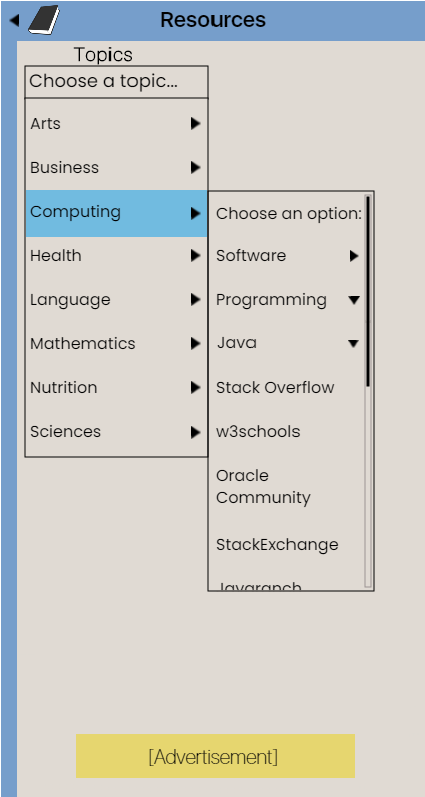
“Resource Finder”: ToolBear features a resource finder, which allows users to find reputable sources of help with ease. When in need of assistance, they can select the subject associated with their question, find the topic at hand and choose from a list of highly-regarded online resources which should answer any questions that they may have.
“Helpful Programs”: The “Helpful Programs” feature works similarly to the resource finder, allowing users to select a subject and a topic. Its purpose is to take this information, and return a list of links to the download pages of well-acclaimed programs which suit the use case defined by the aforementioned user-input.
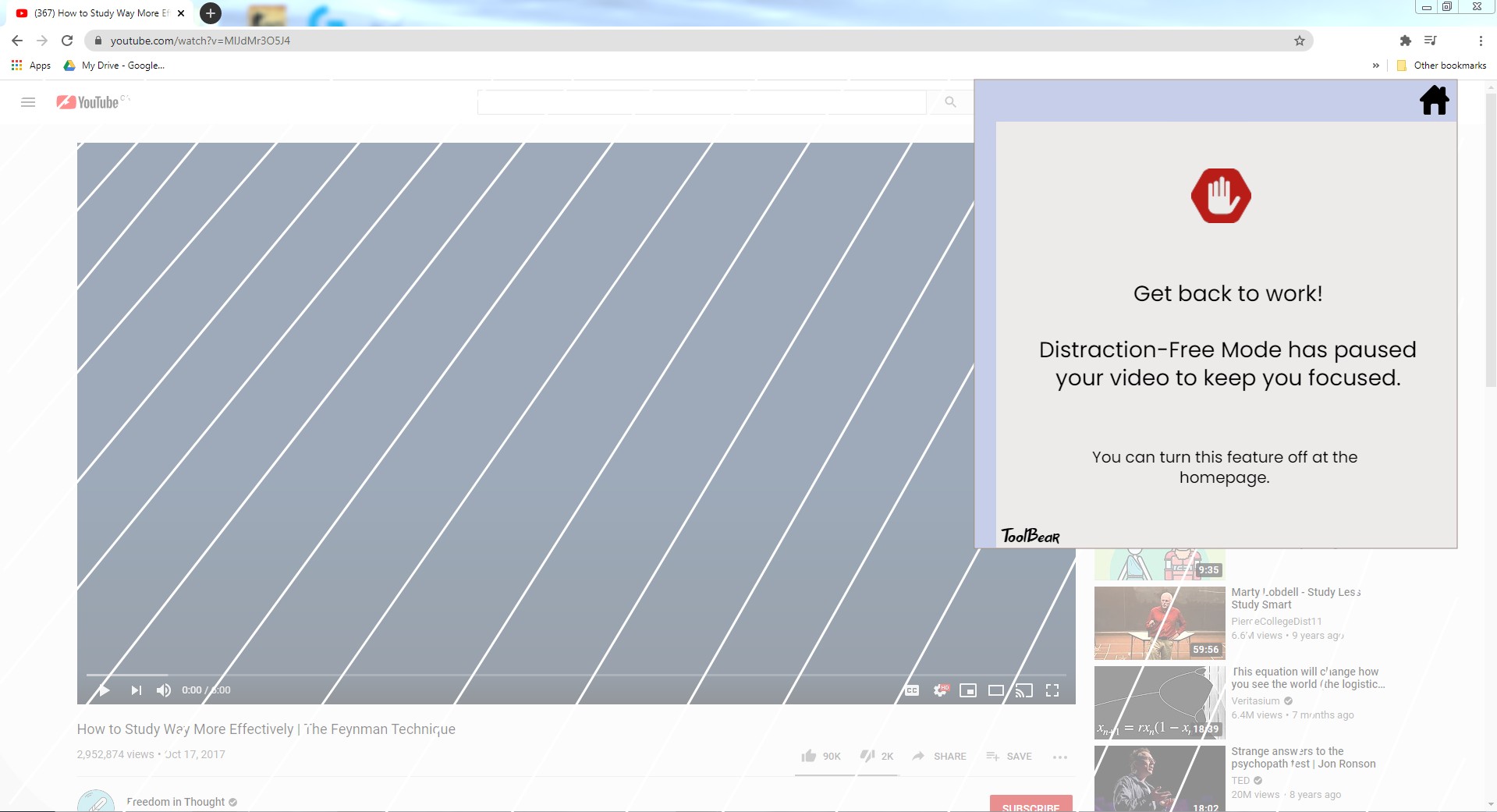
“Distraction-Free Mode”: “Distraction-Free Mode” is a feature that can be toggled on and off. Its purpose is to eliminate procrastination during work sessions, and it achieves this goal by placing a barrier on websites that are known to be a safe space for students looking to “take a break”. Using Youtube as an example, when turned on, this feature will place a translucent layer over the website’s GUI, which cannot be bypassed while the feature is on. A window pops up, telling the user to get back to work, with the option to view the ToolBear homepage in the upper right-hand corner of the window.
“Formulas”: The “Formulas” feature aims to eliminate frustration when trying to solve math and science problems. The formulas will be organized in a list format, organized by subject, and easy to access when users feel frustrated or lost.
“Writing Guidance”: Because writing can be tedious and forgetting proper essay structure is fairly commonplace, ToolBear features an area dedicated to allowing users to select the type of writing they’re doing, whether that be an essay, news article or literary analysis. If the user selects guidance for writing an essay, they will be prompted with a window asking them to select the type of essay (For example, literary analysis, persuasive, informative, etc.). They will then have the option to select what exactly it is that they’re looking for, such as a description of the type of writing piece they’ve been assigned, or a guide detailing the appropriate structure and words to avoid. From there, they will see a list of links which lead to reputable websites that should help answer their questions.
“EZ Cite”: Citations are a pain to write from scratch, which is why ToolBear has the ability to take a link for a reference, allow the user to select the type of citation they desire, and scan the web page provided for the necessary information to write an appropriate citation. If certain information cannot be found within the webpage, users will be prompted to manually satisfy the required piece of information, or leave it blank and have the program work around it. The citation creator has the capability to create entire bibliographies for the user, accepting multiple reference links and storing complete citations in an alphabetically-ordered list for the user to copy and paste into their works cited page.
Pomodoro Timer: ToolBear features a pomodoro timer, with the goal of promoting this effective method of studying and getting work done. With a 25 minute timer and buttons to pause and restart the timer, users can easily click the ToolBear icon in their extension bar, bring up the homepage, and see how much time they have left on the clock, with the ability to pause and restart it without needing to travel through multiple folders. When the 25 minute period has elapsed, a chime tone plays and indicates that it’s time for a short break. In the event that users are unfamiliar with the pomodoro technique/what the timer on their homepage means, they can click on the area which reads: “What’s this?” and view some text explaining what the timer means and how to use the pause and restart controls. It will also provide them with suggestions as to how they should spend their break properly, as well as the fact that their break should be 5 minutes long.
“Helpful Articles”: “Helpful Articles” works similarly to “Writing Guidance”, except the user will receive a list of articles instead of guidance documentation.
“Planner”: “Planner” is a calendar which allows users to enter their assignments (Along with start and due dates), homework (How many questions they’ve been assigned), work (Shift times), and personal activities. The focus of this feature is to organize the user’s days, and provide them with insight into when they’ll be able to do schoolwork, when they have to put the pencil down and get ready for work, etc. This feature will have GPS functionality - The user will be able to set their home location (Where ToolBear is installed on their computer), and mark where their workplace is located, as well as the location of any other places they may spend part of their day at. Using Google Maps or an alternative maps service, ToolBear will determine the amount of time needed to travel from home to the destination, taking into account multiple different modes of transportation (Public transit, biking, travel by car, walking). Users will be able to set the mode of transportation that they’ll be using, and the Planner will use this information to determine travel times. When it’s time to leave, ToolBear will play a recognizable, yet non-intrusive tone to indicate that the user needs to get going; Will also place a window on the user’s screen with text telling them to get ready - to act as a visual aid in the event that they do not hear the tone.
“Wellness”: The “Wellness” feature allows users to input their meals (Calories) and exercise (They can choose their exercises from a dropdown menu as well as their reps and sets). Using information from reputable health and wellness resources online, the app will make recommendations as to how many calories they need to make up for (Recommended foods to eat so they can accomplish this), healthier alternatives to the foods they eat, and what exercises they should focus on to maintain a good level of fitness.
“Productivity”: The “Productivity” feature works in conjunction with the “Planner” feature (Shares values - Hours of schoolwork, hours spent at a job, etc.) and recommends activities to the user which they can do in their free time. These activities are meant to serve as a means of betterment, promoting productive pastimes.
“Exam Preparation”: The “Exam Preparation” feature allows users to select subjects that they have exams in, and the level of exam which they will be writing (eg. high school/university). ToolBear will search the internet using these keywords (eg. “11th grade math exam study guide”), and use their location to find documentation/resources detailing their local school curriculum and what to expect for upcoming tests. Users will receive a list of links which contain this information.
“Study Guides”: The “Study Guides” feature allows the user to select a subject that they will be needing to study for, as well as their grade/university year and return a list of links to resources where they can find extra practice questions, explanations, diagrams, etc.
“Motivation”: The “Motivation” feature runs on a 3 minute timer, and switches between famous and impactful quotes by influential people of the world. The feature scans the internet to find quotes, and recognizes the names of the people who wrote said quotes. It will find a picture of them online, and overlay the quote itself into these images in a contrasting color. This will all be contained within the window that appears when the user clicks on the Motivation feature, and aims to serve as a means of uplifting hard-working students when morale is low.
“Reminders”: The “Reminders” feature is simple, allowing users to enter reminders for themselves as well as the date and time that they’d like to be reminded of said thing. ToolBear will remind users by summoning a window that displays the text they inputted, and it will play a chime tone that repeats until a “dismiss” button (Present in the window) is clicked.
Advertisements: ToolBear is free by default, and runs ads. These ads are of the “banner” variety, to be as least intrusive as possible (The whole idea is to have a clean, linear interface). Ads will be manually added when companies agree to advertise with ToolBear. All ads run within ToolBear will be promoting useful products that serve a purpose to students who work hard. There is a “Remove Ads” button on the homepage, which leads users to a page which details the pricing and benefits of ToolBear premium.
ToolBear Premium: The paid version of ToolBear aims to be affordable, making it available to many students from many places. It removes ads, allowing for a completely purpose-built GUI, and it replaces the banner ad on the homepage with a “Customization” feature. This allows users to choose from an extensive list of themes, and change the colours of everything. They will be able to paste custom hex codes into a dedicated area and use custom colours that ToolBear may not support by default.
Connect With ToolBear: There is a button at the bottom of the homepage, which displays all of the social media that ToolBear has a presence on (YouTube, Facebook, Twitter, Instagram). Direct links to these social media pages are integrated into the names of each social media service listed, which users can click and visit.
Settings: At the very bottom of the homepage, users can access a settings menu by clicking the “Settings” button. This leads to a page with misc. Settings that users can change, such as alert sound volume, brightness, window positioning, etc.
What we learned & Challenges
The Jumpstart EdTech competition only lasts a total of three days, which forces participants to prioritize time management. Our team learned how to focus, and work under this time pressure without becoming flustered. Additionally, it was important for our team to realize that even though being detail-oriented is typically a strength, focusing too much on details, would hinder our ability to submit a well-rounded project. Thus, in order to succeed under these time constraints, we had to look at the big picture to ensure quality work, without getting so caught up in the details that it limits our ability to meet the deadline.
What's next for ToolBear Extension
We envision ToolBear being used by students across the world. We plan on upgrading the GUI to look more modern, and implementing language settings so that it can be accessible to students who do not have English as their primary language.
_ Product Requirements Document for ToolBear: _ https://docs.google.com/document/d/1eaGkn5kOQ3-s0G84ssmOuVMDPCqhm9vzgR5CFdBnwM0/edit## How I built it


Log in or sign up for Devpost to join the conversation.