-
-
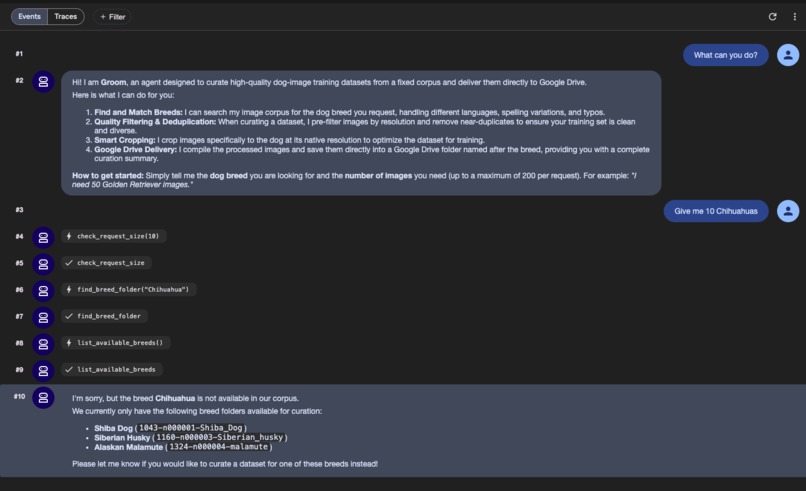
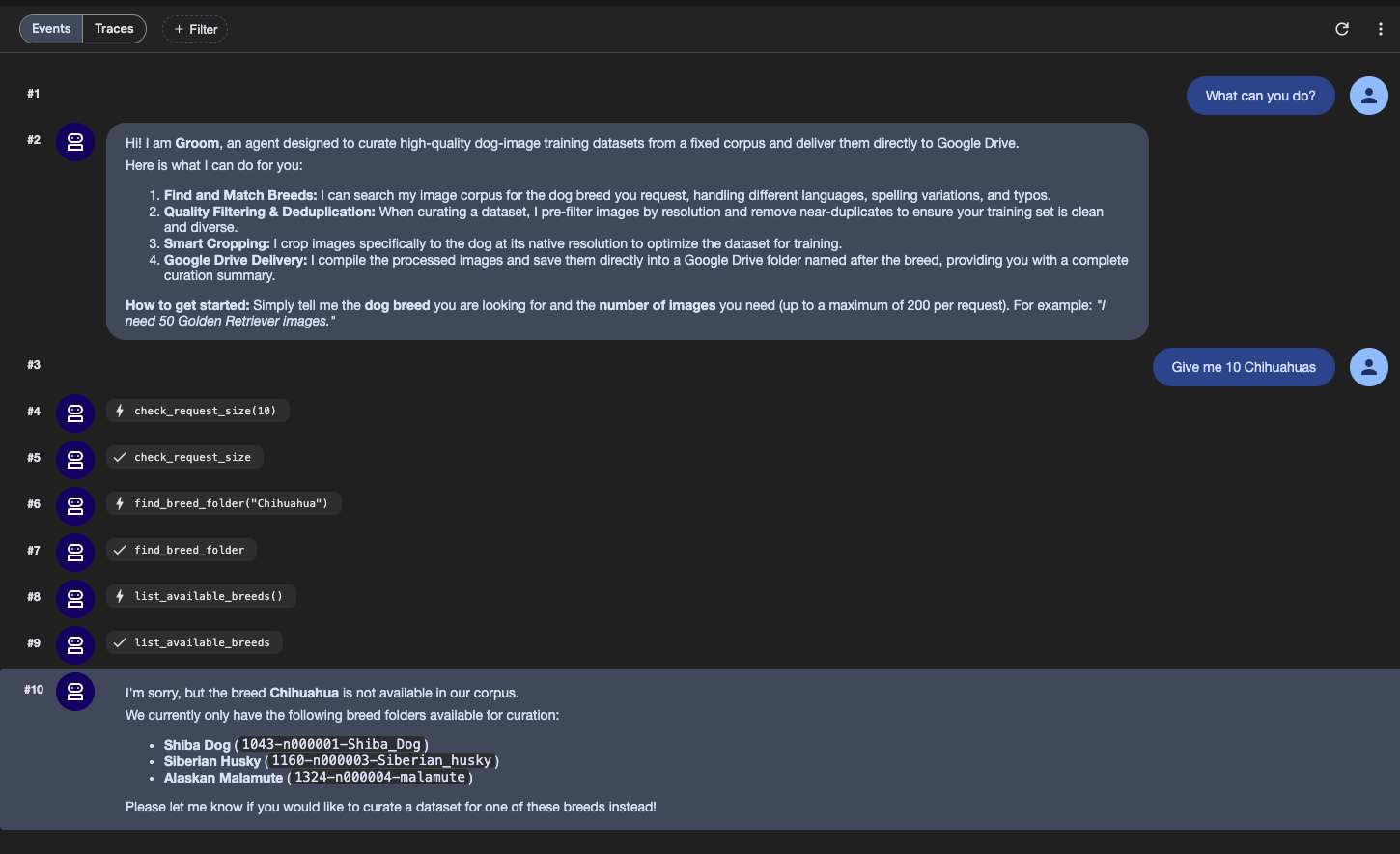
Agent did not find breed, stopping to ask
-
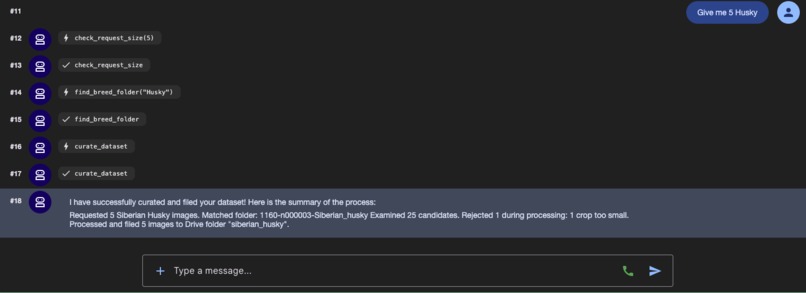
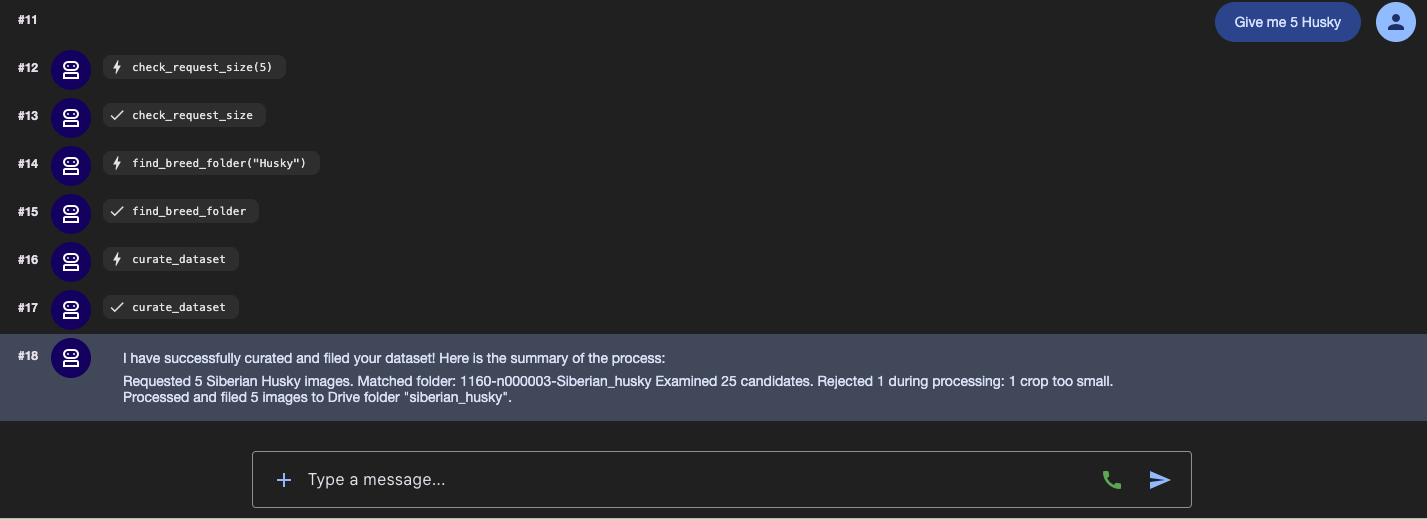
Agent success
-
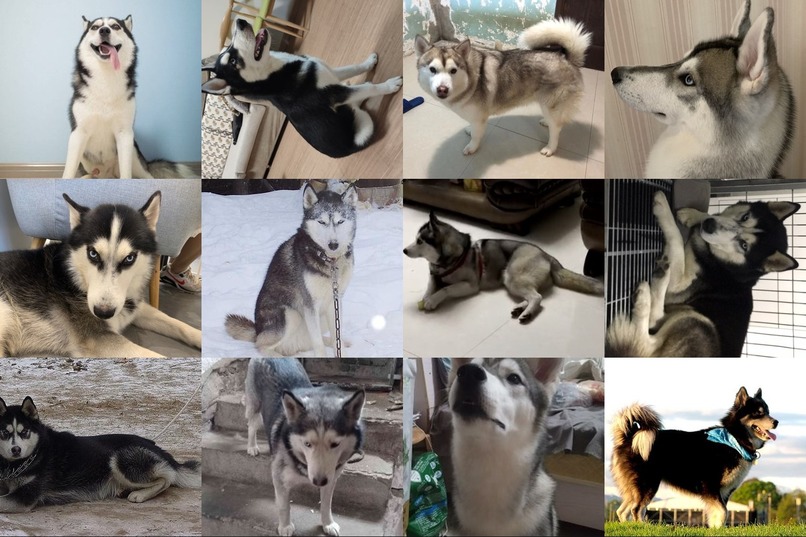
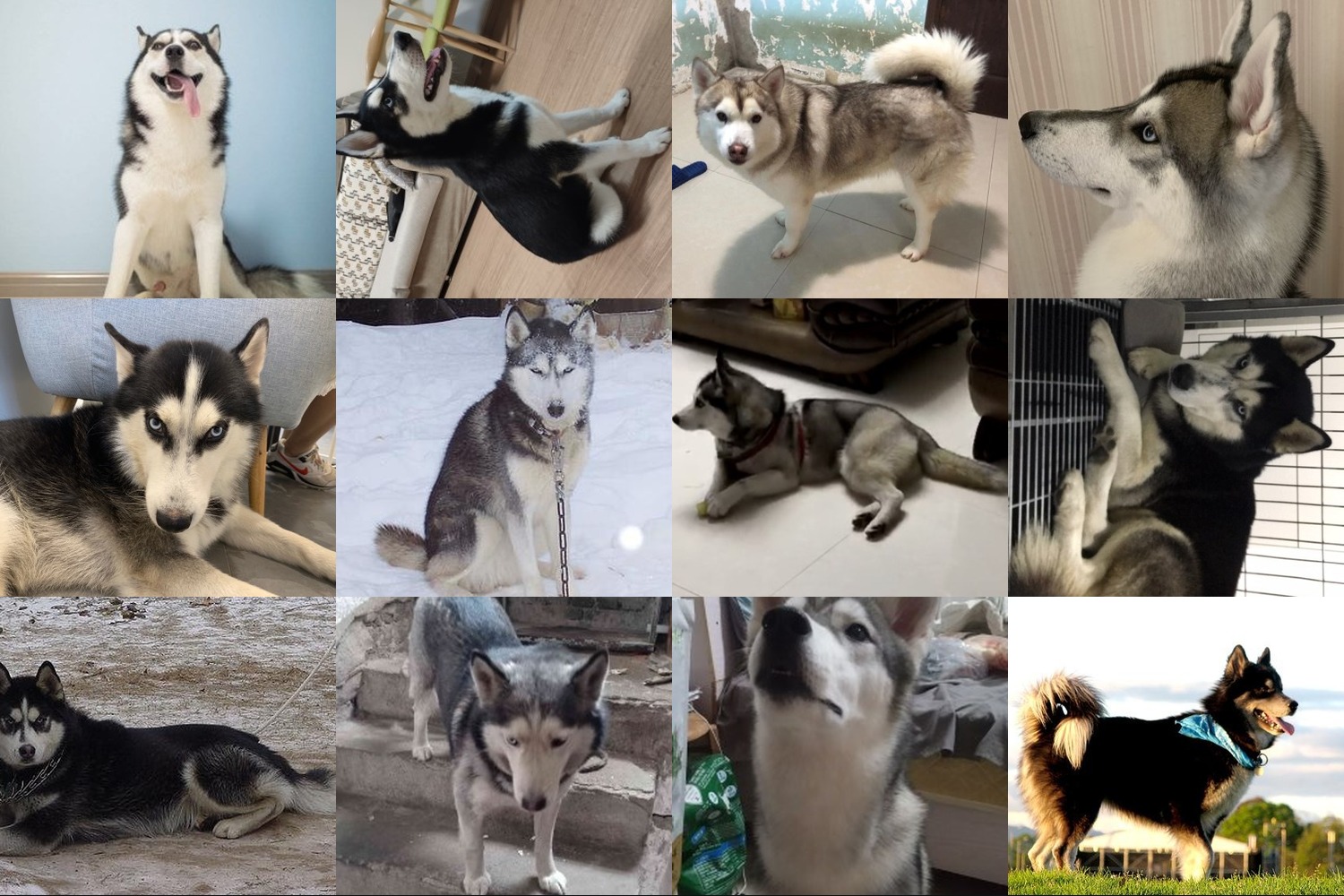
Curated output
-
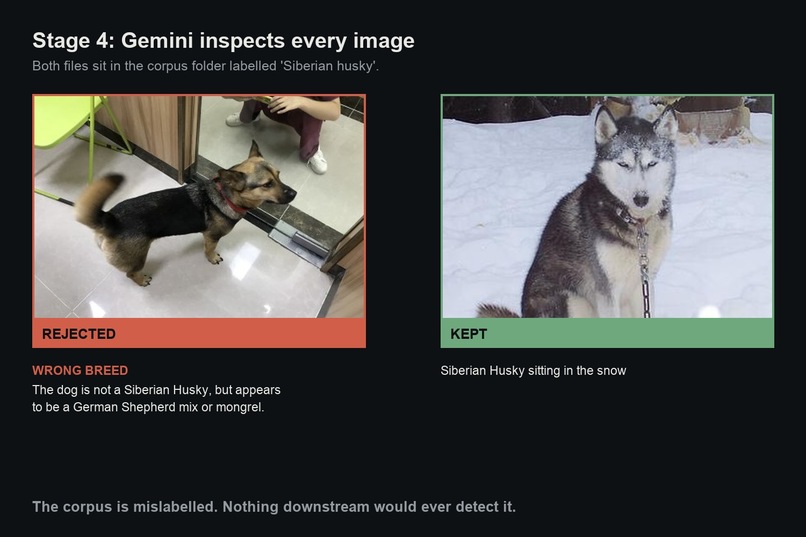
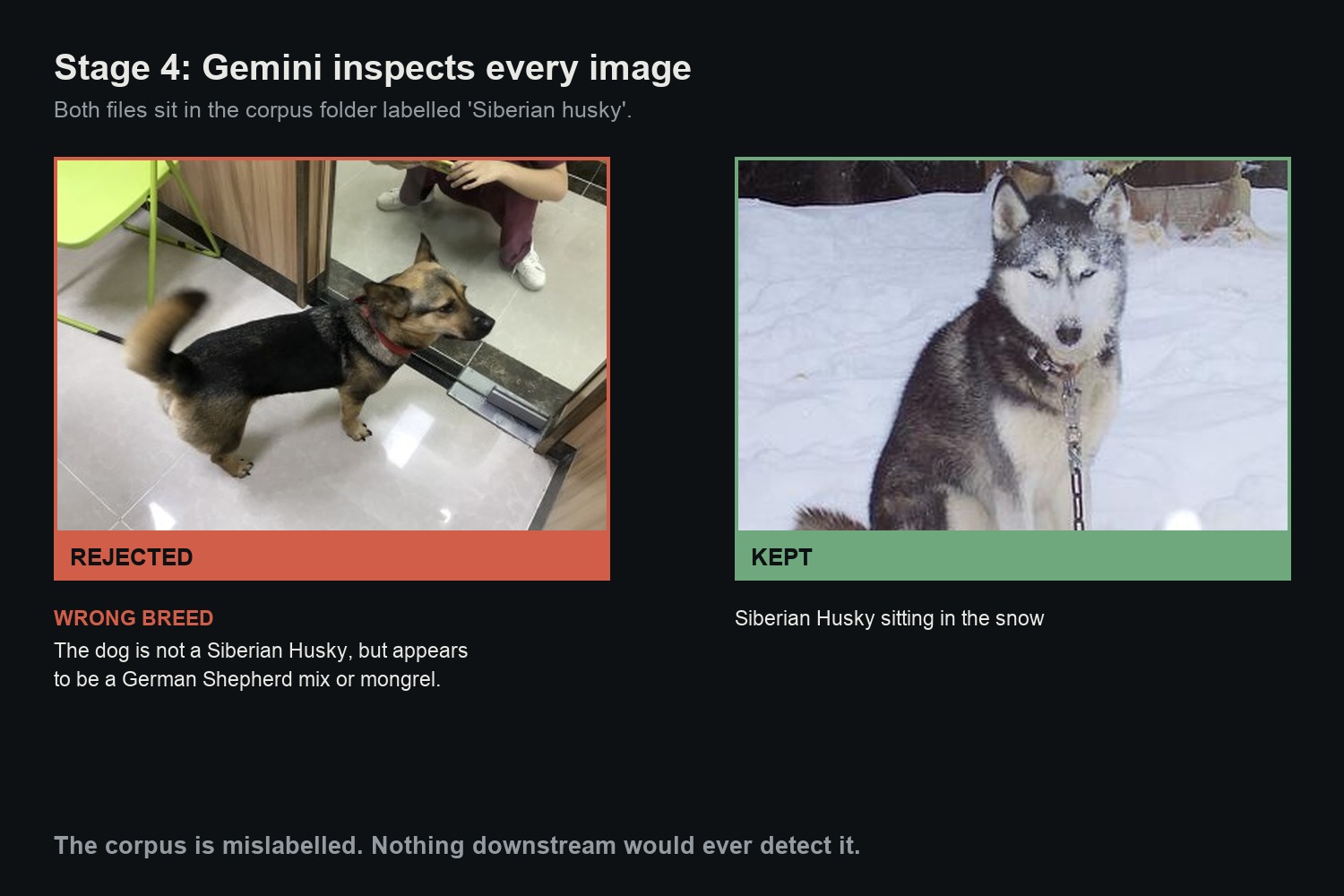
Mislabeled catch
-
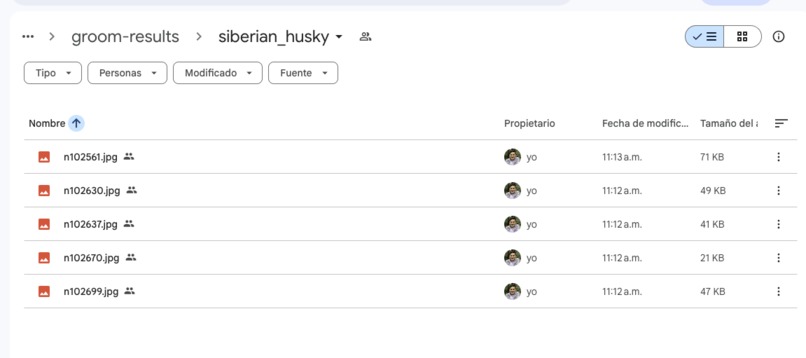
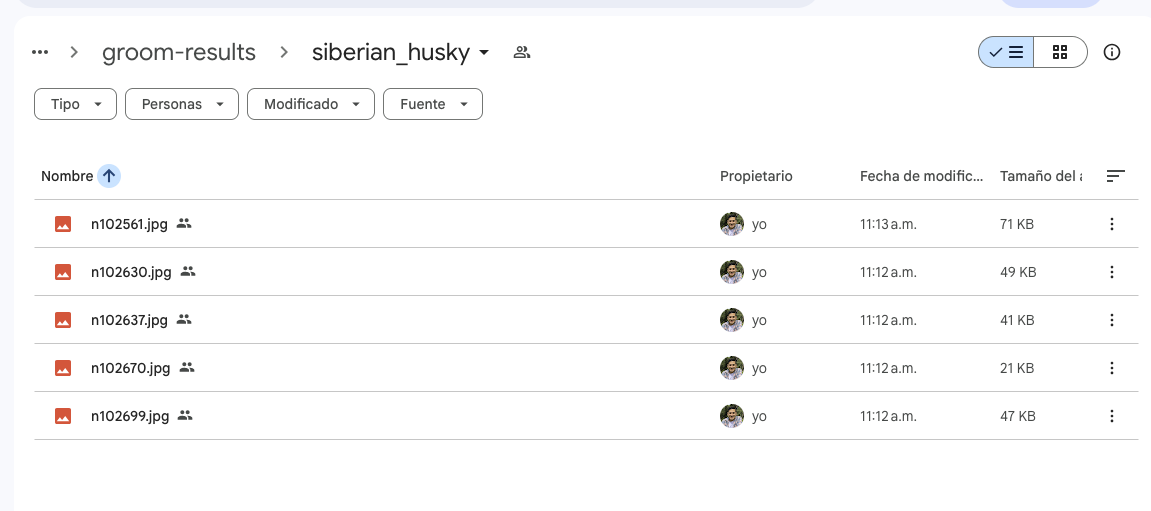
Husky saved in Google Drive
-
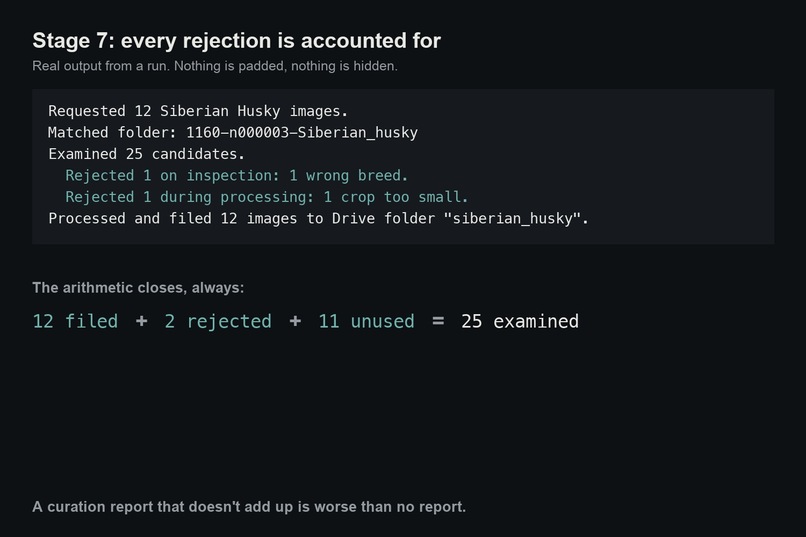
Report
-
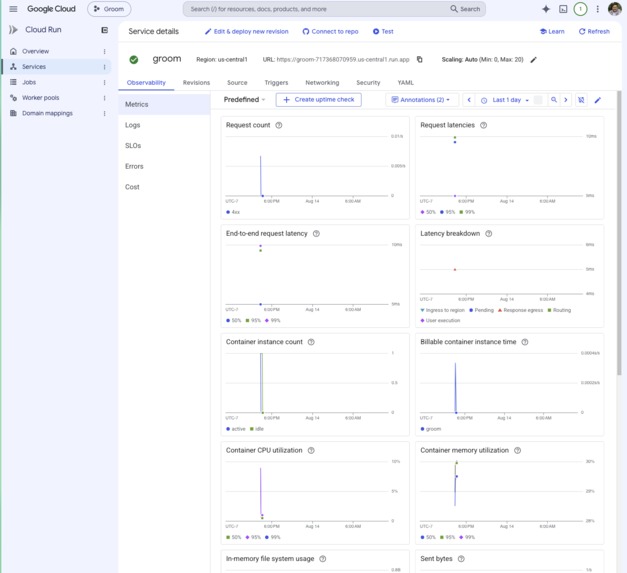
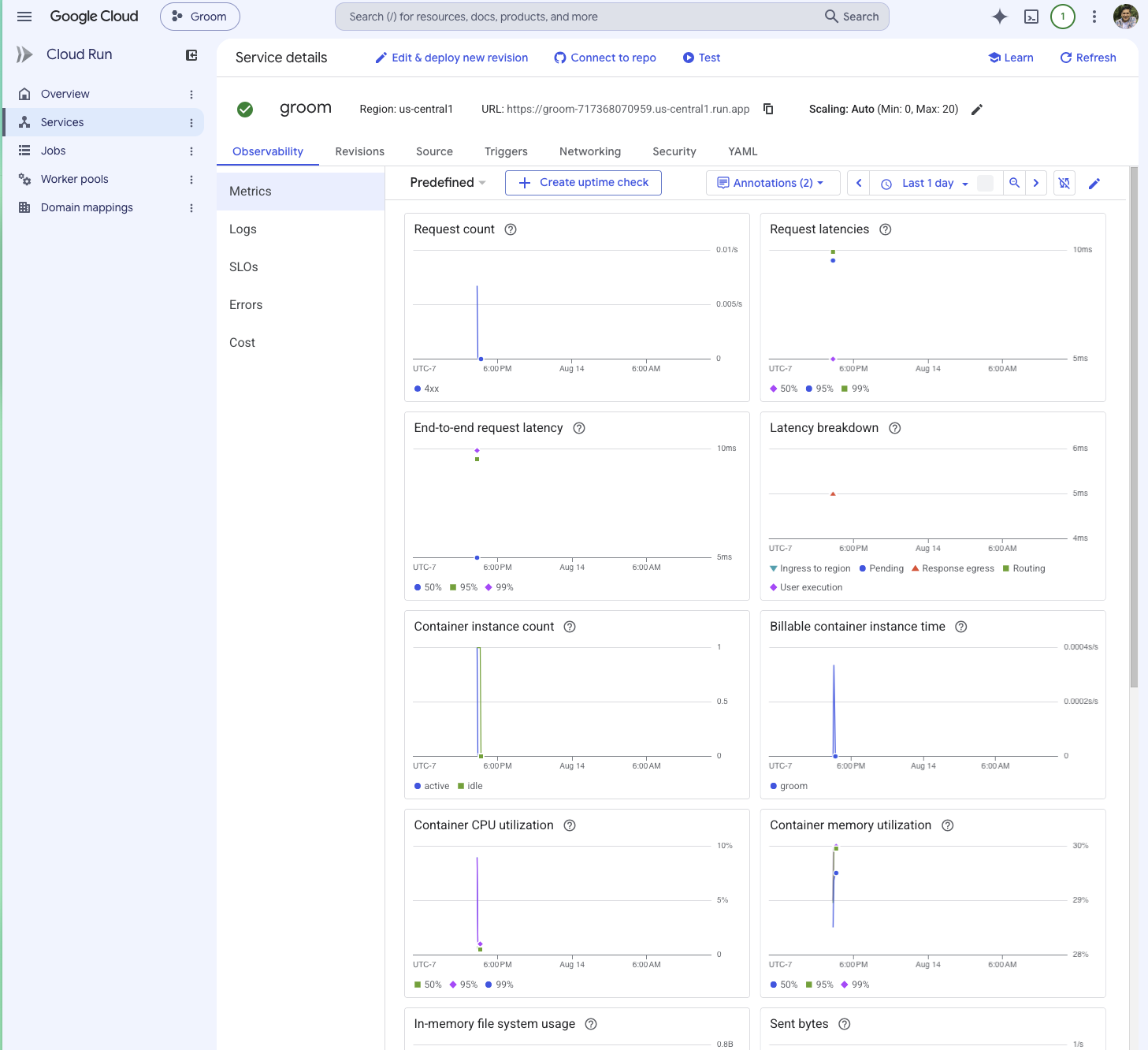
Running on cloud server
Inspiration
I maintain Todogs, a dog breed recognition app for Android and iOS. A user points their camera at a dog and an on device TensorFlow Lite model names the breed, which gets added to their collection — a Pokédex for real dogs.
The model knows 117 breeds. Adding more means preparing training data, and that work looks like this: download a few hundred images per breed, open every one, delete the ones with no dog, delete the ones with five dogs, delete the blurry ones, delete the studio shots that look nothing like what my users actually photograph, hunt for near-duplicates, crop and resize whatever survived, and file it. Then start again with the next breed.
Right now I am training using dog-images repositories, but in the near future I'd like to re-train using the users taken photos, which are more natural, that means evaluating tons of images one by one.
It is hours of clicking and none of it is engineering. Worse, the mistakes are invisible. A mislabeled image doesn't crash anything — it quietly makes the model a little worse, and you find out months later when the app confuses two breeds and you have no idea why.
That is the friction I wanted an agent to solve.
What it does
You ask Groom for "100 Siberian Husky images" and it runs a seven-stage pipeline without supervision:
- Matches the breed name to a folder in the source corpus, using Gemini
- Pre-filters on resolution and decodability
- Deduplicates by perceptual hash, catching near-identical shots rather than just identical files
- Inspects every surviving image with Gemini, judging whether it belongs in a training set at all
- Crops to the annotated dog at native resolution
- Files the results to a Google Drive folder named after the breed
- Reports what was kept, what was rejected, and why
Stages 1 and 4 are where the model earns its place. Everything else is deterministic on purpose — there is no reason to spend a model call on a question a pixel measurement answers exactly.
Inspection asks a real question of each photo: is there a dog, is it the breed I asked for, is there only one, is it sharp enough, is it a photograph at all, and does it look like something a phone camera would produce? That last criterion is the counter-intuitive one. A studio portrait on a seamless backdrop is an excellent photograph and poor training data here, because Todogs never sees anything like it. Casual, imperfect, real-world snapshots are the target, not a defect to filter out.
How we built it
Gemini 3.5 Flash via Vertex AI for two different jobs — text with structured output for breed matching, multimodal for image inspection. Google ADK for the agent and its tools. Cloud Run for the deployed service, Cloud Storage for the corpus, the Drive API for output, and Secret Manager for the Drive credential.
The pipeline stages are separate modules that each run standalone, without an agent or a model session, which is how nearly all of the verification got done. Candidates are fetched in batches with a carry-over pool, and inspection runs only on the images a request still needs — Cloud Storage reads are cheap and model calls are not.
Inspection deliberately runs on the full image, before cropping. The annotation's bounding box frames a single dog, so cropping first would hide the second and third dog in frame — exactly what that stage exists to catch.
Todogs is an existing app of mine and is not part of this submission. It's the consumer of what Groom produces, and the reason several design decisions look the way they do — Groom crops loosely and never resizes, because Todogs' training pipeline resizes to 224 itself and its users photograph dogs with. background around them. Groom itself was built from scratch during the hackathon period.
Challenges we ran into
Agent region us-central1 does not work locally. It took me a while to figure out why I was getting a 404 when testing the tutorial agent for the first time, it was because the region the ADK documentation example uses is us-central1 but it does not work when testing locally, I had to use global.
A service account cannot write files to Google Drive. It has no storage quota of its own, so it creates folders happily — folders are zero bytes — and then fails every single upload. Both fixes Google suggests require Workspace. I lost real time to two approaches that look correct and aren't: adding the Drive scope to a user login (Google blocks it outright, since Drive is a restricted scope) and impersonating the service account (authenticates cleanly, then hits the same wall). Groom now runs Drive as the user through a stored OAuth token while everything else stays on the service account.
My own crop logic was quietly damaging half the dataset. The output spec said square, and the annotated bounding box is usually wider than the photo is tall, so a square crop could only be had by padding with black bars. Measured across 240 images: 44–63% were being letterboxed, with bars averaging a fifth of the frame. The fix wasn't a better padding strategy — it was noticing that the square requirement was the cause, and dropping it.
A vague line in a prompt silently discarded good data. My first inspection prompt rejected a perfectly good photo of a husky against a plain painted wall as a "studio shot". The criterion was too loose and the model applied it to any uncluttered background. Prompts don't fail loudly when they're vague; they just throw away things you wanted.
I caught my own prompt faking the behavior I was proudest of. The matcher stopped to ask whether "husky" meant Siberian husky or malamute — but only because I had named that exact pair as an example in the system instruction. The corpus folder is literally called Siberian_husky and no other husky breed is present, so nothing was ambiguous. I replaced the example with a description of what ambiguity is, and got better behavior from the same mechanism.
Accomplishments that we're proud of
This closes a big loop for my Todogs project. I thought this was going to be one of the hardest thing to achieve since I started Todogs app I was wondering "I want to use the photos generated by users to re-train the model and make it better and unique but, how do I do to evaluate all the images?", it turned out to be much more straightforward that I though, this is the piece I needed.
It does exactly what I need it to do, it's ready to be used after the Hackaton.
It refuses. Ask for a breed the corpus doesn't have and it stops and tells you — it will not quietly hand you the nearest available breed. Ask for something genuinely ambiguous and it stops and asks which folder you meant. Ask for more images than the ceiling allows and it rejects the request rather than trimming it to fit. This isn't an edge case, it's the point: a confidently wrong breed match poisons a training set in a way nothing downstream can detect, so an agent that curates data has to be willing to deliver less rather than deliver wrong.
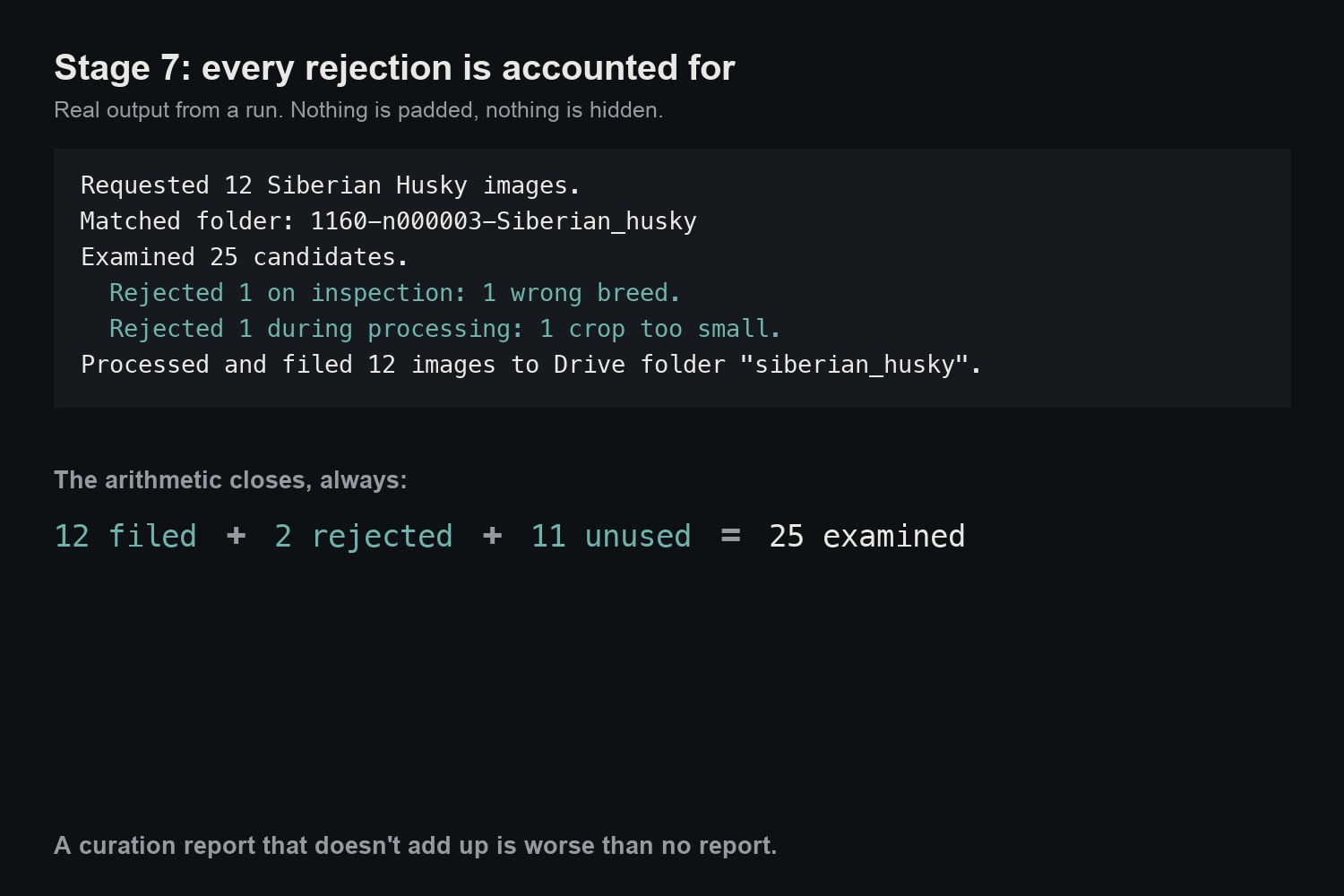
The numbers reconcile. Every rejected image carries its filename, the stage that turned it down, and why, and the report groups them by stage and reason. filed + rejected + surplus always equals candidates examined, exactly. A curation report that doesn't add up is worse than no report, because you'd trust it.
It got measurably faster and cheaper as I went. The pipeline was downloading 113 images to deliver 25 because each batch discarded its unused survivors; carrying them across iterations brought it to 38. Images are downscaled before inspection, sent at low media resolution, and only inspected once a batch is trimmed to what's actually needed.
It runs on Google Cloud, end to end, for about a fifth of a cent per image. Deployed on Cloud Run, reading from Cloud Storage, calling Gemini on Vertex AI, writing real files to Drive. Inspectine one image costs roughly $0.0019, about 500 images per dollar!. Curating the whole 117 breed dataset, around 23,000 images, would come to somewhere near $50 in record time. The manual version is months of clicking.
What we learned
Learn by doing. I have learned a lot more from doing this project than by reading and watching videos about agents over the last months. I setup the whole flow, I learned concepts like VertexAI, Cloud Run, Account Service (this was the hardest one), how to call Gemini from code and not just with IDE. Creating an Agent is much easier than theory makes it seem.
It's easier to train models if you have the whole context, so for this case, don't resize twice. The training code already resizes to 224, so scaling to a fixed size here would resample twice and bake one resolution into every file permanently. Groom stores native resolution and native aspect ratio, and leaves that decision downstream where it belongs.
Local .env variables don't travel into the container. They have to be set explicitly on the Cloud Run service. The deployed agent failed with the exact error I'd already fixed locally, because the fix never left my machine.
And the honest result: the pass rate is 96%, because Tsinghua Dogs is already a curated academic dataset rather than a web scrape. Nearly all rejections are mislabeled breeds. That's still the failure worth catching — 4% wrong-breed images in a 200-image set is eight images teaching the model the wrong answer — but it's a smaller number than I expected, and it would look very different on an uncurated source.
What's next for Groom
Run the full corpus. Everything so far has been measured one breed at a time, deliberately, to learn the real cost per image before spending it thirty thousand times.
Point it at messier sources. The quality criteria are barely exercised by an academic dataset. A web scrape is where "is there actually a dog in this photo" starts earning its keep, and where I expect the pass rate to tell a very different story.
Remember what it has judged. Write every verdict to a manifest beside the images, so a run can process only what it has never seen — never re-inspecting (or re-paying for) a rejected image, and resuming instead of restarting when it dies partway. Not by upload timestamp: a date says when an image arrived, not whether it was judged. With that in place, Cloud Scheduler can trigger it periodically over whatever is new.
Implement on my own users generated images. With Todogs, I am getting more and more images on Firebase Storage, the good thing is the images are saved by dog breed, so I am creating my own repository to improve the model, now, some images are not good, even not the right dog, because the model can make mistake, but now I can curate them and get the right ones in a hearth beat to re-train the model, so it learns from it's own generated data, for this I´d need to use a quarantined set and Gemini asked cold without seeing the classifier´s guess, and a held-out, validation set that never receives the labels. Picture a system that does this process every n-months autonomously, saving tons of time and manual work. That would be awesome!!
Built With
- cloud-run
- cloud-storage
- gemini
- google-adk
- google-cloud
- google-drive-api
- imagehash
- oauth2
- pillow
- pydantic
- python
- secret-manager
- vertex-ai


Log in or sign up for Devpost to join the conversation.