-
-
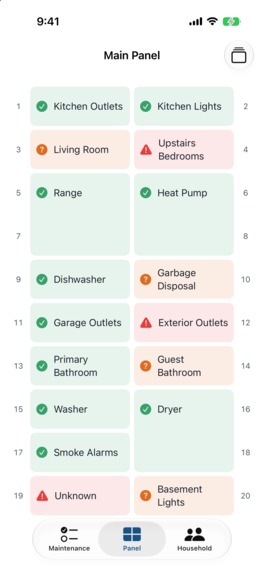
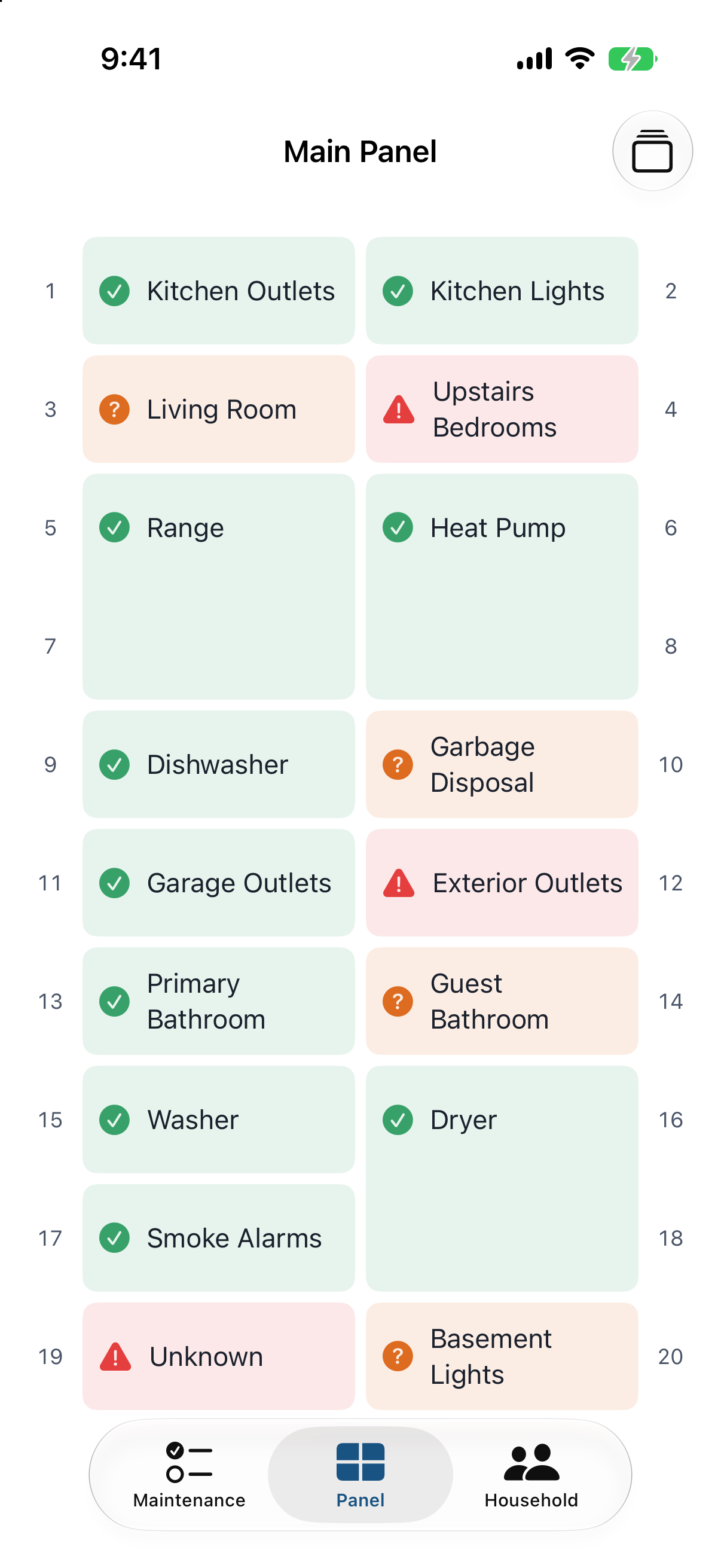
Breaker panel schedule
-
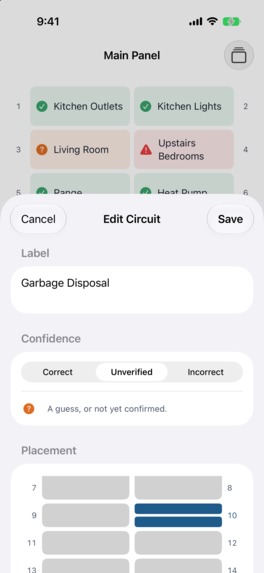
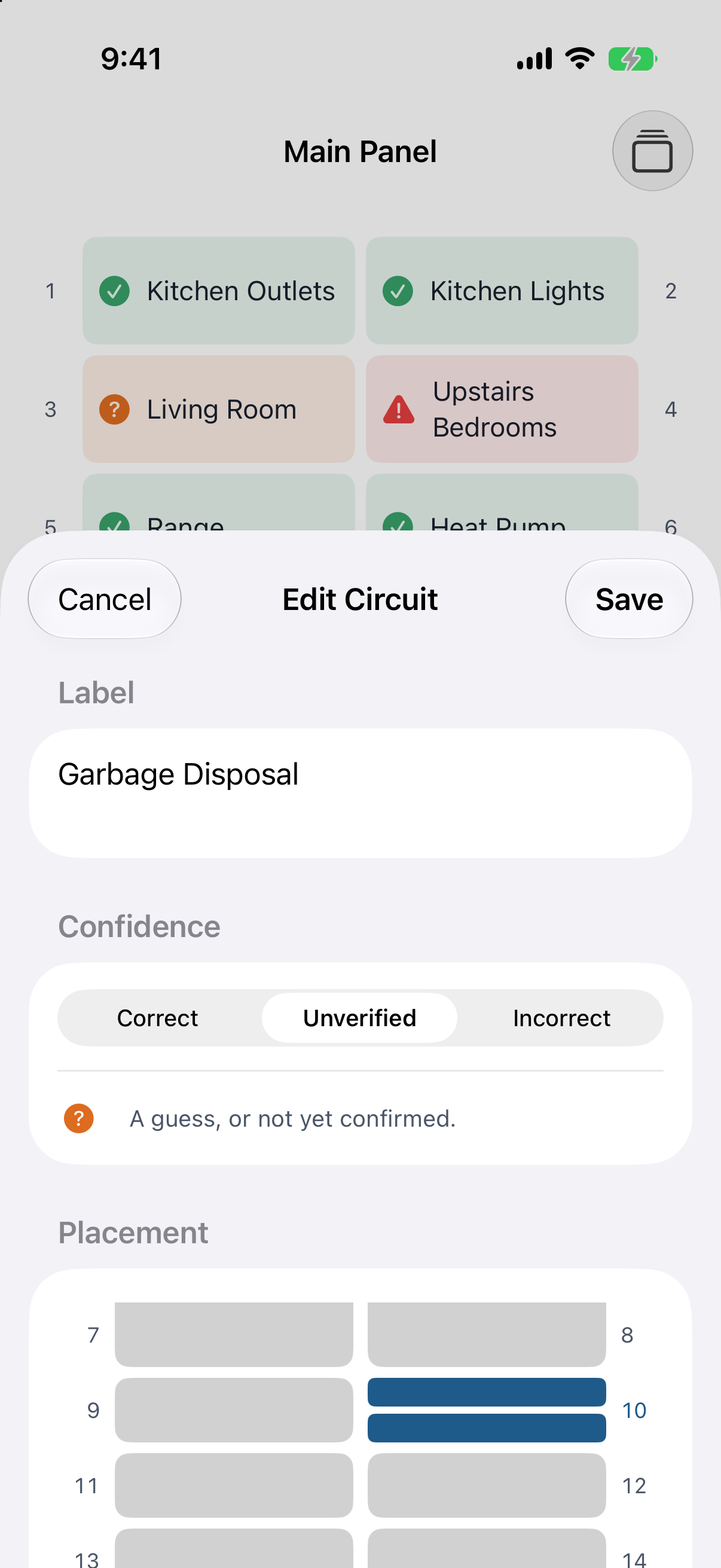
Editing a breaker
-
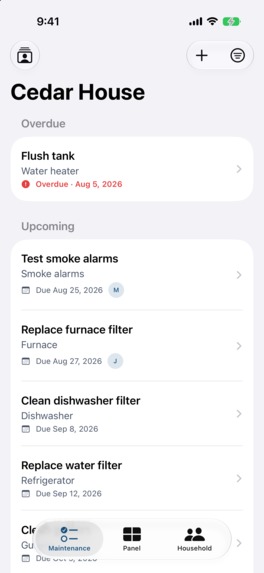
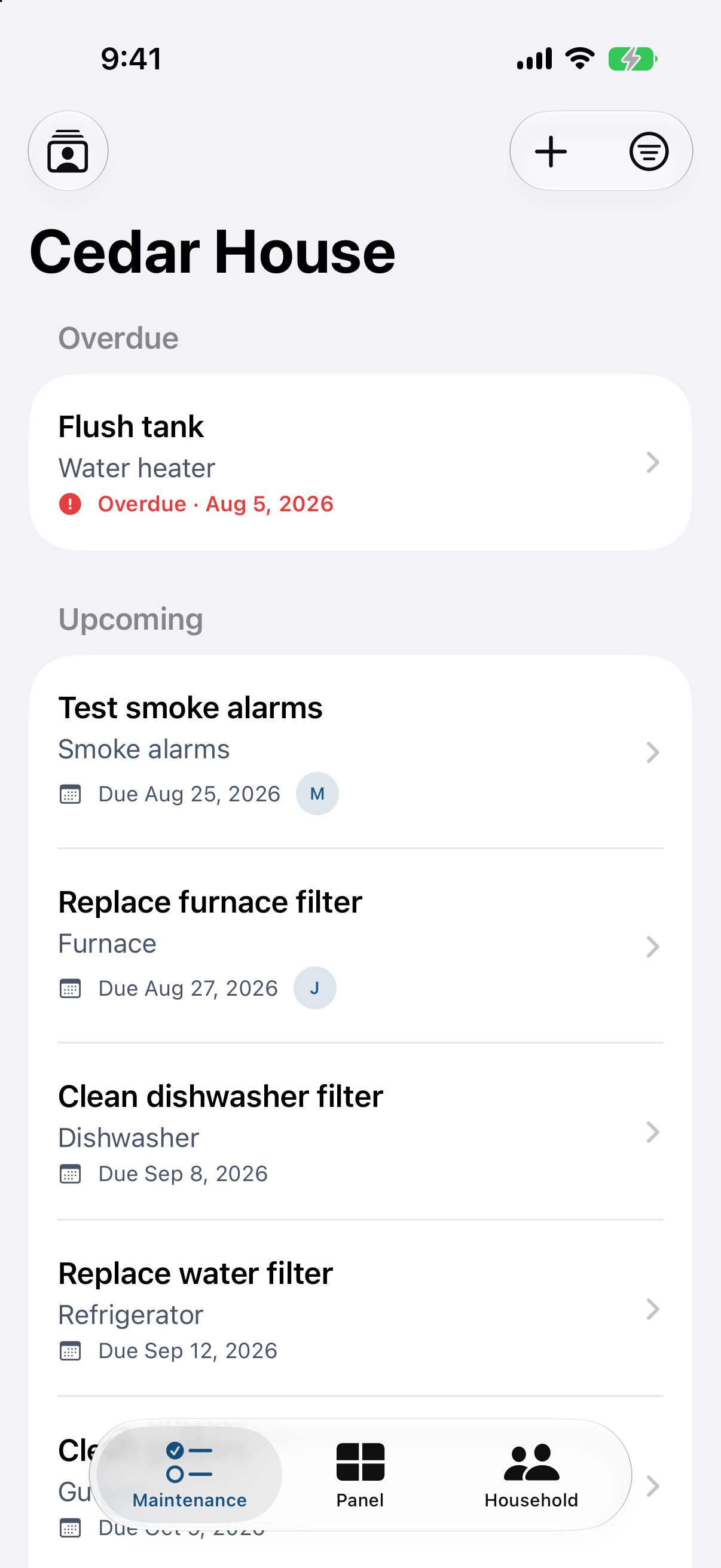
Maintenance List
-
App Icon
Inspiration
When my wife and I were buying our first house, we knew we needed a way to keep up with maintenance. We asked some friends what they used, and one sent me their home maintenance spreadsheet.
It tracked every maintenance task, when it was due, who completed it, and which contractor did the work. It even had a separate sheet for the breaker panel, with each breaker labeled by what it controlled and if it needed to be verified or was correct. The system itself was exactly what we needed.
The problem was using it on my iPhone. Google Sheets was difficult to read on a small screen and awkward to update while actually doing work around the house.
That spreadsheet became the starting point for Tobi. I took the same system and turned each part into something designed for a phone: maintenance tasks and due dates became Tobi's tasks, completed work and contractors became its history and contractor records, and the separate breaker panel sheet became Tobi's breaker panel.
Tobi came directly from that spreadsheet. The information and structure worked; I just wanted a better way to use it.
What it does
Tobi is a home maintenance app for iPhone, iPad, and Mac. Everything for your home lives in a household, including tasks, reminders, maintenance history, contractors, and your breaker panel.
Maintenance
You add the things in your home, like a furnace or water heater, then add the work each one needs.
Tasks can be:
- Recurring on a schedule
- One-off jobs
- Assigned to someone in the household
The Maintenance tab groups everything into Overdue, Upcoming, and Done so it is easy to see what needs attention.
Reminders
Tobi reminds you about maintenance in a few different ways:
- A push notification when a task is due
- Another push notification if it becomes overdue
- A daily email on days when tasks are due or overdue, including what is coming up over the next two weeks
- A notification when someone else in the household completes a task
Task reminders go to the assigned person, or to the whole household if no one is assigned. Push reminders can also be snoozed.
Tobi also sends a monthly report showing what was completed, what is coming up, and what is overdue.
Suggested maintenance
Tobi helps figure out what maintenance your home needs.
When you add an item, it suggests routine maintenance and how often each task should be done.
- Common items use Tobi’s built-in maintenance catalog
- Anything else uses Apple’s on-device model to generate suggestions directly on the device
Maintenance history
When a task is completed, Tobi records:
- Who did it, either someone in the household or a contractor
- Any notes about the work
- When the task was completed
If the task repeats, Tobi automatically schedules the next due date.
Over time, this creates a history of when work was done, who did it, and what they noted.
Breaker panel
Tobi lets you recreate your electrical panel on screen so it matches the one on your wall.
The layout uses two columns, with odd-numbered slots on the left and even-numbered slots on the right. You add a circuit by tapping where its breaker sits, and Tobi determines the breaker type from that shape.
Each circuit also includes:
- A label
- A confidence flag showing whether the label has been verified or is still a guess
Sharing
You can invite everyone who lives in the home using a link or code and add them as an owner or member.
Everyone in the household shares the same:
- Tasks
- Reminders
- Maintenance history
They can all update that information, and when someone completes a task, the others are notified.
Contractors
Tobi keeps the people who work on your home in one place.
Each contractor is linked to the jobs they have done, so you can see their full history with your home.
Siri, Shortcuts, and Spotlight
Tobi also works with Apple’s system features.
You can:
- Complete a task with Siri or a shortcut
- Snooze a task with Siri or a shortcut
- Search for a task, item, contractor, or household in Spotlight and jump directly to it
Tobi is free to start. A free household can have up to three tasks, with reminders and suggested maintenance included.
A household subscription removes that limit and adds the breaker panel, sharing, and contractors. The subscription covers everyone in the home.
Before subscribing, anyone can explore a sample household from the paywall.
How I built it
I built Tobi as a native SwiftUI app for iPhone, iPad, and Mac, targeting iOS 26. I went native simply because I like building native apps. Tobi uses Sign in with Apple, push notifications, App Intents for Siri, Shortcuts, and Spotlight, plus Apple’s on-device model to generate maintenance suggestions.
Firebase sits behind the app because I plan to take Tobi multi-platform, with web and Android next, and I wanted one backend all three could share. It handles sign-in with Apple, Google, or email, stores the household data shared by everyone in a home, and runs the server functions that keep each household in sync and send reminders and emails.
RevenueCat handles both subscriptions and subscription support. Its SDK powers my custom SwiftUI paywall, while a server webhook tells Tobi whenever a subscription changes so the app always knows who has access. RevenueCat’s Customer Center is also built into Settings, where people can manage their subscription without leaving Tobi.
RevenueCat also works alongside PostHog to help me make business decisions. PostHog handles analytics and the feature flags behind my experiments, including real 50/50 tests of my paywall and onboarding. It shows me where people drop off, while RevenueCat shows what those changes do to trials, conversions, and revenue.
AI tools wrote the app’s code, although the tool I relied on changed over the course of the build. Claude Code was the tool I was most comfortable with and ended up building about 95% of Tobi.
When newer model versions came out, I moved to Cursor because it gave me more for my money. It is the best tool I’ve found for writing code, and I can switch between models whenever I want. Today, I use Cursor for all of Tobi’s code.
Keeping the app and backend in one repo made both Claude Code and Cursor much more useful. When a change touches both sides, the agent can see the Swift code and the server code together and update both in one pass. That is a big part of why these tools sped up my work.
Design and copy is where I also dipped into more AI assistance as ChatGPT models are better at writing and starting designs.
Throughout this process, I ended at Cursor my most used tool for coding and ChatGPT my most used tool for copy and marketing direction.
Challenges I ran into
Getting people into Tobi
At launch, Tobi's paywall appeared right after home setup. A user told me they had lost their setup and had been stuck on the loading screen for minutes. I dug into the data to find out what was happening and found that 20 of the 33 people who hadn't subscribed had built their home, reached the paywall, and lost that work after closing the app.
I fixed the lost work by saving onboarding on the device for 7 days. But the bigger problem was asking people to pay before they'd really used Tobi. My wife, who is much closer to Tobi's audience than I am, said she'd want to try the app and fill in a household first. That feedback and the abandoned setups led me to switch Tobi from a hard paywall to freemium with 3 free tasks.
Keeping household data private
Sharing means everyone in a household can see and update the same data, while nobody outside it should have access. Firestore security rules enforce that by checking whether someone belongs to the household they're trying to access.
Getting those rules right took more than one pass before launch. I found several cases where someone could access or change data they shouldn't have been able to, so I tightened the Firestore rules and moved sensitive actions like subscription changes, household creation, invites, and role changes into Firebase Functions.
Sharing one subscription
I don't expect a household to pay for multiple subscriptions to manage one home, so one subscriber unlocks Tobi for everyone they invite.
RevenueCat provides the subscription status, which I store on the household in Firestore. After a purchase, restore, or sign-in, Firebase Functions also check RevenueCat directly. This makes sure the subscription reaches the household and covers every household that owner has.
Finding users
The challenge I'm still working on is finding users. Moving to freemium helped remove one blocker, and PostHog showed me another point of drop-off: the screen where people name their new home.
It's the first screen after choosing to set up a home, so anyone who leaves there never sees what Tobi does. My best guess is that people don't understand why they need to name a house or what the point is. Improving that first step is part of figuring out how to get more people far enough into Tobi to see its value.
Accomplishments that I’m proud of
Shipping and improving Tobi
Tobi 1.0.0 was approved on its first App Store submission and launched on August 2, 2026. I chose that date intentionally so there was no question it launched during the Shipaton window.
I kept shipping updates through version 1.5.0 on September 21. Those updates added saved onboarding progress, a free tier with 3 tasks, a native subscribe sheet for free users, and support for Siri, Shortcuts, and Spotlight.
Getting people to pay
RevenueCat recorded Tobi’s first trial on August 4, two days after launch. On September 9, that trial converted and earned Tobi its first App Store dollar.
Since launch, 3 of 8 trials have converted to paid subscriptions, a 37.5% conversion rate. Tobi brought in $55.38 in September, its first month of revenue.
Seeing someone fully use it
One user told me on Threads, “I started adding all of my items... love it so far.”
That stood out because adding all of your items means setting up the appliances and systems in your home along with the maintenance each one needs. Getting people far enough into Tobi to do that has been one of my hardest problems since launch, so seeing someone go through the full setup and enjoy it felt like a meaningful result.
Making decisions from data
I also tried to measure changes instead of guessing.
A 50/50 onboarding test showed that the longer setup flow retained no more people than the shorter one, so I kept the short version. Testing the hard paywall against freemium made the next drop-off clearer, so freemium shipped to everyone. After shortening the yearly trial, I checked signups and saw no change.
The clearest result came from the App Store listing. On September 18, I changed the subtitle to “Track who fixed what at home” and added an App Preview video. Product page views increased from 65 in the week before to 87 in the week after.
What I learned
Building something useful does not mean people will find it
I built Tobi because my wife and I needed a better way to manage our first house. The people who have found it are using it and paying for it, but needing the app myself did nothing to help anyone else discover it.
That has been the biggest lesson since launch. Building Tobi has not been the hardest part. Getting people to find it has.
That now shapes where I spend my growth time. App Store optimization came first because most of Tobi’s impressions already come from App Store search. SEO is my other focus because the web is where homeowners already search for help. Since September 17, I’ve published a Tobi blog post about every other day. Those posts have not produced downloads yet, but they put Tobi in front of people while they are actively looking for answers.
Trusting my own data
I also learned not to keep something just because it is common advice.
I tested a longer onboarding flow in PostHog against my shorter one. The longer version built a suggested maintenance plan, but completion and drop-off were the same, so I kept the short flow.
I saw the same thing with the paywall. Tobi launched with a hard paywall after home setup, but 20 of the 33 people who never subscribed had reached that point and left. From September 6 to 19, I tested the hard paywall against freemium with 3 free tasks. The hard paywall did not perform better, so I shipped freemium to everyone.
I also shortened the yearly plan’s free trial from 1 month to 1 week. Signups did not change, which told me the trial length was not the problem.
All three results pointed to the same issue: people need to get far enough into Tobi to understand what it does. After freemium shipped, PostHog showed that the biggest drop-off now happens even earlier, on the screen where people name their home. That is the next thing I’m changing and measuring.
What's next for Tobi
Fixing onboarding
The first thing I’m changing is the screen where people name their home. PostHog shows that it is the biggest drop-off before anyone reaches the paywall.
I’m planning to remove that screen and start home setup by adding a first task instead. Then I’ll measure whether more people make it through onboarding.
Getting more people to find Tobi
Finding users is still the main growth problem, so SEO remains my focus. Since September 17, I’ve published a blog post on gettobi.com about every other day.
Those posts are bringing people to the site, but none of that traffic has turned into downloads yet. The next step is figuring out how to turn those visits into people who try Tobi.
Bringing Tobi to the web and Android
I also want Tobi on the web and Android, which is why I chose Firebase as the backend from the beginning.
The web version comes first. I already have a plan for a mobile-friendly app at app.gettobi.com with the same features as the iPhone app, including maintenance tasks, the breaker panel, invites, and contractors.
It will use the same Firebase data as the iPhone app, so everyone in a household sees the same tasks, panel, and history. Web subscriptions will use RevenueCat Web Billing with the same Household entitlement, so one subscription still covers the household no matter where the owner pays.
The web app will also be installable and support reminder notifications, giving Android users access to Tobi’s reminders before a native Android app exists.
Continuing to test the business model
Freemium with a household subscription is how Tobi works today, but I do not consider it final.
The paywall currently sits on the breaker panel, sharing, and contractors. I may move it to other features later, and I’ll keep testing until the data shows which setup works best.

Log in or sign up for Devpost to join the conversation.