-
-
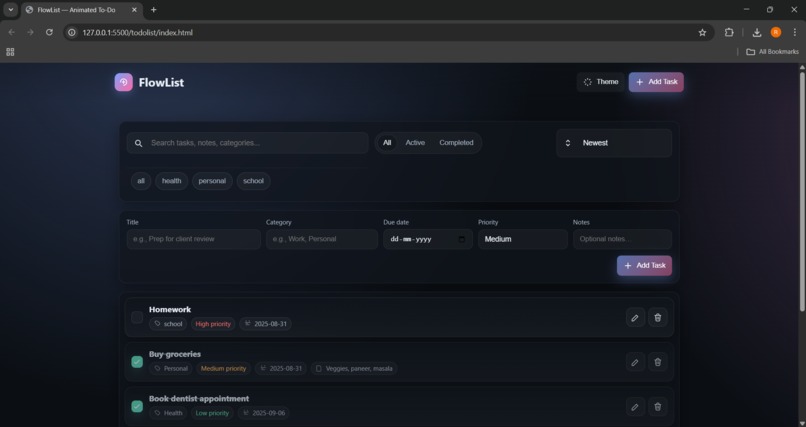
Flowlist (To-Do list)

Inspiration
The idea came from my daily struggle of keeping track of tasks during college. I often forgot small but important things, so I wanted to build a simple, lightweight, and customizable tool to stay organized without relying on complex apps.
What it does
The To-Do List app helps users add, edit, and delete tasks, mark them as complete, and store everything locally so tasks are saved even after refreshing the page. It’s clean, minimal, and designed to make productivity effortless.
How we built it
Designed the user interface with HTML & CSS for simplicity. Used JavaScript (or React if you built with it) to handle task management and dynamic updates. Implemented local storage so tasks persist across sessions. Organized the code into clear, reusable sections for scalability.
Challenges we ran into
Debugging issues with tasks not updating correctly in local storage. Maintaining a balance between adding features and keeping the app lightweight. Ensuring smooth UI/UX while learning better project structuring.
Accomplishments that we're proud of
Building a working productivity tool from scratch. Creating a clean and user-friendly interface. Learning how to make the app persist data locally, which was new for me.
What we learned
Strengthened skills in DOM manipulation / state handling. Learned how to manage persistent data with local storage. Improved project structuring and GitHub workflow.
What's next for To-Do list
Adding categories, deadlines, and reminders. Adding voice input support to quickly add tasks by speaking. Sending email or notification reminders for upcoming tasks.
Built With
- css3
- github
- htm
- javascript
- vscode

