-
-
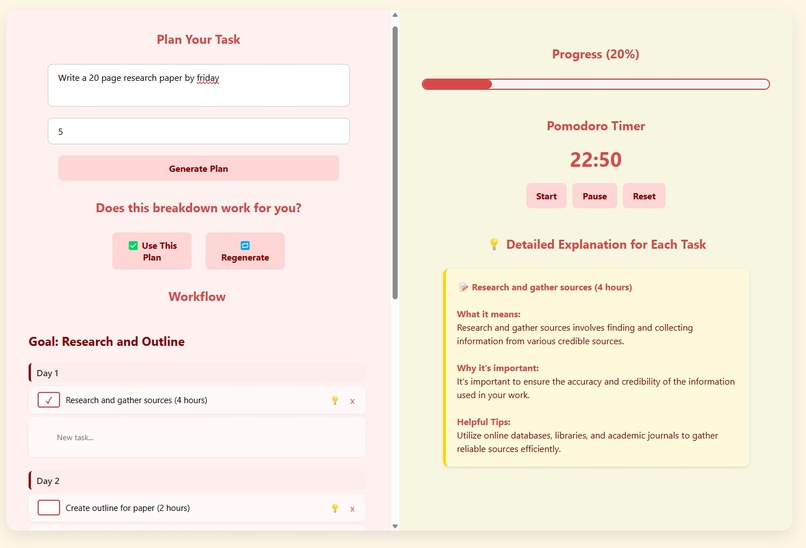
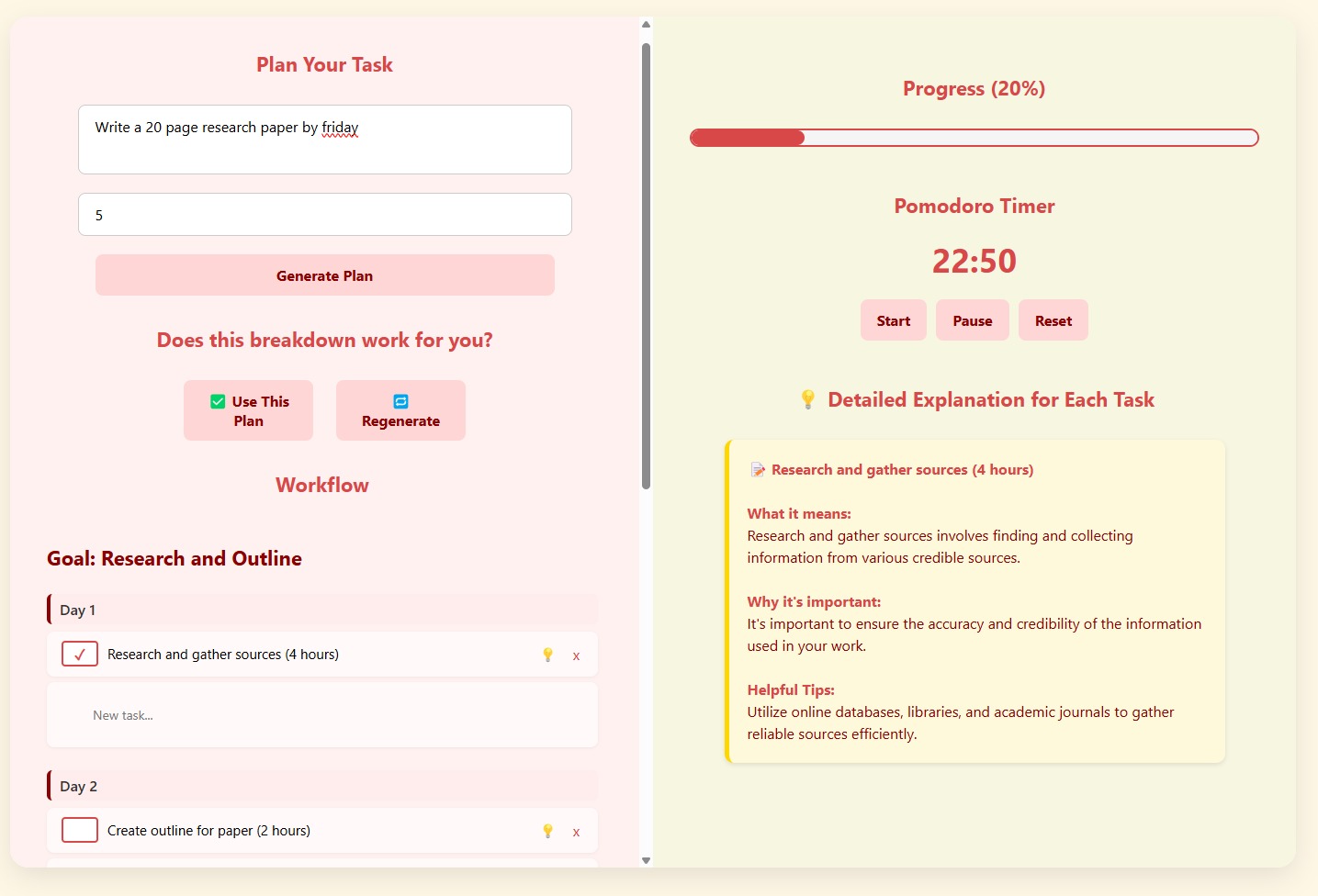
UI for our InFlow web app
Inspiration
We were inspired by the common feeling of overwhelm students face when trying to start big assignments. Many of us have stared at a blank screen, unsure how to begin or break down what we need to do. Traditional planners and productivity tools assume we already know how to plan, prioritize, and stay focused — but many students need support with that part too. We wanted to build something that bridges the gap between intention and execution: a tool that meets students where they are and guides them, one clear step at a time.
What it does
InFlow is an AI-powered productivity assistant that helps students:
- Generate a structured, multi-day to-do list from a single prompt
- Regenerate that plan if it doesn’t suit their needs
- Use a built-in Pomodoro timer to stay focused and avoid burnout
- Click a 💡 lightbulb button on each task for tips, tricks, and an explanation of why that step matters
- Track their progress visually, all within a calming dual-pane interface The result: students can go from “I don’t know where to start” to “I know exactly what to do next.”
How we built it
We built InFlow using:
- HTML, CSS, and JavaScript for a clean, responsive frontend
- OpenAI’s GPT model to generate task breakdowns and lightbulb tips
- Prompt engineering to tailor task generation and explanations
- A custom task parsing engine that adjusts task duration and urgency across multiple days
- Built-in Pomodoro timer and progress bar logic using vanilla JS
- Everything runs client-side for a seamless experience with no login or backend required.
Challenges we ran into
- Prompt tuning: it took time to get OpenAI to return task lists that felt human, structured, and relevant across different prompt types.
- Designing a plan regeneration system that doesn’t feel frustrating or repetitive
- Keeping the UI minimalist while packing in meaningful functionality — balancing flexibility with simplicity
- Aligning the visual layout to make the checklist, date headers, and timer feel cohesive and intuitive
Accomplishments that we're proud of
- We created a polished, functional prototype in under 24 hours — complete with real-time AI integration.
- The lightbulb feature is something we haven’t seen in other planning tools — it gives students not just structure, but insight.
What we learned
- Simplicity is powerful — the most helpful features are often the ones that feel invisible.
- Prompt design is an art. A small change in wording made the difference between a vague output and a clear, actionable task list.
- Not all students need the same structure — flexibility and regeneration make InFlow feel personal and empowering.
- A clean UI goes a long way in keeping users engaged and not overwhelmed.
What's next for InFlow
- User accounts and saved progress, so students can come back to their plans across devices
- Task difficulty sliders to adjust cognitive load (easy → deep work)
- More lightbulb types (motivation boosts, checklist templates, calming reminders)
- Voice input for accessibility
- A campus rollout model — partnering with wellness centers to distribute InFlow to students who need support managing their mental workload
Built With
- flask
- html
- javascript
- openai
- python
- vercel


Log in or sign up for Devpost to join the conversation.