Tloque Nahuaque: About the Project
Inspiration
The idea behind Tloque Nahuaque was born from a simple observation: small businesses that need the most data privacy have the fewest tools to achieve it.
Law offices handle privileged attorney–client files. Medical practices store PHI under HIPAA. Financial advisors manage portfolios governed by SOX and GDPR. Yet all of them default to the same handful of public SaaS products — Google Drive, Slack, shared spreadsheets — because the alternative (self-hosting) requires a dedicated sysadmin and a weekend of YAML wrangling.
We asked ourselves:
What if standing up a fully private, air-gapped cloud stack was as easy as running one command — and managing it was as easy as typing plain English to a desktop robot?
The name Tloque Nahuaque comes from Nahuatl and roughly translates to "Lord of the Near and the Nigh" — an omnipresent force. We wanted the platform to feel the same way: always there, always watching over your infrastructure, yet invisible until you need it.
How We Built It
Architecture at a Glance
The system follows a modular microservices architecture with four major layers:
┌─────────────────────────────────────────────────────┐
│                  Desktop Pet (Nahua)                 │
│              PyQt6 · Drag · Chat · Discord           │
├─────────────────────────────────────────────────────┤
│                  Management Dashboard                │
│           React + TypeScript · Vite · REST           │
├─────────────────────────────────────────────────────┤
│                 Orchestrator Engine                   │
│     FastAPI · NLP Agent · Inventory · Compliance     │
├─────────────────────────────────────────────────────┤
│                 Container Runtime                    │
│         Docker SDK · Isolated Network Mesh           │
└─────────────────────────────────────────────────────┘
Backend — Python / FastAPI
The orchestrator engine is a Python backend exposing a REST API via FastAPI. It wraps the Docker SDK to manage container lifecycle (deploy, start, stop, restart, pull), and organizes services through a declarative catalog.yml. Every container is deployed into an isolated Docker network mesh to enforce the principle of least privilege — services cannot talk to each other (or the outside world) unless explicitly configured.
Key modules include:
| Module | Role |
|---|---|
docker_client.py |
Container lifecycle, volume persistence, image pulls |
nlp_agent.py |
Conversational SysAdmin via local Ollama LLM |
inventory_manager.py |
SQLite-backed inventory with threshold-triggered task generation |
telemetry.py |
Real-time CPU, RAM, and disk metrics via psutil |
snapshot_manager.py |
Encrypted Docker volume backup and disaster recovery |
audit_logger.py |
Tamper-evident compliance logging for HIPAA / GDPR |
The Conversational SysAdmin — NLP Intent Mapping
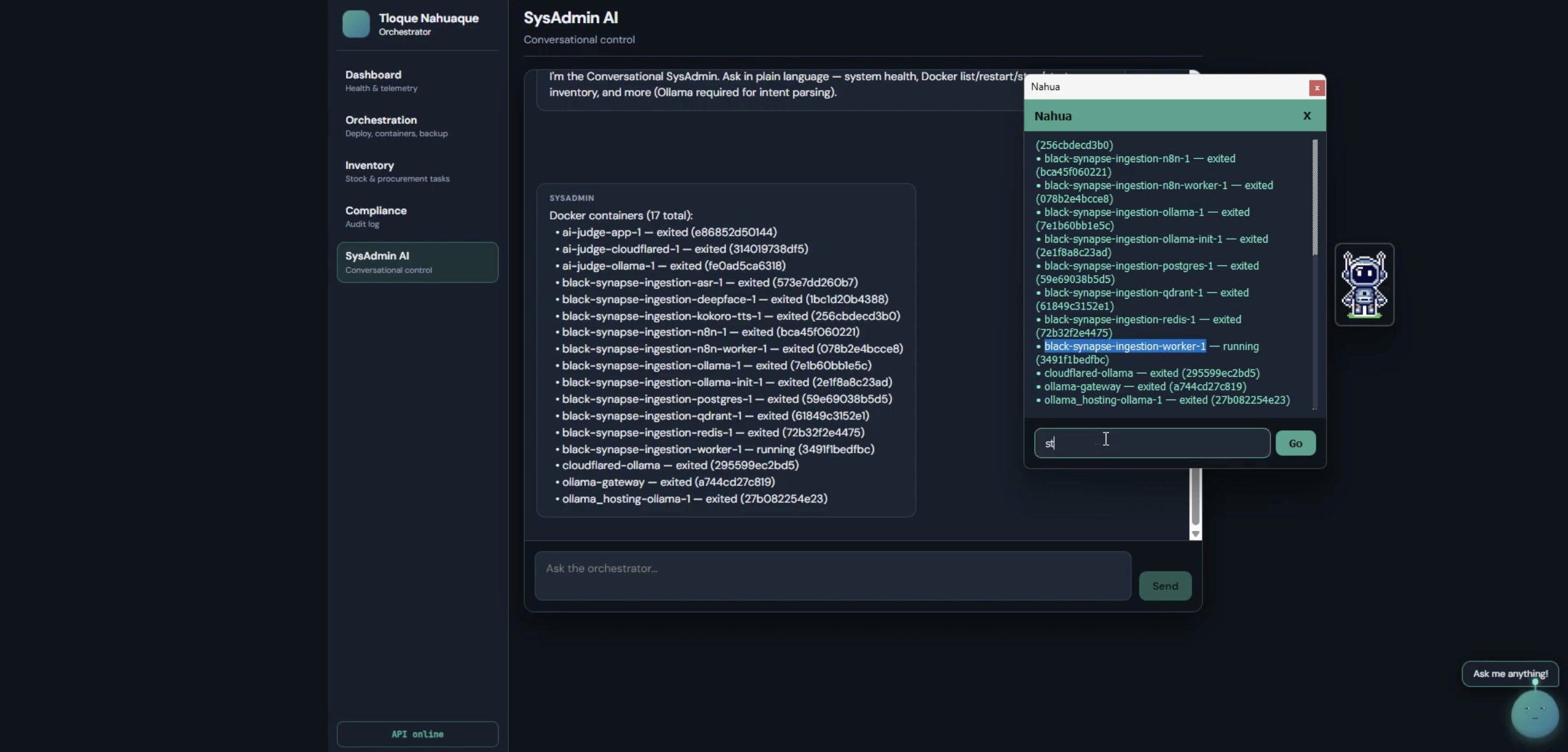
This is the heart of the project. Instead of requiring users to learn Docker CLI or navigate complex admin panels, we let them type commands in plain English:
"Restart Nextcloud and then check system health."
The NLP agent sends the user's message to a locally hosted Ollama model (e.g., qwen3.5) with a structured system prompt. The LLM returns a JSON intent (or an ordered list of intents for multi-step commands), which the agent maps to concrete backend actions.
Formally, the pipeline can be described as:
$$ f: \mathcal{L} \xrightarrow{\text{LLM}} \mathcal{I}^{k} \xrightarrow{\text{dispatch}} \mathcal{A}^{k} $$
where $\mathcal{L}$ is the space of natural-language inputs, $\mathcal{I}$ is the discrete intent space (e.g., list_containers, restart_service, check_health, …), and $\mathcal{A}$ is the action-result space. The superscript $k \leq 10$ allows multi-intent chaining — a single user message can trigger up to 10 sequential orchestrator actions.
The supported intent vocabulary currently covers:
$$ \mathcal{I} = {\texttt{list_containers},\; \texttt{restart_service},\; \texttt{stop_service},\; \texttt{start_service},\; \texttt{pull_image},\; \texttt{check_health},\; \texttt{consume_inventory},\; \texttt{unknown}} $$
Smart Inventory & Automated Procurement
The inventory system uses an SQLite database with threshold-based alerting. When stock for any item $i$ drops below its defined threshold $\tau_i$:
$$ q_i < \tau_i \implies \text{Task}_{\texttt{restock}}(i) \text{ is auto-generated} $$
This means the system doesn't just track what you have — it tells you what to buy before you run out.
Desktop Pet — Nahua
Nahua is a PyQt6 native application that renders as a frameless, always-on-top, translucent widget. It floats over your entire desktop (not trapped in a browser) and provides:
- Drag anywhere — mouse event tracking with
mousePressEvent/mouseMoveEvent - Click to chat — opens a chat window connected to the orchestrator's
/api/chatendpoint - Idle personality — random chatter every ~25 seconds from a curated line pool
- Bounce animation — subtle vertical oscillation via a
QTimerloop - Discord notifications — a background
discord.pyclient listens for DMs and @mentions and surfaces them as purple speech bubbles
Frontend — React + TypeScript + Vite
A responsive management dashboard with dedicated pages for:
- System Health — live CPU / RAM / disk telemetry
- Orchestration — deploy, view, and control container stacks
- Inventory — add items, consume stock, view auto-generated procurement tasks
- Compliance — browse tamper-evident audit logs
- SysAdmin Chat — talk to the NLP agent from the browser
One-Command Startup
Everything — backend, frontend, and desktop pet — launches from a single script (start.sh / start.bat) and tears down cleanly with stop.sh / stop.bat. No Docker Compose files to edit, no environment variables to hunt down.
Challenges We Faced
1. Getting the LLM to Return Structured JSON Reliably
Local LLMs (especially smaller quantized models) are notoriously inconsistent with output formatting. Our NLP agent needs perfectly valid JSON every time — no markdown fences, no preamble, no trailing commentary. We iterated heavily on the system prompt, adding explicit negative examples ("Do not include markdown code blocks") and post-processing with regex to strip <think>...</think> tags that some reasoning models emit. Even so, we had to wrap parsing in a try/except to gracefully degrade:
$$ P(\text{valid JSON} \mid \text{prompt}) < 1 \implies \text{fallback intent} = \texttt{parse_error} $$
2. Cross-Thread Communication in PyQt6
The desktop pet runs on the Qt main thread, but both the Discord listener and the chat API calls run in background Python threads. Qt widgets cannot be mutated from non-main threads. We solved this by creating a pyqtSignal bridge — background threads emit signals, which Qt dispatches to the main thread's event loop:
Background Thread → pyqtSignal.emit() → Qt Event Loop → UI Update
3. Docker Daemon Availability
Not every user has Docker running at all times. The DockerClientManager gracefully initializes with client = None when the daemon is unreachable, and every method checks if not self.client before attempting SDK calls. This prevents hard crashes and provides human-readable error messages instead.
4. Multi-Intent Parsing
Supporting multi-intent commands (e.g., "List my containers, then restart Nextcloud, then check health") introduced ordering and safety concerns. We cap at $k = 10$ intents per message and execute them sequentially, collecting results per step. This required careful prompt engineering to teach the LLM the difference between single-intent and multi-intent JSON schemas.
5. Cross-Platform Startup
Making one-command startup work across macOS, Windows, and Linux required separate shell scripts (start.sh, start.bat) with platform-specific process management, virtual environment activation, and background process handling.
What We Learned
- Local LLMs are powerful but unpredictable. Prompt engineering for structured output is an art — and a
try/exceptis not optional. - Desktop-native feels different from web-native. Nahua being a real desktop widget (not a browser tab) makes it feel like a companion, not an app. PyQt6 made this possible but demanded careful thread safety.
- Privacy is a feature, not a constraint. Running everything locally isn't a limitation — it's the product. Zero data leaves the network.
- Small businesses need less UI, not more. The conversational interface eliminates the need to learn admin dashboards. If you can describe what you want, the system does it.
Built With
| Layer | Technologies |
|---|---|
| Backend | Python 3.10+, FastAPI, Docker SDK, SQLite, psutil |
| AI / NLP | Ollama (local LLM), qwen3.5, structured prompt engineering |
| Frontend | React, TypeScript, Vite |
| Desktop Pet | PyQt6, discord.py, asyncio |
| Infrastructure | Docker Engine, Docker Compose V2, isolated network mesh |
| Platforms | macOS, Windows, Linux |


Log in or sign up for Devpost to join the conversation.