-
-
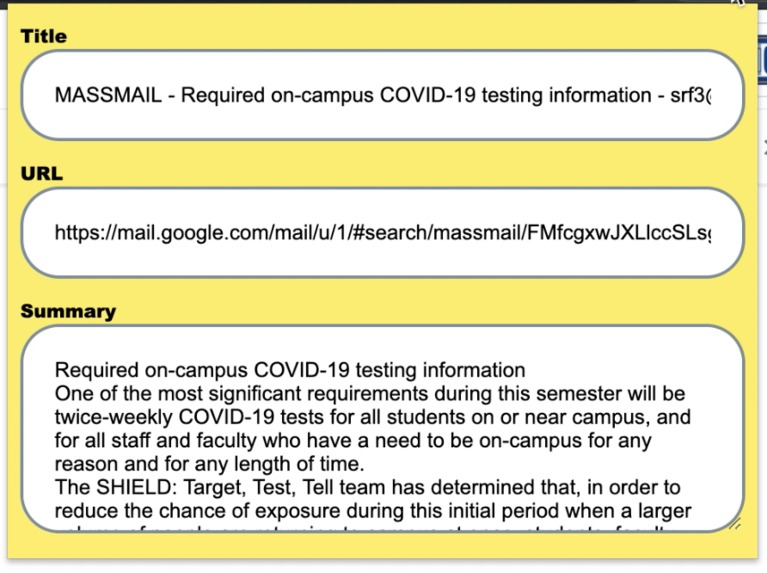
Extension in action

Inspiration
There is a lot of extremely important information being communicated to us via the internet these days, especially with school being primarily online. The long Massmails, syllabi, and Piazza posts that we receive have extremely important content, however, they are so lengthy and, at times, confusing that it can be hard to find exactly what the key information is that we need to know. This is where the inspiration for the TLDR (Too Long; Didn't Read) Chrome extension came from.
What it does
TLDR that finds the main points from any text the user highlights and gives the user a concise gist of the email containing only the information you need to know!
How I built it
TLDR was built using Javascript, HTML/CSS, Firebase, and the DeepAI API. TLDR first sends the highlighted text off to a Firebase server which then routes the data through the DeepAI API. After DeepAI organizes the summary it sends it back through Firebase and into the browser.
Challenges I ran into
We originally thought that we would be able to simply make the DeepAI API call from the Chrome extension without using a Firebase server. However, we found out that the API was doing some things that Chrome did not allow so we ended up having to call the API through the Firebase function we wrote.
Accomplishments that I'm proud of
We are extremely proud that this extension is so easy to use and can provide value in so many different contexts.
What I learned
Using Firebase was not originally in the plan and no one on our team had any extensive prior knowledge of how to use it. However, we learned a lot about how useful this tool can be for acting as a middle man between the frontend and backend.
What's next for TLDR Chrome Extension
We hope to expand TLDR to be able to route the summaries into a Google Doc so that users can easily store important information they've selected in one place. We hope to also get the extension on the Chrome store as well so that anyone can use it!


Log in or sign up for Devpost to join the conversation.