-
-
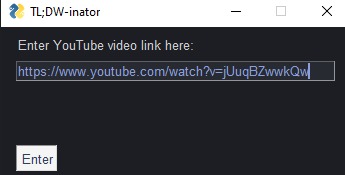
Minimalistic Primary GUI
-
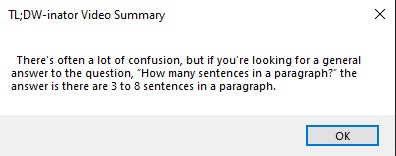
Summary GUI
-

Logo


🧪The TLDW-inator (Too Long; Didn't Watch)
"Perry the Platypus, behold my new evil scheme, the TLDW-inator!" \ Tired of watching long videos just to grasp a concept? Or maybe you aren't that much of a visual learner, here's an awesome tool that you can use for free. Read on to learn more.
🤓 Detailed explanation for nerds
The TLDW-inator is a light weight Desktop app for students or researchers to understand the content of a video in a few words.
>How is this done?
All you have to do is enter a YouTube video link whose content you want to understand. Now simply wait for a few minutes as the program understands the audio in the file using the Deepgram API and then shortens it using the NLTK Package. Hence, using Deepgrams advanced AI speech recognition and NLTKs data summarization model the whole video is summarized in a few sentences or words.
>Limitations
- Videos that are too small can't be summarized, because of the API rnot catching those words (latency).
- Local files arent supported, this feature will be added ASAP, couldn't be added due to the time limitation.
- Cannot be used as a Binary (Due to the Hackathon being held for less than 24 hours, I didn't have the time to build a binary, but it's on the roadmap.)
>Other Technical Details
- Programming Language used: Python 3.9
- GUI designing and programming done using PySimpleGUI and PyAutoGUI
- Audio Speech Recognition done using Deepgram Python SDK
- Natural Language Processing and Text Summarization done using NLTK and Pysummarization
- Source code and Docs Hosted on GitHub
⚙️Installation and Usage
>Steps for installation and usage:
- Install the Source Code from the Official GitHub page
- Enter the API keys in the
db.txtfile from the deepgram website. - The GUI will now appear, enter the YouTube link .
- Wait for sometime (a few seconds approximately) and your video transcript plus video summary will be ready.
>Links to get the API keys:
>What to do with the API key
Step 1. Make a .txt file called db.txt in the same location as the App (binary or script file) \
Step 2. Enter the key in the first line in the text file and close it \
Step 3. You're good to go!!
>Installation video
YouTube video on how to work with the app \ YouTube video on how to set API keys
Drawbacks
Here are a few drawbacks related to the project:
- Binaries aren't available (due to the time limit for the hackathon, it is on the roadmap though)
- Grammar, the summary doesnt have the best grammar, because of innacurate text extraction.
❤️ Contributing
Pull requests are welcome. For major changes, please open an issue first to discuss what you would like to change.
Please make sure to update tests as appropriate.
License
Built With
- api
- asr
- deepgram
- natural-language-processing
- nltk
- python

Log in or sign up for Devpost to join the conversation.