-
-
Robot
Inspiration
Affordable robots often operate with strict limits on processing power, memory, energy and connectivity.
A computer-vision model that performs well on a workstation may react too slowly or consume too many resources when moved onto an edge device. In robotics, this is more than a technical inconvenience: delayed perception can produce delayed actions.
We wanted to explore a practical question:
How can developers move a robot-perception workflow from a large development environment to an efficient, explainable and reproducible Arm64 edge deployment?
TinyNav-Arm was created as a learning-focused Physical AI reference project. It demonstrates the complete loop:
Sense → perceive → estimate risk → decide → act.
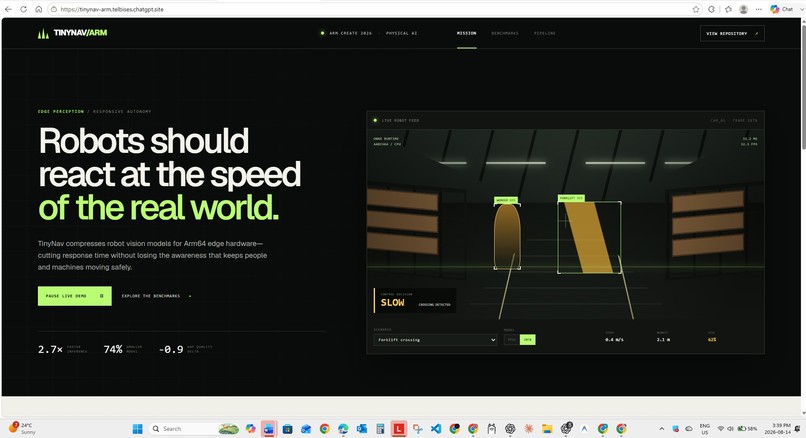
Instead of building another object-detection demonstration, TinyNav-Arm connects perception output to understandable control decisions such as GO, SLOW, TURN_LEFT, TURN_RIGHT and STOP.
What it does
TinyNav-Arm is an open-source robot-perception and control toolkit containing five connected components.
- Warehouse sensor simulator
The application includes deterministic simulated warehouse scenarios:
Clear aisle Forklift crossing Blocked path
Each scenario produces simulated camera data and structured detections containing:
Object label Confidence score Bounding box Estimated distance
This allows developers to learn and test the control pipeline without purchasing specialized robotics hardware.
- Explainable safety controller
TinyNav-Arm converts perception results into deterministic navigation decisions:
GO SLOW TURN_LEFT TURN_RIGHT STOP
The controller considers:
Detection confidence Distance from the robot Object position inside the camera frame Configurable stop and caution zones
Every decision includes a reason, risk score, target speed and nearest-object distance.
- ONNX Runtime integration
The project includes an optional ONNX Runtime inference adapter configured for CPU execution.
It supports:
ONNX model loading Input preprocessing CPU-only inference Graph optimization Explicit thread configuration Memory-pattern reuse CPU memory arenas Per-inference latency measurement
Developers can connect their own appropriately licensed detector and adapt the model-specific output decoder.
- Quantization and benchmarking tools
TinyNav-Arm includes command-line tools for:
Converting ONNX model weights to INT8 Comparing FP32 and INT8 artifacts Running benchmark warmups Measuring median latency Measuring p95 and p99 latency Calculating frames per second Recording target architecture and runtime information Producing machine-readable JSON evidence
The benchmark tool records the actual hardware architecture so that visualization data cannot accidentally be presented as measured Arm64 results.
- Interactive dashboard
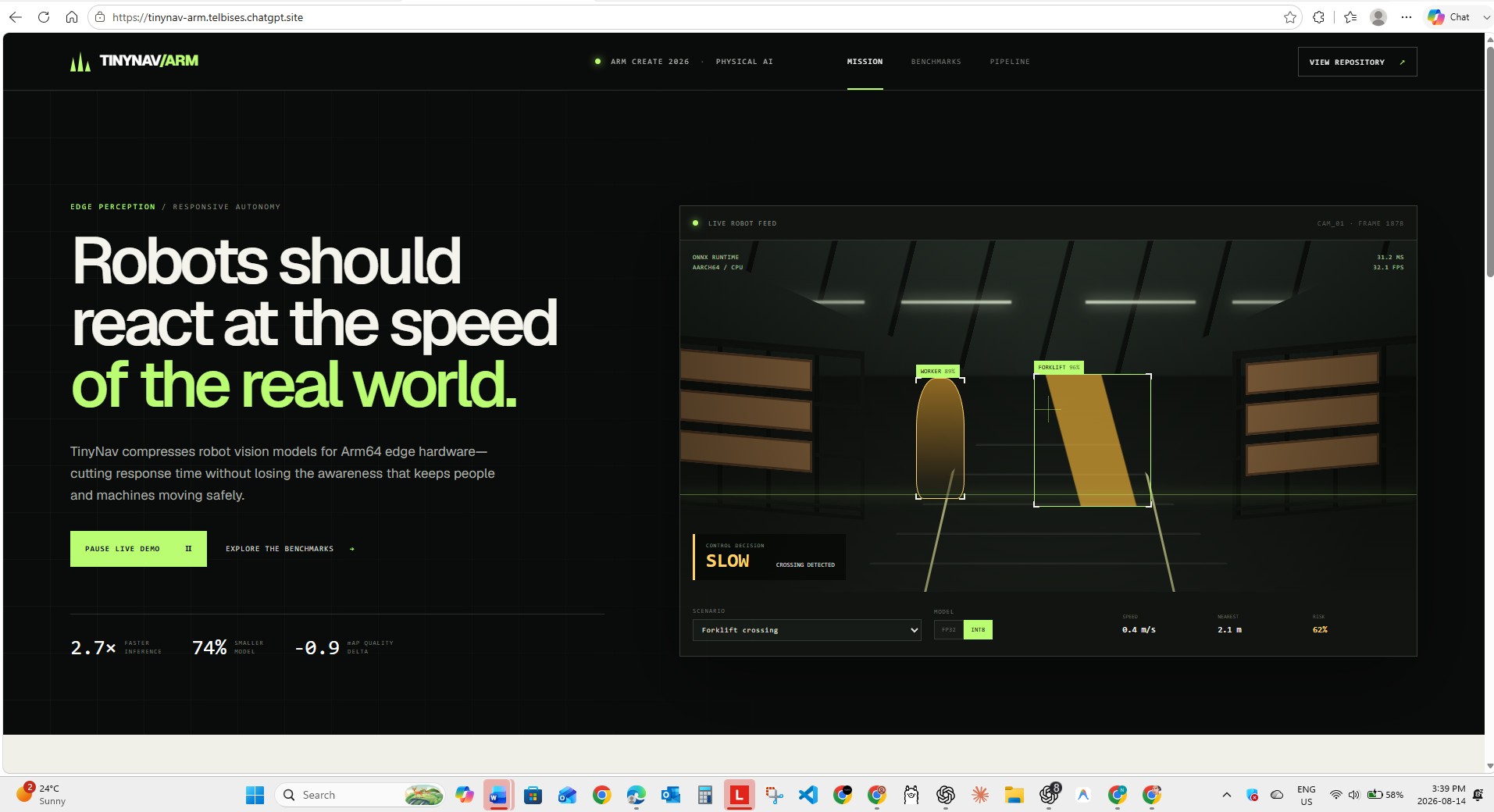
The web application visualizes the entire Physical AI workflow.
Users can:
Switch between warehouse scenarios Observe simulated object detections See the robot’s control decision Pause and restart the simulation Compare FP32 and INT8 modes Explore the optimization workflow Review benchmark categories Understand the deployment pipeline
The dashboard helps explain the project quickly to learners, robotics developers and hackathon judges.
How we built it
TinyNav-Arm combines a Python Physical AI backend with an interactive TypeScript dashboard.
Physical AI and backend Python 3.10+ FastAPI Uvicorn NumPy ONNX Runtime ONNX Runtime quantization OpenCV-compatible preprocessing Pytest Frontend React 19 TypeScript Next.js Vinext Tailwind CSS Responsive CSS animations Infrastructure and developer experience Docker Docker Compose GitHub Actions Arm64 Linux CI runner MIT open-source license Machine-readable benchmark artifacts
The architecture separates perception, risk estimation and control.
Camera or simulator ↓ Object detections ↓ Distance and risk estimator ↓ GO / SLOW / TURN / STOP ↓ Benchmark and evidence report
This separation makes the project easier to understand and allows developers to replace the detector without rewriting the navigation policy.
How TinyNav-Arm uses Arm
TinyNav-Arm treats Arm64 as a reproducible deployment target rather than simply adding an Arm label to the project.
The repository includes:
An Arm64 GitHub Actions workflow using an Arm Linux runner CPU-oriented ONNX Runtime configuration Explicit inference-thread controls Graph-optimization settings INT8 model-weight quantization Architecture-aware benchmark reports Setup guidance for Raspberry Pi and other AArch64 systems A repeatable FP32-versus-INT8 validation workflow
The intended workflow is:
Start with an FP32 ONNX detector. Establish a baseline. Generate an INT8 artifact. Run both models on the same Arm64 target. Compare size, latency, throughput, memory and model quality. Accept the optimized model only if it meets the selected accuracy threshold. Functionality and output
TinyNav-Arm produces several reusable outputs:
Robot-control output { "action": "SLOW", "speed_mps": 0.4, "risk_score": 65, "reason": "forklift in caution zone", "nearest_distance_m": 2.1 } Optimized-model output detector-int8.onnx Benchmark output results/benchmark.json
The report contains:
Number of benchmark iterations Median inference latency p95 latency p99 latency Frames per second CPU architecture Processor information Python version Model identifier Interactive output
The dashboard presents:
Robot-camera visualization Detected objects Control decisions Risk information Optimization pipeline Model comparison Deployment artifacts Challenges we ran into Separating visualization from evidence
The dashboard needs representative values to explain the optimization concept, but competition performance claims should only come from a named Arm64 target.
We addressed this by:
Labelling dashboard numbers as representative prototype data Creating a separate measured benchmark command Recording the real execution architecture Generating machine-readable JSON results Avoiding unsupported performance claims Supporting different object detectors
Different ONNX detectors have different input sizes, output tensors and post-processing requirements.
Rather than silently assuming one model family, TinyNav-Arm provides:
A generic ONNX session wrapper Standard preprocessing Raw model outputs An explicit location for model-specific decoding
This makes the limitation visible and keeps the core project reusable.
Testing without specialized robotics hardware
We wanted the project to remain accessible to developers who do not own a robot or Raspberry Pi.
The deterministic warehouse simulator makes the perception-to-control workflow testable on an ordinary computer. The same controller can later be connected to a real detector and educational robot.
Designing a safe boundary
TinyNav-Arm is a learning tool—not certified industrial safety software.
We deliberately:
Keep control decisions deterministic Document every decision reason Avoid autonomous real-world machinery deployment Recommend simulation or controlled educational hardware Include clear safety disclosures Accomplishments that we’re proud of Built a complete sense-decide-act Physical AI loop Created explainable robot-control decisions Designed three understandable warehouse scenarios Added a reusable ONNX inference adapter Added INT8 quantization tooling Added repeatable latency benchmarking Added an Arm64 continuous-integration workflow Created a polished interactive visualization Separated representative numbers from measured evidence Released the project under the MIT license Made the project usable without specialized hardware What we learned
We learned that Physical AI optimization is not only about reducing model size.
End-to-end robot responsiveness depends on:
Image preprocessing Inference runtime Graph optimization Model precision Thread configuration Memory behavior Post-processing Risk estimation Control latency
We also learned that average latency alone is not sufficient.
For a physical system, an occasional slow response can matter more than the average response. That is why TinyNav-Arm measures median, p95 and p99 latency.
Another important lesson was that model compression must be evaluated alongside model quality. A smaller model is not automatically better if it loses the detections required for safe navigation.
What’s next for TinyNav-Arm
The next development milestones are:
Integrate a permissively licensed lightweight object detector. Add the model license, source, checksum and attribution. Implement static INT8 quantization using representative calibration frames. Measure detection quality before and after quantization. Benchmark the pipeline on Raspberry Pi 5. Measure peak memory and power consumption. Add ROS 2 publisher and subscriber adapters. Connect TinyNav-Arm to a low-risk educational rover. Add recorded camera and lidar scenarios. Create a model-selection tool that recommends the best artifact for a target latency and accuracy threshold. Setup instructions Requirements Python 3.10 or newer Node.js 22 or newer Git An Arm64 device or environment for final Arm validation Clone the repository git clone [INSERT PUBLIC GITHUB REPOSITORY URL] cd tinynav-arm Create the Python environment python -m venv .venv
Activate it on Linux or macOS:
source .venv/bin/activate
Activate it on Windows:
.venv\Scripts\activate Install the simulation and development dependencies pip install -e ".[dev]" Run the automated tests pytest -q Run the warehouse simulation python tools/run_demo.py --scenario forklift
Available scenarios:
clear forklift blocked Start the API uvicorn tinynav.api:app --host 0.0.0.0 --port 8000
Open:
Call:
GET /api/frame/forklift
Expected action:
SLOW
Call:
GET /api/frame/blocked
Expected action:
STOP Run a measured CPU benchmark python tools/benchmark.py \ --iterations 200 \ --output results/benchmark.json Install ONNX dependencies pip install -e ".[onnx]" Quantize an ONNX model python tools/quantize.py \ --model models/detector-fp32.onnx \ --output models/detector-int8.onnx Benchmark a real ONNX model python tools/benchmark.py \ --model models/detector-int8.onnx \ --iterations 500 \ --output results/int8-arm64.json Run the dashboard cd dashboard npm install npm run dev
Open the local address displayed by the development server.
Testing instructions for judges
The fastest validation path is:
pip install -e ".[dev]" pytest -q python tools/run_demo.py --scenario forklift --frames 5
Judges should observe SLOW decisions for the forklift scenario.
Then run:
python tools/run_demo.py --scenario blocked --frames 5
Judges should observe STOP decisions for the blocked-path scenario.
The API can be validated with:
uvicorn tinynav.api:app --host 0.0.0.0 --port 8000
Then visit:
The interactive frontend is available at:
https://tinynav-arm.telbises.chatgpt.site
Built with
Select or enter the following technologies on Devpost:
Arm64 Physical AI Robotics Python FastAPI ONNX ONNX Runtime INT8 quantization NumPy React TypeScript Next.js Docker GitHub Actions Edge AI Computer vision Machine learning Project category
Choose:
Physical AI
Suggested secondary categories, if Devpost allows them:
Machine Learning/AI Robotics Open Source Developer Tools Edge Computing Project status
TinyNav-Arm currently provides:
A working deterministic warehouse simulation A working safety-decision controller A working API ONNX inference and quantization adapters Benchmark-generation tooling Automated tests Arm64 CI configuration An interactive web visualization
The dashboard’s FP32 and INT8 comparison values are representative prototype data. They should not be described as measured Raspberry Pi or Arm64 results unless they are replaced with results collected from a named Arm device.
Safety and accuracy disclosure
TinyNav-Arm is an educational and hackathon reference implementation. It is not certified robot-safety software and should not directly control industrial machinery or operate around people without appropriate engineering review, controlled testing and certified safety systems.
The simulator uses structured, deterministic detections. Real deployments require a validated perception model, calibrated distance estimation, failure handling, emergency-stop systems and target-specific testing.
Short project description
TinyNav-Arm is an open-source Physical AI reference toolkit for optimizing robot perception on Arm64 edge systems. It combines a warehouse sensor simulator, explainable navigation controller, ONNX Runtime inference adapter, INT8 quantization tools, reproducible benchmarks, Arm64 CI and an interactive dashboard. The system converts detections into GO, SLOW, TURN or STOP actions while clearly separating representative visualization data from measured hardware results.
Why TinyNav-Arm should win
TinyNav-Arm makes Physical AI optimization accessible, measurable and reusable.
It is more than a robot visualization. It provides a complete developer workflow:
Simulate → perceive → decide → optimize → benchmark → validate on Arm.
The project combines technical implementation with an approachable experience. Developers without specialized hardware can understand the control loop, while developers with an Arm64 target can attach an ONNX model and produce reproducible benchmark evidence.
Most importantly, TinyNav-Arm treats performance claims responsibly. It separates illustrative dashboard values from measured results, records the execution architecture and encourages developers to evaluate speed, memory and model quality together.
This combination of Physical AI, Arm64 developer tooling, explainable control decisions and honest benchmarking makes TinyNav-Arm a useful foundation for robotics learning and future edge deployments.
Try out the app https://vercel.com/lightllms-projects/tinynav-arm/deployments

Log in or sign up for Devpost to join the conversation.