-
-
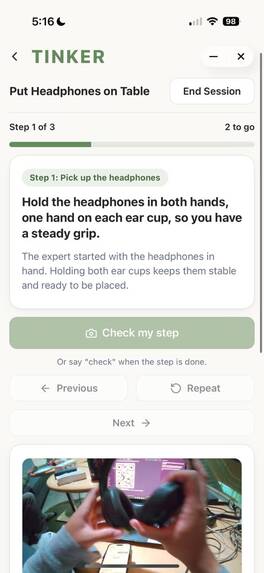
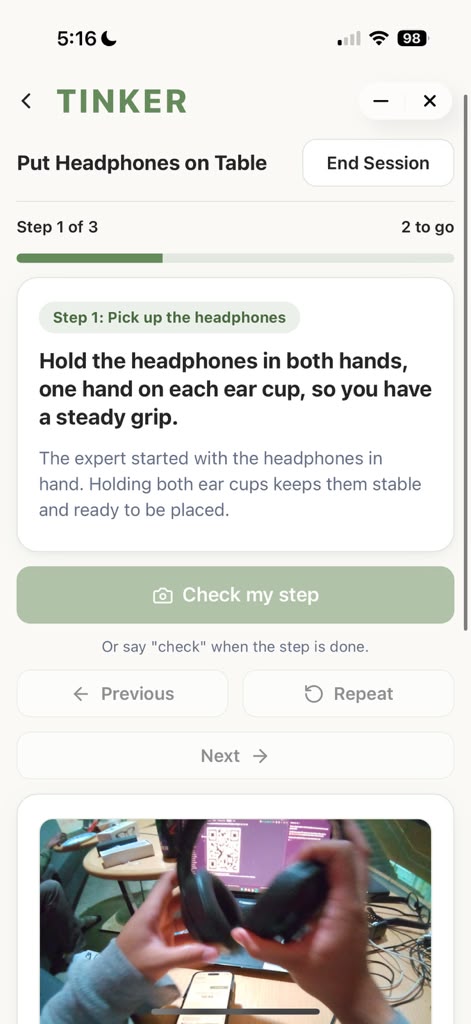
First step within the learning mode with instructions and reference images. As well as, voice commands can check individual steps.
-
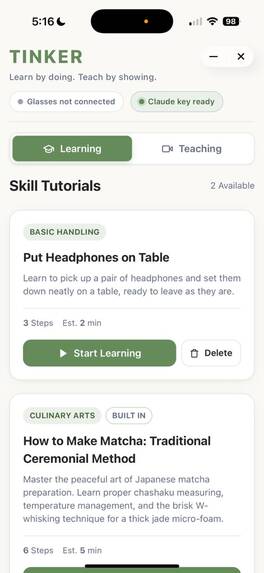
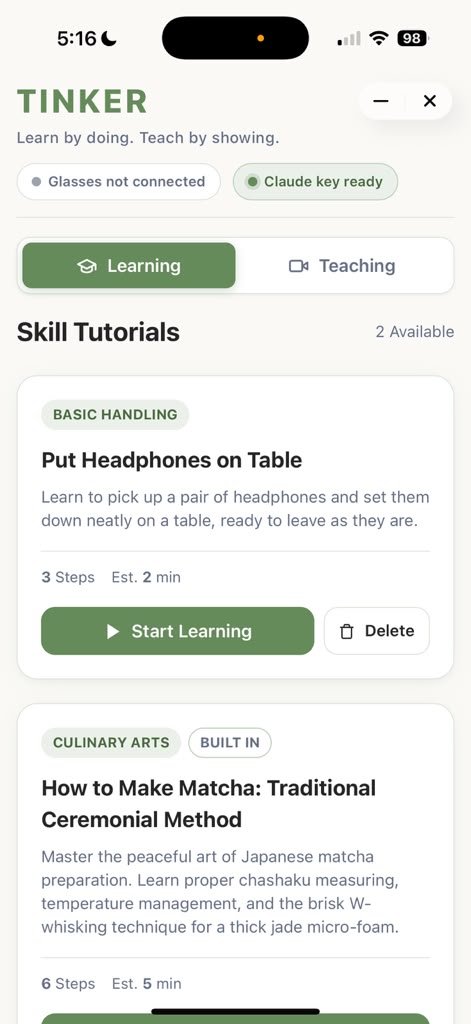
The "Learning Mode" section where various skills are saved and anyone can access them.
-
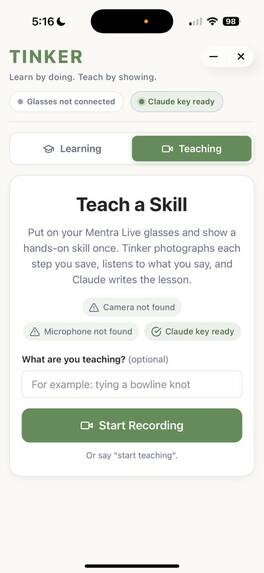
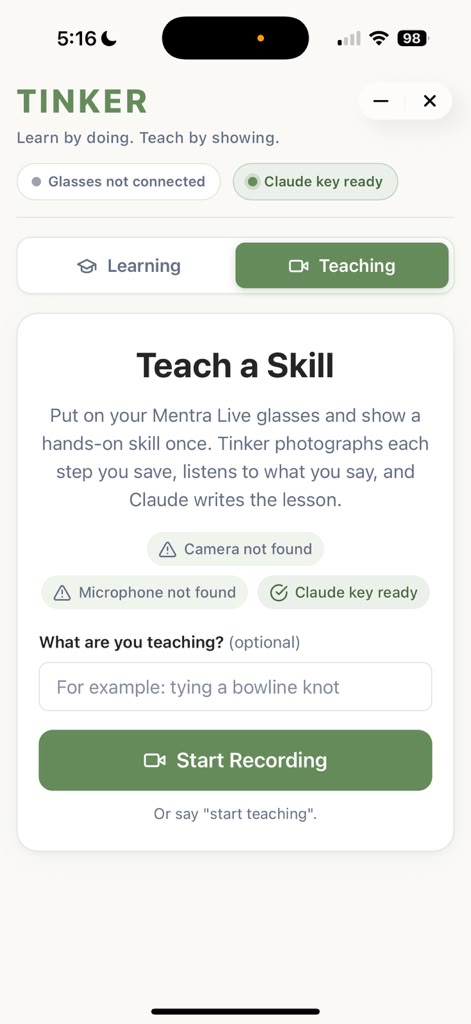
The "Teaching Mode" section where anyone can begin recording a lesson or use voice commands to start.
-
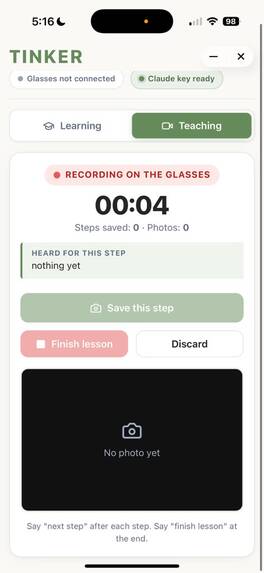
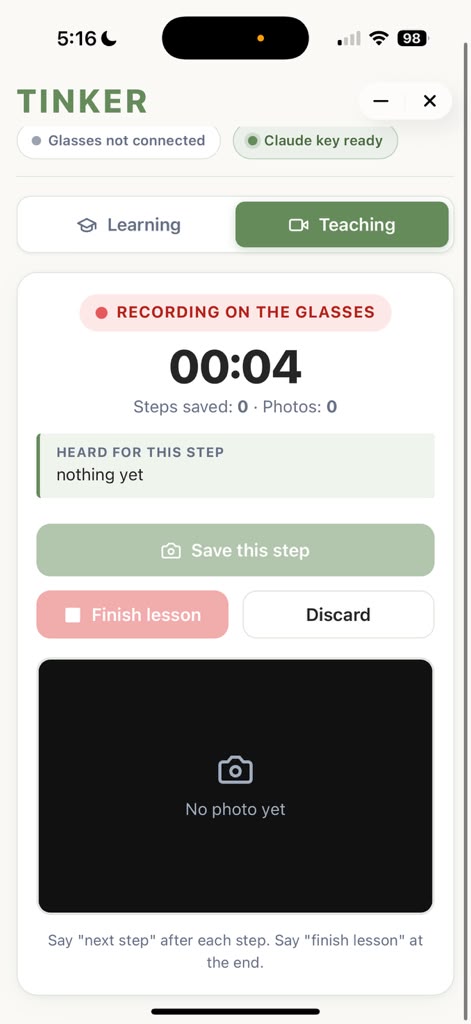
Recording a lesson, either can use voice commands to record images and steps. As well as using the app itself to record individual steps.
-
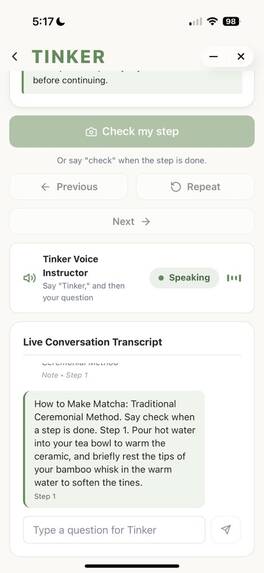
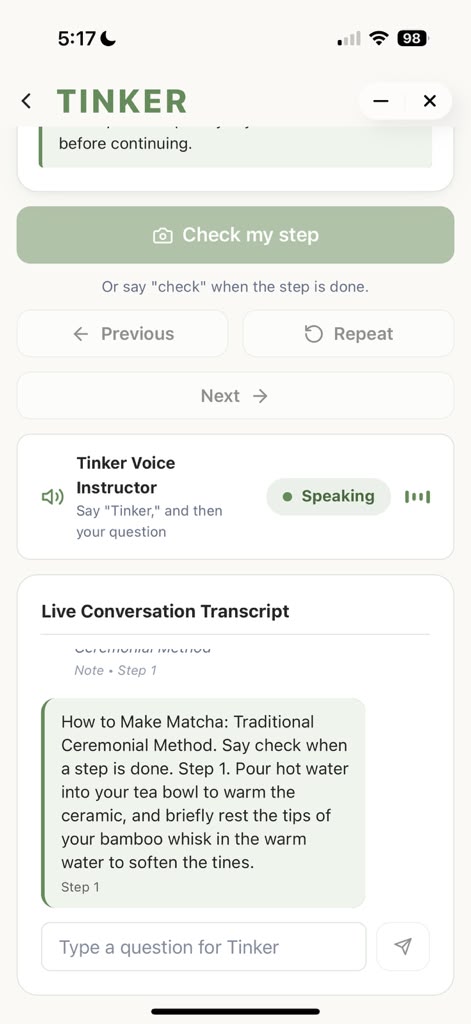
Provided live conversation transcript when the Tinker is talking to the learner.
-
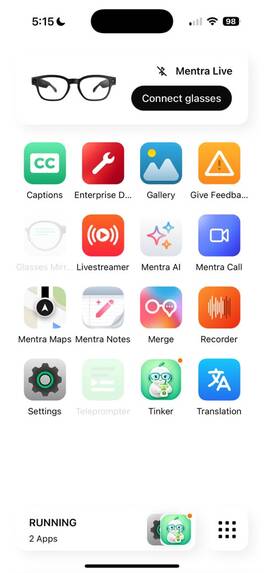
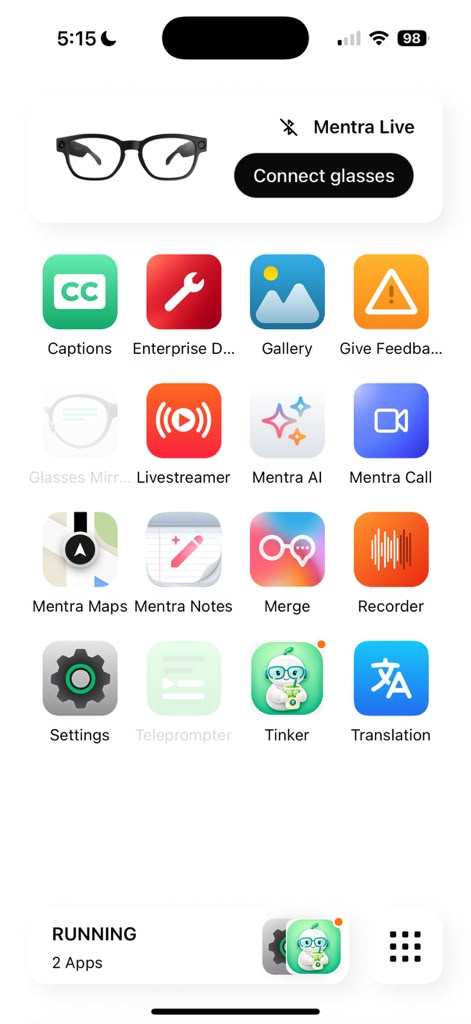
Mentra App including the Tinker Application at the bottom row.
-
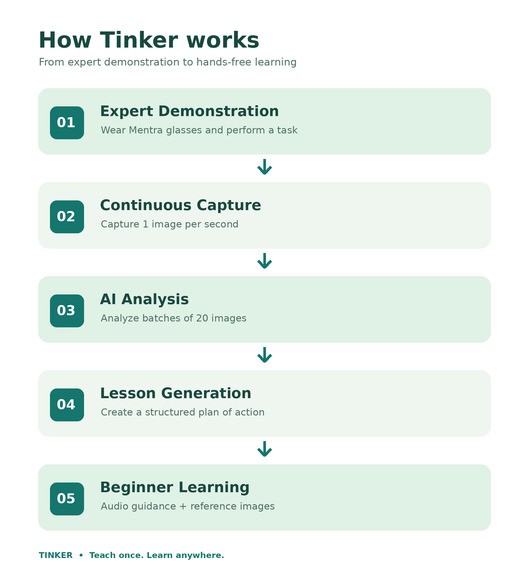
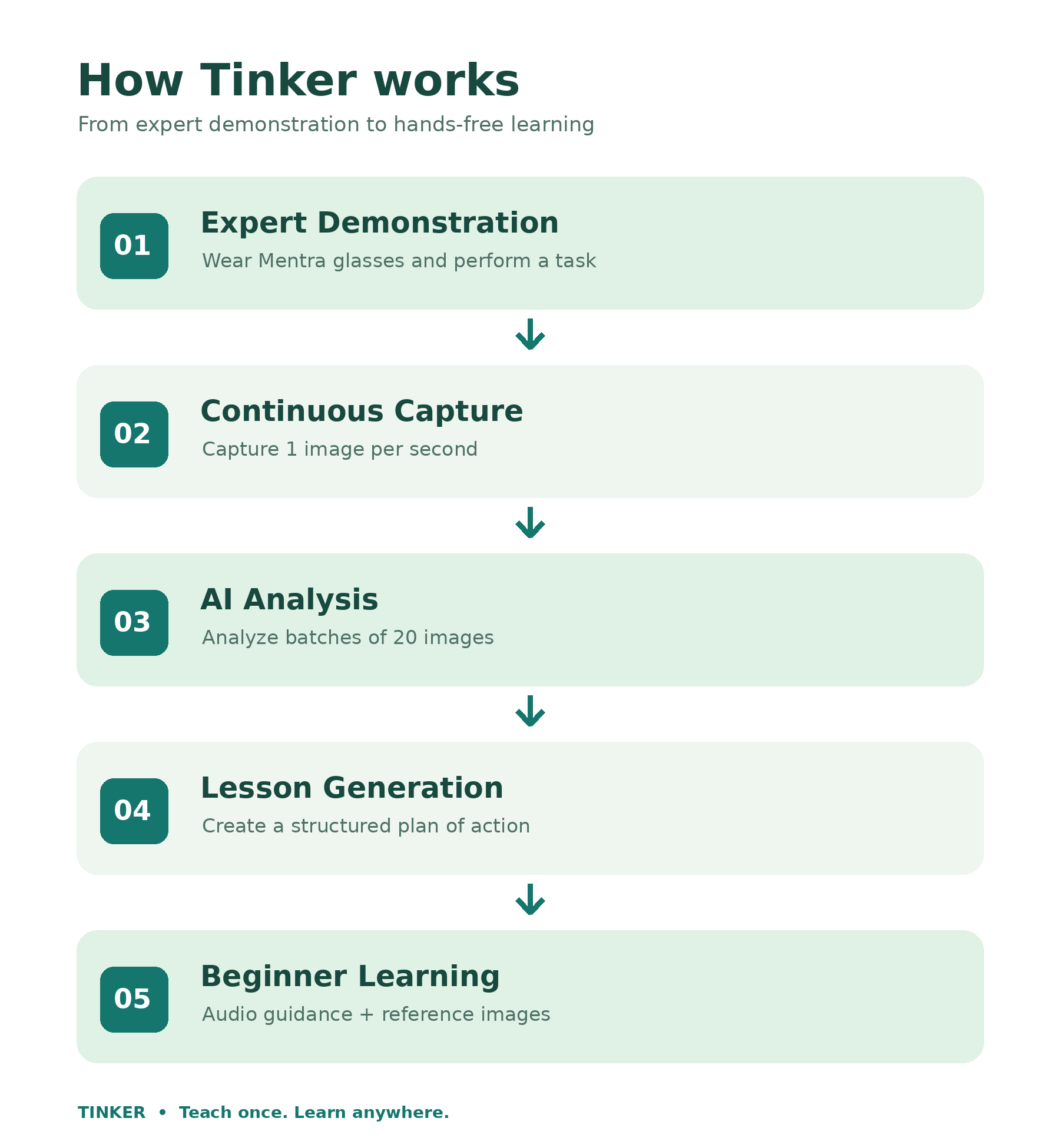
Diagram of the system architecture about how Tinker works from the beginning to the end.
Inspiration
There are thousands of ways to learn something online. But who helps you when it's your turn to actually do it?
For our team, that question started with something we all love: matcha. 🍵
Matcha is more than just our favorite drink. It's something that brings our team together, and we were fascinated by the creativity and craftsmanship involved in preparing it.
One of our teammates, Dinara, first learned how to prepare and whisk matcha through TikTok tutorials. Another one of our teammates, Chawin, watched multiple YouTube videos on how to craft the perfect matcha latte. But with countless videos demonstrating different techniques, water temperatures, measurements, and whisking methods, something that seemed simple quickly became overwhelming. After experimenting and practicing, she even organized a matcha pop-up during the summer, turning something she'd learned online into a real hands-on experience.
That experience revealed a problem much bigger than making a drink: Watching someone demonstrate a skill isn't the same as knowing how to perform it yourself. Matcha also carries a rich cultural history. Rooted in Japanese tea traditions, its preparation is an art form that involves patience, precision, and craftsmanship.
This made us think about the countless skills and traditions passed down through generations, from family recipes to traditional crafts and specialized techniques.
What if technology could help people learn these skills while preserving the knowledge and cultural stories behind them?
That inspired Tinker, our friendly AI companion on the Mentra Live, which represents curiosity, experimentation, and learning through practice.
We started with matcha because it's something we all love. But Tinker is about something bigger: making human knowledge easier to learn, share, and pass between generations.
What it does
Tinker is an AI-powered, hands-on learning platform that transforms real-world demonstrations into interactive lessons through the Mentra Live smart glasses.
Instead of requiring people to watch tutorials repeatedly or create training materials manually, Tinker connects two groups: experts who share their knowledge and beginners who want to learn.
Our platform has two connected experiences.
1. Teach Mode — Demonstrate once, teach many
An expert puts on the Mentra Live smart glasses and performs a task naturally while explaining what they're doing.
For our first demonstration, that task is preparing matcha.
As the expert works, Tinker captures one image per second, documenting the process from their point of view.
Every 20 seconds, the AI analyzes a batch of 20 captured images to understand the progression of the task, identify important actions, and recognize transitions between steps.
Once the demonstration ends, Tinker uses the captured information to generate a structured plan of action that a beginner can follow.
Instead of manually writing instructions or filming an entire educational course, the expert can begin by doing what they already know.
One demonstration becomes a reusable learning experience.
2. Learn Mode — Your AI companion in the physical world
A beginner puts on the Mentra Live glasses and selects a lesson created by an expert.
Tinker then becomes their personal learning companion, guiding them through the task using spoken instructions.
For example, while learning how to prepare matcha, the beginner can receive audio cues explaining what to do next, how to position their tools, and when to move to the following step.
The AI can also access reference images captured during the expert's original demonstration. These images provide visual context to support the instructions and help the learner understand what each stage should look like.
Rather than constantly switching between a phone screen and the physical task, the learner can concentrate on practicing while Tinker provides guidance.
The expert demonstrates. Tinker learns the process. The beginner learns by doing.
How Tinker works
Expert demonstrates → AI captures images → AI analyzes the process → Tinker creates a lesson → Beginner receives hands-free guidance.
Our first use case focuses on matcha preparation, but the same approach could help people learn cooking techniques, traditional crafts, equipment setup, and other practical skills.
By turning real-world expertise into repeatable learning experiences, Tinker also opens the door to preserving skills, craftsmanship, and knowledge that are traditionally passed from one person to another.
Teach once. Learn anywhere.
How we built it
We built Tinker using Mentra Live smart glasses, Mentra MiniApp SDK, Gemini, TypeScript, and Python. We also used Claude, Codex, VS Code, and Google Antigravity during development.
How it works
Expert Demo → Image Capture → AI Analysis → Lesson Generation → Beginner Guidance
An expert wears Mentra Live glasses and demonstrates a task. Tinker captures one image per second and analyzes groups of 20 images using Gemini. The system then generates a structured, step-by-step lesson with reference images.
Beginners wear the glasses and follow the lesson through hands-free audio instructions while practicing the task.
Our technology
- Mentra Live + MiniApp SDK: Smart-glasses integration, image capture, and audio interaction.
- Claude: Image analysis and lesson generation.
- TypeScript + Python: Application logic and image processing.
- Gemini, Codex, VS Code + Antigravity: Development, testing, and debugging.
One demonstration. One reusable lesson. Endless opportunities to learn.
Challenges we ran into
Working with unfamiliar hardware: None of us had developed with smart glasses before. Learning how to use Mentra Live and its beta-stage MiniApp SDK came with a steep learning curve. We encountered bugs during hardware updates and difficulties pairing the glasses with our phones, which required additional troubleshooting.
Building AR without a visual display: Mentra Live doesn't have built-in AR optics, so we couldn't display instructions directly in front of the learner. This pushed us to rethink the experience around audio-first guidance. Our challenge became figuring out how to help users navigate physical tasks, track their progress, and enjoy learning without a visual interface.
Turning demonstrations into actionable lessons: Capturing an expert's actions was only the beginning. We needed to transform sequences of images into structured instructions that beginners could understand. Designing a workflow that captures one image per second and analyzes batches of 20 images introduced challenges around processing, identifying meaningful actions, and organizing the results into useful steps.
The $40 Matcha Powder Problem 🍵: As a team of matcha lovers, we wanted to demonstrate Tinker through matcha preparation. But the matcha powder we found cost around $40, which was expensive for a student hackathon. We explored ways to demonstrate the whisking technique without relying on costly ingredients, reminding us that hands-on learning should be accessible to everyone.
Accomplishments that we're proud of
We started with something we all love: matcha and challenged ourselves to build a system that could turn an expert's real-world demonstration into an interactive learning experience.
Using Mentra Live smart glasses and the Mentra MiniApp SDK, we developed Tinker around two connected experiences: capturing practical knowledge from experts and helping beginners learn through hands-free audio guidance.
What we're proud of
- Building our first smart-glasses experience: None of us had worked with smart glasses before. Despite hardware update bugs, phone-pairing issues, and the challenges of a beta SDK, we gained hands-on experience developing with Mentra Live.
- Connecting teaching and learning: We designed Teach Mode and Learn Mode as one connected workflow, allowing an expert's demonstration to become the foundation for a beginner's lesson.
- Turning images into instructions: We developed an AI-processing approach that analyzes sequences of images and organizes them into actionable learning steps, rather than simply describing individual photographs.
- Rethinking AR without optics: Mentra Live lacks a visual display, so we approached learning through audio-first interaction. This pushed us to design guidance that supports users while their hands and attention remain on the task.
- Making learning personal: Our matcha demonstration and Tink mascot helped us create a product that reflects our team's interests while exploring a larger opportunity in education and cultural knowledge sharing.
Our proudest accomplishment is taking a skill we personally care about and exploring how technology can make practical knowledge easier to teach, learn, and pass forward.
What we learned
Rethinking AR without a visual display: One of our biggest takeaways was learning that augmented reality doesn't necessarily require visual overlays. Since Mentra Live lacks a visual display, we focused on creating an audio-first experience using voice commands, spoken instructions, and AI-generated feedback. We explored how users could interact naturally with Tinker to record steps, request assistance, and check their progress without interrupting their physical tasks.
Developing with the Mentra MiniApp SDK: None of us had previously developed applications for smart glasses. We learned how to integrate image capture, AI analysis, and voice interactions directly within the Mentra ecosystem. One of our biggest milestones was enabling users to capture photos through voice commands, have AI analyze those images, and receive spoken feedback through the glasses. We also leveraged Mentra's native speech-to-text and text-to-speech capabilities, reducing our reliance on third-party voice APIs.
Learning TypeScript and designing system architecture: For several team members, TypeScript was an unfamiliar language. Throughout development, we gained experience with its syntax, asynchronous programming, and structuring an application that connects smart-glasses hardware, AI processing, and backend services.
Building within a hardware ecosystem: Rather than developing a standalone application, we learned how to build specifically for the Mentra Live and its MiniApp ecosystem. This gave us valuable experience working with hardware constraints, SDK limitations, and integrating multiple components into a cohesive user experience.
Designing AI around human interaction: We learned that effective AI assistance should complement what users are doing rather than distract them. By prioritizing hands-free guidance and natural voice interactions, we explored how AI could make practical learning more accessible, intuitive, and engaging.
Ultimately, Tinker taught us that the most meaningful augmented reality experiences aren't always about what users see, but how technology helps them interact with the world around them.
What's next for Tinker
While we started with matcha, our vision for Tinker extends far beyond preparing a single drink. We want to transform Tinker into a platform that makes hands-on learning more accessible while preserving valuable knowledge and skills for future generations.
Preserving traditional arts and craftsmanship: We envision expanding Tinker beyond matcha preparation to other traditional art forms, such as pottery, calligraphy, origami, and cultural cooking techniques. By allowing experts to demonstrate their craft and transform their knowledge into interactive lessons, Tinker could help preserve cultural traditions and introduce learners to skills they may never have encountered otherwise. Our goal is to make it easier for knowledge to be shared across cultures, communities, and generations.
Expanding into technical and industrial training: Tinker could also support hands-on learning in technical fields, including engineering, manufacturing, and laboratory environments. For example, an engineering instructor could demonstrate how to assemble an electrical circuit on a breadboard, explaining each component and connection. A student could then follow the same process using Tinker's hands-free guidance, receiving step-by-step instructions and AI-assisted feedback while building the circuit themselves. This approach could make practical training more accessible and allow learners to revisit expert demonstrations whenever they need additional support.
Supplementing traditional education with personalized AI assistance: One of our most important long-term goals is to bring Tinker into educational environments as an additional learning resource. Students don't always fully understand a concept after attending a lecture or watching an instructional video once. We envision a system where teachers can demonstrate a concept, explain a procedure, or teach Tinker a specific lesson. Students could then use the smart glasses to revisit that material through interactive, hands-on guidance at their own pace. Rather than passively rewatching lectures, students could ask questions, practice concepts, and receive personalized assistance asynchronously, even when their instructor isn't available. Our goal is not to replace teachers, but to empower them with another tool that helps students learn. Tinker would serve as an educational supplement, reinforcing classroom instruction while giving students more opportunities to practice and build confidence independently.
Making Tinker a more interactive learning companion: We also want to improve Tinker's ability to understand a learner's progress through real-time image analysis, contextual voice commands, and personalized feedback. Future versions could recognize when a learner completes a step, identify potential mistakes, and adapt instructions based on their needs, creating a more natural and responsive learning experience.
Ultimately, we envision Tinker as more than an AI-powered tutorial platform. We want it to become a bridge between people who possess valuable knowledge and those eager to learn.
From preserving cultural traditions to supporting classrooms and technical training, our mission remains the same: learn by doing and teach by showing.
Built With
- anti-gravity
- claude
- codex
- css3
- html5
- mentralivesdk
- python
- typescript
- visual-studio-code


