-
-
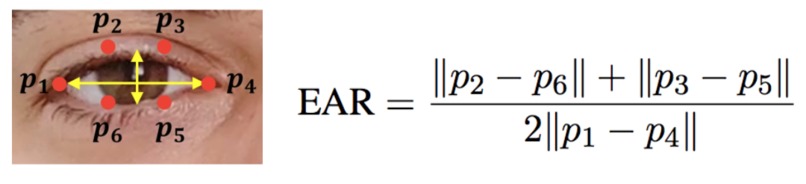
Eye aspect ratio
Inspiration
As first-year students, we found the task of managing our workload difficult and overwhelming. Although there exists to-do list applications, it is challenging to do our tasks in the right order: when we are energetic, we tend to spend time on things we enjoy, such as games; and when the deadlines approach, we would stay up all night trying to finish our assignments. Thus, we wanted to create a tool that not only keeps track of our tasks but also takes care of managing the scheduling as well. For this, we developed a web-app for the user to input and edit tasks, which connects to a webcam and Raspberry Pi to detect the user's drowsiness levels and sort the tasks accordingly.
Background Research
From the SE101 Time Management Module, specifically the Time Management Is Energy Management section, we realized the huge impact one’s energy level can make on one’s productivity and work efficiency. We then established the goal of the project to be mapping one’s highest energy times to their most difficult tasks, and that by assigning menial work we could make even low energy times productive. To detect the user’s energy level, we researched drowsiness detection algorithms. Specifically, we found that one way to detect drowsiness was the eye aspect ratio (EAR) of an individual. We found an algorithm that we could use in order to compute the EAR, and convert it into an energy level. In order to implement this, we followed a tutorial from PyImageSearch (Rosebrock 2021). This tutorial also helped us in setting up our python environment on our Raspberry Pi, and with OpenCV.
For automatic schedule planning based on long-term data, we researched statistical methods, and decided to use a linear regression algorithm to model the relationship between the time of the day and the user’s drowsiness. We also discovered scikit-learn, a Python library for data analysis. Using its linear regression model, which is based on least squares linear regression, we can estimate the user’s drowsiness levels for the next day based on sufficient past data.
Implementation
For the web-app’s frontend, we used React and Material-UI to make it functional and user friendly. To use the web-app, the user will first log-on to the website (https://timeturner.ml) by entering their email address and password into text fields, and after authenticating their request with our Firebase database, the main task page is loaded. If they do not have an account, they can go to the sign-up page to create an account by providing their name, email address, and password. After signing up, they will be automatically redirected to the task page.
At the task page, the user then can enter in tasks with dropdown boxes for specified duration (1-24 hours), enjoyment levels (1-10), and difficulty (1-10). We also created button components to allow for the adding, removal, and sorting of tasks. For the backend, we store user info (email, name, and password) as well as their tasks with Firebase. We also used Firebase to deploy our website. This connection to Firebase enabled us to then edit tasks and organize them based on our task optimization algorithm.
The task optimization algorithm was implemented in JavaScript for easier integration with the frontend. The algorithm sorts the tasks by their priority with the following factors: enjoyment, difficulty, and drowsiness. Each factor also has an impact factor (i.e. how much they affect a task’s priority). For the priority calculation, since drowsiness has a greater impact on more difficult tasks, we developed the formula priority = enjoyment - drowsiness * difficulty, where each factor would also be multiplied by their corresponding impact factor. In addition, if the user’s energy level is greater than a certain amount (i.e. 80%), then the tasks would be sorted purely by difficulty, in descending order, allowing the user to complete the most difficult tasks during their most energetic times.
The drowsiness detection algorithm was implemented in Python, using the OpenCV library. The main libraries that it used were openCV, dlib, imutils, numpy, and scipy. A lot of these libraries depend on one another, however, after initializing the webcam as a video input stream, we used dlib’s facial landmarks to find the coordinates of certain points on the user’s eyes. Then, we use the EAR (eye aspect ratio) algorithm (shown below), to get a number that we can then transfer to a user’s energy percentage by multiplying by some constant. Lastly, we would sum up these energy percentages for every frame in 10 seconds, take the average, and then push it to our backend in Firebase so that the front end could access it and sort tasks accordingly.
The hardware components of the project include a Raspberry Pi and a webcam. For the Raspberry Pi, we connected a monitor to display information and a webcam to provide data.
Design Trade-offs
In the end, we chose to not implement the speaker or mic add-ons due to the lack of time. Since we adapted the agile development methodology, these features are independent from the functionality of the overall product, hence this did not further affect other aspects of the project.
In addition, uploading and running the drowsiness detection program on the Raspberry Pi turned out to be slower than what we expected because of a low grade Raspberry Pi. Taking the performance of the raspberry pi into consideration, we increased the interval between each facial scan from 5 seconds to 10 seconds.
Finally, we did not implement a long-term drowsiness tracker with the statistical methods we researched, due to insufficient data and time. Instead, we aimed for a more accurate and functional program for daily tasks, and used a basic averaging algorithm to calculate the user’s usual drowsiness.
What's next for TimeTurner
In the future, we would like to implement a working speaker to remind the user to take a break when they get drowsy instead of showing a warning only on the website. We would also like to implement speech to text functionality with a microphone connected to the raspberry pi in order for the user to add tasks via voice command. Additionally, we would like to add visual sentiment analysis to rearrange tasks more effectively by assessing the users mood as well as drowsiness level. Finally, we would also like to add smart scheduling, so that we would use data collected overtime in order to accurately schedule an entire day with one initial scan, based on past results.

Log in or sign up for Devpost to join the conversation.