-
-
Cover
-
Problem statement
-
Architecture
-
Tech Stack
-
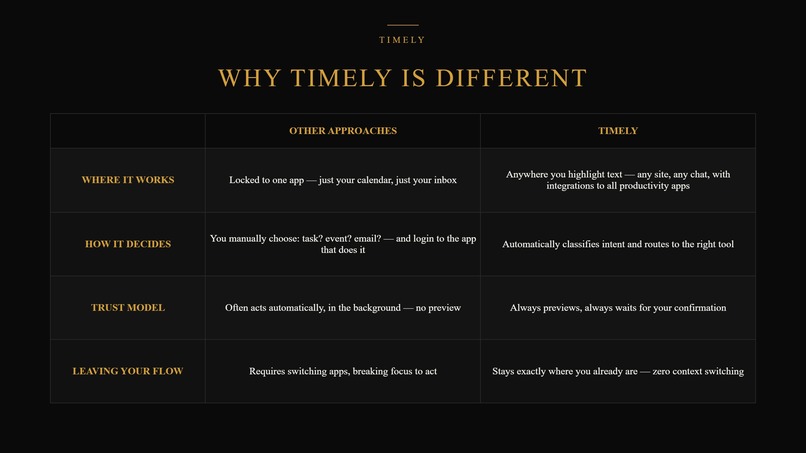
Why Timely
-
End
Inspiration
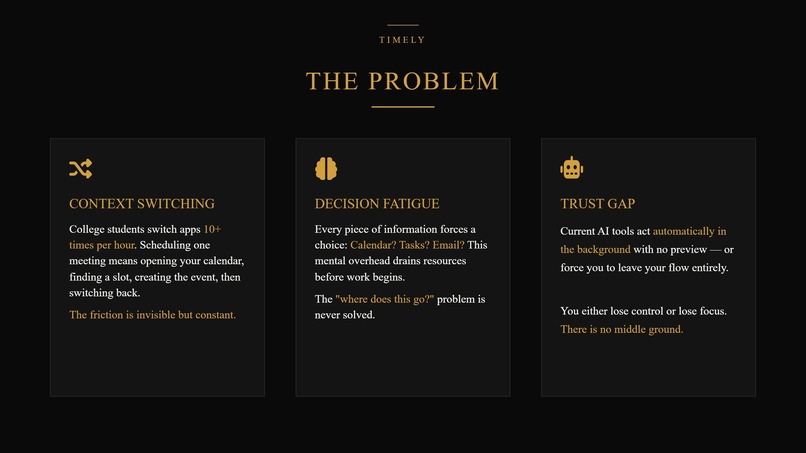
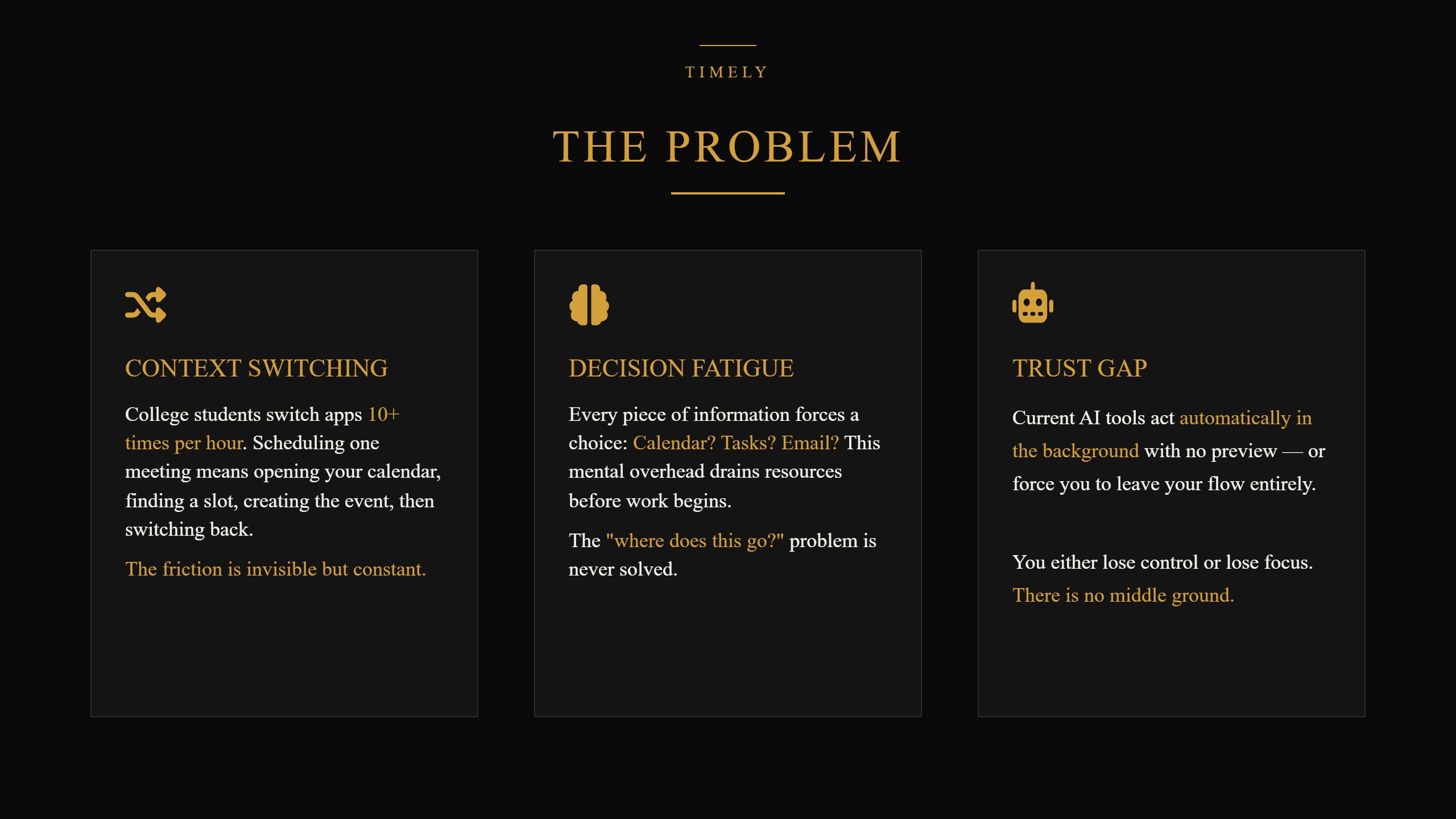
As undergraduates, we often found ourselves overwhelmed by the sheer number of things demanding our attention. Between lectures, assignments, project deadlines, meetings, and personal commitments, it felt like there was never enough time in the day. What frustrated us most was not the lack of productivity tools, but the fact that managing those tools became another task in itself. We had to constantly remember to create reminders, update to-do lists, schedule meetings, and organize our thoughts before we could even begin working.
Over time, we began asking a simple question: what if productivity tools could do more of the thinking for us? What if a quick note, message, or idea was enough for an assistant to understand our intent and take action automatically?
That question became the inspiration for Timely. We wanted to create a productivity companion that reduces the mental burden of organization, helping people spend less time managing tasks and more time accomplishing them.
What it does
Timely is an intelligent personal assistant that lives within a user's workspace as a Chrome extension. It understands context from notes, messages, emails, and other interactions, then infers and performs relevant actions using productivity tools.
Whether creating tasks, scheduling meetings, setting reminders, or drafting content, Timely reduces the need for manual organization. Its purpose is to help users stay productive and make just their intentions become actions.
How we built it
How our backend was built:
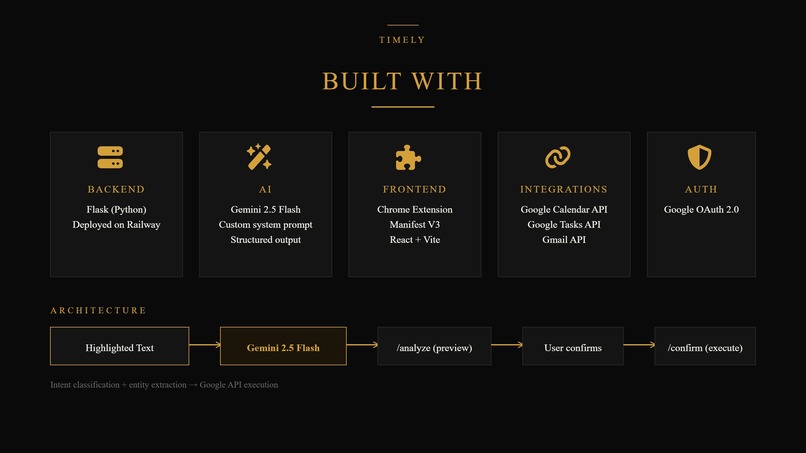
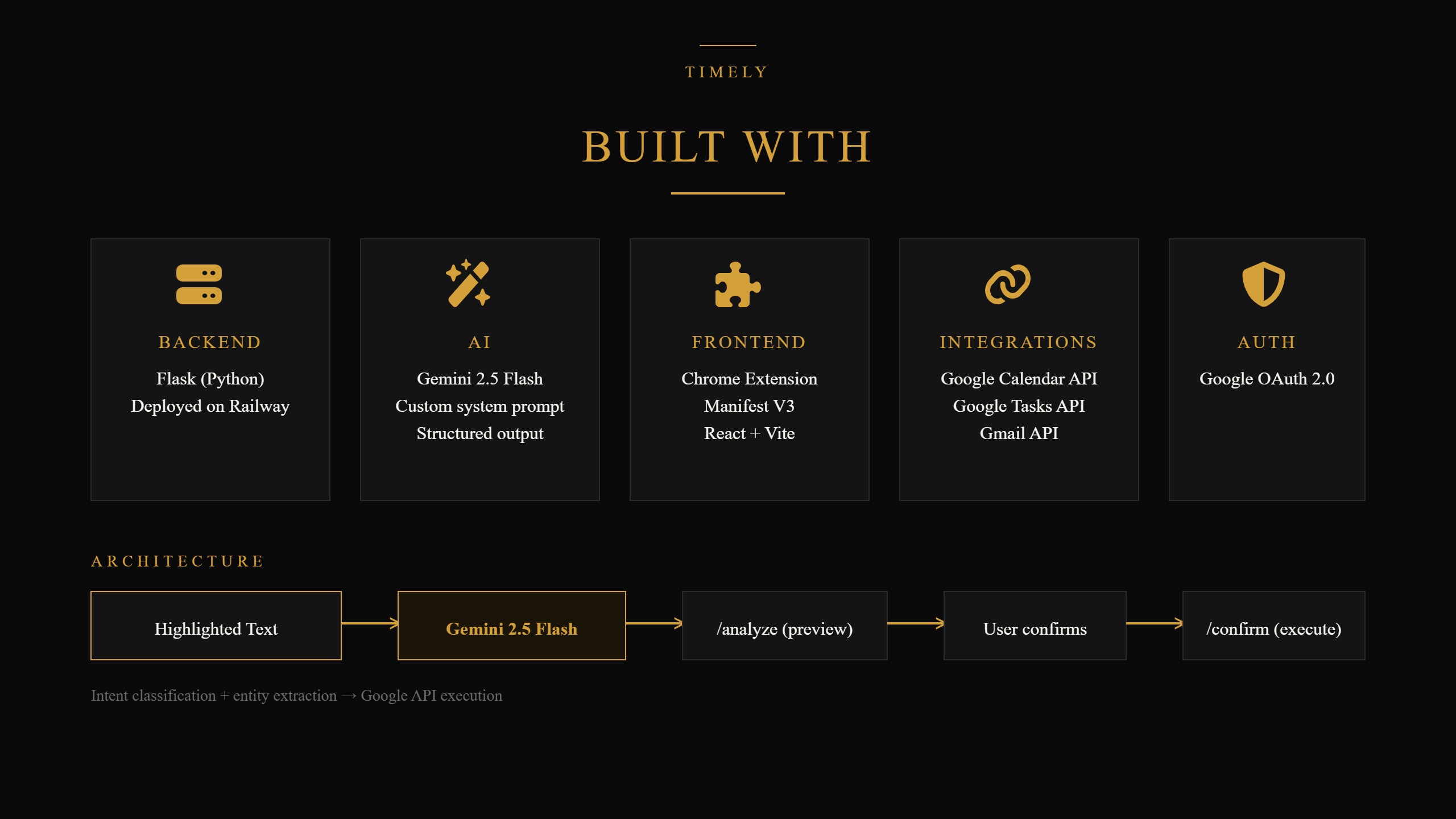
Our backend is a Flask REST API written in Python, deployed on Railway. It exposes three core endpoints: /auth/status to confirm Google connectivity, /analyze to interpret highlighted text, and /confirm to execute an approved action.
When text comes into /analyze, we pass it to Gemini 2.5 Flash alongside a custom system prompt that enforces a strict JSON output schema describing the detected intent, extracted entities, a confidence score, and any ambiguity flags. We inject the current date into every prompt so Gemini always anchors relative time references (e.g., Friday,''tomorrow morning'') to the real calendar date rather than guessing.
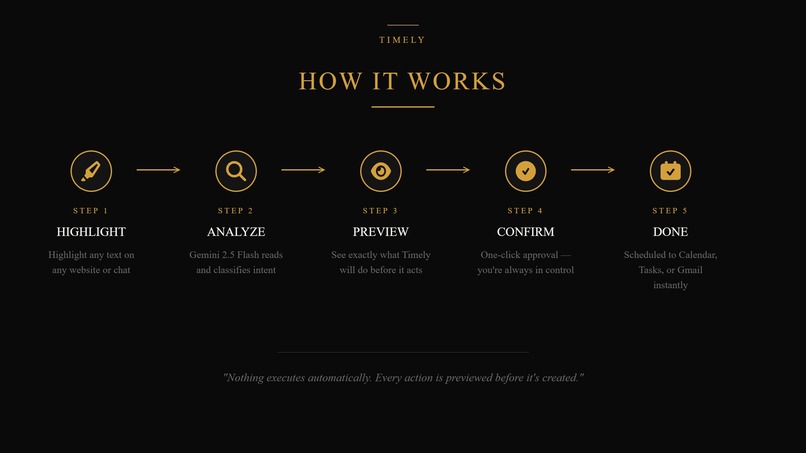
Rather than executing immediately, /analyze stores each proposed action in memory under a unique ID and returns a preview to the extension. Only when the user explicitly confirms does /confirm look up that stored action and call the relevant Google API (Calendar, Tasks, or Gmail) using OAuth credentials authenticated via Google's InstalledAppFlow.
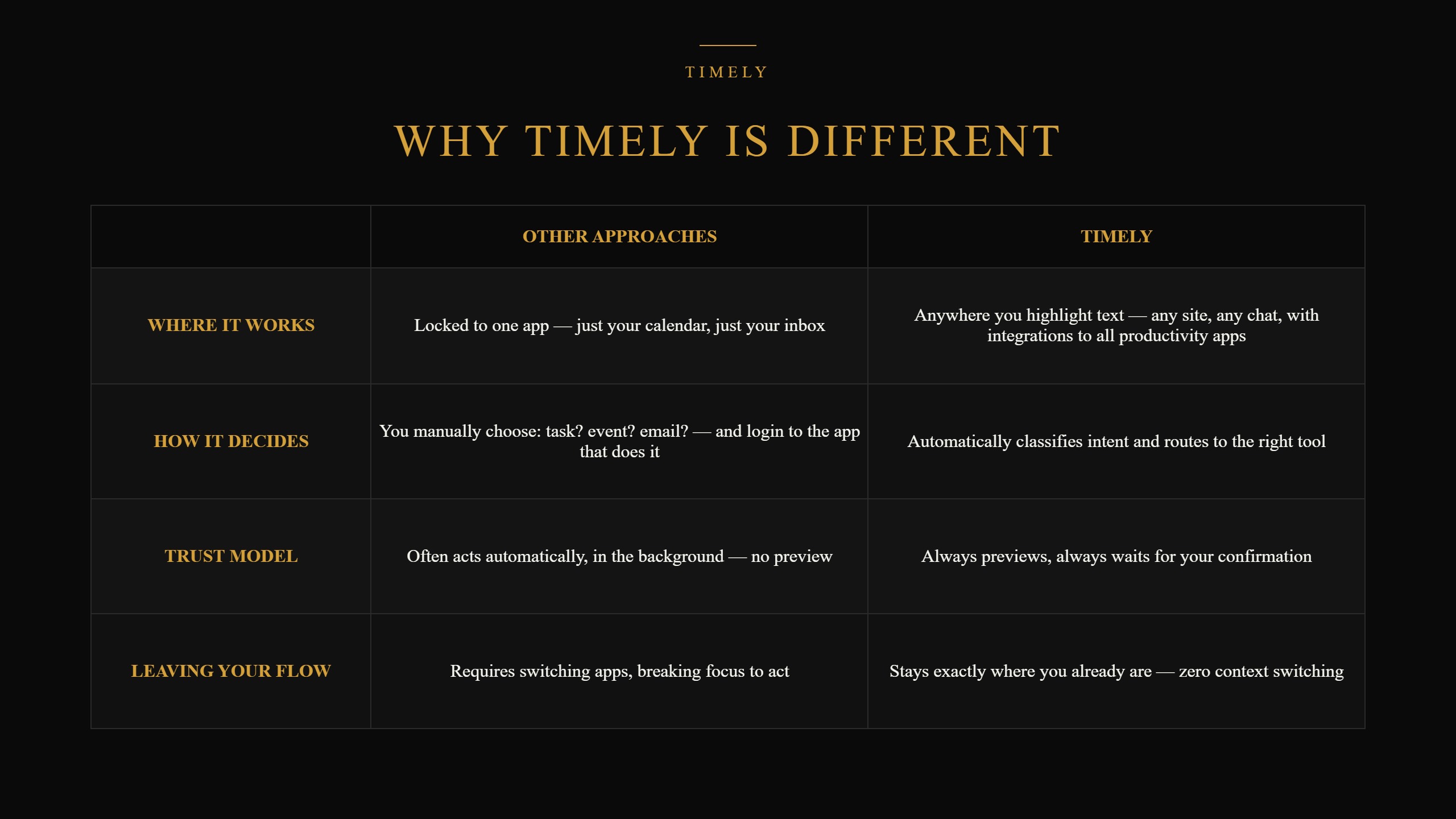
We deliberately chose this two-step design: it keeps a human in control of every action that touches real data, while still letting the AI handle all the actual language understanding. Authentication, AI reasoning, and execution are cleanly separated, which made it possible for our frontend and backend developers to build in parallel against a shared API contract instead of being blocked on each other.
How our frontend was built:
Timely was built with React, Vite, and Chrome extension tools.
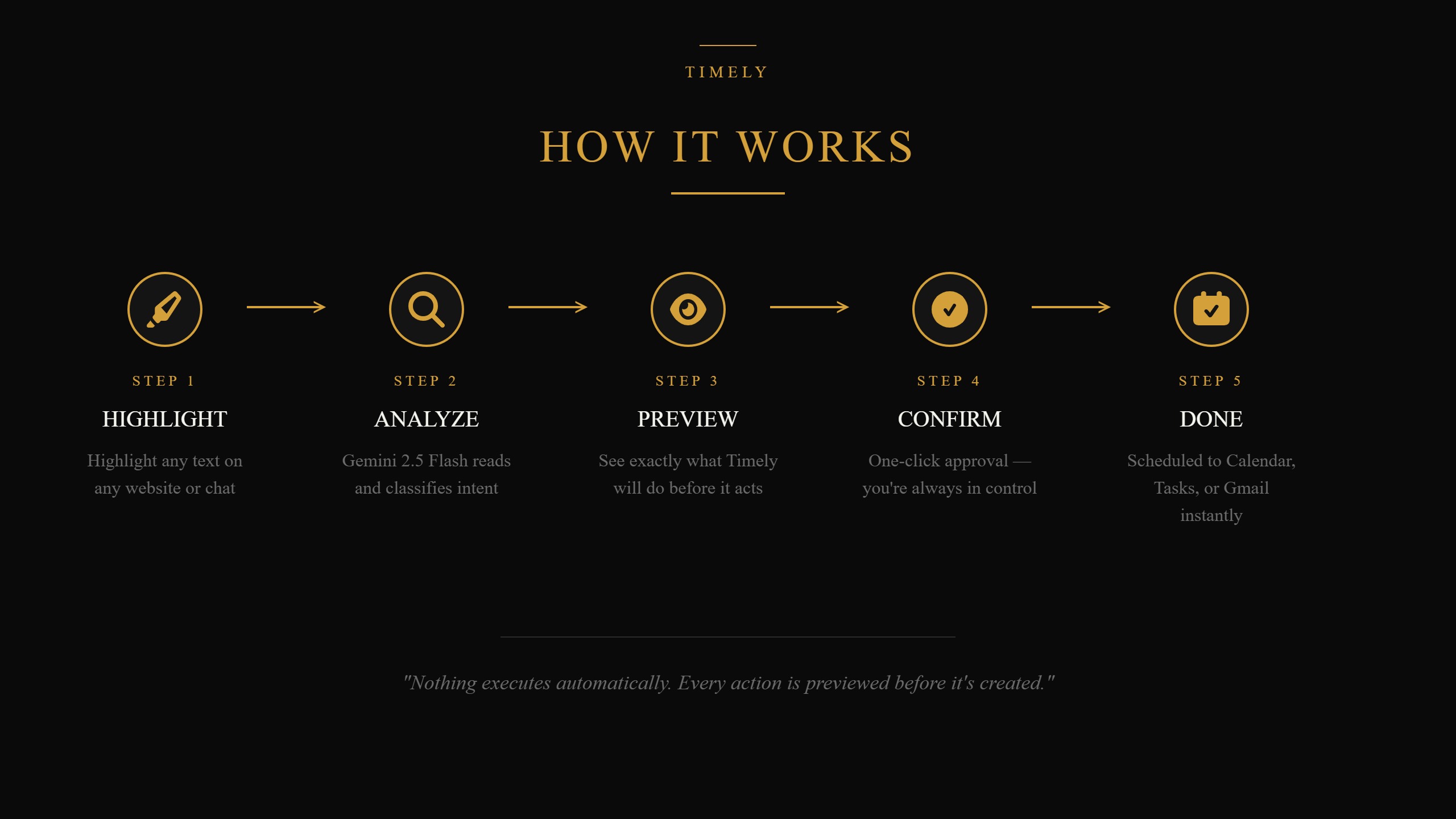
With the user’s permission, Timely listens to the user's highlighted text and suggests a small icon bubble for them to click. When they click on this icon, their highlighted text is sent to Timely to read the content and get the context. The backend passes a set of accepted inputs, which are then rendered to the user. Once the user approves it, the task is performed on their behalf.
The user can also see their context history when they open the extension from the Chrome extension menu.
Challenges we ran into
One thing we noticed early was that our system prompt alone wasn't enough to fully relay the goals we had for Timely's system design and execution flow. Gemini would understand the task correctly, but our backend was set up to act on that understanding immediately, which wasn't actually what we wanted.
So we added a confirmation layer between Gemini's understanding and Google's execution. For example, if Timely reads a highlighted message about having a dinner date next week Friday, it doesn't go in and schedule it immediately. Instead, Timely shows the user exactly what it's about to do, and the user has to hit a confirm button to approve or reject the offer before anything actually happens. We split our backend into two steps to make this possible: one that previews the action, and a separate one that only executes once the user has explicitly confirmed.
Accomplishments that we're proud of
One of our biggest wins was successfully executing a real human-in-the-loop system not just planning for one, but shipping a working confirm/reject flow that sits between Gemini's suggestions and any real action on a user's Google Calendar, Tasks, or Gmail.
Alongside that, we focused heavily on making the actual user experience feel seamless: a user simply highlights text anywhere on the web, a small icon appears, and within two clicks, Timely has read the message, understood the intent, and shown exactly what it's about to do. We got all three integrations (Calendar, Tasks, and Gmail) working end-to-end with real Google data, each automatically routed based on what Gemini classified from the highlighted text.
What we learned
Building Timely showed us that productivity is about managing time and tasks effectively, not just staying busy. We learned that many productivity challenges come from poor organization and small forgotten actions, such as setting reminders or following up on commitments.
We also found that many productivity tools require too much manual effort. This reinforced our belief that technology should reduce cognitive load by helping users turn notes, messages, and ideas into actionable tasks more naturally.
What's next for Timely
Phase 1: Focuses on expanding integrations beyond the Google ecosystem, adding Notion, the rest of Google Workspace, and Obsidian, so Timely can act across however a user actually organizes their life and work.
Phase 2: We plan to explore Nous Research's Hermes Agent architecture, which is self-hosted with zero telemetry, meaning a user's data never leaves their own infrastructure. Instead of logging raw conversations, Timely would store structured, summarized context (e.g., ``discussed project deadline with Sandra'') that the user can view, edit, or delete at any time.
For example, a user could ask, ``I have a meeting with Sandra today. What did we last discuss?'' and Timely would surface that from its own memory. The same learning layer would enable Timely to notice patterns in a user's routine and suggest things like a morning routine or focus exercises, never acting on them automatically, consistent with the human-in-the-loop principle we built into the core product.
- Phase 3: Takes Timely beyond the browser entirely into a desktop app so it works across your whole PC, not just highlighted web browser text, alongside exploration into wearable integration, where a voice command like ``Hey Timely'' could trigger the same pipeline hands-free.


Log in or sign up for Devpost to join the conversation.