-
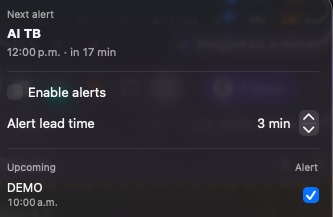
UI Demo
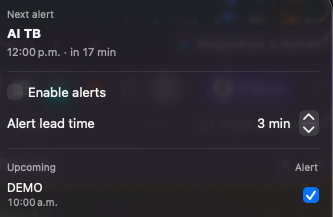
Inspiration
Back-to-back calendar invites are easy to miss. Standard notifications get buried, and I kept joining meetings late because a small banner slipped past me. I wanted something impossible to ignore — a reminder that takes over the screen the moment a meeting is about to start, then gets me into the call instantly.
What it does
Time to Meet is a lightweight macOS menu bar app that watches your calendar and, just before a meeting begins, shows a full-screen, screen-saver-level overlay across all spaces. The overlay shows the meeting details and lets you jump straight into the call by opening the meeting link in your default browser. It detects when you're already on a call and suppresses the alert so it never interrupts a meeting you're already in, and meetings are opt-in so you only get reminders for the events you care about.
How I built it
The app is written in Swift as a native menu bar app. It reads calendar events locally through EventKit, extracts meeting links from event data, and renders an overlay window at screen-saver level so it appears above other apps and across spaces. A call detector watches for active calls to decide when to stay quiet. The project is packaged for Mac App Store distribution with App Sandbox and a Calendar entitlement.
Privacy
All calendar data is read locally on-device through EventKit and is never transmitted anywhere.
Challenges and what I learned
Getting an overlay to reliably display at screen-saver level across all spaces under the App Sandbox took some iteration, as did handling the calendar permission prompt and call detection cleanly. I also learned a lot about preparing a native macOS app for Mac App Store review, including signing, entitlements, and sandbox constraints.

Log in or sign up for Devpost to join the conversation.