-
-
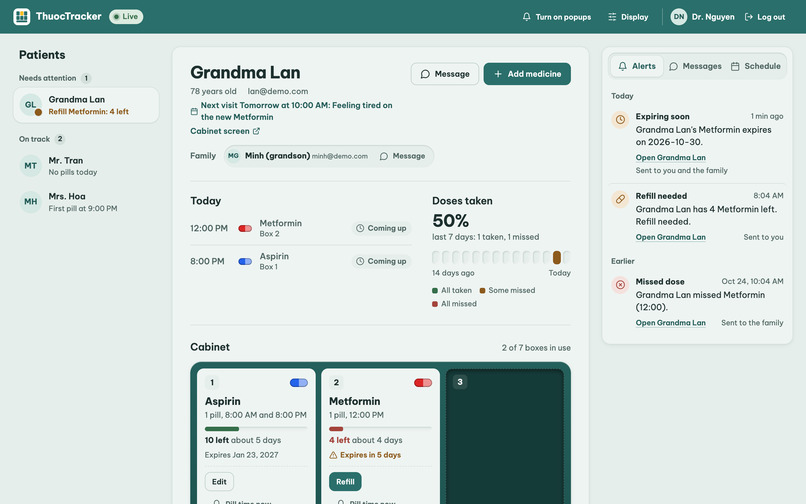
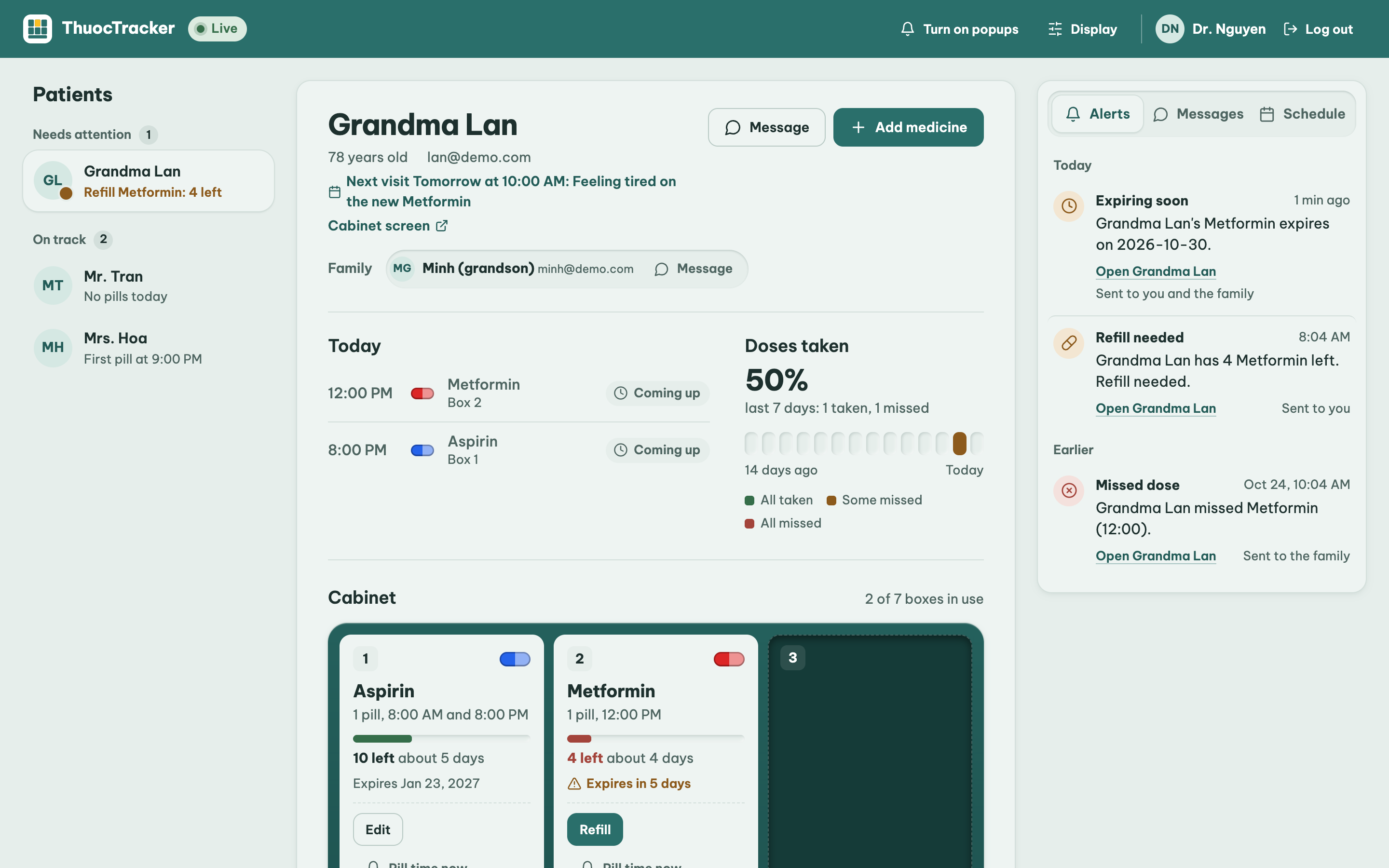
Doctor dashboard
-
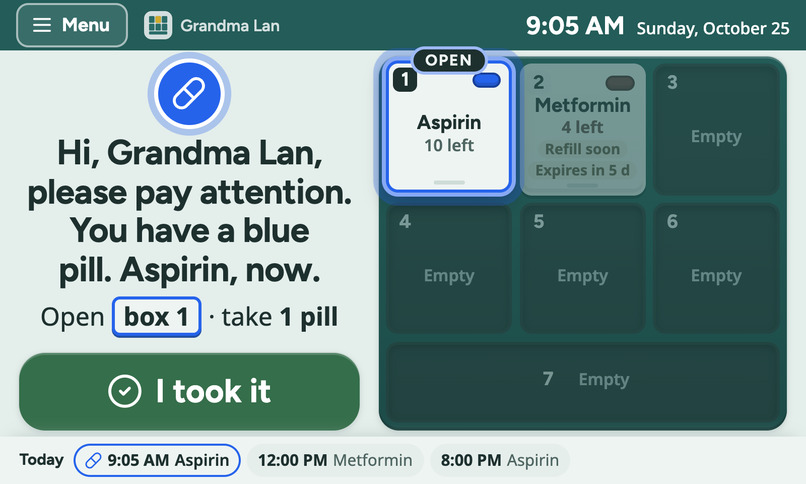
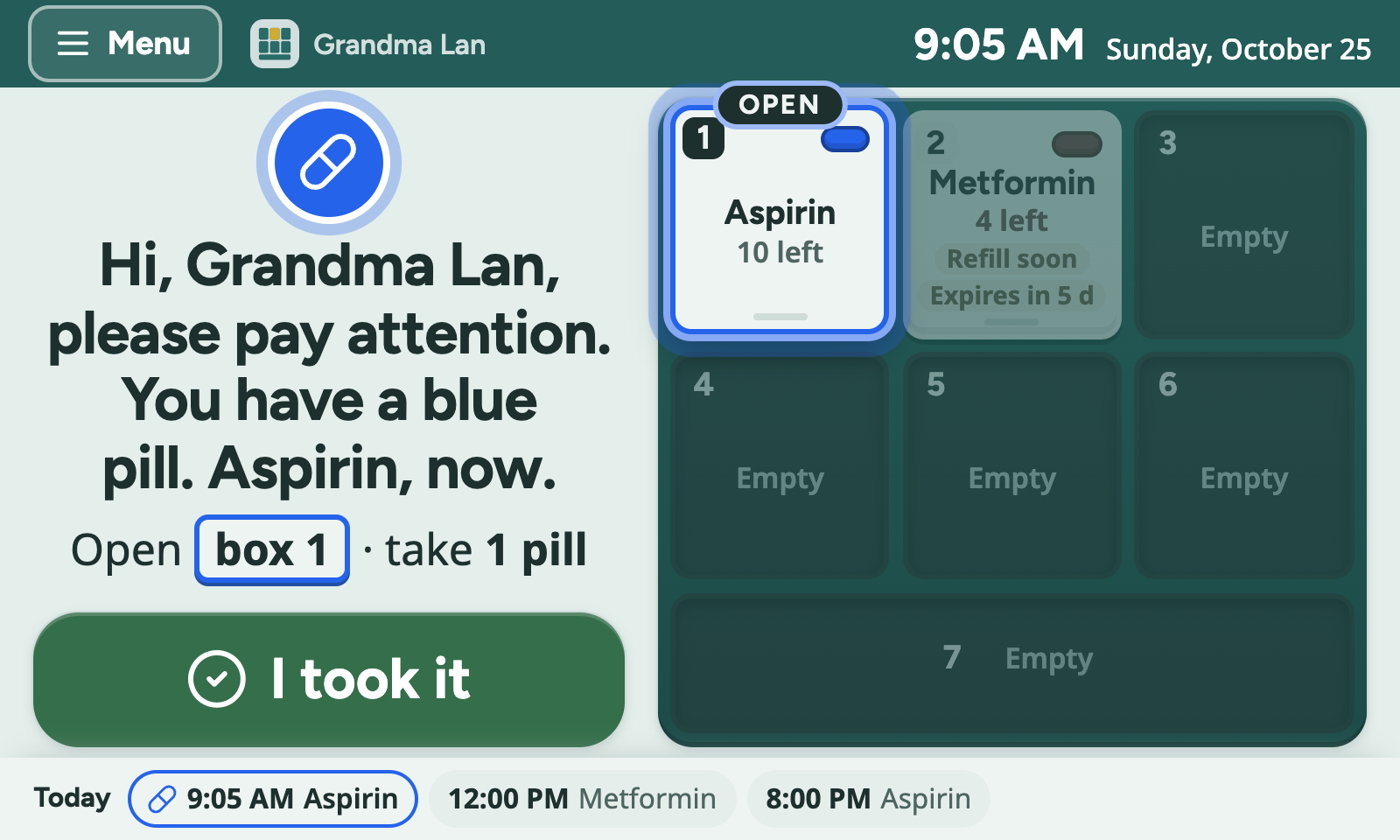
Cabinet screen
-
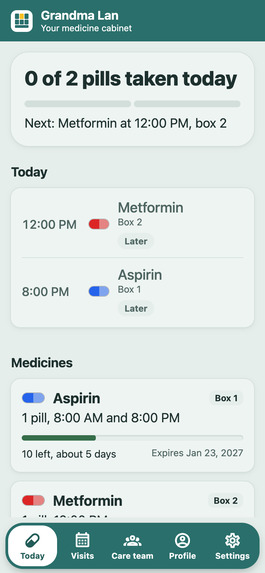
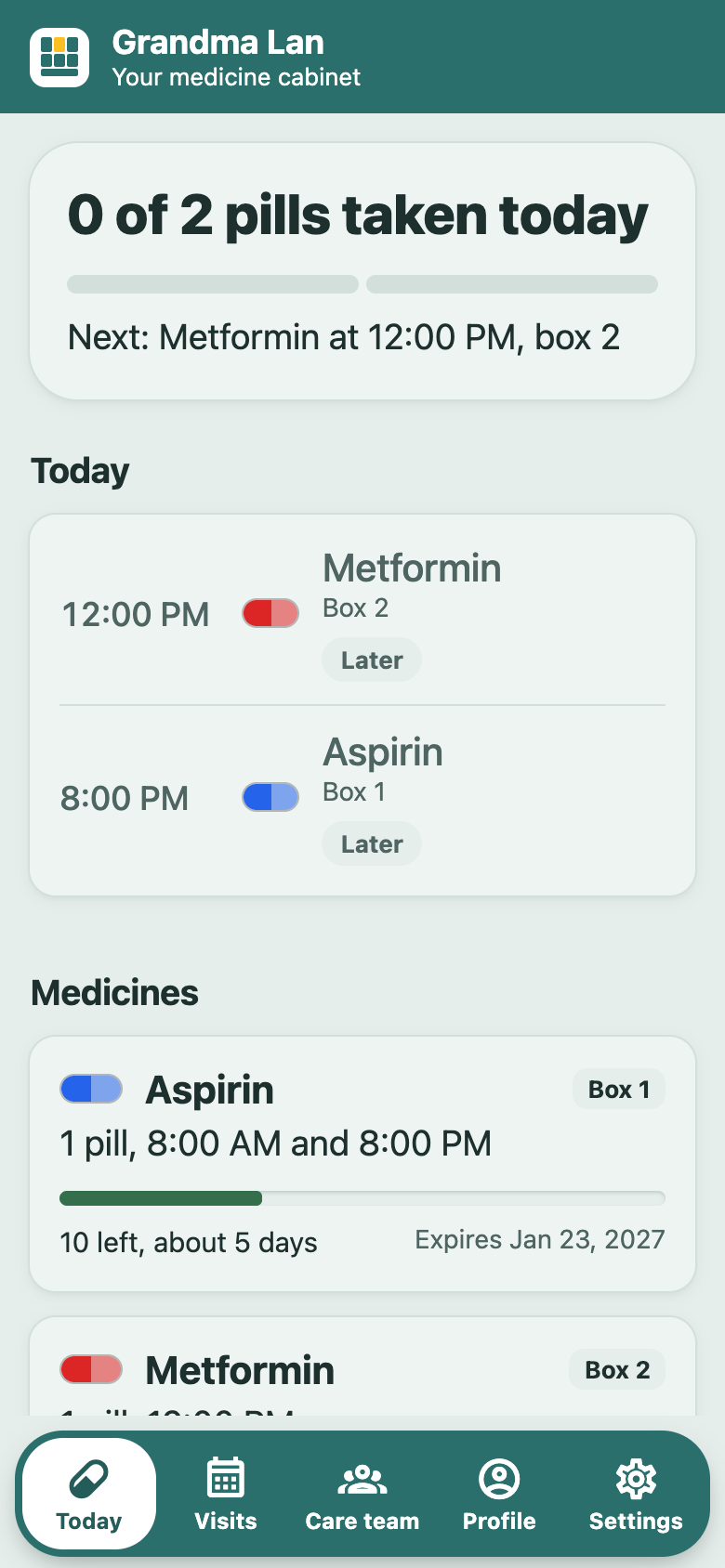
Patient account
-
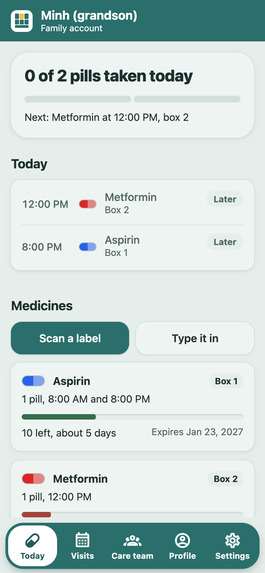
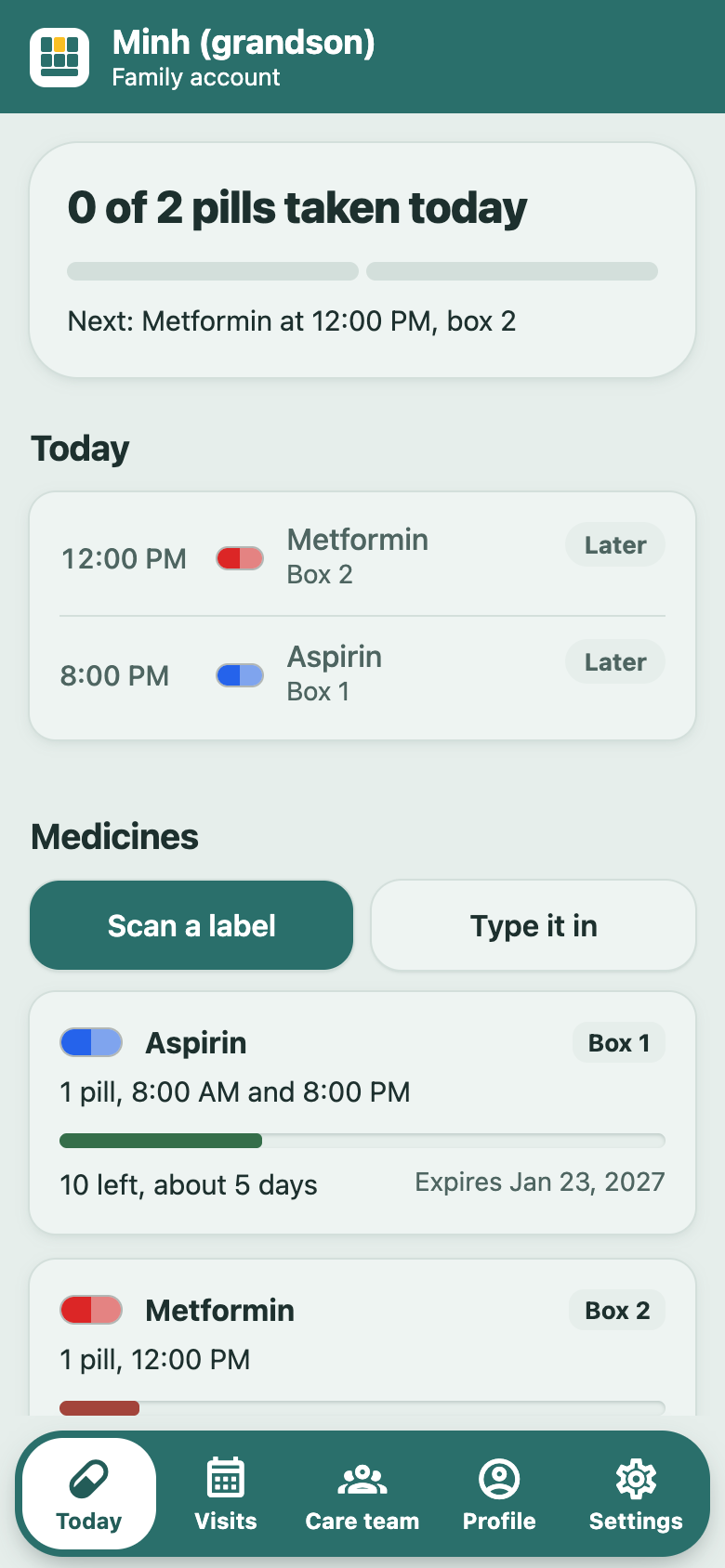
Family member account
Inspiration
"Thuốc" is Vietnamese for "medicine."
Many of us have grandparents who take several pills a day. They forget a dose, or they forget they already took one and take it twice. Their doctor writes the prescription and never finds out whether it was taken. Their family usually hears about a problem only once it has become serious.
We wanted to close that loop for elderly and Alzheimer's patients without asking them to learn a smartphone app.
What It Does
ThuocTracker is a smart medicine cabinet linked to a doctor dashboard and a mobile app for patients, families, and doctors.
Pill time: The cabinet names every pill that is due in one announcement: "Hi, Mary Johnson, please pay attention. You have a blue pill and a red pill. Aspirin and Metformin, now." The touchscreen shows which drawer to open ("Open box 1 · take 1 pill"). The patient's phone and the family's phones both get a push notification, because many older patients don't use a phone. The reminder repeats every 10 minutes.
Confirming a pill: The patient opens the drawer, takes the pill, and taps "I took it" on the screen or "Yes" in the app. The doctor and family see it right away.
Missed doses: If a pill isn't confirmed within 30 minutes, the family and doctor are alerted. The patient gets a message that only informs them ("Your family and doctor have been told"), never one saying "take it now," because a late pill can double up with the next one, and ThuocTracker never changes a dose.
"Did you take your pill?": For up to 3 hours after pill time, the patient's phone and the cabinet screen ask about any pill that wasn't confirmed: Yes / Not yet. "Not yet" asks again in 30 minutes. A late "Yes" tells the family and doctor that the pill was taken late.
Double doses: If the patient confirms a pill that's already marked taken, the cabinet warns, "You already took this one."
Voice questions: The patient taps "Ask a question" and asks, "Did I take my pills today?" or "When is my next pill?" Answers come only from the real dose log and schedule. If the answer isn't there, the cabinet says it doesn't know and tells the patient to ask their doctor. About a missed pill, it says to ask the doctor before taking it late.
Label scanning: A doctor or family member photographs a medicine bottle with their phone. AI fills in the name, dose, times, quantity, and expiration date. A person checks every field and picks a free drawer before it is saved.
Alerts: Low pills (fewer than 5 left) and medicine expiring within 7 days trigger notifications to the family and doctor.
Drug safety for doctors: Before prescribing, the doctor can check a new drug against the patient's medicines. ThuocTracker searches 53 FDA prescribing labels and quotes the exact warning sentences, for example, clarithromycin with metformin (low blood sugar) and with atorvastatin (muscle damage). The doctor can also ask the labels a question in plain words and get an answer that cites every passage it used.
Appointments: The doctor opens visit times on a 3-month calendar and can repeat them weekly in one click. The patient or family books a time and says why. Two people can never book the same time, and the patient and family get a reminder an hour before.
Doctor dashboard and chat: Doctors see each patient's cabinet, today's doses, pills left, a 14-day history, live alerts, and their schedule. Doctors, patients, and families can message each other in the app, and doctors can also chat from the dashboard.
How We Built It
Cabinet: A plywood cabinet with 7 3D-printed pill drawers, a Raspberry Pi 5, and a 5-inch touchscreen running our Next.js cabinet page in Chromium kiosk mode. The screen has a large-text option and turns dark at night. An ESP32-S3 runs the speaker (MAX98357A), microphone (INMP441), and a volume knob, and talks to the Pi over one USB cable.
Backend: FastAPI running on a laptop with a Tiger Data (PostgreSQL) database. The backend makes every decision: a scheduler runs every 2 seconds and handles reminders, missed doses, alerts, and appointment reminders. Several laptops can run the backend on one shared database. A lease row decides which one runs the scheduler; if that laptop stops, another takes over within 15 seconds and catches up on any doses due in the gap.
AI: Gemma 4 runs locally through Ollama. It transcribes the voice question, answers it, and reads labels. Gemini is the fallback for label reading. ElevenLabs speaks the answers. The Pi, with only 1 GB of RAM, runs no AI; it sends voice recordings to the backend.
Drug label search: 53 DailyMed FDA labels live in Tiger Data, split into passages with local MiniLM embeddings (pgvector, with a pgvectorscale DiskANN index) and full-text search. One SQL query ranks passages by meaning and by keyword, then merges the two rankings (Reciprocal Rank Fusion). The interaction check uses no AI at all.
Web: A Next.js doctor dashboard and cabinet touchscreen interface.
Mobile: An Expo (React Native) app for patients, families, and doctors, with push notifications through Expo and Firebase. Users log in with email and password or with Auth0.
Challenges We Ran Into
Campus Wi-Fi restrictions: Campus Wi-Fi blocks traffic between devices, so the Pi and backend couldn't reach each other. We moved everything onto a phone hotspot.
Running multiple backends: State we had kept in memory, including reminder state and the Pi's command queue, caused duplicate alerts when multiple backends ran at the same time. We moved all shared state into the database, made each scheduler step a conditional write, and allowed only one dose per medicine per pill time.
The local model made up doses: With an empty dose log, Gemma invented doses every time we tried ("You took metformin at 8:00 AM" for a patient who has no metformin). Now every medicine, pill color, and time in its answer is checked against the log, and any answer that fails the check is replaced with "please ask your doctor." It also treated "What do I need to take now?" as a request for medical advice and refused to answer, so schedule questions are now answered straight from the schedule in code.
Unreliable label output: Local models sometimes returned malformed times or values such as "60 tablets" in the wrong field. We clean the output, and anything unreadable is left empty for a person to fill in rather than being made up. The Gemini fallback hit free-tier rate limits, so we now shrink photos and retry once.
ESP32 audio unit: USB endpoint limits on the ESP32-S3, the board reading its own echoed lines, and a CircuitPython read that silently stopped halfway through long answers all needed fixes. The kiosk browser couldn't use a microphone, so the screen's "Ask a question" button now records through the ESP32.
Voice speed: We switched to ElevenLabs' fast model (about 0.75 seconds per sentence instead of 2), made the Pi check for commands every half second, and now show the answer on screen exactly when the cabinet starts saying it.
Expo development: An
npm installquietly downgraded the Expo SDK, Android needed a development build for push notifications, and phones couldn't upload label photos as files, so the app now sends them as base64.Auth0 and Expo Go: Auth0's React Native SDK needs its own native code, which Expo Go doesn't include, so just importing it crashed the app for everyone testing in Expo Go. The app now checks for the native module first and shows "Continue with Auth0" only in our development build; everywhere else, email and password login still works. On iPhone, a free Apple ID can only make development builds that expire after 7 days and can't receive push notifications.
Accomplishments We're Proud Of
Working end-to-end hardware: The full loop works on real hardware: pill time arrives, the cabinet speaks and shows which drawer to open, the patient confirms on the screen or phone, and the family and doctor receive an alert when necessary.
Safety-first design: The AI only reminds and alerts. It never changes a dose, never says "take it now," and its answers are checked against real data before anyone hears them. The drug check quotes the FDA label word for word.
Local AI processing: Voice questions, label reading, and drug label search run on local models. The patient's recording and dose log stay on our laptop; only the final answer sentence goes to ElevenLabs to be spoken.
Backup mechanisms: Every feature has a fallback for the demo:
- If Wi-Fi or ElevenLabs goes down, the cabinet plays stored sounds.
- If the local model can't read a label, Gemini does, or a person types it in.
- If the laptop running the scheduler stops, another backend takes over.
Team coordination: Four people working on four different parts of the system stayed in sync through a shared status board and API contract in the repository.
What We Learned
Design for people who won't use a phone. That's why family members receive the same reminders as patients, and the cabinet asks the same questions as the app.
Check a model's answer against the data. A prompt alone didn't stop it from making things up; a check in code did.
Store shared state in the database, not in a server's memory, especially when more than one machine is involved.
Small local models such as Gemma 4 can handle focused tasks well when their outputs are validated and cleaned.
Agree on the API contract early. Setting it in the first hour saved us integration work.
What's Next for ThuocTracker
Pharmacy integration: Connect with real pharmacies so refills can be ordered automatically when supplies run low.
Adherence analytics: Help doctors spot missed-dose patterns over weeks and generate adherence reports before appointments.
Multilingual voice support: Expand voice interaction to more languages, starting with Vietnamese.
Drawer sensors: Detect when a drawer opens, so the cabinet knows a pill was taken without a tap.
iPhone app: Push notifications on iPhone, which need a paid Apple Developer account.
Hardware improvements: Build a smaller enclosure and add battery backup.
Real-world testing: Test ThuocTracker with families, caregivers, and elderly patients to improve reliability and usability.
