
throughline
A programming language and build system for AI-generated video, making sure entities appear consistent across scenes and any changes to entities and scenes will only require a click to rebuild, not provenance-tracking from scratch.
The problem
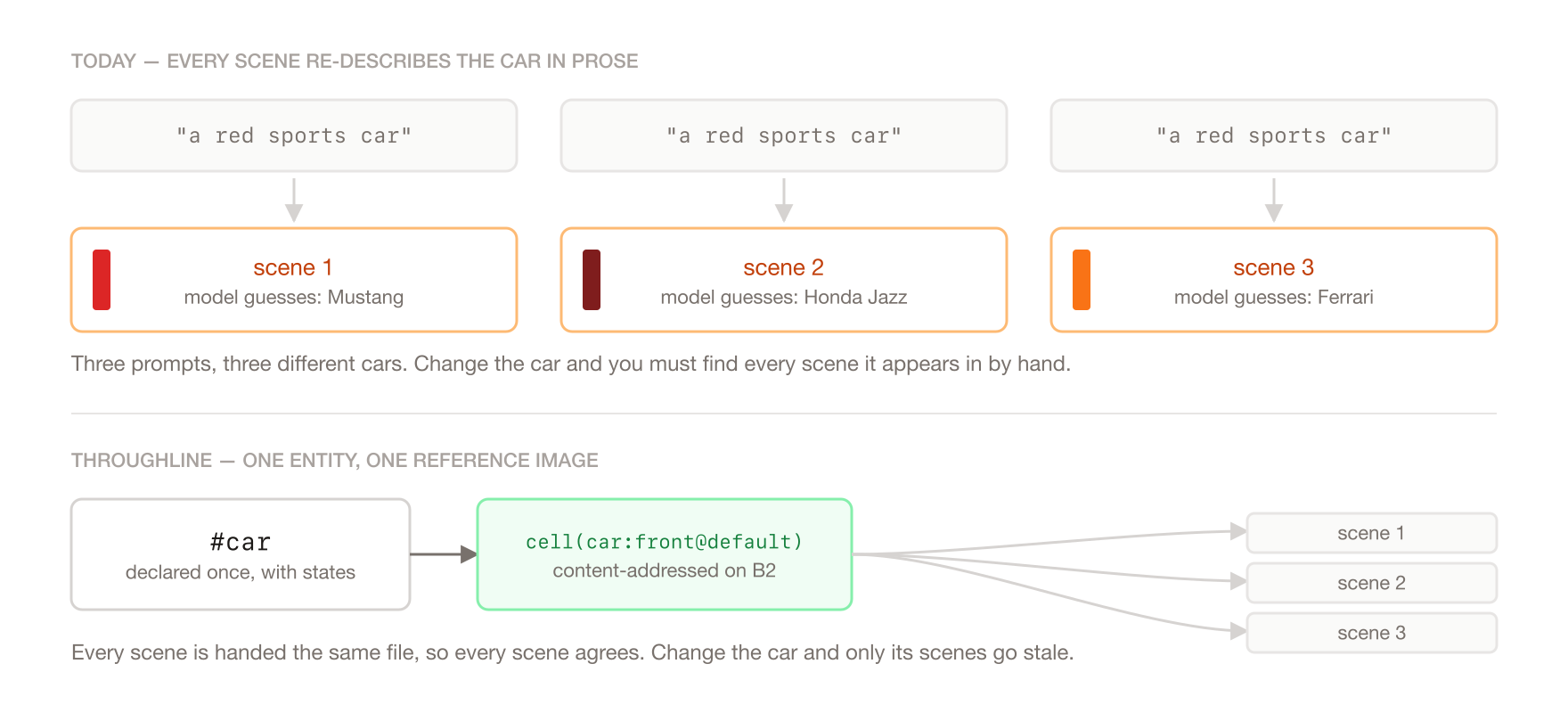
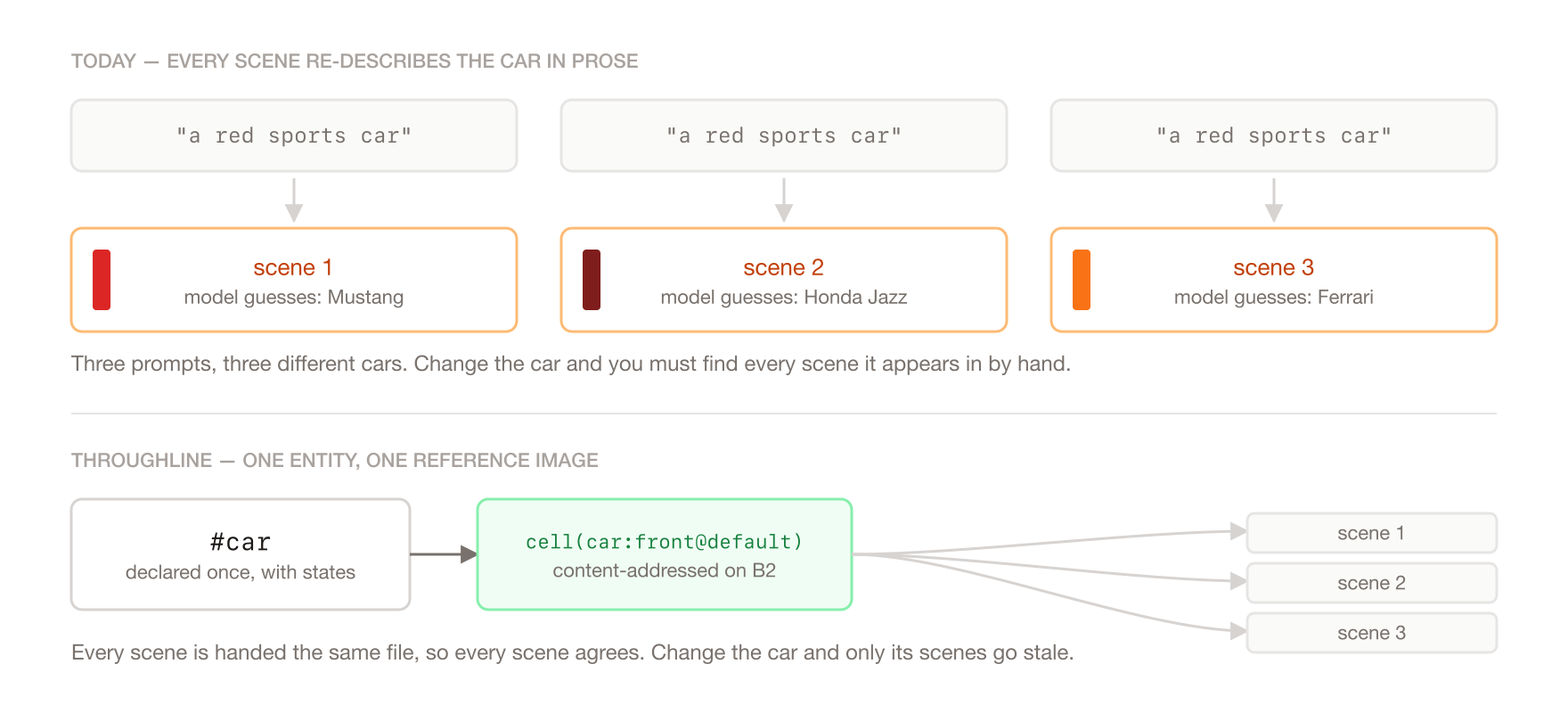
We've all probably witnessed our Tiktok Feeds and Youtube Shorts getting taken over by AI-generated media. The massive improvements in AI video generation over the past two years has opened up new opportunities for the content creator economy. However, as we use these models to stitch together short scenes into longer films, no matter how excellent or prolific a model is, there is an innate problem we have to face: the model is guessing what we meant by a certain word. If I told the model to generate a video of a "car", one might generate a Mustang, and another might generate a Honda Jazz. This is the problem of consistency, and it happens because we cannot specify every possible attribute of an item upfront.
And to go even deeper than that, the generated film is not the final version. People iterate over artifacts all the time, but how does one iterate over a specific part of the AI-generated film? Currently the workflow is as follows: Let's say I want to edit how a car looks, and this car appears in a couple of scenes throughout the film. I'll have to look through each scene to see if the car appears, and then regenerate those scenes with a new description of the car. After that, I can stitch the new scenes together to form a film.
Notice how both these inconveniences happen because of the lack of provenance within the semantics of the workflow. The workflow doesn't understand that I am using a certain entity across 2 scenes. As a downstream effect, the entity might not appear consistent across the scenes and when I change it, it becomes impossible to quickly locate where I use that entity.
What it does
Ok, now I've motivated the problem, and I'm roughly hinting at what the solution looks like. If you are familiar with compilers, this is gonna be essentially a build system like Make. But for the uninitiated, to manage provenance within our workflow, we need to have a manifest to store information on what an entity is, what scenes there are, and what entities are within which scenes.
Does that sound familiar? Because that is what a prompt is. A prompt defines the entities and the scenes. It's just that the prompt lies in the space of natural language and we cannot determistically derive the entities and scenes from this space.
So can we make the prompt slightly more structured? Structured enough to understand what an entity is, and where it is located in a film.
entity car: prop {
  "a red sports car, matte finish, black alloy wheels, low profile"
}

entity garage: setting {
  "a cramped concrete garage, one strip light overhead, oil stains on the floor"
}

scene the_reveal in #garage {
  camera: slow push-in

  The shutter rolls up. The #car sits under the strip light, still ticking.
}

scene the_drive in #garage {
  camera: handheld, low

  The #car pulls out into the rain.
}
That is the whole thing. The prose inside a scene is still prose, I did not have to learn a new way to describe a shot. The only thing I added is a # in front of the car, and that one character is what tells the compiler these two scenes are talking about the same object rather than two objects that happen to share a noun.
We can, and it's not too difficult, we just have to put in a little more effort upfront. Now, entities also have various perspectives. We want to make sure that it looks right from above, below and every angle. So, we also allow the manifest writer to define perspectives.
Not just that, an entity can also have various states. A book can be open, closed or burning, and we'd want this to look consistent as well across scenes. Another nice addition that we get by introducing state is a state machine. If the book is open in a previous scene with no one closing it in between, we can infer that the book is still open. That goes beyond visual consistency and pulls in state consistency.
So, who writes this manifest? If a manifest is just a more structured version of a prompt, then it'd be the prompter. Though with all these syntax, it can be the difference between writing an essay and writing C++. To deal with that, there are some affordance to make it simpler for an AI agent to writing and direct a film for you. And it all happens almost invisibly through an MCP server.
The insight
Nice, we have a new of prompting with provenance in mind, but how does it actually make sure anything is consistent? The boring part: we generate a reference image for every state and perspective an entity could have. The insight: consistency and cache invalidation are the same problem. If a scene is conditioned on a reference image, and that image is content-addressed, then reusing the image and reusing the render are the same act. Two shots agree about a character precisely because they were handed the same file.
And everything else falls out of taking that seriously. State is threaded through the script like dataflow, so a prop that breaks in scene two is broken in scene four without re-annotating it, and that threading is exactly what decides which reference images a scene depends on. Editing a description invalidates precisely the cells derived from it. The planner can say which input moved, because a scene's hash inputs are stored structured rather than as one digest (which is what natural language prompts are).
Demo
- Demo video: https://youtu.be/rvykpr338y4
- Live app: https://throughline-vq43wse6ua-ue.a.run.app/p/alphago-sedol (the authorised URL for judges is provided in the additional info section on Devpost)
- Repo: https://github.com/kavishsathia/throughline
The thing to watch for is the second build. Anyone can turn a prompt into a clip. What is worth two minutes of your time is changing one line of a finished film and watching throughline tell you that eight of eleven clips are still good, and then prove it by reusing them.
How it works
The language
The manifest is a file called .thru, and it has two things in it: entities and scenes.
entity book: prop {
  "a thick leather-bound journal, deep blue cover, brass clasp"
  state broken: "spine snapped, pages loose, brass clasp torn off"
  views: front, back, top
}

scene the_argument in #study:wide {
  camera: static, eye level

  #marcus paces behind the desk, the #book open in front of him.
  He slams his fist down. The #book -> broken skids off the desk.
}
#book is a reference. #book -> broken is the moment it breaks, and it stays broken in every later scene without me writing that down again. #book.broken says it is already broken here (a cut, not a beat), and #book@broken is a one-off for a flashback that deliberately leaves the thread alone. If I need a quick prop I never declared, #vase("a cheap porcelain vase") declares it inline.
Before anything is generated, the compiler lints the whole thing: unknown states and views, transitions to nowhere, states nothing ever produces, dialogue from a speaker who does not exist. All of that is caught for free, before a cent is spent.
The cell grid
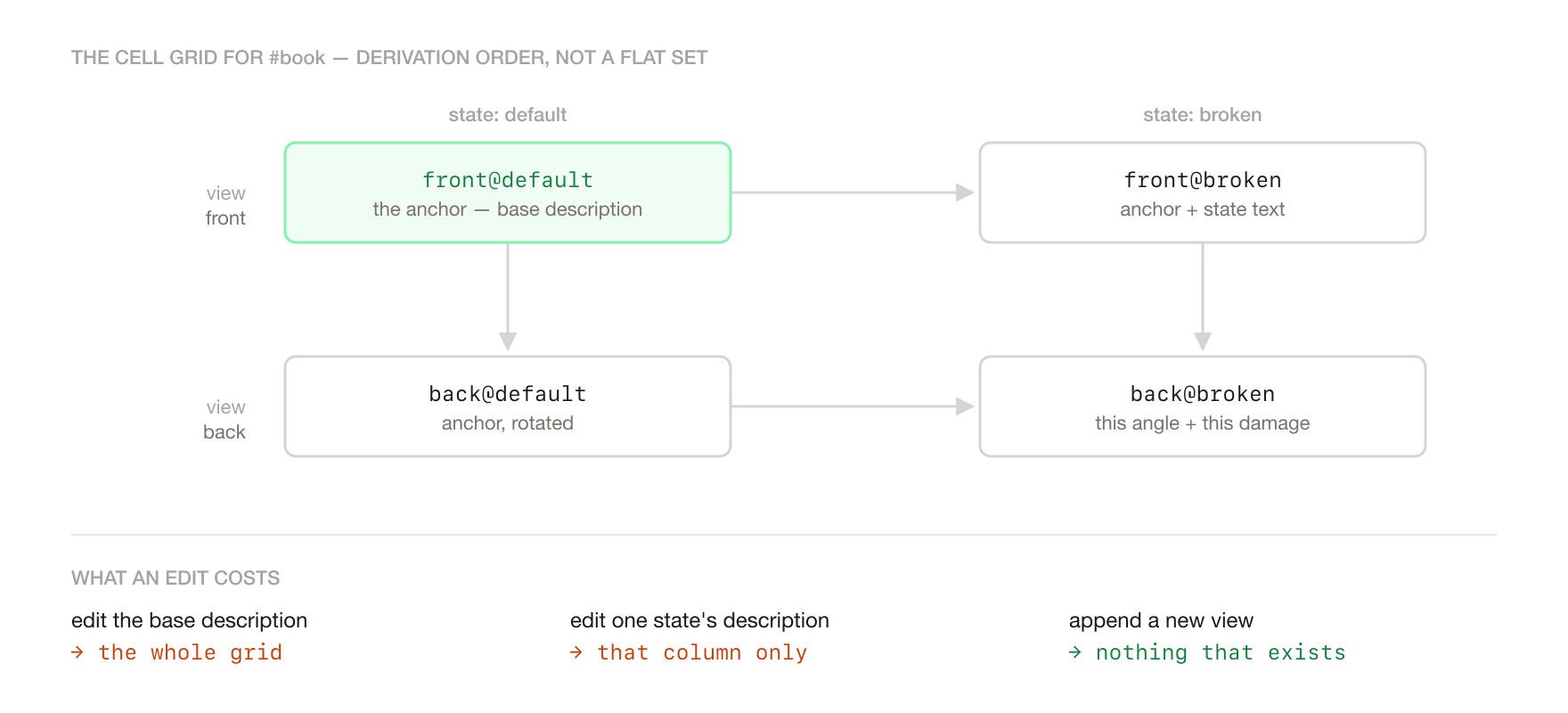
Every entity becomes a grid of cells, one per entity:view@state combination, and each cell is one reference image. The grid is not generated flat, it is derived in a fixed order:
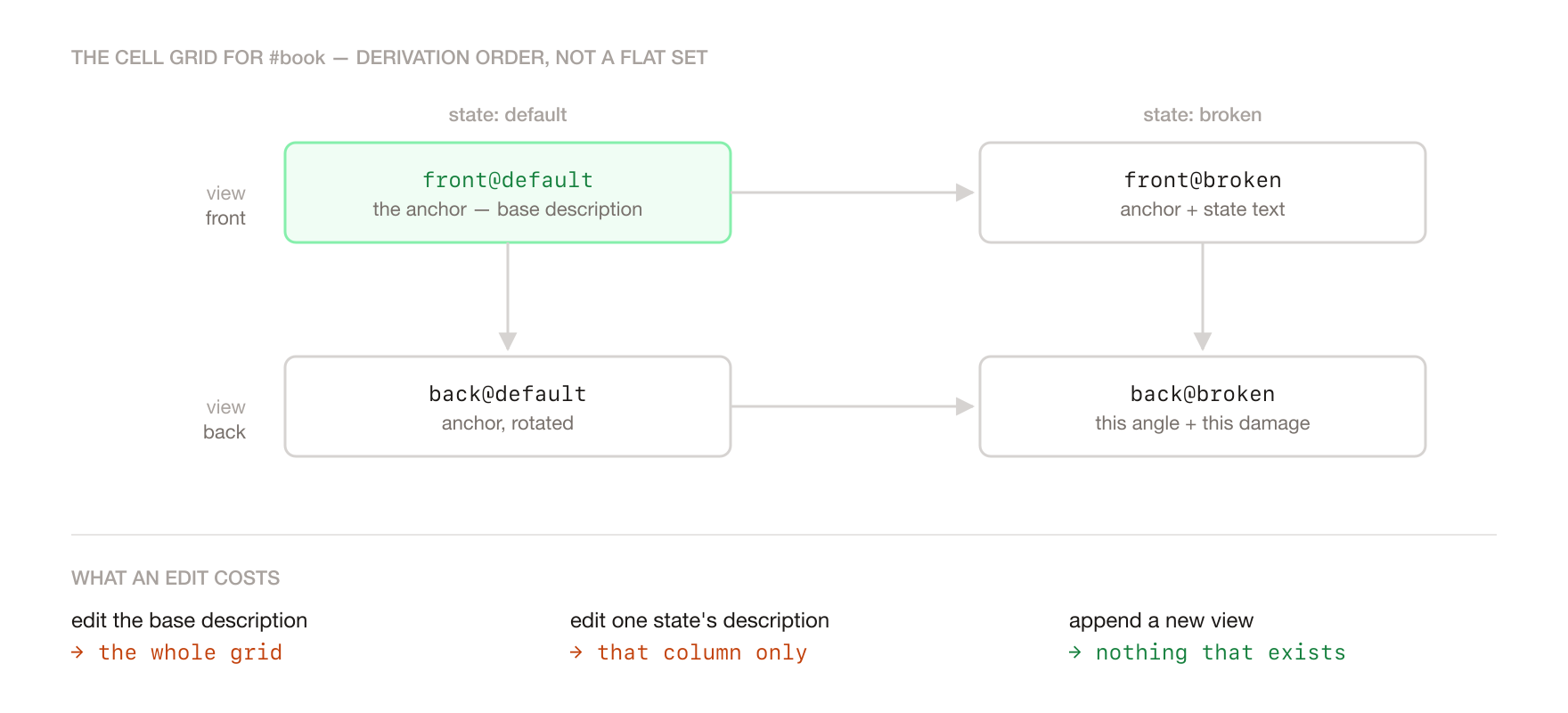
That order is the whole trick. Editing the base description invalidates the entire grid, editing one state's description invalidates only that state's column, and adding a new view invalidates nothing that already exists. A scene then hashes over its setting cell, its cast's cells, its script text, its camera, its transitions, and the state effects of the scenes before it.
Plans that explain themselves
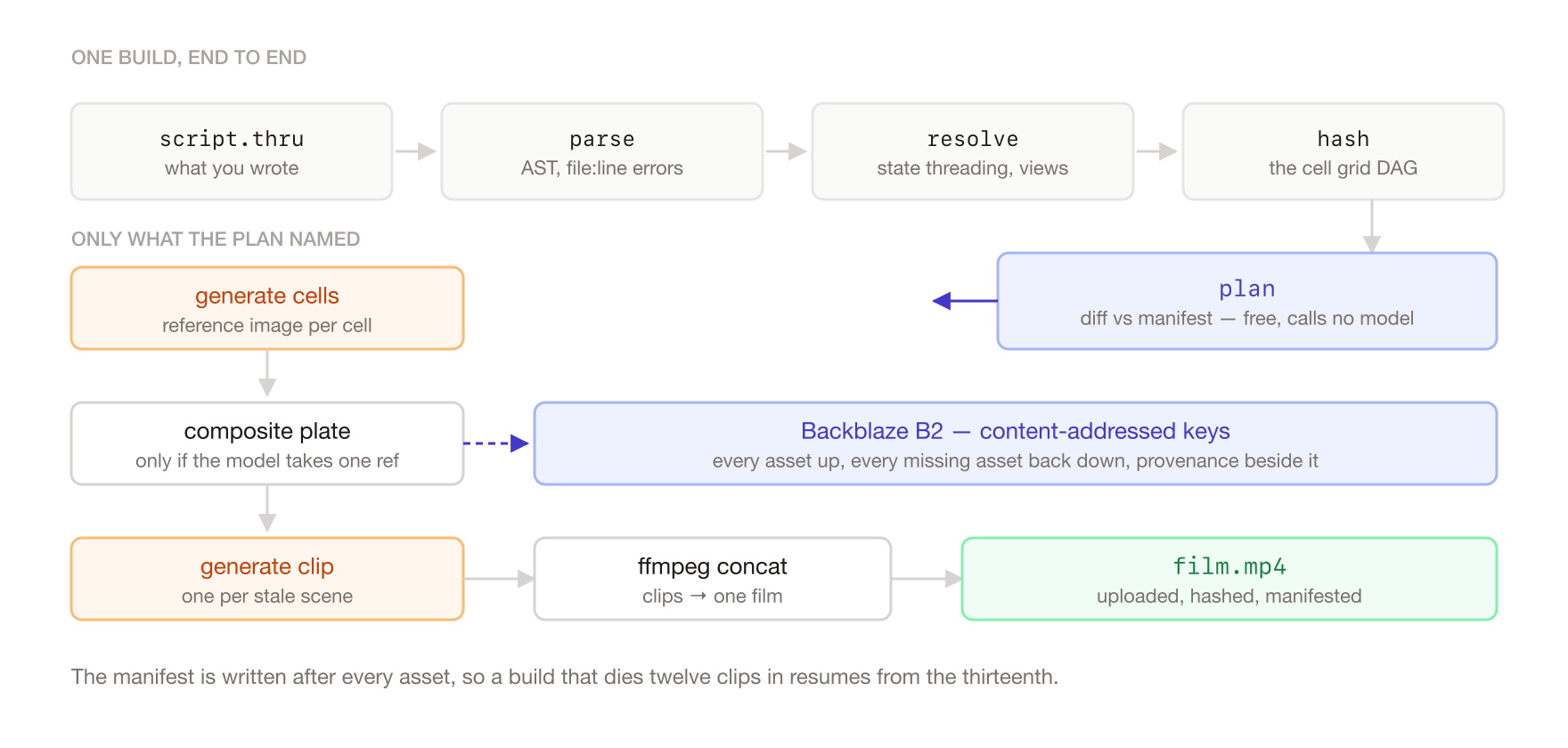
Because those inputs are hashed separately and stored broken out instead of squashed into one digest, thru plan can name the one that actually moved:
Scene clips to generate (1):
  ~ the_payoff                   scene text changed
Scene clips cached (4):
  = the_fryer
  = the_handoff
  = the_reveal
  = ad

Plan: 0 image(s), 1/5 scene(s) to generate; 4/5 reused from cache.
Planning calls no model, so it is free and instant. You always know what a build will cost before you agree to pay for it.
Reference plates
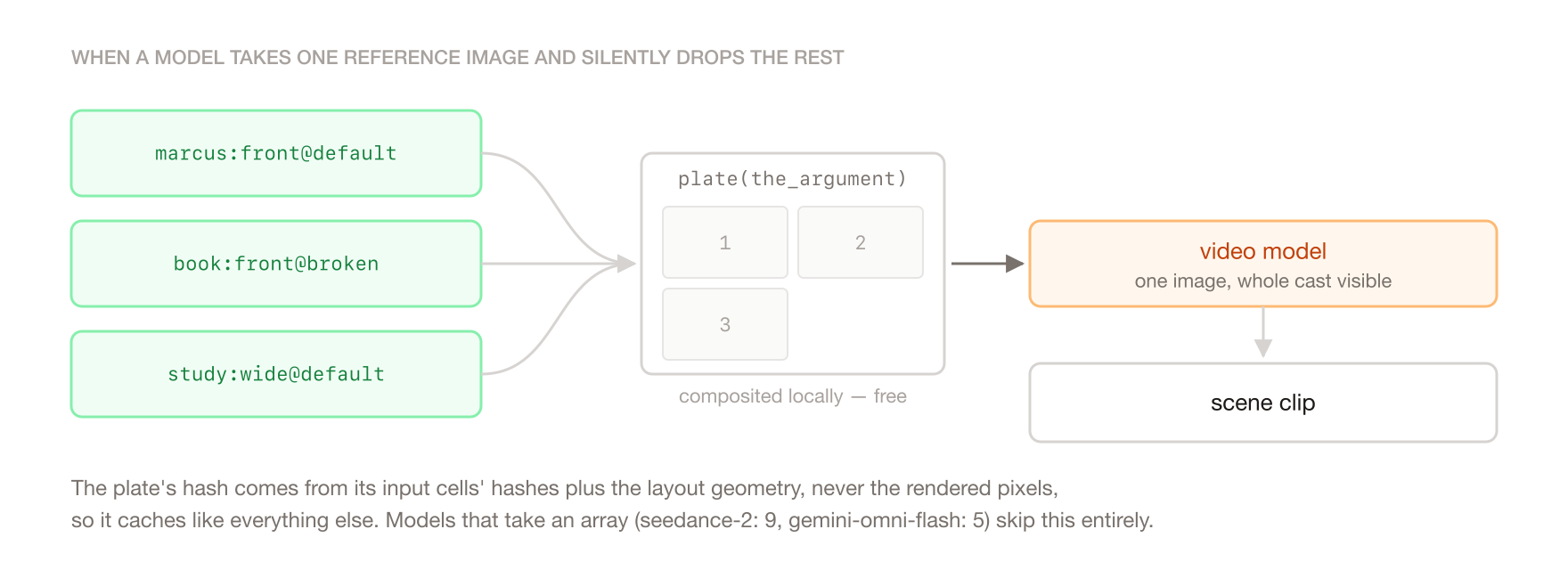
Here is where reality got in the way. Most video models accept exactly one reference image per call and silently drop the rest, so a scene with four cast members cannot just hand over four cells. When that happens, throughline composites the cast into a single labelled sheet and conditions the scene on that instead.
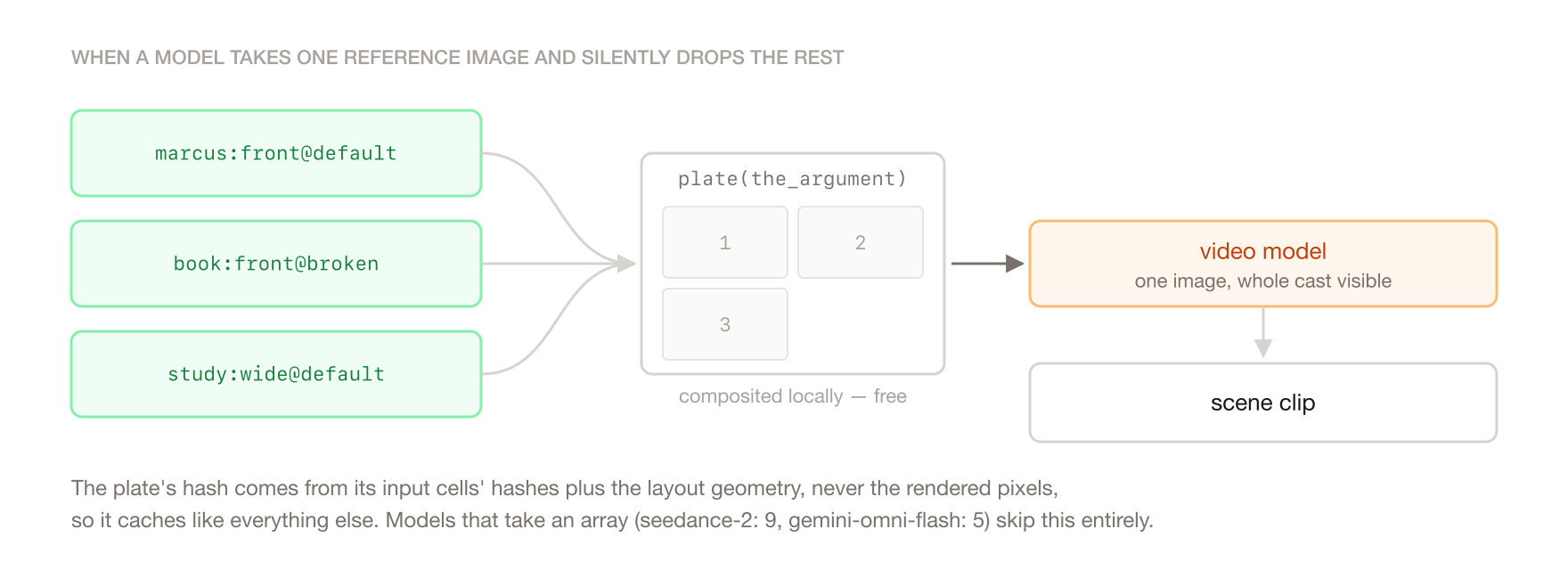
The composite is local and free, and its hash comes from the input cells' hashes plus the layout geometry, never the rendered pixels, so it caches like everything else and survives a Pillow upgrade nudging antialiasing by one pixel. Models that do take an array (seedance 2.x takes nine, gemini-omni-flash takes five) skip compositing entirely and receive the cells directly.
Assembling the cut
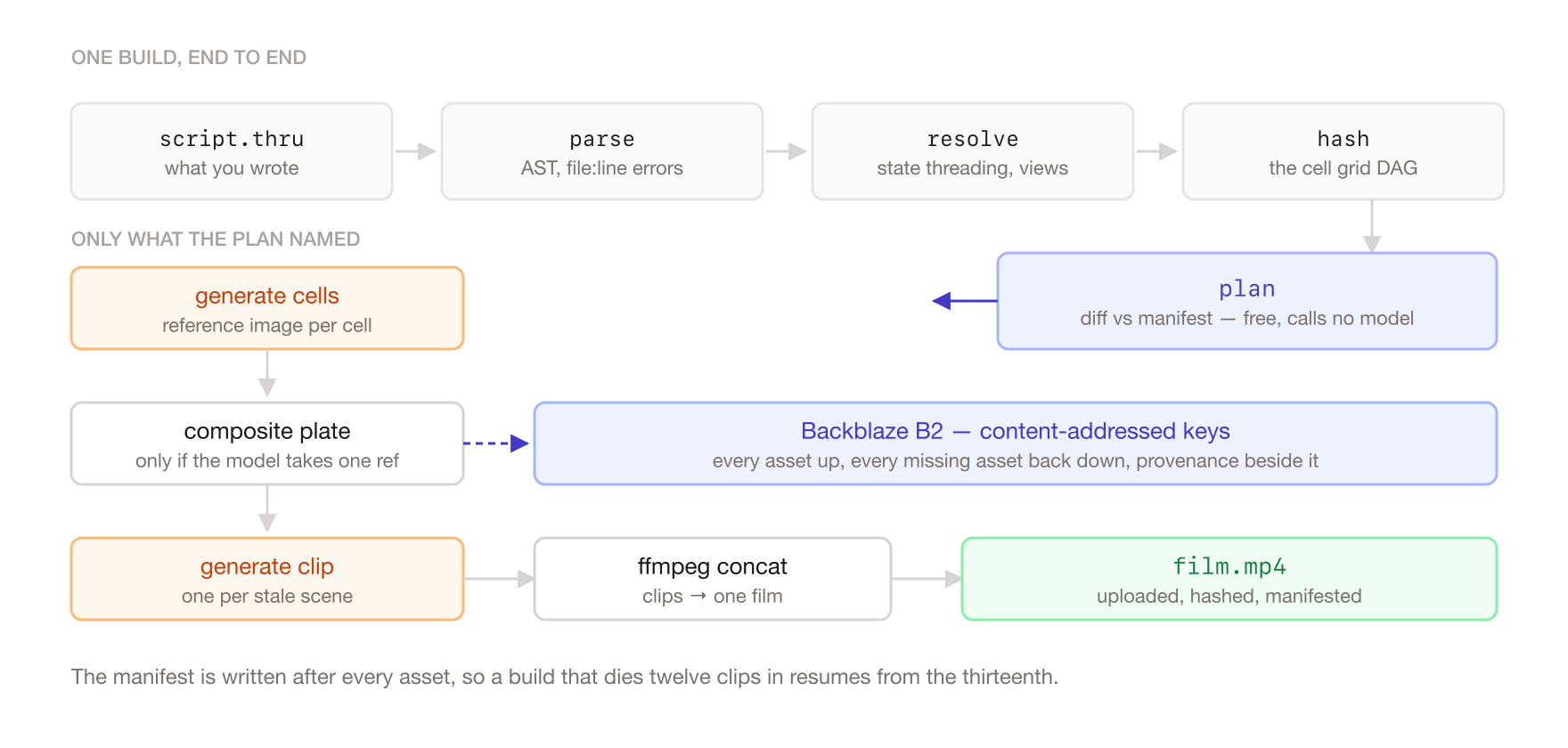
Once every scene clip exists, ffmpeg concatenates them in script order into one watchable film, which is uploaded to B2 like everything else. The film is hashed over its ordered scene hashes, so reordering two scenes reassembles the cut without regenerating a single clip.
Providers and models
Everything runs through GMI Cloud, orchestrated by Genblaze:
seedream-5.0-litefor reference images (every cell in every entity's grid)gemini-omni-flash-previewfor scene clips (reference-to-video, takes up to 5 references)seedance-2is also supported and takes up to 9 references
The default backend is a mock, not a real one. It runs the entire pipeline offline at zero cost, writing real placeholder PNGs plus a .json sidecar of exactly what would have been sent to the model. That means an accidental build never spends money, the whole test suite needs no credentials, and a misconfigured deploy fails into the free path instead of the paid one.
How it uses Backblaze B2
B2 is not where the film gets dumped at the end, it is what makes the cache real.
Every generated asset lands under a content-addressed key, so identical bytes are stored once no matter how many projects produce them. The manifest records, per artifact, its input hash, its B2 URL and its digest. That triple is what lets a machine which has never seen a project serve it.
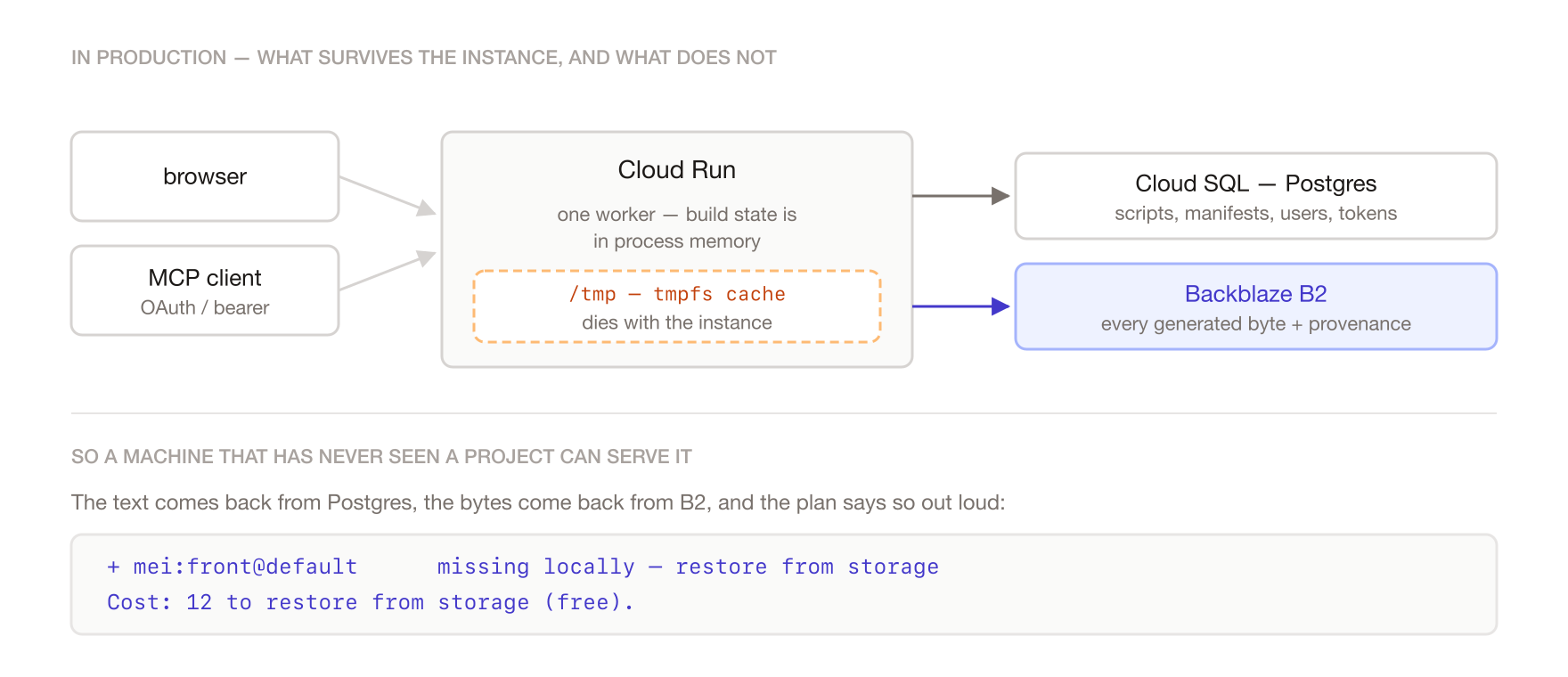
The payoff shows up when a locally cached asset goes missing. The plan does not say "regenerate", it says:
+ mei:front@default    missing locally — restore from storage
~ the_walk             missing locally — restore from storage

Cost: 12 to restore from storage (free).
Bytes already uploaded are bytes already paid for, so the fix is a download, not another generation. This is exactly what happens in production: the deployed app runs on Cloud Run where the filesystem is tmpfs and dies with the instance, so local disk is a pure cache and B2 is the durable half. Genblaze's provenance manifests land in the same bucket, so how a clip was made is stored next to the clip.
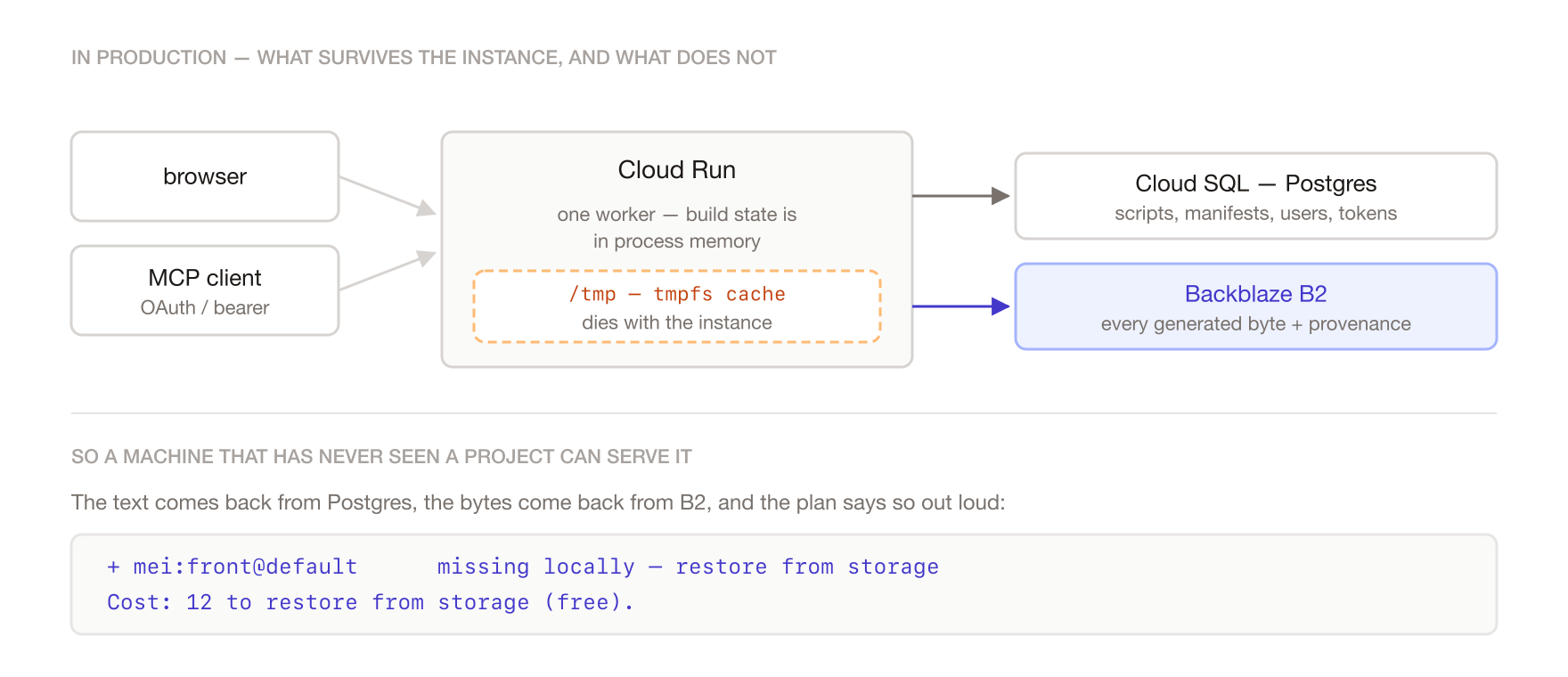
One constraint worth writing down: the bucket has to be public-read. Providers fetch reference images over plain HTTP, so a private bucket means the model literally cannot see what it is supposed to be conditioning on. Encryption stays off too, SSE-C breaks public reads outright and SSE-B2 buys nothing on a public bucket.
How it uses Genblaze
Genblaze is the seam the whole build orchestrator plugs into. throughline's graph decides what to generate and in what order; Genblaze decides how that reaches a provider and where the result lands.
Each artifact is one Pipeline run, deliberately, rather than one long chained pipeline. throughline already knows the ordering and what to skip, so a chained pipeline would be fighting it. Conditioning comes in through external_inputs, which are the caller-held assets throughline just built, and the ObjectStorageSink writes straight to B2 with KeyStrategy.CONTENT_ADDRESSABLE.
Two things needed correcting locally, and both are written up in BACKLOG.md to send upstream:
- Genblaze maps every GMI video model to a single image slot, including seedance 2.x, whose API documents
reference_imagesas an array of nine. Since registered families take precedence over shipped ones by design, throughline registers a corrected family over the top rather than forking. That is the difference between a scene seeing its whole cast and a scene seeing one member of it. URLPolicy.PUBLICis unreachable for every S3 backend, because the sink checkspublic_url_basewhileS3StorageBackendstores_public_url_base.AUTOproduces the public URLs anyway, and there is an assertion that verifies it rather than trusting it.
Production readiness
- 240 tests, running on CI against Python 3.11, 3.12 and 3.13, plus ruff.
- Resumable builds. The manifest is written after every asset, so a build that dies twelve clips in resumes from the thirteenth instead of repaying for the first twelve. A failed build still checkpoints, because partial work is paid-for work.
- Deployed on Cloud Run, with scripts and manifests in Cloud SQL and assets in B2. Single worker, because build progress lives in process memory and a second worker would answer half the poll requests with "no such job".
- Accounts, ownership and sharing. Showcase projects are readable by everyone and writable by nobody. API tokens are stored as SHA-256 only, so a database leak yields nothing an attacker can present.
- A hard spend cap, enforced at
Backend.generatewhere money is actually spent rather than by counting buttons on the way in. Restores are never charged, since restoring instead of regenerating is precisely the behaviour you want people to hit.
The MCP server
An agent cannot watch a clip and tell you whether the lighting is right. But it can edit a script and read a diff, and that turns out to be most of the job.
So the whole thing is exposed over MCP: list projects, read and edit scripts, plan, build, poll status. Every mutation returns the resulting plan and its cost, so a model can decide whether a change is worth a dollar before spending it. Auth is bearer tokens with a full OAuth flow on the side, which is what lets Claude attach to a deployed instance as a connector and direct a film end to end.
What running it against real models taught us
Three things that only became obvious once real money was involved:
- Providers accept one reference image and drop the rest silently. Not an error, not a warning, just a scene conditioned on less than the prompt claimed. This is the entire reason reference plates exist.
- Reference images dominate framing.
camera: slow push-inon acloseview lost outright to a reference showing the whole room. A close-up needs a cell that is a close-up, not a prompt asking for one. - Handing a model the before and after cell of a transition makes it stage the change rather than pick an endpoint. The pairing exists for the cache's benefit, and it turned out to be usable direction.
Known limits
Written down properly in BACKLOG.md, because a list of known problems without the reasons is just a list of things nobody will ever do. The ones that matter:
- Manifest asset paths are machine-specific, so a project cannot yet be copied between machines cleanly. Fix is storing paths relative to the project root, about eight call sites.
- Nothing retries a transient provider fault. Both failures seen so far were the provider's own "please try again", and each killed a whole build. Two attempts with a backoff would have ridden through both.
--prunehides remote objects rather than deleting them. B2 bills for hidden versions, so prune currently claims to reclaim storage it does not reclaim. The right shape is a lifecycle rule with a retention window, which turns an accidental deletion into an undo window.- Reference cells are square, because
seedream-5.0-litehas no aspect ratio control. A wide beach gets described to the video model as a square crop.
What's next
Retries with backoff, relative asset paths so projects are portable, and a B2 lifecycle rule so prune tells the truth. After that, the interesting one is aspect ratio: cells are the cheap half of a build, a whole cast costs less than half of one clip, so testing a Gemini image model that takes aspect_ratio is nearly free and probably fixes framing outright.
Try it yourself
pip install -e ".[dev]"

thru check examples/study.thru    # parse and lint continuity
thru plan  examples/study.thru    # what would regenerate, and why (free)
thru build examples/study.thru    # generate what is stale, assemble the cut
That runs the whole pipeline on the mock backend with no credentials and no network. Now change one line of dialogue, run thru plan again, and watch it tell you that one clip is stale and the rest are cached. That second plan is the entire point of the project.


Log in or sign up for Devpost to join the conversation.