-
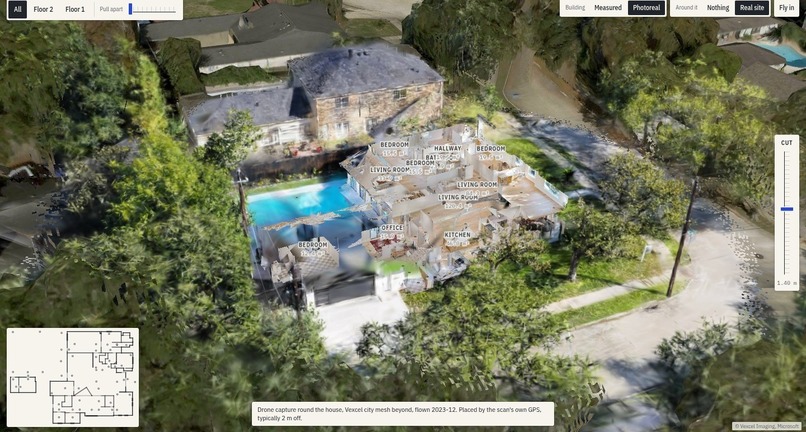
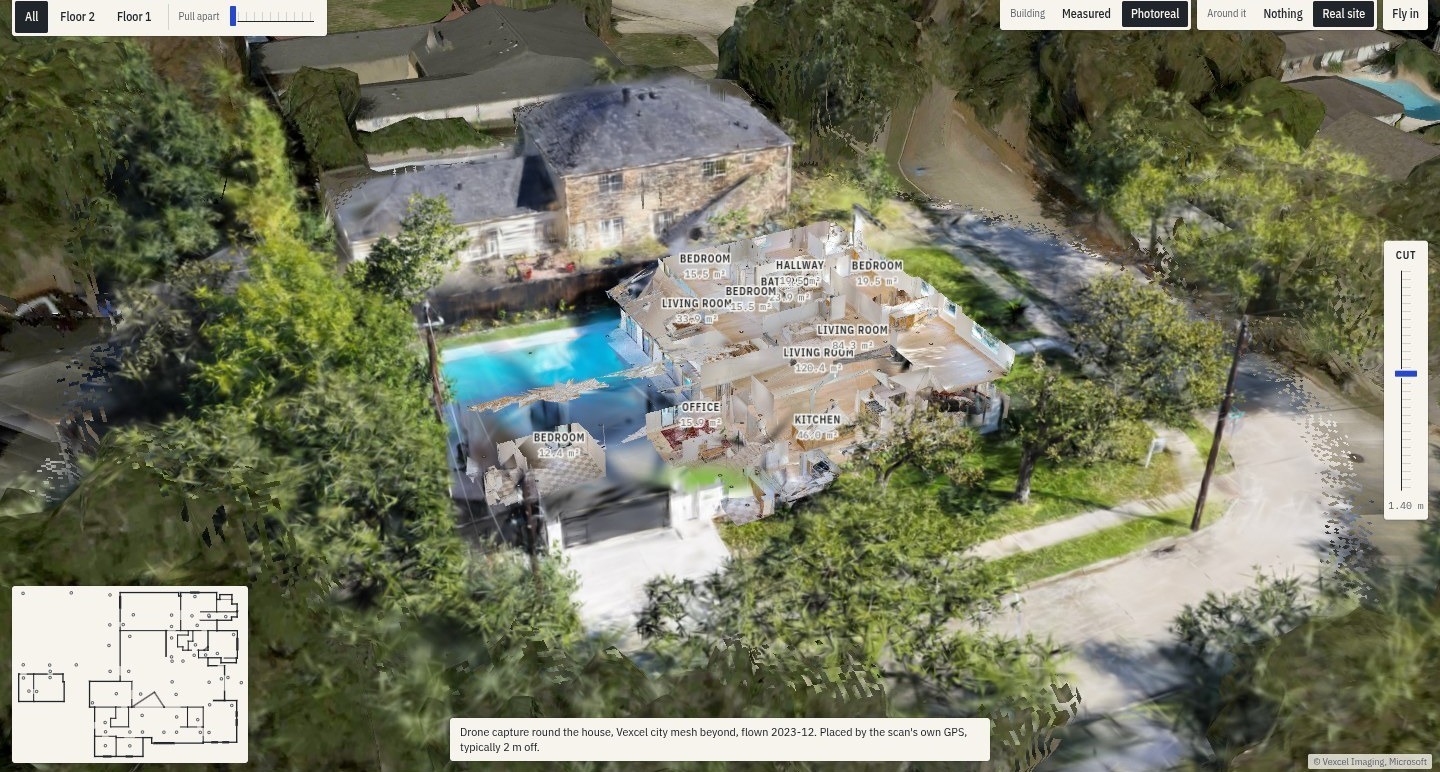
A Houston house in one world: the scanned mesh baked with its own panoramas, cut open in the drone capture and the Vexcel 3D city.
Code: https://github.com/benz16107/cranley Site and docs: https://cranley.app Video (2:00): [link goes here]
Measure the building before you commit
Listings say "two-car garage", "accessible", "fits a king bed". Nobody measures before you sign. Cranley is one place where an agent assembles the tools your need requires, from a city map down to a measured doorway, and checks real buildings inside and out. Every number comes from a calculation, never from a model's text.
It is for the person the listing fails: a wheelchair user signing a lease, a Houston family before a storm, a fire crew going into a house it has never seen, a small business checking a space against its headcount, a CoStar researcher checking a record against the building.
Tracks
| Track | What we built for it | Where to look |
|---|---|---|
| CoStar: Inside and Out | All three layers (Matterport interiors, Vexcel aerial and 3D city, CoStar records) in one frame; an agent that plans, fans out per building and checks claims across layers | Record versus reality, flood, garage and driveway fit, site tools, search by measurement |
| Amazon: Practical AI | Ask in plain words, get a workspace you can act on; it learns the person once and adapts every later investigation, with the adaptation measured on screen; works on your own home through the iPhone scan | "Cranley knows", Home, the phone companion, PDF reports |
| LangChain deepagents | Planning, parallel subagents shown live, human approval with resume from a MongoDB checkpoint, skills, memory, a rubric grader, LangSmith experiments | The agent panel on any investigation |
| Photon 2.0 | The same agent over iMessage and a phone call: marked plan pictures, reply threads as investigations, approvals by reply, photos and voice notes in, the PDF in the chat | Text or call the Cranley line |
| MLH Tiger Data | The building facts database: hypertables, compression, continuous aggregates, DiskANN room search, pgai vectorizer, forks for what-ifs | Search by measurement, Insights, Renovate |
| MLH MongoDB Atlas | Workspaces and their operation log, change-stream live sync with the phone, hybrid search, time series, vector memory, guarded MCP | Investigations, the phone, share links |
The problem
The information to answer "will this work for me" exists: laser scans of the interior, aerial photos sharp enough to count parking spaces, market records for the same address. Each sits in its own product, and every feature that exists works inside one listing at a time. Nobody joins the layers, and nobody asks your question across a whole city.
What it does
- You say what you need. "I use a wheelchair, 81 cm wide. Find a one-bedroom in Houston I can get into and use the bathroom."
- The agent composes the workspace. It picks the tools from more than 75 (step-free route, door widths, turning space, bathroom clearance), asks only for what is missing, and shows its plan.
- It checks many buildings at once. One subagent per building, in parallel, each lane visible. Expensive steps (a fire simulation, a vision read of every panorama) wait for your yes.
- You see the evidence. A ranked table, the route drawn through the photoreal building, the narrow door in red, the panorama that shows it, and the source and reliability of every number.
- You can change the building. "Widen this door": the renovate tool edits the plan, re-runs the checks and prices the work.
- You take it with you. A PDF report with numbered fixes and a list of what was not checked.
The same workspace works for 50 kinds of user. A Houston homeowner watches Hurricane Harvey's measured water levels rise through their own house and gets the list of what to carry upstairs first. A fire captain gets a pre-plan with search routes and a smoke simulation run through NIST's CFAST model on the measured rooms. A car owner learns whether two trucks fit the garage. An office tenant tests whether the team fits, room by room, and a tenant rep ranks candidate sites on a weighted scorecard with market comps.
It learns you once
Tell Cranley your wheelchair is 70 cm wide on the first home you look at. On the next home you type six words, "Is this one workable for me?", and it asks nothing: it measures every doorway against your chair, leaves out the tool you removed last time and keeps back the kinds of check you said were not relevant. Each of those decisions is written on screen with where it came from ("You told me on 14 Nov"), and one click changes or forgets it.
Measured, not claimed. We replayed one scripted wheelchair user over three homes through the real composer and agent. Questions asked: 1, then 0, then 0. Tool inputs filled from what it already knew: 0, then 3, then 3. Checks kept back because the person had waved that kind off: 0, then 3, then 9. Of the checks shown, the share this person's fixed rule counts as relevant: 19 of 29, then 38 of 38, then 46 of 46. The same counts appear in the app for a real person, under "How Cranley has adapted to you", taken from their own history. It is a replay of one person, not a user study, and time to the first result did not change in a way we can claim.
What makes it different
- Inside, outside and the record together. Tools check one layer against another: the listed area against the measured one, the floor height from aerial elevation against the door sill from the scan.
- Your own building. The iPhone app scans a room with LiDAR (Apple RoomPlan) and converts it to the same plan format, so every geometry tool runs on a space that is in no dataset.
- Photoreal 3D we built ourselves. The scanned mesh baked with its own panoramas, interior Gaussian splats we trained, set in the 3D city with a cut-away, one continuous view from the street into the room.
- Physics, not pictures. CFAST for smoke. USGS high-water marks for floods.
- The building in its city. One continuous view from the map through the aerial and the 3D city into the room, with 66 map layers around it (flood zones, Harvey high-water marks, hydrants, zoning, permits, transit, live weather), each labelled with its source and fetch date.
- Search by what is measured inside. "One-floor houses with three bedrooms and every door at least 81 cm" is one query.
- Where people already are. Over Photon 2.0, ask by iMessage or a phone call from the viewing itself; a photo of a doorway with a bank card in it gets measured, and the PDF arrives in the chat.
- Any agent can use it. Every tool is also an MCP tool and a
thresholdCLI command, so Claude Code can ask "will an F-150 fit in this garage" and answer from the result. - Honest by construction. Each number carries its layer, its method and a high, medium or low label. A scan that cannot answer gets an "unknown" verdict with the reason.
How we built it
- Server (Python, FastAPI). Engines built once and shared by every tool: routes and clearance through the wall graph, rule packs, takeoff, georeference and sun, water; a panorama reader (vision model) for room labels and objects; an aerial site reader. Each tool is a manifest plus a handler that returns a typed result with metrics, checks, findings, overlays and sources.
- Agent (LangChain deepagents, LangGraph). A composer picks tools for the need with structured output. An investigator deep agent plans with todos, sends one subagent per building or property, pauses for approval through human-in-the-loop middleware, resumes from a MongoDB checkpoint, loads skills per need, remembers per building, and is graded by a rubric before it speaks. Every turn is a LangSmith trace; the composer has a LangSmith dataset and experiments.
- Workspace. One document per session, changed only through typed operations by the agent and the person alike, logged with who, when and which run, with undo.
- Databases. MongoDB Atlas for people's work (workspaces, op log, change streams, Atlas Search, Vector Search,
$rankFusion, time series, TTL share links). Tiger Cloud for building facts (hypertables, compression, continuous aggregates, PostGIS, pgvectorscale, BM25, pgai vectorizer, jobs, forks). - Web (React 19, Vite, TypeScript). MapLibre and deck.gl for the map; three.js, React Three Fiber and Spark for the dollhouse, panoramas, meshes and splats. A shared core with the App look on top. Base UI, cmdk, Sonner, Vaul, NumberFlow and react-resizable-panels.
- Messaging (Photon 2.0). A bridge turns iMessage events into agent turns: reply threads map to investigations, attachments to tools, and every outgoing line is built from the tool result. One signature-checked relay is the only public endpoint; an ElevenLabs agent over SIP answers calls with the same tools.
- Phone. A companion web app paired by QR (GPS, camera, mic, barometer, tilt), and a native SwiftUI app with RoomPlan, ARKit LiDAR measuring and the barometer.
- Hardware. Interior splats trained with Brush on an AMD mini PC's integrated Radeon 780M through Vulkan, no NVIDIA, 16 to 23 minutes per building. The same machine runs the API, CFAST and Ollama.
Challenges we ran into
- The scans' mesh download was unavailable, so the first dollhouse was drawn from the wall graph. Later we found the scanned mesh through the model API and baked it with the panoramas.
- About half the scans have no wall graph. Every tool checks the plan's quality first and says plainly when it cannot answer; for some scans we recovered walls from the schematic drawing.
- The compass direction of a scan had no documented convention. We fitted it against building footprints from the aerial data before any tool relied on it.
- Some scans put their origin on an upper floor, which sank every 3D overlay by a storey until we fixed one height for the whole scene.
- A DiskANN index grown row by row had recall@10 of 0.0, so a TimescaleDB job now rebuilds it hourly.
- An agent turn once claimed "none of the checks ran" after twelve runs. That became the rubric grader.
Accomplishments that we're proud of
- Every tool run through the real API on a 15-place demo set: 266 answers, 62 honest "cannot answer here", 1 error from a bad input, 0 judged wrong (from 29 wrong before the review pass).
- About 600 server tests and 90 web tests.
- Photoreal interiors trained on an integrated GPU.
- A phone reading reaches the desktop workspace in about a second.
- Adaptation, counted from the op logs: questions asked 1, 0, 0 and checks kept back 0, 3, 9 over three homes for one returning user.
What we learned
- The value is in the join. Each layer alone answers little; the floor height from the air plus the sill from the scan answers the flood question.
- An agent is most useful when it never states a number. Choosing, asking and explaining is its job; measuring is the code's.
- Saying "this scan cannot tell" is a feature people trust more than a guess.
What's next
- The iPhone app on real phones, so any shop or home can be checked in ten minutes.
- More rule packs: fire codes and accessibility standards by city.
- A hosted MCP server, so any agent can check a building. Today it runs on the machine that holds the data and serves Claude Code, Claude Desktop and Cursor there.
Limits
- Only scans with a wall graph get geometry checks; the rest get what panoramas and records can say.
- Flood and fire results are planning aids, not inspections.
- The iPhone app runs in the simulator; it has not been on a phone yet.
Built with and credits
Our code was written during the event. Libraries and tools we used: FastAPI, Pydantic, Shapely, NumPy, LangChain deepagents, LangGraph, LangSmith, langchain-mcp-adapters, MongoDB MCP server, pymongo, pg8000, pgai, fastembed, Ollama (nomic-embed-text), Anthropic Claude, React, Vite, three.js, React Three Fiber, drei, Spark, MapLibre GL, deck.gl, Base UI, cmdk, Sonner, Vaul, NumberFlow, react-resizable-panels, zustand, Brush (splat training), NIST CFAST (fire model), Photon 2.0, ElevenLabs, Apple RoomPlan and ARKit, OpenStreetMap, USGS high-water marks. Data from CoStar, Matterport and Vexcel under the event's terms; none of it is in the repository.
Built With
- anthropic
- arkit
- deck.gl
- deepagents
- elevenlabs
- fastapi
- langchain
- langgraph
- langsmith
- maplibre
- matterport
- mongodb-atlas
- ollama
- pgvector
- photon
- postgis
- python
- react
- roomplan
- swift
- swiftui
- three.js
- tiger-data
- timescaledb
- typescript
