Inspiration
Reading a drawing means turning flat views into a solid in your head. A floor plan, a CAD drawing and an assembly diagram all ask for it. It is a skill, and research says it can be trained: a meta-analysis of 217 training studies found that spatial skills improve with practice (Psychological Bulletin, 2013).
I wanted a way to practise it for a few minutes a day that is hands-on and fun, not a worksheet. Three Views is one new shape a day. You reach into a box, place blocks, and watch their shadows move on the walls. Nobody has studied Three Views itself, so I claim only this: it is a daily way to practise.
What it does
Three Views is a daily warm-up for spatial thinking, for anyone who works from drawings: engineering and architecture students, designers, makers.
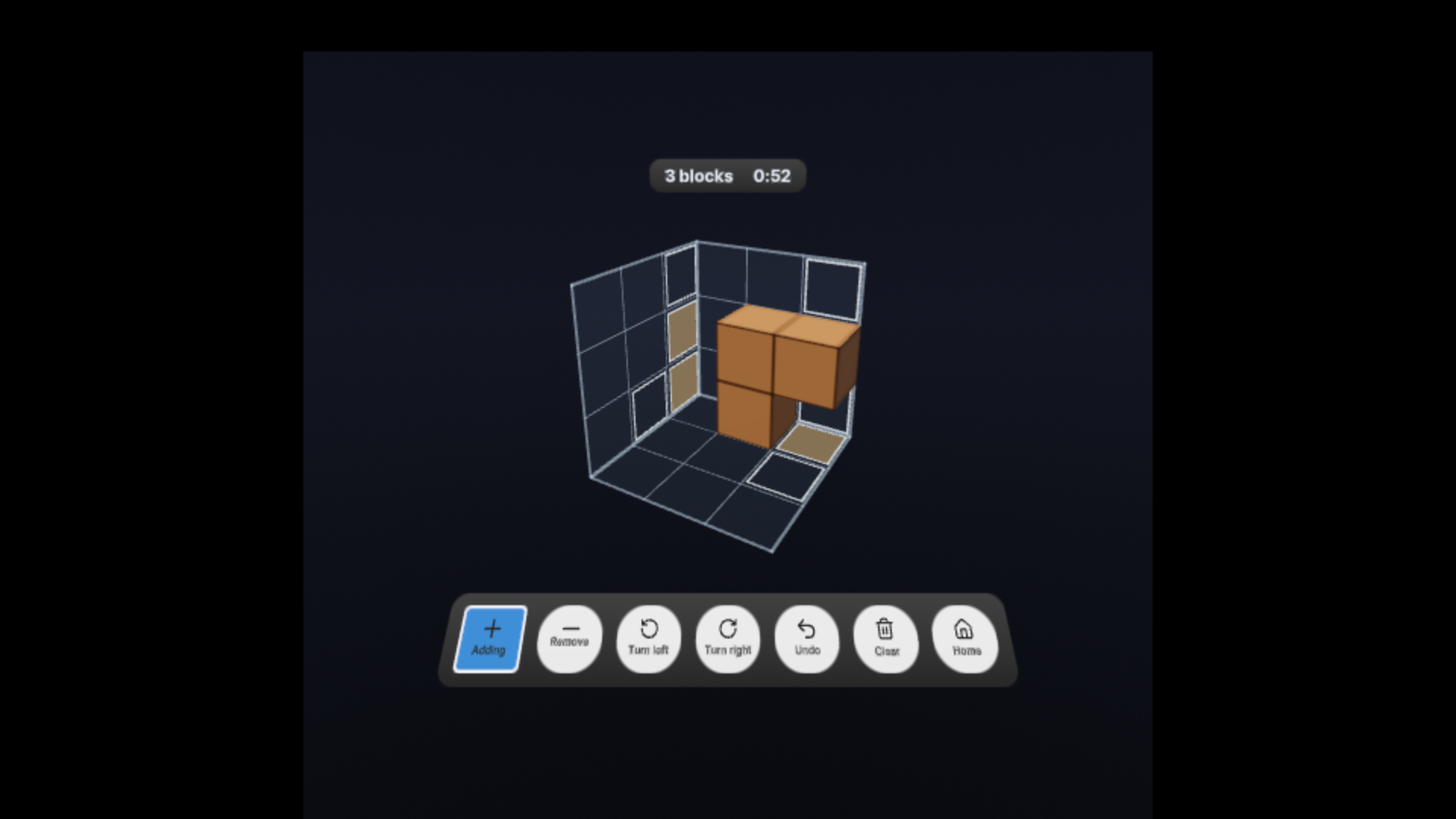
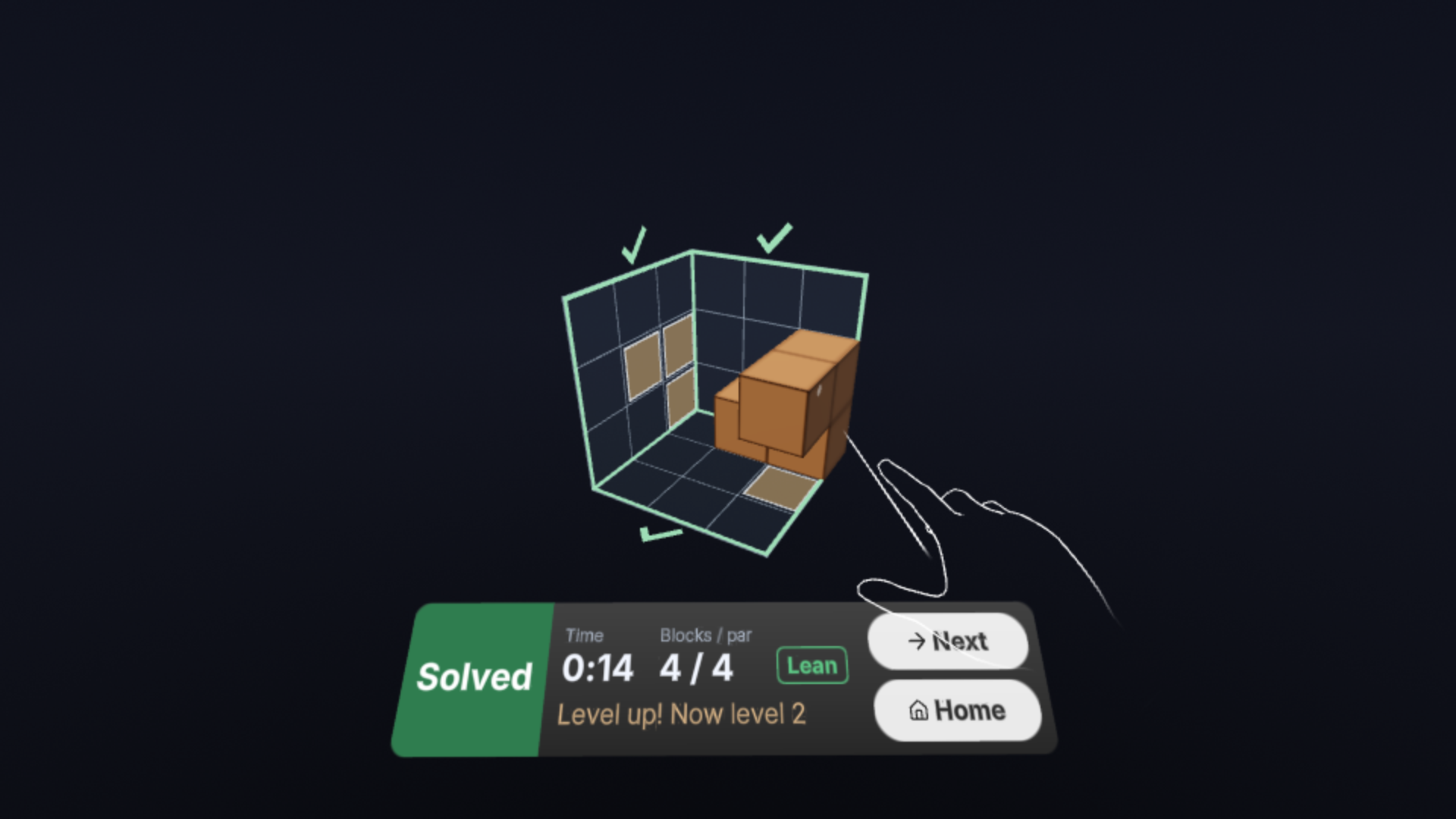
The top, front and side outlines of a hidden shape glow on three walls of a glass box. You build a shape from blocks inside the box until its three shadows match the three outlines. Any shape that casts the right shadows wins, so there is more than one answer.
Depth is the point. In a headset the solid and its three shadows sit in front of you at once, so you compare them directly and not through a flat picture of them.
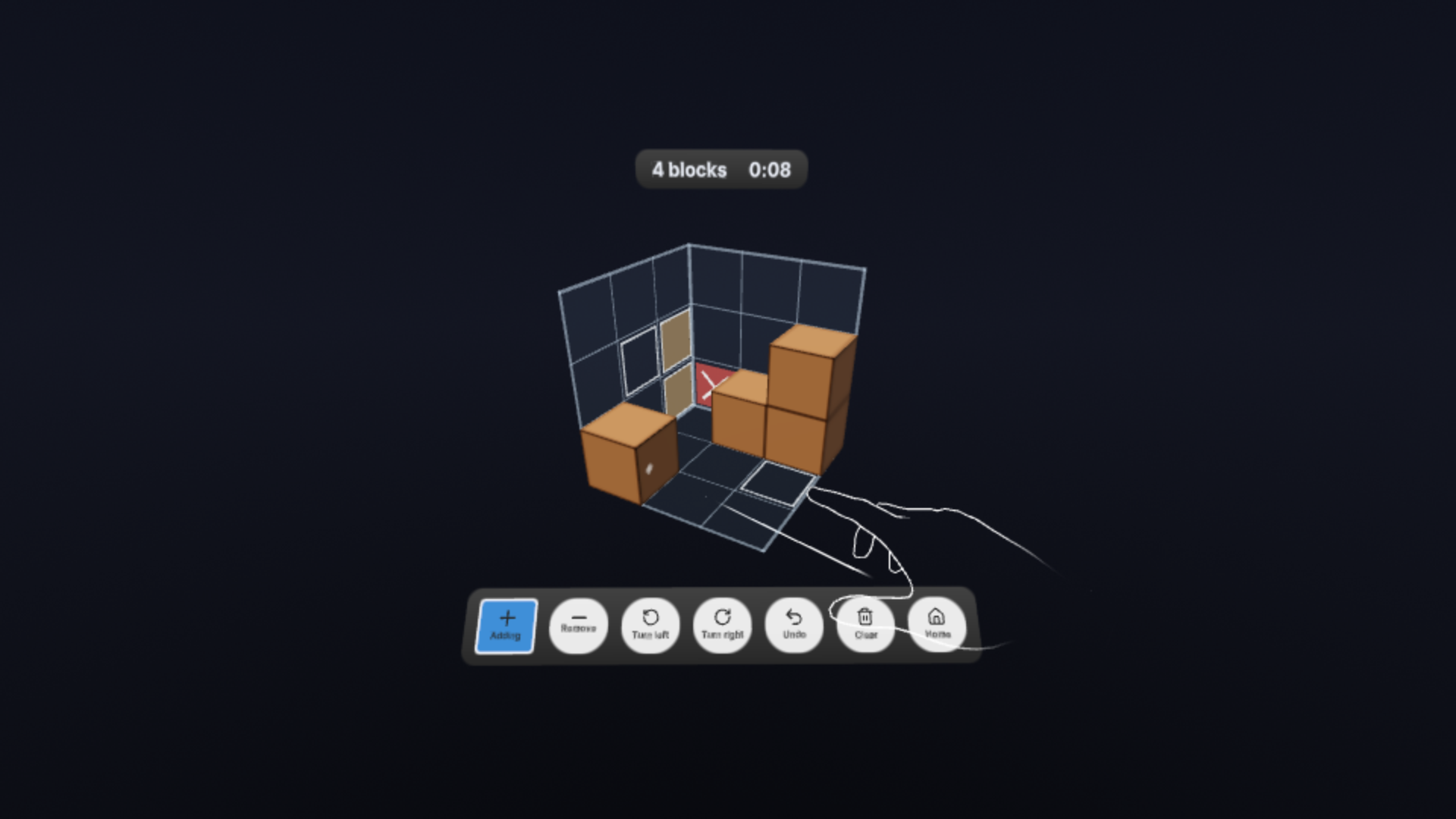
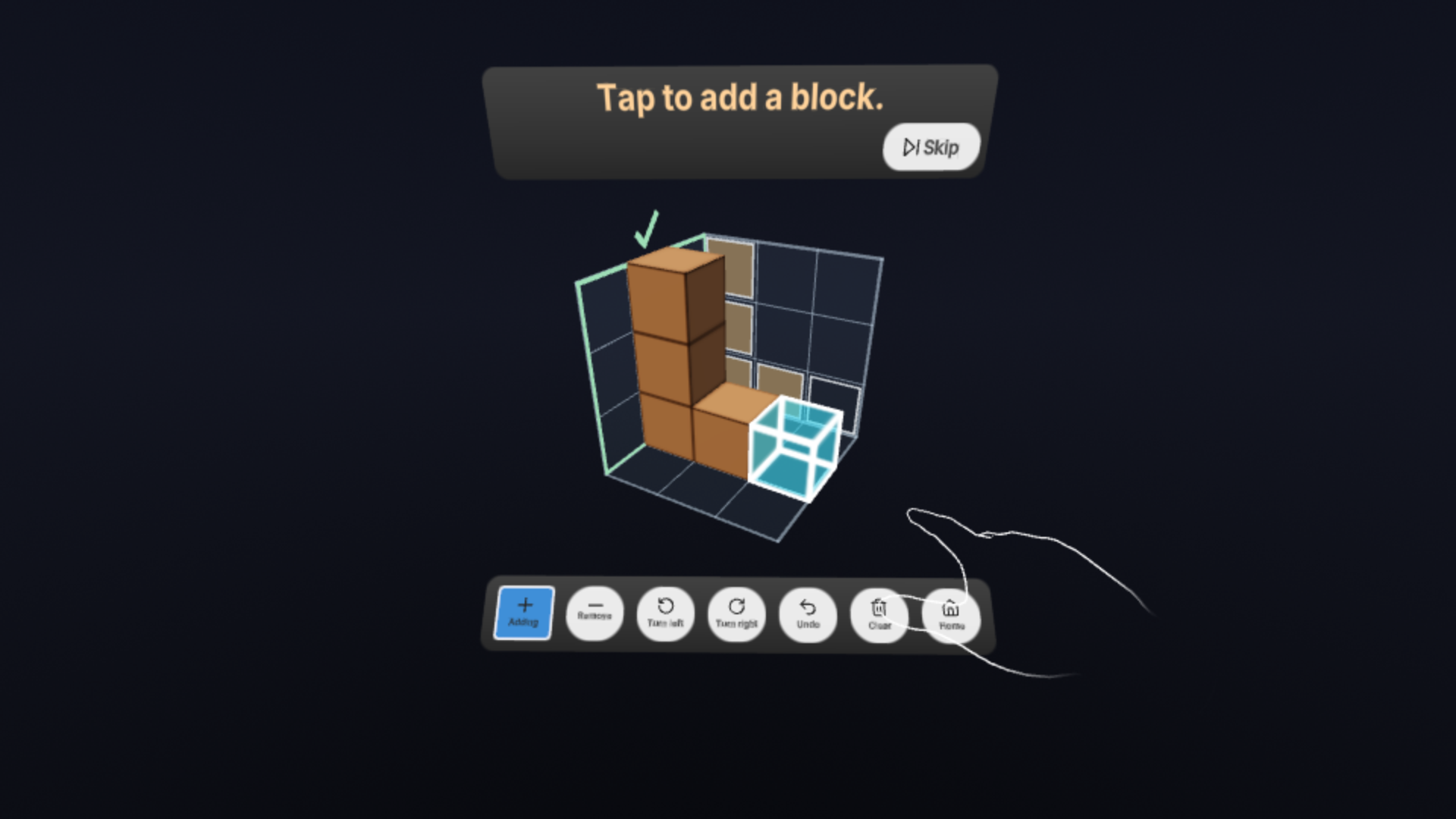
- Every action is a tap. Point and pinch to add a block on a floor square or on the face of another block. Switch to Remove and tap a block to take it away. Turn left and Turn right rotate the box a quarter turn. Undo steps back one move. Clear empties the box after a second tap to confirm.
- The walls show where you are. A square your build covers fills in. A square outside the outline gets a cross. A wall that matches gets a tick. Three ticks solve the puzzle.
- The first minute teaches by doing. Three short lessons show Add, Remove and Turn, each with one line of text and a glowing ghost block where to tap.
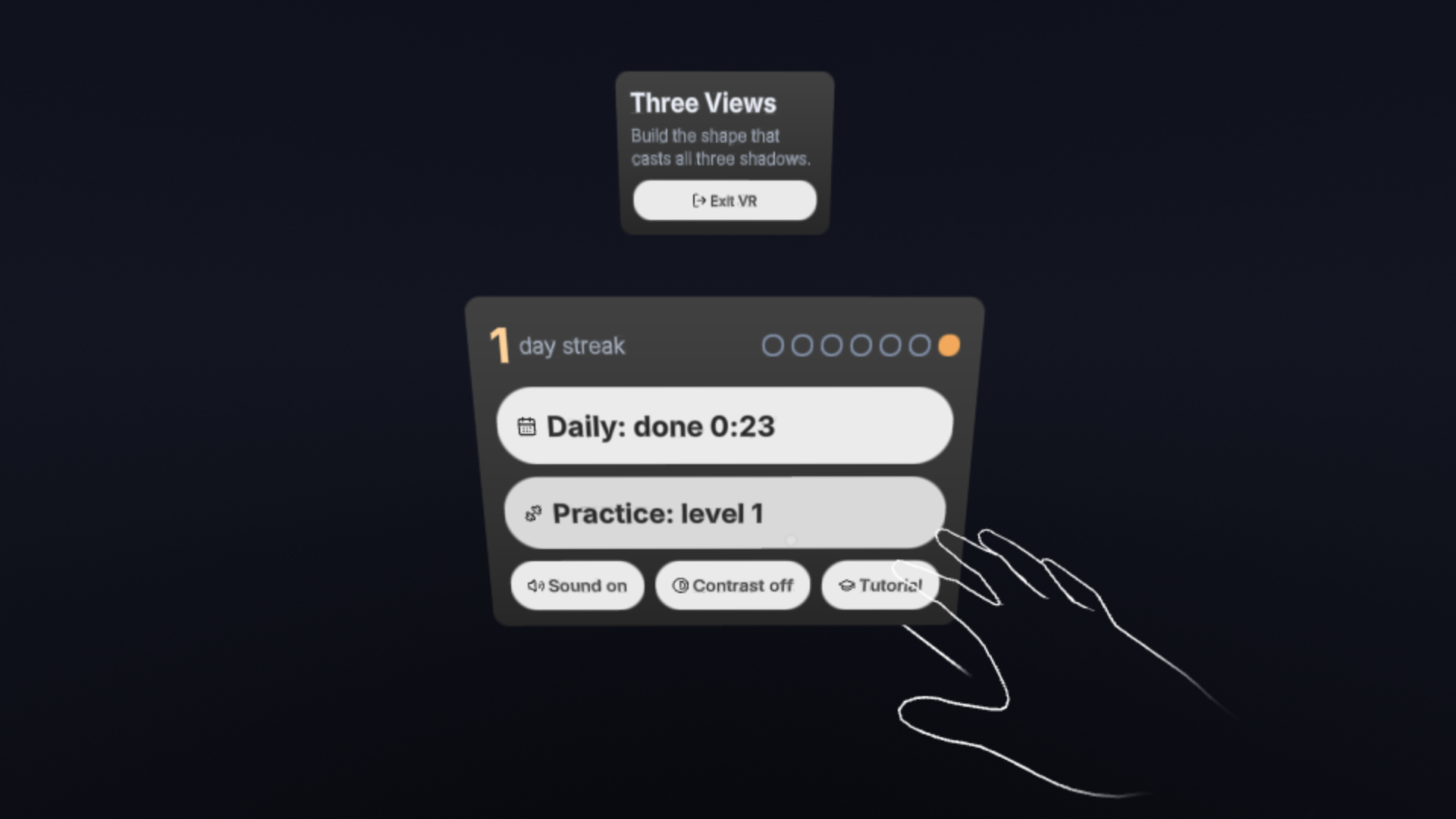
- A daily habit with visible growth. One new daily warm-up, the same for everyone on the same date, and a streak with seven day-dots for solving it on consecutive days. Practice has eight levels; two solves move you up one. The result card shows your time, blocks used against par, and a "Lean" mark when you used par or fewer.
- Made for seated play and a narrow view. You play seated, and the box and buttons sit in front of you. Everything fits inside the Meta VR Glasses' field of view, and the glasses' gaze and pinch work for every action. Sound can be turned off and there is a high-contrast mode. Colour is never the only signal.
- No account. Progress is kept only in your browser. The app still works if storage is blocked.
It runs in the Meta Quest Browser on Quest 3 and 3S, on Meta VR Glasses, and in a flat desktop browser tab with a mouse.
How I built it
- Immersive Web SDK 1.1.0 (WebXR) with TypeScript. Three.js comes through the SDK.
- Game logic is pure TypeScript with no rendering code: projecting a shape to its three outlines, the solve check, a seeded puzzle generator, levels, the daily puzzle and saved progress. Puzzles are generated from a seed, so the same date gives the same puzzle on every device. The solve check compares outlines, never the generator's hidden shape. 17 tests cover it, run with
node --test. - All geometry is generated in code and all sounds are synthesized with the Web Audio API. There are no imported 3D models, images or audio files of our own.
- UI panels use UIKitML with the SDK's Horizon kit, dark scheme.
- Blocks are drawn as one instanced mesh, with the edge lines baked into a texture, and each wall's marks are merged into a few meshes. That keeps the draw count flat as the build grows.
- No server of our own. It is a static site on GitHub Pages. No accounts and no analytics. One outside request we don't control: when XR starts, the SDK loads the standard hand and controller models from a public CDN (cdn.jsdelivr.net). If that is blocked, the game is still fully playable; the hands just aren't drawn.
- Built with AI coding agents. I used Claude Code to plan the work as small tickets and write and test the code ticket by ticket. I made the product decisions and checked each step.
How it was tested, honestly
Three Views was built and verified only in the browser, in the SDK's XR emulator (IWER), using the Meta Quest 3 and Meta VR Glasses device profiles. It has never been run on a physical headset or on Meta VR Glasses. In the emulator:
- The daily warm-up, practice and the tutorial were solved by hand ray and pinch, by controller, by mouse, and by gaze and pinch on the glasses profile.
- Every screen was measured to fit inside the glasses' view (37° left and right, 25° up, 43° down), and every tap target is at least 3° across.
- In the busiest case (40 blocks while turning) the scene drew 94 draw calls per stereo frame. These are laptop measurements, not headset ones.
- Blocked storage, blocked audio, reload mid-puzzle, leaving and re-entering XR, rapid repeated taps and 200 random taps were all tried with no app errors.
What I could not check without a headset:
- Real frame rate on Quest 3/3S and on the glasses.
- Real hand tracking (pinch detection, ray jitter, losing the hand) and real eye-tracking accuracy.
- How legible text and 10 cm blocks are at headset resolution, and the glasses' optics near the edges of the view.
- Sound: I never heard it on a device, and I couldn't confirm it starts when XR begins without a page tap.
- Comfort over a 10-minute seated session.
- Behaviour offline: the hand and controller models come from a CDN, so offline they aren't drawn (input still works in the emulator).
Challenges I ran into
- No headset. Every interaction had to be one that can't fail on a device I couldn't try: large targets, taps and snaps, no drags, no physics, nothing that depends on hover.
- Seeing three walls at once. Square-on, the side wall was almost edge-on from the seat. The box now rests turned about 30°, so all three walls face you.
- Draw calls. The first version drew every block twice and every wall square as its own mesh: 610 draw calls per frame with 40 blocks. Instancing the blocks and merging the wall marks brought that to 94.
- The glasses' narrow view. Panels, the control bar and the result card had to be sized and placed so everything fits, and short labels had to stay on one line.
Accomplishments that I'm proud of
- Any shape that matches wins. The app checks shadows, not one stored answer.
- The tutorial is three taps and a turn, with almost no text.
- The whole daily warm-up can be solved by gaze and pinch in the glasses profile.
What I learned
- Designing for taps only made the app simpler, not poorer.
- On a narrow display, layout is measured in degrees, not pixels.
- Honest testing in an emulator means writing down what it cannot show.
What's next
- Test and tune on real Quest 3/3S and Meta VR Glasses hardware. This comes first, because everything so far was tested in the emulator only.
- Bundle the hand models with the app, so it makes no outside requests and works offline.
- Larger grids and hand-made puzzle packs.
- A weekly challenge and a shareable result image, still with no account.
- A left-handed layout and more contrast options.
- Package it as a PWA for the Meta Horizon Store.
- Show your solve times improving from week to week on Home.
Built With
- claude-code
- github
- immersive-web-sdk
- meta-quest
- meta-vr-glasses
- node.js
- three.js
- typescript
- uikitml
- web-audio-api
- webxr
