InspirationMy interest in cybersecurity grew from my early experiences with coding and technology. As I learned more about how software and computer systems work, I became increasingly interested in how people can protect themselves from online threats.
Phishing attacks and suspicious links are common ways people are targeted online. Many users receive convincing messages that pressure them into clicking links, sharing passwords, or revealing personal information. I wanted to create a project that could help make these warning signs easier to understand.
That idea inspired ThreatLens AI.
What It Does
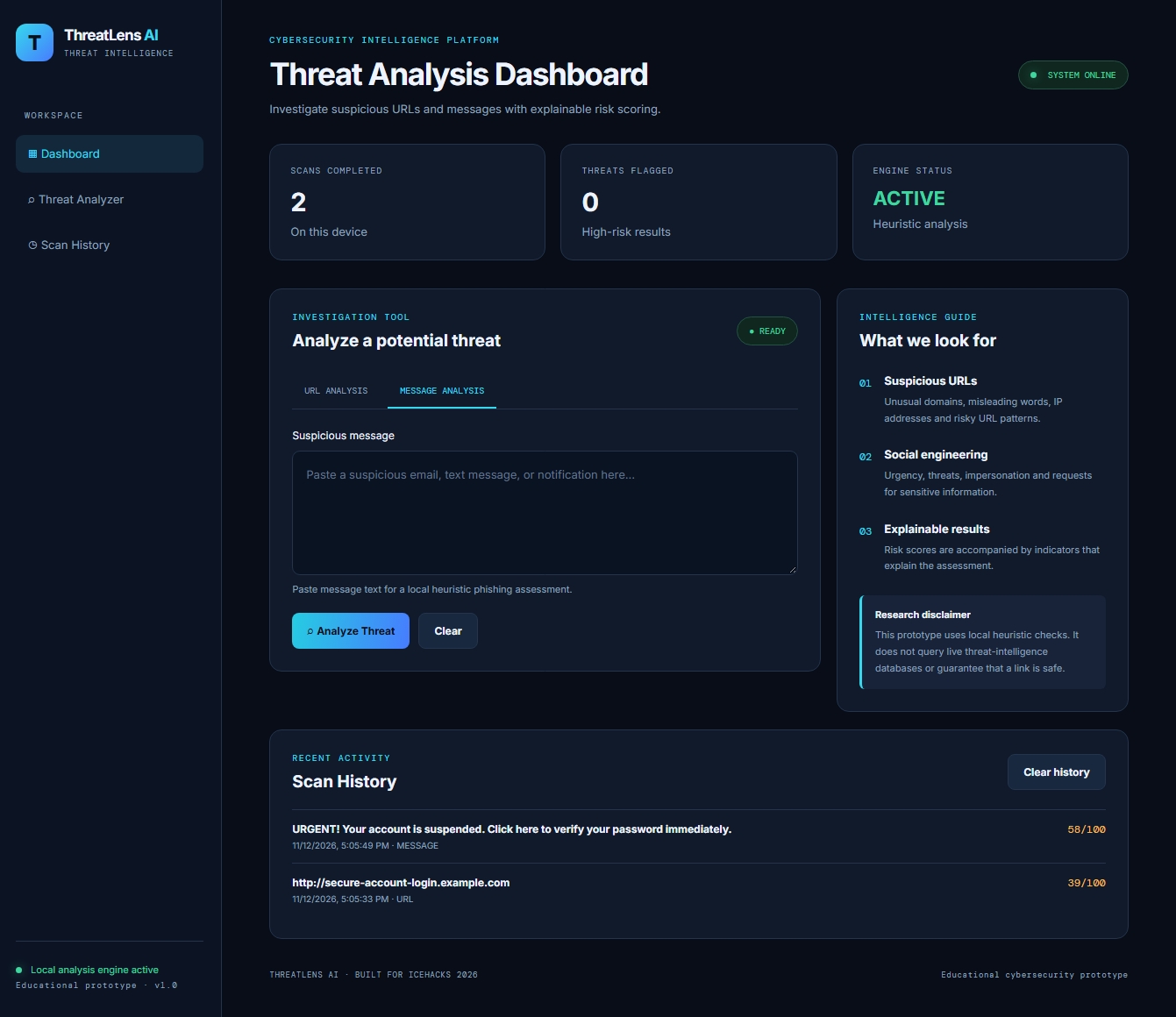
ThreatLens AI is a cybersecurity analysis dashboard designed to help users investigate suspicious URLs and potentially harmful messages.
The application provides:
- URL Analysis: Checks submitted URLs for suspicious patterns, unusual domains, and other warning signs.
- Message Analysis: Examines message content for phishing-related language, urgency tactics, and requests for sensitive information.
- Risk Scoring: Assigns a score from 0 to 100 based on detected indicators.
- Explainable Results: Shows users which indicators contributed to their risk assessment.
- Security Recommendations: Provides practical guidance based on the assessment.
- Scan History: Stores previous results locally in the browser.
- Report Export: Allows users to download their analysis results.
How I Built It
I developed ThreatLens AI using HTML, CSS, and JavaScript.
HTML provides the dashboard structure, CSS creates the interface and responsive layout, and JavaScript powers the analysis engine, risk scoring, scan history, and report generation.
The current version uses locally executed heuristic rules to identify suspicious patterns. It does not rely on a trained machine-learning model or live threat-intelligence database. I wanted the results to be understandable, so the application explains the indicators behind each assessment rather than presenting a score without context.
Challenges I Faced
One of my biggest challenges was bringing multiple cybersecurity features together into one working application. I had to organize the dashboard, connect the different analysis functions, make the results understandable, and ensure that the scan history and report export features worked correctly.
Another challenge was making the project useful without depending on expensive services or complicated infrastructure. I focused on building a lightweight browser-based application that users can access without installing additional software.
Testing and refining the application also helped me understand how important it is to distinguish between suspicious indicators and confirmed threats.
What I Learned
Through this project, I strengthened my understanding of JavaScript, front-end development, cybersecurity awareness, pattern recognition, and user-focused design.
I also learned that cybersecurity tools should do more than identify potential risks. They should help people understand why something may be dangerous and what steps they can take to protect themselves.
What's Next
I would like to expand ThreatLens AI with additional analysis capabilities, more advanced threat-detection methods, and integrations with reputable threat-intelligence services. Future versions could also explore machine-learning-based classification and more detailed security reporting.
My goal is to continue developing ThreatLens AI into a more comprehensive educational cybersecurity tool that makes online safety easier to understand and practice.
Built With
- css
- cybersecurity
- dectection
- github
- html
- javascript
- localstorage
- phishing
- web
