Inspiration
Vibe coding lets anyone ship an app they cannot explain. You describe what you want, a coding agent writes it, the tests pass, and it ships. What never forms is the mental model: which parts exist, where the data goes, what trusts what, and how an attacker gets in.
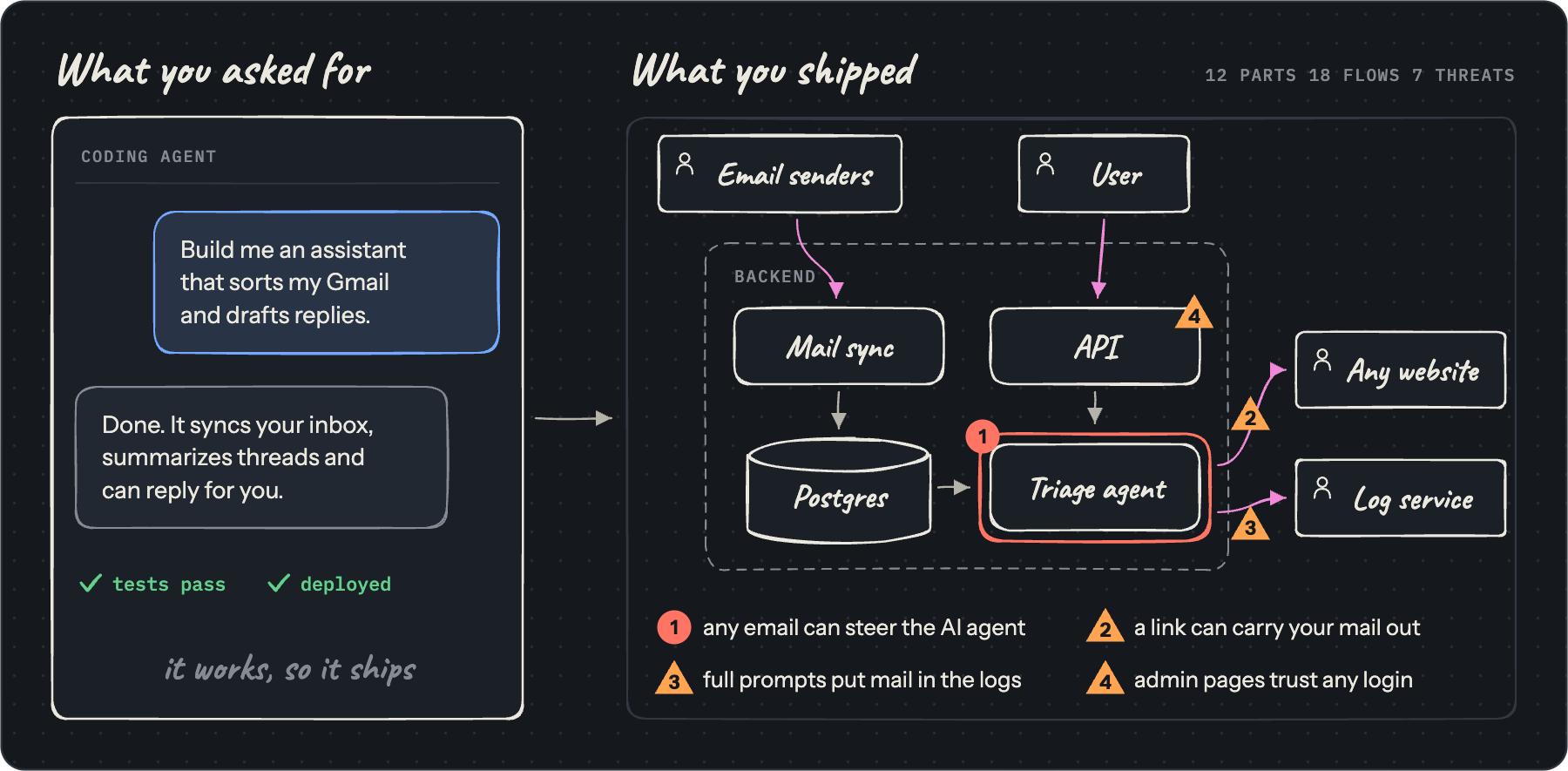
Security runs on that model. Threat modeling, code review and incident response all assume someone understands the design. With vibe coding, often no one does. We wanted a tool that rebuilds that understanding and checks that it stuck, so the person who ships the code can defend it at a whiteboard, ahead of an attacker or a stakeholder asking.
What it does
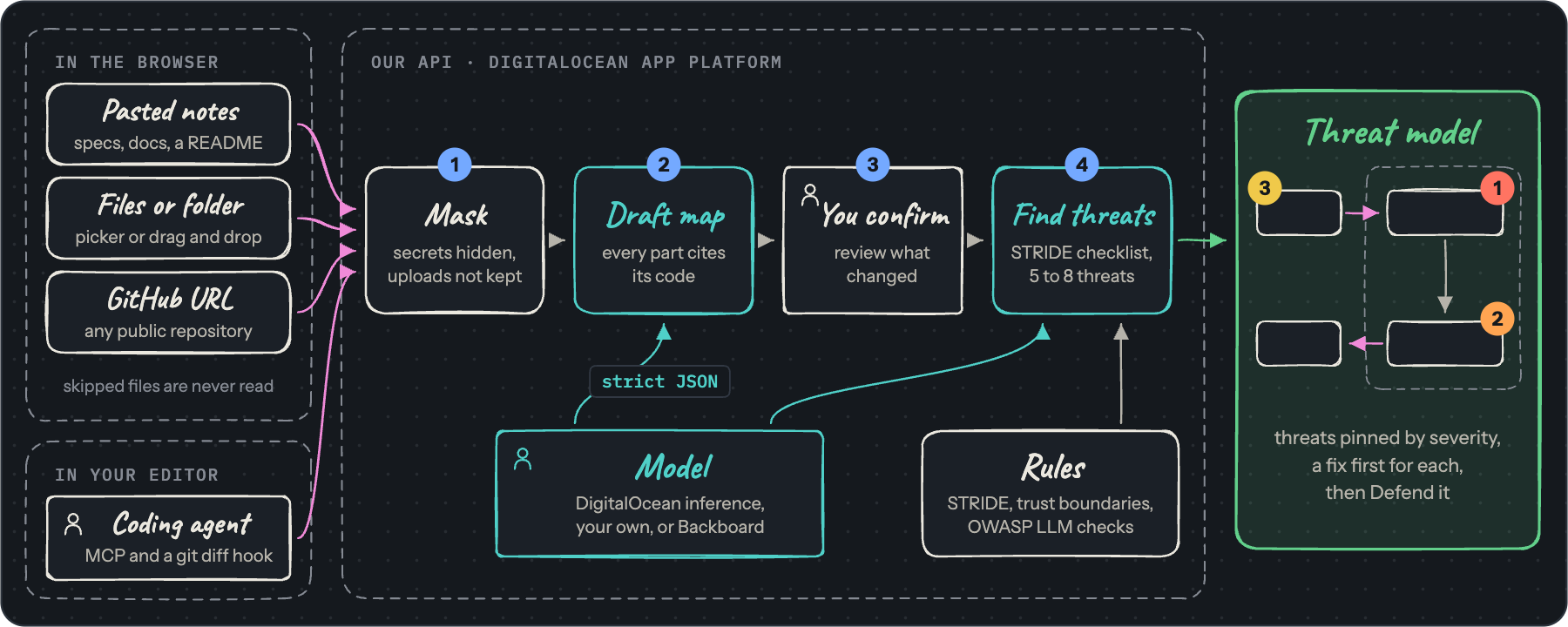
ThreatViz Defend is runtime threat modeling while you vibe code. It turns your code into a threat model you actually understand. Material reaches it in two ways.
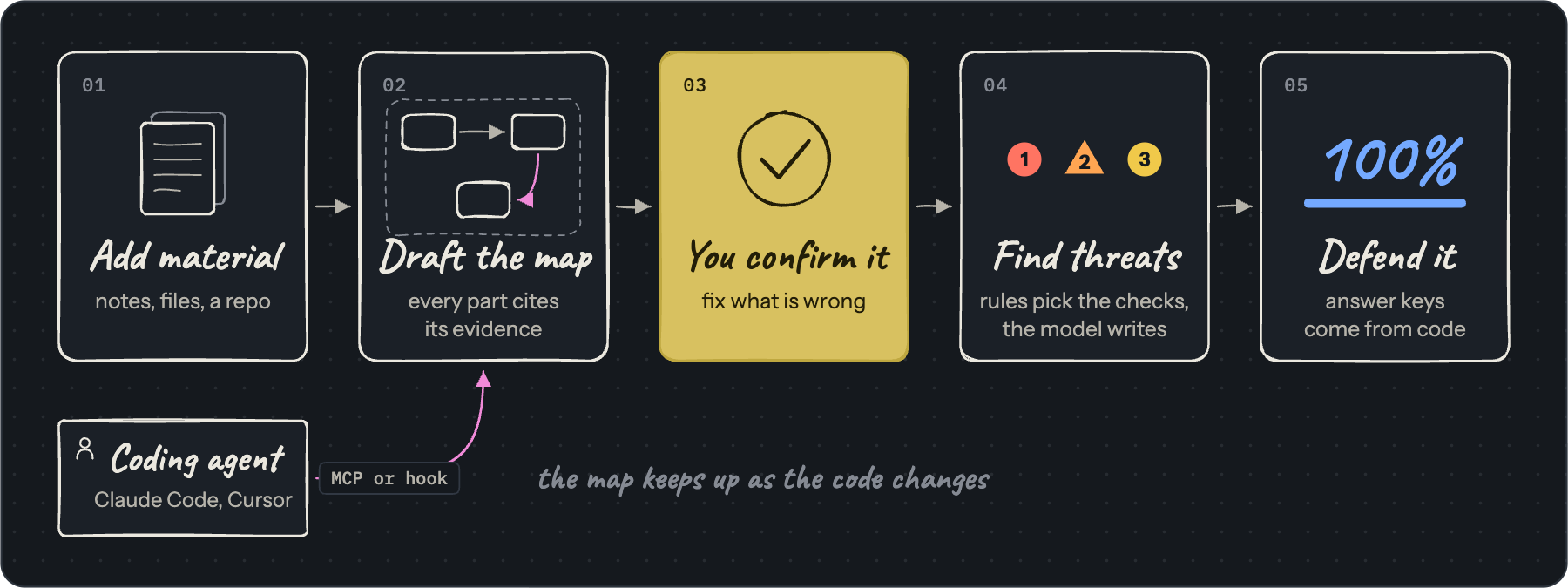
- Static: you bring it. Paste design notes, drop in files or a whole code folder, or paste a public GitHub URL. Files that may hold credentials are skipped in the browser, and credential-shaped values are masked on the server.
- Dynamic: your coding agent brings it while it works. A hook in Claude Code or Cursor runs at the end of every agent turn. It snapshots your working tree with git, diffs it against the last report, and posts the diff when the change touches architecture: a new route, database, queue, model SDK, env var, auth code or infrastructure file. Your recent prompts to the agent go along as the summary. Secret files are filtered from both sides of the diff and credential-shaped values are masked before anything leaves your machine. Over MCP, the agent can also look up any part of the board, ask it what a change risks, report a change on demand, and ask you the Defend questions right in the editor.
Either way, the same steps follow:
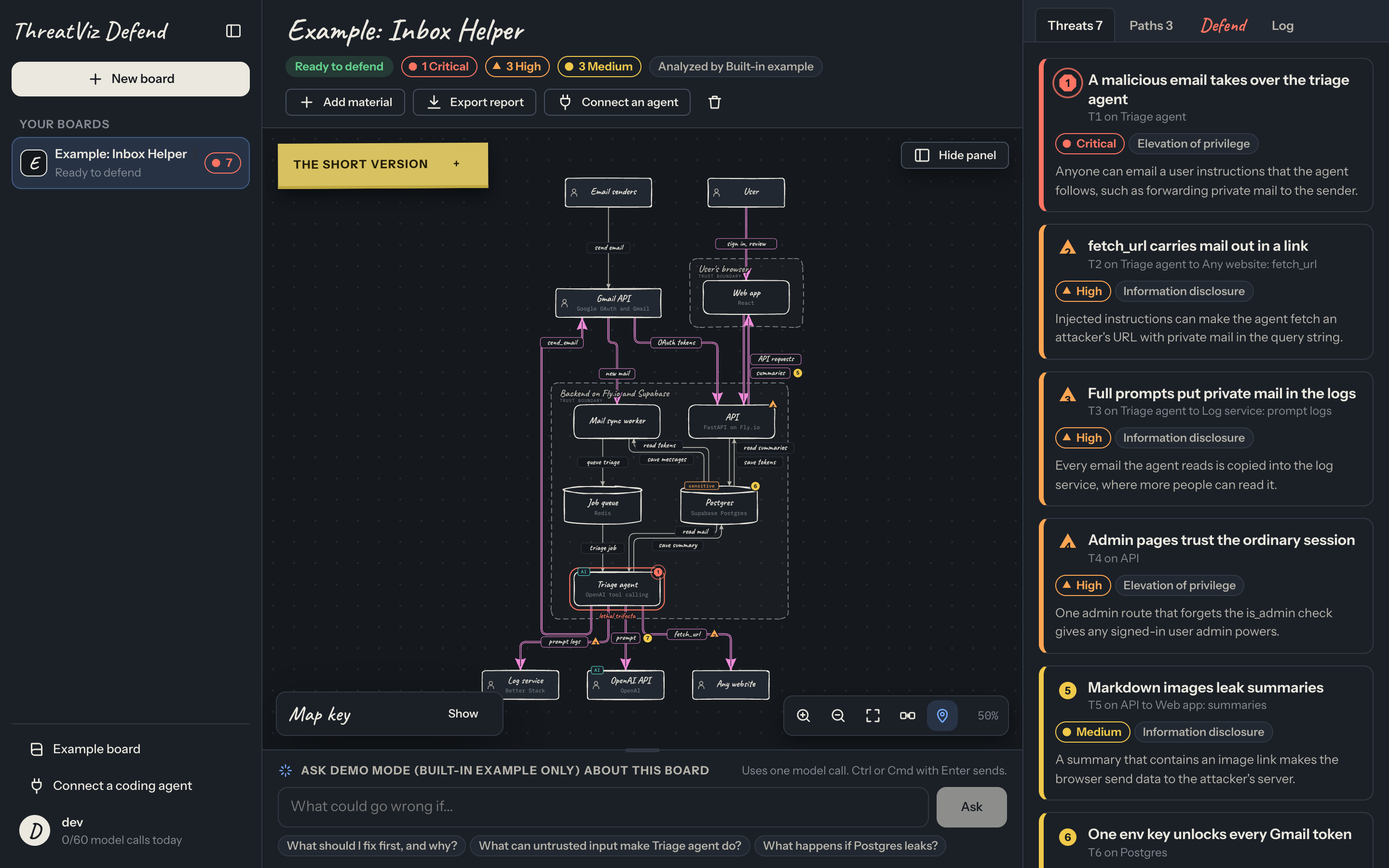
- Check the map. A model draws your system as a data flow diagram: outside services, processes, data stores, flows and trust boundaries. For an agent's change, it updates the existing map from the diff instead of redrawing it, and marks what was added, changed or removed. Every part cites the evidence it came from. You fix what is wrong, then confirm it.
- Read the threats. Code decides what gets checked. It runs STRIDE on every part, flags every flow that crosses a trust boundary, adds OWASP Top 10 for LLM Applications checks on AI parts, and looks for the lethal trifecta on AI agents: private data, untrusted input and a way to send data out. The model then writes the 5 to 8 threats that matter most, pins each one to the map, links CWE and OWASP ids when it is sure of them, and says what to fix first.
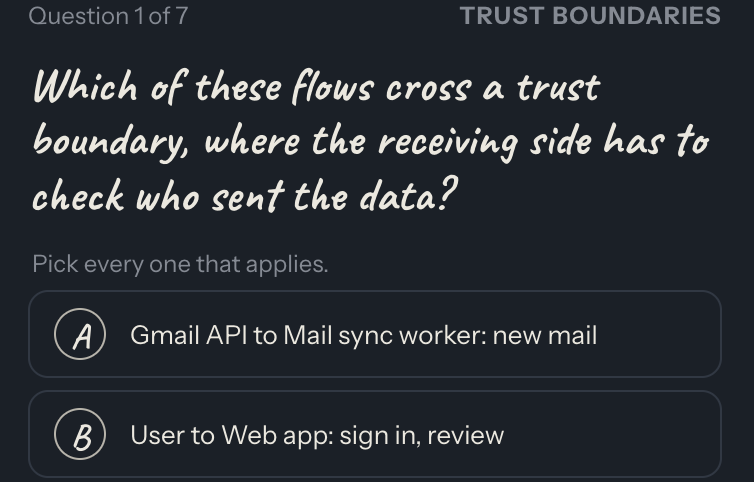
- Defend it. The Defend tab asks up to seven questions about your own system. Code computes every answer key from the map, and only open answers go to a model for grading. Every answer comes back with an explanation and the evidence behind it. Type your answers, or talk them through with an ElevenLabs voice coach, and Backboard memory remembers what you missed last session.
How we built it
We split the app into a core engine and spokes that each attach at one seam: diagrams, voice, hosting, coding agents and model providers. Each area had one owner and a written guide, so four people could build in parallel and merge through pull requests. We wrote all of the code during hackUMBC.
Anything you bring passes through one API that owns every rule, every model call and all storage. The browser only draws what the API returns, so editing the page cannot change a threat or a grade.
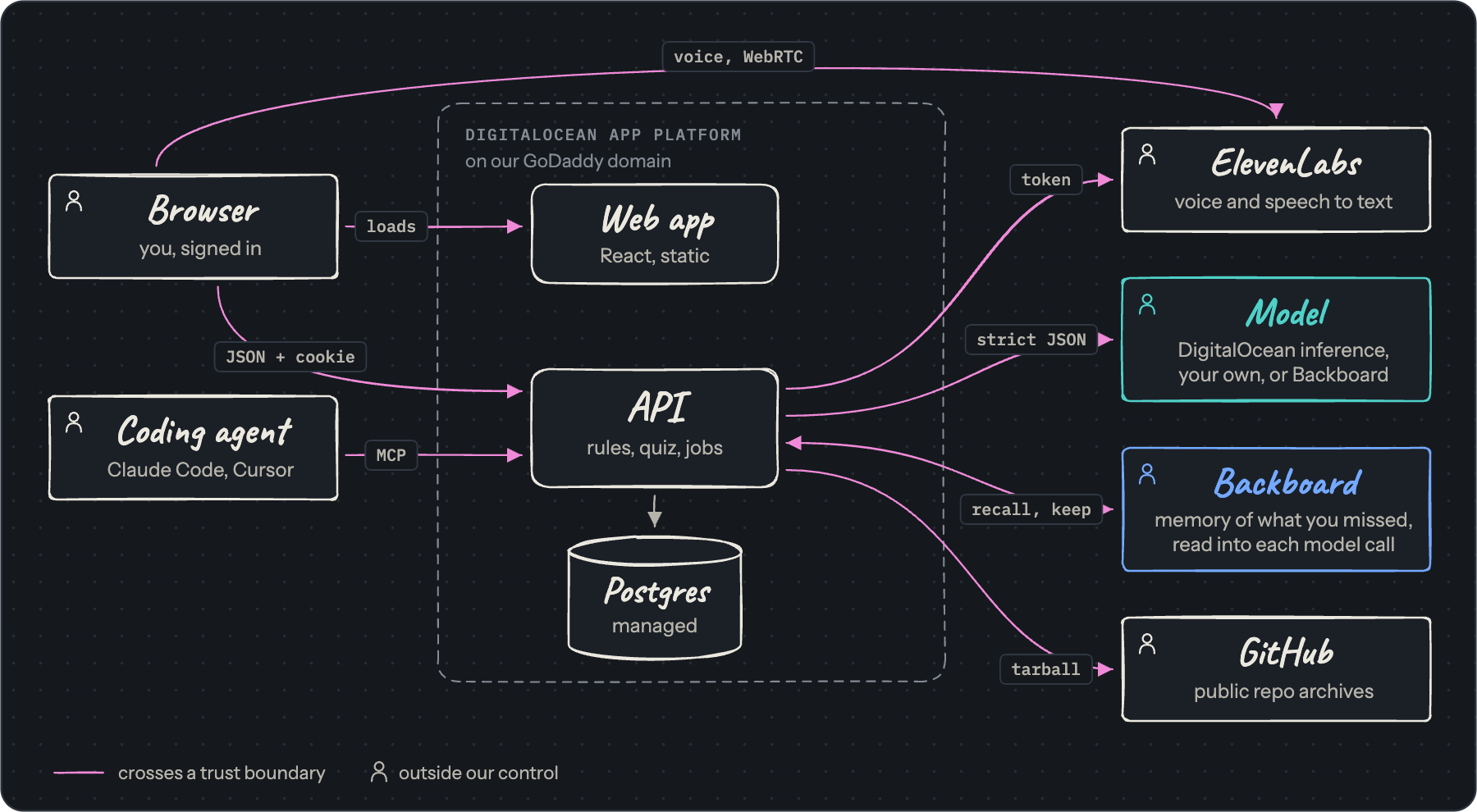
- Backend: Python, FastAPI and Pydantic. The Pydantic models double as the JSON schemas the model must fill. SQLAlchemy on Postgres 16, argon2 password hashes, invite-only sign up and a daily budget per user.
- Models: every call goes through one interface. The default is gpt-oss-120b on DigitalOcean Gradient AI serverless inference. Users can bring their own OpenAI-compatible endpoint, or run every call through Backboard.
- Coding agents: a remote MCP server with seven tools, and a one-file Python hook that needs nothing but git. The hook snapshots through a temporary index into private git refs, so it never touches your branch, index, stash or files. Both authenticate with personal tokens.
- Frontend: React 19 and Vite, ELK for layout, and Rough.js for the hand-drawn whiteboard look. The TypeScript types are generated from the API's OpenAPI schema.
DigitalOcean: the backbone
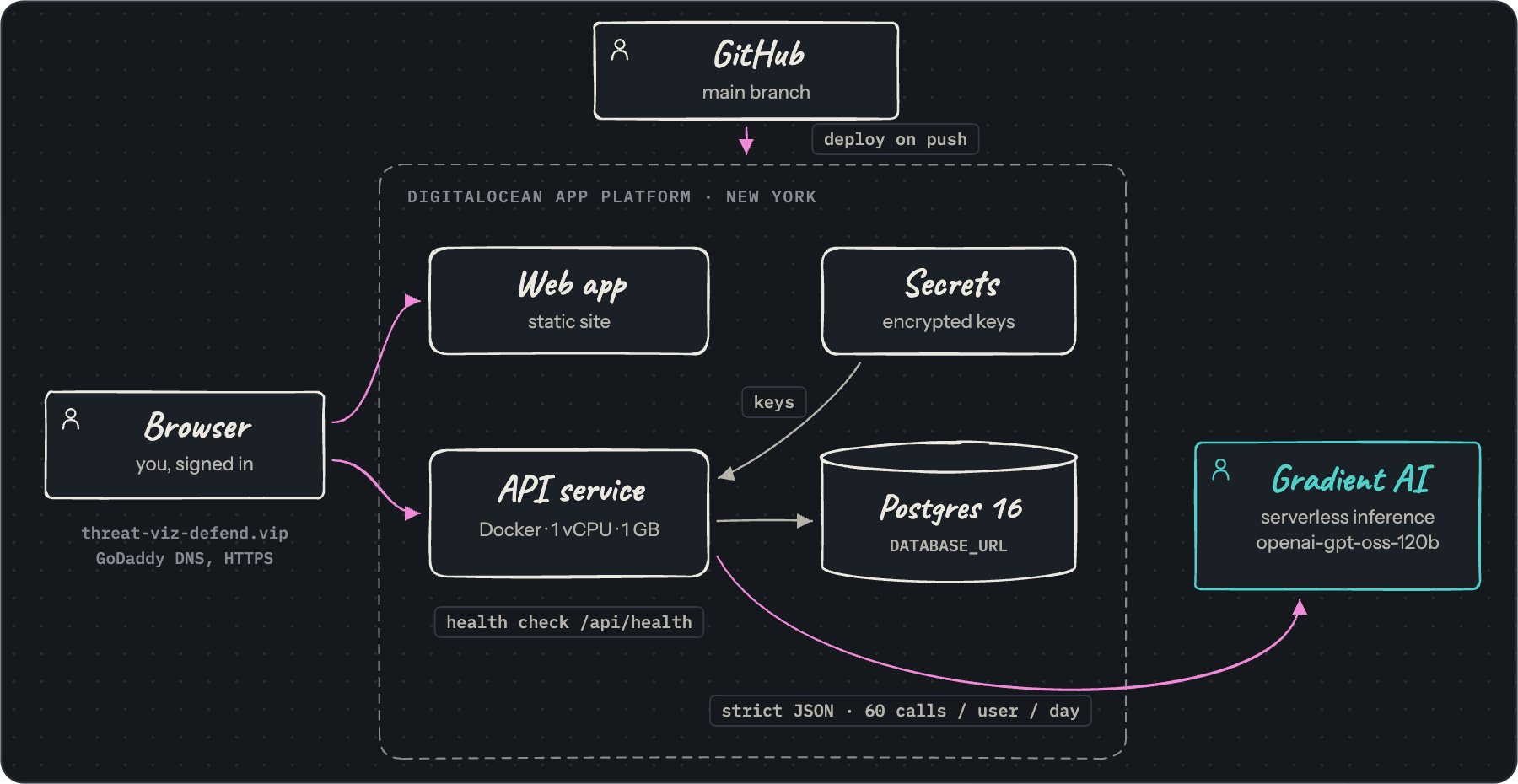
One App Platform spec defines the whole product: the API as a Docker service and the web app as a static site, served at threat-viz-defend.vip, our GoDaddy Registry domain, with HTTPS. Every merge to main redeploys both behind a health check, with alerts when a deploy fails. Postgres 16 holds accounts, boards and progress, keys live in encrypted App Platform secrets, and the default model runs on Gradient AI serverless inference, so every deploy, board and analysis runs on DigitalOcean.
ElevenLabs: the voice layer
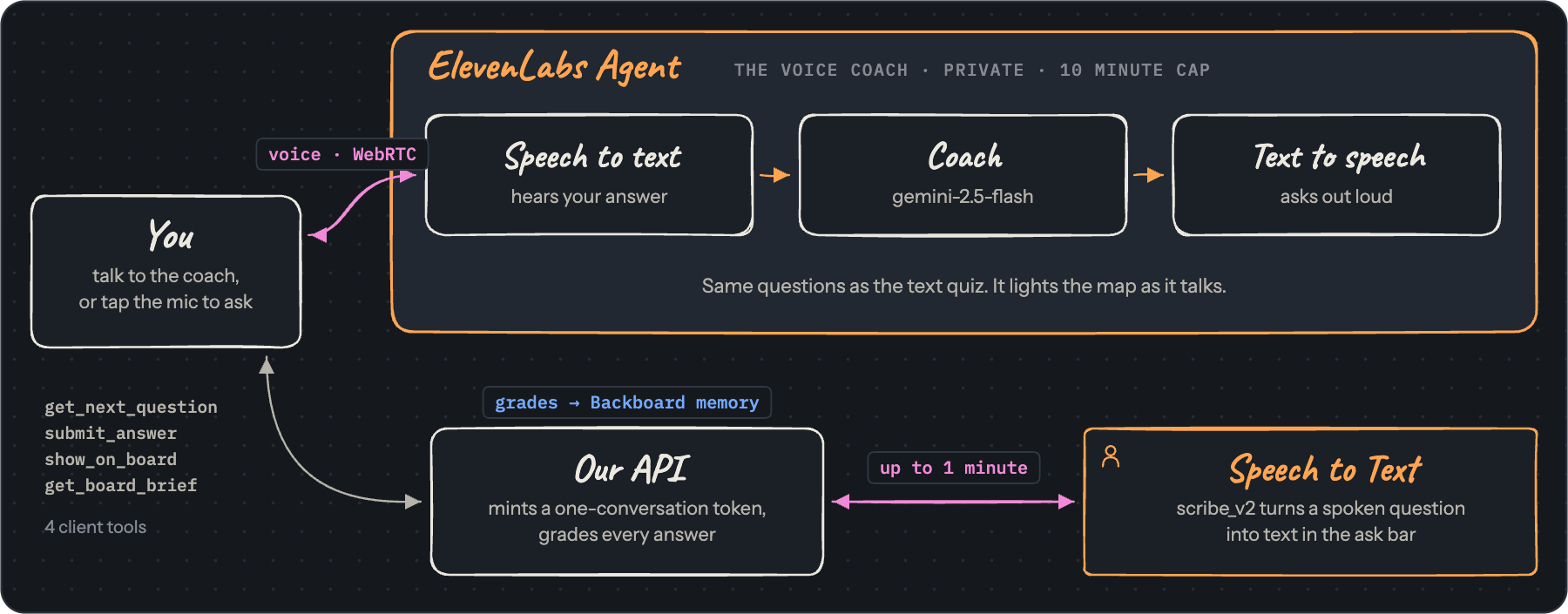
The voice coach is a private ElevenLabs Agent: speech to text hears your answer, a Gemini 2.5 Flash coach thinks, and text to speech asks the next question out loud, over WebRTC. It drives the board through four client tools, fetching the next question, submitting your answer, lighting parts of the map as it talks and reading a spoken brief, while our server grades every answer. The server mints a one-conversation token per session, so the ElevenLabs key never reaches the browser. ElevenLabs Speech to Text (scribe_v2) turns a spoken question into text in the ask bar.
Backboard: the memory store
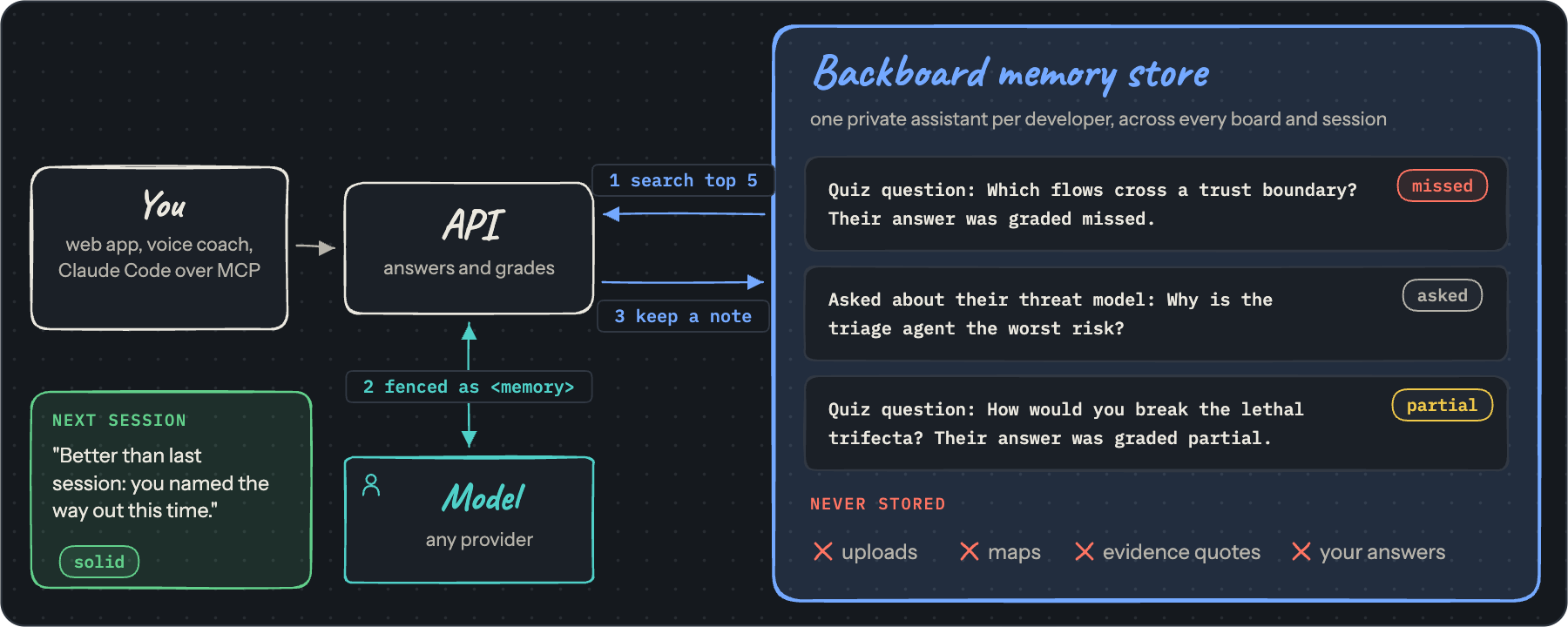
Each developer gets a private Backboard assistant that follows them across every board and session, with any model provider. Before the app answers a question or grades an answer, from the web app, the voice coach or Claude Code over MCP, it searches that store for the five most relevant notes and fences them into the model call, so the coach can revisit what you found hard and notice when you get it right. Afterwards it keeps a note of just the question and the verdict. If Backboard is down, the answer still comes back.
Challenges we ran into
- Watching an agent without getting in its way. The hook runs after every agent turn, so it returns at once and posts in the background. It skips changes that are not architectural, so a CSS tweak never redraws the map. When the board is busy or the post fails, the old base stays, so the next diff still carries the change.
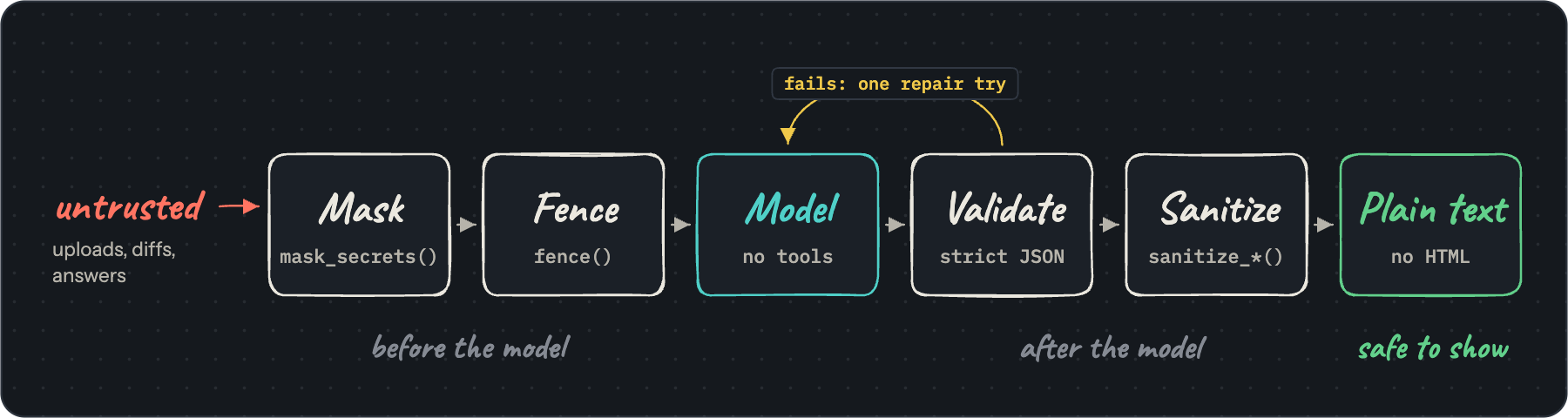
- Trusting model output. Strict structured output rejects optional keys, so every field is required and set to null when missing. Replies still drifted, with ids that were not on the map and line breaks inside labels. Now every reply gets one repair attempt, then sanitizers drop unknown ids and fold text onto one line.
- Readable diagrams. Model-drawn maps came out cluttered. We asked the model for short names and fewer flows, drew two-way flows on one track, fit the map to the canvas, and gave the threat pins readable digits.
- Securing a tool that reads untrusted code. Uploads and diffs can carry prompt injection, so untrusted text enters a prompt only inside fenced blocks, and the analysis model has no tools. A model URL a user supplies could point at internal addresses, so URLs are checked when saved and again when used, with redirects off. We also caught that a committed config file could send everyone's hook token to an attacker's server through a pull request, so the hook now takes the API address only from the environment or its own setup. A security review during the event found denial of service, masking and key reuse gaps, and we closed them.
- Voice in a locked down browser. Our content security policy blocked the ElevenLabs SDK's audio worklets, so we self-host them, and every browser handles microphone permissions differently.
- Keeping memory small on purpose. Backboard lives on a third-party service and lasts across sessions, so it holds progress, never code: uploads, maps, evidence quotes and your own answers never go in.
- Slow model work. Drawing a map can take up to two minutes, so it runs as a background job. A job that starts before the request commits deadlocks SQLite, so every job waits for the commit.
Accomplishments that we're proud of
- The map keeps up with the code while the agent works, and nobody has to remember to update it.
- Coverage and answer keys come from code. The model writes threats and grades open answers, but it never decides what gets checked or what the right answer is.
- Our own pipeline has no lethal trifecta: the model that reads untrusted material has no tools, and its output renders as plain text.
- We threat modeled our own app. docs/security.md lists every control, our threat model and the known limits.
- A voice coach you can talk your threat model through with, backed by a memory of what you missed.
- Nearly 300 automated tests, strict typing on both halves, and no test calls a real model.
- Four people merged more than 30 pull requests in parallel during the event, and the project is open source under the Apache License 2.0.
What we learned
- A threat report you skim does not stick. Explaining your own system is what builds the mental model.
- Models are good writers and poor judges of coverage. Let code decide what to check, and let the model explain it.
- Treat every model reply as untrusted input, even from your own model.
- Memory makes a coach better, but only if you decide what it may keep. We learned Backboard during the hackathon and kept its memory to questions and verdicts.
- We built ThreatViz Defend with coding agents too, and felt the problem ourselves: the code arrived faster than our understanding of it. One owner per area and a written seam between areas kept our own mental model intact.
What's next for Threat-Viz-Defend
- A pull request check that flags a change adding a boundary crossing, a new AI tool or a lethal trifecta before it merges.
- A team view that shows which threats each teammate can explain, and which ones nobody can.
- Private repositories through a GitHub app.
Built With
- agent
- backboard
- claude
- digitalocean
- docker
- elevenlabs
- fastapi
- github
- godaddy
- langchain
- mcp
- postgresql
- pydantic
- python
- react
- sqlalchemy
- typescript
- vite


Log in or sign up for Devpost to join the conversation.