-
-
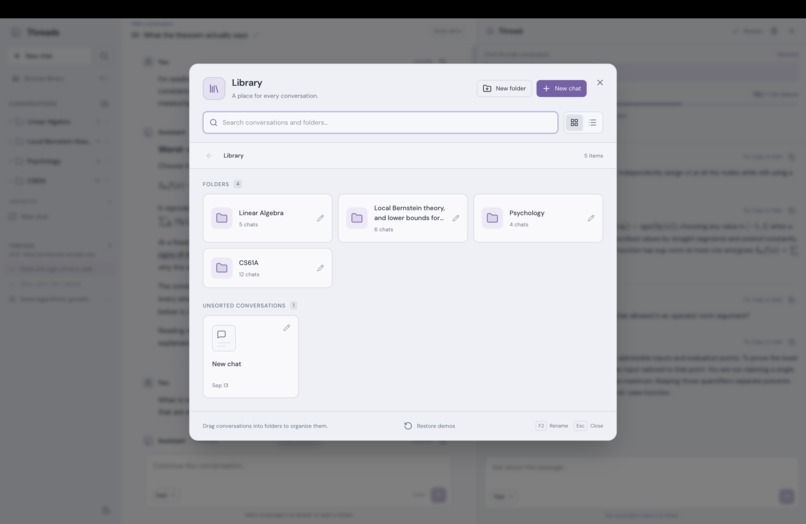
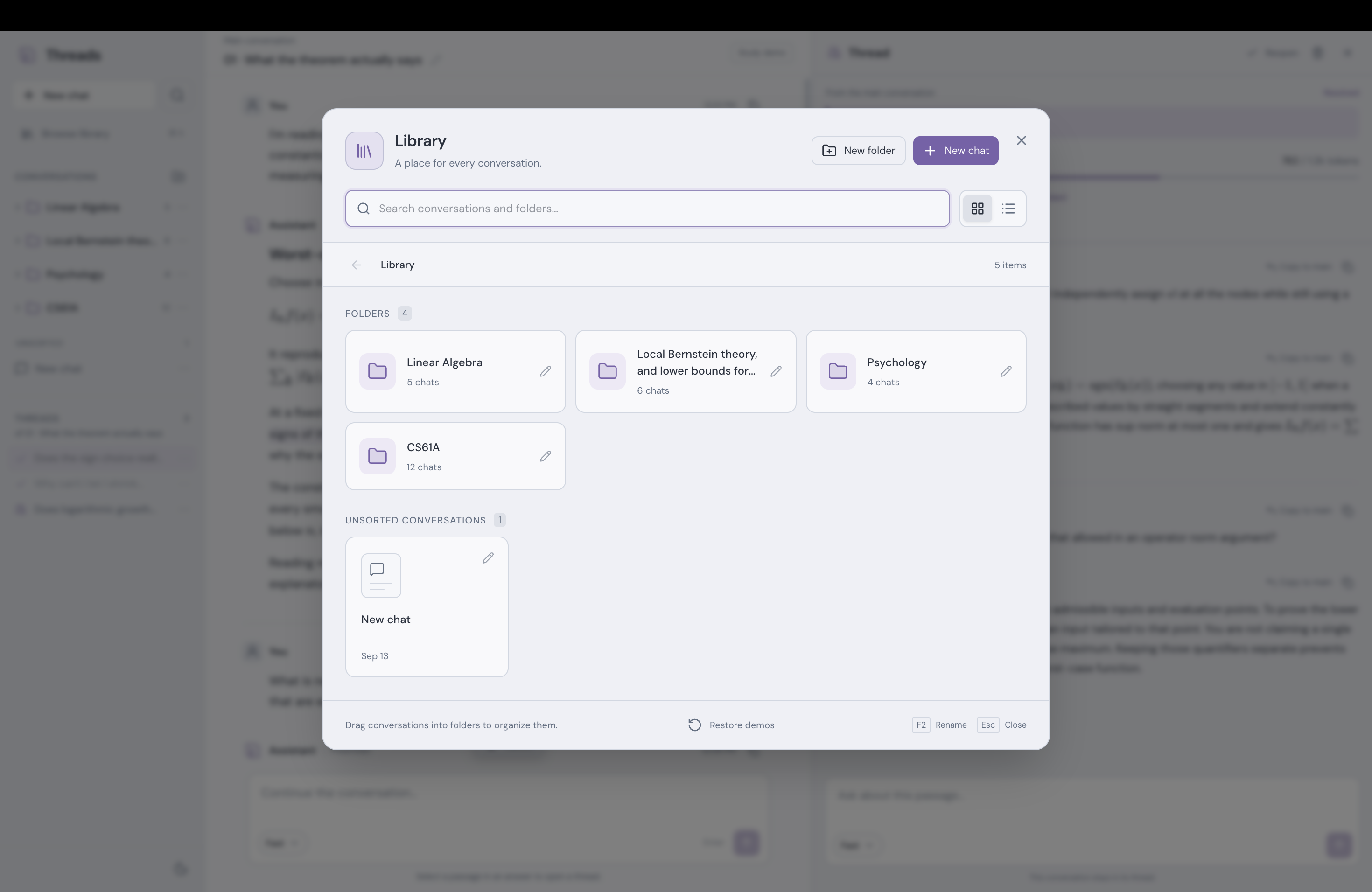
Folder organization
-
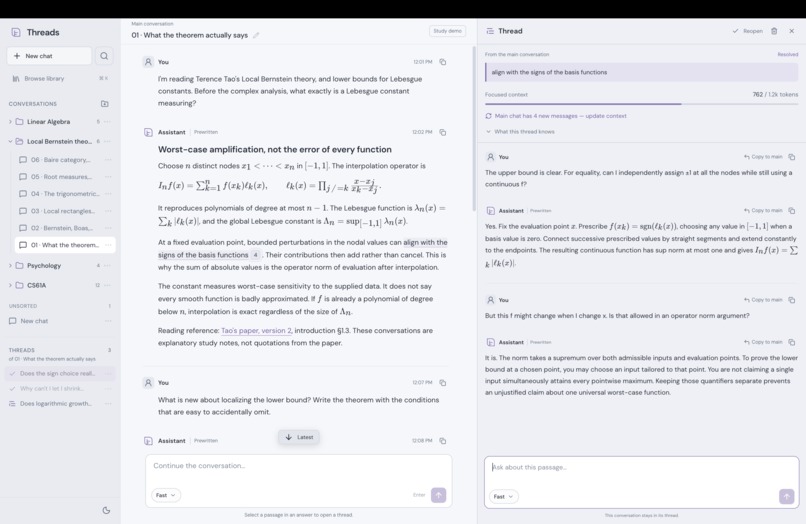
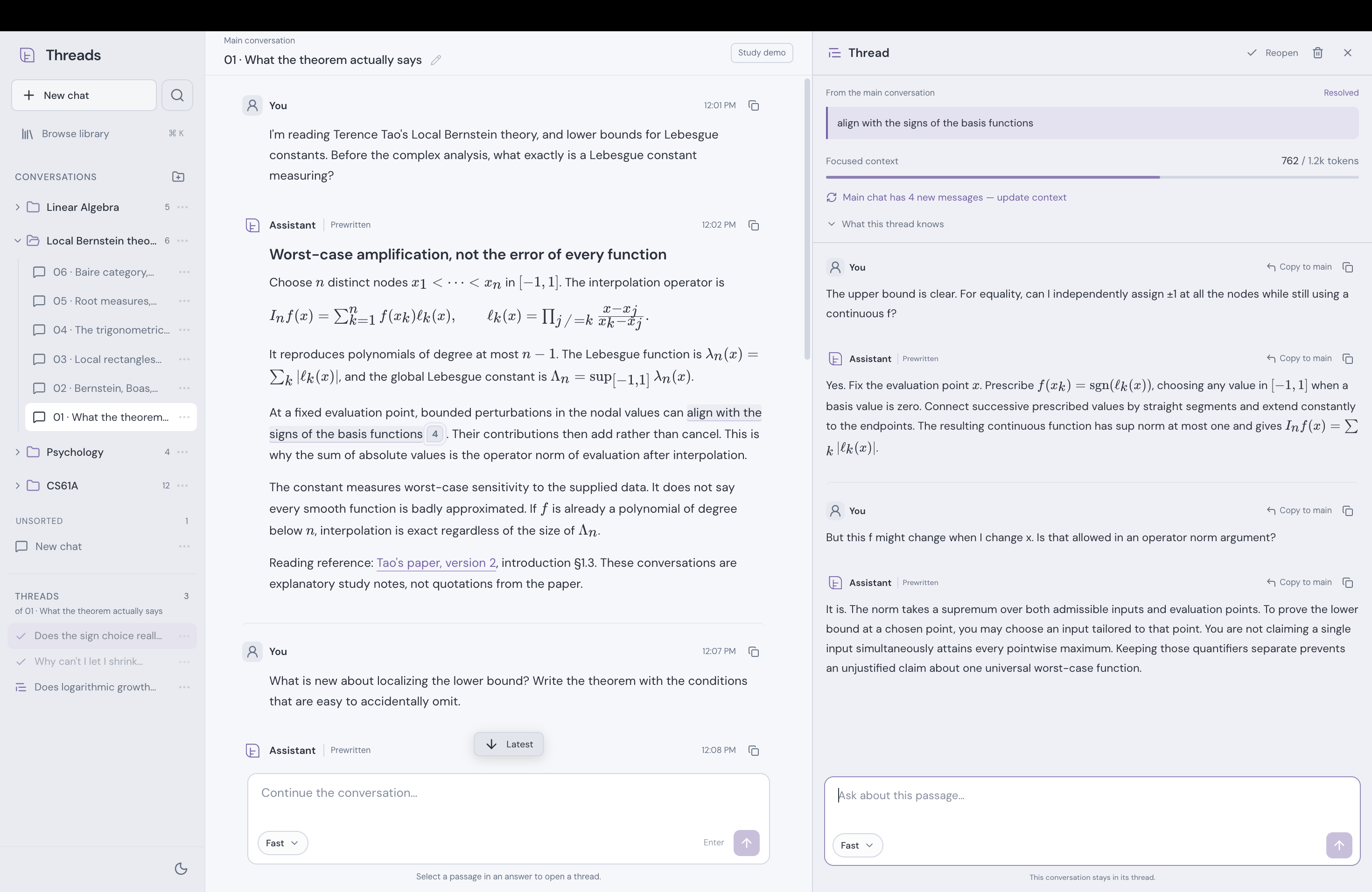
Thread view
-
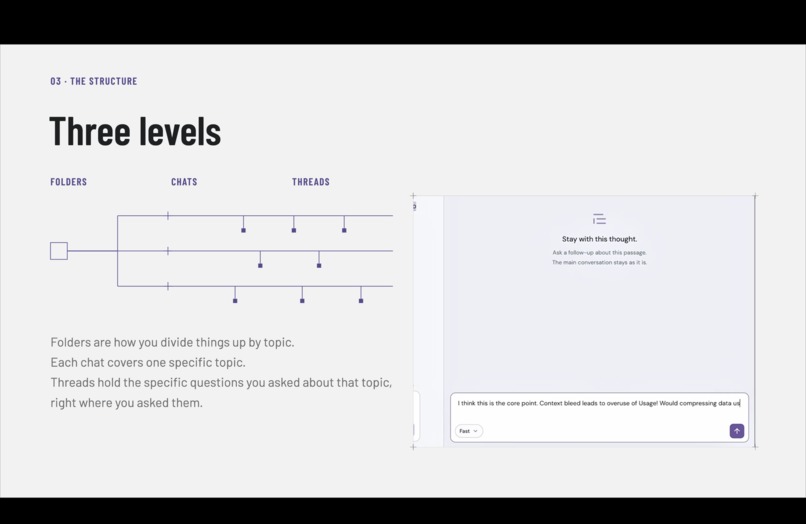
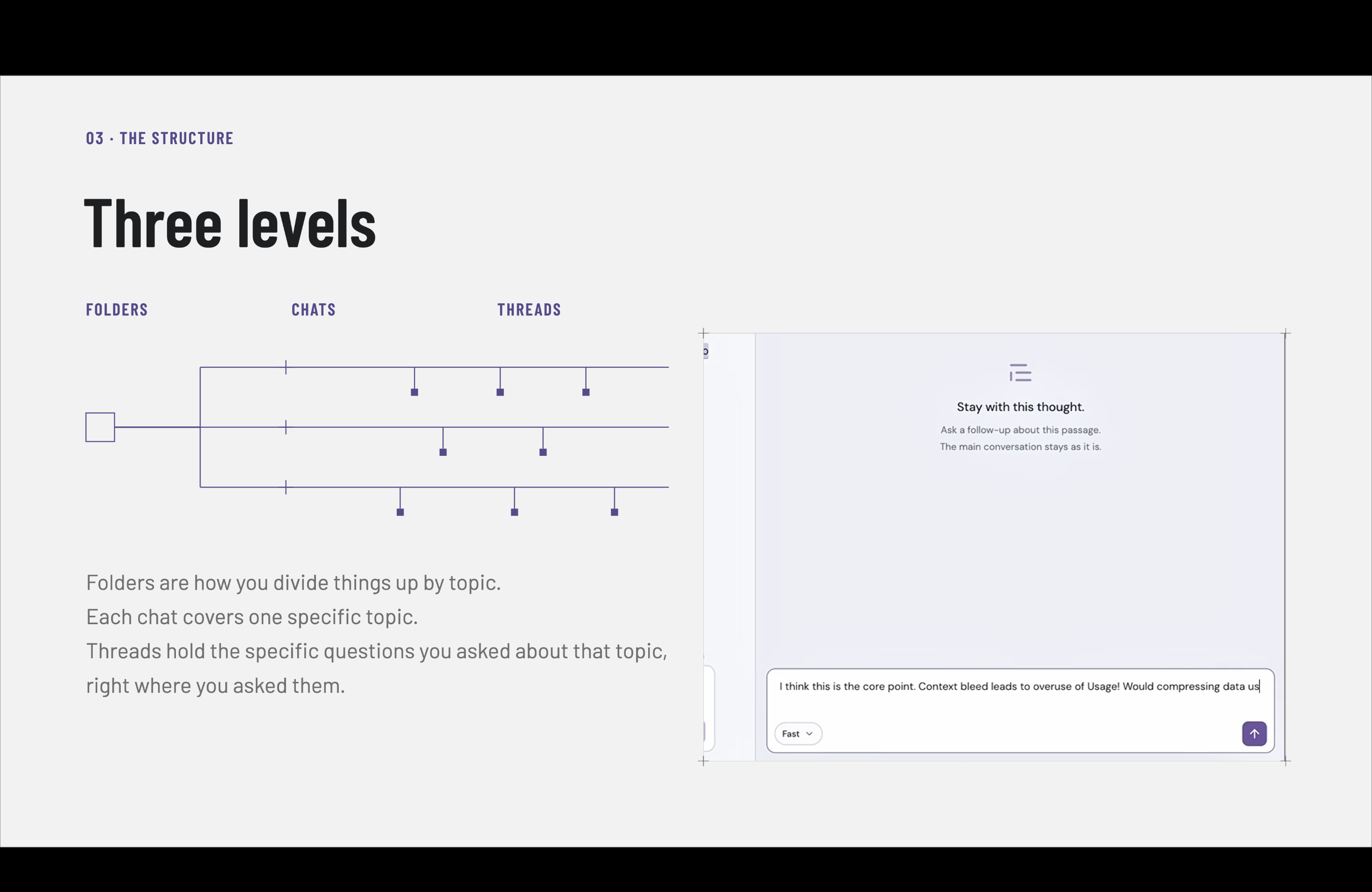
Three levels to learning!
Inspiration
We’re Edward from UC Berkeley and Kaitlyn from Cornell. As college students, we use AI the right way, to bounce ideas around and dig deeper into certain topics. But there are a couple of major problems that get in the way.
Every follow-up in a linear chat adds another message below all the messages already there. Eventually, after enough tangents and digressions, we’re left with a mass of text that’s difficult to navigate and even harder to come back to before a test.
There’s also the context problem. In an API-backed conversation, carrying that history forward can increase input-token usage and costs. Models have finite context windows, and not every tangent needs to become part of the next answer.
But do you want to open a new chat every time you have a question about an AI response? Of course not.
We wanted a way to go deeper without losing the bigger picture.
What it does
Threads solves this problem by making, well, threads.
Within a chat, you can select a passage in a completed AI response and open a thread to ask questions or explore that specific topic. The best part is that it doesn’t add muck to the linear scrolling chat. It adds another dimension.
On top of that, each thread becomes its own microcosm. It has its own conversation history and a frozen snapshot of background context from the main discussion, while keeping the original answer available. The thread’s messages do not automatically become part of the main chat’s context, and so it doesn't kill slowly and exponentially make the chat bot get slower, dumber, and more expensive in tokens.
Now take a look at the bigger picture. We already organize our coursework into subjects, chapters, and individual questions. Threads gives our AI study sessions a similar structure:
- Folders for broad subjects or courses.
- Chats for chapters, topics, or study sessions.
- Threads for questions about specific passages, terms, or ideas.
With Threads, you can actually review a learning session and revisit which questions you had and where. The goal is to return to the actual discussion, not reconstruct it from a long scroll.
How we built it
We built Threads as a local, single-user web app with Next.js, React, and TypeScript, using Tailwind CSS and Radix UI for the interface. The backend runs on Node.js and stores folders, chats, messages, and thread anchors locally in SQLite through Drizzle ORM.
We use the AI SDK to stream responses from DeepSeek, Anthropic, and OpenAI.
The important part is how we assemble context. When a thread is created, we attempt to compress the surrounding main conversation into a structured briefing. Thread responses use that briefing alongside the original answer, the selected passage, and the thread’s own message history.
The briefing stays frozen until the user chooses to refresh it. If compression fails, we fall back to a snapshot of the last four main-chat messages. Main-chat prompts are assembled separately and exclude thread histories.
We also support Markdown and LaTeX math rendering through KaTeX, so studying a technical subject doesn’t mean reading a wall of raw formatting commands.
Challenges we ran into
One challenge was making threads genuinely separate, rather than just moving the same overflowing conversation into a different panel. The context rules had to match what users saw on screen.
Another was keeping a thread attached to exactly the passage that created it. Markdown formatting can make displayed text differ from the stored source. We verify selections against the original text instead of guessing; if a selection cannot be mapped exactly, we don’t create an unreliable anchor.
Math rendering introduced another version of that problem. We normalize supported LaTeX delimiters before saving a completed response, rather than rewriting saved messages when they are displayed. That lets us render equations without later shifting existing thread anchors.
These details are easy to overlook, but they matter when the whole point is being able to come back to a question and find it where you left it.
Accomplishments that we’re proud of
We’re proud that the structure isn’t just visual. The separation you see between a chat and a thread also exists in what we send to the model.
We brought together persistent conversations, streaming responses from multiple model providers, readable equations, and a folder-chat-thread hierarchy into one study workflow.
Most importantly, this is something we will be using going forward. We wanted to build a tool that solves a problem we actually run into, not just something that looks good in a demo.
What we learned
We learned that organizing the interface and organizing the model’s context are closely connected. A side panel only solves half the problem if every unrelated tangent still gets carried into the main conversation.
More context is not automatically more relevant context. We had to be deliberate about what a thread inherits, what stays separate, and when the user should refresh its background information.
We also learned how much work sits behind a seemingly simple interaction like “select this passage and ask a question.” Getting that interaction right meant thinking about rendering, source positions, persistence, and prompt construction together.
What’s next for Threads
We want to keep using Threads in our own coursework and get feedback from other students using it in theirs.
We’d like to test how easily students can find and revisit old questions, and compare token usage across equivalent linear and threaded study sessions. That would help us measure the benefits and tradeoffs rather than just assume them.
Our goal is simple: make it easier to follow a question as far as it takes you, without losing the conversation that got you there.
Built With
- ai
- anthropic
- css
- deepseek
- drizzle
- katex
- next.js
- node.js
- openai
- orm
- radix
- react
- sdk
- sqlite
- tailwind
- typescript
- ui
- vercel
- vitest

Log in or sign up for Devpost to join the conversation.