Inspiration
Beginner programmers spend a surprising amount of time translating error messages rather than learning the idea behind them. A general AI chatbot can help, but it pulls the learner out of the IDE, asks them to paste code into a cloud service, and often jumps straight to a finished solution. That is fast, but it can remove the productive struggle where learning happens.
Thonny already gives beginners one of the clearest Python environments. I wanted to preserve that simplicity and add a private teaching layer directly inside the normal write-run-debug loop: no account, no API key, no internet dependency, and no answer generator.
What it does
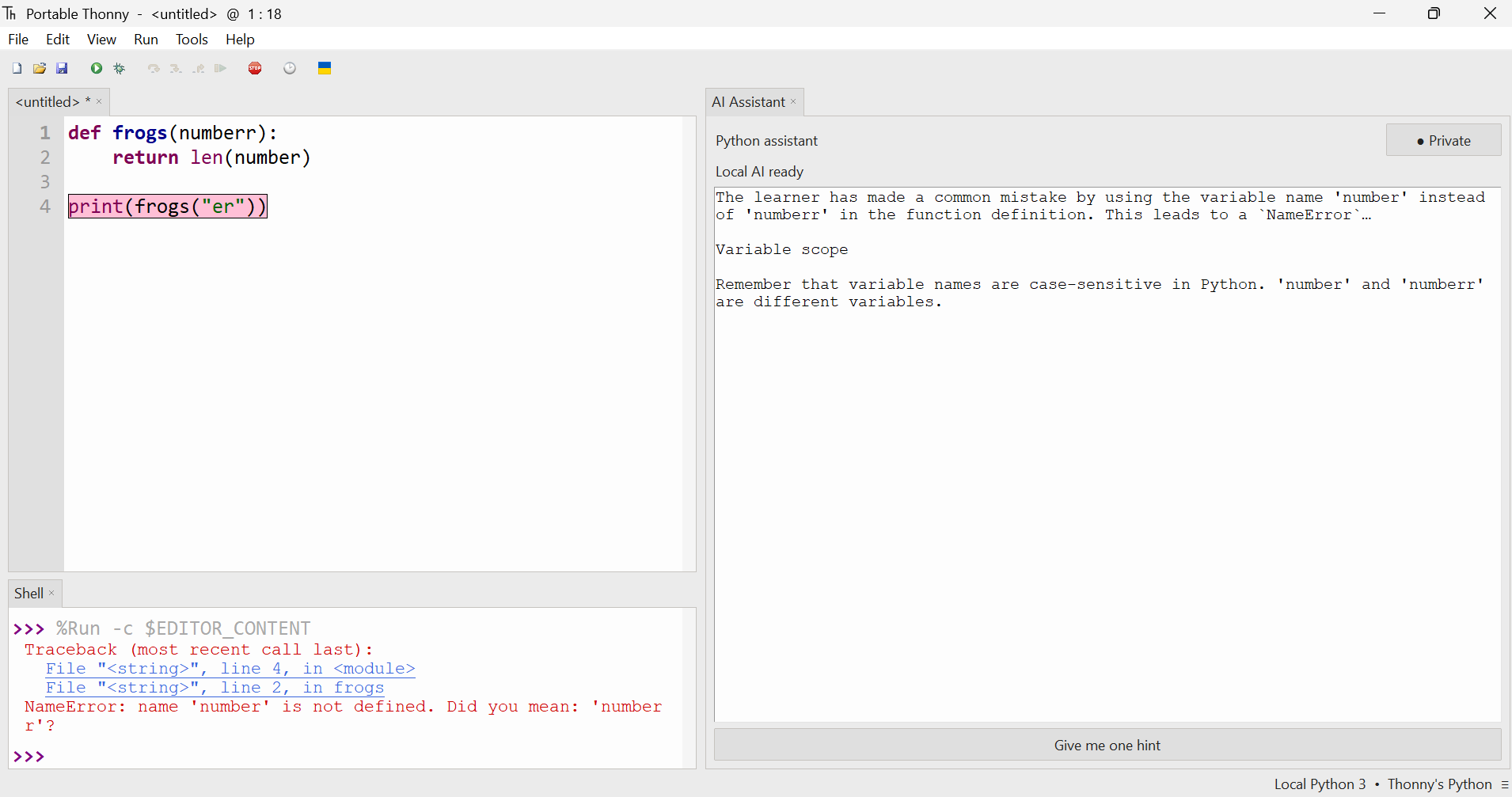
Thonny Plus is a Windows Python learning IDE with a fully local AI Assistant. Learners write and run code using Thonny's familiar editor, Shell, Run button, input handling, and debugger. If Python raises an exception, the assistant automatically highlights the relevant line and streams a short explanation plus one useful next step.
The interaction stays intentionally small. With no active error, the contextual action explains code. After an error it offers one hint. Selecting editor code or Shell output focuses the explanation on that selection, and the action changes colour so the learner can see which context is active. There is no second output pane, free-form chatbot, automatic fix, code completion, or solution generation.
Everything runs on the learner's computer. The installer bundles Python, llama.cpp, and Qwen2.5-Coder-1.5B-Instruct Q4_K_M. Learner code is sent only to a loopback process and never to a cloud service.
How we built it
I forked the open-source Thonny IDE during OpenAI Build Week and used Codex with GPT-5.6 for every feature added after the fork. I directed the product, tested real Windows installer builds, supplied screenshots and failure logs, and made the final scope decisions. Codex/GPT-5.6 worked across the Python/Tk UI, Thonny event system, model protocol, Windows packaging, and regression tests.
The assistant observes Thonny's native execution events rather than replacing
its runtime. It normalizes exceptions, chooses the smallest relevant source or
Shell context, and sends a bounded request to a persistent Python worker. That
worker launches a hidden llama.cpp server bound only to 127.0.0.1, keeps the
Qwen model loaded, reuses prompt cache, constrains generation with a JSON schema,
and streams safe fields back to the UI. A deterministic explanation appears
immediately if the model is still warming up or cannot start.
For distribution, we built a one-command PowerShell pipeline requiring Python 3.13 on the Windows build server. It downloads checksum-pinned runtimes and the model, stages licences and Python package metadata, performs real Python and persistent-Qwen smoke tests, and produces an Inno Setup installer. Large runtime artifacts and the GGUF model stay outside Git.
Challenges we ran into
The hardest problem was not merely getting a local model to answer; it was making the entire experience dependable and unobtrusive on a beginner's computer.
The first UI prototype created a parallel classroom runner, a second output pane, several Coach buttons, and an internal activity dropdown. Testing showed that these controls competed with Thonny instead of helping it, so we removed them and rebuilt the assistant around Thonny's existing Run and Shell workflow. We also narrowed an early Python/JavaScript/Go concept to Python so the shipped experience could be coherent and deeply integrated.
Real Windows builds exposed issues that source-only testing did not: missing Thonny distribution metadata, an absent Ruff executable, Basedpyright launch failures, callbacks targeting a closed language server, terminal windows opened by model subprocesses, malformed Qwen JSON, overly long responses, and slow cold inference. Each failure became a regression test or release gate. The focused suite now has 40 passing tests, while the installer smoke test loads the real model once and sends two requests through the same worker.
Accomplishments that we're proud of
- The learner never has to choose an “AI activity”; the appropriate support is inferred from the error, selection, and current editor state.
- The AI is helpful without becoming an answer machine. Policy, prompt design, structured output, word limits, and UI affordances all reinforce learning.
- Code and diagnostics remain private. The product works offline after install and requires no account or API key.
- Local inference behaves like part of the IDE: hidden process, one model load, prompt reuse, streaming, cancellation, and immediate fallback guidance.
- The model and runtimes are reproducibly downloaded, checksum-verified, licence-staged, smoke-tested, and bundled by one Windows build command.
- The final design adds one assistant panel without duplicating Thonny's editor, execution controls, or Shell.
What we learned
An educational AI feature is defined as much by what it refuses to do as by what it can generate. Removing chat, fixes, and solution generation made the product more focused, not less capable. Contextual automation also worked better than a menu of teaching strategies: learners think in terms of “this error” or “this line,” not internal AI activity names.
We also learned that offline AI is a systems problem. Model quality matters, but startup lifecycle, prompt caching, bounded context, structured streaming, process visibility, packaging metadata, licences, deterministic fallback, and clear status feedback determine whether the feature feels trustworthy.
Codex with GPT-5.6 was especially effective when a visible failure crossed several layers. It helped trace Windows logs back through package staging, subprocess startup, model parsing, and Tk callbacks, then turn each finding into a narrow fix plus a regression test.
What's next for Thonny Plus
The immediate goal is a measured first visible AI token in under five seconds on typical classroom CPUs. We plan to benchmark representative low-end hardware, tune llama.cpp per machine, shrink invariant prompt prefixes, prewarm without blocking startup, and offer explicit speed and low-memory profiles.
After the Windows build is hardened, we want Linux and macOS packages, multilingual explanations, accessibility testing with real learners, and educator-controlled teaching profiles. The longer-term vision is a private learning IDE that adapts its help to a student's progress while preserving the student's ownership of every solution.
Built With
- codex
- gpt-5.6
- python
- thonny

Log in or sign up for Devpost to join the conversation.