Inspiration
The problem: online shoppers often find a product that is almost right, but not quite. The top has a bow they don't want. The pants come in the wrong color. The dress is \$40 over their budget. There is no way to tell the store "I want this exact item, but with one change." Store search only matches keywords, so the shopper scrolls, gives up, and leaves without buying anything.
This is a financial gap for stores, in two ways:
- Lost sales and wasted ad spend. These shoppers already want to buy, and many arrived through ads the store paid for. When they can't find the version they want, the store loses the sale and the money it spent to bring them in. For example: a store gets 100,000 searches a month, and 10% are shoppers looking for a variation who leave without clicking anything. Converting just 2% of those shoppers at a \$60 average order would recover about \$12,000 per month, and the amount grows with the store's traffic:
$$100{,}000 \times 10\% \times 2\% \times \$60 = \$12{,}000 \text{ per month}$$
- Lost demand data. The store never finds out what the shopper wanted. There is no abandoned cart and no record of the missed request. Merchandising teams decide what to stock next without knowing that customers were asking for a specific variation, so they keep missing the same sales.
Current search tools don't solve this, even AI-powered ones. In the CLIP image model that many visual search tools use, searching "a blouse with a bow" and "a blouse without a bow" returns 5 of the same top 8 results. The model does not understand "without," so a shopper who asks for no bow gets shown bows.
What it does
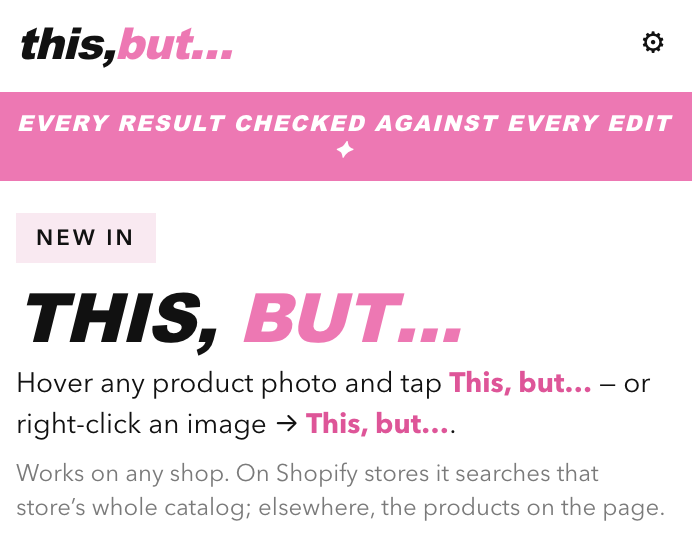
This, But is a Chrome extension that lets shoppers ask for a change to any product they see on a store's website, and shows them only the items from that store that actually have that change.
How it works for the shopper:
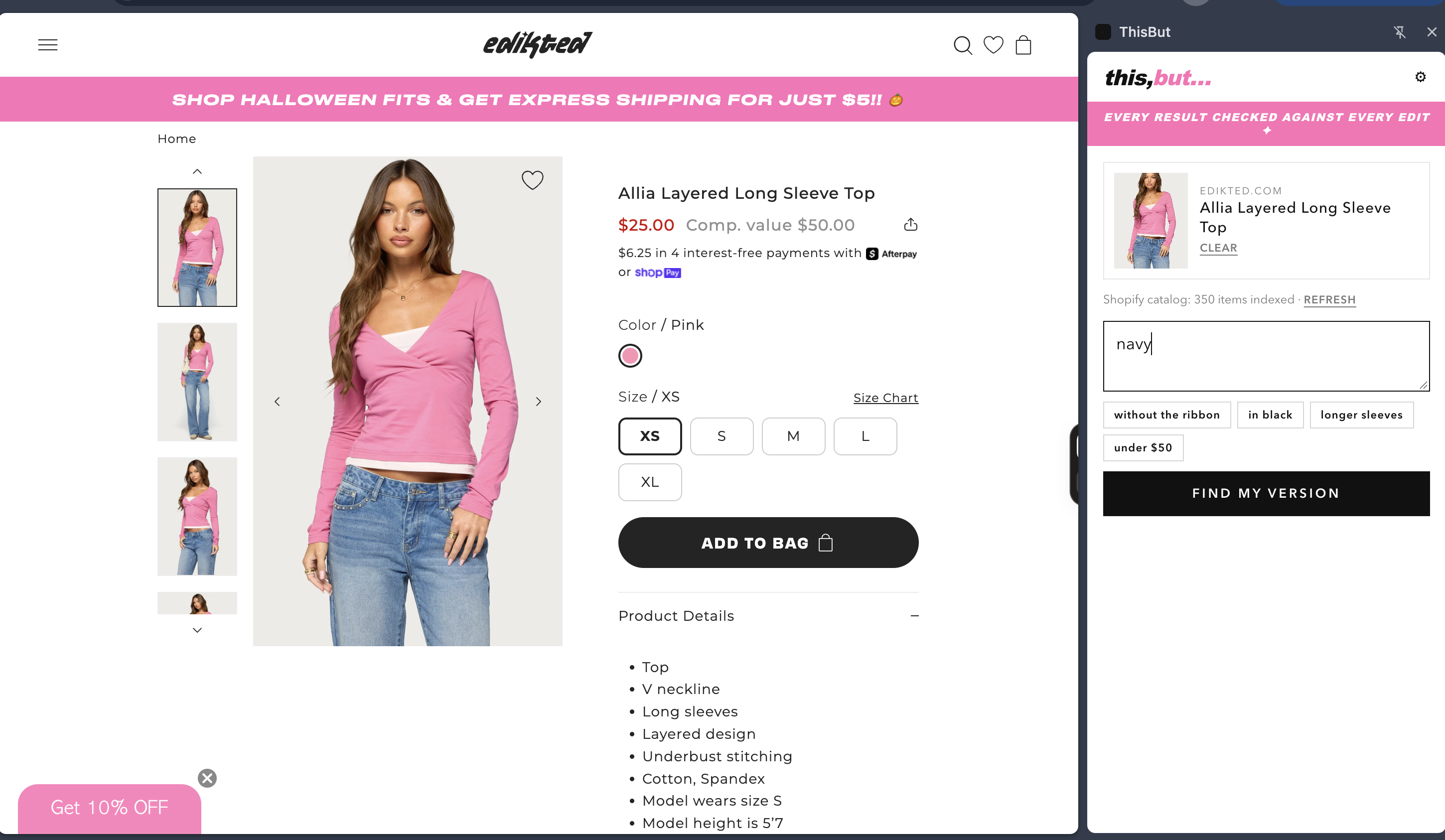
- Pick a product. On any shopping site, hover over a product image and click the "This, but…" button, or right-click the image. A side panel opens next to the page with that product.
- Type the change you want in plain words, for example "without the bow", "in black", "longer sleeves", "under \$50", or "with a logo".
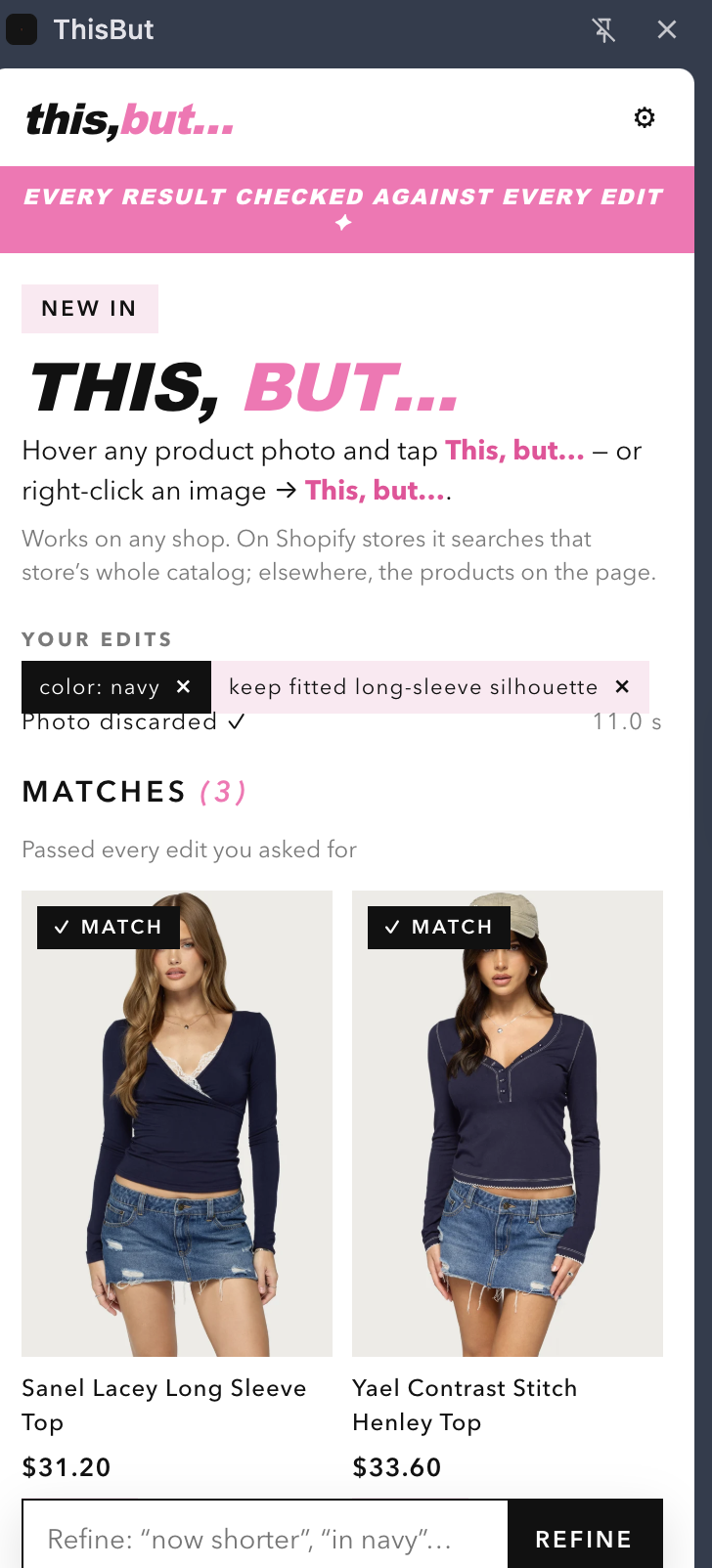
- See only real matches. This, But searches that store's own catalog and checks every result against every change you asked for. Each result lists which changes it passed and which it missed. A product is only labeled a Match if it passes every change you asked for.
- Buy it on the store's site. Clicking a result opens that product's page on the same store, so the sale stays with that merchant.
- Keep refining. Typing "now shorter" adds to your earlier changes instead of starting a new search.
It works on Shopify and WooCommerce stores, and on most stores that publish a sitemap. On Edikted's live website, I selected a pair of mint sweatpants and typed "with a logo." This, But read 350 of the store's products and returned 8 verified matching products in 10.5 seconds.
When nothing matches, the store still gets value. The shopper can save a wish, for example "Blouse without a bow, up to \$45." Merchants see these requests in a Demand Gaps dashboard: what customers asked for, how many asked, the price they said they would pay, and an estimated dollar value of that demand:
$$\text{estimated demand} = \text{number of shoppers} \times \text{median price they would pay}$$
For example: "Blouse without a bow: 212 shoppers × \$45 median price." When the merchant adds a product that matches, the system checks it against the saved wishes and notifies those shoppers.
Privacy: wishes are saved as text only. Merchants only see requests that 3 or more shoppers made, never individual people. The demo checkout is test mode only, and the card number never leaves the shopper's browser.
How I built it
- Understanding the request: Claude (Sonnet 5.5) reads the selected product and the shopper's typed change, and converts them into a structured list: what to keep, what to remove, what to change, what to add, and a maximum price. The output is validated (with zod) and retried once if it's malformed. Every request is also given a consistent label, like
Blouse · remove bow, so identical requests from different shoppers are counted together. - Finding candidates: CLIP (ViT-B/32, running on my server through transformers.js) compares the product to every item in the store's catalog in about 30 milliseconds. Because CLIP doesn't understand "without," I don't send it negative words. The request is rewritten as a positive description of the item the shopper wants, and anything the shopper wants removed becomes a penalty in the ranking. For each catalog product $p$:
$$\text{score}(p) = 0.5\,\cos(v_{\text{product}}, p) + 0.5\,\cos(v_{\text{description}}, p) - 0.25\,\max_i \cos(v_{\text{removed}_i}, p) + 0.05\cdot[\text{same category}]$$
Items over the shopper's budget are excluded.
- Checking every result: Claude reviews the top 16 candidates against every requested change, in two batches that run at the same time. If a check isn't answered, it counts as a fail. If checking takes longer than 25 seconds, the results are shown as "unverified" and none are labeled as matches.
- Working on any store: the Chrome extension (Manifest V3) adds the button and the side panel. To get a store's catalog, it first tries Shopify's public product list, then the WooCommerce product API, then the store's sitemap plus the product details on each page. If none of these work, it uses the products visible on the current page. My server processes each store's product images once and caches them, so later searches on that store are faster.
- Web app and merchant tools: built with Next.js and TypeScript. It includes live search progress updates, saved wishes, the Demand Gaps dashboard with estimated revenue for each gap (charts built with recharts), and a merchant page for adding products, which automatically checks new products against open wishes. Data is stored in Upstash Redis or a local file.
- Testing and cost control: an evaluation of 10 test searches, checked against Fashionpedia, a dataset where humans labeled the parts of each garment. Plus 30 automated tests, per-user rate limits and a daily search cap to keep costs predictable, and a Docker image that includes the model.
Challenges I ran into
- Search models don't understand "without." I turned removed features into ranking penalties and had Claude check every result before calling it a match.
- My first full test returned 0 matches. The system was adding requirements the shopper never asked for, like "keep the daisy pattern." Now only explicitly requested changes decide a Match, and the main test search went from 0 matches to 10.
- Stores block automated requests. Some image servers returned HTTP 403 errors to my server, so the extension now loads product images through the shopper's browser, with a screenshot crop as a backup.
- Every store organizes its catalog differently, so the extension tries Shopify, WooCommerce, the sitemap, and finally the current page, in that order.
Accomplishments that I'm proud of
- It works on a real, live store, not just a demo catalog. The recorded demo on Edikted shows the full flow.
- It doesn't label wrong items as matches. In testing, the human labels in the Fashionpedia dataset confirmed 98.6% of verified matches, meaning the feature the shopper asked to remove really was absent.
- Speed and coverage: my hardest test search returned 10 verified matches in 13.1 seconds, 9 of 10 test searches returned at least 3 matches, and the median search time was 12.7 seconds.
- It turns failed searches into demand data with an estimated dollar value that a store can act on.
- The full product works end to end: the matching system, the web app, the merchant dashboard, the Chrome extension, the evaluation suite and the pitch video.
What I learned
- Embedding models can't represent negation. Vectors for "with a bow" and "without a bow" are nearly the same, so exclusions have to be handled outside the embedding, for example as a penalty.
- Retrieval and verification are separate problems. Fast vector search is good at narrowing thousands of items to a shortlist, but a slower model that reasons about each item is needed to confirm it actually meets the request.
- Validate model output in code. Requiring structured JSON, checking it against a schema, and recomputing labels myself made the system predictable. Free-form model output was not reliable enough to count or compare.
- Ground-truth evals catch logic bugs, not just accuracy problems. Testing against human labels exposed a design flaw (treating preferences as requirements) that looking at results by eye had missed.
What's next for This, But
- Deploying the backend publicly. Host the server on Railway or Render, using the existing Docker image, with at least 2 GB of RAM for the CLIP model and a persistent volume for cached store catalogs. Move rate-limit counters and storage to Upstash Redis so the service can run on multiple instances.
- Getting Chrome Web Store approval. Submit the packaged extension with a public privacy policy, justify each permission (side panel, context menu, storage, scripting, tabs, and access to all sites), and complete the data-use disclosures. Access to all sites gets extra scrutiny in review, so the next step is to limit what the extension reads before the shopper clicks "This, but…", and possibly switch to requesting site access only when the shopper uses it on a store.
- Locking down the API after approval. Restrict the server to requests from the published extension's ID (the
ALLOWED_ORIGINSsetting is already built in), set a per-day spend cap, and add monitoring for errors and cost per search. - Supporting more stores. Handle stores that load products entirely with JavaScript or block automated requests, by collecting catalog data through the shopper's browser instead of the server.
- Lowering latency and cost. Cache verification results so repeated requests on the same store skip the AI check, pre-index popular stores, and aim for searches under 5 seconds.
- Expanding to other browsers. Publish to Edge Add-ons (same package) and port to Firefox, which uses a different sidebar API.
The goal: turn "almost what I wanted" into "added to cart", for shoppers and for the stores' revenue.
Built With
- anthropic-api
- chrome
- claude
- clip
- docker
- fashionpedia
- javascript
- manifest-v3
- next.js
- node.js
- onnx-runtime
- pillow
- playwright
- python
- react
- recharts
- sharp
- shopify
- tailwind-css
- transformers.js
- typescript
- upstash-redis
- vitest
- woocommerce
- zod

Log in or sign up for Devpost to join the conversation.