-
-
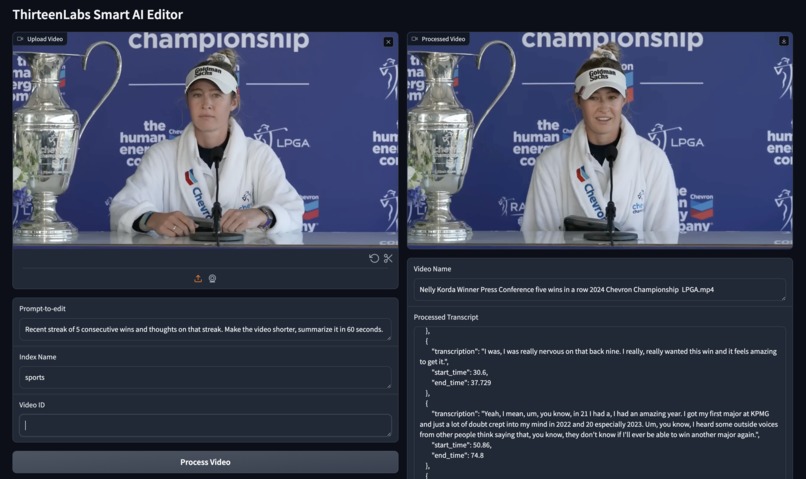
demo
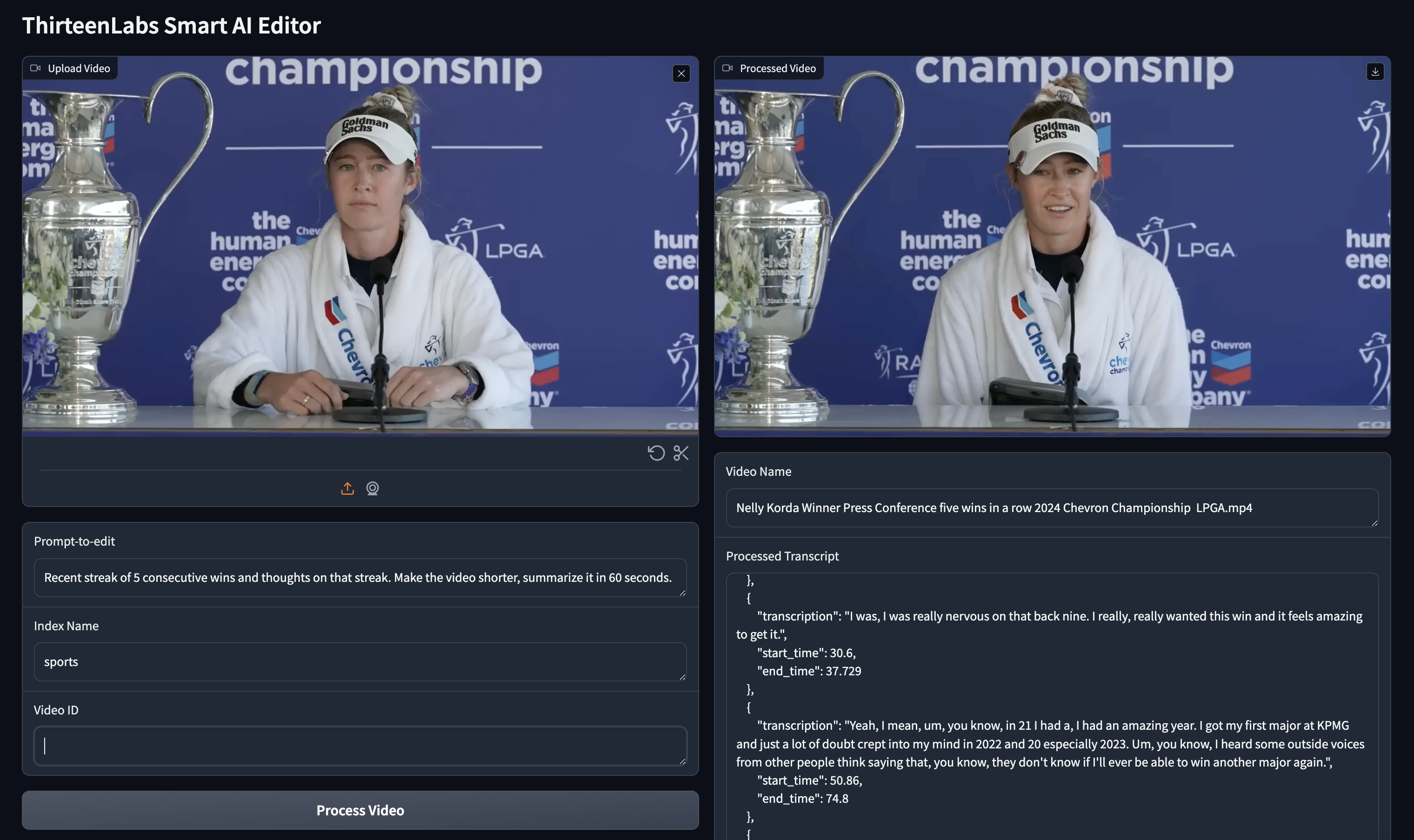
Smart-AI-Editor
ThirteenLabs Smart AI Editor
Overview
ThirteenLabs Smart AI Editor is an advanced video processing application that utilizes AI to edit videos based on user-defined prompts. This app can create highlight reels from sports press conferences or YouTube videos, generate video descriptions, and provide video dubbing in different languages. It leverages various AI models to deliver high-quality video editing and transcription services.
Features
- Video Upload: Users can upload a video for processing.
- Prompt-based Editing: Users can input a prompt that guides the AI in creating a highlight reel or summarizing the video content.
- Video Transcription: The app extracts transcriptions from the uploaded video.
- AI-powered Highlight Creation: Using the transcriptions, the AI creates a coherent and engaging highlight reel based on the user's instructions.
- Video Stitching: Selected video segments are stitched together to form the final output video.
- Video Dubbing: Users can translate and dub the video into different languages.
- Gradio Interface: A user-friendly interface built with Gradio allows easy interaction with the app.
How to Use
- Upload Video: Upload the video file you want to process.
- Provide Prompt: Enter a prompt that specifies how you want the video to be edited (e.g., focus on specific topics, create a highlight reel).
- Specify Index and Video ID: Provide the relevant index name and video ID if necessary.
- Process Video: Click "Process Video" or "Process New Video" to start the video processing.
- View Output: The processed video, video name, and processed transcript will be displayed.
- Dub Video: Optionally, you can dub the video into another language by specifying the target language and clicking "Dub video".
Code Explanation
Import Statements
import gradio as gr
import os
import pprint
import json
from twelvelabs import TwelveLabs
import ast
import google.generativeai as genai
import vertexai
from vertexai.generative_models import GenerativeModel, ChatSession
from moviepy.editor import VideoFileClip, concatenate_videoclips
import requests
Function Definitions
Get Video ID
Retrieves the video ID based on the filename.
def get_video_id(filename):
    # JSON data (sample data)
    data = [
        # Data entries
    ]
    for item in data:
        if item['metadata']['filename'] == filename:
            return item['_id']
    return None
Get Transcript
Retrieves the transcription of the video using the TwelveLabs API.
def get_transcript(video_file_name, video_id_input, which_index):
    video_id = get_video_id(video_file_name)
    if video_id is None or video_id_input != "":
        video_id = video_id_input
    client = TwelveLabs(api_key="YOUR_API_KEY")
    transcriptions = client.index.video.transcription(index_id="INDEX_ID", id=f"{video_id}")
    output = []
    for transcription in transcriptions:
        output.append({"transciption": transcription.value, "start_time": transcription.start, "end_time": transcription.end})
    return output
Chat Functions
Functions to interact with the Gemini model for generating responses based on transcriptions.
def get_chat_response(chat: ChatSession, prompt: str) -> str:
    text_response = []
    responses = chat.send_message(prompt, stream=True)
    for chunk in responses:
        text_response.append(chunk.text)
    return "".join(text_response)

def user_input(chat, transcript, user_input, video_title, chat_new=False):
    prompt = f'''
    This is a transcription of a video...
    '''
    output = get_chat_response(chat, prompt)
    return output

def user_input2(chat, transcript, user_input, video_title, chat_new=False):
    prompt = f'''
    This is a transcription of a video...
    '''
    output = get_chat_response(chat, prompt)
    return output
Video Stitching
Stitches video segments based on the transcriptions.
def stitch_video_segments(video_file, segments, output_file, resolution=None, bitrate='10000k'):
    video = VideoFileClip(video_file)
    original_fps = video.fps or 30
    video_segments = []
    for segment in segments:
        start_time = segment['start_time']
        end_time = segment['end_time']
        video_segment = video.subclip(start_time, end_time)
        video_segments.append(video_segment)
    final_video = concatenate_videoclips(video_segments)
    output_params = {'codec': 'libx264', 'fps': original_fps, 'bitrate': bitrate, 'preset': 'slow', 'audio_codec': 'aac', 'audio_bitrate': '192k'}
    if resolution:
        final_video = final_video.resize(resolution)
    final_video.write_videofile(output_file, **output_params)
    video.close()
    final_video.close()
    return output_file
Process Video
Processes the video based on the user's prompt.
def process_video(video_path, prompt, video_id, which_index):
    video_name = os.path.basename(video_path)
    video_id_in = get_video_id(video_name)
    output_transcript = get_transcript(str(video_name), video_id, which_index)
    transcript_combined = user_input(chat, output_transcript, prompt, video_name, False) if which_index != "drew" else user_input2(chat, output_transcript, prompt, video_name, False)
    transcript_combined = ast.literal_eval(transcript_combined)
    transcript_combined2 = json.dumps(transcript_combined, indent=4)
    processed_video = stitch_video_segments(video_path, transcript_combined, 'stiched_vid.mp4')
    return processed_video, video_name, transcript_combined2
Dub Video
Dubs the video in a different language.
def dub_video_translate(video_path, translated_to_language):
    url = "https://api.elevenlabs.io/v1/dubbing"
    api_key = "YOUR_API_KEY"
    data = {
        'file': f'{video_path}',
        'source_lang': 'English',
        'target_lang': f'{translated_to_language}',
        'num_speakers': '1',
        'watermark': 'false',
        'name': 'dubbing-test',
    }
    headers = {
        'xi-api-key': api_key,
        'Content-Type': 'multipart/form-data',
    }
    response = requests.post(url, headers=headers, data=data)
    return str(response.json())
Gradio Interface
Defines the Gradio interface for the app.
with gr.Blocks() as demo:
    chat = model.start_chat()
    gr.Markdown("# ThirteenLabs Smart AI Editor")
    with gr.Row():
        with gr.Column():
            chat_input = chat
            video_input = gr.Video(label="Upload Video")
            prompt_input = gr.Textbox(label="Prompt-to-edit")
            which_index = gr.Textbox(label="Index Name")
            video_id = gr.Textbox(label="Video ID")
            process_button = gr.Button("Process Video")
            process_button2 = gr.Button("Process New Video")
        with gr.Column():
            video_output = gr.Video(label="Processed Video")
            video_name_output = gr.Textbox(label="Video Name")
            transcript_output = gr.Textbox(label="Processed Transcript")
    with gr.Row():
            dub_video_btn = gr.Button("Dub video")
            dub_video_btn2 = gr.Button("Dub video with lip sync")
            target_language = gr.Textbox(label="Target Language")
            response_out = gr.Textbox(label="Translate Status")
    dub_video_btn.click(fn=dub_video_translate, inputs=[video_input, target_language], outputs=[response_out])
    process_button.click(fn=process_video, inputs=[video_input, prompt_input, video_id, which_index], outputs=[video_output, video_name_output, transcript_output])
    process_button2.click(fn=process_video_new, inputs=[video_input, prompt_input, video_id, which_index], outputs=[video_output, video_name_output, transcript_output])
demo.launch()
GitHub Repository Setup
Repository Structure
thirteenlabs-smart-ai-editor/
│
├── README.md
├── app.py
├── requirements.txt
└── .gitignore
README.md
# ThirteenLabs Smart AI Editor

ThirteenLabs Smart AI Editor is an advanced video processing application that utilizes AI to edit videos based on user-defined prompts. This app can create highlight reels from sports press conferences or YouTube videos, generate video descriptions, and provide video dubbing in different languages.

## Features

- Video Upload
- Prompt-based Editing
- Video Transcription
- AI-powered Highlight Creation
- Video Stitching
- Video Dubbing
- User-friendly Gradio Interface

## How to Use

1. **Upload Video**: Upload the video file you want to process.
2. **Provide Prompt**: Enter a prompt that specifies how you want the video to be edited (e.g., focus on specific topics, create a highlight reel).
3. **Specify Index and Video ID**: Provide the relevant index name and video ID if necessary.
4. **Process Video**: Click "Process Video" or "Process New Video" to start the video processing.
5. **View Output**: The processed video, video name, and processed transcript will be displayed.
6. **Dub Video**: Optionally, you can dub the video into another language by specifying the target language and clicking "Dub video".

## Installation

1. Clone

```markdown
1. Clone the repository:
    ```bash
    git clone https://github.com/yourusername/thirteenlabs-smart-ai-editor.git
    ```
2. Navigate to the project directory:
    ```bash
    cd thirteenlabs-smart-ai-editor
    ```
3. Create a virtual environment:
    ```bash
    python -m venv venv
    ```
4. Activate the virtual environment:
    - On Windows:
        ```bash
        venv\Scripts\activate
        ```
    - On macOS and Linux:
        ```bash
        source venv/bin/activate
        ```
5. Install the required dependencies:
    ```bash
    pip install -r requirements.txt
    ```

## Running the App

1. Ensure you have your API keys for TwelveLabs, Gemini, and ElevenLabs ready.
2. Update the `app.py` file with your API keys where necessary.
3. Run the app:
    ```bash
    python app.py
    ```
4. Open your browser and go to `http://localhost:7860` to access the app.

## Project Structure

- **app.py**: The main application file containing all the logic for video processing and the Gradio interface.
- **requirements.txt**: Contains all the Python dependencies required to run the app.
- **README.md**: Documentation for the repository.

## API Keys

Ensure you have the following API keys and update the code in `app.py`:
- **TwelveLabs API Key**
- **Gemini API Key**
- **ElevenLabs API Key**

Replace the placeholders with your actual keys in the respective sections of the code.

## Contributing

1. Fork the repository.
2. Create a new branch:
    ```bash
    git checkout -b feature-branch
    ```
3. Make your changes.
4. Commit your changes:
    ```bash
    git commit -m "Add new feature"
    ```
5. Push to the branch:
    ```bash
    git push origin feature-branch
    ```
6. Open a pull request.

## License

This project is licensed under the MIT License.

## Contact

For any issues or questions, please open an issue on GitHub or contact [[email protected]].
requirements.txt
gradio
moviepy
requests
pprint
google-cloud
twelvelabs
.gitignore
venv/
__pycache__/
*.pyc
*.pyo
*.pyd
*.db
*.sqlite3
*.log
*.pot
*.pyc
*.pyo
*.pyd
.DS_Store
.env
app.py
Place the entire Python code from above into app.py and ensure that the necessary API keys are replaced with placeholders or fetched securely from environment variables.
import gradio as gr
import os
import pprint
import json
from twelvelabs import TwelveLabs
import ast
import google.generativeai as genai
import vertexai
from vertexai.generative_models import GenerativeModel, ChatSession
from moviepy.editor import VideoFileClip, concatenate_videoclips
import requests

# Add your functions here...

with gr.Blocks() as demo:

    chat = model.start_chat()
    gr.Markdown("# ThirteenLabs Smart AI Editor")

    with gr.Row():
        with gr.Column():
            chat_input = chat
            video_input = gr.Video(label="Upload Video")
            prompt_input = gr.Textbox(label="Prompt-to-edit")
            which_index = gr.Textbox(label="Index Name")
            video_id = gr.Textbox(label="Video ID")
            process_button = gr.Button("Process Video")
            process_button2 = gr.Button("Process New Video")

        with gr.Column():
            video_output = gr.Video(label="Processed Video")
            video_name_output = gr.Textbox(label="Video Name")
            transcript_output = gr.Textbox(label="Processed Transcript")
    with gr.Row():
            dub_video_btn = gr.Button("Dub video")
            dub_video_btn2 = gr.Button("Dub video with lip sync")
            target_language = gr.Textbox(label="Target Language")
            response_out = gr.Textbox(label="Translate Status")

    dub_video_btn.click(fn=dub_video_translate, inputs=[video_input, target_language], outputs=[response_out])
    process_button.click(fn=process_video, inputs=[video_input, prompt_input, video_id, which_index], outputs=[video_output, video_name_output, transcript_output])
    process_button2.click(fn=process_video_new, inputs=[video_input, prompt_input, video_id, which_index], outputs=[video_output, video_name_output, transcript_output])
demo.launch()
Replace "YOUR_API_KEY" and other placeholders with your actual API keys.
This setup ensures that anyone cloning the repository can follow the instructions to get the app up and running quickly.
Built With
- gradio
- python


Log in or sign up for Devpost to join the conversation.