-
-
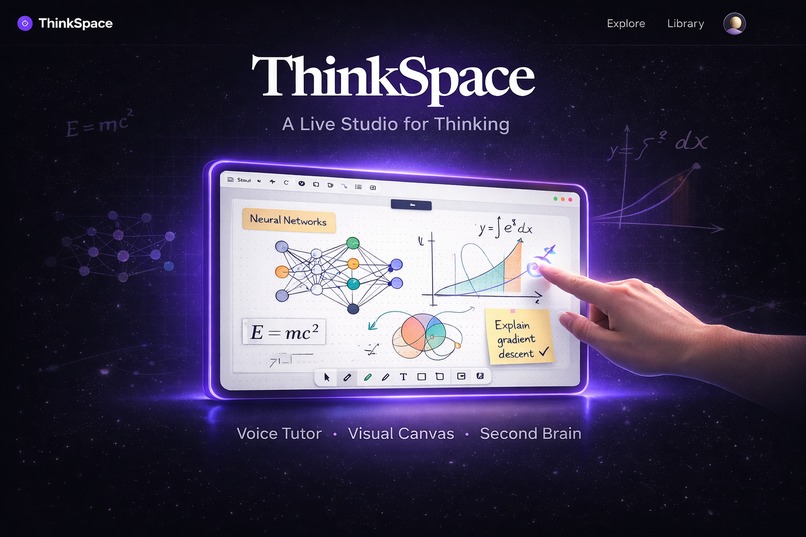
-
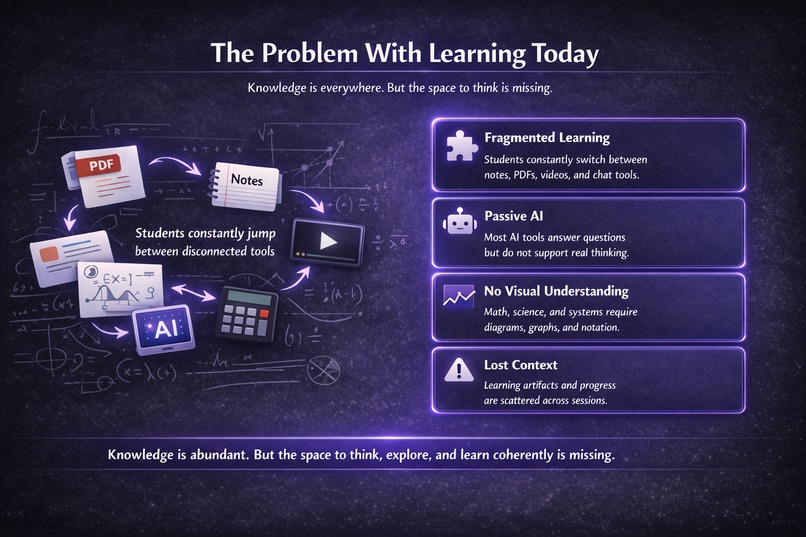
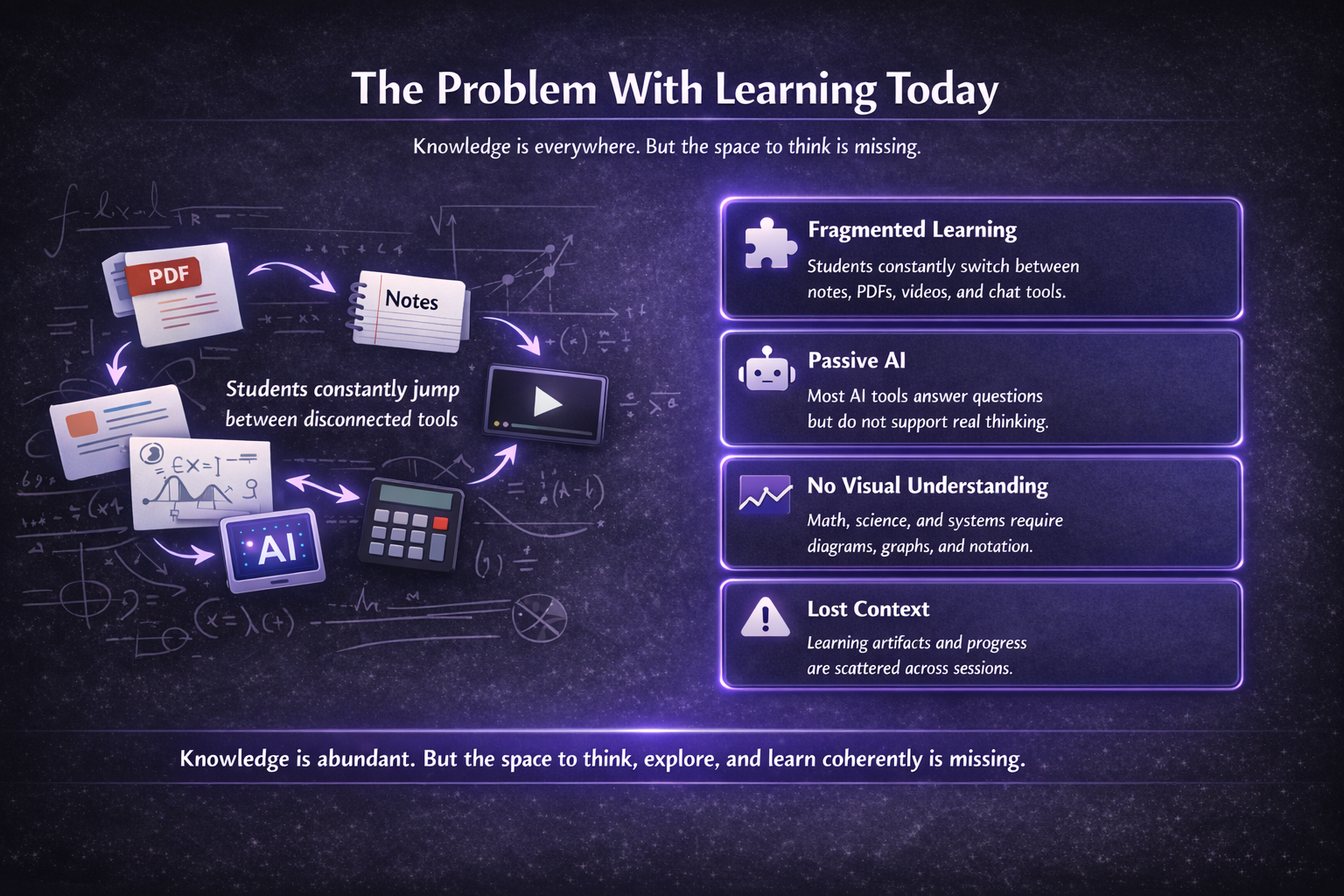
Problem Slide
-
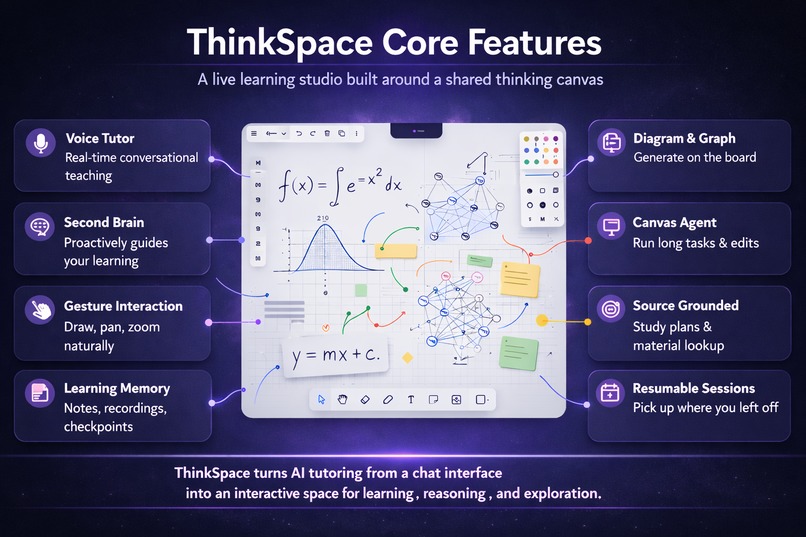
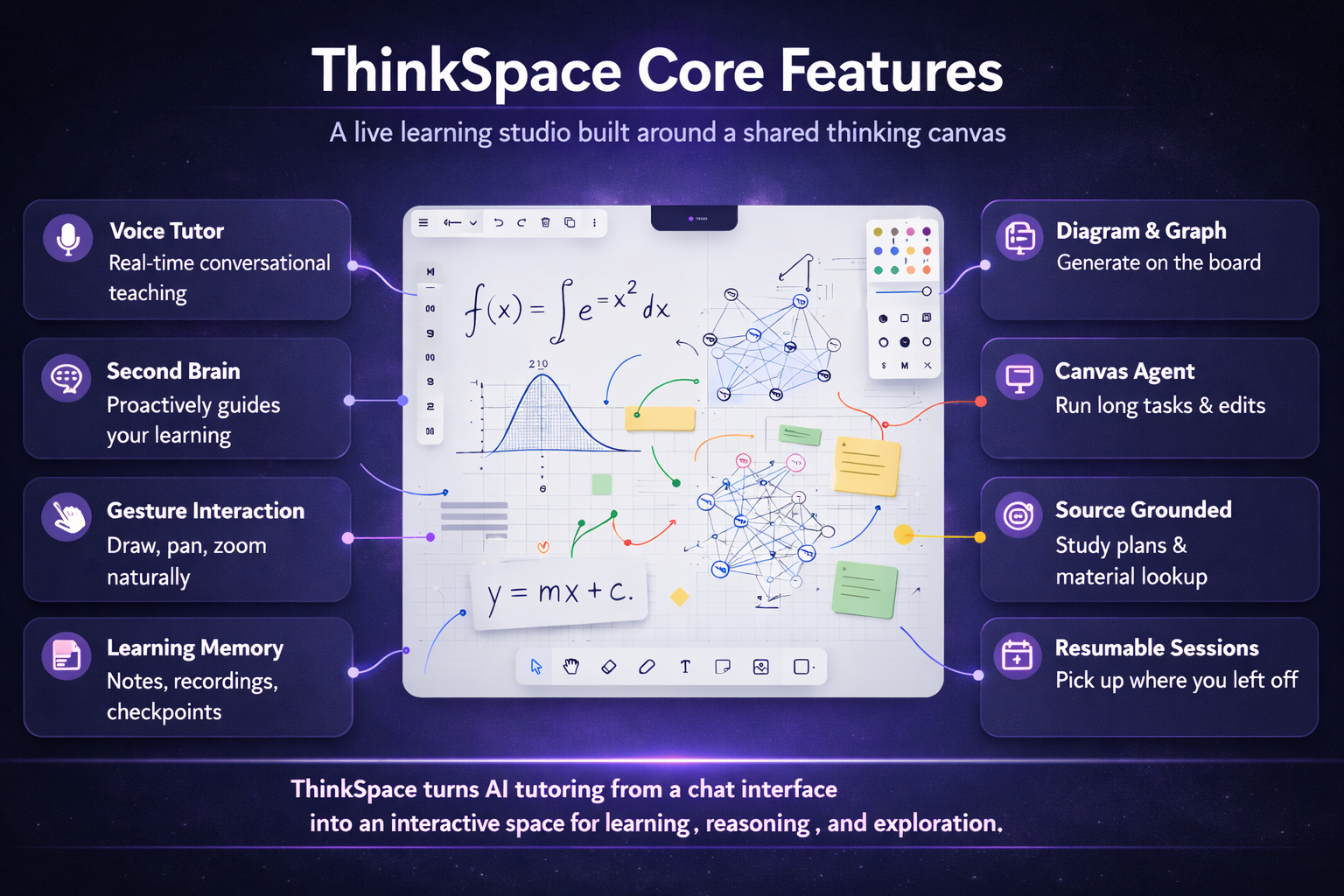
Core Features
-
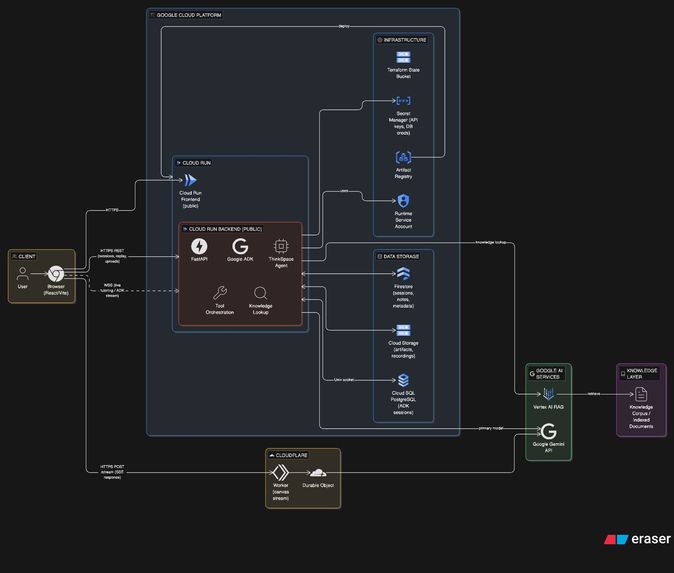
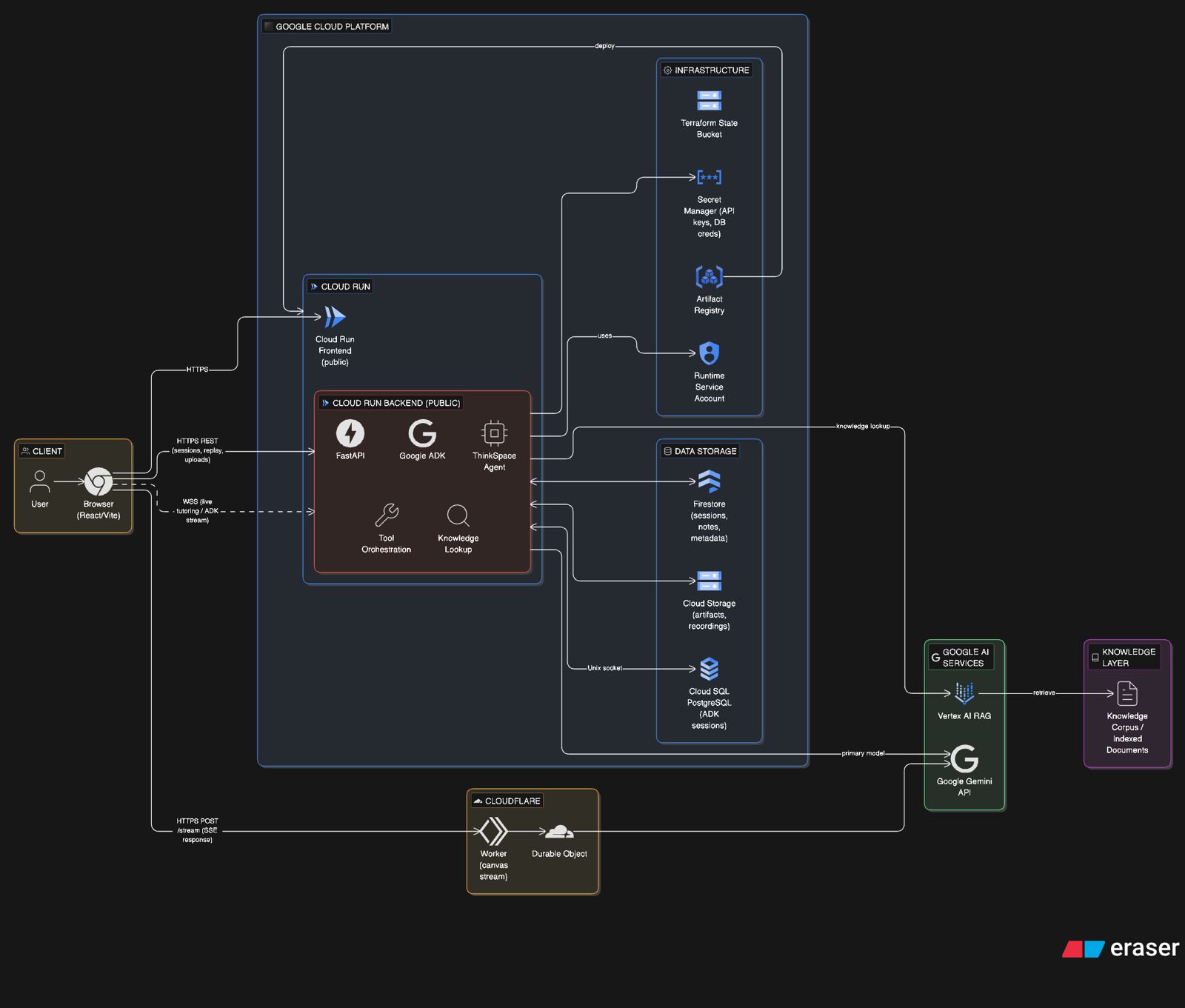
Architecture Diagram
-
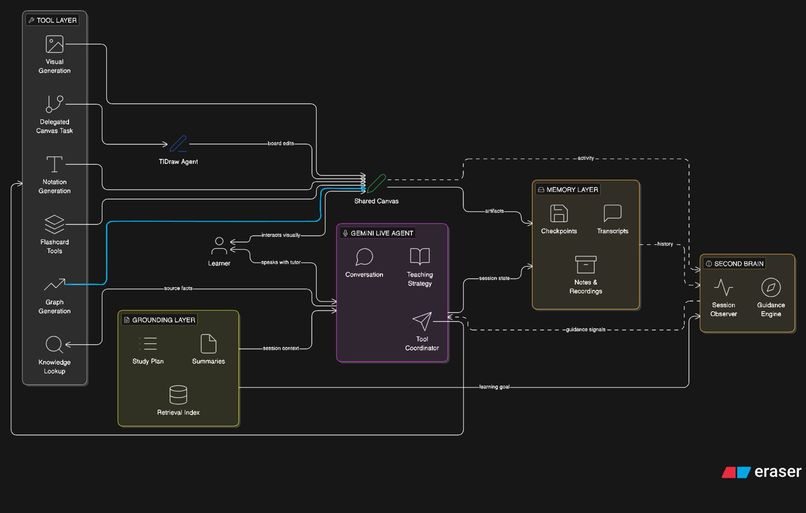
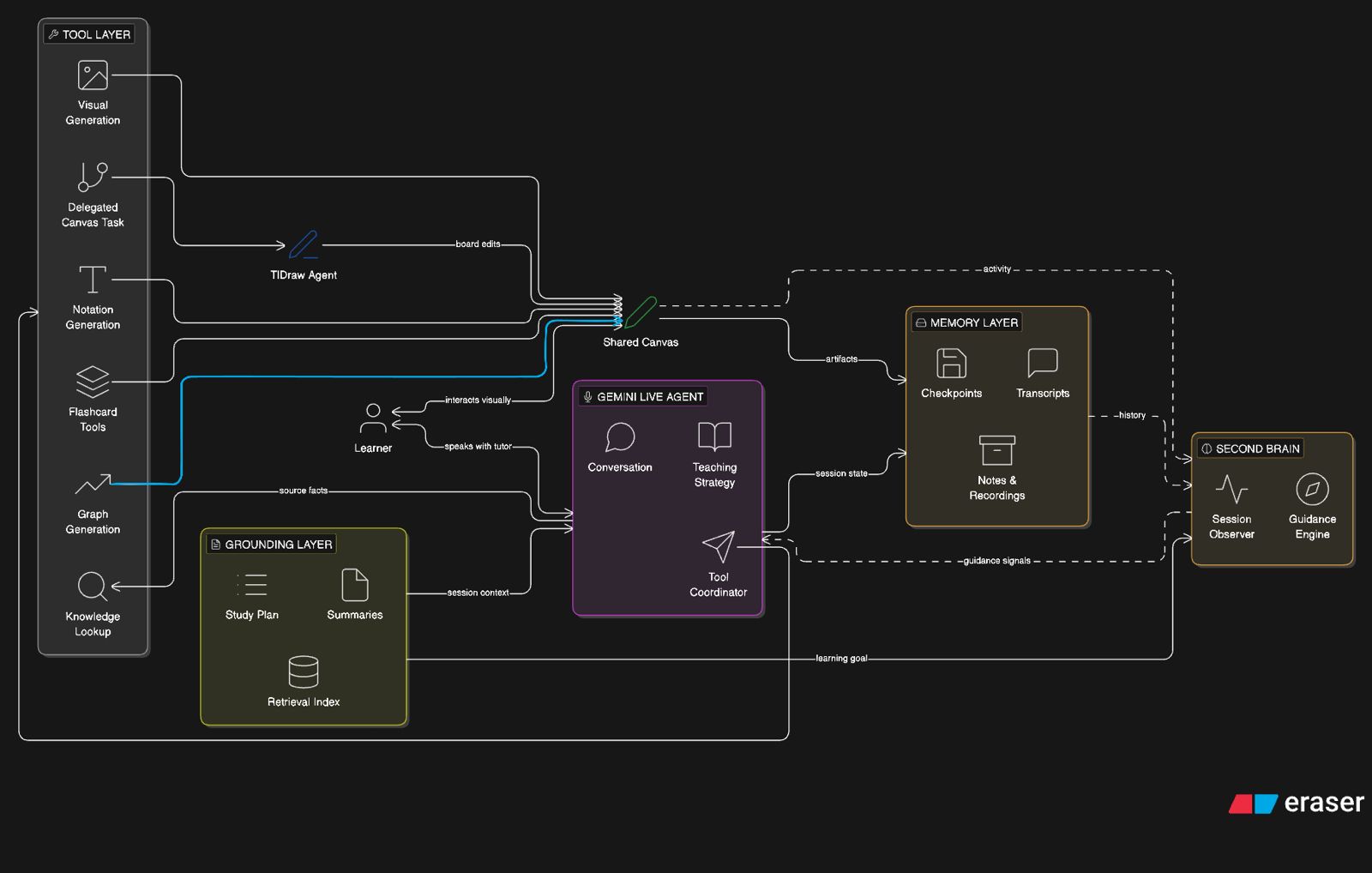
Agent Architecture Diagram
-
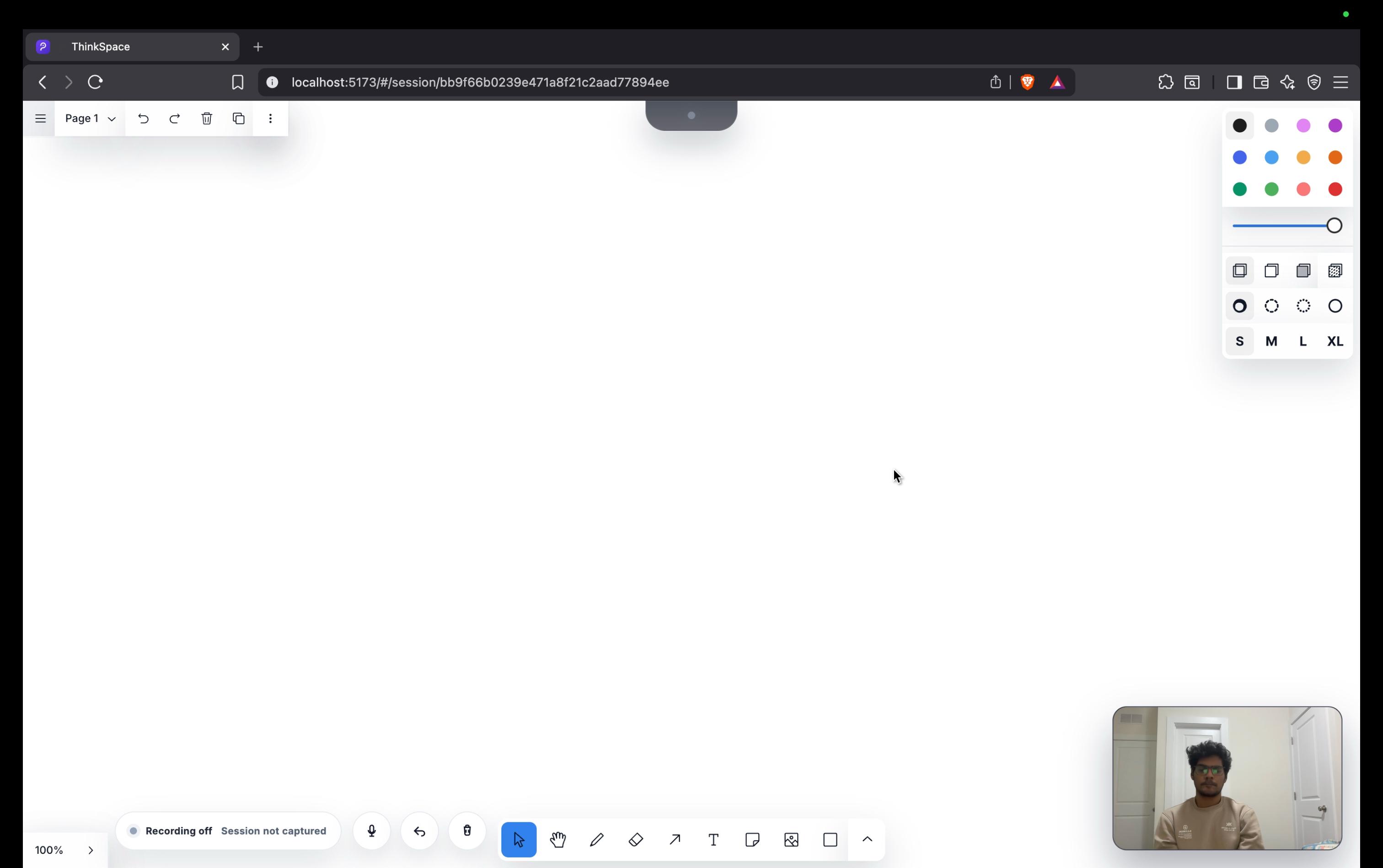
Blank Canvas
-
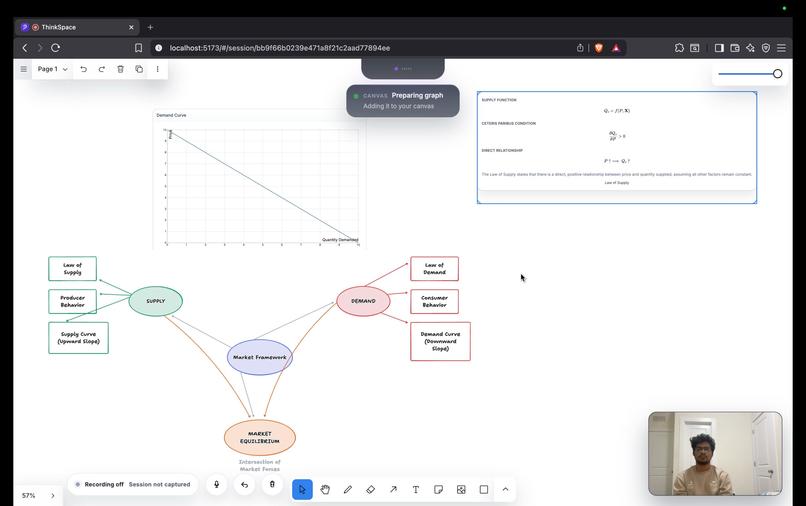
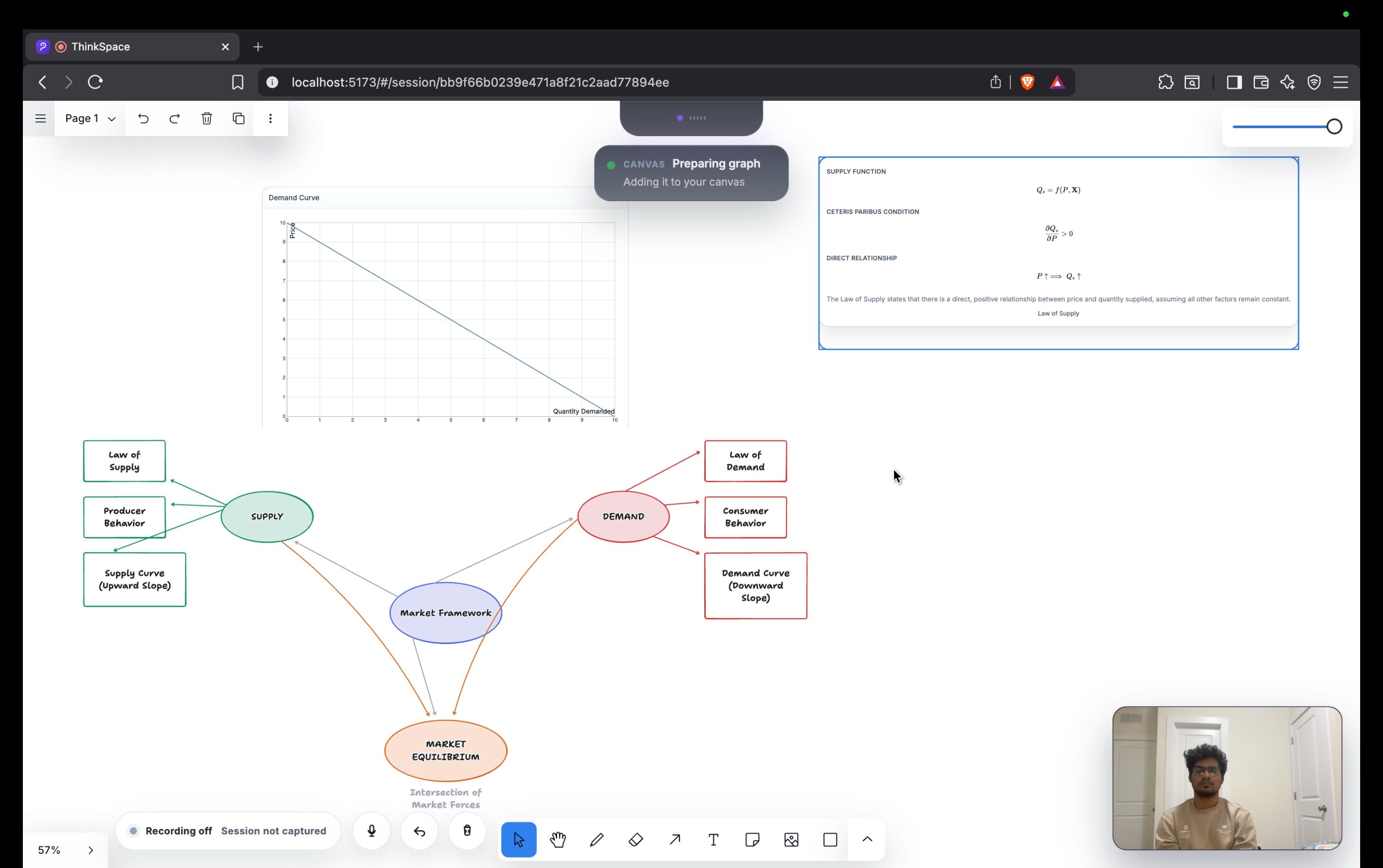
Interactive Live Canvas
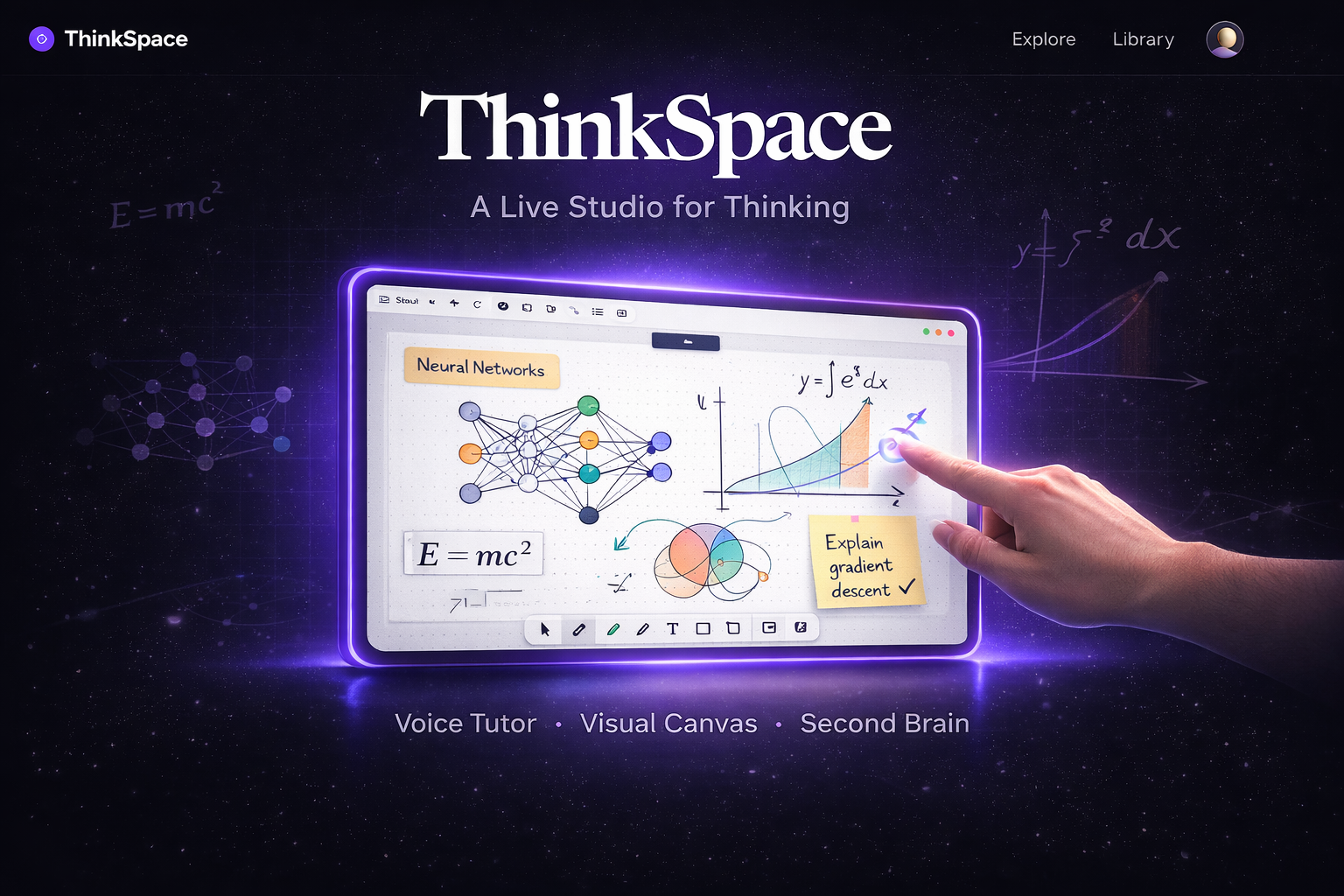
ThinkSpace
Inspiration 🌟
A century ago, the smartest student in the room was the one who knew the most answers. Today, the advantage belongs to the student who can ask the best questions.
Yet the tools we use to learn have barely evolved. Students still jump between slides, notes, videos, and AI chat windows scattered across different tabs. Knowledge is everywhere, but the process of thinking through ideas remains fragmented. Most tools deliver information, but they rarely support how people actually think, explore, and develop understanding.
We were inspired by a simple observation: a blank canvas invites curiosity.
When people have space to sketch ideas, ask questions, and explore visually, deeper understanding naturally follows. ThinkSpace was built around this belief. Instead of treating AI as a question-answering tool, we wanted to create an environment where students could think, explore, and learn alongside an intelligent tutor.
By combining:
- voice interaction 🎙️
- gesture interaction 🤟🏻
- visual reasoning 👁️
- a shared thinking canvas 🧠
ThinkSpace transforms studying into an active exploration of ideas rather than a passive search for answers.
What ThinkSpace Is 🧠
ThinkSpace is a live AI learning studio built around a shared thinking canvas.
Instead of learning through a text box, students interact with an AI tutor that can:
- speak and hold real-time conversations 🗣️
- generate diagrams and conceptual visuals 🎨
- draw graphs 📈
- render mathematical notation using LaTeX ∑
- modify and organize the canvas in real time ✍️
- respond to what the learner is drawing, viewing, and exploring 👀
The result is a study environment where conversation, visuals, and interaction all happen in one place.
Learning Workflow 🗺️
A typical learning session follows three stages.
1. Session Setup 📚
Students begin by:
- uploading their learning material 📄
- defining a learning goal 🎯
ThinkSpace then runs a pre-session grounding pipeline that:
- summarizes the source material 📝
- builds a structured study plan 🗺️
- creates a source-grounded session context for the tutor 🧠
- prepares a retrieval index for precise lookup during the session 🔎
This setup matters because the live tutor should not begin as a blank chatbot. It begins with a pedagogical map of the material, a compact source summary, and an indexed knowledge base that can be queried when exact source grounding is needed.
We also designed a knowledge.lookup path for targeted retrieval from the learner's uploaded materials. Rather than retrieving constantly on every turn, ThinkSpace uses retrieval as a precision tool. The intended retrieval layer is backed by Vertex AI RAG Engine so the tutor can pull exact, source-grounded excerpts when needed without turning the whole session into a search workflow.
2. Live Learning Session 🎙️
During the session, the AI tutor can:
- explain concepts verbally 🎙️
- generate visuals and diagrams 🖼️
- draw graphs and mathematical notation 📊
- reorganize or extend the board dynamically 🧩
- create interactive study artifacts such as flashcards 🃏
Students can interact with the canvas by:
- speaking to the tutor 🗣️
- drawing or sketching ideas ✏️
- zooming or panning across the board 🔍
- annotating or circling elements ⭕
- erasing or modifying content 🧽
The system observes these interactions and adapts the lesson dynamically, much like a human tutor responding to how a student explores a whiteboard.
3. Tutor Personas 🎭
ThinkSpace supports different learning styles through three tutor personas:
- Professor 👨🏫 for deep explanations and structured teaching
- Coach 🧭 for guided exploration with hints and scaffolding
- Challenger 🧪 for questions, flashcards, and tests that push understanding
Together, these elements transform learning into a visual conversation with ideas instead of a one-shot question-and-answer exchange.
How We Built It ⚙️
ThinkSpace is designed as a real-time multimodal learning system where the tutor understands both the live conversation and the visual state of the canvas.
Core Architecture 🏗️
At the center of the system is a single tutor orchestrator built using:
- Google ADK ☁️
- the Gemini live session runtime ⚡
The orchestrator is responsible for:
- managing tutoring strategy 🎓
- maintaining the live conversation 💬
- deciding when to explain, ask questions, or call tools 🛠️
- coordinating visual and interactive teaching artifacts 🎨
- incorporating proactive guidance from the second reasoning layer 🧩
Instead of exposing multiple agents to the learner, ThinkSpace maintains one consistent tutor identity. Behind the scenes, specialist execution systems handle long-running work such as visual generation, widget rendering, flashcard workflows, and delegated board edits. In practice, these behave like subagents or specialist workers, but they remain hidden behind one coherent tutor experience.
Backend Infrastructure ☁️
The backend runs on Google Cloud and acts as the coordination hub for live tutoring sessions.
Core technologies include:
- FastAPI for backend services 🚀
- WebSocket communication for real-time interaction 🔌
- Cloud Run for scalable runtime execution ☁️
- Firestore for session metadata and notes 🗂️
- Cloud SQL (PostgreSQL) for session state 🛢️
- Cloud Storage for artifacts and recordings 📦
- Google Secret Manager for configuration and credentials 🔐
The backend manages:
- live tutoring streams 🎙️
- transcript persistence 📝
- tool orchestration 🛠️
- frontend action routing 🔁
- acknowledgement handling ✅
- proactive tutoring guidance 🧠
- session checkpoints and replay artifacts ⏪
We also treated infrastructure as code as part of the build, not an afterthought. ThinkSpace uses Terraform-managed cloud infrastructure for core services such as storage, databases, secrets, and runtime deployment, which made the system easier to provision, iterate on, and deploy reliably during the project.
Frontend Runtime 🖥️
The frontend is built using:
- React ⚛️
- Vite ⚡
- a canvas-based runtime built on the tldraw agent template 🎨 (3rd Party Application with trial license)
It acts as the live execution environment where tutoring artifacts appear.
The frontend is responsible for:
- rendering generated visuals, graphs, and notation 🖼️
- displaying flashcards 🃏
- capturing viewport screenshots 📸
- tracking canvas activity 👣
- managing session recording 🎥
- hosting a gesture-based interaction system ✋
- running delegated board edits on the canvas surface 🧑🎨
The gesture pipeline on the frontend is an important part of the experience. We built a browser-side gesture runtime that uses camera input, hand tracking, and gesture classification to control the canvas through native interactions like cursor movement, drawing, panning, and zooming, making the board feel like a live multimodal study surface rather than a static whiteboard.
Tool Architecture 🛠️
ThinkSpace uses a dedicated tool system that allows the tutor to generate artifacts directly on the canvas.
Key tools include:
canvas.generate_visualfor diagrams and conceptual visuals 🎨canvas.generate_graphfor mathematical graphs 📈canvas.generate_notationfor LaTeX equations and derivations ∑canvas.delegate_taskfor complex editable board work 🧑🎨- flashcard tools for interactive knowledge testing 🃏
knowledge.lookupfor exact source-grounded retrieval when precision matters 🔎
Each tool has its own reasoning and placement logic so that generated artifacts appear in meaningful locations on the board.
There are also different execution patterns behind these tools:
- backend-managed async workers for visuals, graph widgets, notation widgets, and flashcards ⚙️
- frontend-managed delegated execution for open-ended canvas edits through the canvas agent 🎨
This distinction is important. Some outputs are generated and inserted as structured artifacts, while others are delegated to a canvas worker that edits the board directly. For editable board operations, ThinkSpace uses the tldraw canvas agent and triggers it through the long-running canvas.delegate_task tool. That division lets ThinkSpace support both precise generated content and flexible whiteboard-style collaboration.
Two-Way UI Acknowledgements ✅
A critical design decision was implementing two-way frontend acknowledgements.
The workflow is:
- The tutor calls a tool.
- The backend sends a UI action request to the frontend.
- The frontend applies the action.
- The frontend sends an acknowledgement back.
- Only then does the tutor treat the artifact as visible.
This prevents the tutor from referring to visuals, graphs, notation, or flashcards before they actually appear on the canvas, significantly improving grounding and reliability.
The Second Brain 🧩
To make the tutor proactive rather than purely reactive, we built a second reasoning layer called the Second Brain.
This system observes:
- canvas activity windows 👣
- viewport screenshots 📸
- structured canvas context 🧾
- compacted session memory 🧠
- flashcard state 🃏
- the broader pedagogical plan prepared during session setup 🗺️
The Second Brain produces structured pedagogical guidance such as:
- learner focus detection 🎯
- conceptual misunderstanding signals 🚨
- suggestions for when to explain, slow down, quiz, or redirect 🧭
- hints about what part of the study plan the learner is currently engaging with 🗺️
A delivery gate ensures these insights are only delivered when they are timely and relevant, so the experience remains helpful rather than intrusive.
Persistent Learning Sessions 💾
ThinkSpace also includes infrastructure for durable learning sessions.
An important part of the experience is that sessions are resumable. Students can leave a study session, come back later, and re-enter the same learning space with the relevant history, artifacts, and context still available.
Each session stores:
- transcript history 📝
- generated notes 📒
- checkpoints 📍
- recordings 🎥
- key learning moments ✨
- suggested next modules 🧭
This allows students to:
- revisit past sessions ⏪
- jump to important parts of a lesson ⏩
- review concepts later 🔁
- continue learning from where they left off 🌱
- resume sessions by re-entering them later without losing context 🔄
Challenges We Faced 🚧
Building ThinkSpace required solving several challenges across real-time interaction, multimodal reasoning, and system coordination.
Real-Time Orchestration ⏱️
The tutor needed to:
- speak 🗣️
- generate visuals 🎨
- update the canvas ✍️
- respond to user interaction 🤝
All at the same time while keeping the conversation coherent.
We solved this through strict orchestration between the backend, tool workers, and frontend acknowledgements.
Grounding the AI 🎯
Ensuring the tutor remained aligned with what the learner actually sees was critical.
To solve this, we grounded the system using:
- viewport screenshots 📸
- structured canvas context 🧾
- transcript compaction 📝
- UI acknowledgement signals ✅
- pre-session study artifacts and source summaries 📚
This prevents the AI from hallucinating board state and helps it stay anchored in the learner's actual materials.
Proactive Tutoring 🤝
Designing the Second Brain was challenging.
We needed the system to:
- observe learner behavior 👀
- reason about learning progress 🧠
- suggest teaching interventions 🤝
But we also had to ensure it did not interrupt the learner unnecessarily.
This required designing activity windows, reasoning pipelines, and a delivery gate for safe proactivity.
Visual Placement 📐
Graphs, diagrams, and notation must appear in meaningful positions on the canvas.
To solve this, we built a geometry preprocessing system that:
- analyzes occupied canvas regions 📐
- detects free space 🫧
- uses screenshot-assisted placement reasoning 📸
- inserts artifacts without overlapping existing content 🧩
System Latency and Synchronization 🔄
Voice interaction, canvas updates, gesture input, background jobs, and AI reasoning all operate concurrently.
Maintaining responsiveness required careful management of:
- asynchronous tool execution ⚙️
- WebSocket streams 🔌
- frontend-backend synchronization 🔄
- event coordination 🧭
- long-running specialist workers that complete at different times ⏳
What We Learned 📘
Building ThinkSpace taught us that learning with AI becomes far more powerful when interaction goes beyond text.
When students can:
- speak 🗣️
- draw ✏️
- annotate 📝
- explore visually 👀
the learning process becomes much closer to how people naturally think and reason.
Context Matters More Than Prompts 🧭
We discovered that effective tutoring requires understanding what the learner is doing, not just what they ask.
By grounding the tutor in:
- conversation history 💬
- canvas state 🎨
- screenshots 📸
- structured session summaries 🧾
- source-grounded study artifacts 📚
we created a system that reacts to learner behavior rather than only responding to isolated questions.
Proactive Assistance Requires Careful Design ⚖️
Observing learner activity unlocks powerful tutoring possibilities.
However, poorly timed interventions can disrupt learning. Designing the Second Brain delivery gate helped us balance helpful guidance with learner autonomy.
Multimodal Learning Is the Future 🚀
Voice interaction, visual diagrams, mathematical notation, gesture-driven exploration, and source-grounded retrieval each play a role in understanding complex ideas.
When these elements are combined into a single coherent environment, learning becomes:
- more interactive 🤝
- more intuitive 💡
- more engaging ✨
ThinkSpace represents our effort to move AI-assisted learning beyond static chat interfaces toward dynamic thinking spaces where curiosity and understanding can evolve naturally.


Log in or sign up for Devpost to join the conversation.