-
-
System Architecture
Inspiration
I believe the future interaction with computers will go beyond keyboard/mouse/screens. To gain wider adoption of XR, there has to be more use cases than games.
What it does
User can use dictation and image transcription to create a word document. AI agent can help with editing. Specialized agent with domain knowledge can give user feedback on word document. User can save the document locally to the device then connect to a computer to retrieve the file.
How we built it
Interaction SDK
Hand tracking for thumbs up to start/stop recording, marker that tracks to user's index finger and scissors pose to turn on/off scene wall and table mesh.
MR Utility Kit
Passthrough and scene. After user scans the room with table marked, scene allows document to move onto the table surface.
Cloud Hosted Server
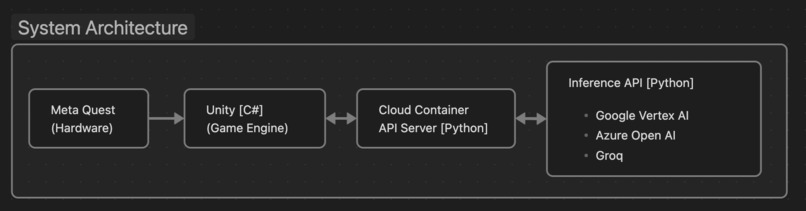
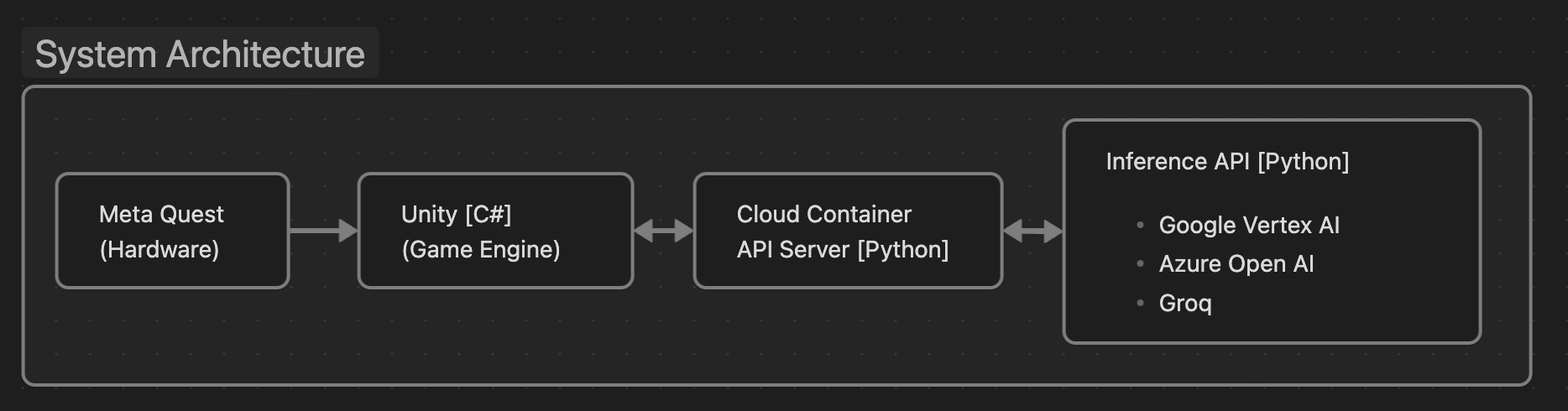
I created an API server on google cloud to facility all AI functions in python. The app on Quest3/Pro makes API calls to this server and receive text response. This allows user to install the APK on device and everything will work without any AI infrastructure setup.
AI
- Voice to Text: Whisper (small) runs on device, provides transcribed text
- Text to text: various AI platform, selectable by each window. OpenAI, Llama3, Gemini.
- Image to text: VertexAI Gemini 1.5 pro
- Text to speech: eleven labs
Challenges we ran into
How to let user (judges) install the apk and then it just works without additional setup. I cannot expect my users to know how to setup any of the AI infrastructure to power this app, so I had to create an api server hosted on the cloud to handle all of the AI functions. Once I got the API server running on google cloud, the app can make API calls and get response from various AI platform seamlessly.
Accomplishments that we're proud of
The entire word document creation workflow is proven to viable. The technologies to make natural interaction possible is ready and waiting for developers. I am energized to keep building on this idea after this hackathon.
What we learned
Eye tracking is an under utilized feature in the Quest Pro. I'm happy that I found a use case for this feature. When there are multiple AI agents and document in the space, activating window by just looking at it is more natural than turning my head and I believe I can refine the window activation logic with more time.
What's next for Project Ada
On editing, add all of the typical word editing functions but with more natural interactions. Add ray cast to eye tracking so I can change what I'm looking at easier. Make it easy to create more agents, change LLM model, have conversation with multiple agents. Long term goal: build a cloud infrastructure to allow user login, save files to the cloud, so user can pull files off on the web. Expand beyond word editing and into other areas where people can be more productive.
Built With
- azure
- elevenlabs
- google-cloud
- interactionsdk
- mrutilitykit
- openai
- quest
- questpro
- unity
- vertexai
- whisper


Log in or sign up for Devpost to join the conversation.