-
-
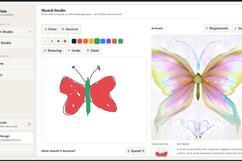
art studio page
-

Landing page
-
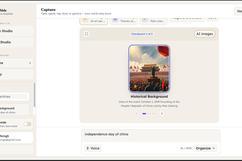
story telling
-
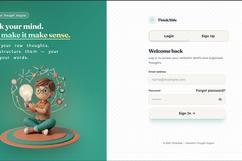
login page
-
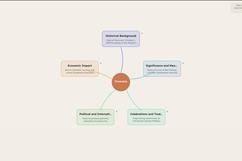
mind map
-
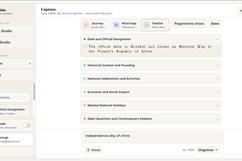
tasklist
-
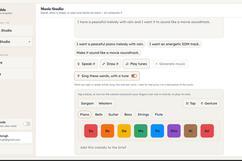
music studio
-
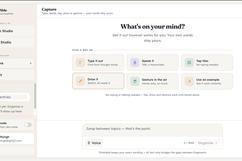
though organizer
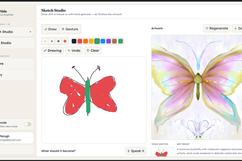

Inspiration
This idea started with something that felt very familiar to us. A lot of us who are neurodivergent, ADHD, autistic, or simply people whose brains seem to have eleven tabs open at the same time, know what it's like to get a really good idea in the middle of a hyperfocus spiral, only for it to come out completely unorganized. A ten-minute voice note. A Notes app entry covering five different topics. A bunch of half-finished thoughts that made perfect sense at 2am but are almost impossible to untangle the next morning.
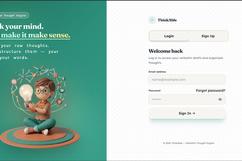
Most tools that say "just make an outline" assume you've already done the hardest part: figuring out how your thoughts fit together. We wanted to flip that around. ThinkAble lets you dump the thought exactly as it comes to you, typed, spoken, drawn, tapped out, or even gestured, and then helps find the structure underneath it.
One rule kept coming back throughout the project: don't put words in the user's mouth. If AI cleans up someone's thought so much that it no longer sounds like them, something important has been lost.
What it does
ThinkAble takes messy, unstructured thoughts and helps turn them into something you can actually work with while keeping the original thought intact.
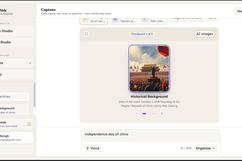
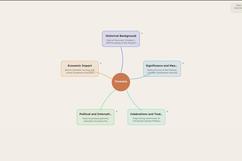
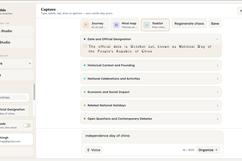
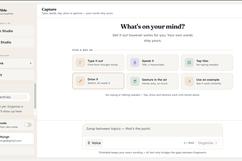
There are five ways to capture an idea: type it, speak it (transcribed with Whisper), tap it out from a word bank, draw it, or sketch it using hand-gesture tracking directly in the browser. ThinkAble then finds the themes and can present them as a mind map, task list, sequential "journey," or essay.
The feature we care about most is the verbatim vs. AI-connective distinction. Every phrase is marked as either verbatim, meaning your exact words, or AI-connective, meaning a small bridge the AI added to connect thoughts or explain repetition. The model isn't quietly rewriting everything. You can always see what came from you and what came from AI.
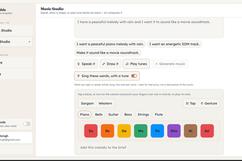
We also wanted ThinkAble to be more than a thought-organizing tool. Sketch Studio can turn a doodle or text description into AI-generated artwork, while Music Studio can turn a described mood into a procedurally generated track with optional AI-sung vocals. Everything is saved to personal history, so an idea you had at 2am doesn't simply disappear.
How we built it
The frontend is React 19 with Vite, styled using Tailwind CSS v4 and animated with Framer Motion. Gesture drawing uses MediaPipe Tasks Vision, with hand tracking happening entirely in the browser. The backend is written in Go using chi, with JWT authentication verified against Supabase's JWKS endpoint and a direct Postgres connection for storage. Supabase handles authentication and the database, while row-level security keeps each user's data tied to their account.
For the AI layer, we didn't want the app depending on one API working perfectly. Almost every feature uses a primary-plus-fallback approach. Text organization and reasoning primarily run through Groq using gpt-oss-120b and llama-3.3-70b, with Gemini as a fallback when Groq's daily token limit runs out. Image generation uses Hugging Face's FLUX.1-schnell and Cloudflare Workers AI's Stable Diffusion. The sung-vocals feature also has a client-side procedural voice fallback. Voice input uses Groq-hosted Whisper, while drawing interpretation uses a vision model.
Challenges we ran into
The hardest part was making the "verbatim vs. AI-connective" promise trustworthy. Getting an LLM to summarize something is easy. Getting it to reorganize someone's thoughts while proving it didn't rewrite their words is much harder.
We added explicit validation on the backend to compare the model's output with the original input and catch cases where it drifts from the source.
Rate limits were another constant problem. Free-tier Groq quotas disappear quickly during repeated testing and demos, so we built the Gemini fallback directly into the request flow. If the primary provider isn't configured, hits a rate limit, or fails, the request automatically moves to the next option.
Gesture drawing was another challenge. Getting MediaPipe's hand landmarks to actually feel like drawing took a lot of experimenting with smoothing, gesture detection, and thresholds.
Accomplishments that we're proud of
We're proud that the "never paraphrase your words" promise isn't just written on the landing page. It's backed by the actual system, with visible tagging and backend validation.
We're also happy with how resilient the AI layer became. Between different providers, fallback chains, and procedural fallbacks, most important features can degrade gracefully instead of completely breaking when an API has a problem.
Going from one simple idea, "help people organize their thoughts," to five input methods and four output formats feels like we built an actual product, not just a collection of hackathon features.
What we learned
One of the biggest things we learned is that accessibility features aren't really "extra" features. Supporting different ways of expressing a thought, not forcing one "correct" way of thinking, and preserving someone's natural phrasing ended up making ThinkAble better for everyone.
We also learned how much work goes into making AI features reliable. The model call itself is probably the easiest part. Handling rate limits, building fallbacks, validating outputs, and making sure the app still works when an API fails is what makes an AI feature usable outside a perfect demo.
What's next for ThinkAble
We want to build a mind map that grows across multiple sessions, allowing themes to connect and evolve over time instead of living inside individual entries.
We also want to improve gesture and voice input, add more detailed calm-mode and sensory controls, and give users more control over the visual style of generated artwork.
Long term, we want ThinkAble to feel less like another tool you have to sit down and use, and more like a running, structured record of how your thoughts actually move: messy, creative, sometimes disconnected, but still completely yours.

Log in or sign up for Devpost to join the conversation.