Inspiration
Imagine you are cooking, and an ad pops up on the YouTube video playing in the background. Your hands are too dirty and wet to directly use your mouse and skip the ad, yet you want to go back to your video. What if you are lounging on your couch, wanting to select something to watch on your TV, but too exhausted to get up and grab the remote?
As college students, we face these small, yet frequent inconveniences that occur in our day-to-day lives, as we know many others do as well. These moments inspired our team to think: what if there was a way to perform simple media controls and navigate our devices hands free?
We drew inspiration from the real-life Theremin device, an instrument that allows an individual to create sounds using only hand movements. We had seen examples of Python libraries that capture an image and detect the orientation and gesture of a hand, and decided to pipe a webcam feed to control a desktop.
What it does
Theremin Device Interactor is a Python-based project that incorporates the mediapipe library to detect and track hand movement.
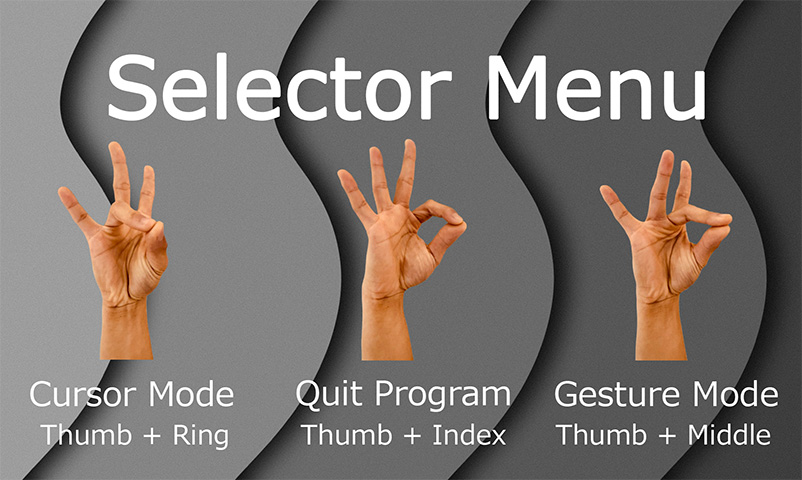
It consists of 2 modes, Gesture Mode and Cursor Mode, which users can freely switch between through a main menu.
These modes take hand gestures made by the user and perform simple controls on the device, such as media control, mouse clicking and movement, and desktop switching. A webcam is used, capturing hand movement and mapping gestures to media and cursor controls.
Gesture mode has a GUI interface, allowing users to map the predetermined hand gestures to actions on their device.
How we built it
Languages: Python Libraries: mediapipe, opencv, pynput, tkinter, pillow, keyboard, ctypes
Challenges we ran into
Webcam limitations: During testing, our webcam had difficulties tracking fast hand movements, due to our webcam blurring our hand when that happens. As a result, a mouse acceleration system was implemented, tracking the previous 5 cursor locations to predict the next location. Perhaps the biggest challenge was creating and fine-tuning gesture detection at any distance from the camera. We achieved this by recording the constant distance between the apex of the index finger and the bottom of the wrist, and applying the Euclidean distance formula in order to gauge distance without using Infrared sensors.
Accomplishments that we're proud of
Our team’s proudest accomplishment was being able to develop a project that closely aligned with our initial visions.
Additionally, our project was able to:
Differentiate between right and left hands. Recognize 15 hand gestures, which all perform separate and independent actions.
We managed to create a seamless project that allows for “hands-free” switching of wireless detection modes and shutting down the program.
What we learned:
How to detect hand gestures through a webcam. We did this by using the mediapipe python library. Handling an interactive and speedy cursor interaction with the Windows Window Manager. Scaling movement tolerances for gestures based on the hand position from the screen.
What's next for the Theremin Device Interactor?
Our team believes that the Theremin Device Interactor has potential to be expanded on, and we plan on doing so in the future. Some features we are interested in incorporating are:
A method for users to record their own hand gestures and map them to actions of their choice, similar to a macro recorder!
Using the Infrared sensors present in many laptop cameras as part of the Windows Hello Interface, to leverage better spatial hand detection.


Log in or sign up for Devpost to join the conversation.