-
-
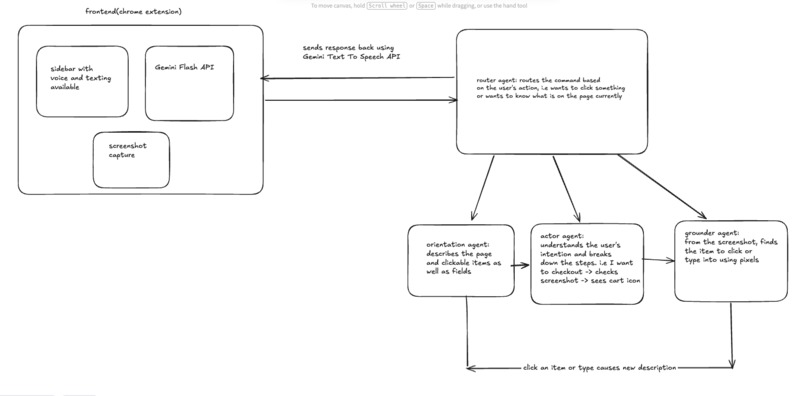
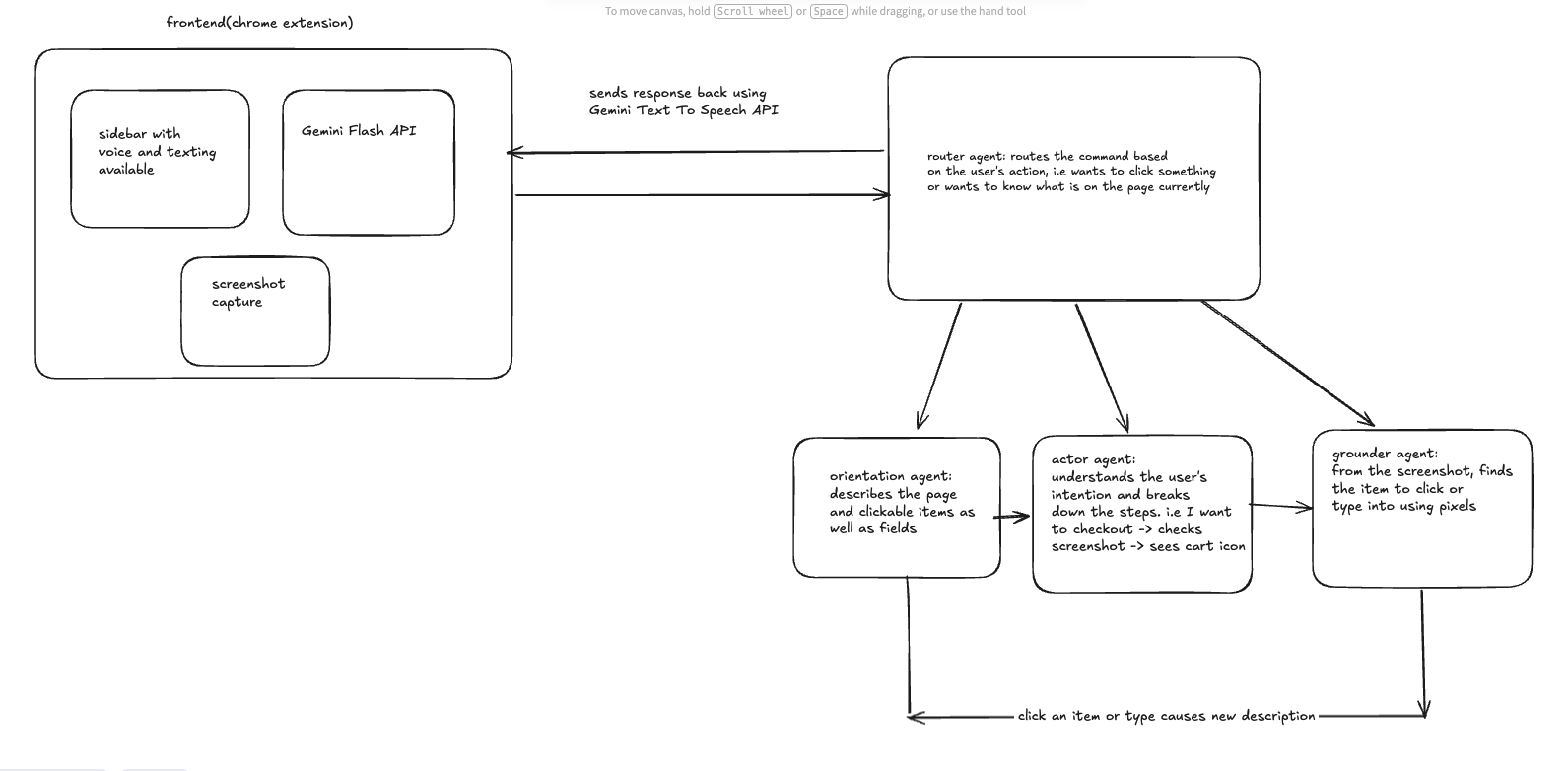
agent architecture diagram
Overview
Theia is a Chrome extension that acts as a real-time AI assistant for blind and visually impaired users. It lets users navigate the web entirely through voice — speaking commands like "click the Add to Cart button" or "describe what's on this page" — and responds with natural spoken audio describing what is happening on screen.
Features & Functionality Voice-Controlled Browsing Users tap a mic button in the sidebar and speak a command. Theia captures a screenshot of the active tab, sends it along with the spoken command to an AI backend, and speaks back a response. No keyboard or mouse required. Page Orientation Every time a page loads or the user switches tabs, Theia automatically describes the page — what site it is, what content is visible, and every clickable button and link — so the user always knows where they are without having to ask. Natural Language Actions Users can say things like "click the search bar", "type [email protected] in the email field", "scroll down twice", or "go to gmail.com". The agent interprets the command, finds the right element on screen by its visual coordinates, and executes the interaction programmatically. Multi-Step Reasoning If a user says "set the quantity to 4" and the current quantity is 1, the agent figures out it needs to click the "+" button 3 times — not once. Self-Correcting Action Loop After every action, the agent takes a fresh screenshot and verifies whether it worked. If it didn't, it retries up to 3 times automatically before reporting back. Natural Voice Output Responses are spoken aloud using Google's Gemini TTS model with a natural-sounding voice. If the TTS quota is exceeded, it falls back to the browser's built-in speech synthesis.
Technologies Used Agent Development Kit, Gemini 2.5 Flask, Python, Web Speech API, Gemini TTS API
Agent Architecture The backend uses a multi-agent pipeline built with Google ADK:
- Router Agent — reads the first two words of every message and transfers to the right sub-agent (orientation task or action task)
- Orientation Agent — takes a screenshot and page metadata, describes the visible content in plain spoken language for the user
- Actor Agent — given a screenshot and a voice command, decides what action to take and outputs a precise target description
- Grounder Agent — scans the screenshot to find the exact pixel coordinates of the target element using a normalized 0–1000 bounding box scale
- Action Loop — wraps the Actor + Grounder in a retry loop (up to 3 iterations) that re-runs the pipeline if the action didn't succeed --- Data Sources
- Live browser screenshots — captured via chrome.tabs.captureVisibleTab at command time; this is the primary input to every agent decision
- Page metadata — scroll position, viewport dimensions, URL, and page title extracted from the DOM and passed alongside each screenshot
- User voice — captured via the Web Speech API running in the content script (mic access is blocked on extension pages in MV3, so recognition runs on the real webpage instead) --- Findings & Learnings Multi-agent coordination is powerful but fragile at boundaries. Getting the router to reliably hand off to the right sub-agent required very explicit prompt engineering — the agent had to be told to look only at the first two words and never respond directly. Subtle prompt wording caused it to sometimes answer inline instead of routing. Vision-based grounding is surprisingly capable. Gemini 2.5 Flash can locate specific UI elements from a screenshot description with high accuracy using a 0–1000 normalized coordinate system. The key was asking the grounder to read exact text labels rather than describe element positions visually. Chrome MV3 has strict context restrictions. The Web Speech API is blocked on chrome-extension:// pages, so speech recognition had to run inside the injected content script on the real webpage and relay results back to the sidebar through the background service worker. The relay itself caused duplicate messages (a bug fixed during development) because chrome.runtime.sendMessage from a content script already reaches all extension contexts directly. Rate limits are a real constraint with Gemini free tier. The free tier allows only 5 requests per minute per model. Each user command triggers 3–4 agent calls (router → actor → grounder → orientation), hitting the limit quickly. Moving to a paid tier or batching calls is necessary for real usage.

Log in or sign up for Devpost to join the conversation.