-
-
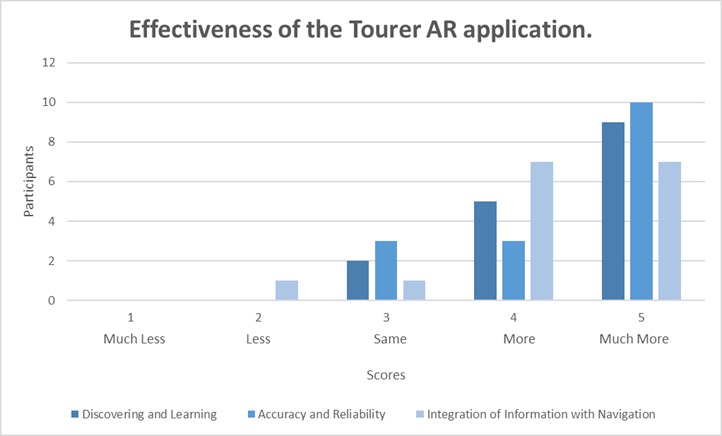
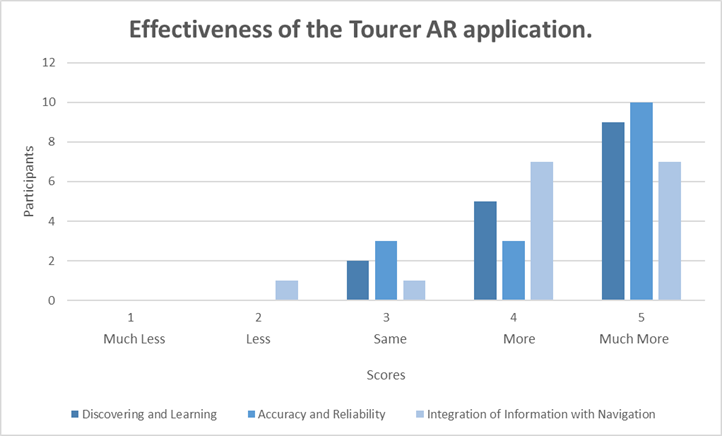
Bar Chart of Effectiveness of the Tourer AR app for Discovering and Learning, Accuracy and Reliability and Integration with Navigation.
-
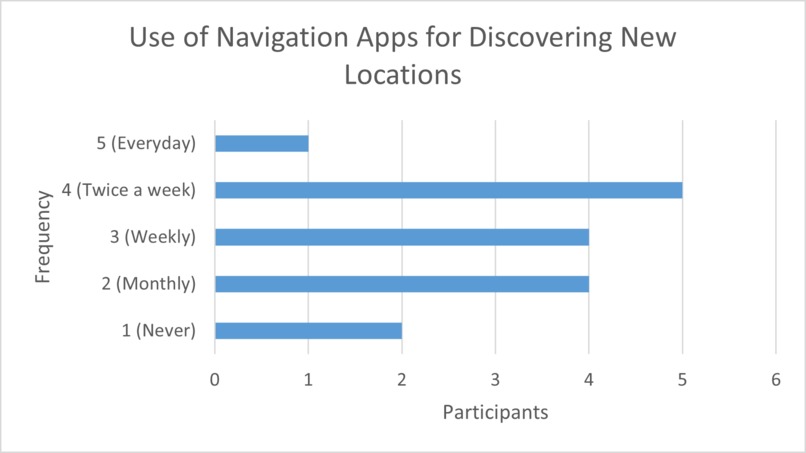
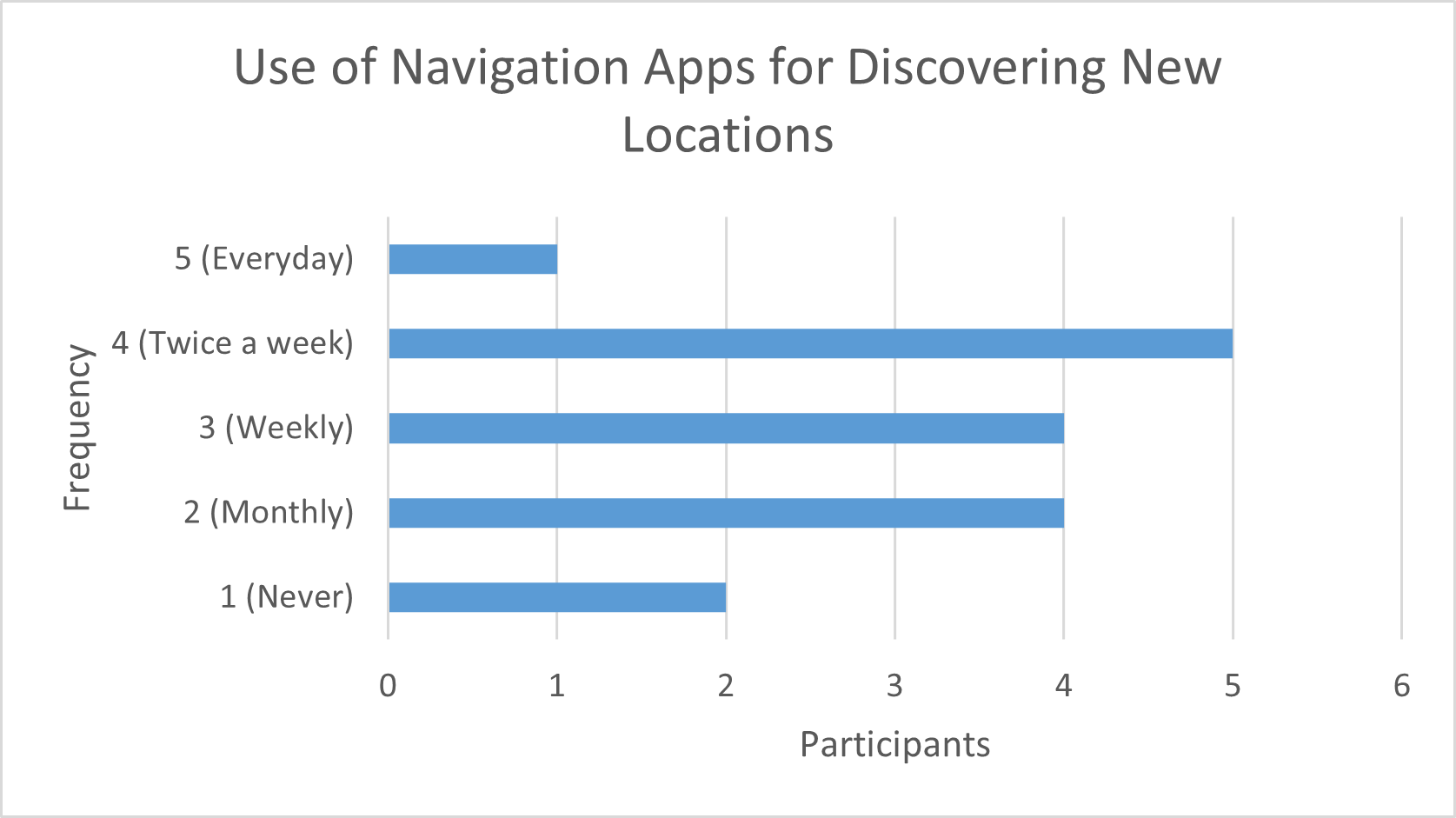
Bar Chart of Frequency of Navigation Application Usage for Discovering New Locations.
-
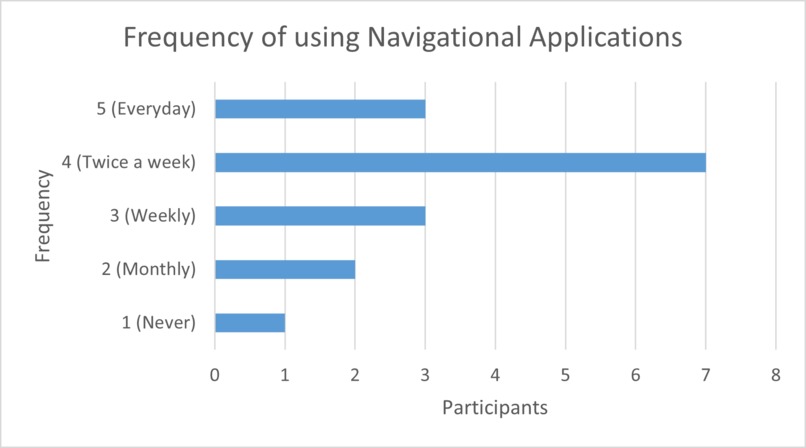
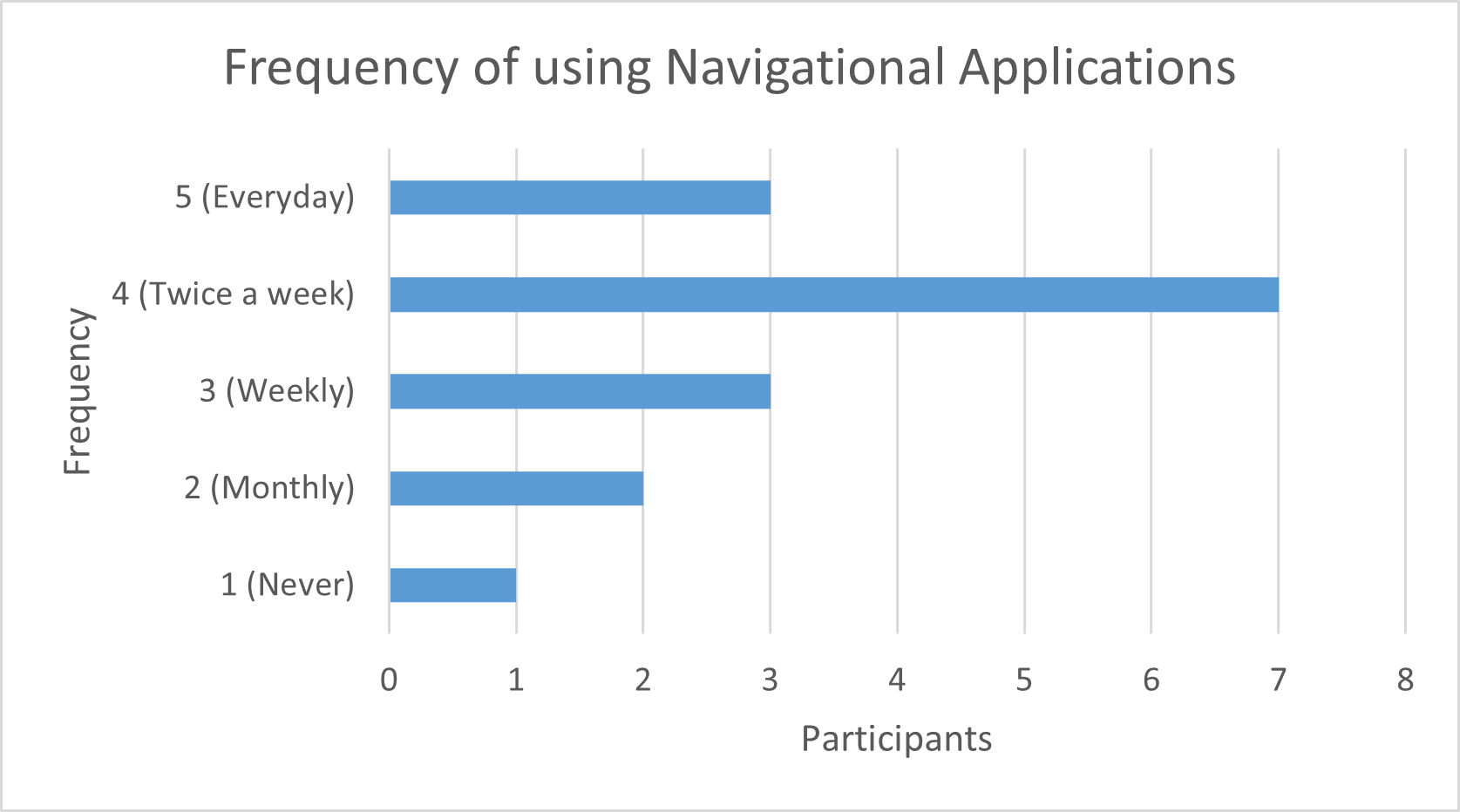
Bar Chart of Frequency of Navigation Application Usage.
-

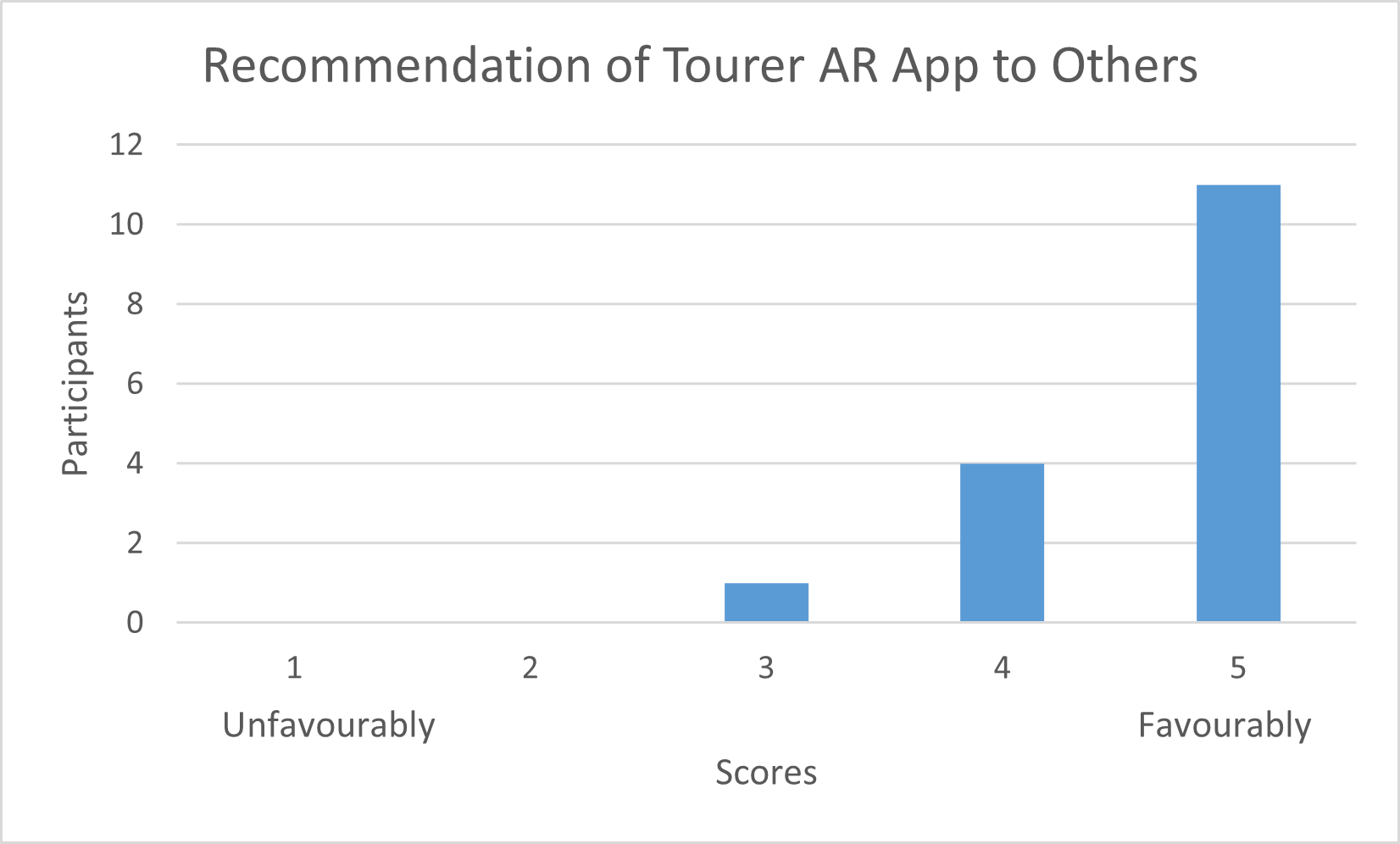
Bar Chart of Participants that would recommend The Tourer to others.
-
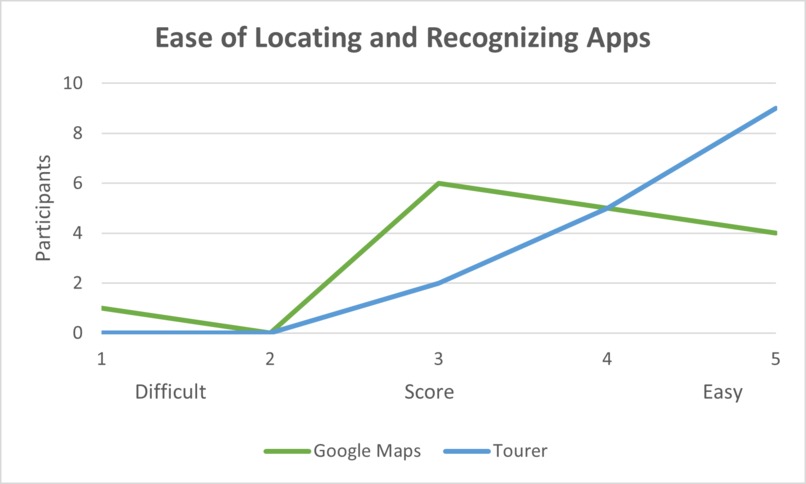
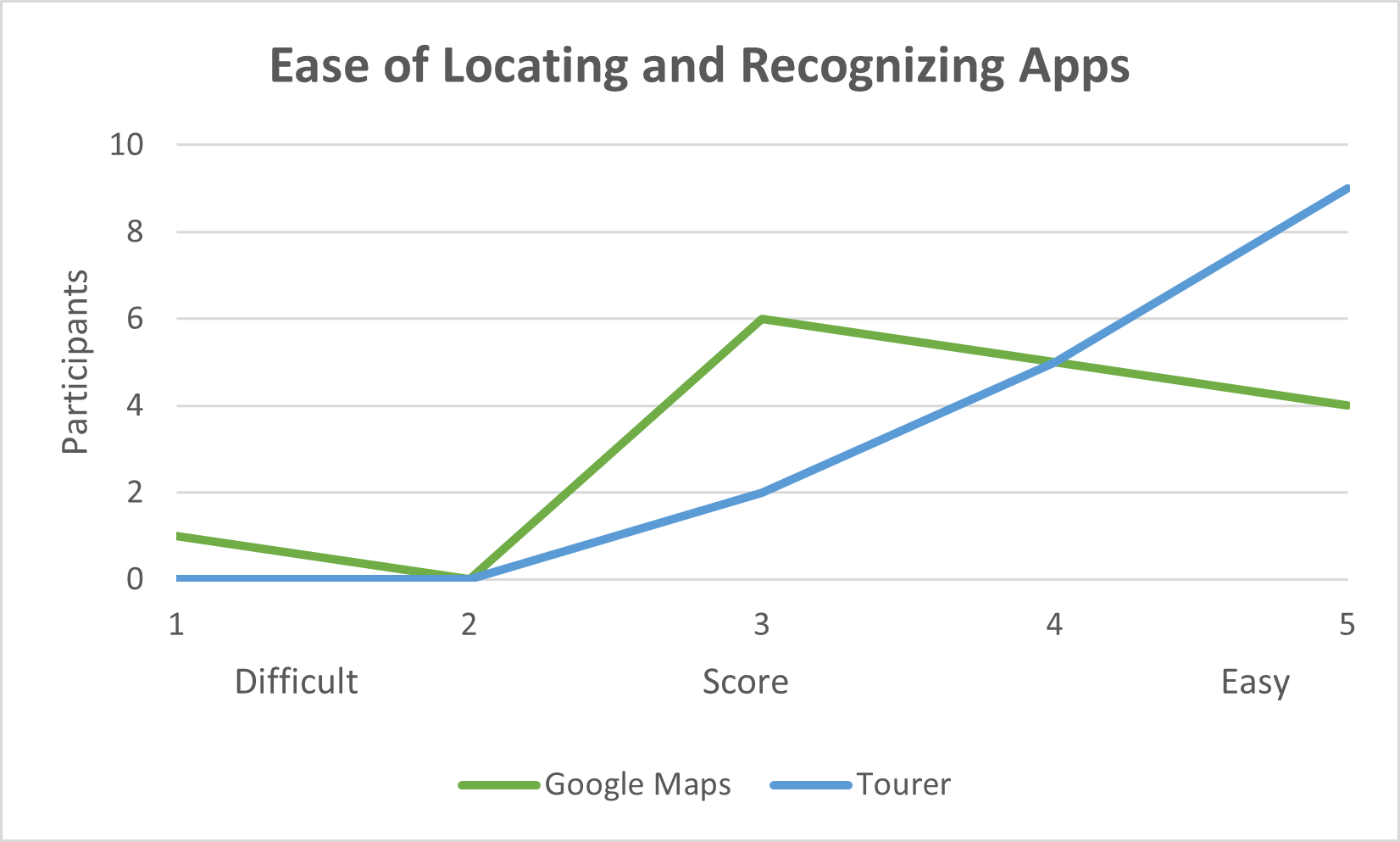
Line Chart of Ease of locating and recognizing both the Google Maps and Tourer AR applications.
-
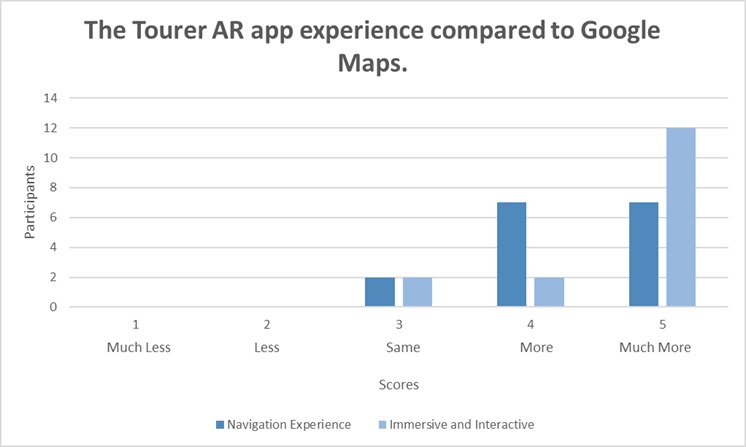
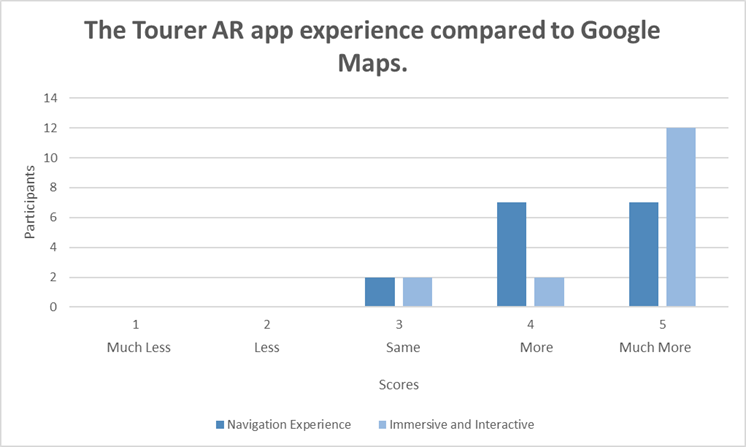
Bar Chart of The Tourers experience compared to Google Maps regarding navigation experience and immersive and interactive.
-
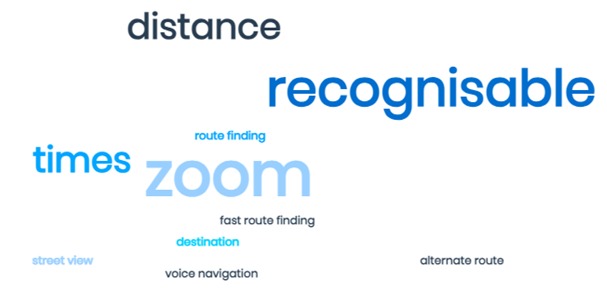
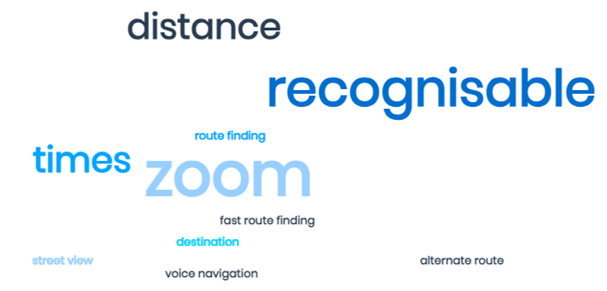
Qualitative analysis word cloud illustrating participants' preferences for Google Maps.
-
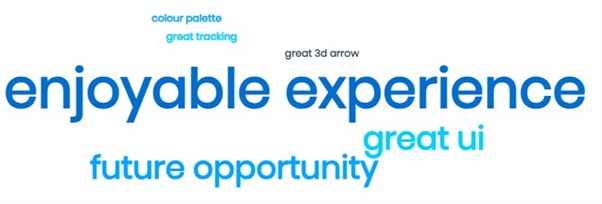
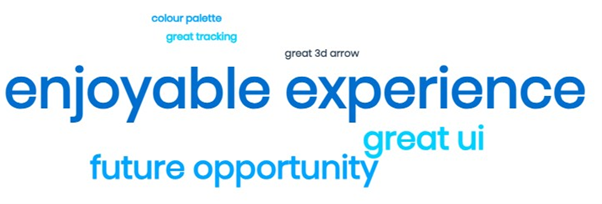
Qualitative analysis word cloud illustrating participants' additions to their experiences.
-
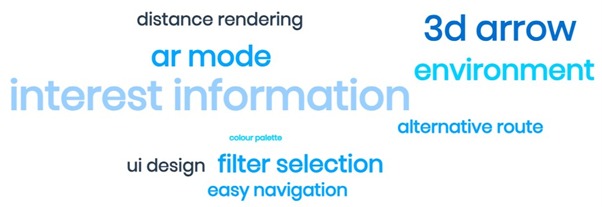
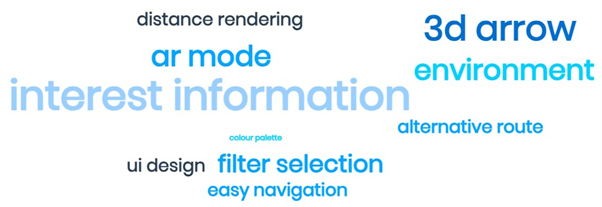
Qualitative analysis word cloud illustrating participants' preferences for The Tourer AR Application.
-
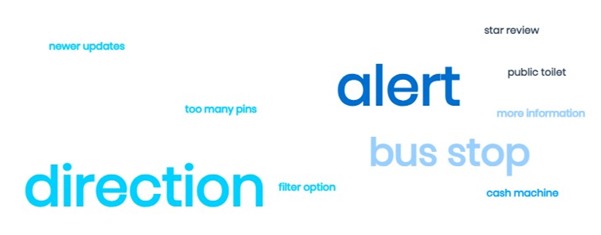
Qualitative analysis word cloud illustrating participants' suggested improvements for Google Maps.
-
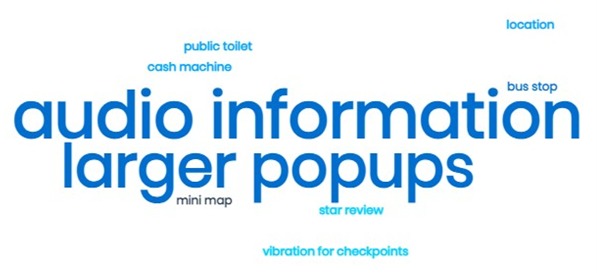
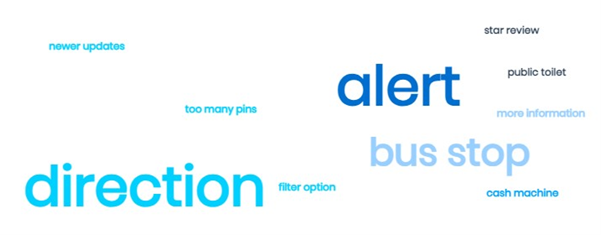
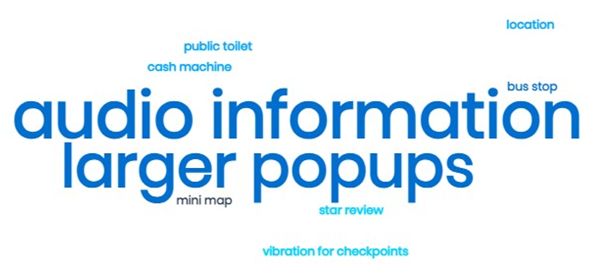
Qualitative analysis word cloud illustrating participants' suggested improvements for The Tourer AR Application.
-

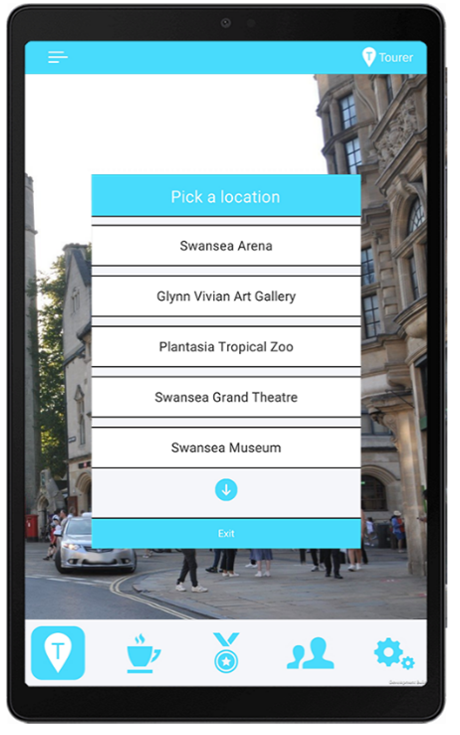
Screenshots of Tourer AR, showing highlighted locations
-
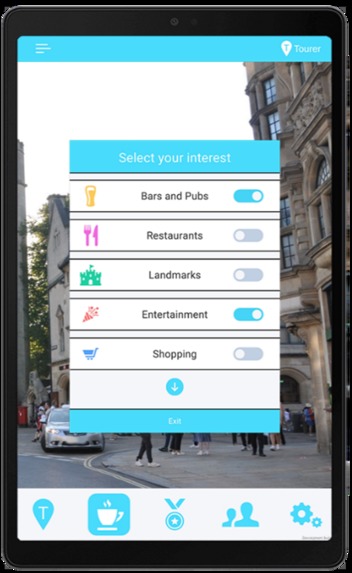
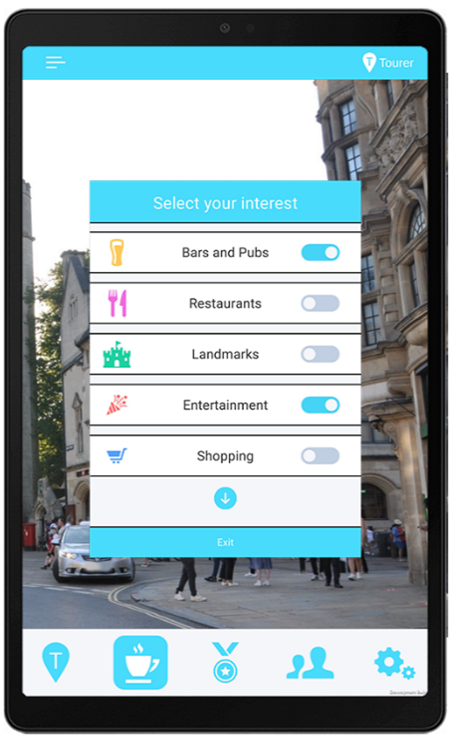
Screenshots of Tourer AR, showing interest panel.
-

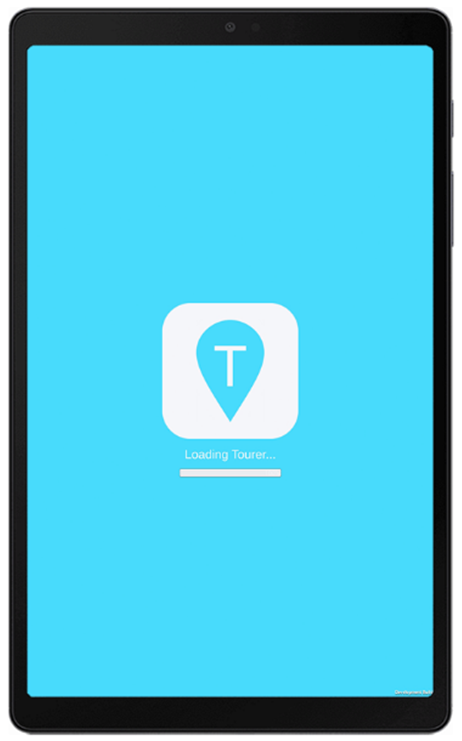
Screenshots of Tourer AR, showing loading screen
-
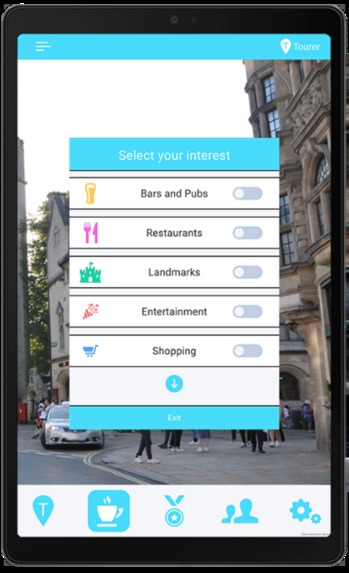
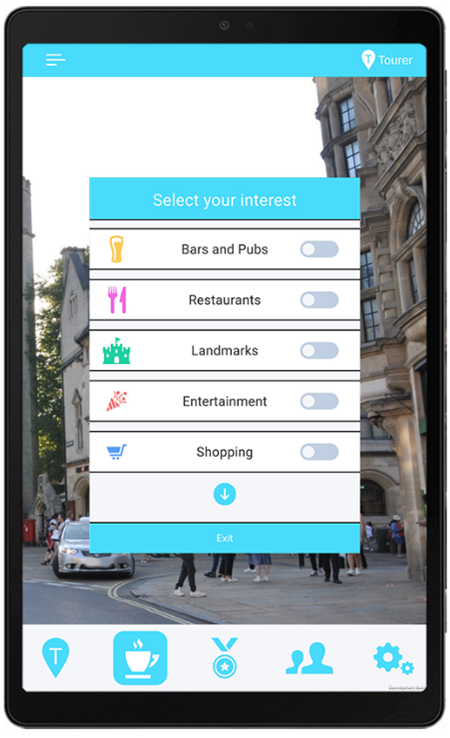
Screenshots of Tourer AR, showing interests’ filter.
-
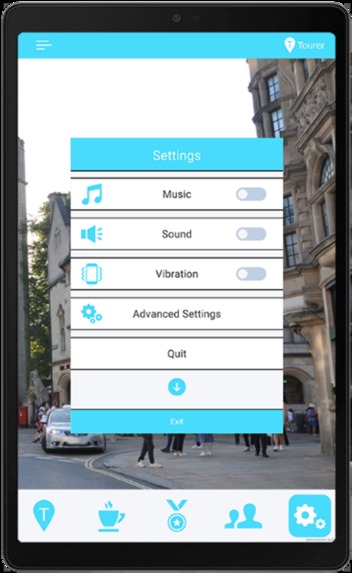
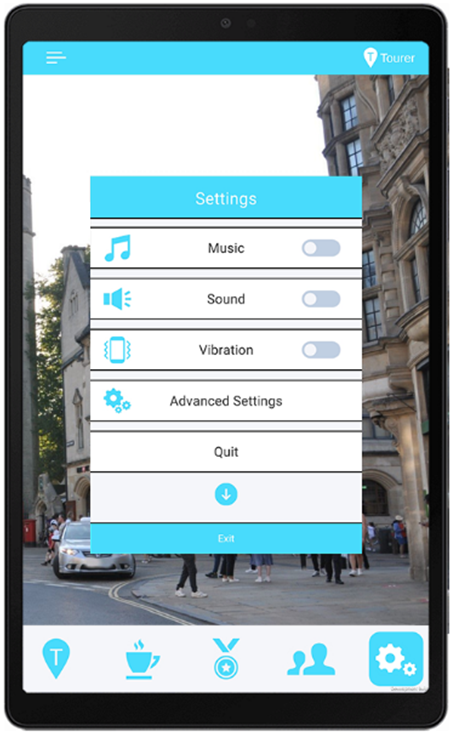
Screenshots of Tourer AR, showing settings
-
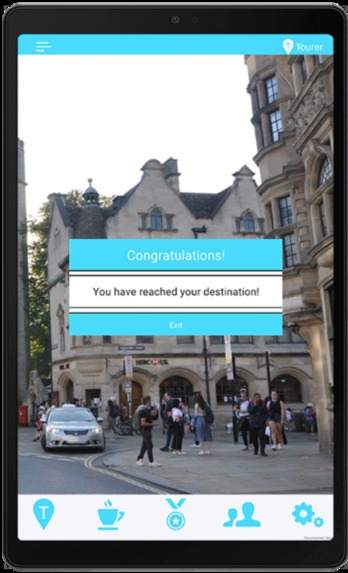
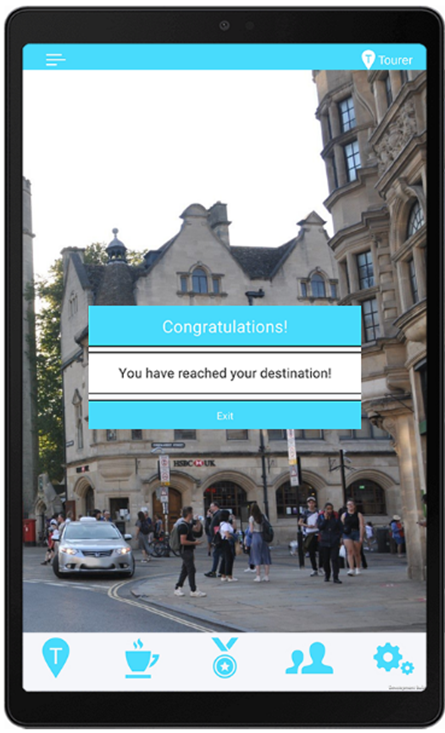
Screenshots of Tourer AR, showing reach destination
Inspiration
Several factors motivated the development of the application. One of them was the increasing interest and progress in AR and VR technologies. These technologies create engaging and immersive experiences, enhancing reality and offering new opportunities for users.
Another factor was the importance of cultural tourism and its economic benefits for cities. The application was inspired by the need to use cultural experiences to stimulate economic development and create a sense of connection and appreciation for the urban environment.
The idea of smart cities and digital twins also influenced the inspiration. These concepts use technology and innovation to improve urban planning and management. They aim to provide users with useful information and services that can improve their quality of life and well-being.
Moreover, the personal interest and curiosity of the developer was a key factor. The developer was fascinated by the potential of AR to enrich city exploration and navigation. The goal was to create an original and enjoyable application that goes beyond traditional methods, exploring the possibilities of augmented reality in a city context.
What it does
The app is an innovative augmented reality mobile application that enriches city exploration by superimposing valuable information and points of interest onto the user’s physical surroundings. The app allows users to choose from multiple pre-programmed routes to landmarks, or explore the city freely by filtering points of interest based on their preferences.
The app uses ARCore Geospatial API to connect digital content to any location captured by Google Street View and build AR experiences worldwide. The app provides users with an immersive and interactive experience, deepening their understanding of a city’s historical, cultural, and architectural significance. The app also incorporates gamification elements, such as medals and community scores, to motivate users to engage in physical activity and friendly competition. The app aims to transcend conventional navigation methods, such as Google Maps, and offer a more authentic and enjoyable exploration journey.
How I built it
I utilized Google’s ARCore Geospatial API to develop the Tourer AR App, enabling the connection of digital content to any location captured by Google Street View and the creation of AR experiences worldwide. This involved leveraging device sensors and GPS information to identify the user’s surroundings, comparing them to Google’s Visual Positioning System (VPS) for accurate determination of the user’s device position and orientation.
An initial challenge arose when VPS functionality was found to be unavailable in Swansea and limited to London. This limitation affected tracking reliability, necessitating the exploration of alternative methods to enhance tracking and navigation features.
To establish a brand identity, I created the name "Tourer" to reflect the app’s primary user demographic—tourists. The brand identity included a logo, color palette, typography, and tone of voice. The logo, featuring a recognizable location pinpoint icon with a distinctive ‘T,’ was designed to communicate the app’s navigation purpose. The color palette centered around the 'Megaman' soft pastel blue hue, with 'Lynx white' as a complementary color. The typography was selected for clarity, legibility, and alignment with the app’s brand personality. The tone of voice adopted was friendly, informative, and engaging.
The UI design is aimed at intuitiveness, efficiency, and accessibility for users. Various elements like buttons, menus, icons, and navigation tools were incorporated, ensuring consistency across different devices. The interest selection panel employed a distinct toggle system, providing clarity to users. Gamification elements, including medals and community scores, were integrated to motivate user engagement.
A loading screen was implemented for acquiring GPS signals and loading essential assets, utilizing the brand color 'Megaman' and a loading bar indicating scene loading progress.
For navigation, an arrow indicated the direction of the next waypoint using a specially designed shader for visibility and clarity. A waypoint system was devised, initially planning to use Unity’s Nav Mesh system but opting for ARCore Geospatial despite limitations due to its altitude determination capability.
A "skip waypoint" button was implemented to address GPS signal issues, ensuring users could smoothly continue their journey in less favorable signal conditions.
Multiple pre-programmed routes to landmarks were provided, offering personalized choices for efficient sightseeing and diverse perspectives.
The arrow was adjusted to indicate the direction of the nearest waypoint instead of focusing exclusively on the immediate next point, accommodating user deviations from the recommended route.
A notification system informed users when they reached their destination, enhancing confidence, safety, and time efficiency.
Sound effects were incorporated to provide auditory feedback and alerts, enriching the user experience without the need for visual attention.
Icons in front of points of interest locations were displayed, categorized, and color-coded, allowing users to filter based on preferences. A panel provided comprehensive information about the location upon clicking.
The app ensured icons were selectively displayed within 50 meters of the user's vicinity, optimizing the user's experience.
Cross-device compatibility was prioritized to widen accessibility and user demographics, meeting compatibility prerequisites set by app stores.
During user testing, a shift in user behavior was observed: users engaged with The Tourer by raising their devices to eye level, experiencing the cityscape through AR, marking a transformative exploration compared to traditional navigation methods.
The Tourer was identified as having the potential to revolutionize city exploration, dissolving barriers between technology and reality, and offering users an immersive and authentic encounter with the urban environment. The app facilitated a profound sense of connection by seamlessly merging contextual information with the physical landscape, transcending conventional navigation methods.
Challenges I ran into
I discovered that the VPS functionality of the ARCore Geospatial API was inaccessible within the city of Swansea and only available in London, significantly limiting the application's capabilities as tracking became less reliable. To address this limitation, I had to explore alternative methods to enhance the tracking and navigation features of the app.
During testing, I encountered GPS signal issues such as drifting and inaccuracy, which posed challenges in accurately reaching waypoint checkpoints and progressing to subsequent points. To mitigate this, I implemented a "skip waypoint" button, allowing users to bypass a waypoint when faced with these issues. Another challenge arose from the testing device lacking direct mobile data connectivity, requiring it to be tethered to an alternate device for internet access.
Initially, I planned to utilize Unity's pre-existing Nav Mesh system for pathfinding and AI-controlled navigation within the scene. However, I faced a limitation with the ARCore Geospatial API, preventing me from updating the navigation system as the tiles were stored in the cloud rather than on the devices. Despite this limitation, I decided to leverage the latest AR system, ARCore Geospatial, because it provided the crucial advantage of determining altitude, essential for pedestrian travel. To overcome the obstacle of navigation updates, I had to explore alternative methods to create a new navigation system compatible with the Geospatial API.
Accomplishments that I am proud of
To achieve this, I utilized Google's ARCore Geospatial API and Visual Positioning System. This technology allowed me to connect digital content to any location captured by Google Street View, creating AR experiences worldwide while accurately determining the user's position and orientation.
In addition to the technical aspects, I created a comprehensive brand identity, user interface, navigation system, and a unique waypoint system for the application. This ensured that the app was not only innovative but also intuitive, efficient, and accessible for users.
The application boasts various features and functionalities aimed at enhancing the user experience. These include a loading screen, an arrow, icons, a panel, sound effects, a "skip waypoint" button, multiple pre-programmed routes, and elements of gamification.
To validate the effectiveness of the application, I conducted user testing and compared its performance to existing navigation methods, such as Google Maps. Throughout the development process, I encountered and successfully addressed challenges and limitations, including GPS signal issues, unavailability of VPS functionality, incompatibility with the Nav Mesh system, and cross-device compatibility.
Observations from user testing indicated that the application has the potential to revolutionize city exploration. By offering an immersive and interactive experience, it deepens users' understanding of a city's historical, cultural, and architectural significance.
Quantitative insights obtained from Likert scale responses collected from 16 participants further supported the positive reception of the Tourer AR app. Users found it valuable for city exploration and cultural learning, praising its ability to provide accurate information, facilitate navigation, and enhance their overall experience. In comparison to Google Maps, participants rated the Tourer AR app higher in terms of navigation experience, immersion, and interaction. They expressed a willingness to recommend the Tourer AR app to others interested in learning about the culture of a place.
What I learned
Throughout the learning process, I gained valuable skills in designing and developing an innovative AR mobile application named "Tourer." This application aims to enrich city exploration by superimposing valuable information and points of interest onto the user's physical surroundings.
One of the key learnings was how to effectively utilize Google's ARCore Geospatial API and Visual Positioning System. This technology enabled me to connect digital content to any location captured by Google Street View, facilitating the creation of AR experiences worldwide while accurately determining the user's position and orientation.
In addition to the technical aspects, I acquired knowledge on creating a comprehensive brand identity, user interface, navigation system, and a unique waypoint system for the application. The emphasis was on ensuring that the app is intuitive, efficient, and accessible for users.
Learning to implement various features and functionalities was a crucial part of the process. This included the development of a loading screen, an arrow, icons, a panel, sound effects, a "skip waypoint" button, multiple pre-programmed routes, and incorporating elements of gamification to enhance the overall user experience.
Conducting user testing and evaluating the application's effectiveness, especially in comparison to existing navigation methods like Google Maps, provided insights into refining and improving the Tourer app based on user feedback.
The learning journey also involved overcoming various challenges and limitations encountered during the development process. Issues such as GPS signal issues, unavailability of VPS functionality, incompatibility with the Nav Mesh system, and cross-device compatibility were addressed through problem-solving and adaptation.
The exploration highlighted the potential of the application to revolutionize the paradigm of city exploration. By offering an immersive and interactive experience, Tourer has the capability to deepen users' understanding of a city's historical, cultural, and architectural significance, changing the way users engage with their surroundings.
What's next for The Tourer AR Application
The Tourer AR App, being a conceptual application developed for my Master's in Virtual Reality dissertation, currently has no specific plans for future developments unless there is expressed interest from users for it to become a full-fledged application. However, several ideas for potential future developments have been outlined, aiming to enhance the cultural tourism experience and increase the application's functionality, usability, and social-economic impact:
Automating Route Creation: Implementing the use of the Google Places API to automate the process of creating routes and points of interest. This API can provide rich and relevant information about various locations and businesses.
Collaboration with Local Entities: Collaborating with local councils and enterprises to secure financial support, promote cultural tourism, and offer incentives and discounts to app users who visit specific establishments.
User-Created Routes: Allowing users to create and share their own routes with the community, facilitating a more personalized and targeted exploration of different areas and themes.
Real-Time Data on Crowd Density: Providing real-time data on crowd density and occupancy rates at various venues, assisting users in avoiding crowded areas and discovering less-visited alternatives. This feature can also help businesses optimize their operations and customer service.
Wi-Fi Positioning: Utilizing Wi-Fi access points to improve the accuracy and reliability of GPS positioning, especially in urban environments and indoors where GPS signals may be obstructed or weakened.
Gamification Elements: Introducing gamification elements and peer-versus-peer scores to motivate users to engage in physical activity, foster friendly competition, and create a sense of community and enjoyment.
Stationary Information Panel: Implementing a stationary panel that displays information about points of interest to address the issue of text moving with the camera, ensuring readability.
Mini Map Feature: Creating a mini-map that shows a 2D view of the user's surroundings and position to enhance navigation, orientation, and spatial awareness. This feature could provide information about public toilets, cash machines, and public transport stops and schedules, addressing users' needs for convenience, financial accessibility, efficient navigation, safety, and a more authentic exploration of the destination.


Log in or sign up for Devpost to join the conversation.