-
-
mainpage
-
architecture of TMT
Inspiration
in the present world, there are a lot of conflicts: political conflicts, legal conflicts, opinion-based conflicts. one of the main reasons for this is the media. Especially, when opinions matter (like politics or social issues), the media can express extreme opinions, take a stance of aggression, or distort the real story. I have seen this happen in my country (South Korea) and chances are my country is not the only place this is happening. I made this extension to prevent extremist views or political/social conflicts that happen due to distorted/biased/opinion-based media content.
What it does
this ai-based extension changes your media content consumption from a subjective experience to an objective experience. in doing so, it potentially prevents political/social conflicts as corrects distorted content, neutralises biased content, and identifies opinion-based content.
How we built it
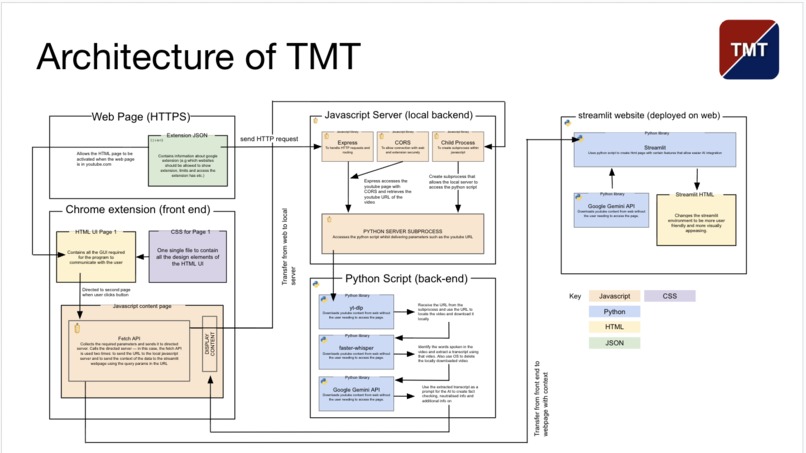
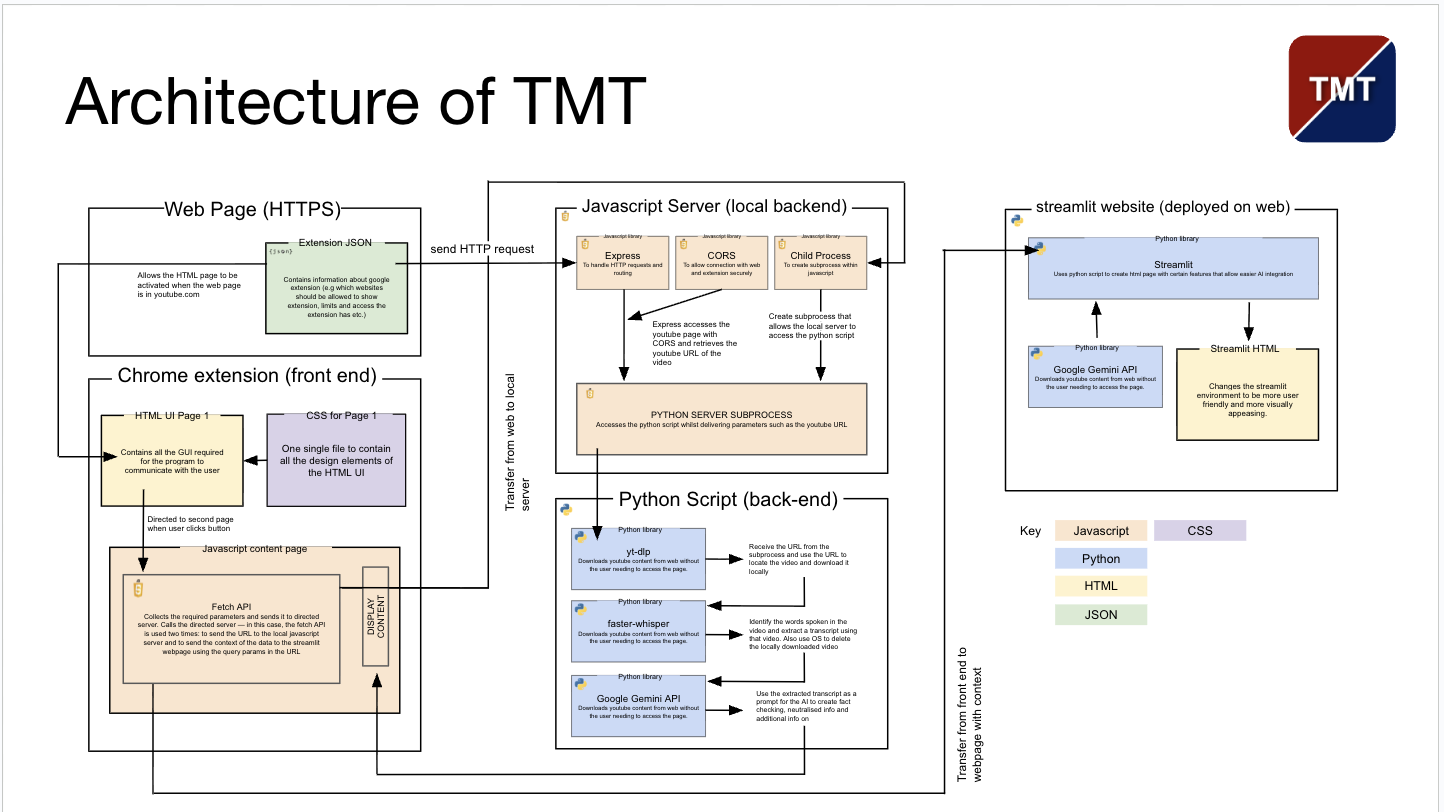
for the google chrome extension, I used javascript as a front-end and python as the main back-end whilst using a javascript local server to connect the two scripts together. for the ai chat page, I used the open source streamlit library as a front-end and python back-end whilst integrating the Gemini API
Challenges we ran into
the main challenges was learning how to use javascript to an advanced level in a short amount of time. I knew how to use javascript but only to a beginner's level—this is where most of the problems come in. the other main challenge was connecting the scripts together. I had to connect the javascript frontend with the python backend seamlessly in order for this program to work and struggled a lot to get it working. another smaller, but still significant, challenge was sending the data from the javascript front end to the streamlit page. Because the two scripts were never designed to be connected, it was difficult to transfer data effectively without corrupting it.
What we learned
I learned how to use javascript to a somewhat sophisticated level—although I'm not 'the best' at javascript. I think I can now handle most difficult tasks. I learned how to creatively solve problems—like using the URL as a way of transferring data or using google ai prompting as a tool to split string values.
What's next for TMT: The Media Tranquilizer
- publish TMT on the google chrome webstore for public use.
- deploy the javascript local server on the cloud for public use. -expand usuable platforms (e.g instagram, facebook etc.)


Log in or sign up for Devpost to join the conversation.