-
Logo
-
AI detection algo
-
Layout
Inspiration
I realized that keyboards are one of the most frequently touched objects we own, yet they are rarely cleaned because dirt accumulates gradually and is easy to ignore. Existing cleaning products tell us how to clean, but not whether a keyboard actually needs it.
I wanted to build a simple AI-powered tool that could instantly answer the question:
"How healthy is my keyboard?"
By combining computer vision with a simple health report, I aimed to make keyboard maintenance visual, actionable, and easy to understand.
What it does
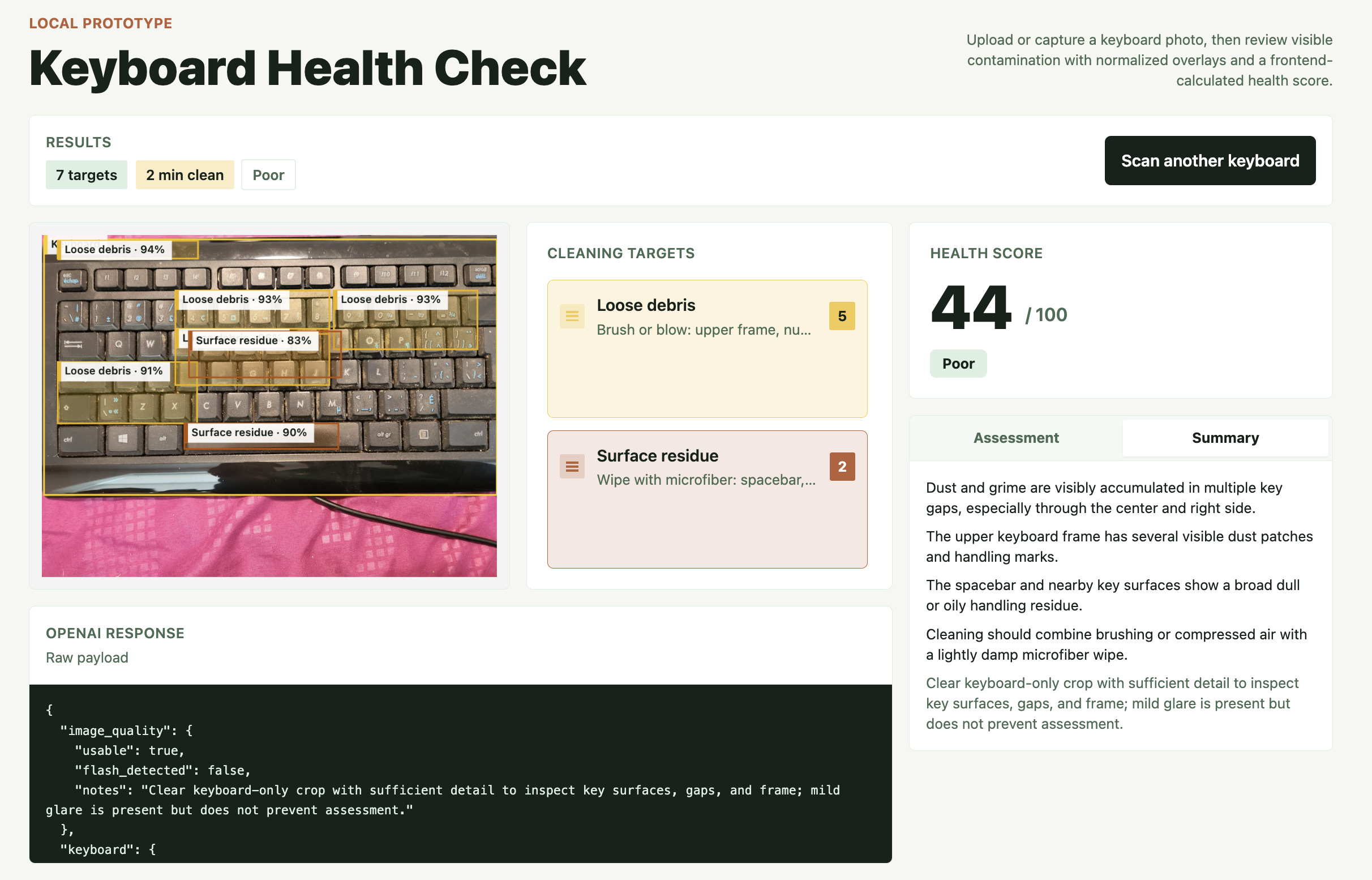
The Healthy Keyboard allows users to take or upload a photo of their keyboard.
The AI automatically:
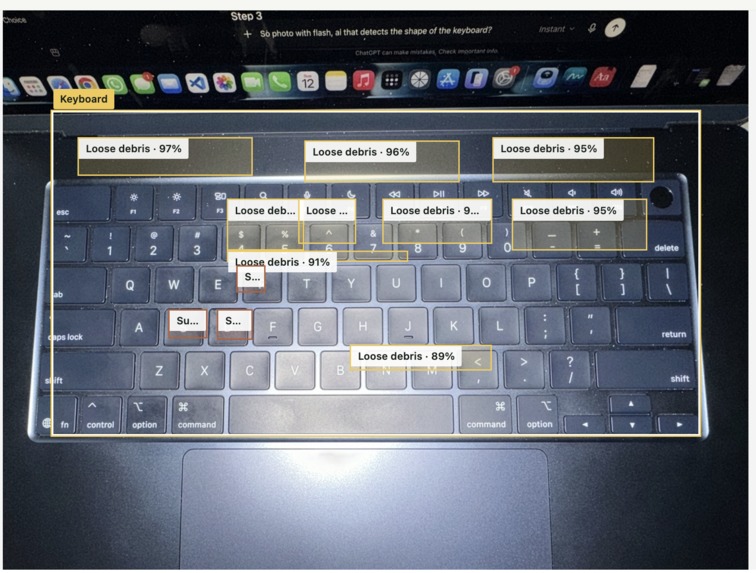
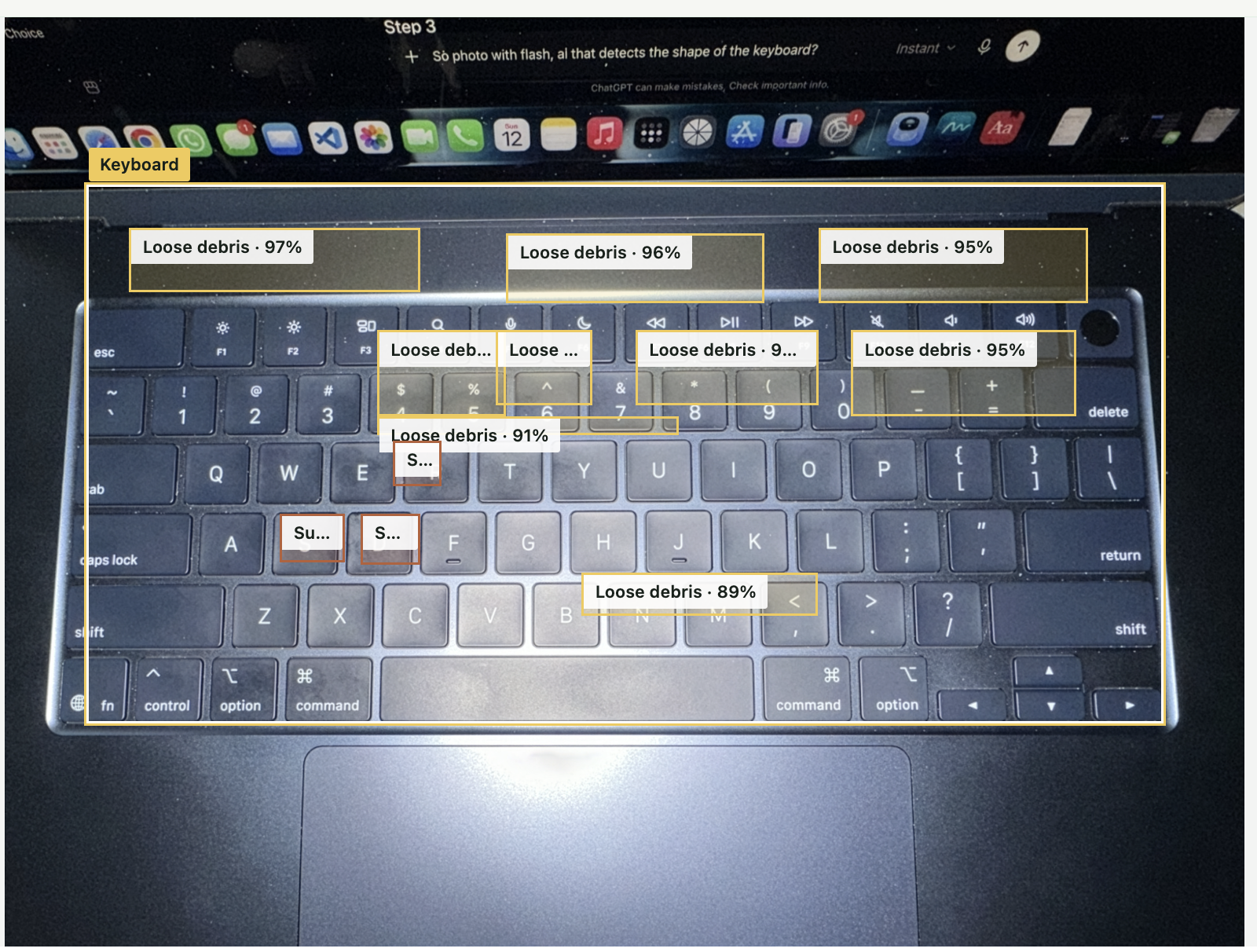
Detects the keyboard Identifies visible contamination such as dust, fingerprints, grease, fibres, and debris Draws overlays highlighting affected regions Classifies contamination into cleaning categories Estimates the contamination level and cleaning time Recommends the appropriate cleaning method
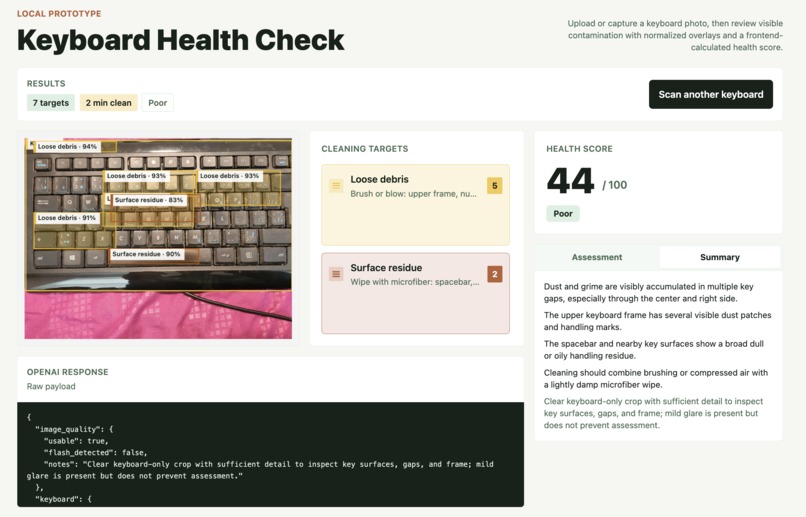
The result is an easy-to-understand keyboard health report that helps users know exactly what needs cleaning.
How I built it
I built the application using a lightweight client-server architecture.
Frontend: Vue 3, TypeScript, and Tailwind CSS Backend: Node.js with Express AI: A multimodal vision model that analyzes uploaded keyboard images and returns structured JSON describing visible contamination
The frontend visualizes the AI response by drawing the detected keyboard boundary and contamination overlays directly on the uploaded image. Health information and cleaning recommendations are then generated from the returned detections.
Challenges I ran into:
One of the biggest challenges was balancing accuracy with user trust.
Vision models occasionally over-detected contamination, incorrectly identifying reflections or shadows as dirt. I spent significant time refining the prompt to encourage conservative detections and structured outputs.
Another challenge was designing a simple but informative JSON format that could consistently describe different contamination types while remaining easy for the frontend to visualize.
Finally, I had to think carefully about the user experience—guiding users to take photos with flash and ensuring the AI focused only on the keyboard instead of surrounding objects.
Accomplishments that I'm proud of Built a complete end-to-end AI workflow from photo upload to annotated health report. Designed a structured vision pipeline capable of detecting and classifying multiple contamination types. Created an intuitive visualization that highlights exactly where cleaning is needed. Developed a simple health assessment experience that is easy for non-technical users to understand. Demonstrated how multimodal AI can be applied to a practical everyday problem rather than being used purely as a novelty. What I learned
I learned that building with multimodal AI is as much about prompt and output design as it is about choosing the right model.
I also discovered that user experience matters just as much as model accuracy. Small details—such as guiding users to use flash, limiting false positives, and presenting clear visual overlays—greatly improve confidence in the results.
Most importantly, I learned that AI becomes significantly more valuable when it produces actionable insights instead of simply describing an image.
What's next for The Healthy Keyboard
My next goal is to improve detection accuracy by incorporating a dedicated computer vision pipeline alongside multimodal AI.
Future plans include:
More accurate contamination localization Before-and-after cleaning comparisons Scan history and progress tracking Support for different keyboard types Workspace Health Check, expanding beyond keyboards to mice, desks, monitors, and other frequently used equipment Enterprise support for offices, schools, and shared workspaces to help monitor device cleanliness YOLO model for better and customised accuracy.
Ultimately, I envision The Healthy Keyboard as the first step toward an AI-powered workspace maintenance assistant that helps people keep the tools they use every day clean, healthy, and well maintained.
Built With
- ai
- cv
- express.js
- json
- node.js
- sharp
- tailwind
- typescript
- vite
- vue
- zod

Log in or sign up for Devpost to join the conversation.