-
-
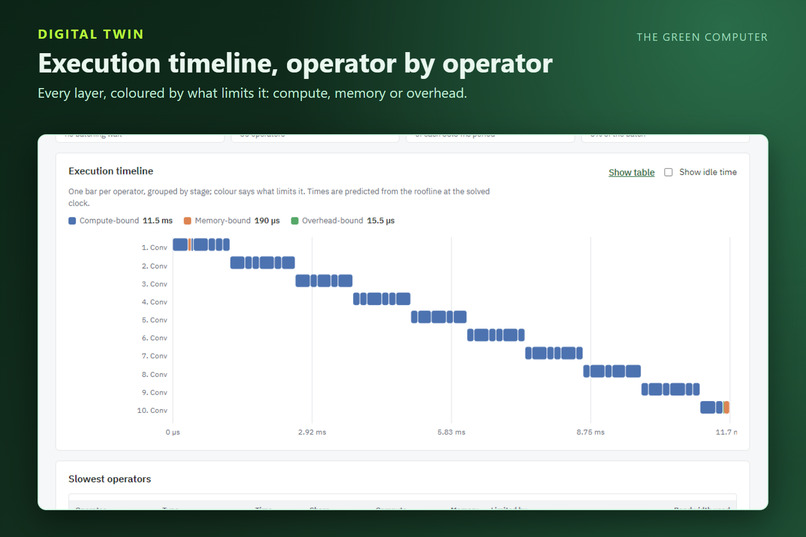
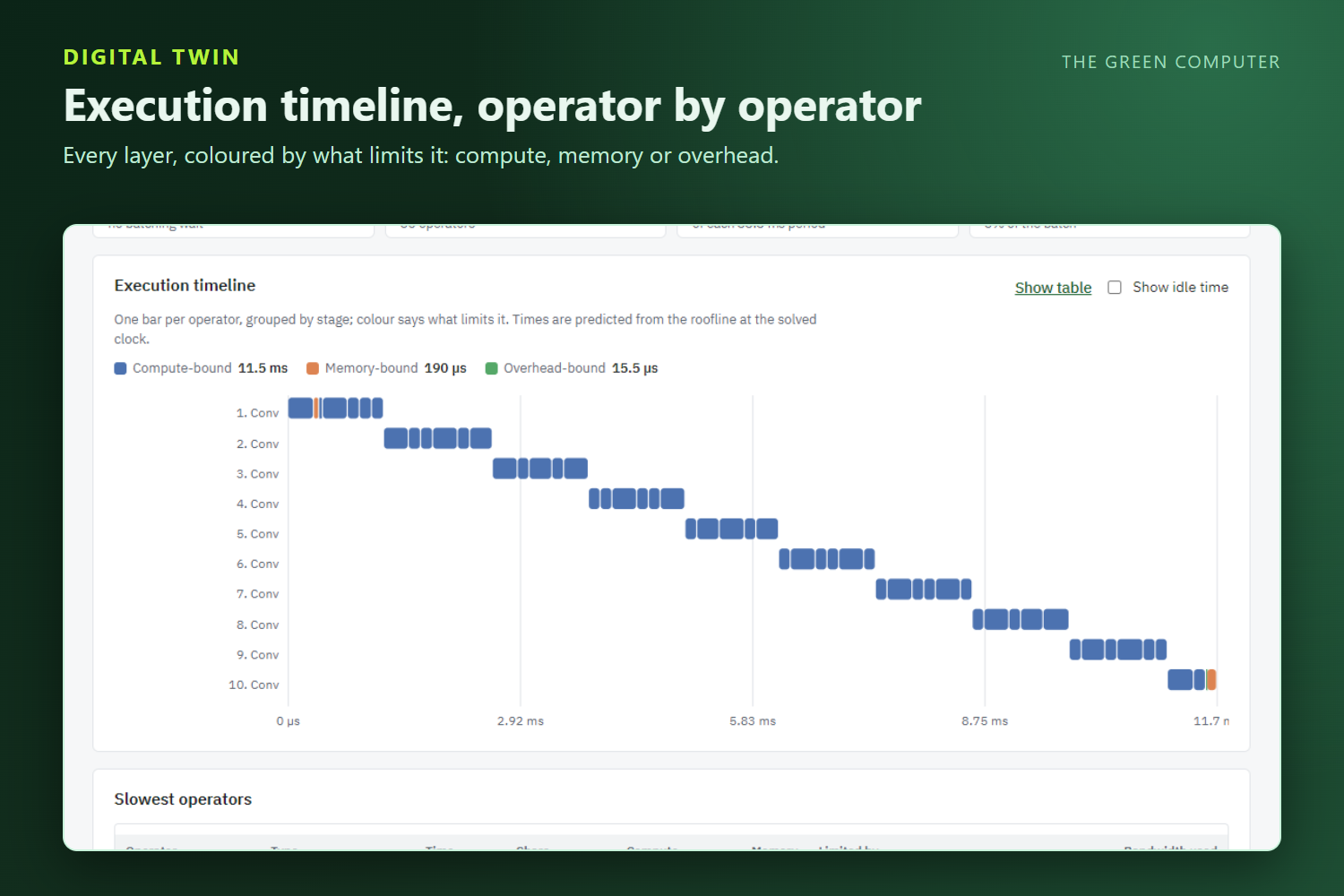
The execution timeline shows every operator, coloured by whether compute, memory or overhead limits it.
-
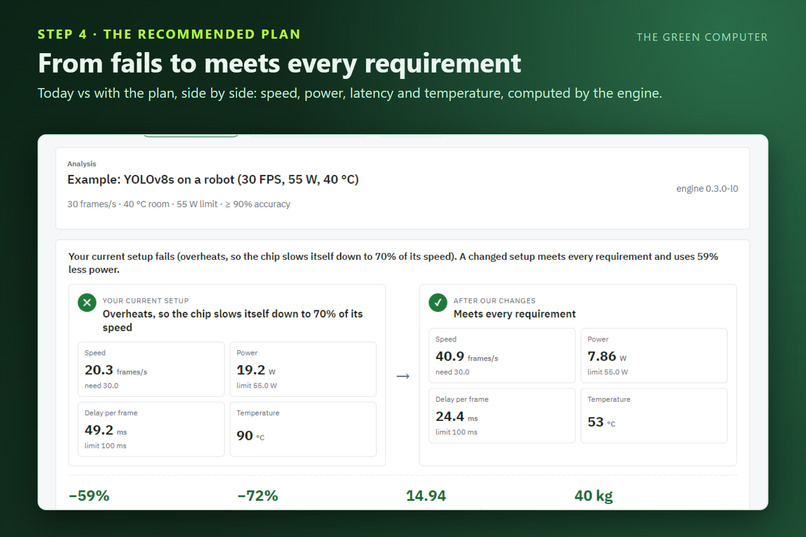
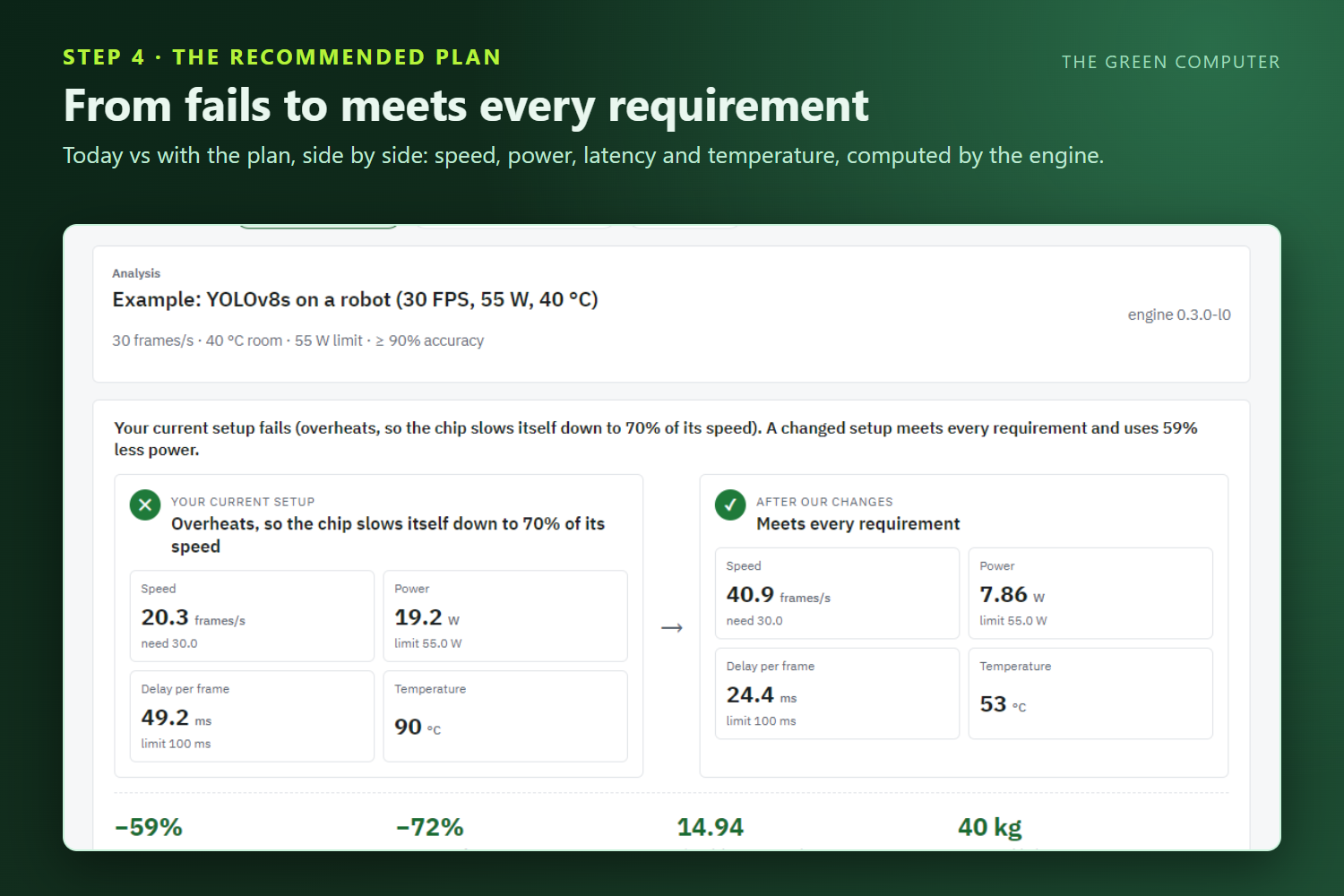
Today versus the recommended plan, side by side: the setup goes from failing to meeting every requirement.
-
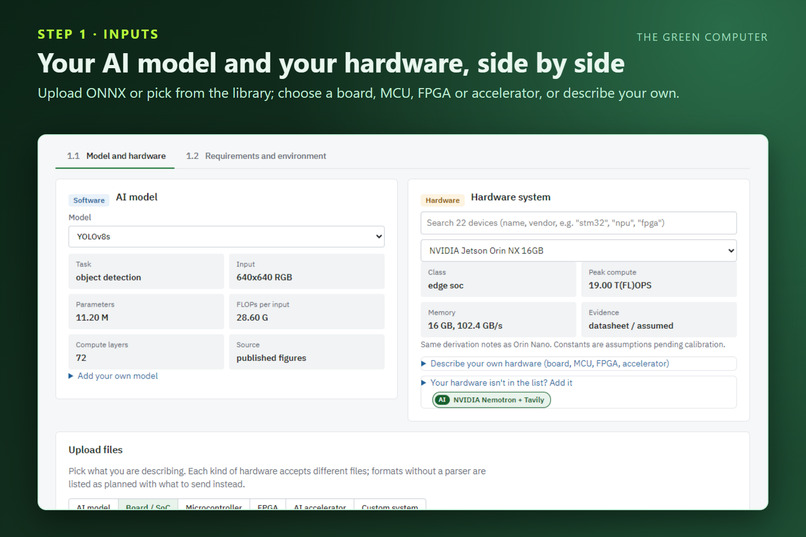
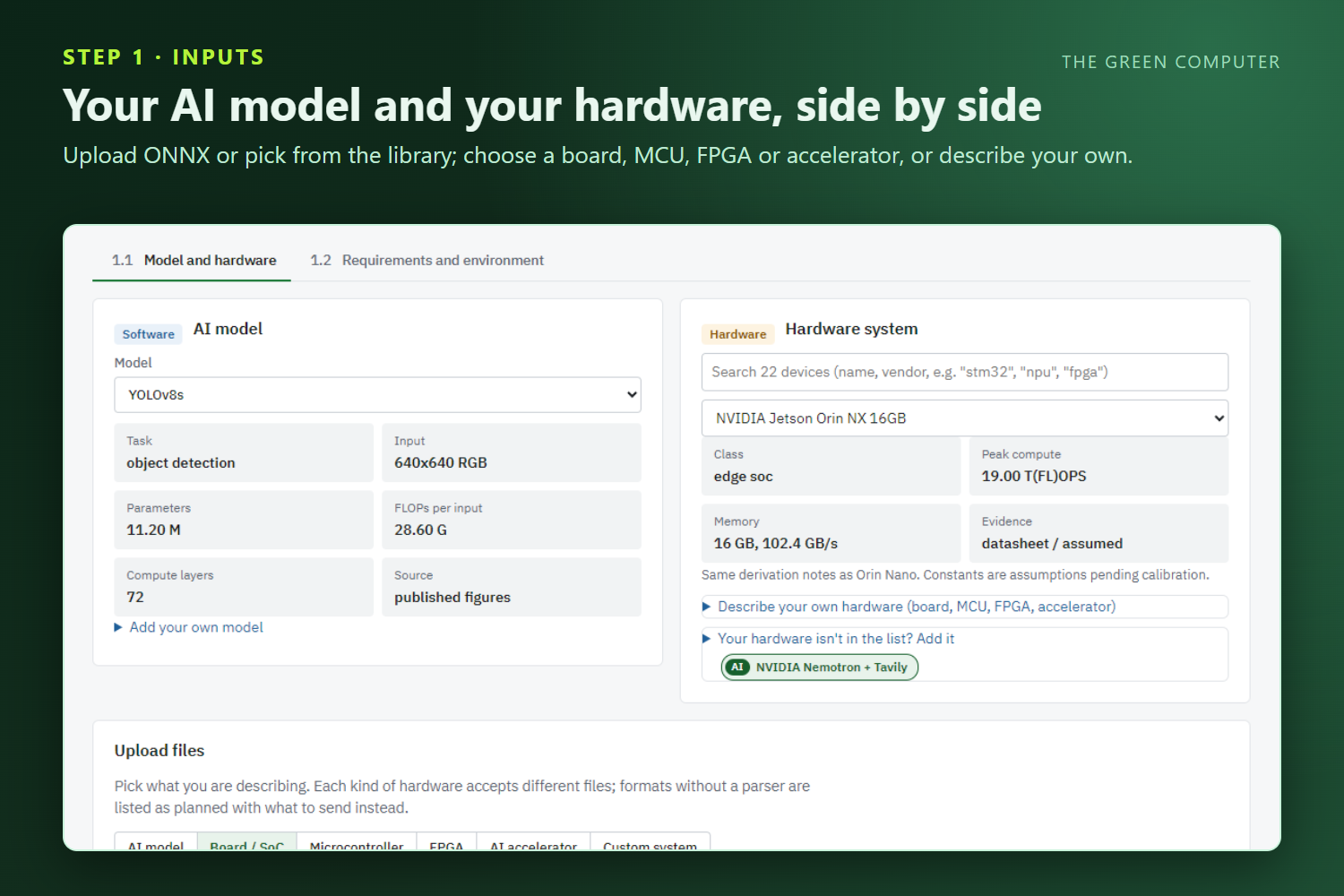
Choose an AI model and a hardware system side by side, from the library or your own ONNX file and device profile.
-
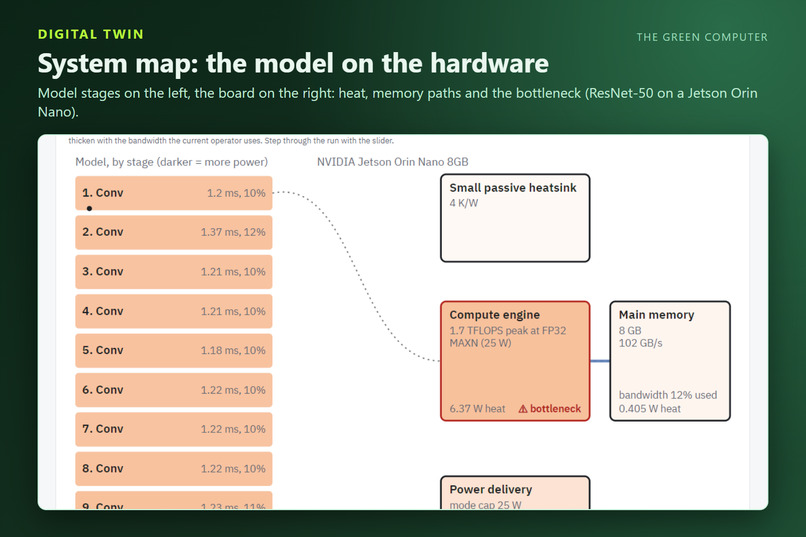
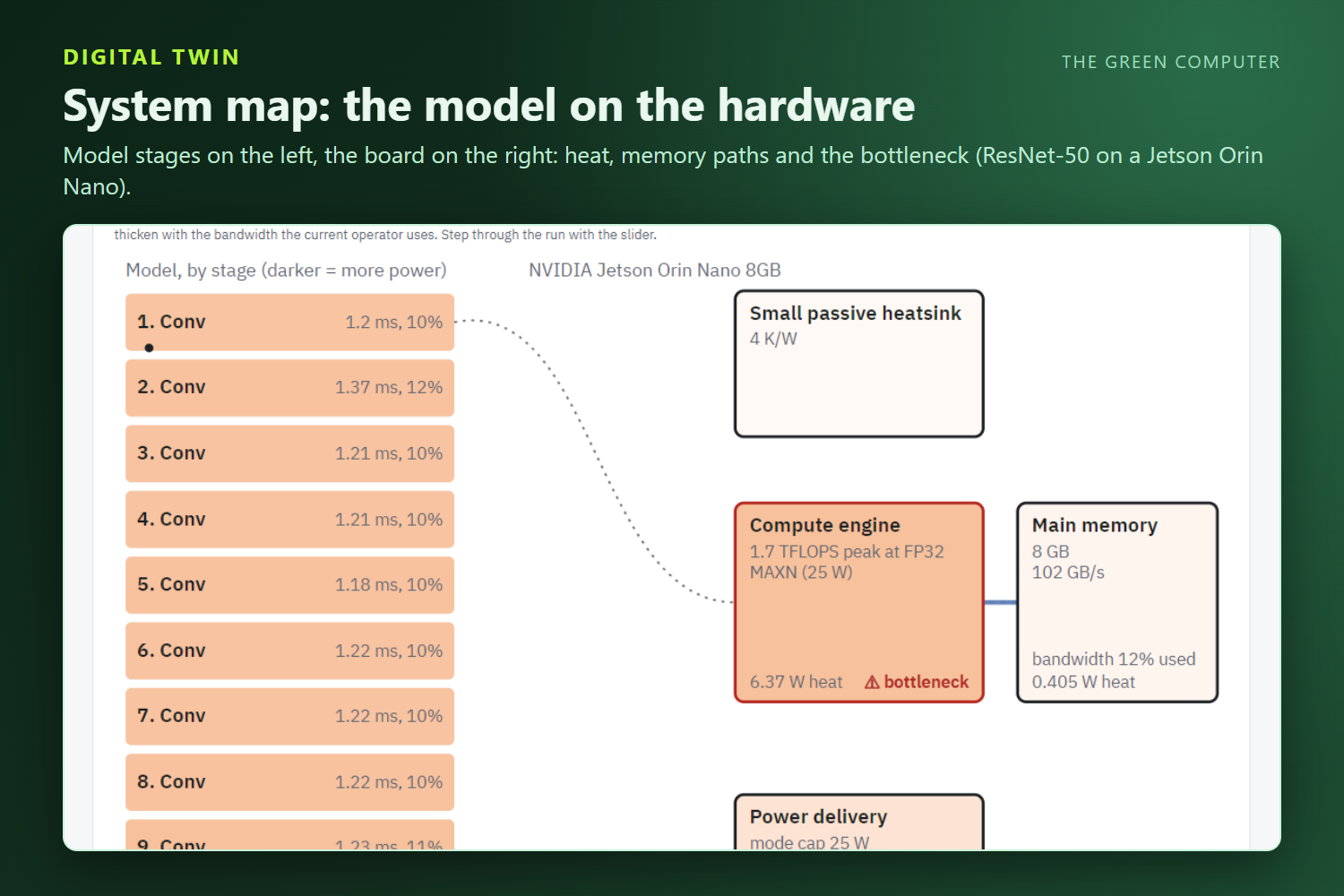
The digital-twin system map places each model stage on the hardware and highlights the bottleneck, here ResNet-50 on a Jetson Orin Nano.
-
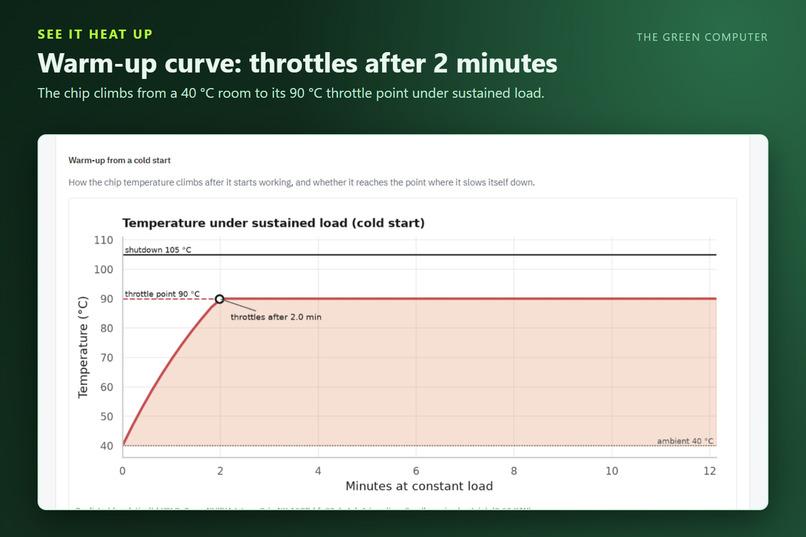
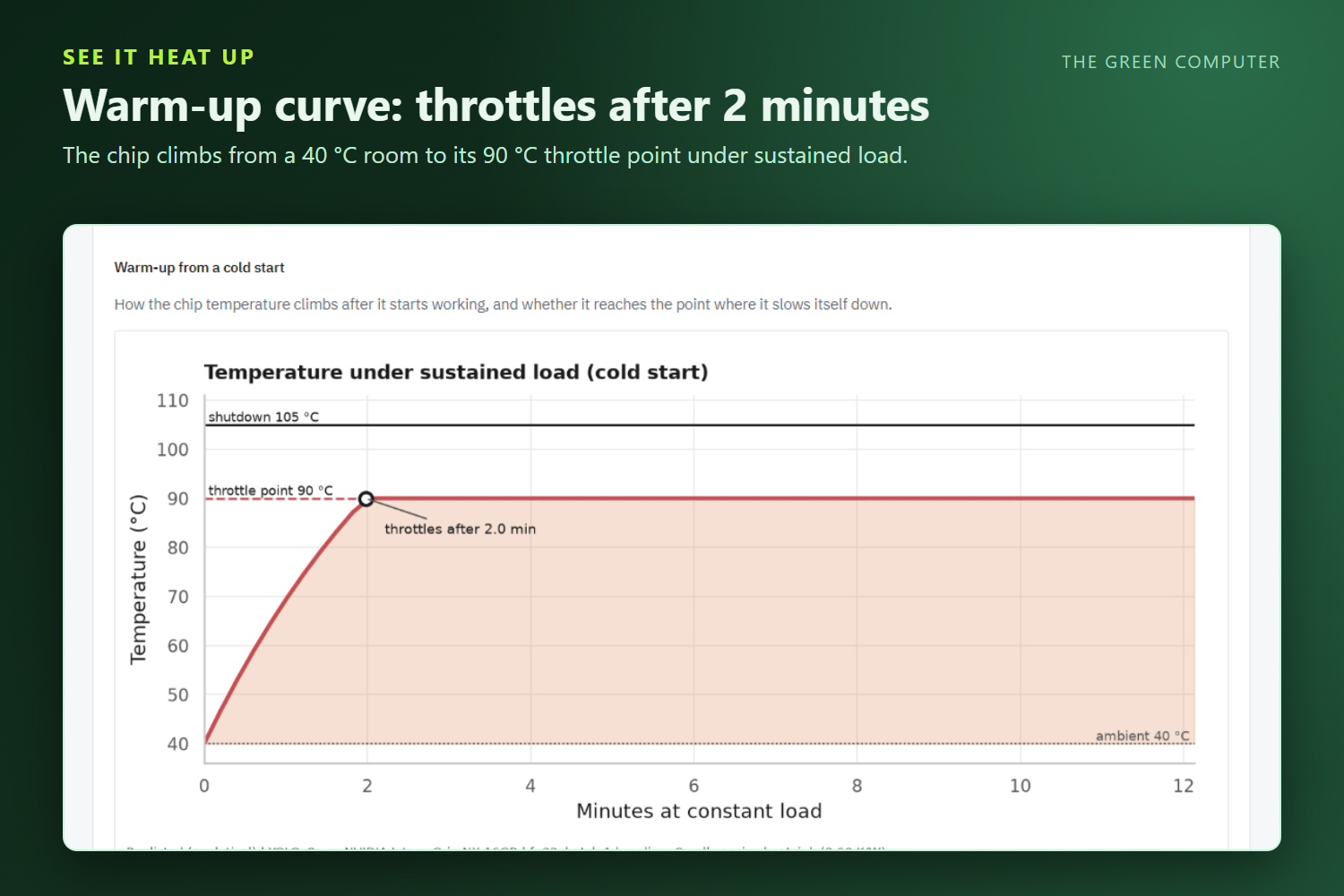
The warm-up curve shows the chip climbing from room temperature to its throttle point after about two minutes of sustained load.
-
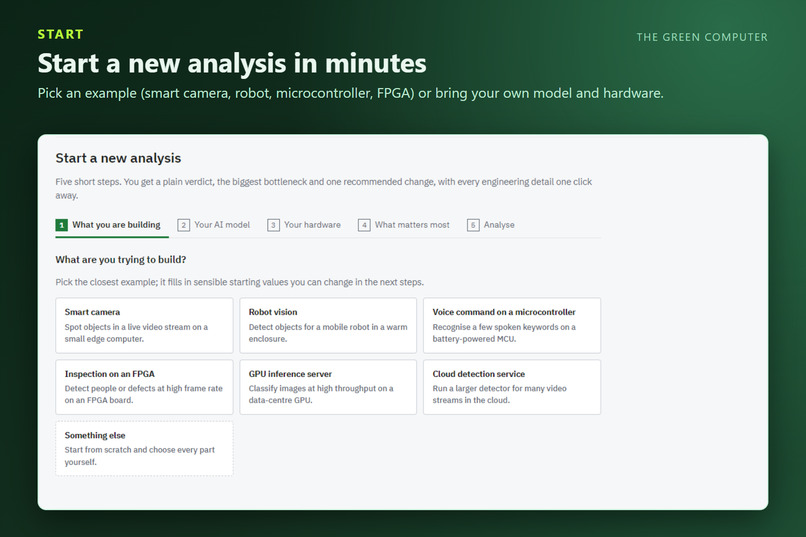
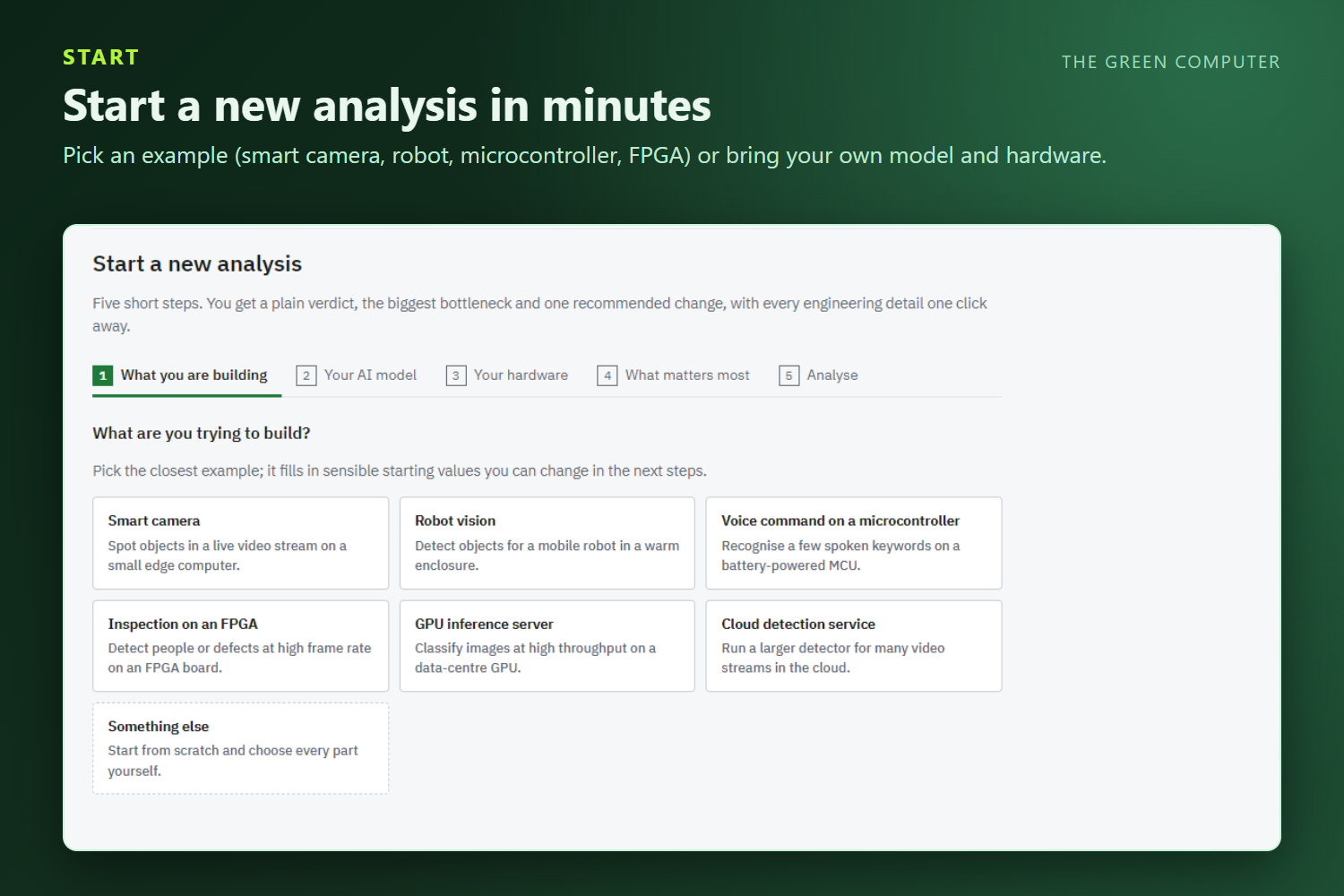
Start a new analysis in minutes from ready-made examples or your own model and hardware.
-
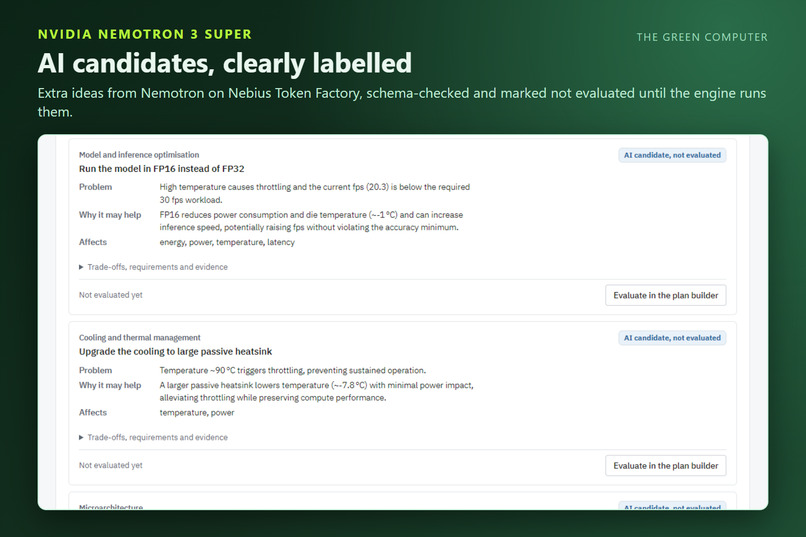
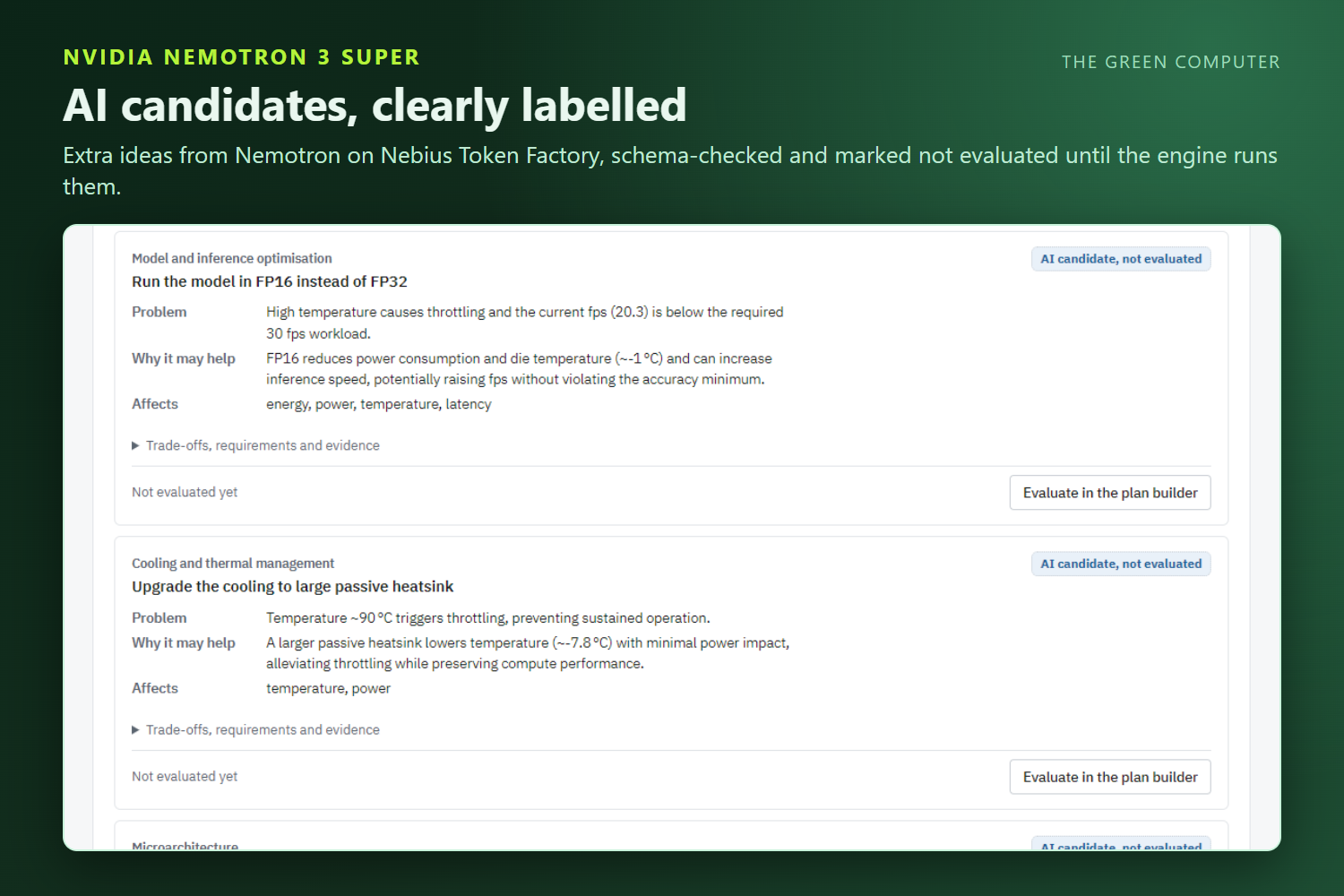
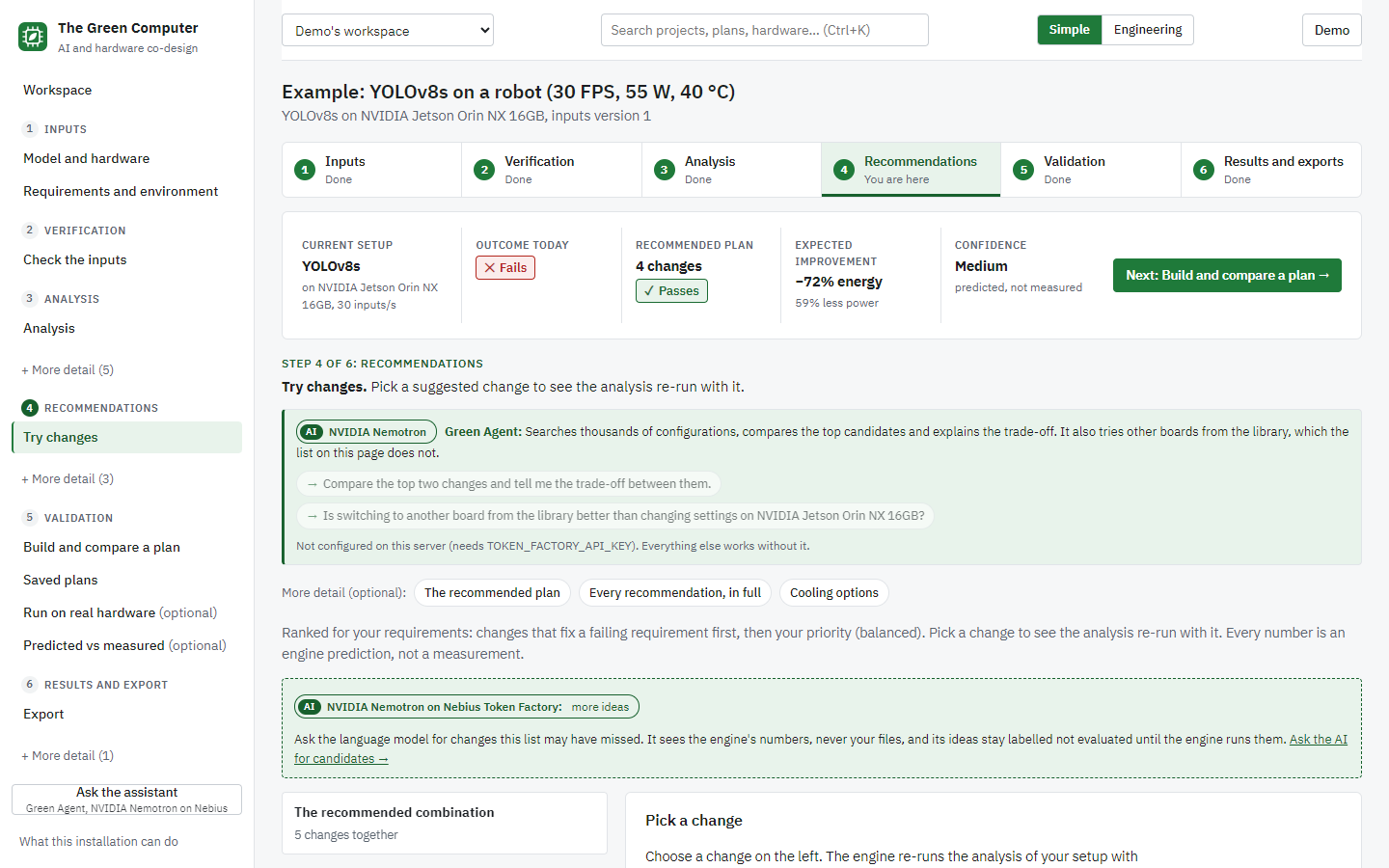
NVIDIA Nemotron 3 Super proposes extra ideas, each schema-checked and clearly labelled “not evaluated” until the engine runs it.
-
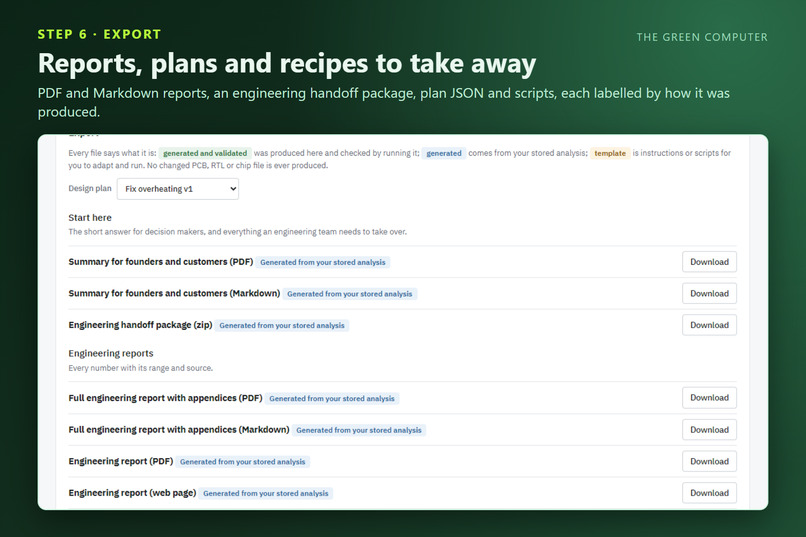
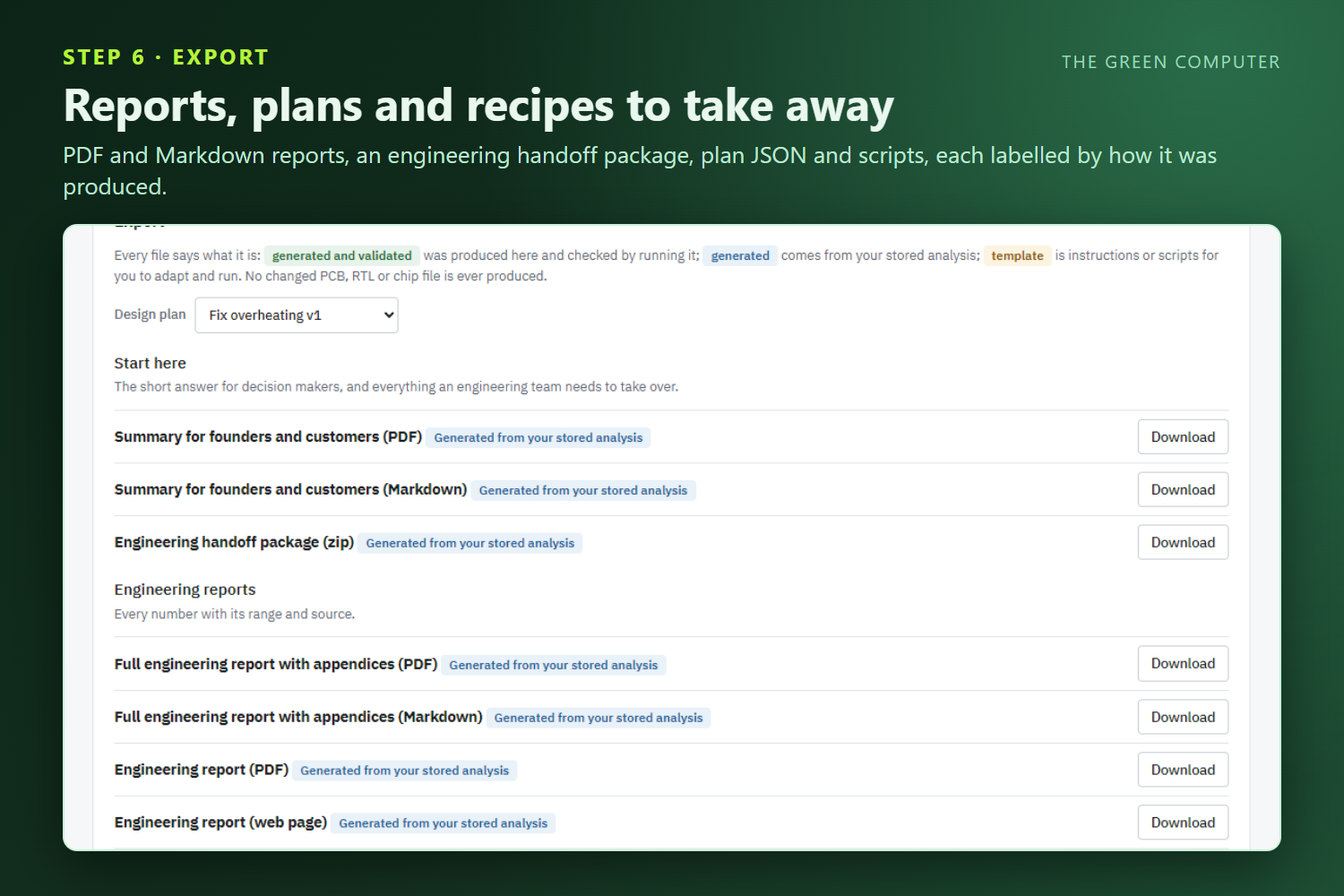
Export reports, an engineering handoff package, plan files and recipes, each labelled by how it was produced.
-
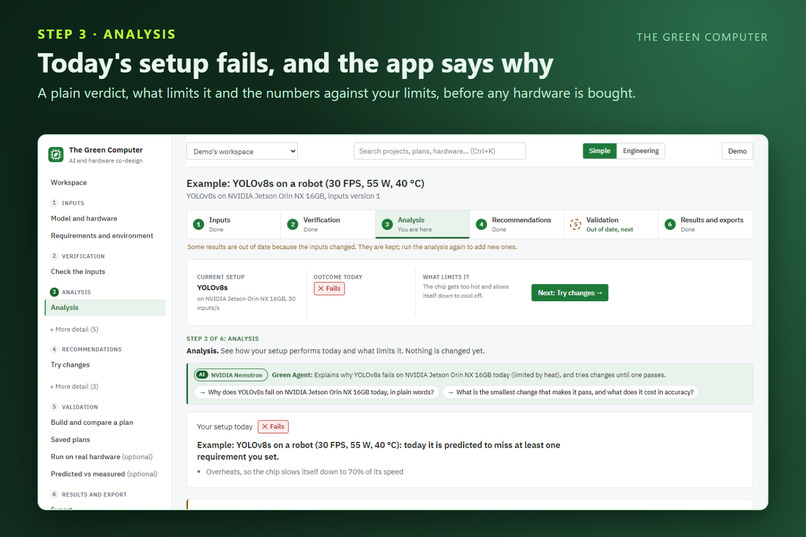
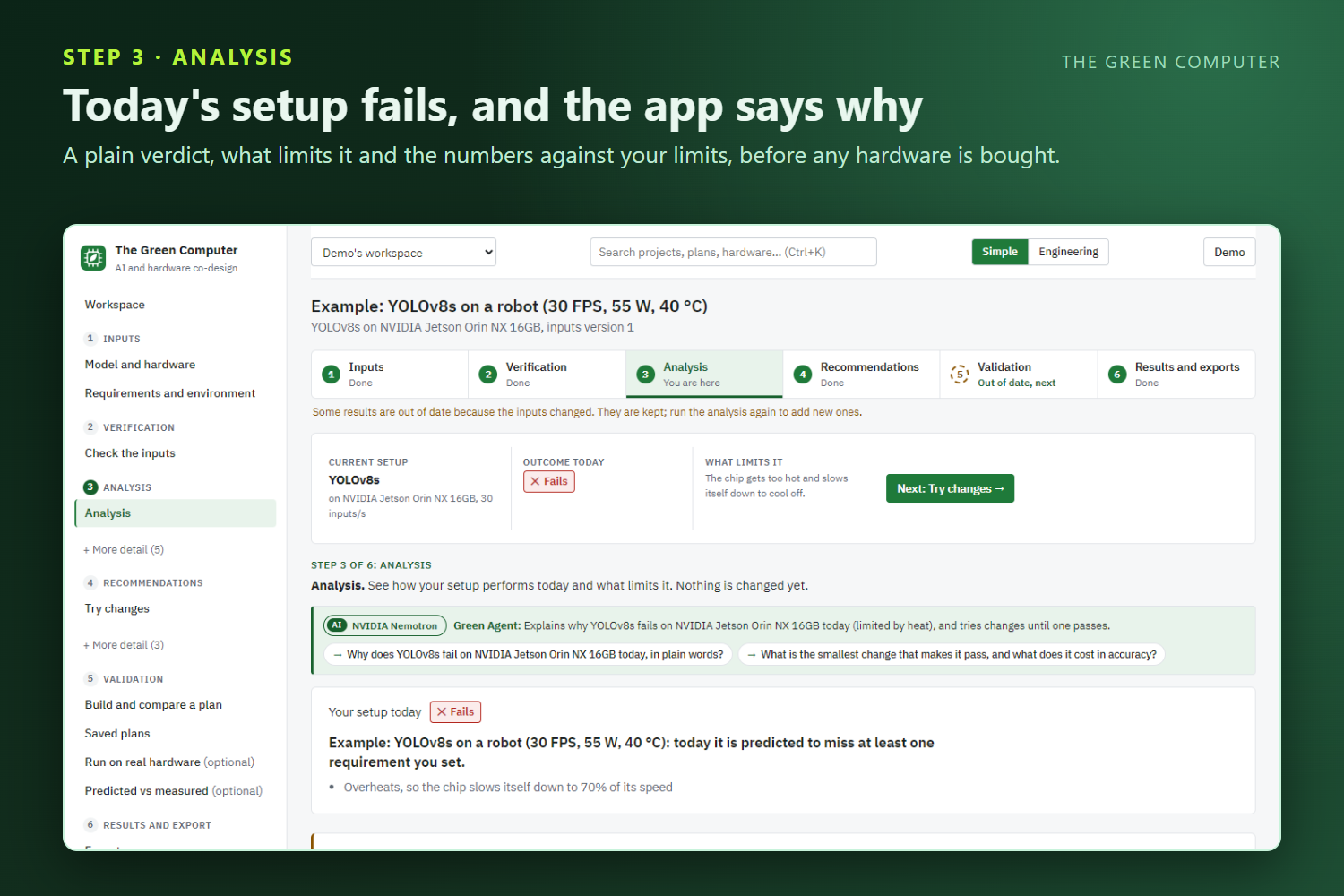
The analysis gives a plain verdict on today’s setup (a YOLOv8s fails because the chip overheats) before any hardware is bought.
-
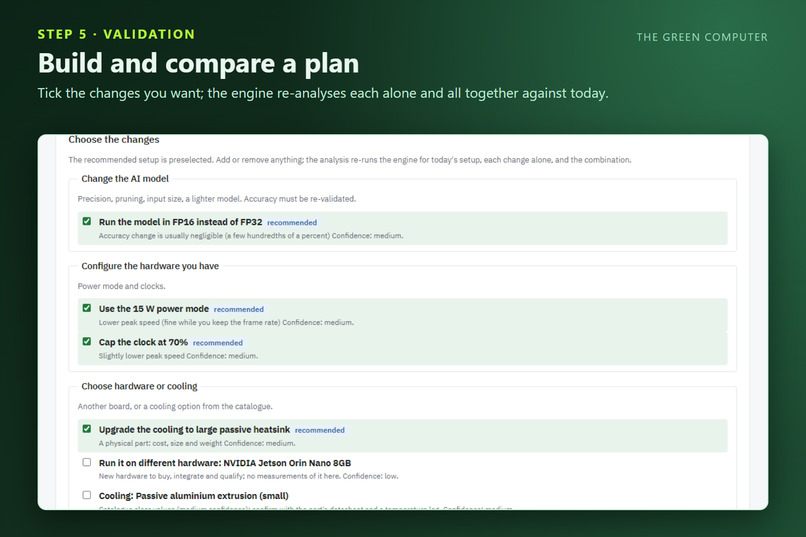
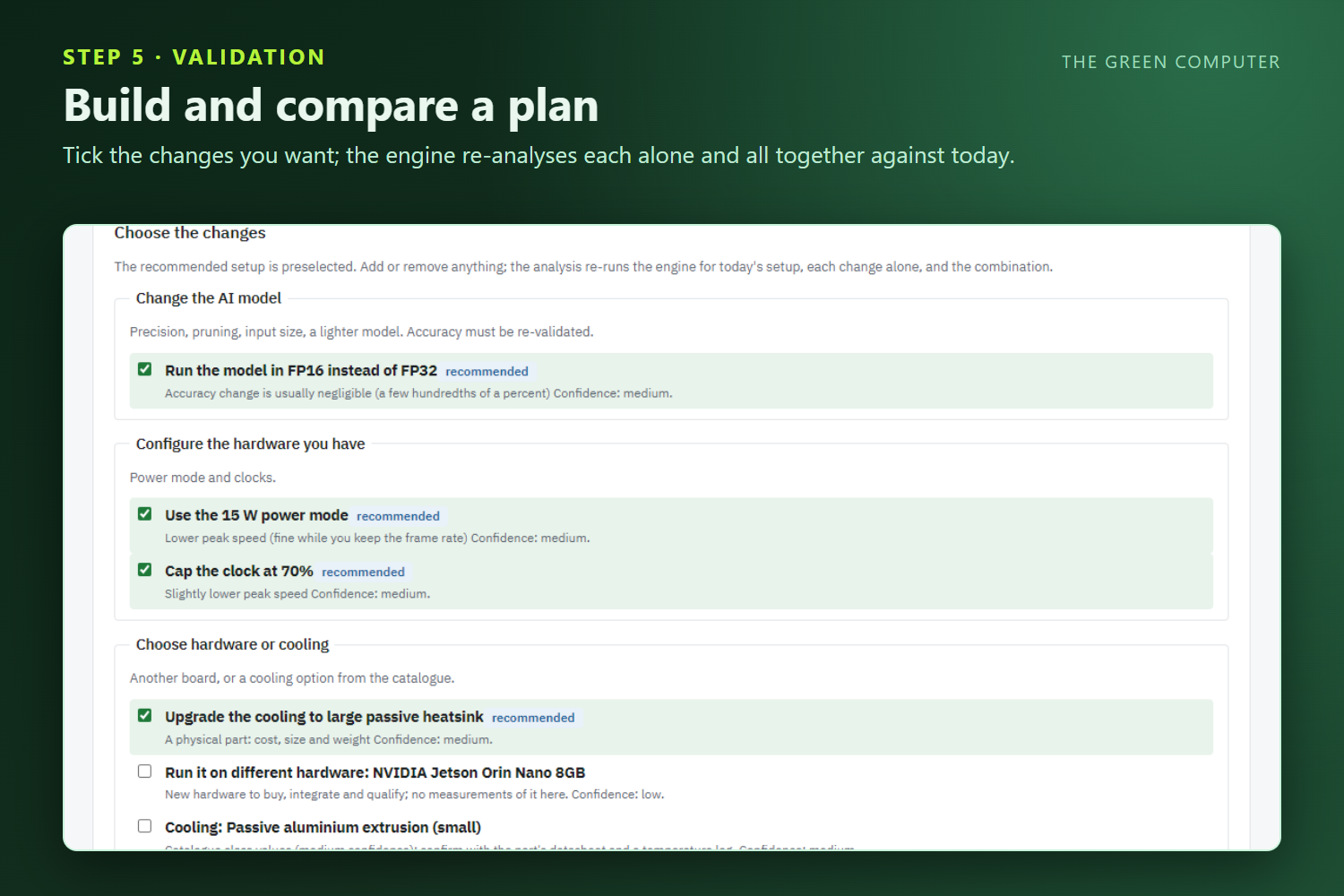
Build a plan by ticking changes, and the engine re-analyses each change alone and all of them together against today.
-
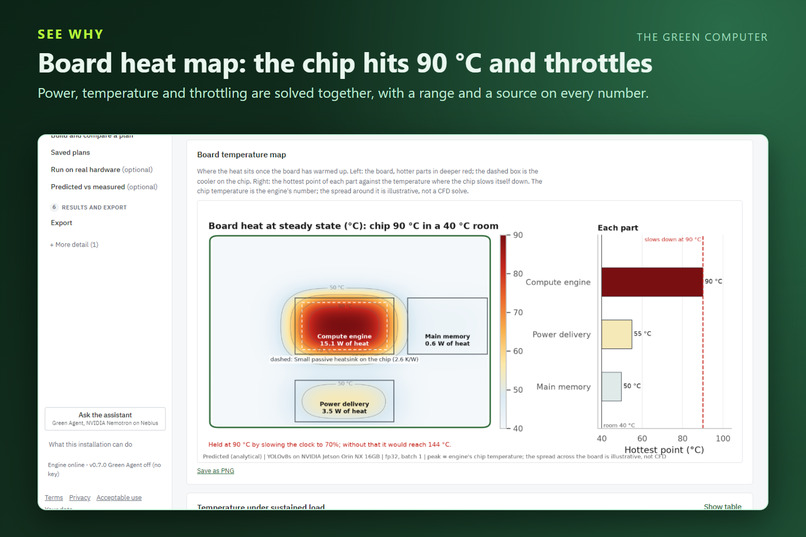
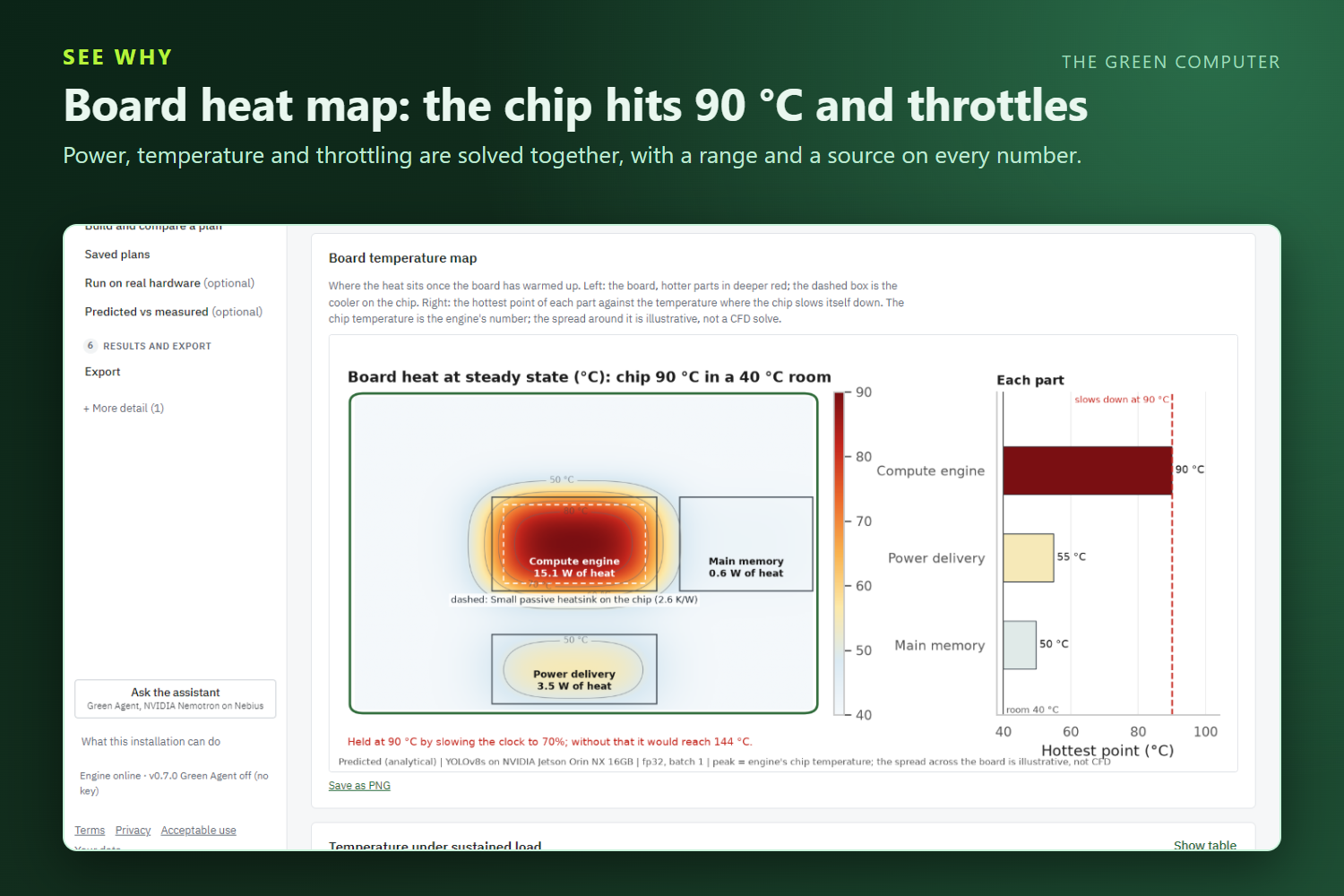
The board heat map shows the compute engine reaching 90 °C and throttling to 70% speed in a 40 °C room.
-
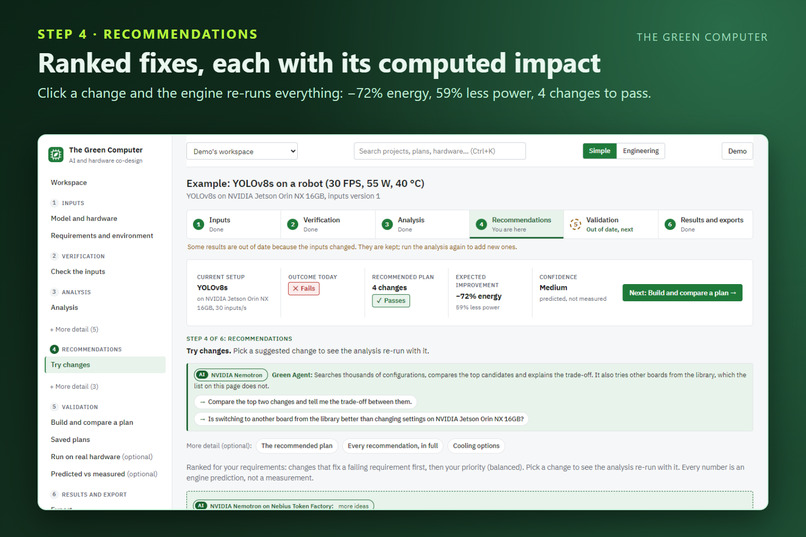
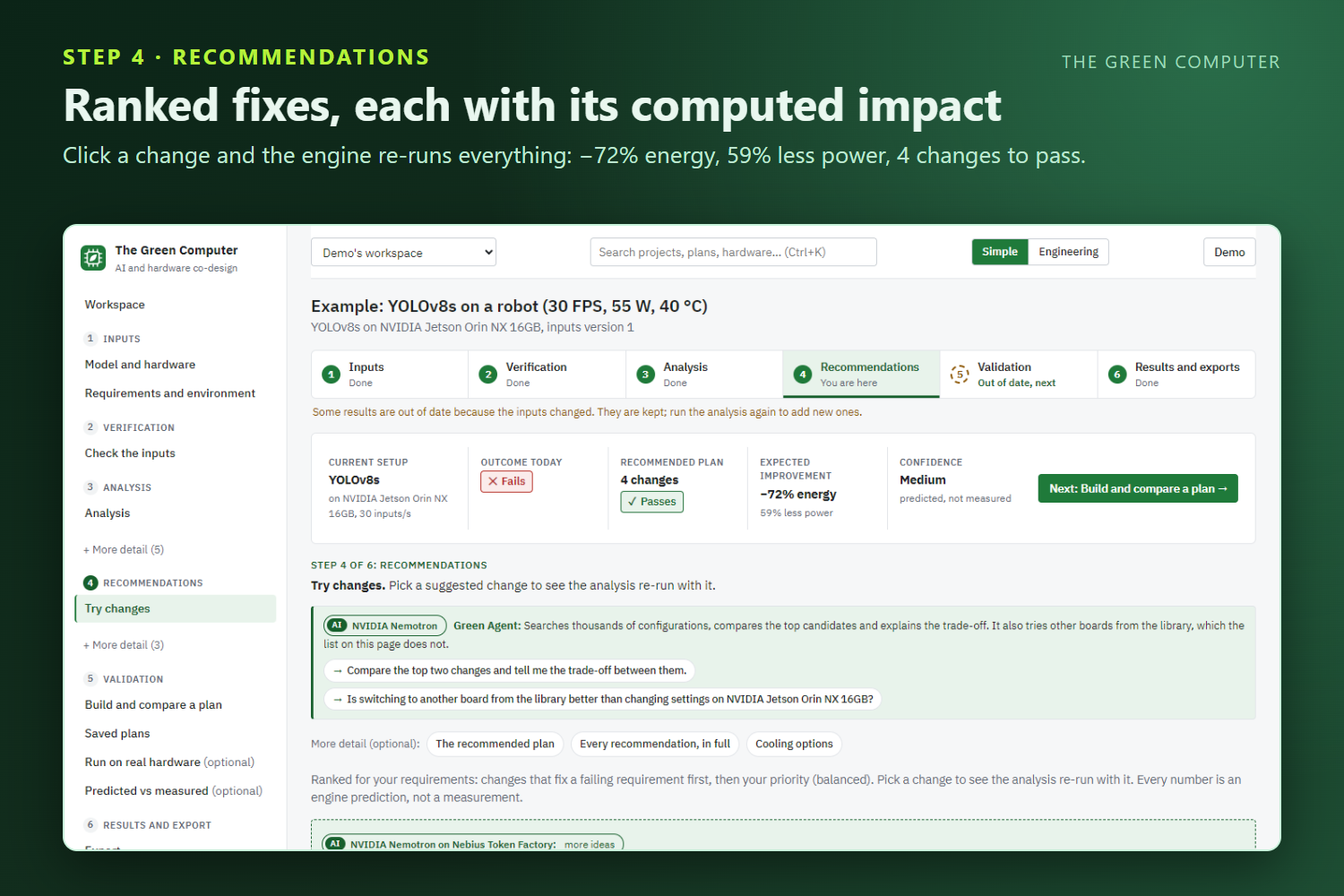
Ranked recommendations show each fix’s computed impact, and the top plan passes with 72% less energy and 59% less power.
-
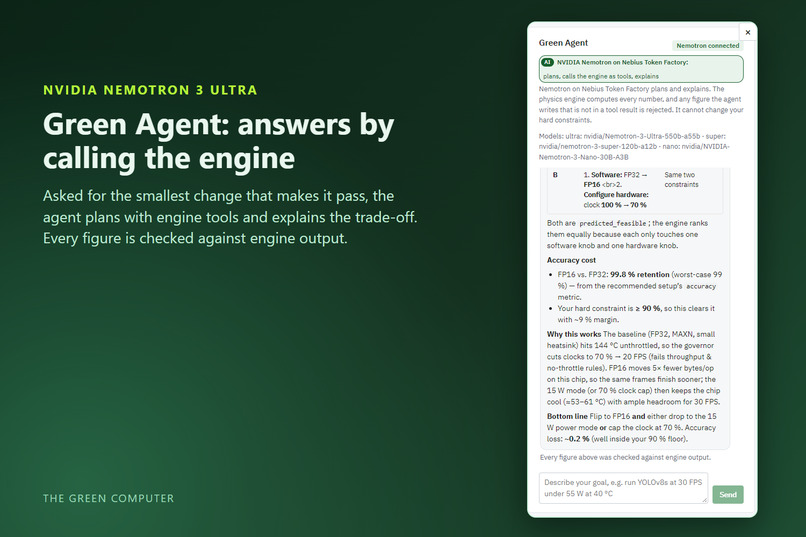
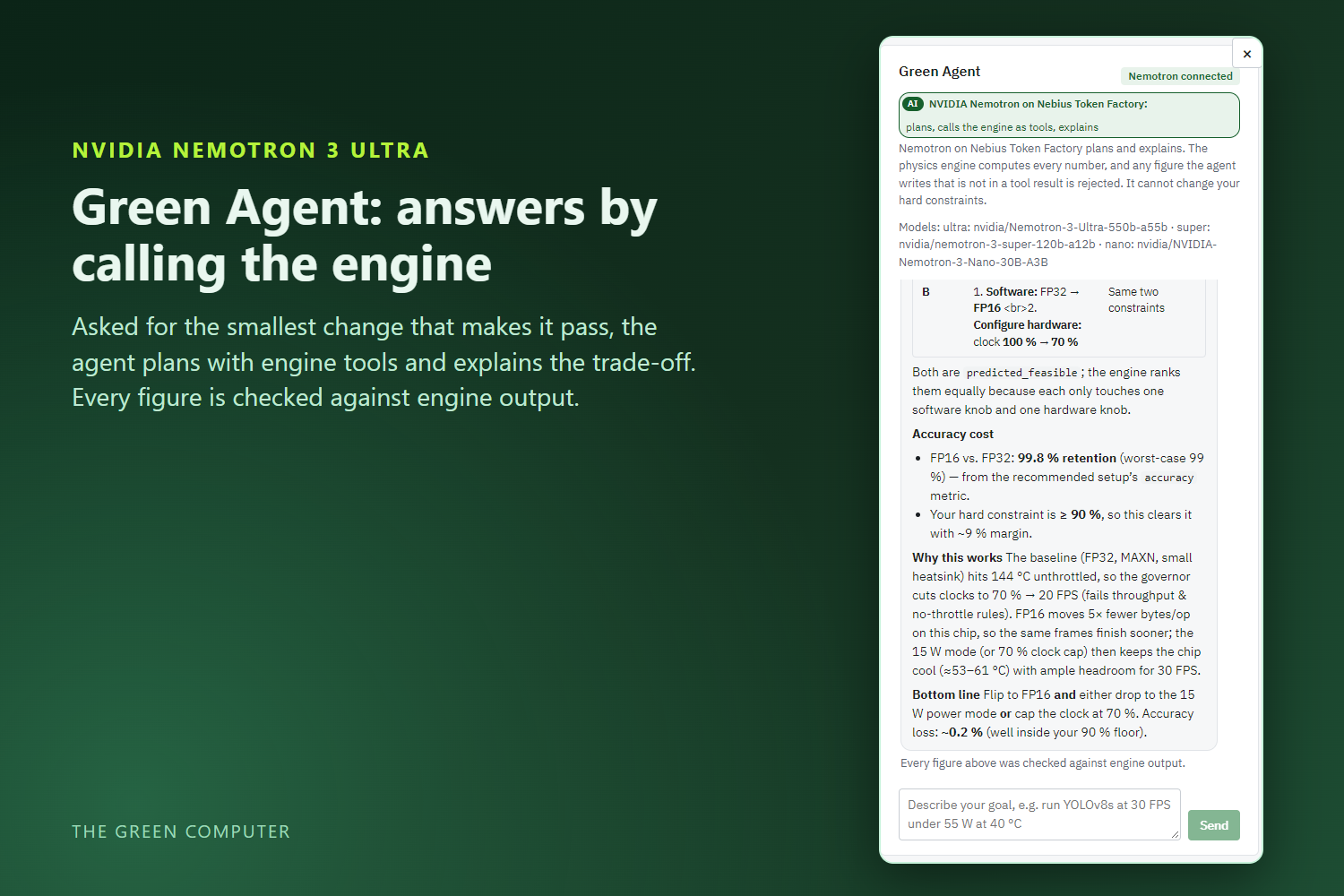
The Green Agent, powered by NVIDIA Nemotron 3 Ultra on Nebius Token Factory, answers by calling the physics engine.
-
The Green Computer: “The Sustainable Tech of 21st Century”, predicting how AI models will run on hardware before anything is built.
Inspiration
"The Sustainable Tech of 21st Century"
It started with a frustration we kept hearing from people who build robots, smart cameras and edge devices. You pick a model, pick a board, wire everything up, and only then do you find out the truth: the chip runs hot, slows itself down to cool off, the frame rate collapses, or the whole thing draws more power than the battery or enclosure can handle. By that point you've already bought the hardware, and the fix is weeks of trial and error. Should you shrink the model? Quantise it? Change the power mode? Buy a heatsink? Buy a different board altogether?
Nobody had one place that answered those questions before the money and time were spent. And each wasted watt isn't just a battery problem; at scale it's energy and carbon too. AI is moving onto billions of small devices, so getting this right is one of the quiet ways technology can become more sustainable.
So we set ourselves a simple goal: let an engineer see how an AI model will behave on a piece of hardware before building anything, and give them fixes they can actually trust.
What it does
The Green Computer is an AI and hardware co-design platform. You describe or upload an AI model (an ONNX file or one from the library), pick or describe your hardware (boards, microcontrollers, FPGAs, accelerators), and tell it what must be true: how many inputs a second, how much power, how hot the room is, how much accuracy you can afford to lose.
Then it walks you through one clear, numbered path:
1. Analyse today's setup. You get a plain-language verdict ("fails: the chip gets too hot and slows itself down"), what is limiting it, and your numbers against your limits. It also shows four figures: a heat map of the board, the warm-up curve as the chip heats over time, where the energy actually goes, and power over a batch. Nothing is suggested yet; this page is only about understanding where you stand.
2. Try changes, and watch the impact. This is the heart of the app. Recommendations come at five levels:
- the AI model itself (quantise to FP16 or INT8, prune, use a smaller input, swap to a lighter model),
- how it runs (batching),
- hardware settings (power modes, clock limits),
- hardware or cooling choice (another board, a better heatsink),
- chip and board ideas (directional what-ifs, clearly labelled as such).
They're ranked to fix whatever is failing first, then by your priority. Click any change and the engine re-runs the entire analysis with it applied. You immediately see the new verdict, what moved, and the same four figures side by side: today versus with the change. No rules of thumb, no "this usually helps": every suggestion arrives with its own computed before and after.
3. Plan, compare, measure and export. Combine changes into a plan and compare each change alone, all of them together, and today. Plans are saved as versions that never change. If you can, run the model for real on the server's CPU and compare what was predicted with what was measured. Then export an engineering report, the plan, and a recipe of scripts to apply the changes on the device.
Here's what that looks like on the bundled example. A YOLOv8s object detector on an NVIDIA Jetson Orin NX, in a 40 °C room, fails today: the chip heats to 90 °C and throttles to about 70% of its speed. The recommended plan meets every requirement while using about 72% less energy per input and 59% less power.
Two promises run through the whole app. Your requirements are never loosened to make a result look good. And every number carries a best-case to worst-case range and says where it came from (analytical, calibrated, measured, vendor spec or assumed), so a prediction is never dressed up as a measurement.
How we built it
A physics engine at the core. The numbers come from a deterministic engine, not a language model. It estimates performance layer by layer (a roofline model: is each layer limited by compute or by memory?). It then solves power, temperature, leakage and throttling together, because they feed each other: a hotter chip leaks more power, which makes it hotter, until it throttles. Uncertainty is carried through by re-solving at optimistic and pessimistic corners, which is where the ranges come from. On top of that sit a search over thousands of possible configurations, constraint checks, effort-aware ranking (a heatsink costs more effort than flipping a power mode, so it has to earn its place), and hardware what-ifs.
NVIDIA Nemotron on Nebius Token Factory as the voice and the idea generator. We used three Nemotron tiers, each where it fits best:
- Nemotron 3 Ultra powers the Green Agent, the assistant in the sidebar. You ask "why does this fail?" or "what's the smallest change that makes it pass?", and it plans an answer by calling the engine as tools. A guardrail checks every figure in its reply against the tool results and rejects anything the engine didn't compute. It also cannot touch your requirements.
- Nemotron 3 Super generates extra recommendation candidates the built-in list might have missed. They come back as structured JSON, are checked against a schema, and stay labelled not evaluated until the engine actually runs them.
- Nemotron 3 Nano reads datasheets. When your hardware isn't in the library, Tavily searches the web for its datasheet pages, Nano pulls out each spec together with the page it came from, and a person confirms the values before they're used.
Token Factory made this practical: we had no NVIDIA GPU on the development machine, yet one OpenAI-compatible endpoint gave us all three models, so the right-sized model could handle each job and credits stretched further.
The rest of the stack: FastAPI, SQLAlchemy with PostgreSQL or SQLite, ONNX and ONNX Runtime for model parsing and real CPU runs, and React with TypeScript for the interface, all in one container. The public demo runs on Google Cloud Run with a Neon PostgreSQL database.
We started the repository on 13 October 2026, inside the submission period, so this is a brand-new project.
Challenges we ran into
Keeping the AI honest. Our biggest design worry was a chatbot confidently inventing numbers about someone's hardware. The answer was a clear division of labour. The model can only ask the engine for numbers through tool calls, and a guardrail strips out anything that didn't come from a tool result. The model explains and suggests; the engine decides.
Heat isn't an afterthought. Most estimates check temperature at the end. A setup that looks fast on paper can throttle in a warm room and miss its target entirely, so we had to put the thermal solve inside the search, not bolt it on afterwards.
Being honest about uncertainty. The only real measurements available to us were on a CPU. Rather than pretend otherwise, we made every number carry a range and a source label, and made sure predicted and measured values are never mixed.
Getting reliable structured output from a reasoning model. This one taught us the most. In live runs Nemotron sometimes returned JSON with a missing comma. Once it returned nothing at all, because it had spent its entire token budget thinking before it answered. Another time it sent a single sentence where we'd asked for a list. Each of these broke a feature until we fixed it. The app now repairs the common JSON slip, gives the model more room and retries once, accepts a string where a list was expected, and throws away only a bad candidate instead of the whole reply.
Accomplishments that we're proud of
- An AI that can't make things up. The guardrail and read-only requirements mean the assistant can't invent a figure or quietly loosen your limits.
- Recommendations you can see working. Every change shows its own computed before and after on your system, not a generic tip.
- One coherent product, not a pile of scripts: a numbered path, Back and Next on every page, example projects, and light and dark themes.
- A model parser that matches the published references, ResNet-50 and MobileNetV2 parameter and FLOP counts.
- Calibration that's willing to reject itself. It's only applied if it predicts held-out measurements better, and on real runs it cut held-out error from 130% to 16%.
- Real testing: 346 backend tests and 15 browser journeys with accessibility checks, all passing.
What we learned
The biggest lesson: a language model is at its best as an explainer and idea generator, while something deterministic owns the numbers. That split is what makes the advice trustworthy. We also learned that hosted models need validation, repair and retries rather than blind trust, and that a reasoning model needs a token budget for its thinking, not just its answer. Finally, being upfront about what's predicted versus measured made the tool more convincing, not less. People trust a range with a source far more than a single confident number.
What's next for The Green Computer
- A bigger hardware library and deeper chip-level modelling, so the chip and board what-ifs can go beyond directional.
- A CI check, so a pull request that makes a model slower or hungrier on its target hardware gets flagged automatically.
Honest status
- Live and working: the full app is deployed and free to try. Every step works end to end: analysis, recommendations, plans, real CPU runs and exports.
- NVIDIA Nemotron on Nebius Token Factory, verified live: all three tiers (Ultra for the Green Agent, Super for AI candidates, Nano for datasheet extraction) were tested against the live API on 27 October 2026, including a full tool-calling round trip. Tavily datasheet search was verified live the same day and is switched on in the public demo.
- Built to be trusted: every performance, power and heat figure comes from the physics engine with a best-to-worst range and a clear source label. When you run the model for real, measured results appear next to the predictions, and calibration is only applied when it improves accuracy on held-out measurements.
Try it live: https://green-computer-7yy6xwxdna-ue.a.run.app Code: https://github.com/tsharan17/The-Green-Computer-Nebius-Nvidia
Built With
- alembic
- fastapi
- google-cloud-run
- nebius-token-factory
- nemotron-3-nano
- nemotron-3-super
- nemotron-3-ultra
- neon
- numpy
- nvidia-nemotron
- onnx
- onnx-runtime
- playwright
- postgresql
- python
- react
- sqlalchemy
- tavily
- typescript
- vite

