-
-
Fuuuuuuuuutuuuuure!!!
-
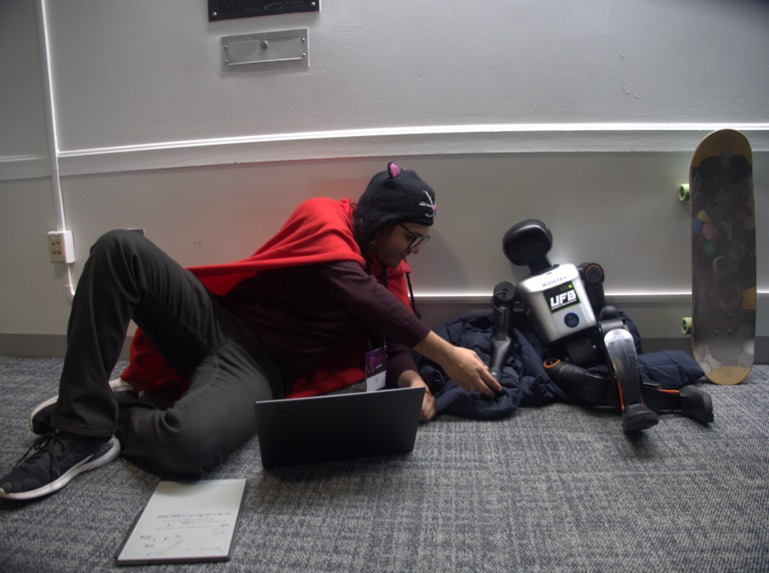
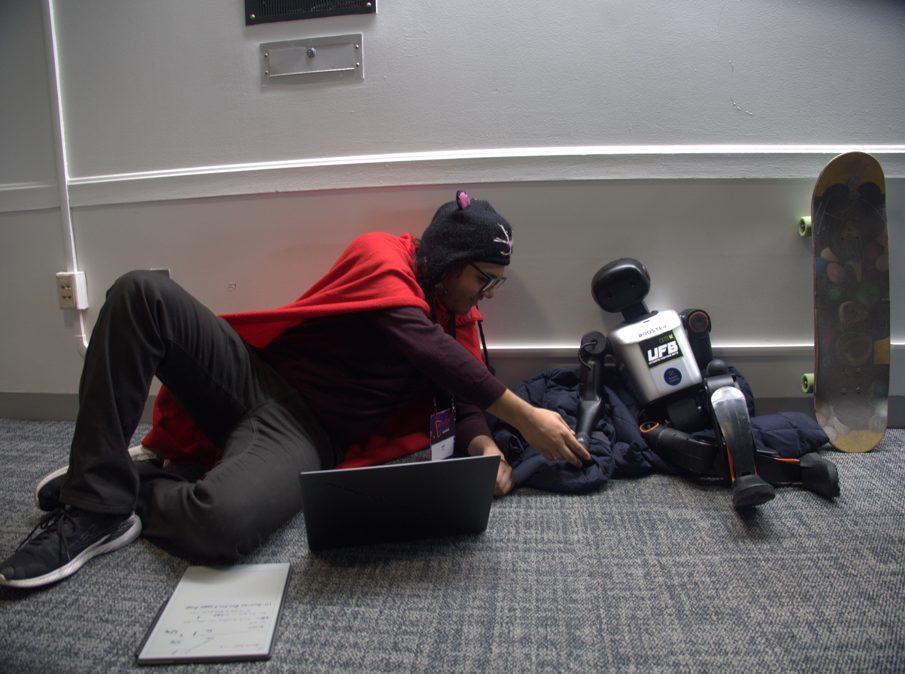
Alif with the robot iterating on the SDK integration
De-Escalate: Expressive Humanoid Persona - Devpost Story
Github repo: https://github.com/danieljtrujillo/The-Future-is-Chrome-MIT-Reality-Hack-2026 (original submission) or https://github.com/Caerii/Personoid-MITRealityHack-2026 (archive fork for long-term + continuing development maintained by Alif)
Inspiration
We were driven by a shared curiosity: What if AI and robots could dream as people do?
This question led us to deep discussions about the purpose of dreams. Dreams are how we process experiences, explore scenarios that might never happen, and build confidence to face challenges. Dreams help us grow, practice responses to difficult situations, and develop emotional resilience.
What if a robot could experience simulated emotional states—anxiety, fear, shyness, anger—and humans could practice helping it through these states? What if we could create a safe space for people to practice de-escalation, empathy, and compassionate conflict resolution with a physical being that responds emotionally?
This vision became De-Escalate: Expressive Humanoid Persona—an XR experience where users interact with a robot experiencing emotional "dreams" or "nightmares," practicing the skills needed to help it through difficult moments.
The Team
This project was built by a five-person team, each contributing distinct expertise:
- Daniel Trujillo: Set up the Samsung Galaxy XR build configuration and Android XR development environment, including OpenXR Unity Port integration. Daniel also integrated TextMesh Pro into the UI system and enhanced the Gemini sample with TextMesh Pro support.
- Marcel Bornstein: Created the complete UI system foundation for Samsung GalaxyXR passthrough mode, including all scribble-style assets, UI scripts, scenes, prefabs, audio feedback, and custom fonts. Marcel also enhanced the visual experience with polish, sprite animations, logo sequences, and refined positioning. Marcel also worked on the Meta Quest 3 build.
- Josh Valenzuela: Created the Voice Concierge addon—a complete Gemini Live voice AI system with mood detection, spatial UI panels, and audio-reactive visualization. Josh was responsible for the Gemini Live API implementation, including the backend logic and framework code.
- Alif Jakir: Developed the robot control pipeline, including LLM-powered keyframe animation system, React 3D visualization frontend, Unity C# integration, architecture, and comprehensive documentation. Alif was responsible for connecting the Python SDK of the humanoid robot to our Unity scene, creating a simulator in Three.js, converting the kinematic representations generated from Gemini into something that drives the robot, and the server that integrates the robot with the simulator and the Unity scene.
- Jose E. Pimentel: Attempted Arduino Uno Q integration with App Lab for environmental feedback and light color systems, though the integration encountered technical issues and was not successfully completed. Jose helped iterate on concepts and clarify the overall system architecture throughout the project.
What it does
In short: We gave a robot anxiety, and we made an XR experience where you try to calm it down!
We transformed a K1 Booster humanoid robot—previously used for robot boxing and fighting—into an emotionally expressive being capable of simulated emotional sensation and expression. Through a combination of sensors, kinematic humanoid robot control, and conversational AI, we created real-world simulation scenarios for human users to practice de-escalation and compassionate conflict resolution.
The Experience
Users don a Samsung GalaxyXR headset and enter a mixed-reality environment where they encounter a Booster K1 robot experiencing emotional distress. The experience is enhanced by Marcel's complete XR UI system foundation—including scenes, prefabs, scripts, custom scribble-style assets, audio feedback, and custom fonts—which Daniel later enhanced with TextMesh Pro integration. The robot expresses emotions through:
- Physical gestures: 8 pre-defined emotional animations (Joy, Anger, Fear, Sadness, Calm, Friendliness, Surprise, Idle) with 50 keyframes each for smooth, expressive motion
- Voice interaction: Real-time bidirectional voice conversations where the robot responds emotionally to user input
- Natural language control: Users can describe desired robot behaviors in plain English, which are converted into robot animations via LLM-powered keyframe generation
- XR UI controls: Marcel's visual enhancements and Daniel's UI system provide intuitive controls for interacting with the robot, with polished visual feedback and smooth animations
The robot runs through scenarios we call "nightmares" or "dreams"—simulated emotional situations where the robot experiences trouble, and the user must help guide it through using voice, gestures, and empathetic communication.
Example Scenario: A police officer in training encounters the robot displaying "Anger" animation—tense, aggressive movements. Arduino lights pulse red in the background, creating an urgent atmosphere. The officer uses the XR UI system to select de-escalation techniques, speaking calmly: "I can see you're upset. I'm here to help." As the officer practices empathetic communication, the robot gradually transitions from "Anger" to "Calm"—shoulders relax, movements slow. The lights shift from red to calming blue, then to peaceful green. The officer receives real-time visual and emotional feedback on their communication effectiveness, building skills that transfer to real-world situations.
Technical Innovation
Our system represents a complete pipeline from XR interactions to physical robot control:
- Multi-Modal Input: Users interact through hand tracking, gaze, voice commands, and UI buttons—powered by Marcel's XR UI system foundation (scenes, prefabs, scripts, assets, audio) enhanced with Daniel's TextMesh Pro integration
- LLM-Powered Animation: Natural language prompts are converted into executable robot keyframe sequences using Gemini 2.0 Flash, OpenAI GPT-4, or Anthropic Claude
- Real-Time Voice AI: Two separate Gemini Live integrations—one for robot control, one for general conversational AI with mood detection
- 3D Visualization: Interactive React + Three.js frontend for previewing animations before execution
- Production-Ready Architecture: Complete SDK integration with comprehensive error handling, safety validation, and deployment guides
Example Use Cases
Reflective Encouragement (Educational)
Scenario: A 7-year-old child named Maya is anxious about starting at a new school. She's shown the robot experiencing a "shy dream"—the robot displays hesitant, withdrawn body language, arms pulled close to its body, head slightly down, avoiding eye contact. Soft, anxious blue lights pulse gently in the background, creating an atmosphere of uncertainty. The child is told: "The robot is too shy to enter the classroom. Can you help it feel brave?"
Maya approaches the robot in XR, using the UI system to select encouraging phrases. She says, "It's okay to be nervous. I'll be your friend." As she speaks, the robot's body language gradually shifts—shoulders relax, head lifts slightly. The lights transition from anxious blue to warm, encouraging yellow. Maya continues: "Everyone is new sometimes. You can do it!" The robot's animation transitions to the "Friendliness" posture—arms opening slightly, more confident stance. The lights brighten to a confident green. Through this interaction, Maya practices empathy and encouragement while seeing the robot's emotional state change in response to her words.
Learning Outcomes:
- Empathy development: Maya practices recognizing and responding to emotional distress
- Social skills practice: She learns encouraging language and supportive communication
- Confidence building: By helping the robot, Maya builds her own confidence to face similar situations
- Emotional regulation: She sees how calm, supportive communication can help others overcome anxiety
Police / Healthcare Worker De-Escalation Training
Scenario 1: Calming an Agitated Individual
A police officer in training encounters the robot displaying "Anger" animation—tense posture, aggressive arm movements, rapid gestures. Arduino lights flash red, creating an intense, urgent atmosphere. The officer must de-escalate the situation.
Wrong Approach: The officer uses commanding language: "Calm down immediately!" The robot's animation intensifies, movements become more erratic. The lights pulse faster, redder. The scenario escalates.
Right Approach: The officer takes a step back, uses calm, measured tones: "I can see you're upset. I'm here to help. Can you tell me what's wrong?" The robot's movements slow slightly. The officer continues with empathetic language, maintaining eye contact through the XR interface. Gradually, the robot transitions from "Anger" to "Calm"—shoulders relax, movements become slower and more controlled. The lights shift from red to calming blue, then to a peaceful green. The officer receives clear visual feedback through both the robot's physical animations and the environmental lighting.
Scenario 2: Gaining Cooperation from Someone in Distress
A healthcare worker encounters the robot in "Fear" animation—crouched posture, protective arm positioning, avoiding eye contact. Arduino lights pulse with anxious purple tones, creating a tense atmosphere. The worker needs to gain the robot's cooperation for a medical procedure.
The worker uses the XR UI system to select appropriate communication strategies. They speak softly: "I understand this is scary. We'll go slowly. You're in control." The robot's animation shifts to "Calm"—more open posture, less defensive. The lights transition to reassuring blue. The worker continues: "Can you tell me what would make you feel safer?" The robot responds positively, and the scenario progresses successfully.
Training Benefits:
- Safe practice environment: No risk to real people during high-stakes training
- Repeatable scenarios: Officers can practice the same scenario multiple times
- Real-time feedback: Immediate visual and emotional feedback on communication effectiveness
- Clear visual feedback: Robot animations provide immediate, clear feedback on emotional states
- Muscle memory: Repeated practice builds de-escalation skills that transfer to real situations
Therapeutic Applications
Scenario: Social Anxiety Exposure Therapy
A client with social anxiety works with their therapist using the system. The robot displays "Fear" animation—tense, withdrawn posture. Arduino lights pulse with anxious purple, creating a safe but realistic simulation of social discomfort.
Session 1: The client practices basic interaction. They use the XR UI system to select conversation starters. Initially, the robot remains in "Fear" posture. The client practices: "Hi, I'm [name]. It's nice to meet you." With repeated practice, the robot gradually transitions to "Calm," then to "Friendliness." The lights shift from purple to blue to warm yellow. The client receives clear visual feedback through both the robot's changing body language and the environmental lighting.
Session 5: The client has progressed. They now practice more complex scenarios—the robot displays "Surprise" (unexpected social situation). The client practices adaptive responses, using the natural language system to generate appropriate robot reactions: "The robot seems surprised. How would you respond?" The client practices: "Oh, I didn't expect to see you here! How have you been?" The robot transitions to "Joy," and the lights brighten to happy yellow, providing positive reinforcement for appropriate social responses.
Therapeutic Benefits:
- Gradual exposure: Clients can practice at their own pace
- Safe environment: No judgment, no real social consequences
- Visual feedback: Robot animations and environmental lighting provide clear emotional state indicators
- Skill building: Practice transfers to real-world social situations
- Progress tracking: Therapists can measure improvement through robot response patterns
Customer Service Training
Scenario: Handling an Upset Customer
A customer service trainee encounters the robot displaying "Anger" animation—aggressive posture, tense movements, simulating an angry customer. Arduino lights flash red, creating an intense atmosphere. The trainee must de-escalate using proper customer service techniques.
The trainee uses the XR UI system to access de-escalation scripts. They practice: "I understand your frustration. Let me see how I can help." The robot's animation shifts slightly—less aggressive, but still tense. The trainee continues with active listening: "Can you tell me more about what happened?" The robot transitions to "Calm," and the lights shift to neutral blue. The trainee successfully resolves the scenario.
Training Outcomes:
- Improved customer service skills
- Confidence in handling difficult situations
- Reduced stress in real customer interactions
How we built it
Architecture Overview
We built a complete, production-ready system spanning multiple technology stacks:
GalaxyXR (Unity) → Python FastAPI Server → Booster SDK → K1 Robot
     ↓                      ↓                    ↓
  Voice AI            LLM Providers        DDS Communication
  Hand Tracking       Keyframe Gen         Real-time Control
  Gaze/UI             Stock Animations     Automatic IK
Technology Stack
AI & Language Models
- Gemini Live API: Real-time bidirectional voice AI for conversational robot control
- Gemini 2.0 Flash: Natural language to keyframe animation generation with structured outputs
- OpenAI GPT-4: Alternative LLM provider for keyframe generation
- Anthropic Claude: Additional provider option for flexibility
XR Platform
- Samsung GalaxyXR: Primary XR device with passthrough mode
- Unity 6000.2.9f1: Game engine with Android XR support
- OpenXR: Cross-platform XR API
- Android XR Extensions: Platform-specific features (hand tracking, eye tracking, face tracking, scene mesh)
- XR Interaction Toolkit: Hand tracking, gaze interaction, UI systems
- Meta Quest 3: Planned secondary client for colocation (Photon integration)
Robot Control
- Booster Robotics SDK: C++/Python SDK with DDS (FastDDS) communication (provided by Booster Robotics)
- Python Extensions: FastAPI server, LLM integration, keyframe animation system (Alif's contribution)
- React + Three.js Frontend: Interactive 3D visualization for animation preview (Alif's contribution)
- Unity C# Integration: Seamless XR-to-robot communication layer (Alif's contribution)
Hardware
- Booster K1 Robot: 22-DOF humanoid robot (4-DOF arms, 2-DOF head, 12-DOF legs)
- Arduino Uno Q: Sensors and lighting for environmental feedback (Jose's integration with App Lab for dynamic light colors that respond to robot emotional states)
- Laptop: More reliable processing than robot's internal computer
Key Components Built
1. LLM-Powered Keyframe Animation System
Location: Assets/BoosterRobotics/booster_robotics_sdk/example/high_level/keyframe_animation/
A sophisticated Python system that converts natural language into executable robot animations:
- FastAPI Server: REST API with endpoints for keyframe generation (
/generate_from_prompt), execution (/execute_sequence), and stock animations - Multi-Provider LLM Integration: Support for Gemini, OpenAI, and Anthropic with structured output parsing
- Posture Generator: Validates and clamps keyframes to safe workspace bounds (X: 0.15-0.5m, Y: ±0.4m, Z: -0.1-0.5m)
- Keyframe Controller: Executes sequences on robot with smooth interpolation and automatic IK
- Stock Animations: 8 pre-defined emotional animations (Idle, Joy, Anger, Fear, Sadness, Calm, Friendliness, Surprise) with 50 keyframes each
Example Flow (Educational Use Case):
Child in XR: "Can the robot wave hello?"
  ↓
LLM generates keyframe sequence (8 keyframes for friendly wave)
  ↓
Posture generator validates workspace bounds
  ↓
Keyframe controller executes with smooth interpolation
  ↓
Robot performs natural waving motion
  ↓
Environmental lights brighten to friendly yellow/green
  ↓
Child practices social interaction in safe, supportive environment
2. React 3D Visualization Frontend
Location: Assets/BoosterRobotics/booster_robotics_sdk/example/high_level/keyframe_animation/frontend/
Complete 3D visualization system built from scratch:
- React 18+ with Vite build system
- Three.js and React Three Fiber for 3D rendering
- Robot 3D Model: Complete K1 robot visualization with STL meshes
- Real-time Animation Preview: Smooth playback of keyframe sequences
- Interactive Controls: Playback controls, speed adjustment, keyframe navigation
- Workspace Visualization: Visual representation of safe workspace bounds
- Keyframe Trajectory Display: Visual path of hand movements
3. Unity XR Integration
Location: Assets/BoosterRobotics/Scripts/
Seamless Unity-to-robot communication:
- BoosterRobotService.cs: Static HTTP service for API communication (async/await, error handling)
- BoosterRobotController.cs: MonoBehaviour component for easy scene integration
- ExampleRobotXRIntegration.cs: Complete XR interaction examples (hand tracking, gaze, UI)
- GeminiLiveAudioClient.cs: Voice control integration for robot (voice commands → robot actions)
4. Voice AI Systems
Two separate implementations:
Alif's Robot Control (
Assets/BoosterRobotics/Scripts/GeminiLiveAudioClient.cs):- Voice commands → Robot actions
- "Wave your arms" → Robot executes animation
- Node.js WebSocket proxy server
- Integrated with keyframe animation system
Josh's Voice Concierge (
Assets/VoiceConciergeAddon/):- General voice AI assistant with mood detection
- Real-time emotion detection from AI responses
- Spatial UI panels in XR
- Audio-reactive visualization
- 7 emotion types with color-coded visualization
5. XR UI System
Location: Assets/UI/
Complete UI system for Samsung Galaxy XR passthrough mode built by Marcel, with TextMesh Pro integration by Daniel:
Marcel's UI System Foundation:
- UI In Passthrough Scene: Complete mixed-reality UI system (
UI_InPassThrough.unity) designed specifically for passthrough mode - DE-UI Prefab System: Modular, reusable UI components (
DE-UI Prefab) for easy scene integration - Custom Scribble-Style Assets: Hand-drawn aesthetic UI elements with organic, playful feel (complete asset library)
- Button states (play, pause, replay, check) with multiple animation frames
- Logo animations (DE logo sequence, Escalator logo sequence)
- Decorative elements (scribble blobs, squares, circles)
- Custom Typography: Nexa-ExtraLight and Nexa-Heavy fonts with SDF assets
- Audio Feedback System: Whistle-based sound effects for natural, non-intrusive feedback (hover, select, win sounds)
- UI Interaction Scripts: Complete script library
EmotionSwitcher.cs- Emotion-based UI state switchingUIButtonSfx.cs&UIButtonSfxBinder.cs- Audio feedback systemButtonColorChange.cs- Dynamic button color changesRandomSpriteSwitcher.cs- Random sprite animationDoodleSpriteEnabler.cs- Conditional sprite visibilitySequentialSpriteSwitcher.cs- Sequential sprite animation
- Visual Polish: Improved color schemes, contrast, visual hierarchy, and positioning optimization
Daniel's Enhancements:
- TextMesh Pro Integration: Advanced text rendering in XR with multiple font families (Anton, Bangers, Roboto, Oswald, and more)
- Gemini Sample Enhancements: Enhanced materials and TextMesh Pro support for Gemini integration
6. Arduino Environmental Feedback System
Location: Arduino Uno Q integration with App Lab
Jose's Arduino Integration provides dynamic environmental feedback that enhances the emotional experience:
Dynamic Light Colors: Arduino-controlled lights respond to robot emotional states
- Anger/Fear: Red/purple pulsing lights create urgent, intense atmosphere
- Sadness: Soft blue tones create melancholic mood
- Joy/Friendliness: Bright yellow/green lights create positive, welcoming atmosphere
- Calm: Peaceful blue/green transitions create soothing environment
- Surprise: Quick color flashes create dynamic, unexpected moments
App Lab Integration: Seamless connection between Unity, robot emotional states, and Arduino lighting
Real-time Synchronization: Lights change in real-time as robot animations transition between emotional states
Architecture Clarification: Jose helped clarify the overall system architecture, ensuring smooth integration between all components
Example Flow:
Robot displays "Anger" animation
  ↓
Unity detects emotional state
  ↓
Arduino receives command via App Lab
  ↓
Lights pulse red, creating intense atmosphere
  ↓
User practices de-escalation
  ↓
Robot transitions to "Calm"
  ↓
Lights shift to peaceful blue/green
This environmental feedback system creates a truly immersive experience where the physical space responds to the robot's emotional state, enhancing training effectiveness and emotional engagement.
Development Process
- Parallel Workstreams: Team members worked on separate components in parallel:
- Daniel: TextMesh Pro integration and Gemini enhancements
- Marcel: Complete UI system foundation (scenes, prefabs, scripts, assets, audio) and visual polish
- Josh: Voice Concierge addon with mood detection
- Alif: Robot control system, LLM integration, and 3D visualization
- Jose: Architecture clarification and concept iteration (Arduino integration attempted but encountered technical issues)
- Iterative Integration: Continuous integration and testing as components came together. Jose played a key role in clarifying the overall architecture and ensuring components integrated smoothly.
- SDK Exploration: Deep exploration of Booster Robotics SDK capabilities and limitations
- Workaround Development: Creative solutions for technical limitations (WSL issues, network problems, API quirks)
Challenges we ran into
Integrating simultaneous complex technologies was fundamentally difficult. We approached this through iterative exploration of SDKs, brainstorming, de-scoping work with workarounds, but we encountered expected technical issues during the hack.
Integration Challenges
Parallel Workstream Coordination: We struggled to integrate our parallel workstreams due to various issues as we discovered how the various APIs functioned. Each team member was working on different components—Marcel on the UI system foundation, Daniel on Samsung Galaxy XR build setup and TextMesh Pro integration, Josh on Gemini Live API implementation and voice AI, Alif on robot control, and Jose on architecture clarification—and aligning interfaces and data formats required constant communication and iteration. Jose helped clarify the overall architecture and ensure that components could properly communicate, though the Arduino integration he attempted encountered technical issues and was not successfully completed.
API Discovery: Many APIs had incomplete documentation or unexpected behaviors that we discovered only through trial and error. This required rapid pivoting and workaround development.
Technical Challenges
Gemini Live Integration
Integrating the WebSocket stream into Unity over MIT WiFi was quite difficult due to strange networking-related reliability issues. The WebSocket connections would drop unexpectedly, requiring reconnection logic and error handling. We solved this by:
- Implementing robust reconnection logic
- Creating a Node.js proxy server to handle WebSocket management
- Adding comprehensive error handling and retry mechanisms
Unity Build Challenges
Building to the Samsung GalaxyXR had significant troubleshooting:
- OpenXR configuration issues
- Android build settings
- TextMesh Pro integration requirements (Daniel's contribution required careful package setup)
- Passthrough mode compatibility
- UI system optimization for XR performance (Daniel and Marcel's work required performance tuning)
We attempted to port the build to Meta Quest 3 but encountered compatibility issues. We successfully built for GalaxyXR using OpenXR, which provided a solid foundation. Daniel's UI system and Marcel's visual enhancements were crucial for creating an intuitive, polished XR experience.
K1 Booster SDK Challenges
We ran into difficulties running the SDK on a Windows laptop through WSL:
- DDS communication issues in WSL
- Network interface configuration problems
- Python-to-C++ bridge latency
Workaround: We ran a Python server directly on the robot, which had some latency issues in the Python-to-C++ bridge for end-effector control, but it was functional.
Robot Resource Constraints
The Battery Problem: There were 3 teams using the robot simultaneously, but only 1 robot battery available at any point in time. The battery took over an hour to fully charge, creating significant bottlenecks.
The Codebase Problem: We had to copy over the robot's codebase and apply changes iteratively, working with:
- Partial documentation
- API quirks (head rotation control didn't work correctly)
- Limited testing time due to battery constraints
Success: Despite these limitations, we successfully controlled the robot's arms, which was quite exciting! We generated custom animations and executed them remotely on the physical robot. Jose's Arduino integration provided valuable environmental feedback even when direct robot testing was limited, allowing us to iterate on the emotional experience through light colors and sensor feedback.
Visualization Development
We created a Three.js application that allowed us to simulate the robot through a mesh loader. Alif built a control rig that allows us to animate it and generate new animations through Gemini-generated semantic Posture descriptions. This visualization system was crucial for:
- Testing animations without robot access
- Iterating on keyframe sequences
- Understanding workspace bounds
- Debugging animation issues
Time Constraints
Testing Delays: Lots of delay from testing and aligning on how we intended things to work, which resulted in many working pieces by the end that could still use better integration and polish.
Winter Storm: The hack was cut short due to a winter storm, so the time that normally would have been used for polishing and final integration was unavailable.
Team Dynamics
Strong Personalities: We had many differences of opinion but were able to come together and resolve our issues with respect and quickly taking responsibility for our mistakes. This required uncomfortable but necessary conversations to refocus as a team.
Accomplishments that we're proud of
Technical Achievements
Remotely Activating Custom Animations on the Robot: We successfully generated keyframe sequences from natural language prompts and executed them on the physical robot. This was a major technical milestone, requiring integration of LLM APIs, workspace validation, keyframe interpolation, and robot SDK communication. For example, a child could say "Make the robot look happy" and watch as the robot transitions through a 50-keyframe "Joy" animation, creating a complete emotional experience.
Complete LLM-Powered Animation Pipeline: Built a production-ready system that converts natural language to robot animations, with support for multiple LLM providers (Gemini, OpenAI, Anthropic), comprehensive error handling, and safety validation. This enables powerful use cases like a healthcare worker practicing de-escalation: they describe a scenario ("The patient is anxious about the procedure"), the system generates appropriate robot animations, providing realistic training without risk to real patients.
React 3D Visualization System: Created a complete 3D visualization frontend from scratch, allowing real-time preview of robot animations before execution. This system includes robot mesh loading, keyframe trajectory visualization, and interactive playback controls.
Multi-Modal XR Integration: Successfully integrated hand tracking, gaze, voice, and UI interactions into a unified robot control system, demonstrating the potential of multi-modal XR interfaces. Marcel's complete UI system foundation (scenes, prefabs, scripts, assets, audio) enhanced with Daniel's TextMesh Pro integration created an intuitive, engaging interface for robot interaction. Jose's Arduino integration added environmental feedback through dynamic light colors that respond to robot emotional states, creating a truly immersive experience.
Two Voice AI Systems: Built two separate, production-ready voice AI implementations—one for robot control (Alif's integration) and one for general conversational AI with mood detection (Josh's Voice Concierge)—both using Gemini Live API. For example, a therapist could use Josh's system to have a conversation with the robot about its "anxiety dream," creating a multi-sensory therapeutic experience.
Complete XR UI System: Marcel built the production-ready UI system foundation for GalaxyXR passthrough mode, including scenes, prefabs, scripts, custom scribble-style assets, audio feedback, and custom fonts. Daniel set up the Samsung Galaxy XR build configuration and enhanced the system with TextMesh Pro integration, creating an exceptional user experience.
Comprehensive Documentation: Created 50+ documentation files covering architecture, deployment, API reference, troubleshooting, and development guides. This documentation makes the system accessible and maintainable.
Architecture & Integration Support: Jose played a crucial role in clarifying the overall system architecture and helping the team understand how components should integrate. While the Arduino integration he attempted encountered technical issues, his work on architecture clarification and concept iteration was valuable in ensuring smooth communication between components.
Team Achievements
Collaborative Problem-Solving: Despite technical challenges and time constraints, we maintained effective collaboration and communication.
Respectful Conflict Resolution: We had many differences of opinion but resolved them with respect and quickly took responsibility for mistakes. This required uncomfortable but necessary conversations to refocus as a team.
Rapid Learning: We quickly learned and integrated multiple complex technologies (Booster SDK, Gemini Live, OpenXR, FastAPI, React Three Fiber) in a short timeframe.
Creative Workarounds: We developed creative solutions for technical limitations, demonstrating the "hacker mindset" of finding workarounds when direct solutions aren't available.
What we learned
Technical Learnings
SDK Integration Complexity: Integrating with proprietary SDKs requires deep exploration and understanding of their architecture. Partial documentation and API quirks require patience and creative problem-solving.
Multi-Stack Integration: Coordinating Unity (C#), Python (FastAPI), React (JavaScript), and C++ (SDK) requires careful interface design and clear communication protocols.
Network Reliability: WebSocket connections in complex network environments (like hackathon WiFi) require robust error handling, reconnection logic, and fallback mechanisms.
XR Development Challenges: Building for specific XR platforms (GalaxyXR) requires platform-specific knowledge and can't always be easily ported to other platforms (Quest 3) without significant rework. Marcel built the UI system foundation optimized for passthrough mode, and Daniel enhanced it with TextMesh Pro integration, together creating a polished, intuitive XR experience.
Robot Control Latency: Python-to-C++ bridges for robot control introduce latency that must be accounted for in real-time applications. Direct C++ integration would be faster but requires more setup.
Visualization Before Execution: Having a 3D visualization system for testing animations before robot execution was invaluable and saved significant time.
Team Learnings
Communication is Critical: Many strong, talented hackers can sometimes need uncomfortable conversations to refocus as a team. Clear communication about expectations, timelines, and technical decisions is essential.
Parallel Work Requires Coordination: Working on separate components in parallel requires early agreement on interfaces, data formats, and integration points. Without this, integration becomes much harder.
Respectful Disagreement: Differences of opinion are natural and can lead to better solutions when handled with respect and open-mindedness.
Taking Responsibility: Quickly taking responsibility for mistakes and working together to fix them is more productive than blame or defensiveness.
Iterative Development: Starting with working prototypes and iterating is more effective than trying to build everything perfectly from the start.
Documentation Matters: Comprehensive documentation (even during a hackathon) saves time and makes the project more accessible to others.
What's next for De-Escalate: Expressive Humanoid Persona
Immediate Next Steps
Complete Integration: Get the whole experience working as we initially discussed. While we have all the pieces working individually, better integration and polish would create a more cohesive experience.
Head Control: Fix the head rotation API issues to enable full expressive control of the robot's head, not just the arms.
Reduced Latency: Optimize the Python-to-C++ bridge or move to direct C++ integration for lower-latency robot control.
Better Glue Code: Improve the integration between components for smoother user experience.
Long-Term Vision
Robot-Agnostic Framework: The framework is agnostic to the robot and should work with any kinematic control system. We plan to:
- Abstract the robot interface further
- Support additional robot platforms
- Create a generic humanoid robot control API
Enhanced Simulation: Implement more of the simulated aspects so the system can offer low-latency control of any humanoid robot stack for motion control and interactive simulations. This includes:
- More sophisticated emotion modeling
- Dynamic scenario generation
- Adaptive difficulty based on user performance
- Multi-robot scenarios
Expanded Use Cases:
- Educational applications (social skills training for children)
- Professional training (police, healthcare, customer service)
- Therapeutic applications (anxiety, social skills, conflict resolution)
- Research applications (human-robot interaction, empathy studies)
Platform Expansion:
- Meta Quest 3 support (currently GalaxyXR only)
- Multi-user colocation (Photon integration)
- Cloud deployment options
- Web-based access for remote training
Advanced Features:
- Machine learning for emotion recognition from user voice
- Adaptive scenarios that respond to user communication style
- Multi-modal emotion expression (combining voice, gesture, and animation)
- Long-term memory for personalized interactions
Challenges Ahead
Robot Access: It will probably be tough to get our hands on another Booster robot, but the framework's robot-agnostic design means we can adapt it to other humanoid platforms.
Polishing Time: The winter storm cut short our polishing time. Future work will focus on integration, user experience, and creating a cohesive narrative experience.
Scalability: Moving from a single-robot demo to a scalable training system will require infrastructure improvements, cloud deployment, and multi-tenant support.
Try it out
GitHub Repository: https://github.com/danieljtrujillo/The-Future-is-Chrome-MIT-Reality-Hack-2026
Documentation: Comprehensive documentation is available in the repository, including:
- Getting started guides
- Architecture diagrams
- API reference
- Deployment instructions
- Troubleshooting guides
Built with
Core Platform & Game Engine
- Unity Engine:
6000.2.9f1(IL2CPP scripting backend, URP rendering pipeline) - Android XR: OpenXR package with Android XR Extensions (passthrough, scene mesh, plane tracking, hand/eye/face tracking)
- XR Interaction Toolkit: Hand tracking, gaze interaction, UI systems
- XR Hands: Hand mesh rendering, pose detection, gesture recognition
- TextMesh Pro: Advanced text rendering with custom fonts (Anton, Bangers, Roboto, Oswald, Nexa)
Programming Languages
- C#: Unity scripting, XR integration, robot control clients
- Python 3.10+: FastAPI server, LLM integration, robot SDK bindings, keyframe animation system
- JavaScript/TypeScript: React frontend, Node.js WebSocket proxy
- C++: Booster Robotics SDK core (via pybind11 bindings)
Backend & API Frameworks
- FastAPI: Python REST API server with async operations, CORS support, comprehensive error handling
- Node.js: WebSocket proxy server for Gemini Live API integration
- DDS (FastDDS): Real-time pub/sub communication for robot control
Frontend & Visualization
- React 18+: Modern UI framework with Vite build system
- Three.js: 3D graphics engine for robot visualization
- React Three Fiber: React renderer for Three.js, enabling declarative 3D scenes
- Vite: Fast build tool and dev server
AI & Machine Learning
- Gemini Live API: Real-time bidirectional voice AI (two separate implementations)
- Gemini 2.0 Flash: Natural language to keyframe animation generation with structured outputs
- OpenAI GPT-4: Alternative LLM provider for keyframe generation
- Anthropic Claude: Additional LLM provider with structured output support
- Multi-Provider Architecture: Abstracted LLM provider system for flexibility
Robot Control & SDK
- Booster Robotics SDK: C++ core with Python bindings via pybind11
- High-Level API: Locomotion, gestures, mode management
- Low-Level API: Direct motor control, sensor access
- Automatic IK: Inverse kinematics computation for end-effector control
- Workspace Validation: Safety bounds checking (X: 0.15-0.5m, Y: ±0.4m, Z: -0.1-0.5m)
Communication Protocols
- HTTP/REST: Unity ↔ Python API server communication
- WebSocket: Real-time bidirectional voice streaming (Gemini Live)
- DDS (FastDDS): Real-time robot control communication
- Server-Sent Events (SSE): Frontend state updates
Python Libraries & Tools
- FastAPI: Web framework for API server
- pybind11: C++ to Python bindings for robot SDK
- google-generativeai: Gemini API client
- openai: OpenAI API client
- anthropic: Claude API client
- numpy: Numerical operations for keyframe interpolation
- pydantic: Data validation and settings management
Hardware
- Booster K1 Robot: 22-DOF humanoid robot (4-DOF arms, 2-DOF head, 12-DOF legs)
- Samsung GalaxyXR: Primary XR headset with passthrough mode
- Arduino Uno Q: Attempted integration for environmental feedback (encountered technical issues)
Development Tools
- Unity Hub: Project management and version control
- Android SDK & NDK: Android build tools
- OpenJDK: Java runtime for Android builds
- Git: Version control
- Vite: Frontend build tool
- Arduino App Lab: Attempted Arduino development environment
UI & Graphics
- Custom Scribble-Style Assets: Hand-drawn aesthetic UI elements (Marcel's contribution)
- Sprite Animation System: Logo sequences, button state animations (Marcel's contribution)
- Audio Feedback System: Whistle-based sound effects for XR interactions (Daniel's contribution)
- Custom Font Assets: SDF (Signed Distance Field) fonts for crisp XR text rendering
Documentation & Architecture
- 50+ Documentation Files: Architecture diagrams, API reference, deployment guides, troubleshooting
- Comprehensive System Design: Multi-layer architecture documentation
- Deployment Guides: Local, device, and robot-deployed configurations
Built for MIT Reality Hack 2026 🚀 ;3
Exploring what it means for robots to dream, and helping humans practice empathy through technology.
Built With
- c#
- chat-gpt
- gemini
- gemini-live
- javascript
- python


Log in or sign up for Devpost to join the conversation.