the extension
personalize your browsing experience in seconds
Inspiration
The web we see everyday is not really customizable. YouTube decides that Shorts belong on your homepage. Gmail decides which rail of icons you can collapse. Twitter (X) keeps the "For You" pinned in front of "Following." Every site has a thousand tiny opinions about how you should spend your attention, and none of them ask you first.
If you actually want a personalized version of these sites, the bar is high. Either you hope someon has already created the extention for the specific change you were thinking of, or you learn Manifest V3, fight with content scripts, write a CSS selector, reload the unpacked extension, and then find out it broke when YouTube renamed a class name. Most people don't have an afternoon for that. They just want the comments gone from youtube or their X for you page customized.
What it does
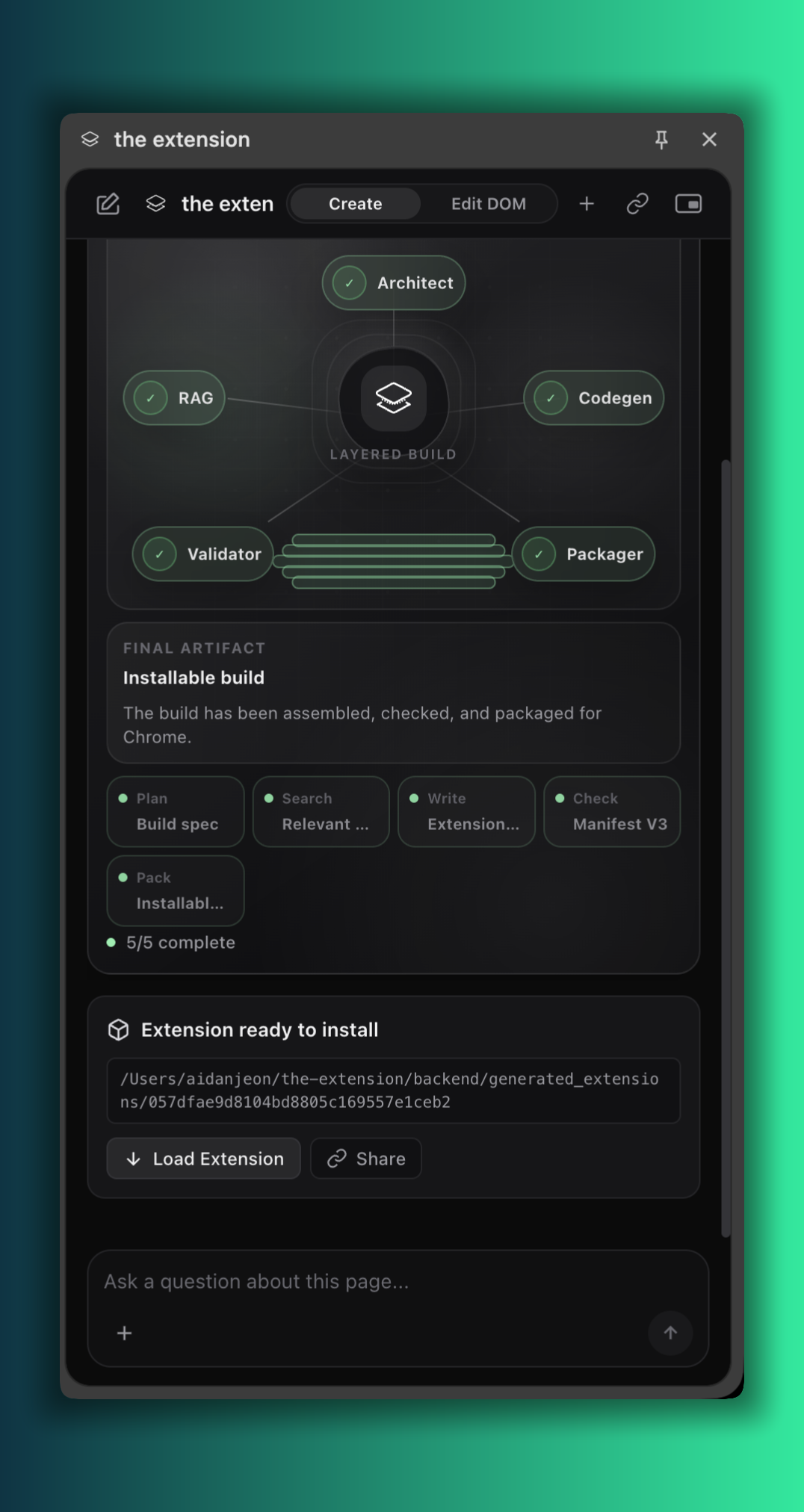
the extension is a browser side panel that turns one sentence into a real, installable Web extension. You type what you want, agents in the background plan it, write it, validate the manifest, package a ZIP, and hands you a Load Unpacked card. End to end, from prompt to installed extension, takes under a minute.
A few things people have actually asked it for:
- "Hide YouTube comments and Shorts on the homepage."
- "Make Gmail's left sidebar wider and pin the Snoozed folder."
- "Remove the Stories row from Instagram web."
- "Block recommended posts on LinkedIn but keep the feed."
- "Remove the trending panel on the X page"
Two modes live in the same panel:
Create mode is the one above. You describe a behavior, and the agent generates a fresh Chrome extension folder with
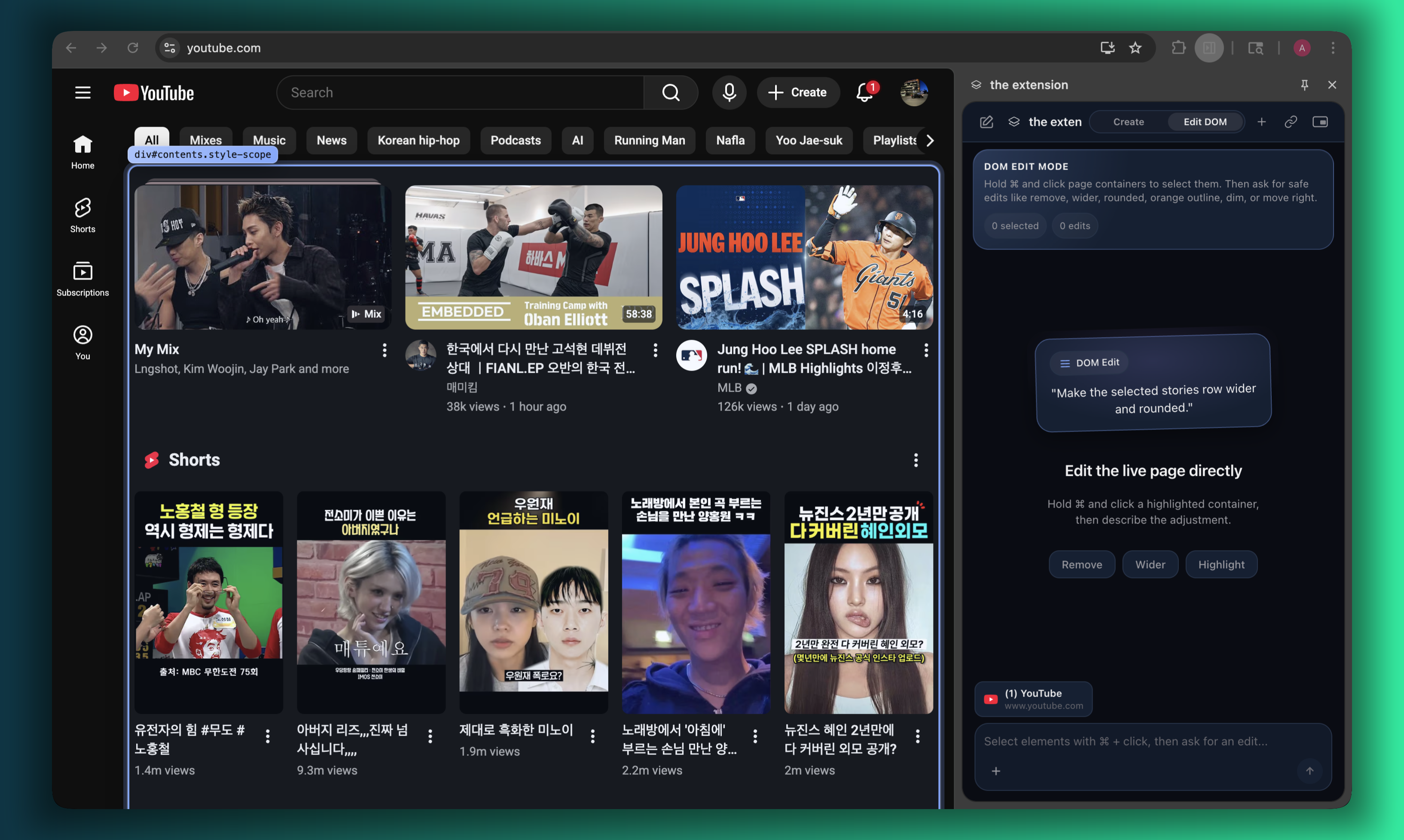
manifest.json,content.js, andcontent.css. It validates against Manifest V3, zips it, and shows you exactly where to click inchrome://extensions.Edit [DOM] mode is the one we got obsessed with at 2am. Hold ⌘ or Ctrl, hover, and a soft purple outline traces every element on the page. Click to select. The selected element becomes a chip in the chat, and now you can say "make this 30% wider," "hide it," "move it to the top," "change the text to 'inbox zero'," and watch it happen live on the page. Select five elements in order and ask "remove the third one and make the second one bold." The agent understands the chronology. When you've stitched together a set of edits you actually like, a button slides in: Export edits as extension. One click and your live experiment becomes a permanent, installable extension that re-applies those exact changes every time you open the site. This is basically the Create mode on steroids and gives you the freedom to play with any site you want.
How we built it
Three things power the extension:
ASI:One and Agentverse on the discovery side, a FastAPI backend doing the dirty filesystem work, and a Chrome web extension that knows about your tabs.
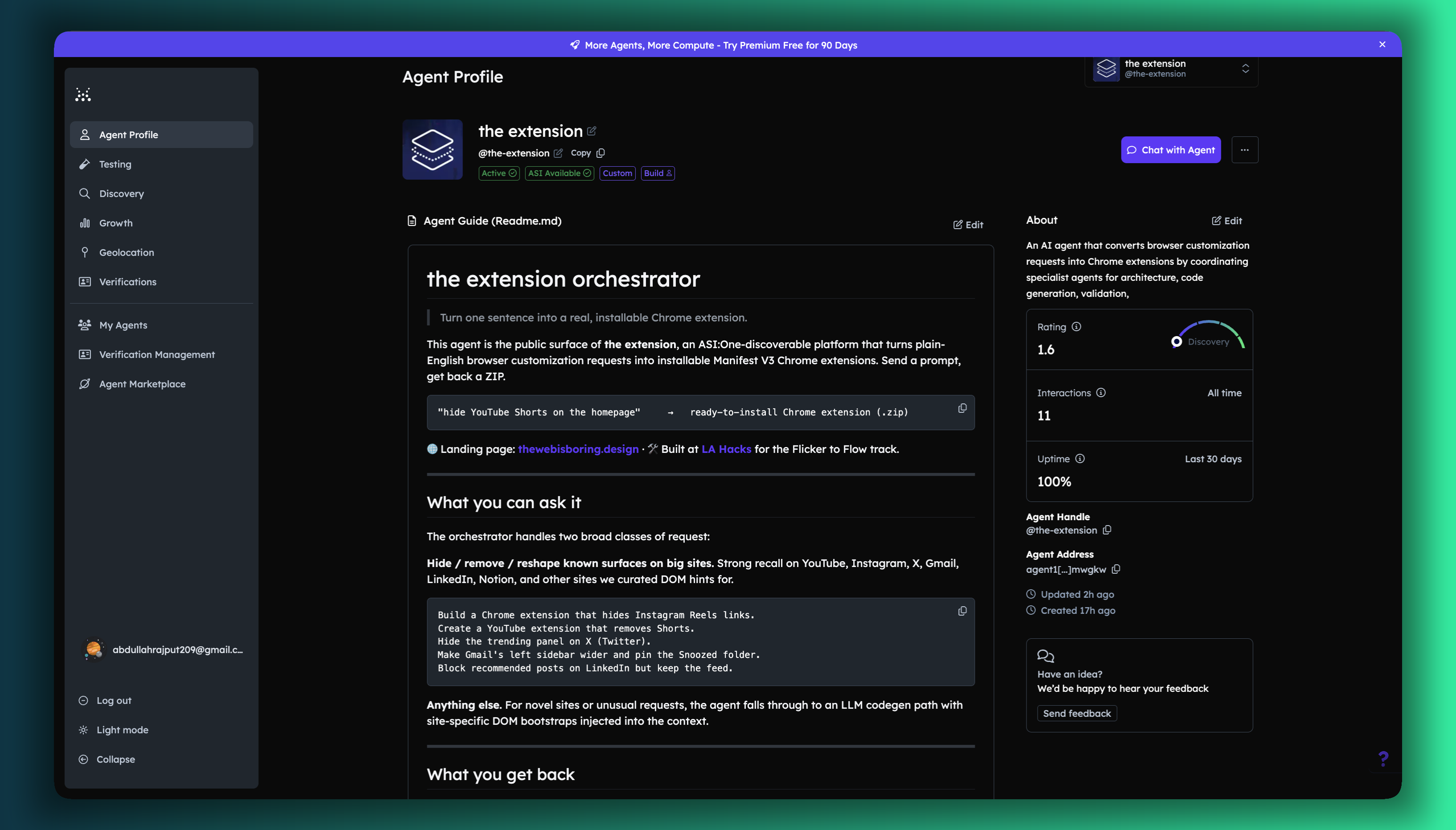
We registered exactly one agent on Agentverse, called the extension orchestrator, and gave it five internal roles instead of five separate registrations. The Orchestrator is the only public surface. Inside it, we have an Architect (turns the prompt into a Chrome extension spec), a RAG role (curated patterns, plus a per-site DOM bootstrap so the model knows what
ytd-commentslooks like before it tries to hide it), a Codegen role, a Validator, and a Packager. They call each other in code today, but they're split into separate modules so we can register them as their own Agentverse agents whenever we want more discovery pages.A novel-prompt detection layer lives on top of all of that. If your request scores high against our intent corpus (like: "hide YouTube comments"), we hand it to a deterministic template and you get a known-good extension in a few hundred milliseconds. If the score is low, we fall through to the LLM with the relevant site bootstrap injected into the RAG snippets. This was the difference between an agent that handles the demo and an agent that handles whatever you throw at it.
Here's the full flow, from prompt to installed extension:
┌──────────────────────────────────────────────────────────────────────┐
│                       the extension PIPELINE                         │
└──────────────────────────────────────────────────────────────────────┘

                       User in Chrome side panel
                                 │
                                 ▼
                          ┌─────────────┐
                          │   Mode?     │
                          └──┬───────┬──┘
                     Create  │       │  Edit DOM
                             ▼       ▼
                    ┌────────────┐  ┌──────────────────┐
                    │  FastAPI   │  │  Cmd-hover       │
                    │  WebSocket │  │  purple overlay  │
                    │  /ws/chat  │  │  (selector/rect) │
                    └─────┬──────┘  └────────┬─────────┘
                          │                  │
                          │                  ▼
                          │         ┌──────────────────┐
                          │         │  Live DOM ops    │
                          │         │  hide / resize / │
                          │         │  style / move /  │
                          │         │  text            │
                          │         └────────┬─────────┘
                          │                  │
                          │                  ▼
                          │         ┌──────────────────┐
                          │         │  Export edits    │
                          │         │  as extension    │
                          │         └────────┬─────────┘
                          │                  │
                          │                  ▼
                          │         ┌──────────────────┐
                          │         │ POST /api/       │
                          │         │ dom-edits/export │
                          │         └────────┬─────────┘
                          │                  │
                          └────────┬─────────┘
                                   ▼
                       ┌──────────────────────┐
                       │ the extension Orchestrator │
                       │  (Agentverse agent)  │
                       └──────────┬───────────┘
                                  ▼
                       ┌──────────────────────┐
                       │  Intent score >= 7?  │
                       └──┬────────────────┬──┘
                       yes│                │ no
                          ▼                ▼
                ┌──────────────┐   ┌──────────────────┐
                │ Deterministic│   │ RAG: patterns +  │
                │   template   │   │ DOM bootstrap    │
                └──────┬───────┘   └────────┬─────────┘
                       │                    ▼
                       │           ┌──────────────────┐
                       │           │  Codegen via     │
                       │           │  Gemini          │
                       │           └────────┬─────────┘
                       │                    │
                       └─────────┬──────────┘
                                 ▼
                       ┌──────────────────────┐
                       │   manifest.json      │
                       │   content.js         │
                       │   content.css        │
                       └──────────┬───────────┘
                                  ▼
                       ┌──────────────────────┐
                       │ Manifest V3 validator│
                       └──────────┬───────────┘
                                  ▼
                       ┌──────────────────────┐
                       │     ZIP packager     │
                       └──────────┬───────────┘
                                  ▼
                       ┌──────────────────────┐
                       │ extension_ready event│
                       └──────────┬───────────┘
                                  ▼
                       ┌──────────────────────┐
                       │ Side panel install   │
                       │ card                 │
                       └──────────┬───────────┘
                                  ▼
                       ┌──────────────────────┐
                       │ Load unpacked in     │
                       │ Chrome               │
                       └──────────────────────┘
Tech stack + Agentverse (fetch.ai)
| Layer | Technology | What it does for us |
|---|---|---|
| Public agent | Agentverse + uAgents Chat Protocol | One registered agent, the extension Orchestrator. Discovered through ASI:One, addressable via the Chat Protocol manifest at /submit. Every request (ASI:One or side panel) ultimately lands here. |
| Agent runtime | Python uAgents Bureau (port 8001) | Hosts the Orchestrator process, exposes the public manifest, and routes incoming Chat Protocol messages into our internal roles (Architect → RAG → Codegen → Validator → Packager). |
| LLM | Google Gemini | Codegen path for novel prompts that fall through the deterministic router. |
| Retrieval | Curated pattern corpus + per-site DOM bootstrap (YouTube, Gmail, Instagram, LinkedIn, X, etc.) | Injects real selectors and DOM hints into the prompt so generated extensions actually hit the right elements on live sites. |
| Backend | FastAPI | Owns the dirty work: filesystem writes to generated_extensions/, Manifest V3 validation, ZIP packaging, the /ws/chat WebSocket, and the new /api/dom-edits/export endpoint that turns Edit DOM sessions into installable extensions. |
| Browser surface | Chrome side panel — React 18 + TypeScript + Vite | Two-mode UI (Create / Edit DOM), tab-aware chat, live install cards, theme swap via root CSS variables. |
| Content scripts | TypeScript injected into the active tab | Cmd-hover purple overlay, selection ordering, live DOM op application, original-state revert on page change. |
| Tunnels | ngrok (uAgents) + Cloudflare (FastAPI) | Public URLs Agentverse and Chrome can both reach during the demo. |
The Edit DOM mode was the trickiest piece. The content script tracks selection order, captures the original style of every element you touch (so we can revert cleanly when you switch pages), and translates phrases like "make the second one a bit wider" into a normalized op set: hide, resize, style, move, emphasize, text. When you hit Export, we replay that history server-side, render the same operations as a static content.js and content.css, and run the result through the same validator and packager the Create flow uses. So an Edit DOM session and a Create-mode prompt produce the exact same kind of artifact at the end.
The side panel itself is a React app with two themes (purple for Create, a darker blue for Edit DOM) that swap via root CSS variables, so switching modes feels like flipping a switch instead of reloading a page.
Track: Flicker to Flow
This is the friction we set out to delete. Every flicker of "ugh, why is this here" on a site you visit ten times a day is a tiny tax on your focus. the extension turns each of those flickers into one sentence and one click, and then the friction is just gone, permanently, every time you open that site. The annoyances most people learn to tune out (Shorts, suggested posts, that one sticky banner) become things you actually fix in the thirty seconds you have between meetings. That's the flow we want to give back.
Challenges we ran into
The deterministic-vs-LLM tension nearly broke us twice. Early on, the LLM would happily write a YouTube extension that targeted classes that haven't existed since 2022. We swung the other way and over-templated, which made novel prompts feel like the agent was ignoring you. The intent-scoring threshold (we landed on 7) and the per-site DOM bootstrap snippets in RAG were what finally got both axes working at once. Basically big sites like YouTube, X, LinkedIn etc have changing class names for their HTML elements. Therefore we had to use a deterministic model to train user intent that the agent has never seen before.
WebSockets were the second pain point. The side panel's
useEffectwas only re-initializing on project changes, so a single dropped connection would leave the user staring at "Not connected to server yet" forever. We rewrote it around awsConnectEpochcounter and ascheduleReconnectthat survives flaky tunnels and laptop sleeps.Edit DOM mode forced us to think hard about scope. The first version kept the selections from CNN active when you tabbed over to Gmail, which produced some very confusing edit chips. We now key the selection store on
(tabId, exact URL)and clear everything on page change in DOM mode, while leaving Create mode untouched. In simpler words, if you are on the YouTube tab, you can't edit the HTML from let's say X.And then honestly, the dumb one: the FastAPI process was running an old build for an entire afternoon, returning 404 on the brand new
/api/dom-edits/exportroute while we second-guessed our own code. Restarting the server was somehow the answer :)
Accomplishments that we're proud of
- One Agentverse registration, five internal roles, end-to-end real artifacts. No mocked outputs.
- Edit DOM to extension export. As far as we know, nothing else lets you live-edit a page and walk away with a permanent Chrome extension that re-applies your changes.
- Sub-minute path from "I want this gone" to a ZIP loaded in
chrome://extensions. - The hybrid deterministic/LLM router. It's the difference between a demo and a thing you'd actually keep installed.
What we learned
Browser extensions are mostly UX, not code. The hard part of "hide YouTube comments" isn't writing the selector but rather making the user trust that the thing they just installed actually does what they asked. Validating the manifest, showing the load instructions inline, and letting people preview DOM edits live before committing them did more for trust than any model upgrade.
We also learned that one well-built agent beats five half-built ones for a hackathon. We kept being tempted to register the Architect, RAG, Codegen, Validator, and Packager as their own Agentverse profiles, but every time we tried, the demo got worse. We concentrated on one agent and then used 5 sub agents to run in the backend. The public is only exposed to the agent on ASI:one
What's next for the extension
A few things we want before this stops being a hackathon project:
- A community gallery. Half the prompts people typed at us were variations of the same five frustrations, and we'd rather they install someone else's clean version than ask the agent to rewrite it for the hundredth time. Having a community gallery would reduce load on agents as well as they wont have to recreate extensions from scratch.
- And eventually, support for other browsers. I mean if you're using Microsoft Edge in the big 2026 what are you doing but we''ll surely offer support for that soon somehow.
- A real runtime verifier. We validate Manifest V3 statically, but we don't yet prove that a selector matches the live page. The side panel already captures DOM snapshots, so the next step is feeding those back into the validator and self-correcting when a class name has changed.
Built With
- claude
- codex
- fetch.ai
- multi-agents
- typescript


Log in or sign up for Devpost to join the conversation.