-
-
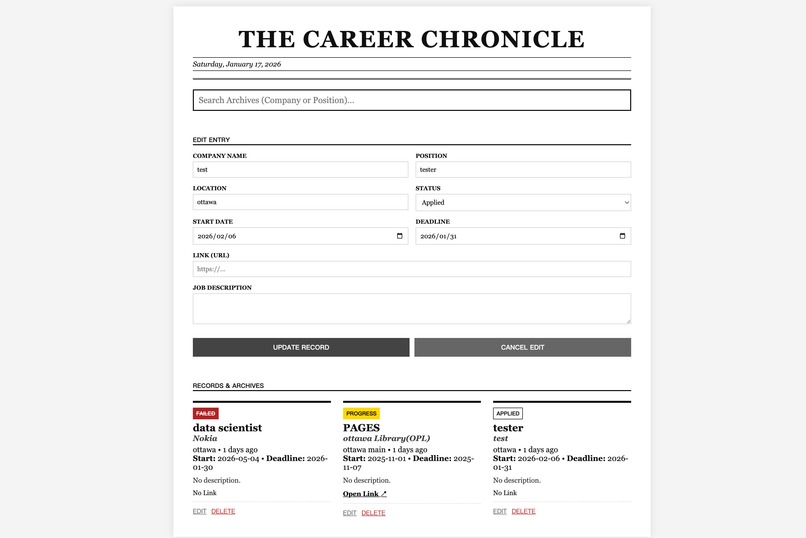
Web interface
For testing: Username:admin password:pascode
Inspiration
Job hunting is often a chaotic and demoralizing "full-time job." We found ourselves drowning in messy Excel spreadsheets, losing track of application dates, and feeling overwhelmed by the lack of organization. We realized that the tools we use to track our careers shouldn't be boring—they should be inspiring.
We wanted to transform the mundane task of data entry into a "publishing ritual." Drawing inspiration from the classic typography of The New York Times, we built The Career Chronicle to turn every job application into a front-page headline, bringing a sense of importance and order to the job search process.
What it does
The Career Chronicle is a retro-styled, cloud-native personal database for job seekers.
"Publish" Applications: Users can record companies, positions, job descriptions, deadlines, and links in a structured format.
Time Tracking: The system automatically calculates and displays exactly how many days have passed since an application was submitted (e.g., "Applied 3 days ago").
Omni-Search: A powerful search bar allows users to instantly filter archives by looking through every field—including the full text of Job Descriptions, locations, and statuses.
Status Management: Users can track the lifecycle of an application (Applied → Interviewing → Rejected) with visual status tags.
Cross-Device Sync: Because it's cloud-based, users can add a job on their laptop and check their status on their phone while on the go.
How we built it
We utilized the MERN Stack philosophy (MongoDB, Express, Node.js) but opted for Vanilla JS on the frontend to keep the application lightweight and focused on the retro design.
Database (The Core): We used MongoDB Atlas as our cloud database.
We leveraged MongoDB's Flexible Schema to iterate rapidly. Mid-project, we needed to add status and link fields; MongoDB allowed us to adapt our data model instantly without complex migrations.
We used Mongoose for data modeling to enforce structure where needed (like required dates) while keeping text fields flexible.
Backend: A Node.js and Express REST API handles all CRUD operations.
For the search feature, we implemented advanced MongoDB Regex queries using the $or operator to scan multiple fields simultaneously.
Frontend: We built a custom interface using HTML5, CSS3 (Grid/Flexbox for the newspaper layout), and Vanilla JavaScript for DOM manipulation and API integration.
Deployment: The app is hosted on Render, utilizing environment variables to secure the MongoDB Connection String and implementing express-basic-auth for privacy.
Challenges we ran into
Search Logic: Initially, our search only filtered by Company Name. We wanted it to be smarter. We had to refactor our backend query logic to traverse the JD (Job Description) text and Status fields simultaneously.
Date Formatting: Handling dates is notoriously difficult. We struggled with discrepancies between the MongoDB storage format (ISO String) and the HTML Date Picker (YYYY-MM-DD). We solved this by creating a dedicated helper function to "sanitize" dates before they populate the edit forms.
Environment Management: Configured the frontend to dynamically switch between localhost for development and relative paths for production deployment to avoid CORS and 404 errors on the live site.
Accomplishments that we're proud of
The "Omni-Search" Feature: We are really proud of how fast and responsive the search is. Typing "Python" instantly brings up every job description mentioning that skill, thanks to MongoDB's indexing capabilities.
Mobile Responsiveness: Successfully translating a complex multi-column newspaper layout into a clean, readable mobile experience so the app is actually usable on the go.
Clone-and-Go Architecture: We built the app so that anyone can fork our repo, add their own MONGO_URI in an .env file, and deploy their personal instance in under 5 minutes.
What we learned
MongoDB Best Practices: We learned the importance of IP Whitelisting in MongoDB Atlas for secure cloud connectivity.
Full-Stack Flow: We gained a deeper understanding of how data flows from a user's input, through a fetch request, into a Node.js server, and finally settles into a MongoDB collection.
Error Handling: We learned that "silent failures" are the worst. We implemented robust try...catch blocks in our frontend renderer to ensure that if one record has bad data, the whole page doesn't crash.
What's next for The Career Chronicle
Data Visualization: Using MongoDB's aggregation framework to generate charts showing "Applications per Week" or "Interview Success Rate."
AI Integration: implementing a feature to analyze the stored Job Descriptions and suggest keyword optimizations for resumes.
Email Reminders: Adding a background job to send email nudges for applications that haven't received a response in over 14 days.

Log in or sign up for Devpost to join the conversation.