Inspiration
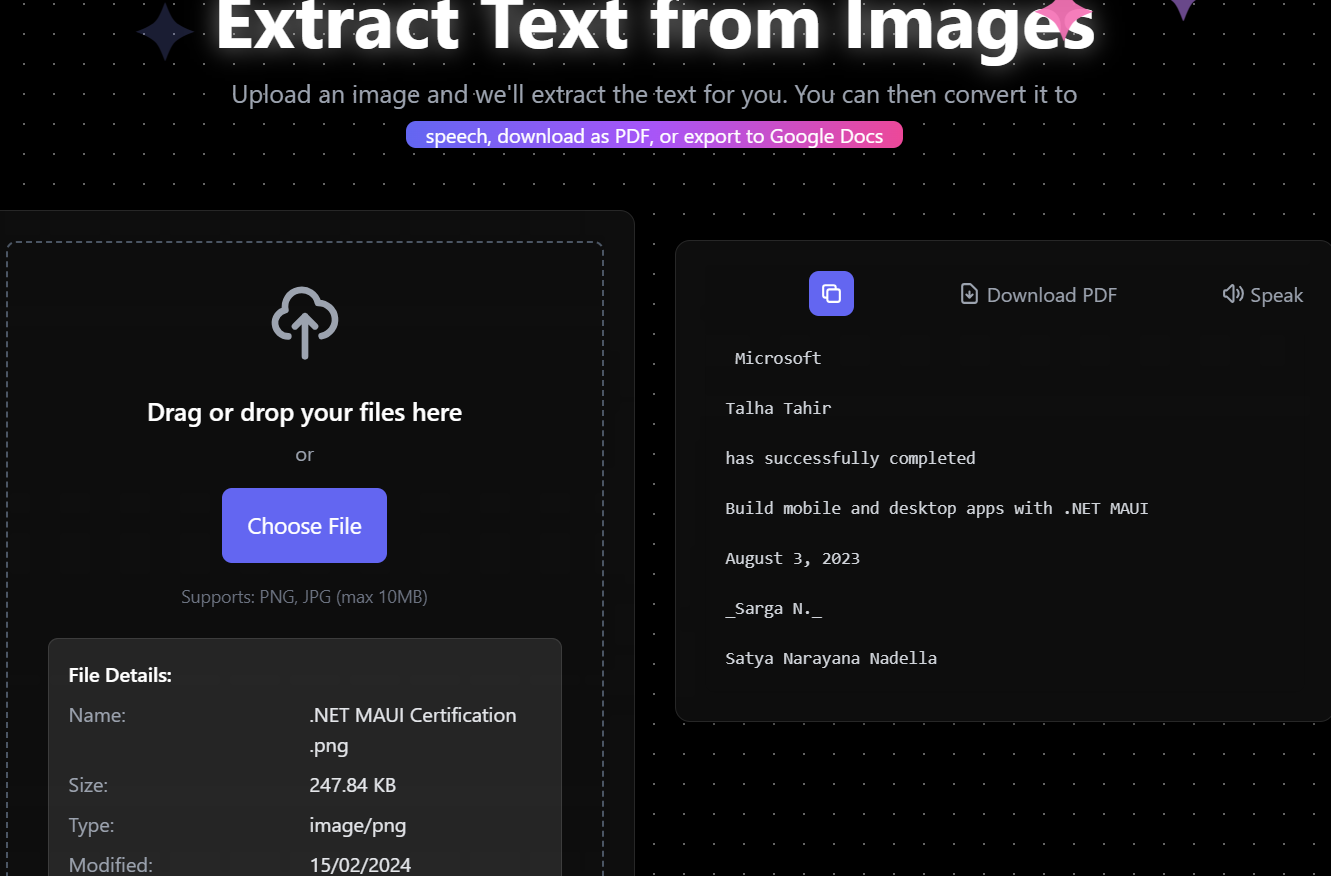
The idea for this project came from the need to streamline the process of extracting text from images, whether for productivity, digitizing documents, or accessibility purposes. I wanted to create a solution that was both easy to use and efficient, leveraging modern web technologies.
What it does
Our Angular OCR app makes extracting text from images faster and easier, empowering users to digitize content in seconds and boost productivity.
How we built it
- Frontend: Developed using Angular 18 for a dynamic and responsive user interface. Used Tailwind CSS for styling to ensure a clean and modern design.
- OCR Integration: Integrated Google's Gemini API, a powerful large language model, to handle text recognition from uploaded images. Implemented features to preview the uploaded image and display extracted text seamlessly.
- Hosting: Deployed on Vercel, ensuring fast and secure access to the app.
Challenges we ran into
- Image Quality Issues: Low-quality or distorted images posed a challenge in achieving accurate text extraction. I addressed this by experimenting with pre-processing techniques like resizing and enhancing contrast.
- Performance Optimization: The OCR process can be resource-intensive, especially for large images. I worked on optimizing the app by limiting file sizes and implementing a loading indicator to improve user experience.
- Cross-Browser Compatibility: Ensuring consistent performance and appearance across different browsers required rigorous testing and debugging.
Accomplishments that we're proud of
Seamless OCR Integration: Successfully implemented gemini service to extract text from images with high accuracy, making the app reliable for users.
User-Friendly Interface: Designed an intuitive and clean UI using Angular and Tailwind CSS, ensuring that even non-technical users can navigate and use the app effortlessly.
Real-Time Processing: Optimized the app for real-time text extraction, providing quick results even for moderately large images.
Deployment: Successfully deployed the app on Vercel, ensuring fast and secure access for users.
Overcoming Challenges: Solved complex issues like handling poor-quality images and optimizing OCR performance, which improved the app's reliability and usability.
Positive Feedback: Received encouraging feedback from peers and testers who found the app useful and appreciated its simplicity and functionality.
Technical Growth: Enhanced my skills in Angular development, OCR technology, and performance optimization while working on this project.
What we learned
While building this project, I gained valuable insights into:
- Angular Framework: Enhancing my frontend development skills and learning how to build responsive and interactive user interfaces.
- OCR Technology: Understanding how Optical Character Recognition (OCR) works and prompting Gemini to extract text from images.
- API Integration: Managing asynchronous operations and optimizing the app for real-time text extraction.
- Error Handling and UX Design: Improving the app’s user experience by gracefully handling errors and edge cases, such as low-quality images.
What's next for Textractor
- Add support for multiple languages in OCR.
- Integrate real-time text translation for extracted content.
- Implement a cloud-based backend for storing and sharing extracted text.
Built With
- angular18
- geminiapi
- tailwindcss

Log in or sign up for Devpost to join the conversation.