Text-to-Assistant: Your Conversational AI Assistant Generator 🤖
Are you new to building voice assistants with Voiceflow? Don't worry, we've got you covered! Introducing Text-to-Assistant, a powerful tool designed to help you take your first steps in creating conversational AI assistants with ease. 🚀
Overview 📝
As Voiceflow enthusiasts, we understand that getting started with building assistants can be challenging at times. New users often struggle to adapt the templates provided during onboarding to real-world use cases. That's where Text-to-Assistant comes in! 💡
Text-to-Assistant is designed to simplify the process of creating voice assistants. While we initially attempted to train a model to understand Voiceflow's file structure, we ultimately opted for a more straightforward approach—training via prompt in a simplified version of the project file. This approach allows you to use the generated blueprint as a foundation for building your assistant. 🛠️
We also explored integrating a TikZ compiler to generate diagram representations of the assistant's flow. Although we couldn't fully implement this feature, we provide the TikZ code and instructions on how to compile it on Overleaf. 📊
With the right support from Voiceflow, we envision integrating Text-to-Assistant directly into the Voiceflow platform or as a ChatGPT plugin. This integration would enable users to seamlessly switch between automated and block-building voice assistants using a Push-to-Talk button or Prompt bar on the canvas. 🎛️
Future Opportunities includes: Interaction Model Generation and Graphic Interface Generation
Sources: Voiceflow, TikZ, LaTeZ Online (https://latexonline.cc/)
Techniches: Prompt Engineering, Prompt Orchestration, CoT, Few-Shot Prompting
Hackathon Prompt Hacks 2023 🏆
Text-to-Assistant is our entry for the Hackathon Prompt Hacks 2023, hosted at prompthacks.devpost.com. Our entry is a Conversational AI assistant generator that can produce instructions for creating voice assistants in just seconds! ⏱️
Simply input your desired assistant, and Text-to-Assistant will provide you with instructions and a diagram illustrating the assistant's flow. 📋
🎥 Short Video (2 Minutes): youtu.be/xXLpz6KnIyo
🎥 Long Video (4+ Minutes): www.loom.com/share/ebda3319f2fd42a6945df5e5c7fda722
How It Works 🧩
Text-to-Assistant uses a series of building blocks to create conversational AI applications. Each block has its own behavior and can be connected to create the desired flow. The available blocks are mapped directly to Voiceflow to facilitate imediate conversion, and include:
- Start: The beginning of the application.
- Talk: Presents text or voice.
- Listen: Captures user input (e.g., known options or entire reply).
- Condition: Forks directions based on variable values.
- Set: Defines or alters variable values and states.
- API: Connects to external services and retrieves responses.
- JavaScript: Executes JavaScript code to manipulate variables.
- End: The end of the application.
Text-to-Assistant will present the result in a structured format, along with a TikZ diagram to visualize the conversational AI application. 📐
This is the prompt we use to generate the flow:
You are a Conversational AI assistant Generator.
You will create a conversational AI application generator engine.
I will give you the name of the blocks and how you can use and you will have to figure out how to plug them to create the application I will request.
You will ask me what do I want to create.

Block: Start
Behaviour: This is the begining of the application

Block: Talk
Behaviour: Presents text or voice

Block: Listen
Behaviour: Capture what the user is about to say. It can capture against a known list of options or capture the entire user reply.

Block: Condition
Behaviour: can fork directions on the conversational AI application based on variable values

Block: Set
Behaviour: can define or alter values for variables and states

Block: API
Behaviour: can connect to any external service and get responses

Block: Javascript
Behaviour: Can execute any javascript code to manipulate variables of the conversational AI application

Block: End
Behaviour: This is the end of the application

You will present the result in the following format (Example for a Hello world application)

BlockId:001
BlockType: Start
Child:002

BlockId:002
BlockType: Talk (Hello World)
BlockChild:003

BlockId:003
BlockType: End
BockChild: null
And this is the prompt we use to generate the diagram
...
create a representation of the above flow in TikZ.
Example
A user might be interested in creating an Assistant to help with Meeting Room reservations. Upon prompting "Create an assistant to be used on a meeting room reservation".
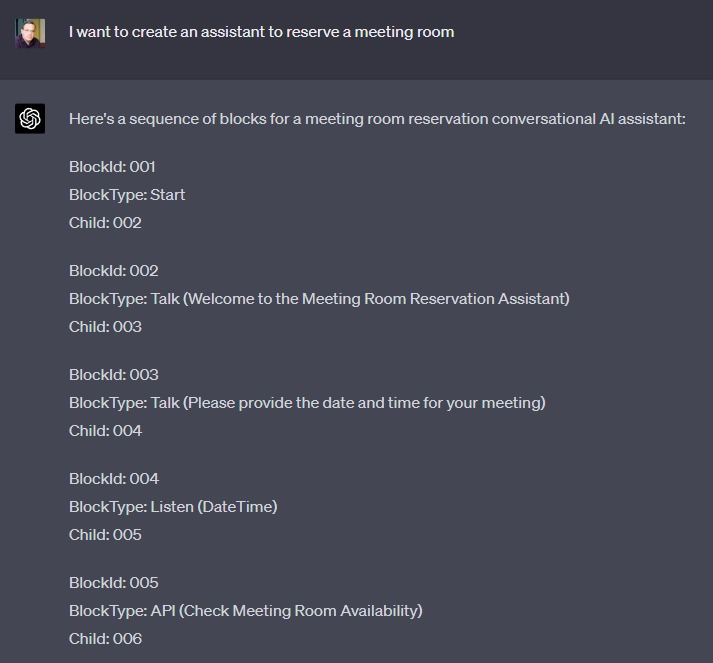
And here is the image that is generated from the flow.
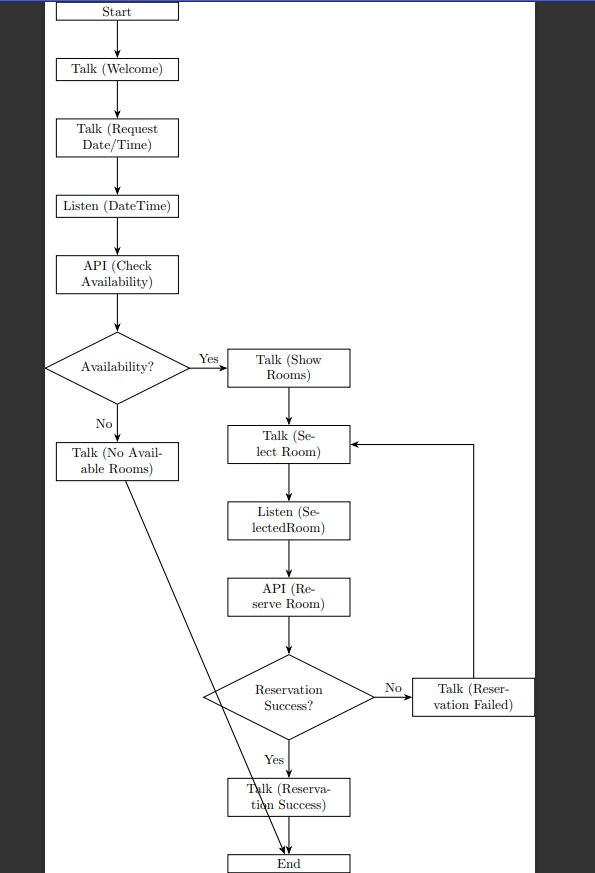
With both documents as intructions, the user can now create the flow on Voiceflow.
Let's Get Started! 🎉
Ready to create your own conversational AI assistant? Give Text-to-Assistant a try and experience the power of automation and simplicity in voice assistant development. Let's get started! 🌟
Built With
- gpt4
- latex
- voiceflow


Log in or sign up for Devpost to join the conversation.