Inspiration
I had to often write many tests using Selenium and often many of these tests were just combinations of simple actions. I decided to create a GUI that will combine all these tests together.
What it does
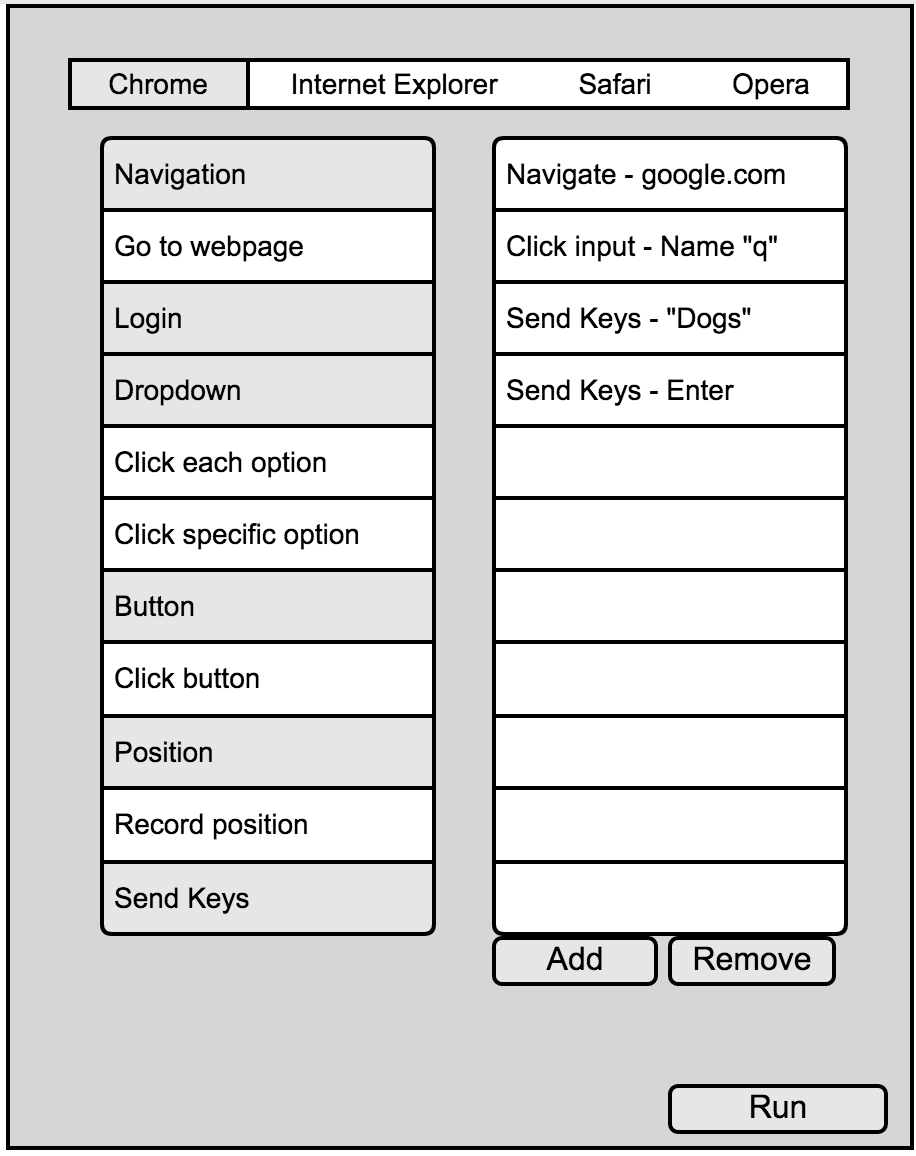
On selecting on your desired web browser, you can choose what you want your Selenium driver to perform. In the example above, I navigated to google.com, found an element with the name attribute "q" , send keys "dogs" and hit enter. This will led me to the following page: https://www.google.ca/search?q=dogs
Testr is really powerful as it can save companies a lot of time, and can accelerate the testing process. It can even rescale the window sizes so you can test the webpage based on the size of the screen. It supports Chrome, Safari, Opera and Firefox.
How I built it
Using JavaFX, I was able to design the GUI. I created lists with basic functions that I usually use while testing my webpages, using these functions as building blocks, on clicking "add" it would add it to a linked list of functions I wish to execute. Clicking on "remove" removes the building block from the queue. You can specify which element you want to perform the action on using either id, class (not recommended in all cases), name, xpath and attributes. This ensures that all the cases are covered. I am using the concept of multi-threading on the whole GUI to make it responsive while the Selenium tests are running. The results of the test are logged simultaneity.
Challenges I ran into
This is was very first project that I've worked on. I was new to programming when I started this project. It taught me fundamental programming and thinking.
Accomplishments that I'm proud of
I am now able to test my webpages in all the browsers without having to do that manually.
What I learned
From basic OOP concepts to complex multi-threading. I learned it all! This project took me about two months to complete and I worked on it alone and from scratch!
Developed For
I developed this for Knowroaming while on my co-op term. Therefore, I wouldn't be able to open source the code.

Log in or sign up for Devpost to join the conversation.