TestPilot
Inspiration
As a solo web developer, testing was one of my most dreaded tasks because it was both repetitive and time-consuming. Every new feature added meant more time writing tests, which added up fast.
I wanted to see if there was an alternative to building and maintaining my own automated testing pipeline; something more adaptable that required less setup and could adapt to changes in my application.
That led me to a simple question:
What if I could just describe what I wanted tested, and AI figured out the rest?
AI agents are particularly interesting for this because they can interact with websites through a browser in ways that are surprisingly similar to how humans do. Rather than writing a rigid script for every possible interaction, an agent could reason about a goal, navigate the application, perform actions, and report what it found.
That idea became TestPilot: an agentic web testing system where you describe what you want to know about your website, and a team of AI agents figures out how to test it.
What it does
TestPilot allows developers to describe a feature or aspect of their website they want to test using natural language.
For example:
"I want to test my user registration system. How easy is it for a new user to create an account?"
Instead of requiring the developer to manually write a test script, TestPilot creates a testing strategy and delegates the work to browser-controlling AI agents.
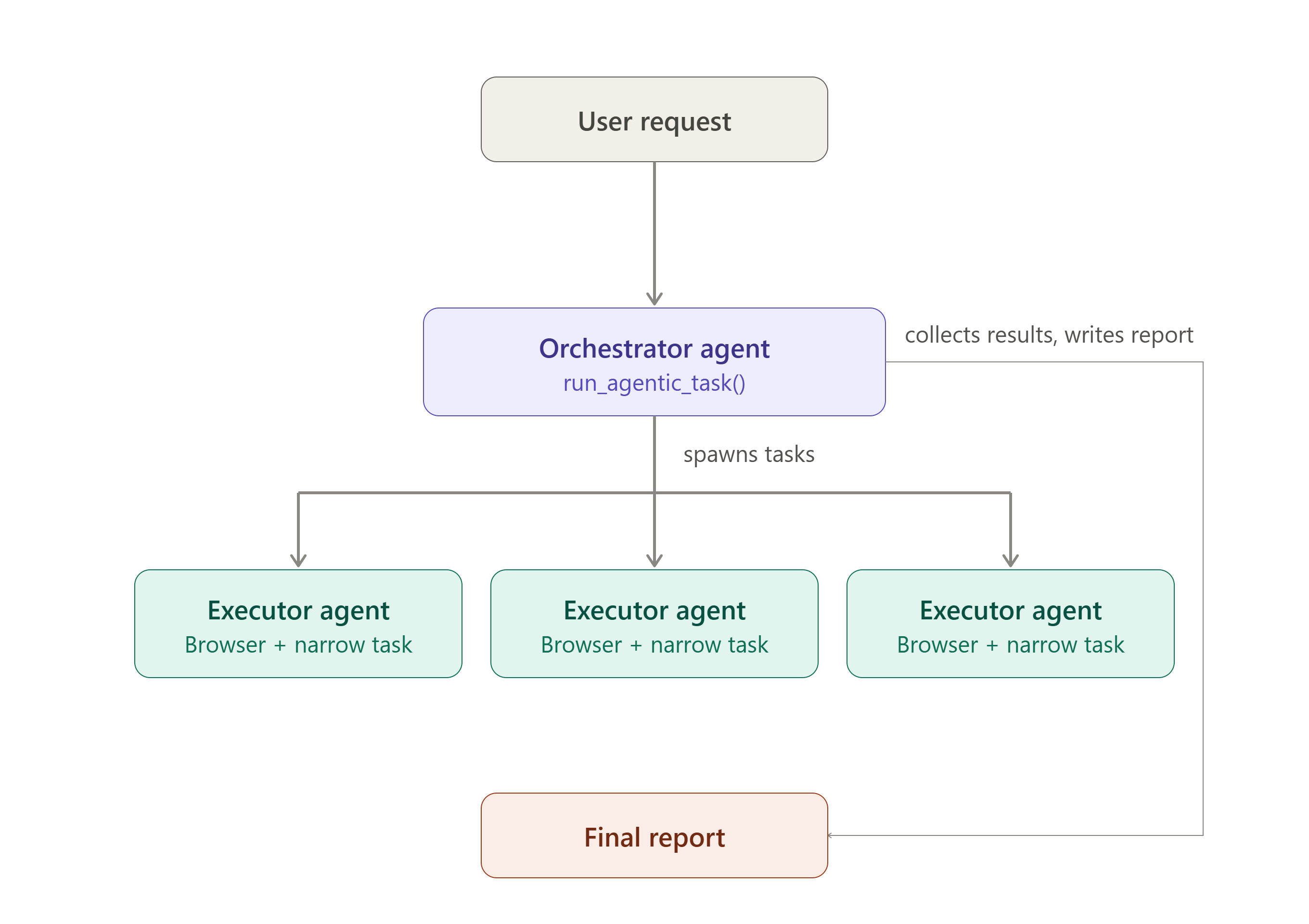
The process works in three stages:
1. Plan
An Orchestrator Agent receives the user's high-level testing request and determines how the feature should be tested.
For example, a request to test a login system might result in a plan containing tasks such as:
- Create a new account
- Log in with valid credentials
- Attempt to log in with an incorrect password
- Try submitting the form with missing fields
- Test the password recovery flow
The orchestrator can decide how many agents are needed, what each agent should do, and which groups of tasks should be run.
2. Execute
The orchestrator spawns Executor Agents, each of which is given a narrow, specific task.
Instead of telling one agent:
"Test the entire login system."
an executor might receive:
"Navigate to the signup page and create a new account using generated test credentials."
The executor then uses a real browser to interact with the application and reports what happened.
Multiple executor agents can run independently, allowing TestPilot to explore different parts of an application in parallel.
3. Report
After the executor agents finish, the orchestrator analyzes their results and generates a final testing report.
The report includes the issues discovered, successful tests, relevant logs, and screenshots that provide visual evidence of what happened during testing.
Testing at any level of specificity
One of the core features of TestPilot is that you don't have to know exactly how to write a test before you start.
If you have a vague request:
"I'm not sure how to test my checkout flow. Can you test it?"
TestPilot can figure out what should be tested and create a plan.
If you have a general goal:
"Test whether a new user can successfully create an account."
TestPilot can turn that goal into concrete test cases and execute them.
And if you already know exactly what needs to happen:
"Go to the signup page, create an account with these credentials, and verify that the user is redirected to the dashboard."
TestPilot can simply carry out the task for you.
You can tell TestPilot what to test, tell it how to test it, or start with almost no idea at all, and it can take it from there. This makes TestPilot useful across the entire testing process, from figuring out what should be tested to actually carrying out the test.
Why TestPilot?
Traditional automated testing is powerful, but there is a significant amount of work before a test can even run. Developers have to identify test cases, determine the steps, write the scripts, handle inputs and edge cases, maintain selectors, and update everything when the application changes.
TestPilot moves much of that work from the developer to the agents.
Instead of translating a testing requirement into dozens of individual test cases, a developer can simply describe what they want to know:
"Test my login system and see how easy it is for a new user to successfully log in."
The Orchestrator Agent turns that high-level request into a testing strategy and delegates the individual tasks to Executor Agents. The developer doesn't need to explicitly define every click, input, or test case ahead of time.
Built for rapid development
This flexibility is especially useful during rapid development and prototyping, where writing and maintaining a traditional test suite can sometimes take longer than building the feature itself.
When a developer changes a feature, they can give TestPilot a new high-level instruction rather than manually rewriting a collection of test cases. The agents can adapt their testing strategy to the new request, lowering the barrier to testing features that might otherwise go untested.
The advantage isn't just that the tests run automatically; it's that The tests themselves can be created automatically.
TestPilot turns:
"I need to write 20 tests for this feature."
into:
"Go test this feature and tell me what you find."
Ultimately, TestPilot is about making testing feel less like another development task and more like having another developer who can explore your application, figure out what to test, do the work, and report back.
How we built it
TestPilot is built around two major components:
- The Django web application
- The agentic testing system
Django Web Application
The Django application serves as both the backend and the frontend of TestPilot.
It handles:
- Storing testing runs
- Tracking agent tasks and their results
- Storing screenshots
- Storing execution logs
- Managing the state of testing runs
- Presenting the results to the user
The Django application also provides the interface where users can submit testing requests and view the resulting reports and evidence.
Agentic System
The agentic portion of TestPilot contains the agent prompts, tool definitions, and logic responsible for planning and executing tests.
All of the agents are built using the AWS Strands Agents SDK.
The agents also have access to custom tools that allow them to interact with the Django application's data layer. This allows the agents to record their progress, retrieve information, and save the results of their work.
The agents are split into two major categories.
Orchestrator Agents
Orchestrator Agents are responsible for the planning and summarization stages of testing.
They receive the user's high-level request and determine how it should be tested within the available constraints.
Their primary tool is:
run_agentic_task()
This tool allows an orchestrator to spawn a set of Executor Agents, each receiving a specific task.
An orchestrator can create multiple sets of agentic tasks as necessary. This means that the testing strategy does not have to be completely predetermined; we can allow the orchestrator to decide what needs to be tested as it explores the application.
The orchestrator ultimately collects the results and produces the final report.
Executor Agents
Executor Agents are responsible for actually interacting with the website.
They receive a very specific task from the orchestrator, such as:
"Create a new account using a generated email address and password."
This separation between planning and execution is an important part of TestPilot's architecture.
Rather than asking one large agent to plan, browse, reason, and execute an entire testing strategy at once, we break the problem into smaller tasks.
This allows each agent to focus on what it does best and also helps control the token usage of the system, since browser-based agentic tasks can become expensive when a single agent is responsible for a large, complicated workflow.
Each Executor Agent has access to a browser instance through the Strands SDK's local Chromium browser tool.
We also created custom tools for generating testing data such as:
- Email addresses
- Usernames
- Passwords
This allows agents to interact with applications that require account creation without requiring the developer to manually provide test data.
Challenges we ran into
Managing screenshots and visual evidence
One of the biggest challenges we encountered was managing screenshots produced during browser-based testing.
Screenshots are extremely valuable for automated testing because they provide visual evidence of what an agent actually encountered. A textual log might tell us that a button failed, but a screenshot can show exactly what the user would have seen.
The default behavior of the Strands SDK's local Chromium browser tool is to save screenshots to a predefined local directory.
However, TestPilot needs to associate every screenshot with the correct testing run and executor task so that the evidence can be displayed alongside the results.
To solve this, we created a subclass of the local Chromium browser implementation and overrode its default screenshot storage behavior.
This allowed us to control where screenshots were saved and associate them with the appropriate TestPilot run.
Accomplishments that we're proud of
We're proud that we were able to turn the idea into a fully deployable product rather than just a proof of concept.
The entire workflow is functional:
User request → Test plan → Agentic tasks → Browser interaction → Results → Final report
We're particularly proud of the separation between the orchestrator and executor agents. It allowed us to create a system where the AI can determine how something should be tested instead of requiring us to hardcode every possible testing workflow.
We're also proud of building the infrastructure around the agents, including task tracking, logging, screenshot management, and persistent results, which turns the underlying agent system into an actual usable application.
What we learned
Building TestPilot taught us a lot about both traditional web testing and agentic systems.
We learned how web applications are typically tested, including the importance of testing not only the happy path but also invalid inputs, unexpected user behavior, and edge cases.
We also learned how to design effective AI agents.
One of the biggest lessons was that giving an agent a broad objective is very different from giving it a well-defined task. By separating the planning and execution responsibilities, we were able to make the agents more focused and reliable.
We also gained experience working with the AWS Strands Agents SDK, including:
- Defining agents and their tools
- Designing prompts for different agent responsibilities
- Giving agents access to external functionality
- Running browser-based agents
- Managing multiple agentic tasks
- Connecting agents to our Django application's data
Most importantly, we learned that building an agentic application isn't just about giving an LLM access to tools. A large part of the engineering challenge is designing the right architecture, task boundaries, state management, and feedback loops around the model.
What's next for TestPilot
There are several directions we want to take TestPilot in the future.
More realistic tester personas
We want to fully implement our tester persona system.
Instead of simply running generic tests, users could ask TestPilot to test their application from the perspective of different types of users.
For example:
- A first-time user
- A frustrated user
- An impatient user
- A mobile user
- An accessibility-focused user
- An experienced user
- An edge-case-focused tester
Each persona could have different goals, behaviors, and expectations, allowing TestPilot to evaluate an application in a way that more closely resembles real human usage.
Dynamic test planning
We also want agents to be able to dynamically discover new testing opportunities.
For example, if an Executor Agent discovers a "Forgot Password" link while testing the login flow, the Orchestrator could recognize that as another relevant feature and automatically create a new task to test it.
This would turn TestPilot from a system that simply executes a predefined plan into one that can explore, discover, and adapt its testing strategy.
Token efficiency
Agentic browser interactions can be token-intensive, particularly when agents need to reason over many steps and screenshots.
We want to explore ways to make TestPilot more efficient, including better task decomposition, smarter context management, and identifying models that provide a good balance between cost, speed, and browser-use reliability.
Better testing reports
Finally, we want to make the generated reports even more useful by providing clearer severity rankings, reproduction steps, screenshots, and potentially automatically generated bug reports that developers can directly turn into issues.
Our ultimate goal is for TestPilot to feel less like an AI demo and more like an AI testing teammate that a developer can hand a feature to and say:
"Go test this and tell me what I need to fix."
Built With
- amazon-web-services
- django
- llm
- python
- strands

Log in or sign up for Devpost to join the conversation.