-
-
 GIF
GIF
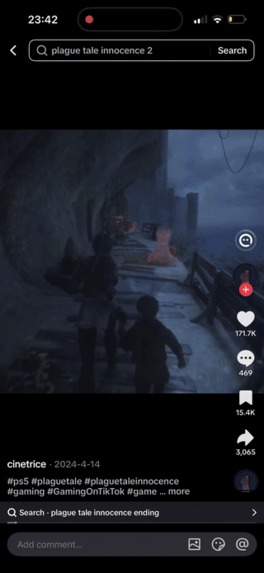
Saving a game from a TikTok
-
 GIF
GIF
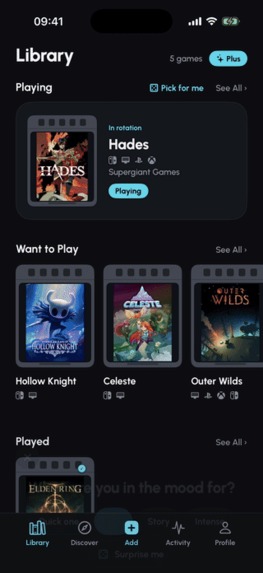
Pick for me
-
 GIF
GIF
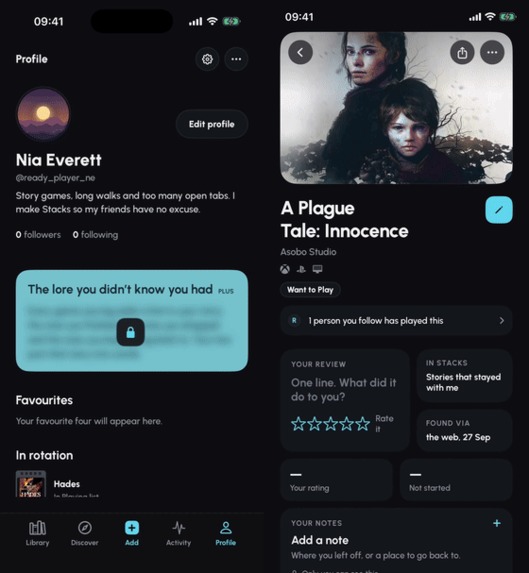
A friend starts a game from your Stack
-
 GIF
GIF
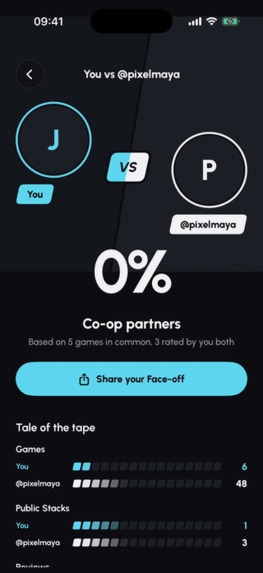
Face-off
-
 GIF
GIF
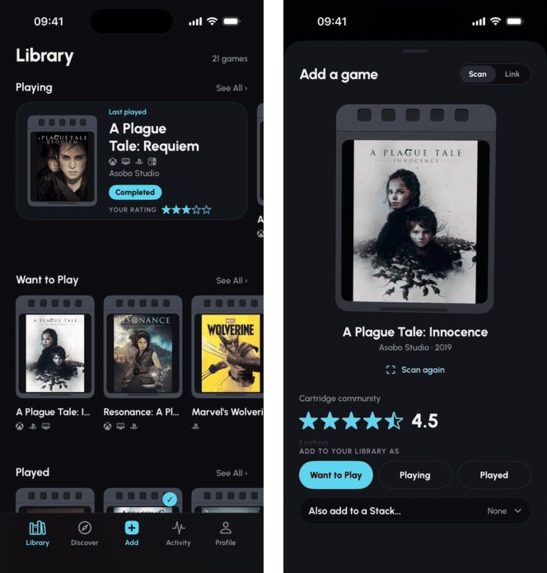
Rating a game, and spinning its 3D cartridge
-
 GIF
GIF
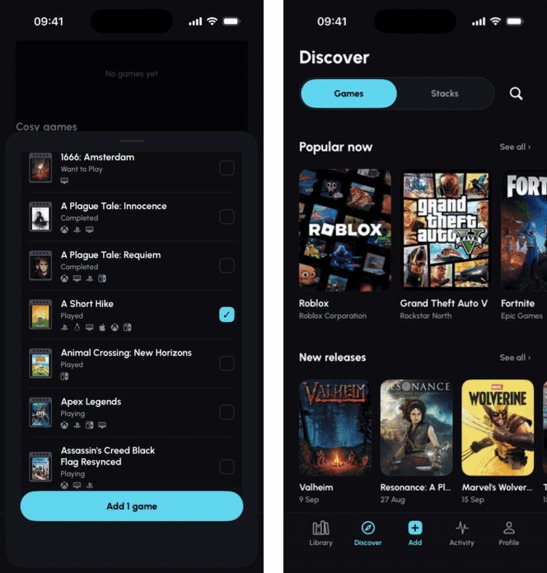
Building and sharing a Stack, and Discover
-
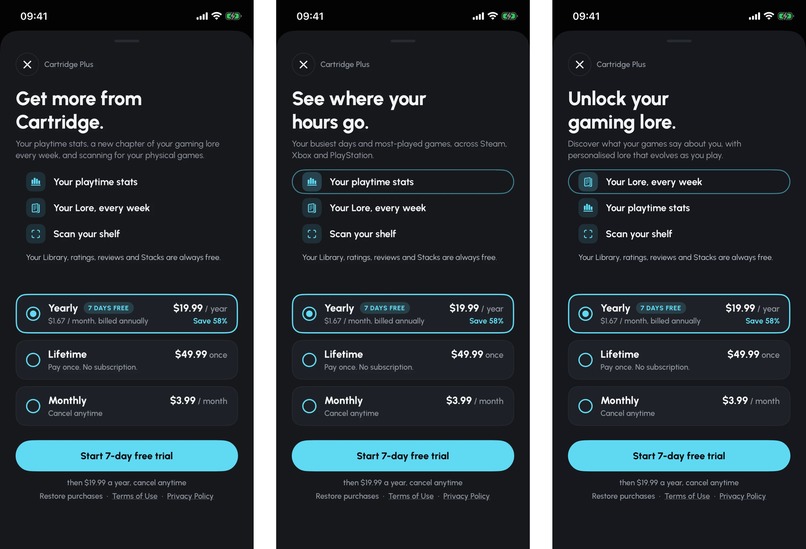
Cartridge Plus paywalls
-
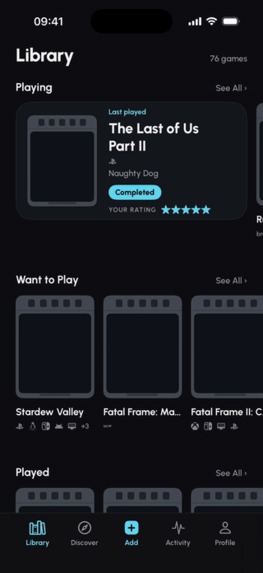 GIF
GIF
Scanning a game case
-

Cartridge app icon, 1024 x 1024
-

-
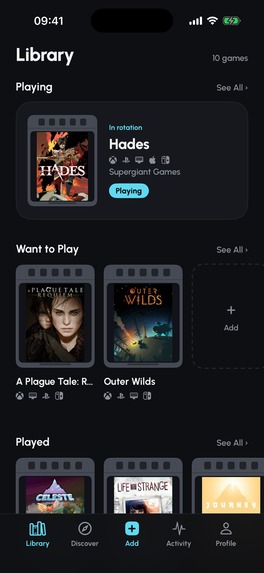
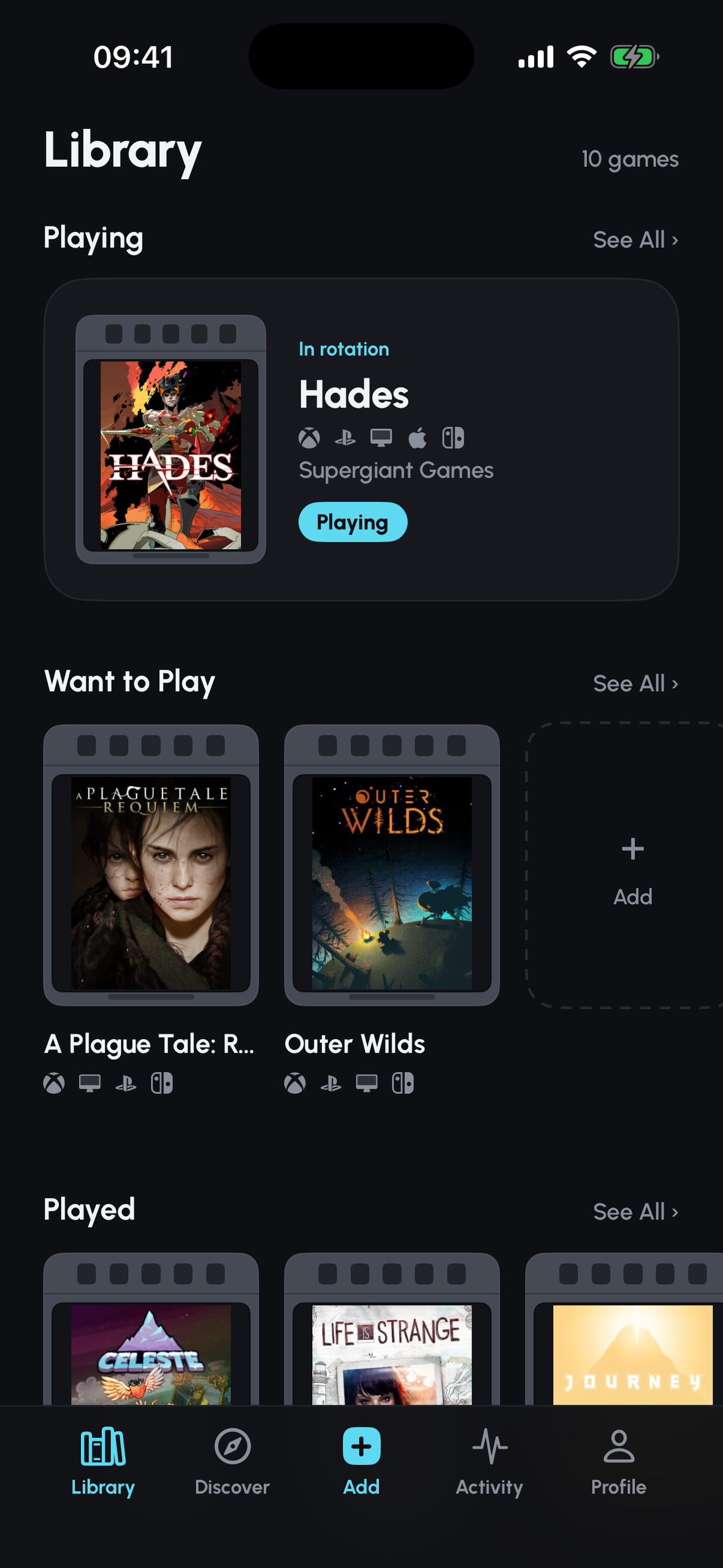
Screenshot (1179 x 2556, no device frame): your Library
-
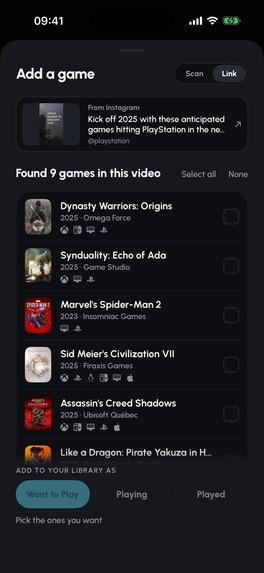
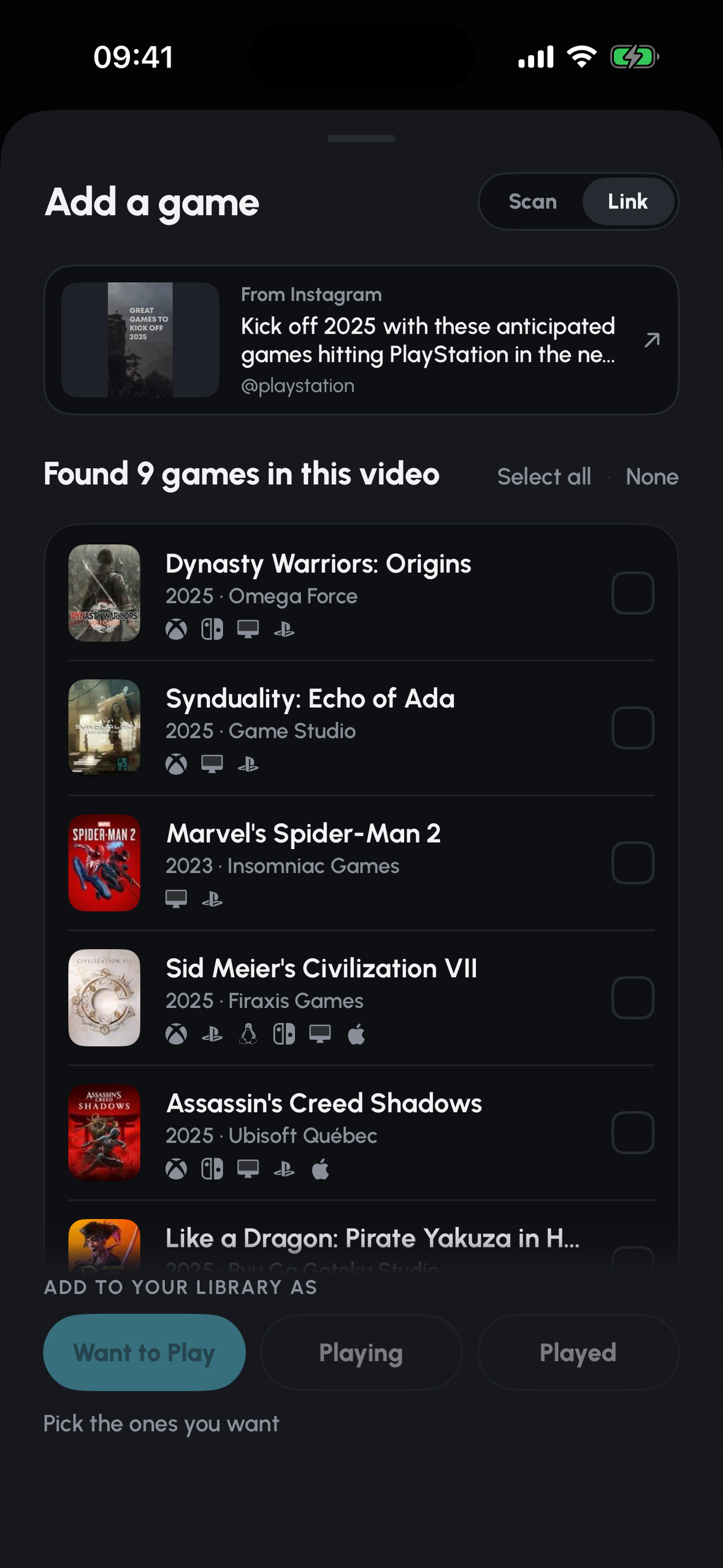
Screenshot (1179 x 2556, no device frame): 9 games found in an Instagram video
-
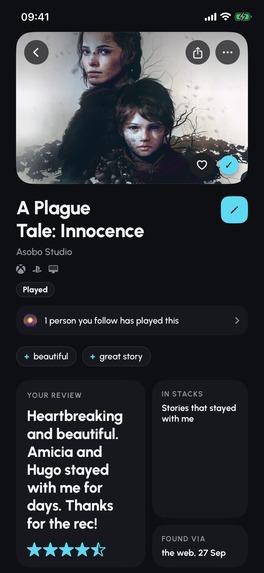
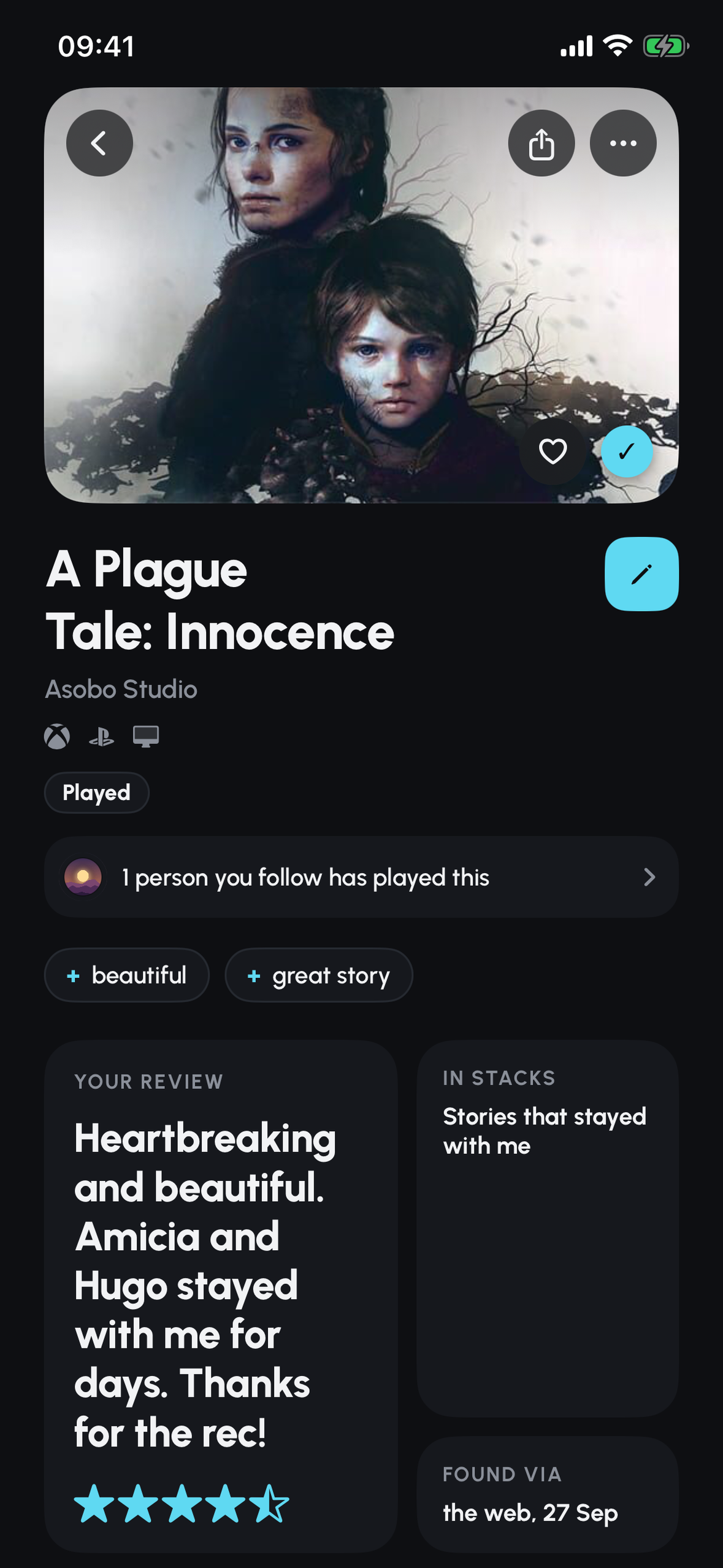
Screenshot (1179 x 2556, no device frame): a game page with your review


Inspiration
One of my favourite games ever started as a mystery. All I had were a few screenshots from a TikTok Live that never said what the game was. A little boy and his sister running and hiding around a cathedral, and a villain who looked a bit like a Pope/church leader. That's more or less what I typed into ChatGPT, and it took loads of back and forth before it finally came back with A Plague Tale: Innocence.
It shouldn't take detective work to find a game you've just watched, and most people wouldn't have had the patience I did. Once the stream's over, the game's pretty much gone with it.
Cartridge does the looking for you, then keeps the game with everything else you've played, rated and recommended to your friends.
What it does
Cartridge is a game tracker built around your friends that lets you add games to your backlog straight from TikTok, YouTube or Instagram. Everything you've played, are playing or want to play lives in one Library. You rate and review what you finish, and you create lists (which I call "Stacks") that you can share with your friends, or make public so anyone can like or comment on them. When you can't decide what to play next, Pick for me chooses from your own backlog, and Face-off shows how your taste compares with anyone's.
Saving games from videos
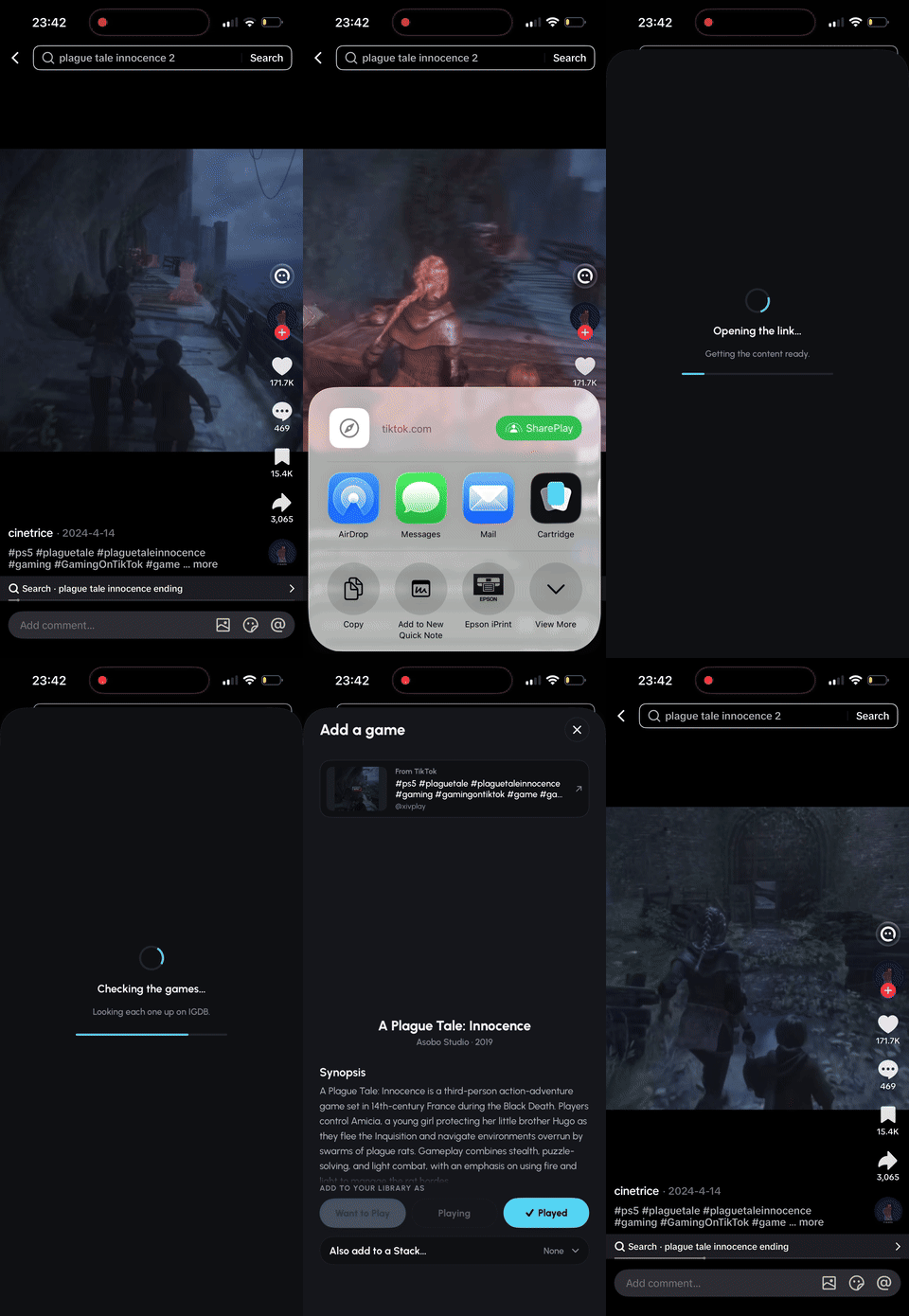 | Share a TikTok, Instagram Reel or YouTube Short to Cartridge and it works out which games are mentioned in the video. It reads the caption, looks at the video and transcribes the audio, then checks each guess against a real game database before showing you anything. If the caption already names a real game, that's confirmed straight away. You pick which games to keep and where they go. This is a free feature for everyone. |
TikTok Live is harder. There's no video file to grab, and streamers rarely say what they're playing. TikTok "technically" does have a feature that tells you the game in the comment section, but there are a couple of issues with it:
- This comment is at the top of the comment section. So if you watch a live stream with plenty of viewers and comments, you're expected to scroll up through thousands of comments to find the game.
- It's often inaccurate. This "title comment" is set by the streamer, who doesn't always play the same game the entire time and might switch games mid-stream. In my latest test, the comment on a livestream claimed the streamer was playing Marvel's Wolverine, but they were actually playing Assassin's Creed Odyssey at the time.
With Cartridge, you can share a livestream and it will record a few seconds of the stream and try to name the game from the gameplay. It gets there some of the time, so I'm calling it an experimental feature for now.
Scanning your collection
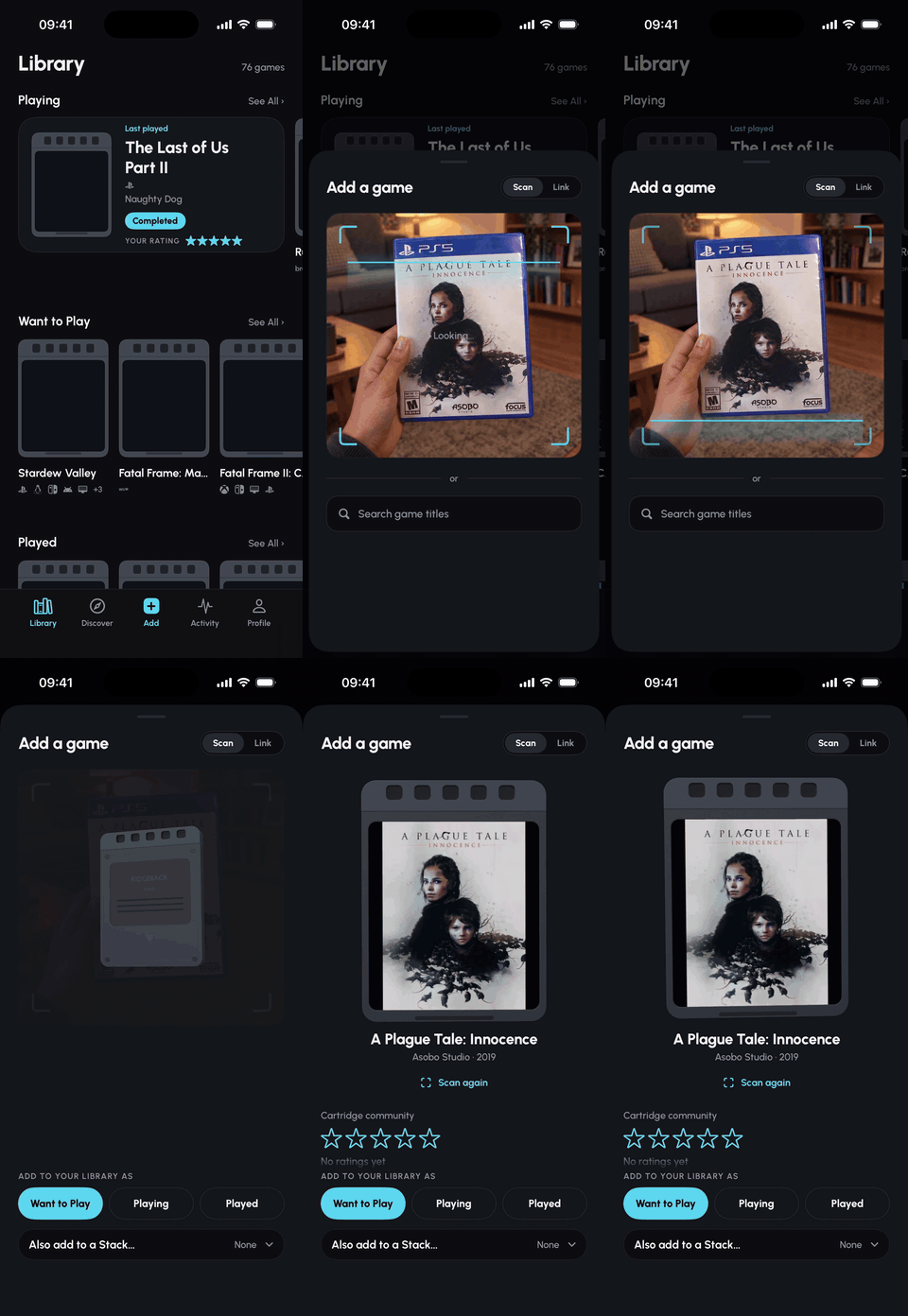 | Point the camera at a game case and Cartridge finds the game from the front cover, the back or the barcode. For a big collection there's a shelf mode that reads several spines at once, so you're not doing it one game cover at a time. |
Your Library
Games sit in Want to Play, Playing and Played, and a finished game can be marked Completed or Abandoned. Ratings go up in half stars, and a review can be a single line. Your profile shows your Favourite Four games, your Stacks and, if you've connected a Steam, Xbox or PlayStation account, the game you're currently playing right now (literally right now).
Every game gets its own 3D cartridge with the cover art on the label. You can spin it, flip it and turn it upside down, and saving a game sends it flying onto the right shelf of your Library.
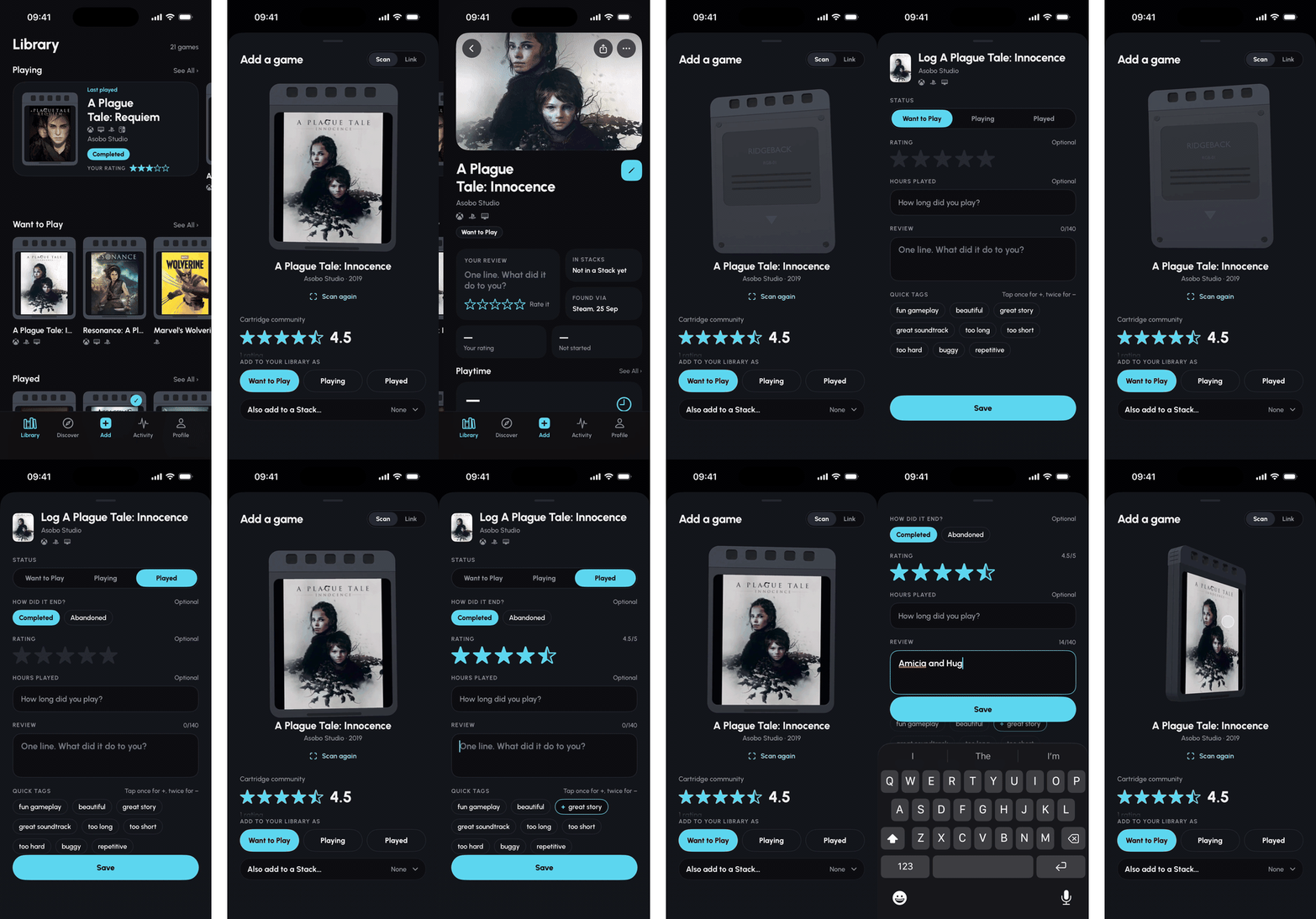
Coming in 1.0.6 (waiting on Apple's approval): each shelf can also open as a deck. Your games stand in a row as big 3D cartridges, one at a time. Swipe to the next, drag one to spin it, tap it to open the game, or double-tap to flip it over. The grid is always one tap away, and Cartridge remembers which one you like for each shelf.
Also coming in 1.0.6: tap Favourites on any profile to see their Favourite Four as big 3D cartridges. You pick yours from Edit Profile, and Share turns them into a story image, with a link that opens your four in Cartridge, or on the web for friends who don't have it yet.
Stacks, Discover and Friends
- A Stack is a list of games with a title, e.g., "Cosy games for a rainy Sunday". It can stay private, be sent to your friend as a link, or be public for anyone to find. Public Stacks show up on the Discover page, where people can like them, comment and follow whoever made them. Each game's page shows its rating and reviews from the Cartridge community, and tells you how many of your friends have played it.
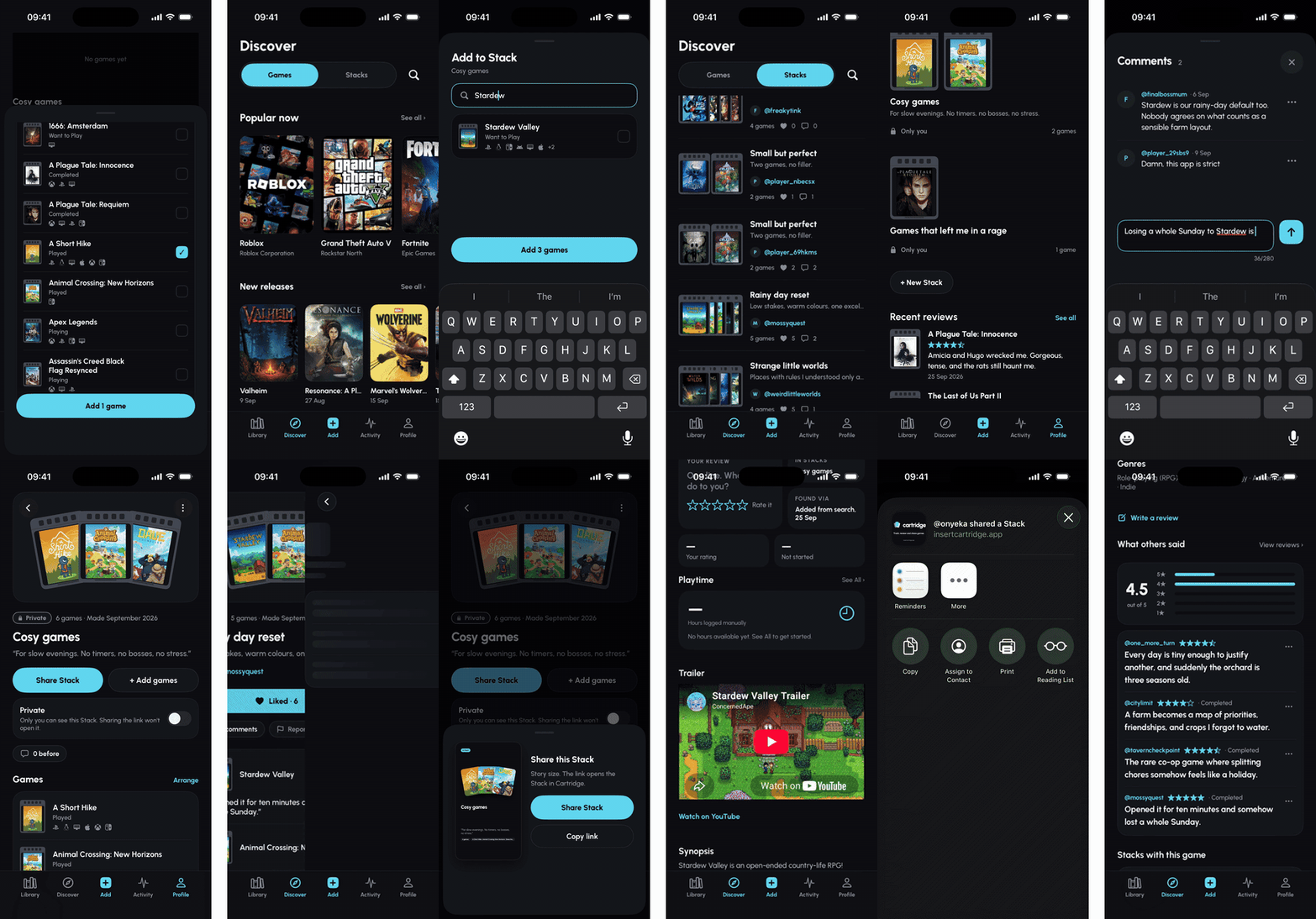
- Every few days a new Cartridge's Picks Stack from me takes the top spot on Discover, and anyone who follows @cartridge gets a notification when it lands.
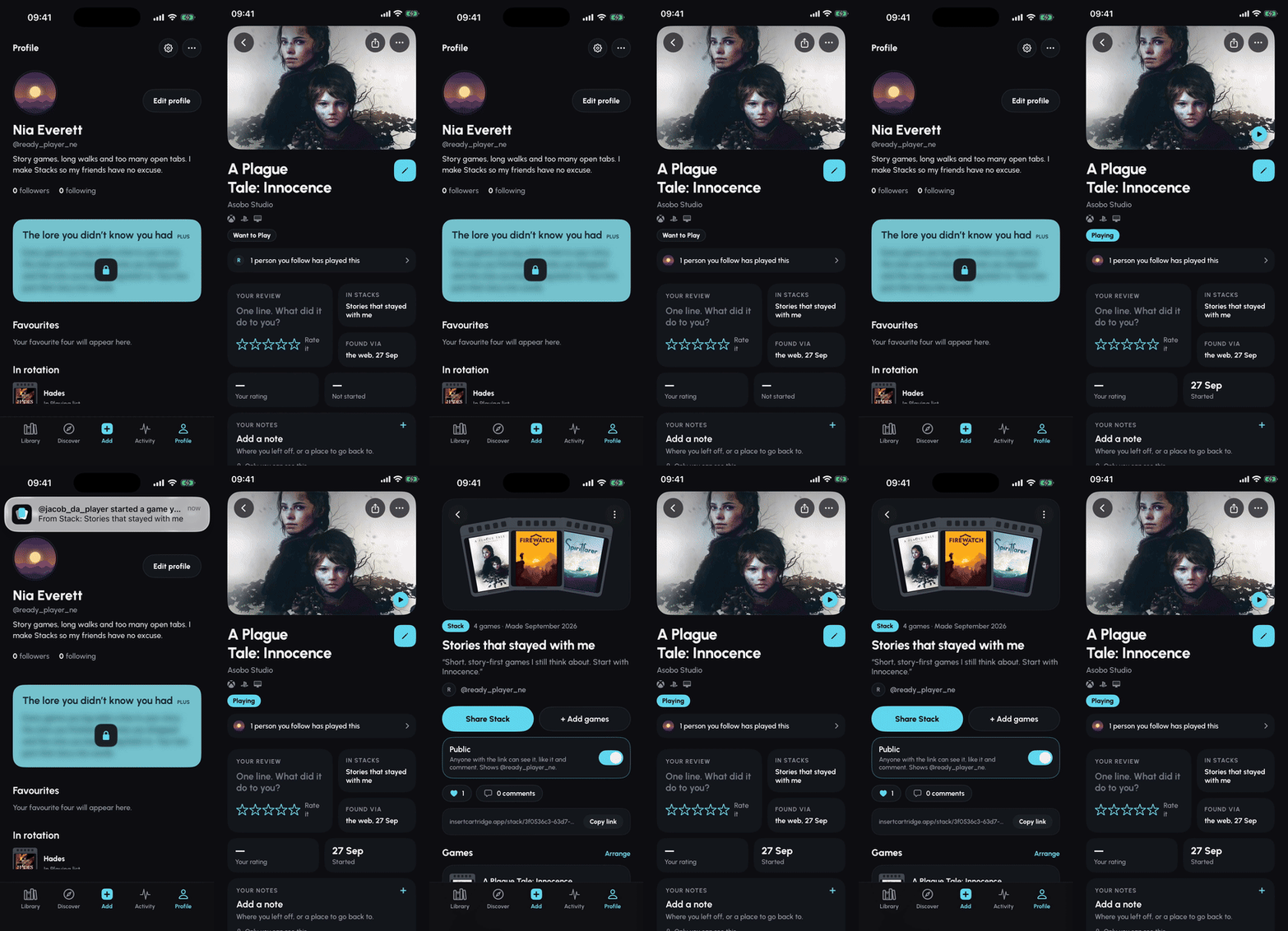
- Every profile has a page on the web, at insertcartridge.app/@handle, that looks just like it does in the app: Favourite Four, what they're playing, reviews and ratings. So a friend without Cartridge can still see your taste, and one tap gets them the app.
- When a friend starts or reviews a game they found in your Stack, you get a notification and it appears in your Activity. It's the closest you'll get to seeing someone actually take your recommendation.
Pick for me
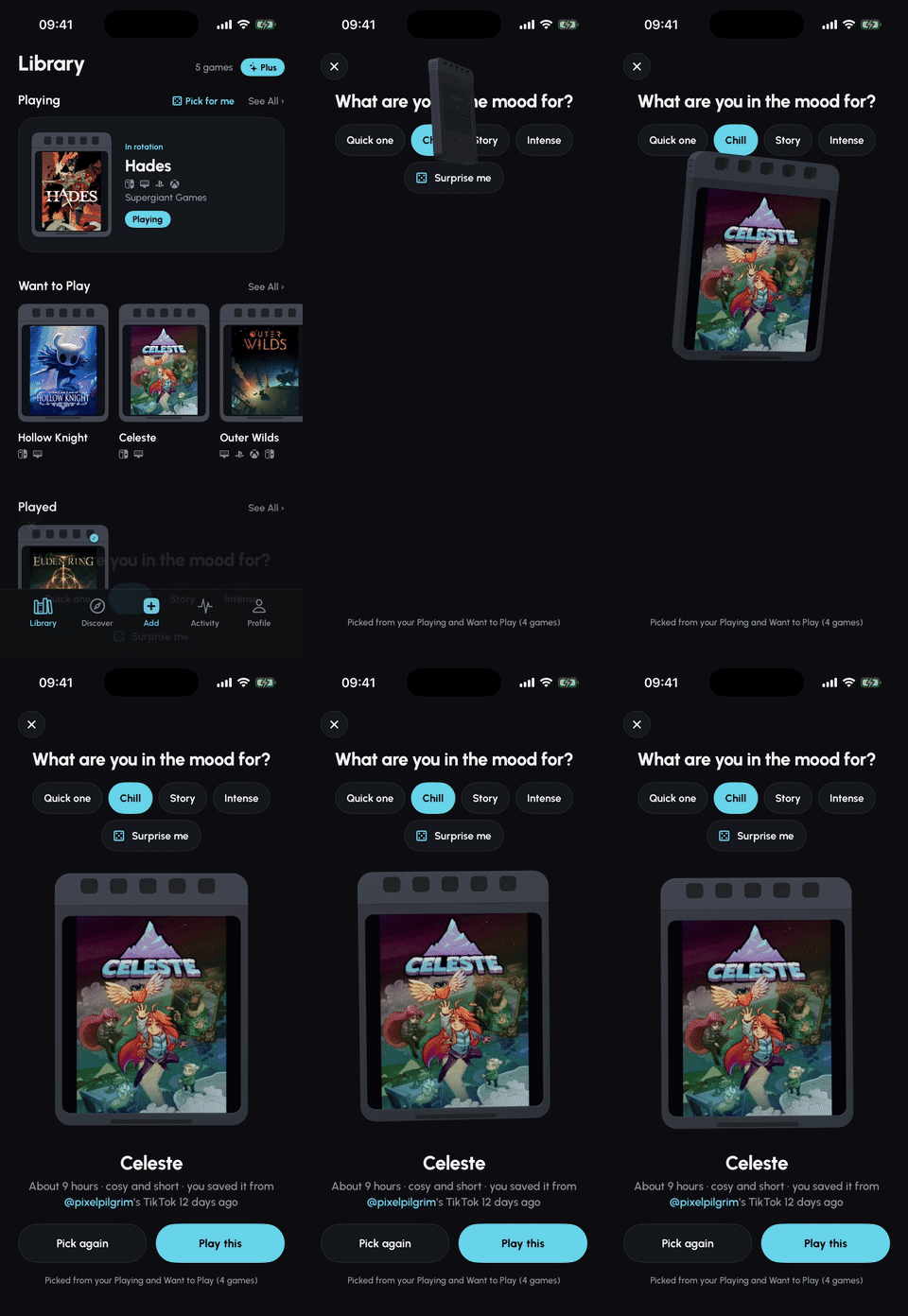 | Can't decide what to play? Tap Pick for me above your Playing shelf and choose a mood: Quick one, Chill, Story or Intense. Cartridge picks one game from your own Playing and Want to Play and tells you why, like how long it takes or whose TikTok you saved it from. Tap Play this and it moves to your Playing shelf, or Pick again for another. It's free for everyone. |
Face-off
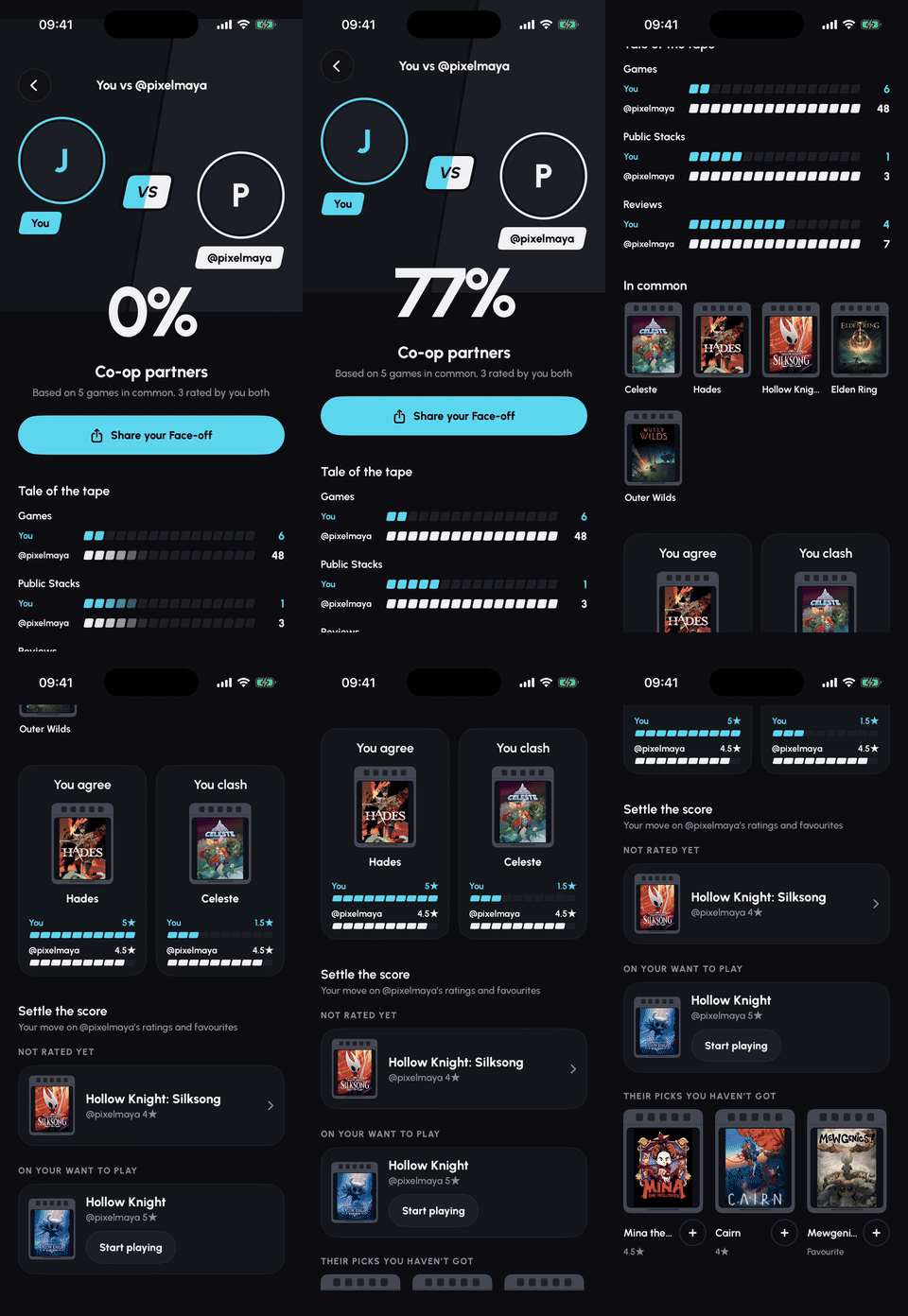 | Open anyone's profile and tap Face-off to see how your taste compares. You get a match score (Perfect combo, Co-op partners, Friendly rivals or Worlds apart), the games you have in common, where you agree and where you clash, and their picks you haven't played yet, which you can add with one tap. Sharing your result sends a link to your profile, so your friends can face off with you too. |
Cartridge Plus
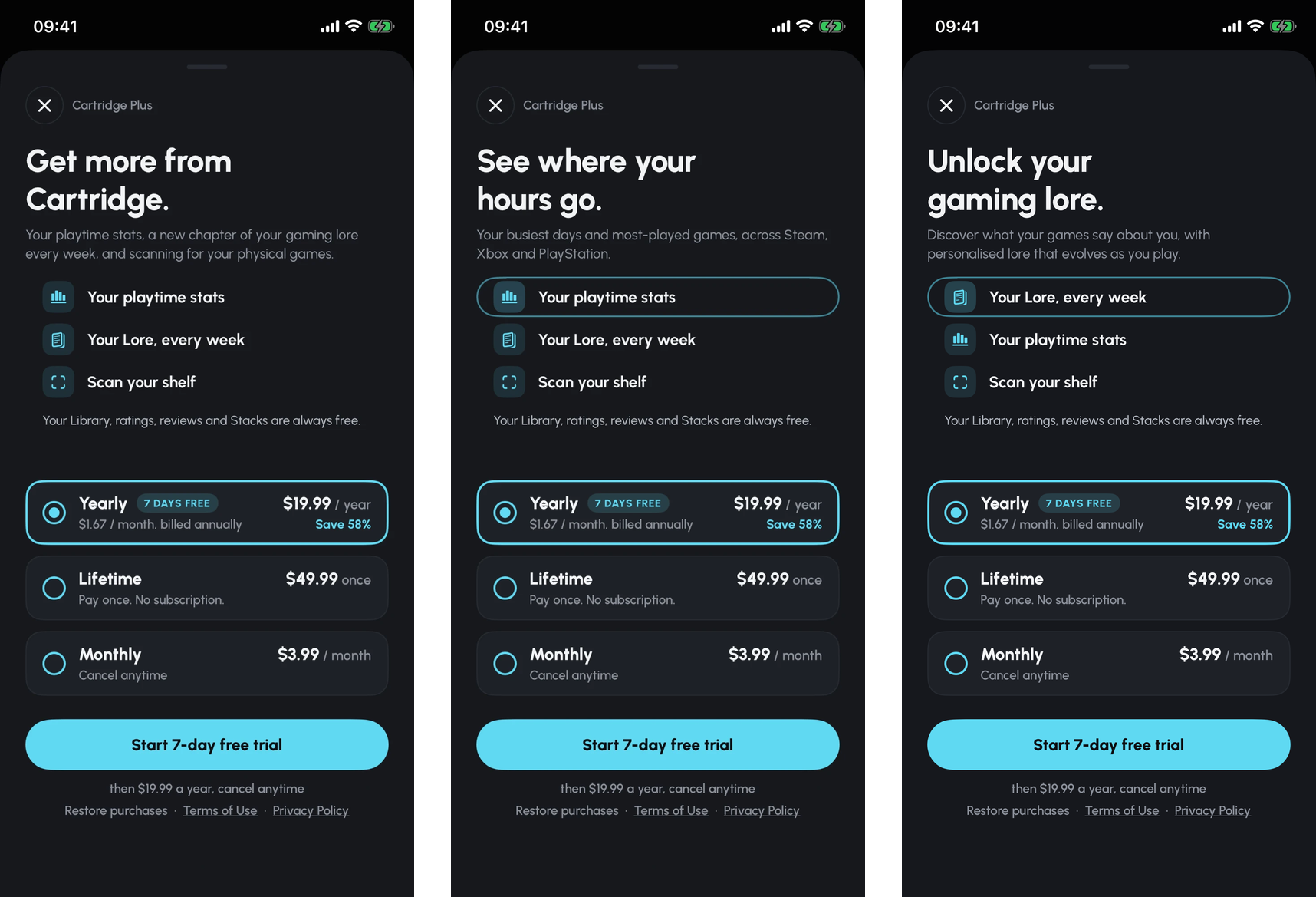
Cartridge is free. Plus is the paid tier, sold through RevenueCat as monthly, yearly (with a 7-day free trial), or a one-off Lifetime purchase. It unlocks the scanner, synced playtime stats across your connected accounts, and Lore, a short paragraph about what your games, gaming habits, reviews and ratings say about you. Lore is rewritten each week if your Library has changed, and you get a notification when a new one's ready.
How I built it
Cartridge is a native iOS app built in SwiftUI. The cartridge is a custom 3D model made in Blender and rendered with RealityKit. The same model runs in the app and in onboarding, and the share sheet shows a pre-rendered picture of it.
Behind it is Supabase. When you share a video, the server reads the caption, watches the video with Gemini and transcribes the audio, then matches every guess against IGDB, a big database of games, before you see anything. If the caption already names a real game, IGDB confirms it straight away, and Google Search and Cloud Vision are the fallback when the video isn't enough. Steam, Xbox and PlayStation sync in the background, which is where the playtime stats come from. I also used RediSearch on Azure to make search forgiving of typos.
OneSignal handles all notifications, email campaigns, in-app messages etc. When a friend starts or reviews a game from your Stack, a worker batches it, checks blocks and settings again at the last second, and makes sure nobody gets the same push twice. The weekly Lore push notification works the same way, and the in-app messages and journeys live in OneSignal, so I can change them without an app update. When a new version comes out, an in-app message shows what's new to people who've updated, and anyone still on an older version gets a nudge to update.
RevenueCat runs subscriptions and the paywall. The server checks with RevenueCat before spending anything on AI, so free accounts never trigger Lore. RevenueCat also shares subscription status with OneSignal, so messages can treat Plus and free players differently.
The website runs on Vercel. Profile and Favourite Four links open in the app if you have it, or on a web page that mirrors the app's own screen if you don't.
Challenges I ran into
Working out which game is in a video. Captions are often about something else and hashtags are there for reach, so neither can be trusted on its own. The model would sometimes name a game with total confidence when it wasn't in the clip at all. So nothing is shown until it matches a real game, and when Cartridge isn't sure, it says so instead of guessing.
Speed. Sharing a video used to take 12 to 18 seconds on my phone before the game appeared, because every step waited for the one before. Now the steps run side by side, game lookups go to IGDB in one batch, TikToks are fetched in a smaller size, and the caption gets checked first, so an obvious one is confirmed straight away. On my test set the server now answers in a median of about six and a half seconds.
Fitting a 3D cartridge into a share sheet. When you share a video from TikTok, Cartridge runs as a share extension inside TikTok, and iOS gives extensions very little memory. The 3D cartridge, with its renderer, model and shadows, was sometimes enough to push it over. If that happens, iOS simply closes the extension and the share sheet drops away. So before the reveal, the extension checks how much memory it has left and picks the full cartridge, a lighter one without shadows, or a flat cover card. My first limits were so cautious that phones only ever got the flat card, so I measured every stage and brought them down. Then iOS 27 came out and share sheets started closing. My measurements showed iOS 27 needs about 10 MB more for the same 3D cartridge, and that earlier shares were holding on to memory. Because the limits live on the server, I switched every phone to the flat cover card without an app update, so sharing kept working. Version 1.0.4 fixes the memory bug and shows a pre-rendered picture of the 3D cartridge in the share sheet instead, so the share sheet never needs the 3D renderer at all. The full 3D cartridge is still there once the game lands in your Library.
Working out when you've finished a game. I wanted imports from connected accounts to automatically know which games you'd actually finished, not just played. Steam, Xbox and PlayStation tell you which achievements you've unlocked, but not which one means you've seen the credits. So I pulled together trophy data for about 20,000 games from community trophy sites, looking for the ones marked as story progress. Some sites count completing all objectives/side-quests as finishing a game, but in a story-based game you're done when the main story ends and the credits roll, not when you've completed every aspect of the game. Then there are games with lots of endings. Until Dawn can end with everyone alive or nobody alive, Detroit: Become Human has dozens of endings. Which trophy means you finished those? After days of work it could only answer for about 3,600 of the 20,000 games, so I dropped it. Imports now sort games into Playing or In progress by when you last played, and you tell Cartridge when you've finished something. I should have made that call a lot sooner.
TikTok Live. You can't download a stream like a normal video, and TikTok treats servers very differently from phones. Streams that opened instantly on my laptop timed out on the server. I got it working some of the time, and decided to ship it as experimental rather than keep pouring days into it.
Accomplishments that I'm proud of
- It's a real app on the App Store, with four updates since launch and a fifth in review!
- I'm a software engineer, so I solve problems every day, but they're usually someone else's. I've built side projects for my own problems before, but Cartridge is the first time I've taken one of my own, built the fix and turned it into something people can pay for, rather than doing that for the company I work for.
- I only found out about Shipaton in mid-August, which left me with about a month. I'd never written Swift, used RevenueCat, or even opened Blender, which is where the cartridge model came from. I learned all of it while building and shipping a real app. This is what I'm proudest of.
What I learned
The App Store takes a while and I didn't know that going in. A bug fix can sit in the review queue for a long time, and even my expedited review has taken more than a day. If I'd known that at the start, I'd have built much more of Cartridge to be driven from the server, so text, layouts and small fixes could change without a new build. The parts I did build that way, like the in-app messages, emails and the share sheet's memory limits, I can change the same day.
I also owe a lot of my learning to the Shipaton livestreams, especially the one on paywalls and onboarding. I'd never thought about the "psychology" behind them. My old paywall was a simple "Get Cartridge Plus" and a list of features, with nothing about why you'd want it. The livestreams taught me a lot about making sure the value proposition is clear.
What's next for Cartridge - The Social Network for Gamers
- Planned v1.0.6 in currently in review:
- UI improvements for a "deck like" view of cartridges that will improv interaction with Cartridges
- Cartridge makes your backlog fun, and I want to improve on that by gaminifying your backlog. Complete and review games to gain XP, increase your public status and unlock cosmetic rewards.
- Refining TikTok Live: quicker and more accurate identification, and other livestreaming platforms such as YouTube and Twitch.
- My slightly stubborn self would like to finish the automatic "mark as complete" when importing games from Steam, Xbox and PlayStation.
- Import and track achievement trophies from connected accounts.
- Gaming Wrapped you can share with friends and on socials.
- Become the Letterboxd for games 🚀
Built With
- blender
- cloudflare
- onesignal
- resend
- revenuecat
- supabase
- swift
- typescript
- vercel


Log in or sign up for Devpost to join the conversation.