Project name
LinguaLens
Tagline
Point. Pinch. Learn.
Short description
LinguaLens uses Meta Quest 3, environment depth, and locally hosted vision AI to identify selected real-world objects and label them in English, French, and Spanish directly in mixed reality.
Elevator pitch
Learn a language by looking at the world around you. LinguaLens turns real-world objects into spatial vocabulary cards using mixed reality, depth sensing, and local AI.
Project story
Inspiration
Camera-based recognition usually ends on a flat screen. We wanted the word for a chair to appear beside the chair, remain there as the wearer moves, and become part of the room.
That made language learning a natural spatial-computing problem. A word can be connected to an object, a place, and a physical gesture instead of becoming another disposable phone lookup.
What it does
LinguaLens turns a real room into a mixed-reality vocabulary map on Meta Quest 3.
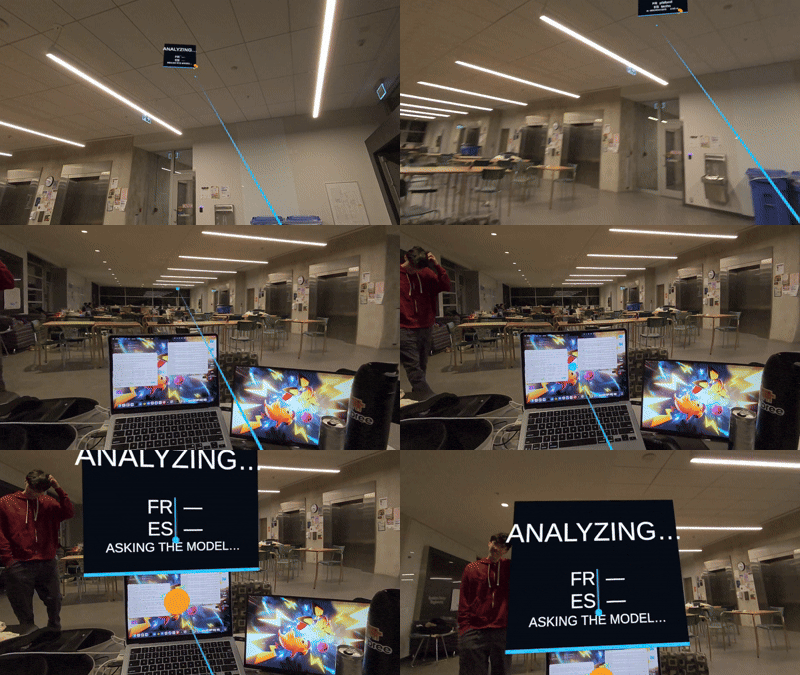
The user points at an object and pinches. Environment depth selects the physical target, and an ANALYZING… card immediately appears at that world-space position.
LinguaLens projects the target into the Quest passthrough-camera image, crops around it, and sends the JPEG over USB to Moondream running through Ollama on the developer laptop. The response is constrained to a small demo allowlist focused on four judge-facing objects: laptop, chair, table, and wall.
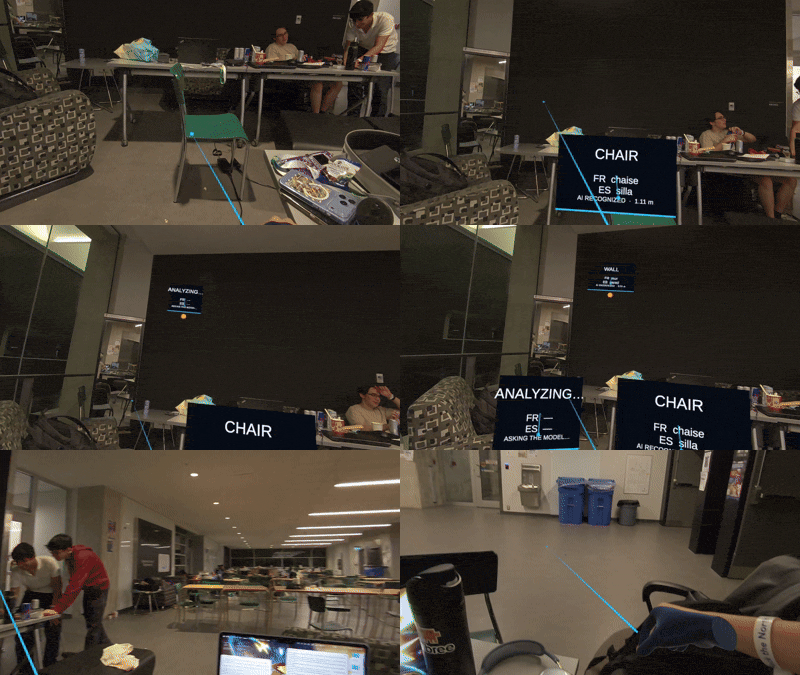
A local vocabulary lookup adds French and Spanish, and the original annotation updates in place. Genuine model successes display AI RECOGNIZED with the measured selection distance. Unsupported or uncertain results display NOT RECOGNIZED instead of being replaced with a convenient demo word.
Multiple annotations can coexist and remain fixed at their selected positions during the current session.
How we built it
We built LinguaLens with Unity 6, C#, Meta XR SDK 205, OpenXR, hand tracking, environment raycasting, Passthrough Camera Access, URP, and world-space text.
The implemented pipeline is:
Quest passthrough camera → hand ray and pinch → environment-depth target → projected camera crop → USB ADB reverse → Moondream through local Ollama → constrained result → local French/Spanish vocabulary → spatial annotation
Ollama and Moondream run locally on the developer laptop. Android Debug Bridge reverse port forwarding carries requests over USB from the Quest to the laptop. The recognition path does not use a hosted or commercial vision API.
Each pinch retains its own target position, camera image, and annotation handle. This ensures that asynchronous model responses update the correct card, even when the user creates several annotations in quick succession.
Challenges we ran into
Passthrough is not the RGB camera feed. The passthrough image visible to the wearer is compositor output. We needed Meta’s dedicated camera-access API and permission before we could capture real, non-black camera frames.
One pinch crosses several coordinate systems. The hand ray and depth hit exist in world space, while the crop requires a corresponding point in the camera image. We verified the exact JPEG from the headset to confirm that it was upright and centered on the selected region.
Small vision models need guardrails. In our tested Ollama configuration, instruction-style one-word prompts could return an empty response or a junk token. A natural visual question was more reliable, so LinguaLens applies a strict allowlist to the resulting description. Unsupported objects remain unrecognized.
Asynchronous responses need spatial ownership. Every request must preserve the camera crop, target, and renderer associated with its original pinch so a later interaction cannot overwrite the wrong annotation.
Accomplishments that we're proud of
- Verified the complete interaction on a physical Meta Quest 3.
- Captured real Quest RGB frames and crops centered around selected targets.
- Demonstrated recognition of laptop, chair, table, and wall.
- Observed environment-depth hits from approximately 0.68 m to 3.54 m.
- Displayed English, French, and Spanish labels at measured world-space positions.
- Supported several independent annotations in the same room.
- Kept Moondream inference local to the developer laptop through Ollama.
- Added honest
NOT RECOGNIZEDbehavior for unsupported or uncertain results. - Passed all 164 Unity EditMode tests.
What we learned
Spatial recognition becomes easier when the interaction already answers “where?”. The hand ray and environment-depth target identify the region of interest, allowing the model to analyze one focused crop instead of interpreting the entire room.
We also learned that XR reliability lives at system boundaries: compositor versus camera, world coordinates versus image coordinates, GPU textures versus JPEG input, Quest localhost versus laptop localhost, and model output versus a safe interface result.
Most importantly, a narrow result that is visibly honest is better than broad recognition that sometimes invents confidence.
What's next for LinguaLens
Next, we would improve crop selection and recognition accuracy, validate surface-aware presentation across more rooms, and expand the supported vocabulary.
We would also add pronunciation, spaced repetition, and persistent spatial anchors so learners can return to vocabulary maps after restarting the application.
Longer term, packaging the model for on-headset inference could remove the USB-connected laptop and make LinguaLens fully standalone.

Log in or sign up for Devpost to join the conversation.